<p align="center">
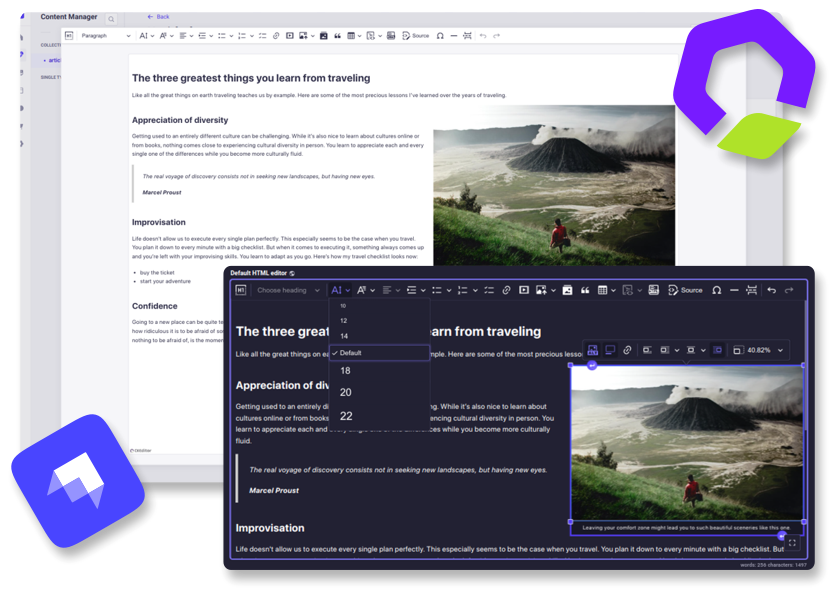
  <img src="https://raw.githubusercontent.com/nshenderov/strapi-plugin-ckeditor/master/assets/v5-head.png"/>
</p>

<h1 align="center">Strapi ➕ CKEditor</h1>

<p align="center">Integrates CKEditor 5 into your Strapi project as a fully customizable custom field. (Community edition)</p>

## 👋 Get Started

- [Features](#features)
- [Installation](#installation)
- [Usage](#usage)
- [Configuration](#configuration)
- [Contributing](#contributing)
- [Migration](#migration)
- [Requirements](#requirements)

## <a id="features"></a>✨ Features

- **Extensive configuration**
- **Media Library integration**
- **Dark theme support**
- **Fullscreen expansion**
- **Responsive images support**
- **Automatic UI translations**
- **i18n support**
- **Self-Hosted**

<p align="right">
    <a href="https://www.buymeacoffee.com/nshenderov" target="_blank">
        <img src="https://cdn.buymeacoffee.com/buttons/v2/default-yellow.png" alt="Buy Me A Coffee" style="height: 60px; width: 217px;" >
    </a>
</p>

## <a id="installation"></a>🔧 Installation

**Strapi v5:**

Add the package to your Strapi application:

```bash
yarn add @_sh/strapi-plugin-ckeditor
```

Then, build the app:

```bash
yarn build
```

**Strapi v4:**

Version 3 of the plugin will remain available for Strapi v4 until March 2026.
Refer to the [**v3 installation guide**](https://github.com/nshenderov/strapi-plugin-ckeditor/blob/3.x.x/README.md#installation)
for setup instructions.

> Note: Version 3 receives only essential bug fixes. The configuration process and available
> features in version 3 differ significantly from the latest plugin versions.

## <a id="usage"></a>✍️ Usage

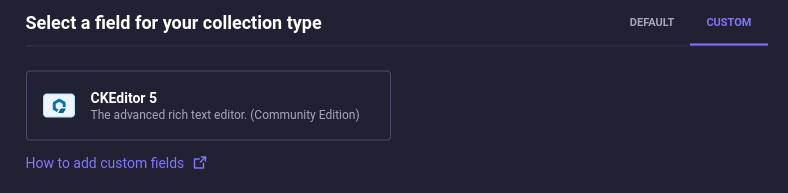
The field can be found in the Content-Type Builder under the `CUSTOM` tab:

<p align="center">
  <img src="https://raw.githubusercontent.com/nshenderov/strapi-plugin-ckeditor/master/assets/v5-usage-guide-2.png" width="700" />
</p>

**Presets**

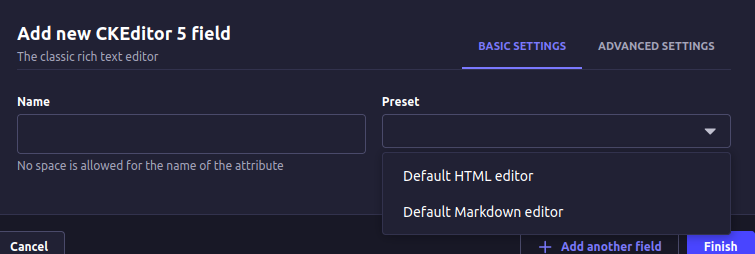
A preset is a set of settings that define the editor's features and appearance. You
can specify a dedicated preset for each field. The available presets can be customized through the
[configuration](#configuration).

<p align="center">
  <img src="https://raw.githubusercontent.com/nshenderov/strapi-plugin-ckeditor/master/assets/v5-usage-guide-3.png" width="700" />
</p>

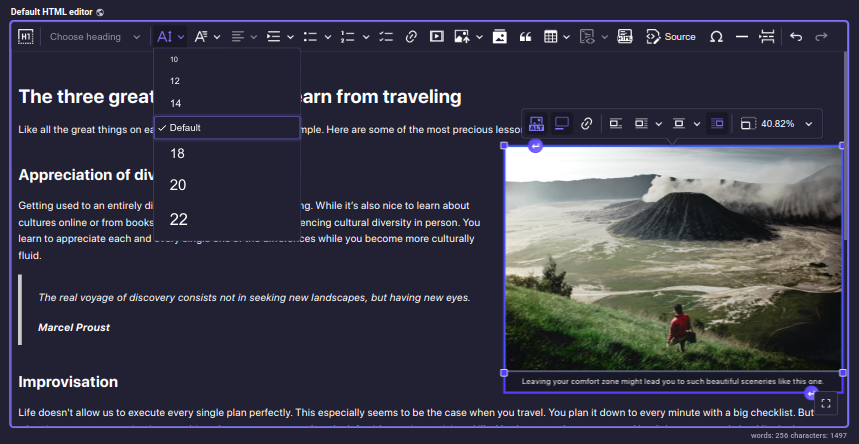
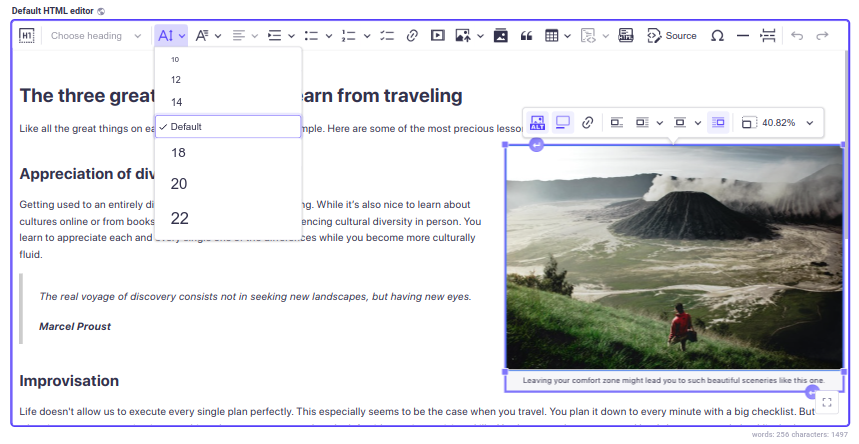
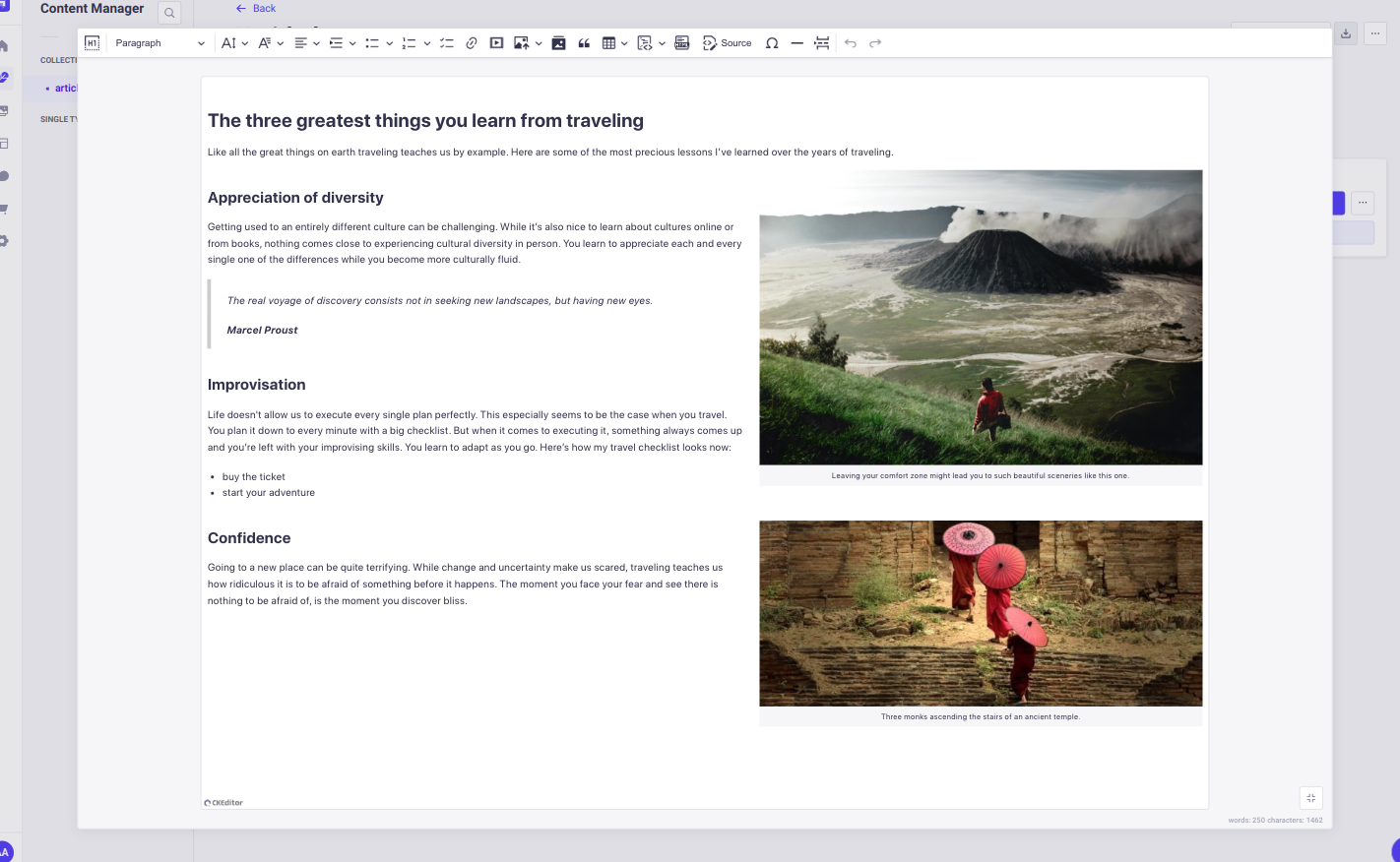
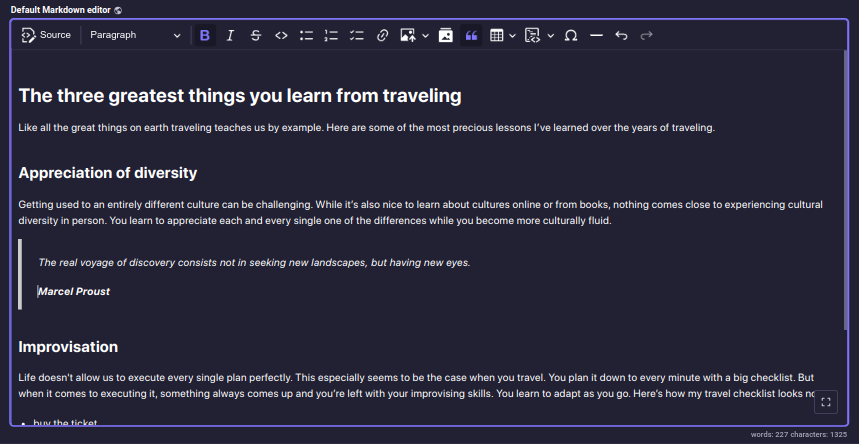
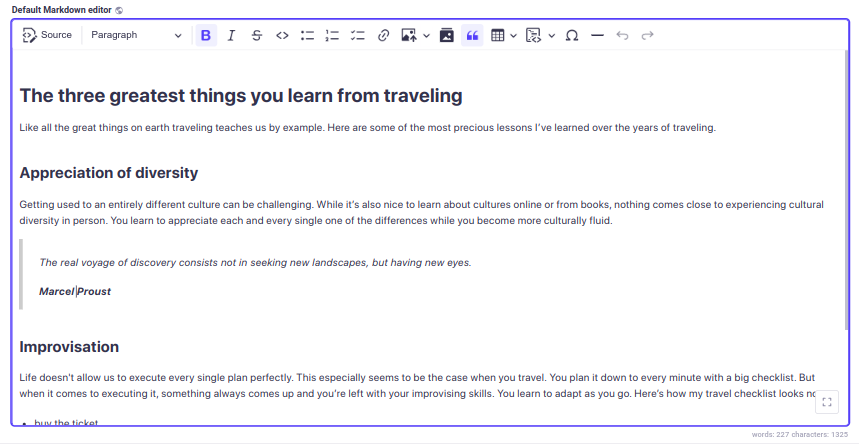
The plugin provides two presets out of the box: `Default HTML editor` and `Default Markdown editor`,
each has different output format: HTML and Markdown, respectively. Both presets include
an extensive set of non-premium CKEditor plugins.

<details>
  <summary>Default HTML editor:</summary>

<p align="center">
  <img src="https://raw.githubusercontent.com/nshenderov/strapi-plugin-ckeditor/master/assets/v5-def-html-dark.png" width="700" />
</p>

<p align="center">
  <img src="https://raw.githubusercontent.com/nshenderov/strapi-plugin-ckeditor/master/assets/v5-def-html-light.png" width="700" />
</p>

<p align="center">
  <img src="https://raw.githubusercontent.com/nshenderov/strapi-plugin-ckeditor/master/assets/v5-def-html-light-full.png" width="700" />
</p>

</details>

<details>
  <summary>Default Markdown editor:</summary>

<p align="center">
  <img src="https://raw.githubusercontent.com/nshenderov/strapi-plugin-ckeditor/master/assets/v5-def-mrk-dark.png" width="700" />
</p>

<p align="center">
  <img src="https://raw.githubusercontent.com/nshenderov/strapi-plugin-ckeditor/master/assets/v5-def-mrk-light.png" width="700" />
</p>

</details>

**Responsive images**

The plugin generates `srcset` attribute for inserted images if the image has any `formats` other than `thumbnail`.

**UI language**: If you don't specify the UI language in the editor configuration, the plugin will
default to the Strapi admin's preferred language. If no preference is set, English will be used as a fallback.

**Content language**: i18n for the editor's content language can be enabled by checking the
`Enable localization for this field` option in the Advanced Settings tab.

> 💡 It is important to use the content styles on the publishing side of your application. Otherwise, the content will look different in the editor and for your end users. [Follow the documentation](https://ckeditor.com/docs/ckeditor5/latest/getting-started/setup/css.html#styling-the-published-content).

> To display content from external sources, such as images or videos, in your admin panel,
> you need to configure your `middlewares.js` file.
> [**Check the documentation for details.**](https://docs.strapi.io/dev-docs/configurations/middlewares#security)

## <a id="configuration"></a>⚙️ Configuration

The plugin configuration must be defined on the front-end.

The plugin provides a set of functions that allow you to modify the plugin's configuration:

```ts
setPluginConfig(config);
getPluginPresets();
getPluginTheme();
```

**setPluginConfig**

The function, accepts a plugin configuration (`PluginConfig`) that can include an array of presets
and a theme object:

```ts
import { setPluginConfig } from '@_sh/strapi-plugin-ckeditor';

function setPluginConfig(pluginConfig: {
  presets: Preset[] | undefined;
  theme: Theme | undefined;
}): void;
```

**Key points:**

- The function must be invoked before the admin panel's bootstrap lifecycle function. The general recommendation is to call it inside the admin panel's register lifecycle function.
- Provided properties will overwrite the default configuration values.
- The configuration becomes immutable after the first invocation, preventing further modifications.

**Plugin configuration object** includes optional `presets` and `theme` properties:

```ts
type PluginConfig = {
  /**
   * Presets are sets of settings that define the editor's features and appearance.
   */
  presets?: Preset[];
  /**
   * Styles applied globally to every editor instance.
   */
  theme?: Theme;
};
```

`presets` is an array of objects of type `Preset`. Each preset includes the following properties:

```ts
type Preset = {
  /**
   * Preset name, displayed in the schema.
   */
  name: string;
  /**
   * Preset description, displayed in the Content-Type Builder.
   */
  description: string;
  /**
   * CKEditor configuration object.
   *
   * @see {@link https://ckeditor.com/docs/ckeditor5/latest/getting-started/setup/configuration.html | CKEditor documentation}
   */
  editorConfig: EditorConfig;
  /**
   * Additional styles applied to the editor instance after the theme styles.
   */
  styles?: EditorStyles;
};
```

`theme` object defines a plugin CSS styles applied to every editor instance. It includes the
following properties:

```ts
/**
 * The `common` styles are applied first, followed by `light` or `dark` styles
 * according to user preferences, and finally `additional` styles.
 */
type Theme = {
  /**
   * Core styles.
   */
  common?: EditorStyles;
  /**
   * Styles applied in light mode.
   */
  light?: EditorStyles;
  /**
   * Styles applied in dark mode.
   */
  dark?: EditorStyles;
  /**
   * Additional styles that complement the theme.
   */
  additional?: EditorStyles;
};
```

```ts
/**
 * Represents styles that can be applied to an editor instance.
 * Can be a plain CSS string or an array of interpolations for dynamic styling.
 */
export type EditorStyles = string | Interpolation<object>[];
```

**getPluginPresets**

```ts
function getPluginPresets(): {
  [key: string]: Preset;
};
```

Returns `presets` object.

- Each property name must match the corresponding preset's name.
- To extend or modify the options visible in the admin panel's content manager,
  changes must be made before the admin panel's bootstrap lifecycle function.

**getPluginTheme**

```ts
function getPluginTheme(): Theme;
```

Returns `theme` object.

**Default presets and theme**

To simplify the process of defining a new preset, the plugin exports default presets and
a default theme, which can be used as a base in custom configurations:

```ts
import {
  defaultTheme,
  defaultHtmlPreset,
  defaultMarkdownPreset,
} from '@_sh/strapi-plugin-ckeditor';
```

**Integration with Strapi's Media Library**

To integrate CKEditor with the Strapi's Media Library, the plugin provides two CKEditor plugins
that can be included in your presets without additional configuration:

```ts
import { StrapiMediaLib, StrapiUploadAdapter } from '@_sh/strapi-plugin-ckeditor';
```

**Available type definitions**

The following type definitions are available for use:

```ts
import type {
  PluginConfig,
  Preset,
  EditorConfig,
  Theme,
  EditorStyles,
} from '@_sh/strapi-plugin-ckeditor';
```

<details>
  <summary>Type definitions</summary>

```ts
/**
 * Plugin configuration object.
 */
export type PluginConfig = {
  /**
   * Presets are sets of settings that define the editor's features and appearance.
   */
  presets?: Preset[];
  /**
   * Styles applied globally to every editor instance.
   */
  theme?: Theme;
};
```

```ts
/**
 * Preset is a set of settings that define the editor's features and appearance.
 */
export type Preset = {
  /**
   * Preset name, displayed in the schema.
   */
  name: string;
  /**
   * Preset description, displayed in the Content-Type Builder.
   */
  description: string;
  /**
   * Additional styles applied to the editor instance after the theme styles.
   */
  styles?: EditorStyles;
  /**
   * CKEditor configuration object.
   *
   * @see {@link https://ckeditor.com/docs/ckeditor5/latest/getting-started/setup/configuration.html | CKEditor documentation}
   */
  editorConfig: EditorConfig;
};
```

```ts
/**
 * CKEditor configuration object.
 *
 * @see {@link https://ckeditor.com/docs/ckeditor5/latest/getting-started/setup/configuration.html | CKEditor documentation}
 */
export type EditorConfig = CKE5EditorConfig;
```

```ts
/**
 * Styles applied globally to every editor instance.
 *
 * @remarks
 *
 * The `common` styles are applied first, followed by `light` or `dark` styles
 * according to the preferences, and finally `additional` styles.
 */
export type Theme = {
  /**
   * Core styles.
   */
  common?: EditorStyles;
  /**
   * Styles applied in light mode.
   */
  light?: EditorStyles;
  /**
   * Styles applied in dark mode.
   */
  dark?: EditorStyles;
  /**
   * Additional styles that complement the theme.
   */
  additional?: EditorStyles;
};
```

```ts
/**
 * Represents styles that can be applied to an editor instance.
 * Can be a plain CSS string or an array of interpolations for dynamic styling.
 */
export type EditorStyles = string | Interpolation<object>[];
```

</details>

### Configuration examples:

<details>
  <summary>Setting a new set of presets [JS]</summary>

```js
// src/admin/app.js

import {
  Bold,
  Italic,
  Essentials,
  Heading,
  Image,
  ImageCaption,
  ImageStyle,
  ImageToolbar,
  ImageUpload,
  Link,
  List,
  Paragraph,
} from 'ckeditor5';

import { setPluginConfig, StrapiMediaLib, StrapiUploadAdapter } from '@_sh/strapi-plugin-ckeditor';

const myCustomPreset = {
  name: 'myCustomPreset',
  description: 'myCustomPreset description',
  editorConfig: {
    licenseKey: 'GPL',
    plugins: [
      Bold,
      Italic,
      Essentials,
      Heading,
      Image,
      ImageCaption,
      ImageStyle,
      ImageToolbar,
      ImageUpload,
      Link,
      List,
      Paragraph,
      StrapiMediaLib,
      StrapiUploadAdapter,
    ],
    toolbar: [
      'heading',
      '|',
      'bold',
      'italic',
      'link',
      'bulletedList',
      'numberedList',
      '|',
      'strapiMediaLib',
      '|',
      'undo',
      'redo',
    ],
  },
};

const myConfig = {
  /**
   * Note: Since the provided `presets` include only `myCustomPreset`
   * this configuration will overwrite default presets.
   */
  presets: [myCustomPreset],
};

export default {
  register() {
    setPluginConfig(myConfig);
  },
};
```

</details>

<details>
  <summary>Setting a new set of presets [TS]</summary>

```ts
// src/admin/app.tsx

import {
  Bold,
  Italic,
  Essentials,
  Heading,
  Image,
  ImageCaption,
  ImageStyle,
  ImageToolbar,
  ImageUpload,
  Link,
  List,
  Paragraph,
} from 'ckeditor5';

import {
  type PluginConfig,
  type Preset,
  setPluginConfig,
  StrapiMediaLib,
  StrapiUploadAdapter,
} from '@_sh/strapi-plugin-ckeditor';

const myCustomPreset: Preset = {
  name: 'myCustomPreset',
  description: 'myCustomPreset description',
  editorConfig: {
    licenseKey: 'GPL',
    plugins: [
      Bold,
      Italic,
      Essentials,
      Heading,
      Image,
      ImageCaption,
      ImageStyle,
      ImageToolbar,
      ImageUpload,
      Link,
      List,
      Paragraph,
      StrapiMediaLib,
      StrapiUploadAdapter,
    ],
    toolbar: [
      'heading',
      '|',
      'bold',
      'italic',
      'link',
      'bulletedList',
      'numberedList',
      '|',
      'strapiMediaLib',
      '|',
      'undo',
      'redo',
    ],
  },
};

const myConfig: PluginConfig = {
  /**
   * Note that since provided `presets` includes only `myCustomPreset`
   * this configuration will overwrite default presets.
   */
  presets: [myCustomPreset],
};

export default {
  register() {
    setPluginConfig(myConfig);
  },
};
```

</details>

<details>
  <summary>Default presets modification using setPluginConfig [TS]</summary>

```ts
// src/admin/app.tsx

import { css } from 'styled-components';

import {
  type PluginConfig,
  type Preset,
  setPluginConfig,
  defaultHtmlPreset,
  defaultMarkdownPreset,
} from '@_sh/strapi-plugin-ckeditor';

const defaultHtml: Preset = {
  ...defaultHtmlPreset,
  description: 'Modified default HTML editor',
  styles: `
    .ck { 
      color: red; 
    }
  `,
  editorConfig: {
    ...defaultHtmlPreset.editorConfig,
    placeholder: 'Modified default HTML editor',
    toolbar: [
      'heading',
      '|',
      'bold',
      'italic',
      'link',
      'bulletedList',
      'numberedList',
      '|',
      'strapiMediaLib',
      'insertTable',
      '|',
      'undo',
      'redo',
    ],
  },
};

const defaultMarkdown: Preset = {
  ...defaultMarkdownPreset,
  description: 'Modified default Markdown editor',
  styles: css`
    .ck {
      --ck-editor-max-width: 1500px;
      --ck-editor-min-height: 700px;
      --ck-editor-max-height: 700px;
    }

    .ck.ck-editor__main {
      border: 3px dashed ${({ theme }) => theme.colors.warning500};
    }
  `,
};

const myConfig: PluginConfig = {
  presets: [defaultHtml, defaultMarkdown],
};

export default {
  register() {
    setPluginConfig(myConfig);
  },
};
```

</details>

<details>
  <summary>Default presets modification using getPluginPresets [TS]</summary>

```ts
// src/admin/app.tsx

import { css } from 'styled-components';
import { getPluginPresets } from '@_sh/strapi-plugin-ckeditor';

export default {
  register() {
    const presets = getPluginPresets();

    presets.defaultHtml.styles = css`
      .ck {
        color: red;
      }
    `;

    presets.defaultHtml.editorConfig = {
      ...presets.defaultHtml.editorConfig,
      placeholder: 'Modified default HTML editor',
      toolbar: [
        'heading',
        '|',
        'bold',
        'italic',
        'link',
        'bulletedList',
        'numberedList',
        '|',
        'strapiMediaLib',
        'insertTable',
        '|',
        'undo',
        'redo',
      ],
    };

    presets.defaultMarkdown = {
      ...presets.defaultMarkdown,
      description: 'Modified default Markdown editor',
      styles: css`
        .ck {
          --ck-editor-max-width: 1500px;
          --ck-editor-min-height: 700px;
          --ck-editor-max-height: 700px;
        }

        .ck.ck-editor__main {
          border: 3px dashed ${({ theme }) => theme.colors.warning500};
        }
      `,
    };
  },
};
```

</details>

<details>
  <summary>Modifying theme using setPluginConfig [TS]</summary>

```ts
// src/admin/app.tsx

import { css } from 'styled-components';

import { type PluginConfig, setPluginConfig, defaultTheme } from '@_sh/strapi-plugin-ckeditor';

const myConfig: PluginConfig = {
  theme: {
    ...defaultTheme,
    additional: css`
      .ck {
        --ck-editor-max-width: 1500px;
        --ck-editor-min-height: 700px;
        --ck-editor-max-height: 700px;
      }

      .ck.ck-editor__main {
        border: 3px dashed ${({ theme }) => theme.colors.warning500};
      }
    `,
  },
};

export default {
  register() {
    setPluginConfig(myConfig);
  },
};
```

</details>

<details>
  <summary>Modifying theme using getPluginTheme [TS]</summary>

```ts
// src/admin/app.tsx

import { css } from 'styled-components';
import { getPluginTheme } from '@_sh/strapi-plugin-ckeditor';

export default {
  register() {
    const theme = getPluginTheme();

    theme.additional = css`
      .ck {
        --ck-editor-max-width: 1500px;
        --ck-editor-min-height: 700px;
        --ck-editor-max-height: 700px;
      }

      .ck.ck-editor__main {
        border: 3px dashed ${({ theme }) => theme.colors.warning500};
      }
    `;
  },
};
```

</details>

<details>
  <summary>Adding Timestamp plugin [JS]</summary>

```ts
// src/admin/app.js

import { Plugin, ButtonView } from 'ckeditor5';

import { setPluginConfig, defaultHtmlPreset } from '@_sh/strapi-plugin-ckeditor';

class Timestamp extends Plugin {
  init() {
    const editor = this.editor;
    editor.ui.componentFactory.add('timestamp', () => {
      const button = new ButtonView();
      button.set({
        label: 'timestamp',
        withText: true,
      });
      button.on('execute', () => {
        const now = new Date();
        editor.model.change(writer => {
          editor.model.insertContent(writer.createText(now.toString()));
        });
      });
      return button;
    });
  }
}

export default {
  register() {
    defaultHtmlPreset.editorConfig.plugins.push(Timestamp);
    defaultHtmlPreset.editorConfig.toolbar.unshift('timestamp');
    setPluginConfig({ presets: [defaultHtmlPreset] });
  },
};
```

</details>

<br />

📂 Default HTML preset: [**admin/src/config/htmlPreset.ts**](https://github.com/nshenderov/strapi-plugin-ckeditor/blob/master/admin/src/config/htmlPreset.ts)

📂 Default Markdown preset: [**admin/src/config/markdownPreset.ts**](https://github.com/nshenderov/strapi-plugin-ckeditor/blob/master/admin/src/config/markdownPreset.ts)

📂 Default theme: [**admin/src/theme**](https://github.com/nshenderov/strapi-plugin-ckeditor/blob/master/admin/src/theme)

> 📌 It is highly recommended to explore [**the official CKEditor5 documentation**](https://ckeditor.com/docs/ckeditor5/latest/getting-started/setup/configuration.html).

## <a id="contributing"></a>🛠 Contributing

Feel free to [fork the repository](https://docs.github.com/en/pull-requests/collaborating-with-pull-requests/working-with-forks/fork-a-repo)
and open a pull request, any help is appreciated.

Follow these steps to set up a plugin development environment:

1. Clone the repository.

2. Read [the Strapi Plugin SDK documentation](https://docs.strapi.io/dev-docs/plugins/development/create-a-plugin#linking-the-plugin-to-your-project).

3. Navigate to the cloned plugin folder and install dependencies, run:

```bash
yarn install
```

4. Link the plugin to your project:

   - In the plugin folder, run:

   ```bash
   yarn watch:link
   ```

   - Open a new terminal, navigate to your Strapi project directory, and run:

   ```bash
   yarn dlx yalc add --link @_sh/strapi-plugin-ckeditor && yarn install
   ```

5. Rebuild the project and start the server:

```bash
yarn build
yarn develop
```

## <a id="migration"></a>✈️ Migration

To upgrade to the latest version, follow the dedicated [migration guide](https://github.com/nshenderov/strapi-plugin-ckeditor/blob/master/MIGRATION.md)
for detailed instructions.

## <a id="requirements"></a>⚠️ Requirements

**v5.x.x**

Strapi **>= 5.0.0**

Node **>= 18.0.0 <= 22.x.x**

---

**v3.x.x**

Strapi **>= 4.13.0 < 5.0.0**

Node **>= 18.0.0 <= 20.x.x**