@alifd/shell
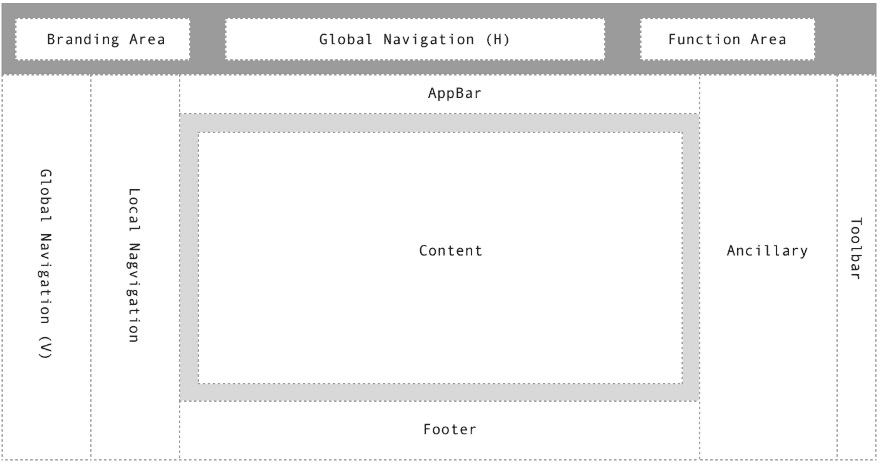
<Shell>
    <Shell.Branding /> Box(row)
    <Shell.Navigation/>
    <Shell.Action /> Box(row)

    <Shell.MultiTask /> Box(row)
    <Shell.LocalNavigation /> Box(column)

    <Shell.AppBar /> Box(column)
    <Shell.Content /> Grid
    <Shell.Footer /> Box(column)

    <Shell.Ancillary /> Box(column)
    <Shell.ToolDock /> Box(column)
        <Shell.ToolDockItem />
</Shell>
其中 <Shell.Content /> 采用Grid布局, 其他均为 Flex布局
API
Shell
| 参数 | 说明 | 类型 | 默认值 |
|---|---|---|---|
| device | 预设屏幕宽度,会影响Navigation LocalNavigation Ancillary等是否占据空间可选值: 'phone', 'tablet', 'desktop' |
Enum | desktop |
| scrollHideHeader | Header滚动时隐藏 | Boolean | false |
Shell.Navigation
向子组件透传 isCollapse 的Context,表示当前是否处于折叠状态
| 参数 | 说明 | 类型 | 默认值 |
|---|---|---|---|
| collapse | 是否折叠(折叠成只有icon状态) | Boolean | false |
| direction | 方向 可选值: 'hoz', 'ver' |
Enum | hoz |
| onCollapseChange | 组件显示或折叠时触发的回调函数 | Function | () =>{} |
Shell.LocalNavigation
| 参数 | 说明 | 类型 | 默认值 |
|---|---|---|---|
| collapse | 是否折叠(完全收起) | Boolean | false |
| onCollapseChange | 组件显示或折叠时触发的回调函数 | Function | () =>{} |
Shell.ToolDock
| 参数 | 说明 | 类型 | 默认值 |
|---|---|---|---|
| collapse | 是否折叠(完全收起) | Boolean | false |
| onCollapseChange | 组件显示或折叠时触发的回调函数 | Function | () =>{} |
Shell.Ancillary
| 参数 | 说明 | 类型 | 默认值 |
|---|---|---|---|
| collapse | 是否折叠(完全收起) | Boolean | false |
| onCollapseChange | 组件显示或折叠时触发的回调函数 | Function | () =>{} |
Config配置项(待视觉稿提供后调整)
- Header (Fixed)
- height
- background
- shadow
- padding(l, r)
- divider (bottom-border-color, bottom-border-size)
- navigation-margin
- navigation-alignment
- MultiTask (Fixed)
- height
- background
- shadow
- padding(l, r)
- divider (bottom-border-color, bottom-border-size)
- Navigation (Fixed)
- width(ver)
- mini-width (ver)
- divider (right-border-color, right-border-size) (ver)
- background
- padding(t, b)
- shadow
- LocalNavigation (Fixed)
- width
- background
- padding(t, b)
- divider (right-border-color, right-border-size)
- shadow
- Ancillary
- width
- background
- divider (left-border-color, left-border-size)
- padding(t, b)
- shadow
- ToolDock
- width
- background
- shadow
- divider (left-border-color, left-border-size)
- padding(t, b)
- AppBar
- min-height
- background
- divider (bottom-border-color, bottom-border-size)
- shadow
- padding(l, r)
- Content
- max-width
- columns
- background
- padding
- gutter-row
- gutter-column
- Footer
- background
- min-height
DEMO 列表
Simple Usage
本 Demo 演示一行文字的用法。
import React, { Component } from 'react';
import ReactDOM from 'react-dom';
import Shell from '@alifd/shell';
import { Menu, Search, Icon, Nav, Breadcrumb, Card, Tab } from '@alifd/next';

import '@alifd/theme-shell/dist/next.css';

const { SubNav, Item, Group, Divider } = Nav;

;(function() {
    var throttle = function(type, name, obj) {
        obj = obj || window;
        var running = false;
        var func = function() {
            if (running) { return; }
            running = true;
             requestAnimationFrame(function() {
                obj.dispatchEvent(new CustomEvent(name));
                running = false;
            });
        };
        obj.addEventListener(type, func);
    };

    /* init - you can init any event */
    throttle("resize", "optimizedResize");
})();

class App extends Component {
  state = {}
  componentDidMount() {
    this.handleResize(window.innerWidth);

    window.addEventListener("optimizedResize", (e) => {
      this.handleResize(e.target.window.innerWidth);
    });
  }

  handleResize = width => {
    if (width < 680) {
      device = 'phone';
    } else if (width > 1280) {
      device = 'desktop';
    } else {
      device = 'tablet'
    }

    if (!(device === this.state.device)) {
      this.setState({
        device
      });
    }
  }


  btnClick = () => {
    this.setState({
      navcollapse: !this.state.navcollapse
    });
  }

  triggerClick = (e, currentCollapse) => {
    console.log(e, currentCollapse)
    this.setState({
      navcollapse: !currentCollapse
    });
  }

  render() {
    return (
      <div className="root">
        <Shell className={"iframe-hack"} device={this.state.device}>
          <Shell.Branding>
            <div className="rectangular"></div>
            <span style={{marginLeft: 10, color: '#FFF'}}>App Name</span>
          </Shell.Branding>
          <Shell.Navigation direction="hoz">
            <Search key="2" shape="simple" type="dark" palceholder="Search" style={{width: '200px'}}/>
          </Shell.Navigation>
          <Shell.Action>
            <Icon type="ic_tongzhi" />
            <img src="https://img.alicdn.com/tfs/TB1.ZBecq67gK0jSZFHXXa9jVXa-904-826.png" className="avatar" alt="用户头像" />
            <span style={{marginLeft: 10, color: '#FFF'}}>MyName</span>
          </Shell.Action>


          <Shell.Navigation trigger={null} collapse={this.state.navcollapse} >
            <Nav type="primary" embeddable>
              <Nav.Item icon="Item">Nav Item 1</Nav.Item>
              <Nav.Item icon="Item1">Nav Item 2</Nav.Item>
              <Nav.Item icon="Item2">Nav Item 3</Nav.Item>
              <Nav.Item icon="Item3">Nav Item 4</Nav.Item>
              <Nav.Item icon="Item4">Nav Item 5</Nav.Item>
              <Nav.Item icon="Item5">Nav Item 6</Nav.Item>
              <Nav.Item icon="Item6">Nav Item 7</Nav.Item>
          </Nav>
          <div className="my-trigger-nav" onClick={this.btnClick}> toggle </div>
          </Shell.Navigation>

          <Shell.LocalNavigation>
            <Nav embeddable>
              <Nav.SubNav label="Local Nav1">
                <Item>Local Nav1</Item>
              </Nav.SubNav>
              <Nav.SubNav label="Local Nav2">
                <Item>Local Nav2</Item>
              </Nav.SubNav>
              <Nav.SubNav label="Local Nav3">
                <Item>Local Nav3</Item>
              </Nav.SubNav>
              <Item>Local Nav4</Item>
              <Item>Local Nav5</Item>
              <Item>Local Nav6</Item>
              <Item>Local Nav7</Item>
              <Item>Local Nav8</Item>
               <Item>Local Nav4</Item>
              <Item>Local Nav5</Item>
              <Item>Local Nav6</Item>
              <Item>Local Nav7</Item>
              <Item>Local Nav8</Item>
            </Nav>
          </Shell.LocalNavigation>

          <Shell.Content>
            <div style={{minHeight: 1200, background: '#fff'}}></div>
          </Shell.Content>
          <Shell.Footer>
            <span>Alibaba Fusion</span>
            <span>@ 2019 Alibaba Piecework 版权所有</span>
          </Shell.Footer>

          <Shell.Ancillary>

          </Shell.Ancillary>
          <Shell.ToolDock>
            <Shell.ToolDockItem>
              <Icon type="ic_search" />
            </Shell.ToolDockItem>
            <Shell.ToolDockItem>
              <Icon type="calendar" />
            </Shell.ToolDockItem>
            <Shell.ToolDockItem>
              <Icon type="atm" />
            </Shell.ToolDockItem>
            <Shell.ToolDockItem>
              <Icon type="account" />
            </Shell.ToolDockItem>
          </Shell.ToolDock>
        </Shell>
      </div>
    );
  }
}

ReactDOM.render((
  <App />
), mountNode);
.my-trigger-nav {
min-height: 30px;
color: #fff;
background: #333;
display: flex;
flex: 1;
justify-content: center;
align-items: center;
}
.avatar {
width: 32px;
height: 32px;
border-radius: 50%;
vertical-align: middle;
}
.rectangular {
width: 32px;
height: 32px;
background: #555;
}
.iframe-hack {
width: 100%;
height: 500px;
}
.fusion-shell-action .next-icon {
margin: 0 30px;
color: #fff;
}
.container .fusion-shell ul {
margin: 0;
}
.demo-list {
display: none;
}
.next-menu-item.next-disabled .next-menu-item-text > a {
background: initial;
}
.fusion-shell-header .fusion-shell-navigation {
margin: 0;
}
.fusion-shell-main .fusion-shell-footer {
background: transparent;
text-align: left;
line-height: 25px;
font-family: AlibabaSans-Bold;
font-size: 16px;
color: #CCCCCC;
min-height: 48px;
padding-bottom: 20px;
}
.fusion-shell-aside .fusion-shell-localnavigation.fusion-shell-collapse .next-nav.next-ver .next-menu-item{
padding: 0!important;
}
.fusion-shell-aside.fusion-shell-navigation.fusion-shell-collapse.fusion-shell-mini {
width: 60px;
}Multi Task
本 Demo 演示一行文字的用法。
import React, { Component } from 'react';
import ReactDOM from 'react-dom';
import Shell from '@alifd/shell';
import { Menu, Search, Icon, Nav, Breadcrumb, Card, Tab } from '@alifd/next';

import '@alifd/theme-shell/dist/next.css';

const { SubNav, Item, Group, Divider } = Nav;

class App extends Component {

  render() {
    return (
      <div className="root">
        <Shell className="iframe-hack">
          <Shell.Branding>
            <div className="rectangular"></div>
            <span style={{marginLeft: 10, color: '#FFF'}}>App Name</span>
          </Shell.Branding>
          <Shell.Navigation direction="hoz">
            <Search key="2" shape="simple" type="dark" palceholder="Search" style={{width: '200px'}}/>
          </Shell.Navigation>
          <Shell.Action>
            <Icon type="ic_tongzhi" />
            <img src="https://img.alicdn.com/tfs/TB1.ZBecq67gK0jSZFHXXa9jVXa-904-826.png" className="avatar" alt="用户头像" />
            <span style={{marginLeft: 10, color: '#FFF'}}>MyName</span>
          </Shell.Action>

          <Shell.MultiTask>
            <Tab>
              <Tab.Item title="Home" key="1"></Tab.Item>
              <Tab.Item title="Documentation" key="2"></Tab.Item>
              <Tab.Item title="Help" key="3"></Tab.Item>
            </Tab>
          </Shell.MultiTask>

          <Shell.LocalNavigation>
            <Nav embeddable>
                <Nav.SubNav label="Local Nav1">
                    <Item>Local Nav1</Item>
                </Nav.SubNav>
                <Nav.SubNav label="Local Nav2">
                    <Item>Local Nav2</Item>
                </Nav.SubNav>
                <Nav.SubNav label="Local Nav3">
                    <Item>Local Nav3</Item>
                </Nav.SubNav>
                <Item>Local Nav4</Item>
                <Item>Local Nav5</Item>
                <Item>Local Nav6</Item>
                <Item>Local Nav7</Item>
                <Item>Local Nav8</Item>
                <Item>Local Nav4</Item>
                <Item>Local Nav5</Item>
                <Item>Local Nav6</Item>
                <Item>Local Nav7</Item>
                <Item>Local Nav8</Item>
            </Nav>
          </Shell.LocalNavigation>

          <Shell.Content>
            <div style={{minHeight: 1200, background: '#fff'}}></div>
          </Shell.Content>
          <Shell.Footer>
            <span>Alibaba Fusion</span>
            <span>@ 2019 Alibaba Piecework 版权所有</span>
          </Shell.Footer>

          <Shell.Ancillary>

          </Shell.Ancillary>
          <Shell.ToolDock>
            <Shell.ToolDockItem>
              <Icon type="ic_search" />
            </Shell.ToolDockItem>
            <Shell.ToolDockItem>
              <Icon type="calendar" />
            </Shell.ToolDockItem>
            <Shell.ToolDockItem>
              <Icon type="atm" />
            </Shell.ToolDockItem>
            <Shell.ToolDockItem>
              <Icon type="account" />
            </Shell.ToolDockItem>
          </Shell.ToolDock>
        </Shell>
      </div>
    );
  }
}

ReactDOM.render((
  <App />
), mountNode);
.my-trigger-nav {
min-height: 30px;
color: #fff;
background: #333;
display: flex;
flex: 1;
justify-content: center;
align-items: center;
}
.avatar {
width: 32px;
height: 32px;
border-radius: 50%;
vertical-align: middle;
}
.rectangular {
width: 32px;
height: 32px;
background: #555;
}
.iframe-hack {
width: 100%;
height: 500px;
}
.fusion-shell-action .next-icon {
margin: 0 30px;
color: #fff;
}
.container .fusion-shell ul {
margin: 0;
}
.demo-list {
display: none;
}
.next-menu-item.next-disabled .next-menu-item-text > a {
background: initial;
}
.fusion-shell-header .fusion-shell-navigation {
margin: 0;
}
.fusion-shell-main .fusion-shell-footer {
background: transparent;
text-align: left;
line-height: 25px;
font-family: AlibabaSans-Bold;
font-size: 16px;
color: #CCCCCC;
min-height: 48px;
padding-bottom: 20px;
}
.fusion-shell-aside .fusion-shell-localnavigation.fusion-shell-collapse .next-nav.next-ver .next-menu-item{
padding: 0!important;
}
.fusion-shell-aside.fusion-shell-navigation.fusion-shell-collapse.fusion-shell-mini {
width: 60px;
}- 示例导航
- Simple Usage
- Multi Task