

 基于 G6,用户可以快速搭建自己的 **图分析** 或 **图编辑** 应用。


 > 强大的动画及交互
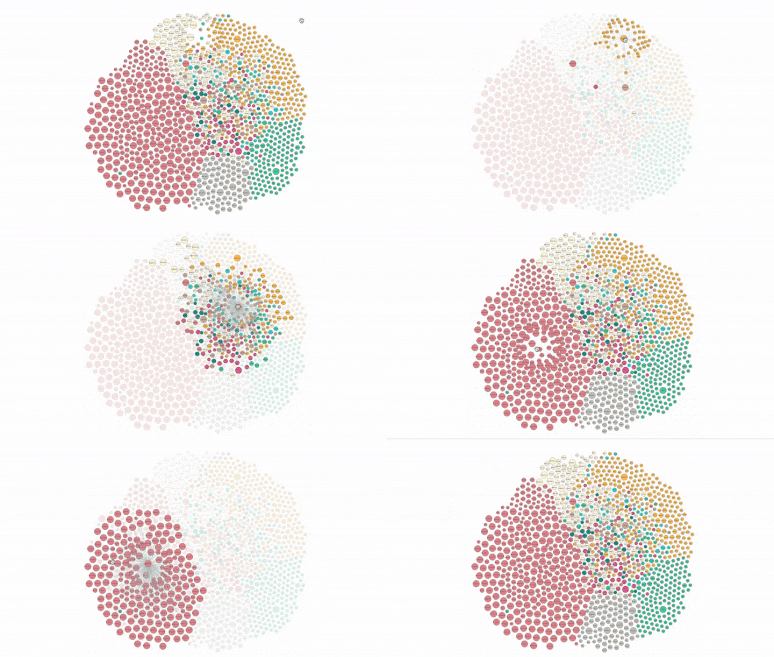

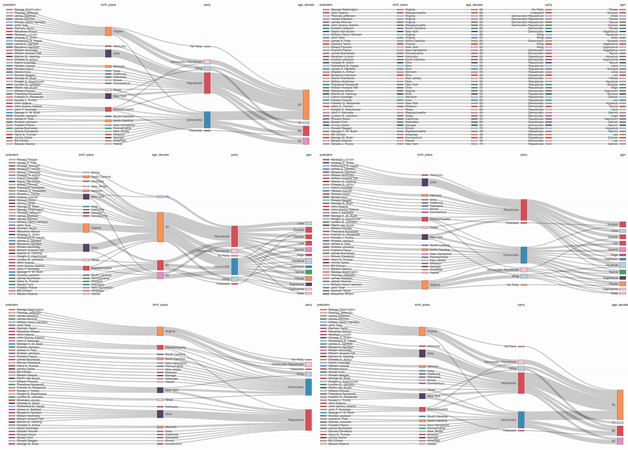


 > 强大的布局
## G6 的特性
G6 作为一款专业的图可视化引擎,具有以下特性:
- 丰富的元素:内置丰富的节点与边元素,自由配置,支持自定义;
- 可控的交互:内置 10+ 交互行为,支持自定义交互;
- 强大的布局:内置了 10+ 常用的图布局,支持自定义布局;
- 便捷的组件:优化内置组件功能及性能;
- 友好的体验:根据用户需求分层梳理文档,支持 TypeScript 类型推断。
除了默认好用、配置自由的内置功能,元素、交互、布局均具有高可扩展的自定义机制。
> 强大的布局
## G6 的特性
G6 作为一款专业的图可视化引擎,具有以下特性:
- 丰富的元素:内置丰富的节点与边元素,自由配置,支持自定义;
- 可控的交互:内置 10+ 交互行为,支持自定义交互;
- 强大的布局:内置了 10+ 常用的图布局,支持自定义布局;
- 便捷的组件:优化内置组件功能及性能;
- 友好的体验:根据用户需求分层梳理文档,支持 TypeScript 类型推断。
除了默认好用、配置自由的内置功能,元素、交互、布局均具有高可扩展的自定义机制。
 > 丰富的图元素
## 安装
```bash
$ npm install @antv/g6
```
## 使用
> 丰富的图元素
## 安装
```bash
$ npm install @antv/g6
```
## 使用
 ```js
import G6 from '@antv/g6';
const data = {
nodes: [
{
id: 'node1',
label: 'Circle1',
x: 150,
y: 150,
},
{
id: 'node2',
label: 'Circle2',
x: 400,
y: 150,
},
],
edges: [
{
source: 'node1',
target: 'node2',
},
],
};
const graph = new G6.Graph({
container: 'container',
width: 500,
height: 500,
defaultNode: {
type: 'circle',
size: [100],
color: '#5B8FF9',
style: {
fill: '#9EC9FF',
lineWidth: 3,
},
labelCfg: {
style: {
fill: '#fff',
fontSize: 20,
},
},
},
defaultEdge: {
style: {
stroke: '#e2e2e2',
},
},
});
graph.data(data);
graph.render();
```
[](https://codesandbox.io/s/compassionate-lalande-5lxm7?fontsize=14&hidenavigation=1&theme=dark)
更多关于 G6 使用的问题,请参考[快速上手](https://g6.antv.antgroup.com/manual/getting-started)。
## 开发
```bash
$ npm install
# lerna bootstrap for multiple packages
$ npm run bootstrap
# build the packages
$ npm run build:all
# if you wanna watch one of the packages, e.g. packages/core
$ cd ./packages/core
$ npm run watch
# run test case
$ npm test
# run test case in watch mode
npm test -- --watch ./tests/unit/algorithm/find-path-spec
DEBUG_MODE=1 npm test -- --watch ./tests/unit/algorithm/find-path-spec
```
## 文档
- 入门教程
- 核心概念
- 扩展阅读
- API
## React 项目集成
针对 React 项目集成,我们有一款单独的产品推荐:[Graphin](https://graphin.antv.vision),它是基于 G6 封装的 React 组件库,专注在关系分析领域,简单高效,开箱即用。
目前 Graphin 在商业图分析项目中均有良好的实践,具体查看[《谁在使用 Graphin》](https://github.com/antvis/Graphin/issues/212)
## G6 图可视化交流群
欢迎各界 G6 使用者、图可视化爱好者加入 **G6 图可视化交流群** 及 **G6 图可视化交流二群**(钉钉群,使用钉钉扫一扫加入)讨论与交流。Graphin 的使用者,爱好者请加入 **Graphin's Group Chat**
> **G6 图可视化交流群** 已满员,该群会不定期移除不活跃的成员。
> 由于维护精力有限,**G6 图可视化交流群** 仅供社区同学相互交流,不进行答疑。欢迎对 G6 感兴趣的同学加入到答疑中来,非常感谢!
```js
import G6 from '@antv/g6';
const data = {
nodes: [
{
id: 'node1',
label: 'Circle1',
x: 150,
y: 150,
},
{
id: 'node2',
label: 'Circle2',
x: 400,
y: 150,
},
],
edges: [
{
source: 'node1',
target: 'node2',
},
],
};
const graph = new G6.Graph({
container: 'container',
width: 500,
height: 500,
defaultNode: {
type: 'circle',
size: [100],
color: '#5B8FF9',
style: {
fill: '#9EC9FF',
lineWidth: 3,
},
labelCfg: {
style: {
fill: '#fff',
fontSize: 20,
},
},
},
defaultEdge: {
style: {
stroke: '#e2e2e2',
},
},
});
graph.data(data);
graph.render();
```
[](https://codesandbox.io/s/compassionate-lalande-5lxm7?fontsize=14&hidenavigation=1&theme=dark)
更多关于 G6 使用的问题,请参考[快速上手](https://g6.antv.antgroup.com/manual/getting-started)。
## 开发
```bash
$ npm install
# lerna bootstrap for multiple packages
$ npm run bootstrap
# build the packages
$ npm run build:all
# if you wanna watch one of the packages, e.g. packages/core
$ cd ./packages/core
$ npm run watch
# run test case
$ npm test
# run test case in watch mode
npm test -- --watch ./tests/unit/algorithm/find-path-spec
DEBUG_MODE=1 npm test -- --watch ./tests/unit/algorithm/find-path-spec
```
## 文档
- 入门教程
- 核心概念
- 扩展阅读
- API
## React 项目集成
针对 React 项目集成,我们有一款单独的产品推荐:[Graphin](https://graphin.antv.vision),它是基于 G6 封装的 React 组件库,专注在关系分析领域,简单高效,开箱即用。
目前 Graphin 在商业图分析项目中均有良好的实践,具体查看[《谁在使用 Graphin》](https://github.com/antvis/Graphin/issues/212)
## G6 图可视化交流群
欢迎各界 G6 使用者、图可视化爱好者加入 **G6 图可视化交流群** 及 **G6 图可视化交流二群**(钉钉群,使用钉钉扫一扫加入)讨论与交流。Graphin 的使用者,爱好者请加入 **Graphin's Group Chat**
> **G6 图可视化交流群** 已满员,该群会不定期移除不活跃的成员。
> 由于维护精力有限,**G6 图可视化交流群** 仅供社区同学相互交流,不进行答疑。欢迎对 G6 感兴趣的同学加入到答疑中来,非常感谢!