 # @atomist/org-visualizer
A tool for visualizing technology usage and drift across an organization.
The cloud native era has led to an explosion of repositories, which we lack tools to understand and manage at scale. See Rod Johnson's blog [This Will Surprise You](https://blog.atomist.com/this-will-surprise-you/) for further discussion.
An Atomist **aspect** captures a concern in your project, in anything available from git: repository content (code and configuration) and git data such as branch counts and committer activity. Aspects support the following use cases:
1. *Visualization* (all aspects): See usage and drift across your organization.
2. *Convergence* (some aspects): Help drive code changes to achieve consistency on an "ideal" state of an aspect, such as a particularly version of a library.
3. *Reaction to change* (some aspects): React to changes in aspect usage within a project: for example, to a library upgrade, removing the Spring Boot Security starter or exposing an additional port in a Docker container.
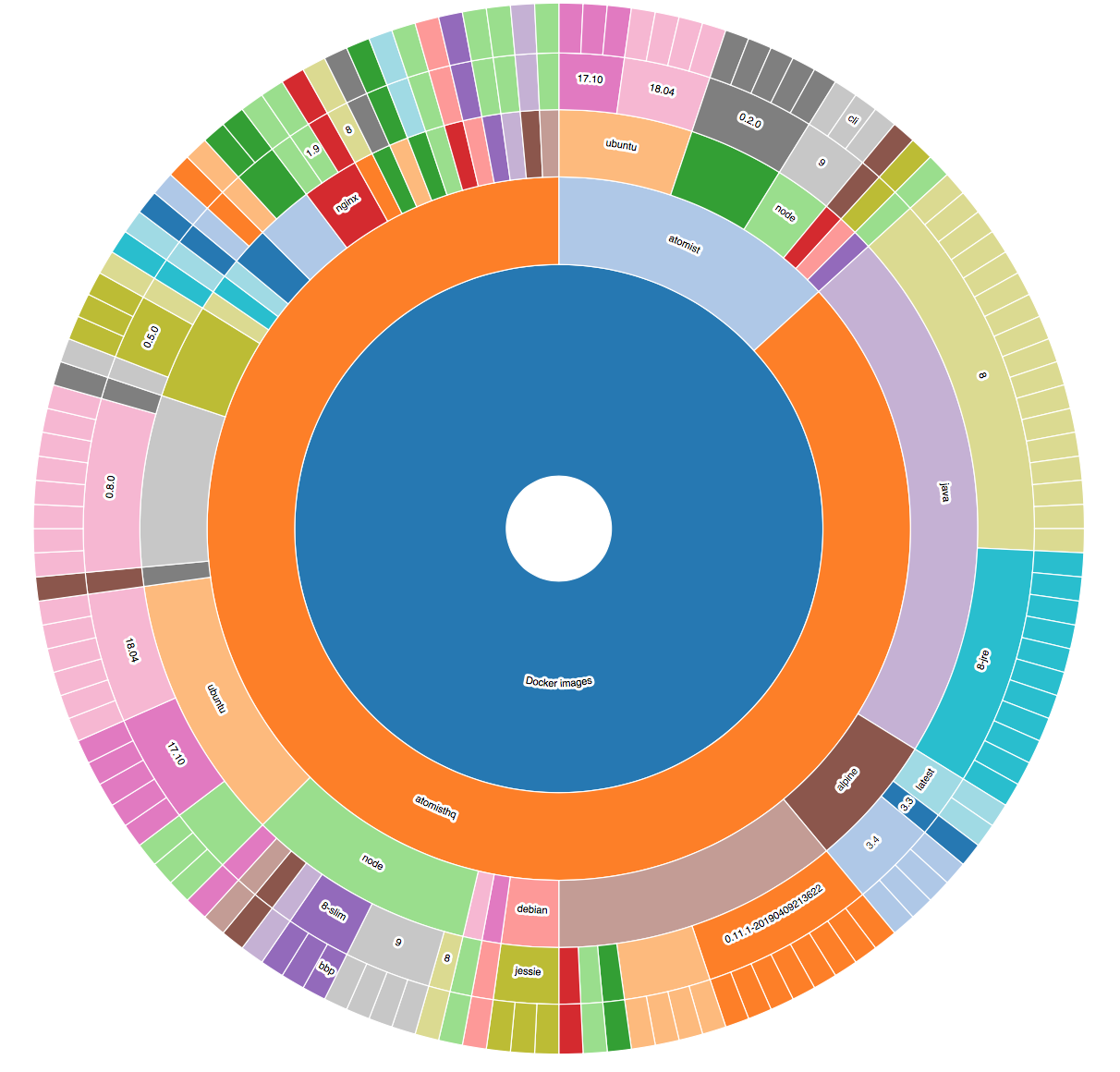
This project focuses on the visualization use case. Visualizations are exposed via d3 sunburst charts and via a REST API returning JSON documents.
There is out of the box
support for investigating the following aspects of your project:
- TypeScript version
- Spring Boot version and starters (with Maven)
- Docker base images, Dockerfile path and exposed ports
- Java build tool (Maven, Gradle)
- Library versions (npm, Maven, Python)
- Inclusion of a code of conduct
- Common CI tools
- git activity and branch count
Analysis is extensible using the Atomist `Project` API. Implementing and registering additional aspects will result in additional visualization links after re-analysis and restarting the application.
An example visualization, showing Docker images used across two GitHub organizations:

## Running
To visualize your org:
1. Clone and build this project
2. Set up the required PostreSQL database
2. Run analysis on your repositories
3. Run the `org-visualizer` and hit its web interface at [http://localhost:2866](http://localhost:2866)
4. If you have more ideas, add code to study more aspects of your projects
### Building
Please use Node 10+.
First, install with `npm ci`.
Next, build with `npm run build`
Next, `npm link` to out the `spider` command in your path.
### Database setup
#### Creating the Database
Data about each repository is stored locally in a PostgreSQL database.
Start Postgres, connect to it, and run the [create.ddl](ddl/create.ddl) script to set up the database.
If you want to wipe out your data and start over, this will also accomplish that.
```
> psql
psql> \i ddl/create.ddl
```
#### Connecting to the Database
For anything other than the default Postgres [connection parameters](https://node-postgres.com/features/connecting) and db `org_viz`:
Configure the Postgres database details in `client.config.json` in your `~/.atomist`:
```json
{
"sdm": {
"postgres": {
"user": "",
"password": "",
"port": "",
"database": "org_viz"
}
}
}
```
If `~/.atomist/client.config.json` does not exist, create it with the above content.
### Other Dependencies
You will need the following installed on your machine for the out of the box aspects to work:
- The `git` binary
- Java
- A JDK (*not* a JRE)
- Maven - `mvn` must be on the path.
- Node
- npm
All artifacts referenced in Maven or Node projects must be accessible when the spider runs. Check by manually running `mvn` or `npm i` on the relevant projects.
### Analyze your repositories
>You can start quickly by loading data from four open source organizations by running the script `load-demo-data.sh`.
The `spider` command is part of this org-visualizer project.
Add it to your path by running `npm link` in your clone of this repository.
#### GitHub
To analyze a GitHub organization, run the following command:
`spider --owner ` e.g. `spider --owner atomist` (not the full org URL).
_To access private repositories, ensure that your GitHub token is available to
Node processes via a `GITHUB_TOKEN` environment variable._
#### Local directories
To analyze local directories, wherever they were cloned from, use the `--l` flag and specify the full path of the parent directory of the repositories, as follows:
```
spider --l /Users/rodjohnson/atomist/projects/spring-team/
```
#### General
>Run `spider` with the `--u` flag to force updates to existing analyses. Do this if you have updated your analyzer code. (See Extending below.)
### Run the web app
Now start the server with `atomist start --local` to expose the visualizations.
Go to [http://localhost:2866](http://localhost:2866).
## Architecture
There are four architectural layers:
1. **Analysis**. This is enabled by implementing [Aspects](lib/customize/aspects.ts). Aspects know how to take **fingerprints** (extractions of small relevant bits) of the code, compare them, and even update them. Analysis is triggered by spidering or, in regular use, by an [Atomist SDM](https://github.com/atomist/sdm).
2. **Query** functionality.
3. **API** layer. Once your server is running, see the Swagger API documentation at [http://localhost:2866/api-docs](http://localhost:2866/api-docs)
4. Simple **UI** using static React and d3 exposing sunburst charts based on the API.
## Extending
This project includes some well known aspects but it is intended for you to add your own.
Do this by updating the `aspects` constant defined in the [`aspects.ts`](lib/customize/aspects.ts) file. Simply add aspects to this array:
```typescript
export const Aspects: ManagedAspect[] = [
DockerFrom,
TypeScriptVersion,
//... add your aspects here
```
>After updating your code you will need to rerun existing analyses. Run the spider again with the `--u` flag to force updates on existing data.
## Next Steps
The [Atomist](https://www.atomist.com) service keeps analyses up to date automatically across all your repositories. It can also help to achieve consistency and convergence in eligible aspects by updating projects, and enabling workflows on change.
See [https://atomist.com/developer.html](https://atomist.com/developer.html) for further information.
-----
Created by [Atomist][atomist].
Need Help? [Join our Slack workspace][slack].
[atomist]: https://atomist.com/ (Atomist - How Teams Deliver Software)
[slack]: https://join.atomist.com/ (Atomist Community Slack)
# @atomist/org-visualizer
A tool for visualizing technology usage and drift across an organization.
The cloud native era has led to an explosion of repositories, which we lack tools to understand and manage at scale. See Rod Johnson's blog [This Will Surprise You](https://blog.atomist.com/this-will-surprise-you/) for further discussion.
An Atomist **aspect** captures a concern in your project, in anything available from git: repository content (code and configuration) and git data such as branch counts and committer activity. Aspects support the following use cases:
1. *Visualization* (all aspects): See usage and drift across your organization.
2. *Convergence* (some aspects): Help drive code changes to achieve consistency on an "ideal" state of an aspect, such as a particularly version of a library.
3. *Reaction to change* (some aspects): React to changes in aspect usage within a project: for example, to a library upgrade, removing the Spring Boot Security starter or exposing an additional port in a Docker container.
This project focuses on the visualization use case. Visualizations are exposed via d3 sunburst charts and via a REST API returning JSON documents.
There is out of the box
support for investigating the following aspects of your project:
- TypeScript version
- Spring Boot version and starters (with Maven)
- Docker base images, Dockerfile path and exposed ports
- Java build tool (Maven, Gradle)
- Library versions (npm, Maven, Python)
- Inclusion of a code of conduct
- Common CI tools
- git activity and branch count
Analysis is extensible using the Atomist `Project` API. Implementing and registering additional aspects will result in additional visualization links after re-analysis and restarting the application.
An example visualization, showing Docker images used across two GitHub organizations:

## Running
To visualize your org:
1. Clone and build this project
2. Set up the required PostreSQL database
2. Run analysis on your repositories
3. Run the `org-visualizer` and hit its web interface at [http://localhost:2866](http://localhost:2866)
4. If you have more ideas, add code to study more aspects of your projects
### Building
Please use Node 10+.
First, install with `npm ci`.
Next, build with `npm run build`
Next, `npm link` to out the `spider` command in your path.
### Database setup
#### Creating the Database
Data about each repository is stored locally in a PostgreSQL database.
Start Postgres, connect to it, and run the [create.ddl](ddl/create.ddl) script to set up the database.
If you want to wipe out your data and start over, this will also accomplish that.
```
> psql
psql> \i ddl/create.ddl
```
#### Connecting to the Database
For anything other than the default Postgres [connection parameters](https://node-postgres.com/features/connecting) and db `org_viz`:
Configure the Postgres database details in `client.config.json` in your `~/.atomist`:
```json
{
"sdm": {
"postgres": {
"user": "",
"password": "",
"port": "",
"database": "org_viz"
}
}
}
```
If `~/.atomist/client.config.json` does not exist, create it with the above content.
### Other Dependencies
You will need the following installed on your machine for the out of the box aspects to work:
- The `git` binary
- Java
- A JDK (*not* a JRE)
- Maven - `mvn` must be on the path.
- Node
- npm
All artifacts referenced in Maven or Node projects must be accessible when the spider runs. Check by manually running `mvn` or `npm i` on the relevant projects.
### Analyze your repositories
>You can start quickly by loading data from four open source organizations by running the script `load-demo-data.sh`.
The `spider` command is part of this org-visualizer project.
Add it to your path by running `npm link` in your clone of this repository.
#### GitHub
To analyze a GitHub organization, run the following command:
`spider --owner ` e.g. `spider --owner atomist` (not the full org URL).
_To access private repositories, ensure that your GitHub token is available to
Node processes via a `GITHUB_TOKEN` environment variable._
#### Local directories
To analyze local directories, wherever they were cloned from, use the `--l` flag and specify the full path of the parent directory of the repositories, as follows:
```
spider --l /Users/rodjohnson/atomist/projects/spring-team/
```
#### General
>Run `spider` with the `--u` flag to force updates to existing analyses. Do this if you have updated your analyzer code. (See Extending below.)
### Run the web app
Now start the server with `atomist start --local` to expose the visualizations.
Go to [http://localhost:2866](http://localhost:2866).
## Architecture
There are four architectural layers:
1. **Analysis**. This is enabled by implementing [Aspects](lib/customize/aspects.ts). Aspects know how to take **fingerprints** (extractions of small relevant bits) of the code, compare them, and even update them. Analysis is triggered by spidering or, in regular use, by an [Atomist SDM](https://github.com/atomist/sdm).
2. **Query** functionality.
3. **API** layer. Once your server is running, see the Swagger API documentation at [http://localhost:2866/api-docs](http://localhost:2866/api-docs)
4. Simple **UI** using static React and d3 exposing sunburst charts based on the API.
## Extending
This project includes some well known aspects but it is intended for you to add your own.
Do this by updating the `aspects` constant defined in the [`aspects.ts`](lib/customize/aspects.ts) file. Simply add aspects to this array:
```typescript
export const Aspects: ManagedAspect[] = [
DockerFrom,
TypeScriptVersion,
//... add your aspects here
```
>After updating your code you will need to rerun existing analyses. Run the spider again with the `--u` flag to force updates on existing data.
## Next Steps
The [Atomist](https://www.atomist.com) service keeps analyses up to date automatically across all your repositories. It can also help to achieve consistency and convergence in eligible aspects by updating projects, and enabling workflows on change.
See [https://atomist.com/developer.html](https://atomist.com/developer.html) for further information.
-----
Created by [Atomist][atomist].
Need Help? [Join our Slack workspace][slack].
[atomist]: https://atomist.com/ (Atomist - How Teams Deliver Software)
[slack]: https://join.atomist.com/ (Atomist Community Slack)