# 🌡️ Automata Thermostat for Node-RED
[](https://github.com/AutomataControls/AutomataThermostat/blob/main/LICENSE)
[](https://www.npmjs.com/package/@automatacontrols/automata-thermostat)
[](https://www.npmjs.com/package/@automatacontrols/automata-thermostat)
[](https://github.com/AutomataControls/AutomataThermostat/stargazers)
[](https://github.com/AutomataControls/AutomataThermostat/issues)
[](https://flows.nodered.org/node/@automatacontrols/automata-thermostat)
[](https://nodered.org)
[](https://github.com/AutomataControls/AutomataThermostat)
---
## 📋 Overview
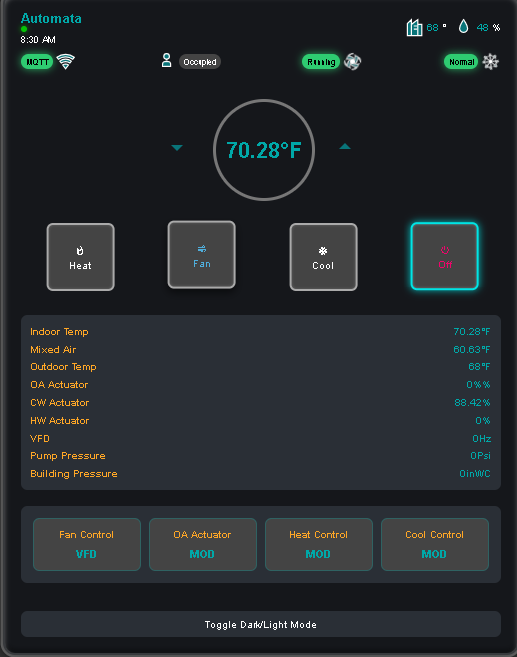
Professional-grade HVAC control interface for Node-RED Dashboard 2.0, delivering sophisticated building automation through an elegantly designed UI. This advanced thermostat seamlessly integrates with Automata Controls' state-of-the-art modulating and switching control logic, enabling dynamic transitions between VFD/TRIAC fan control, modulating/TRIAC outdoor air management, modulating/TRIAC heating control, and modulating/DX cooling modes. Built for industrial-grade reliability and precision, this interface combines intuitive operation with comprehensive system monitoring capabilities, making it the ideal solution for modern building management systems requiring both sophisticated control and user-friendly operation.
---
## ✨ Features
### Core Capabilities
- 🎨 Modern, responsive thermostat interface with dark/light theme support
- 🔄 Real-time temperature monitoring and control
- 🌡️ Multiple HVAC modes (Heat, Cool, Fan, Off)
### Advanced Control Modes
- 🔧 VFD/TRIAC fan control
- 🌬️ Modulating/TRIAC outdoor air control
- 🔥 Modulating/TRIAC heating control
- ❄️ Modulating/DX cooling control
### System Monitoring
- 📊 Supply/Return temperatures
- 🌡️ Mixed air temperature
- 🌍 Outdoor air temperature
- 💧 Zone humidity
- 📈 Actuator positions (OA, CW, HW)
- ⚡ VFD frequency
- 📉 Pump and building pressure
### Building Automation Features
- 👥 Occupancy detection
- ❄️ Freeze protection
- 📡 MQTT status indicators
- 🔄 Animated system status
---
## 🚀 Installation
```bash
npm install @automatacontrols/automata-thermostat
🏁 Quick Start
Install the node through the Node-RED Palette Manager or npm
Add the Automata Thermostat node to your flow
Configure the dashboard group and other settings
Deploy your flow
📥 Input Messages
Control your thermostat by sending messages with the following properties:
javascriptCopy{
"payload": {
"setpoint": 72, // Temperature setpoint
"supply": 70, // Supply air temperature
"outdoorAir": 75, // Outdoor air temperature
"mixedAir": 72, // Mixed air temperature
"humidity": 45, // Zone humidity
"mode": "cooling", // HVAC mode
"occupied": true, // Occupancy status
"freezestat": false, // Freeze protection status
"fanStatus": true, // Fan operation status
"oaActuator": 50, // OA damper position (%)
"cwActuator": 30, // CW valve position (%)
"hwActuator": 0, // HW valve position (%)
"vfd": 60, // VFD frequency (Hz)
"pumpPressure": 12, // Pump pressure (PSI)
"buildingPressure": 0.05 // Building pressure (inWC)
}
}
📤 Output Messages
The node outputs control messages in this format:
javascriptCopy{
"topic": "setpoint", // or "mode", "controlMode_Fan", etc.
"payload": value // Depends on topic type
}
⚙️ Configuration
Node Settings
📝 Name: Custom name for the node
📊 Group: Dashboard group assignment
🎨 Theme: Dark/Light theme selection
🌡️ Units: °F/°C selection
📐 Size: Widget size in dashboard grid
🤝 Support
For issues, feature requests, or contributions:
🐛 GitHub Issues
📦 GitHub Repository
📄 License
MIT License - see LICENSE for details
👨💻 Author
AutomataControls
🌐 GitHub: AutomataControls
📝 Changelog
1.0.0
🎉 Initial release
🎛️ Full HVAC control interface
📊 Real-time monitoring
🔧 Advanced control modes
🏢 Building automation features
1.0.3
🔧 Fixed dependency for node-red-dashboard to version 2.0.0
➕ Added example flow for reference
1.0.4
🖼️ Added Node-RED library screenshot
🔧 Fixed template path loading
1.0.5
🎨 Updated node color to brand pink (#F0056B)
📝 Improved documentation
1.0.6
➕ Added comprehensive example flow
🔧 Enhanced error handling
1.0.7
🔧 Fixed template directory structure
📡 Improved MQTT integration
1.0.8
🔄 Updated node icon
🎨 Enhanced UI responsiveness
1.0.9
➕ Added status badges
📝 Updated documentation with examples
1.0.10
📂 Complete directory restructure
🏷️ Added keyword tags
🔄 Updated license badges
node-red dashboard thermostat hvac building-automation controls ui widget automata temperature-control building-management automation monitoring gpl-3.0
```