![Logo][Logo]

[![iOS][iOS]][iOS-URL] [![Android][Android]][Android-URL] [![Swift][Swift]][Swift-URL] [![Kotlin][Kotlin]][Kotlin-URL] [![React-Native][React-Native]][React-Native-URL]
## Overview 🎇
https://github.com/user-attachments/assets/79580bc7-237c-46b7-b92e-1479cc6d9079
React Native Multiple Image Picker **(RNMIP)** enables application to pick images and videos from multiple smart album in iOS/Android. React Native Multiple Image Picker is based on two libraries available, [HXPhotoPicker](https://github.com/SilenceLove/HXPhotoPicker) and [PictureSelector](https://github.com/LuckSiege/PictureSelector)
## Documentation 📚
## Features 🔥
| 🤩 | ![Logo][Logo] |
| --- | ------------------------------------------------------------------------------------- |
| 🍕 | [**Crop**](/docs/docs/CROP.mdx) single/multiple image. |
| 🎑 | [**Preview**](/docs/docs/PREVIEW.mdx) image/video. |
| 📸 | [**Camera**](/docs/docs/CAMERA.mdx) module for capturing photos and recording videos. |
| 🐳 | Keep the previous selection. |
| 0️⃣ | Selected order index. |
| 🎨 | UI Customization (numberOfColumn, spacing, primaryColor ... ) |
| 🌚 | Dark Mode, Light Mode |
| 🌄 | Choose multiple images/video. |
| 📦 | Support smart album `(camera roll, selfies, panoramas, favorites, videos...)`. |
| 📺 | Display video duration. |
| ⛅️ | Support iCloud Photo Library. |
| 🌪 | Scrolling performance. ☕️ |
## Requirements
Because RNMIP uses Nitro Module, it complies with Nitro Modules' requirements.
View Nitro Modules' requirements [here](https://nitro.margelo.com/docs/minimum-requirements)
- `Xcode 16+`
- `iOS 13+`
- `react-native 0.75+`
- `compileSdkVersion 34+`
## Installation
See more [**Installation**](https://nitrogenzlab.github.io/react-native-multiple-image-picker/getting-started)
## Usage
Here is a simple usage of the Multiple Image Picker.
See more [**Config**](https://nitrogenzlab.github.io/react-native-multiple-image-picker/config)
```typescript
import { openPicker, Config } from '@baronha/react-native-multiple-image-picker'
const config: Config = {
maxSelect: 10,
maxVideo: 10,
primaryColor: '#FB9300',
backgroundDark: '#2f2f2f',
numberOfColumn: 4,
mediaType: 'all',
selectBoxStyle: 'number',
selectMode: 'multiple',
language: 'vi', // 🇻🇳 Vietnamese
theme: 'dark',
isHiddenOriginalButton: false,
primaryColor: '#F6B35D',
}
const onPicker = async () => {
try {
const response = await openPicker(config)
setImages(response)
} catch (e) {
// catch error for multiple image picker
}
}
```
## To Do
- [x] Crop Image in iOS.
- [x] Preview Controller for `iOS`.
- [x] Handle Permission when limited on `iOS`.
- [x] Migrating Library to the New Architecture.
- [x] Multiple Crop Image.
- [x] Multiple Preview Image.
- [x] Dynamic Theme.
- [x] Dynamic Language
- [x] Open Crop Controller.
- [x] Open Preview Controller.
- [x] Open Camera Controller.
## Sponsor & Support ☕️
[![BuyMeACoffee][BuyMeACoffee]][BuyMeACoffee-URL] [![Kofi][Kofi]][Kofi-URL]
[BuyMeACoffee]: https://img.shields.io/badge/Buy_Me_A_Coffee-FFDD00?style=for-the-badge&logo=buy-me-a-coffee&logoColor=black
[BuyMeACoffee-URL]: https://buymeacoffee.com/baronha
[Kofi]: https://img.shields.io/badge/Ko--fi-F16061?style=for-the-badge&logo=ko-fi&logoColor=white
[Kofi-URL]: https://ko-fi.com/baoha
To keep this library maintained and up-to-date please consider [sponsoring it on GitHub](https://github.com/sponsors/baronha). Or if you are looking for a private support or help in customizing the experience, then reach out to me on Twitter [@\_baronha](https://twitter.com/_baronha).
Besides, I also built a product using HXPhotoPicker here, Hope you support:
 ## Built With ❤️
[](https://nitro.margelo.com/docs/nitro-modules)
## Built With ❤️
[](https://nitro.margelo.com/docs/nitro-modules)
[](https://github.com/SilenceLove/HXPhotoPicker)
[](https://github.com/LuckSiege/PictureSelector)
## Star History
[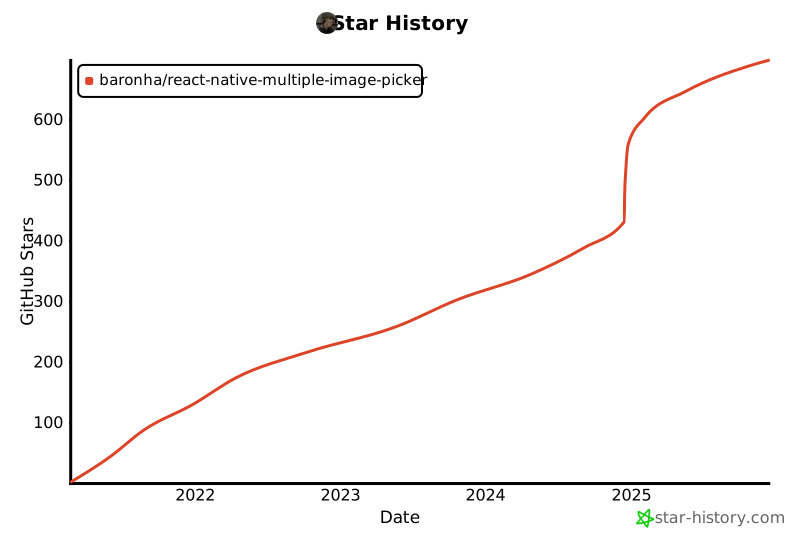](https://star-history.com/#bytebase/star-history&Date)
## Showcase ✨
List of used applications with `@baronha/react-native-multiple-image-picker`
Contributions are welcome! If you have an application that uses `@baronha/react-native-multiple-image-picker`, please open a [pull request](/docs/docs/SHOWCASE/showcase.json) to add it to the list.
See all [**Showcase**](https://nitrogenzlab.github.io/react-native-multiple-image-picker/showcase)
## Performance
We're trying to improve performance. If you have a better solution, please open a [issue](https://github.com/NitrogenZLab/react-native-multiple-image-picker/issues)
or [pull request](https://github.com/NitrogenZLab/react-native-multiple-image-picker/pulls). Best regards!
## License
MIT
[TLPhotoPicker](https://github.com/tilltue/TLPhotoPicker/blob/master/LICENSE)
[PictureSelector](https://github.com/LuckSiege/PictureSelector/blob/master/LICENSE)
[iOS]: https://img.shields.io/badge/iOS-000000?style=for-the-badge&logo=ios&logoColor=white
[iOS-URL]: https://www.apple.com/ios
[Android]: https://img.shields.io/badge/Android-3DDC84?style=for-the-badge&logo=android&logoColor=white
[Android-URL]: https://www.android.com/
[React-Native]: https://img.shields.io/badge/React_Native-20232A?style=for-the-badge&logo=react&logoColor=61DAFB
[React-Native-URL]: https://reactnative.dev/
[React-Native]: https://img.shields.io/badge/React_Native-20232A?style=for-the-badge&logo=react&logoColor=61DAFB
[React-Native-URL]: https://reactnative.dev/
[Swift]: https://img.shields.io/badge/Swift-FA7343?style=for-the-badge&logo=swift&logoColor=white
[Swift-URL]: https://developer.apple.com/swift/
[Kotlin]: https://img.shields.io/badge/Kotlin-0095D5?&style=for-the-badge&logo=kotlin&logoColor=white
[Kotlin-URL]: https://kotlinlang.org/
[Logo]: https://img.shields.io/badge/React_Native_Multiple_Image_Picker-DF78C3?style=for-the-badge