# @boindahood/react-native-biometrics
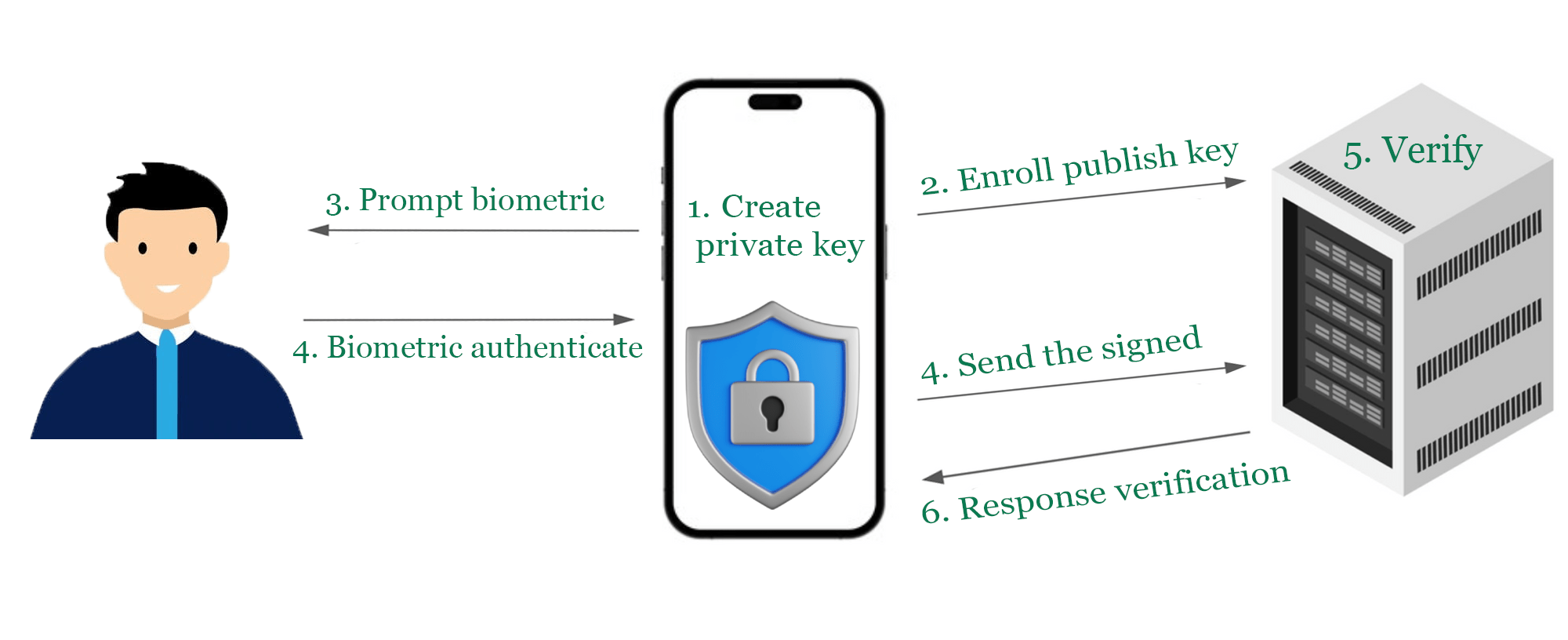
React Native biometric authentication with private key management. Create biometric-protected private keys and digital signatures using native iOS Keychain and Android Keystore.
[](https://badge.fury.io/js/@boindahood%2Freact-native-biometrics)
[](https://www.npmjs.com/package/@boindahood/react-native-biometrics)
[](https://opensource.org/licenses/MIT)
## Features
✅ **Biometric Authentication** - Face ID, Touch ID, Fingerprint, Iris recognition
✅ **Private Key Management** - Hardware-protected private keys with biometric access
✅ **Digital Signatures** - Create cryptographic signatures with biometric authentication
✅ **Cross Platform** - iOS (Keychain) and Android (Keystore) native storage
✅ **TypeScript** - Full type definitions included
✅ **TurboModule** - Built for React Native's new architecture
## 🎉 What's New in v1.0.4
### Private Key Management
- **Hardware-protected keys**: Create and manage biometric-protected private keys
- **Digital signatures**: Sign data with biometric authentication: `createSignature`
- **Cross-platform security**: Secure Enclave (iOS) + Android Keystore support
- **Key lifecycle management**: Create, check existence, and delete keys: `createBiometricKey`, `biometricKeyExists`, `deleteBiometricKey`
### Breaking Changes
- `enum` `BiometricOtherwayMode: 'hide' | 'callback' | 'PIN'`
- `otherwayWithPIN: boolean` → `otherwayWith: BiometricOtherwayMode`
- **New `otherwayWith` modes**: Replaced `otherwayWithPIN: boolean` with flexible mode system
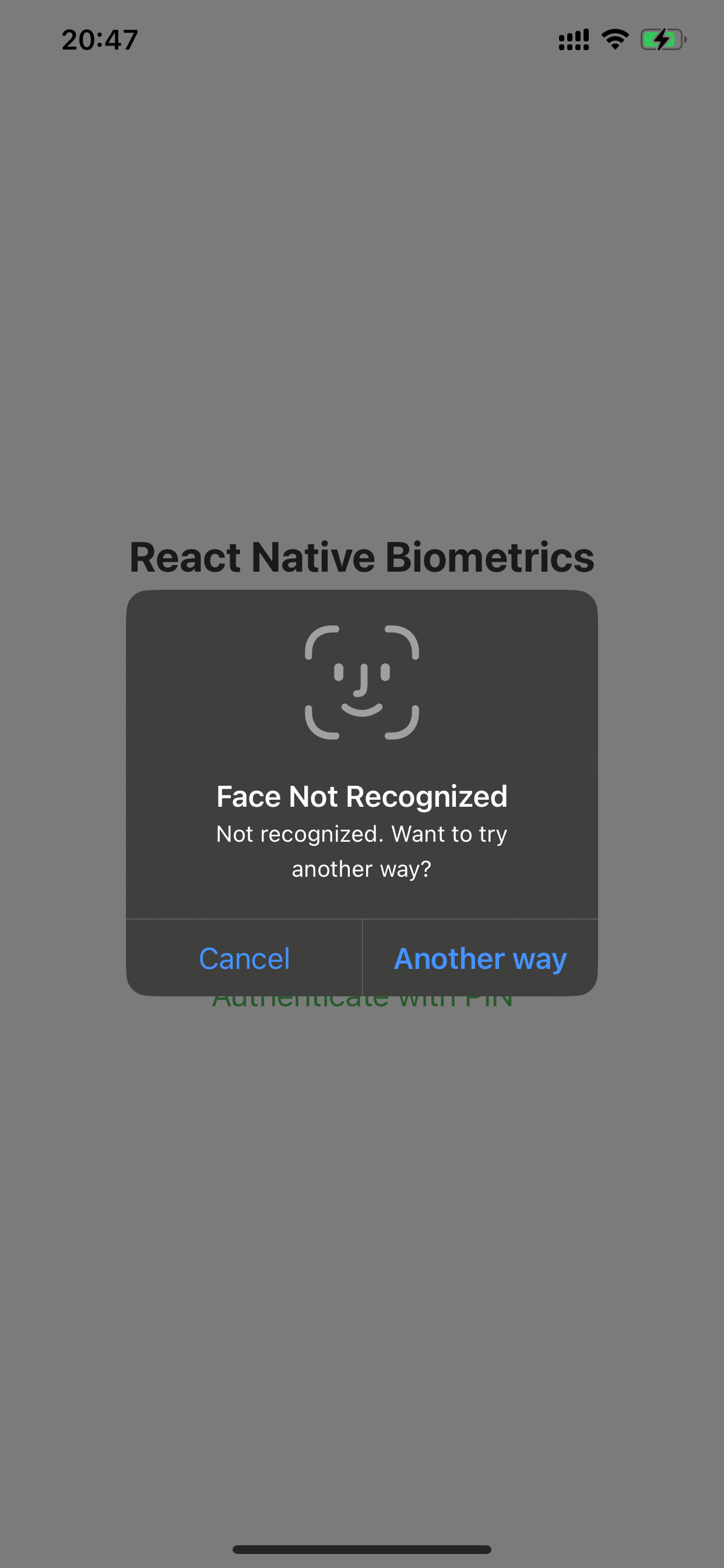
- `'hide'`: **iOS only** - Biometric-only authentication, no fallback button
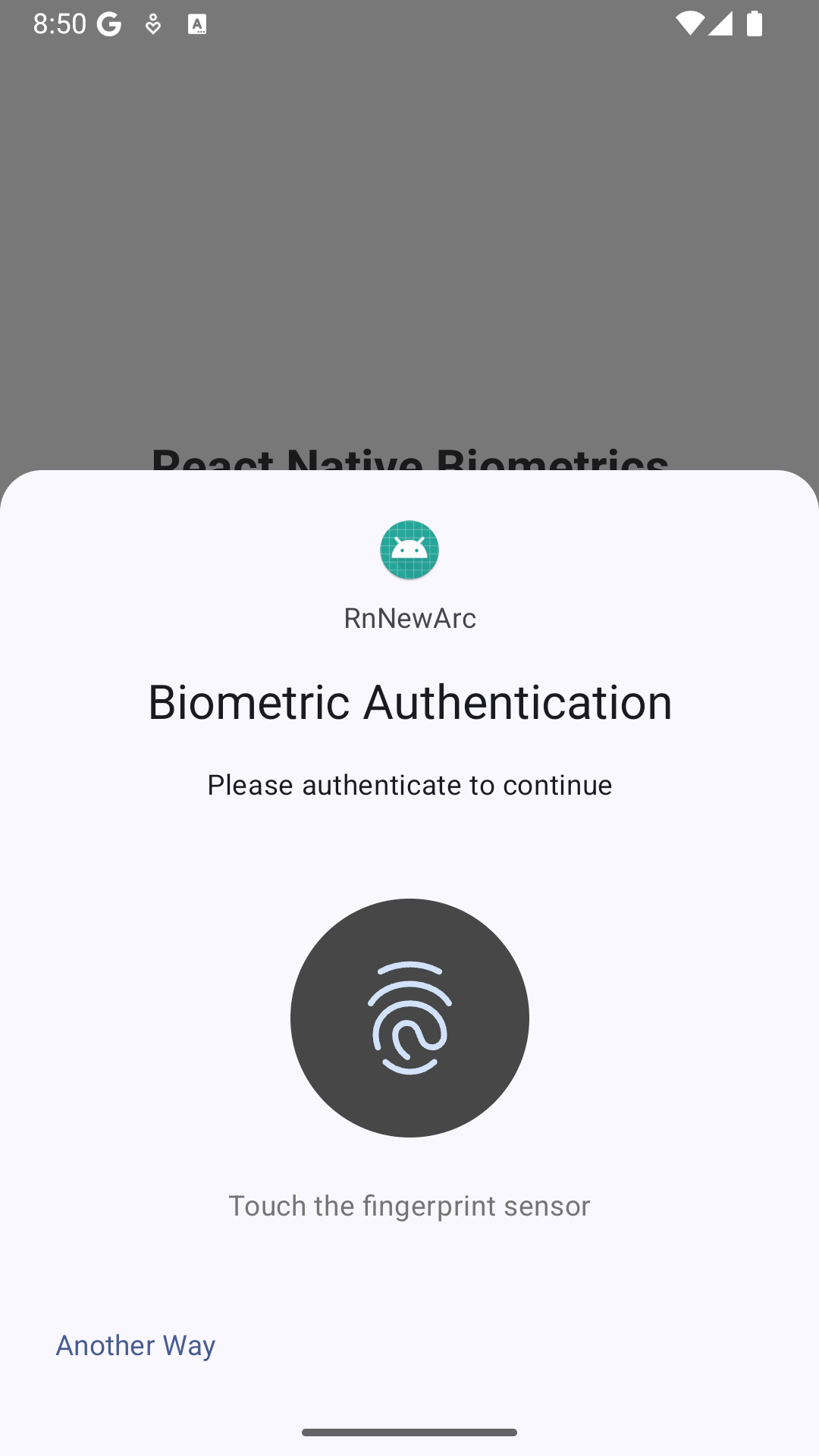
- `'callback'`: Custom fallback button with `pressedOtherway` callback
- `'PIN'`: **Default mode** - Native device PIN/passcode authentication
## Screenshots
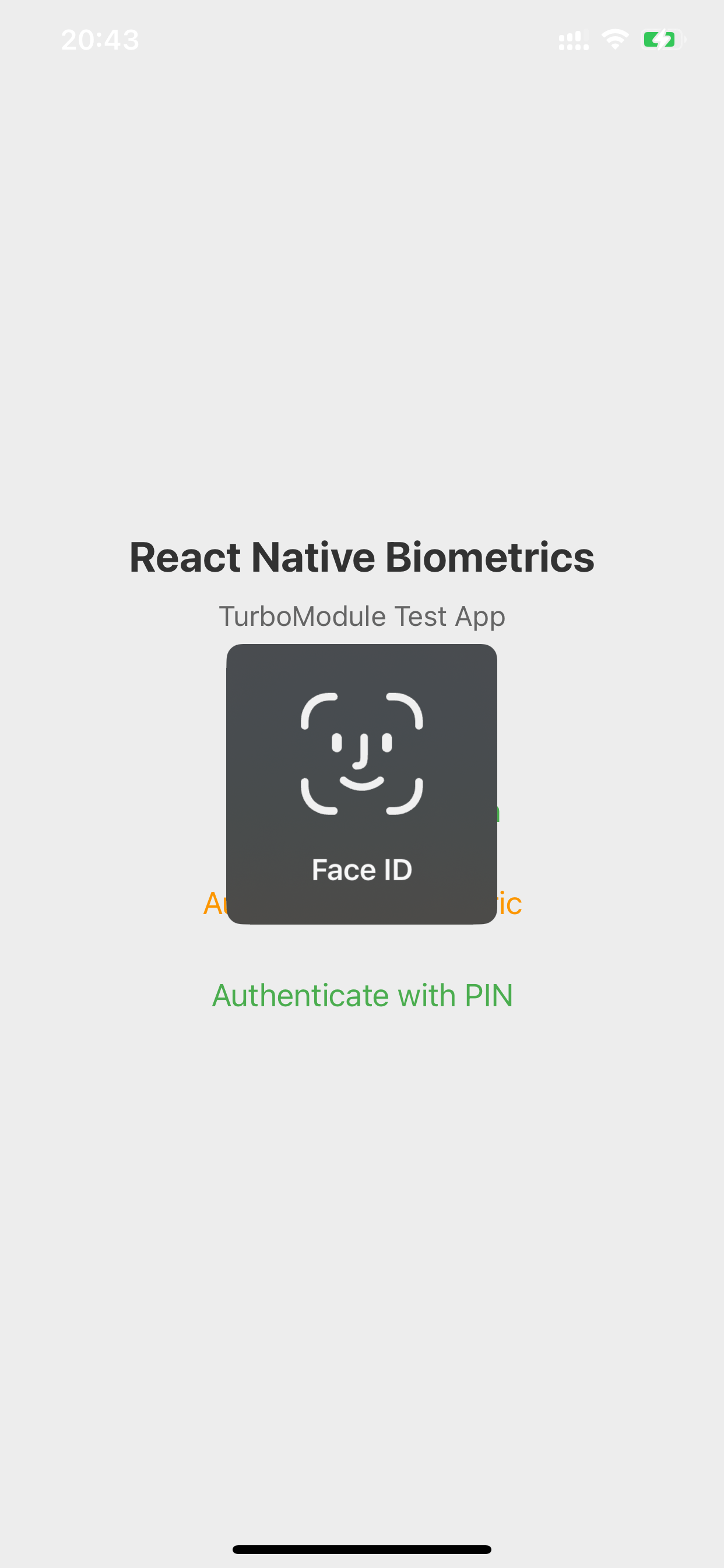
| iOS Authentication | iOS "Another way" fallback | Android "Another way" fallback |
|:---:|:---:|:---:|
|  |  |  |
## Installation
```bash
npm install @boindahood/react-native-biometrics
# or
yarn add @boindahood/react-native-biometrics
```
### iOS Setup
1. Add the following to your `Info.plist`:
```xml
NSFaceIDUsageDescription
This app uses Face/Touch ID for secure authentication
```
2. The library automatically links with LocalAuthentication framework.
### Android Setup
1. Add the following permissions to your `android/app/src/main/AndroidManifest.xml`:
```xml
```
2. Ensure your `minSdkVersion` is at least 23 in `android/app/build.gradle`:
```gradle
android {
defaultConfig {
minSdkVersion 23
// ...
}
}
```
## Usage
### Basic Authentication
```typescript
import ReactNativeBiometrics, { BiometricOtherwayModem, BiometricType, BiometricErrorCode } from '@boindahood/react-native-biometrics';
// Check if biometric authentication is available
const result = await ReactNativeBiometrics.checkBiometricAvailability();
if (result.isAvailable) {
// Authenticate with custom prompt
const authResult = await ReactNativeBiometrics.authenticateBiometric({
titlePrompt: 'Authenticate',
otherwayWith: BiometricOtherwayMode.PIN
});
if (authResult.success) {
console.log('Authentication successful');
} else if (authResult.pressedOtherway) {
console.log('User chose PIN authentication');
}
}
```
### Private Key Management
```typescript
// Create a biometric-protected private key
const createResult = await ReactNativeBiometrics.createBiometricKey();
if (createResult.success) {
// Create a digital signature with custom prompt
const signResult = await ReactNativeBiometrics.createSignature('data to sign', {
titlePrompt: 'Sign Transaction',
otherwayWith: BiometricOtherwayMode.CALLBACK,
otherwayText: 'Use Password'
});
if (signResult.success && signResult.signature) {
console.log('Signature:', signResult.signature);
} else if (signResult.pressedOtherway) {
console.log('User wants to use password instead');
}
}
```
## API Reference
### checkBiometricAvailability()
Checks if biometric authentication is available on the device.
**Returns:** `Promise`
| Property | Type | Description | iOS | Android |
|:---------|:-----|:------------|:---:|:-------:|
| isAvailable | boolean | Device supports and has biometrics enrolled | ✔ | ✔ |
| allowAccess | boolean | App has permission to use biometrics | ✔ | ✔ |
| biometricType | BiometricType | Primary biometric type available | ✔ | ✔ |
| errorCode | BiometricErrorCode? | Error code if not available | ✔ | ✔ |
| errorMessage | string? | Error message if not available | ✔ | ✔ |
Example:
```typescript
const result = await ReactNativeBiometrics.checkBiometricAvailability();
if (result.isAvailable) {
console.log(`Biometric type: ${result.biometricType}`);
} else {
console.log(`Error: ${result.errorMessage}`);
}
```
### requestBiometricPermission()
Requests permission to use biometric authentication.
**Note:**
- **iOS**: Triggers biometric permission prompt - user must grant access to use Face ID/Touch ID
- **Android**: Always returns `success: true` (permissions granted via manifest)
**Returns:** `Promise`
| Property | Type | Description | iOS | Android |
|:---------|:-----|:------------|:---:|:-------:|
| success | boolean | Permission granted by user (iOS) or automatically granted (Android) | ✔ | ✔ |
| errorCode | BiometricErrorCode? | Error code if permission denied or hardware issues | ✔ | ✔ |
| errorMessage | string? | Error message if permission denied or hardware issues | ✔ | ✔ |
Example:
```typescript
const result = await ReactNativeBiometrics.requestBiometricPermission();
if (result.success) {
console.log('Permission granted');
}
```
### authenticateBiometric(options?)
Performs biometric authentication with customizable prompts and fallback options.
**Options Object:**
| Property | Type | Description | iOS | Android |
|:---------|:-----|:------------|:---:|:-------:|
| titlePrompt | string? | Main authentication prompt title | ✔ | ✔ |
| otherwayWith | 'hide' \| 'callback' \| 'PIN'? | Fallback button behavior (default: 'PIN') | ✔ | ✔ |
| otherwayText | string? | Custom fallback button text (required on Android, fallback: "Another way") | ✔ | ✔ |
**Fallback Options:**
- `'hide'`: **iOS only** - No fallback button, biometric-only authentication (Android defaults to PIN)
- `'callback'`: Show fallback button with custom text, returns `pressedOtherway: true` when pressed
- `'PIN'` (default): Allow device PIN/passcode as authentication alternative
**Result Object:**
| Property | Type | Description | iOS | Android |
|:---------|:-----|:------------|:---:|:-------:|
| success | boolean | Authentication successful | ✔ | ✔ |
| pressedOtherway | boolean? | User pressed fallback button (when otherwayWith='callback') | ✔ | ✔ |
| errorCode | BiometricErrorCode? | Error code if authentication failed | ✔ | ✔ |
| errorMessage | string? | Error message if authentication failed | ✔ | ✔ |
Example:
```typescript
// Simple biometric authentication (defaults to PIN fallback)
const result = await ReactNativeBiometrics.authenticateBiometric({
titlePrompt: 'Authenticate'
});
// Explicitly with PIN fallback
const result = await ReactNativeBiometrics.authenticateBiometric({
titlePrompt: 'Secure Login',
otherwayWith: BiometricOtherwayMode.PIN
});
// With custom callback button
const result = await ReactNativeBiometrics.authenticateBiometric({
titlePrompt: 'Biometric Auth',
otherwayWith: BiometricOtherwayMode.CALLBACK,
otherwayText: 'Use Password'
});
if (result.success) {
console.log('Authentication successful');
} else if (result.pressedOtherway) {
console.log('User chose alternative authentication');
}
```
### authenticatePIN()
Performs authentication using device PIN/passcode only.
- **Android**: working normally, it just open prompt PIN only.
- **iOS**: open prompt full with Biometric + PIN flow (via manifest)
**Returns:** `Promise`
| Property | Type | Description | iOS | Android |
|:---------|:-----|:------------|:---:|:-------:|
| success | boolean | Authentication successful | ✔ | ✔ |
| errorCode | BiometricErrorCode? | Error code if authentication failed | ✔ | ✔ |
| errorMessage | string? | Error message if authentication failed | ✔ | ✔ |
Example:
```typescript
const result = await ReactNativeBiometrics.authenticatePIN();
if (result.success) {
console.log('PIN authentication successful');
}
```
### createBiometricKey()
Creates a new biometric-protected private key. Only one key per app is allowed for security.
**Returns:** `Promise`
| Property | Type | Description | iOS | Android |
|:---------|:-----|:------------|:---:|:-------:|
| success | boolean | Key created successfully | ✔ | ✔ |
| errorCode | BiometricErrorCode? | Error code if creation failed (e.g., BIOMETRIC_KEY_EXISTS) | ✔ | ✔ |
| errorMessage | string? | Error message if creation failed | ✔ | ✔ |
Example:
```typescript
const result = await ReactNativeBiometrics.createBiometricKey();
if (result.success) {
console.log('Biometric key created successfully');
} else if (result.errorCode === 'BIOMETRIC_KEY_EXISTS') {
console.log('Key already exists');
}
```
### biometricKeyExists()
Checks if a biometric-protected private key exists.
**Returns:** `Promise`
| Property | Type | Description | iOS | Android |
|:---------|:-----|:------------|:---:|:-------:|
| exists | boolean | Key exists in keystore | ✔ | ✔ |
| errorCode | BiometricErrorCode? | Error code if check failed | ✔ | ✔ |
| errorMessage | string? | Error message if check failed | ✔ | ✔ |
Example:
```typescript
const result = await ReactNativeBiometrics.biometricKeyExists();
if (result.exists) {
console.log('Biometric key exists');
} else {
console.log('No biometric key found');
}
```
### deleteBiometricKey()
Deletes the biometric-protected private key.
**Returns:** `Promise`
| Property | Type | Description | iOS | Android |
|:---------|:-----|:------------|:---:|:-------:|
| success | boolean | Key deleted successfully | ✔ | ✔ |
| errorCode | BiometricErrorCode? | Error code if deletion failed | ✔ | ✔ |
| errorMessage | string? | Error message if deletion failed | ✔ | ✔ |
Example:
```typescript
const result = await ReactNativeBiometrics.deleteBiometricKey();
if (result.success) {
console.log('Biometric key deleted successfully');
}
```
### createSignature(payload, options?)
Creates a digital signature using the biometric-protected private key. Requires biometric authentication with customizable prompts.
**IOS:** options not working for this case, SecKey of iphone will automatic handle this flow. We cant make any impact
**Parameters:**
| Parameter | Type | Description |
|:----------|:-----|:------------|
| payload | string | The data to sign |
| options | BiometricAuthOptions? | Authentication options for prompt customization |
**Options Object:** (Same as authenticateBiometric)
| Property | Type | Description | iOS | Android |
|:---------|:-----|:------------|:---:|:-------:|
| titlePrompt | string? | Main authentication prompt title | ✖ | ✔ |
| otherwayWith | 'hide' \| 'callback' \| 'PIN'? | Fallback button behavior (default: 'PIN') | ✖ | ✔ |
| otherwayText | string? | Custom fallback button text (required on Android, fallback: "Another way") | ✖ | ✔ |
**Returns:** `Promise`
| Property | Type | Description | iOS | Android |
|:---------|:-----|:------------|:---:|:-------:|
| success | boolean | Signature created successfully | ✔ | ✔ |
| signature | string? | Base64 encoded signature | ✔ | ✔ |
| pressedOtherway | boolean? | User pressed fallback button (when otherwayWith='callback') | ✔ | ✔ |
| errorCode | BiometricErrorCode? | Error code if signature creation failed | ✔ | ✔ |
| errorMessage | string? | Error message if signature creation failed | ✔ | ✔ |
Example:
```typescript
// Basic signature creation (defaults to PIN fallback)
const result = await ReactNativeBiometrics.createSignature('data to sign');
// Explicitly with PIN fallback
const result = await ReactNativeBiometrics.createSignature('data to sign', {
titlePrompt: 'Sign Transaction',
otherwayWith: BiometricOtherwayMode.PIN
});
if (result.success && result.signature) {
console.log('Signature:', result.signature);
// Use the signature for authentication or verification
} else if (result.pressedOtherway) {
console.log('User chose alternative authentication');
}
```
## Biometric Types
| Type | Platform | Description |
|:-----|:---------|:------------|
| `touchId` | iOS | Touch ID fingerprint sensor |
| `faceId` | iOS/Android | Face ID facial recognition |
| `fingerprint` | Android | Fingerprint sensor |
| `iris` | Android | Iris recognition sensor |
Example:
```typescript
import { BiometricType } from '@boindahood/react-native-biometrics'
const { biometricType } = await ReactNativeBiometrics.checkBiometricAvailability()
switch (biometricType) {
case BiometricType.TOUCH_ID:
console.log('Touch ID available')
break
case BiometricType.FACE_ID:
console.log('Face ID available')
break
case BiometricType.FINGERPRINT:
console.log('Fingerprint available')
break
case BiometricType.IRIS:
console.log('Iris recognition available')
break
default:
console.log('No biometrics available')
}
```
## Error Handling
The library provides comprehensive error handling with standardized error codes:
| Error Code | Description | iOS | Android |
|:-----------|:------------|:---:|:-------:|
| BIOMETRIC_NOT_AVAILABLE | Biometric hardware not available | ✔ | ✔ |
| BIOMETRIC_NOT_ENROLLED | No biometric credentials enrolled | ✔ | ✔ |
| BIOMETRIC_PERMISSION_DENIED | App doesn't have biometric permission | ✔ | ✔ |
| BIOMETRIC_LOCKOUT | Too many failed attempts, temporarily locked | ✔ | ✔ |
| BIOMETRIC_LOCKOUT_PERMANENT | Permanently locked, requires device unlock | ✔ | ✔ |
| BIOMETRIC_AUTH_FAILED | Authentication failed | ✔ | ✔ |
| BIOMETRIC_USER_CANCEL | User canceled authentication | ✔ | ✔ |
| BIOMETRIC_SYSTEM_CANCEL | System canceled authentication | ✔ | ✔ |
| BIOMETRIC_PRESSED_OTHER_WAY | User pressed fallback button | ✔ | ✔ |
| BIOMETRIC_KEY_EXISTS | Biometric key already exists | ✔ | ✔ |
| BIOMETRIC_KEY_NOT_FOUND | Biometric key not found | ✔ | ✔ |
| BIOMETRIC_UNKNOWN_ERROR | Unknown error occurred | ✔ | ✔ |
Example:
```typescript
import { BiometricErrorCode, BiometricOtherwayMode } from '@boindahood/react-native-biometrics'
const result = await ReactNativeBiometrics.authenticateBiometric({
titlePrompt: 'Authenticate',
otherwayWith: BiometricOtherwayMode.CALLBACK,
otherwayText: 'Use Password'
})
if (!result.success) {
switch (result.errorCode) {
case BiometricErrorCode.BIOMETRIC_NOT_AVAILABLE:
console.log('Biometric hardware not available')
break
case BiometricErrorCode.BIOMETRIC_NOT_ENROLLED:
console.log('No biometric credentials enrolled')
break
case BiometricErrorCode.BIOMETRIC_LOCKOUT:
console.log('Too many failed attempts, try again later')
break
case BiometricErrorCode.BIOMETRIC_USER_CANCEL:
console.log('User canceled authentication')
break
case BiometricErrorCode.BIOMETRIC_PRESSED_OTHER_WAY:
console.log('User pressed fallback button')
// Handle custom authentication flow
break
// Handle other error codes...
}
} else if (result.pressedOtherway) {
console.log('User wants to use alternative authentication')
// Handle fallback authentication
}
```
## Platform Differences
### iOS
- Uses Local Authentication framework with Keychain Services
- Face ID and Touch ID support
- **Requires user permission** - first biometric access triggers system permission prompt
- Supports device passcode fallback via `otherwayWith: 'PIN'`
- Private keys stored in Secure Enclave when available
- **Prompt customization**: `titlePrompt` works for all authentication methods
- **createSignature**: iOS automatically handles biometric prompt, options mainly for consistency
### Android
- Uses AndroidX Biometric library with Android Keystore
- authenticate simple use BIOMETRIC_WEAK prefer: finger > face > iris (avoid BIOMETRIC_LOCKOUT_PERMANENT when user input wrong too many)
- authenticate for createSignature use BIOMETRIC_STRONG
- **Permissions granted via manifest** - no runtime permission needed
- Supports fingerprint, face, and iris recognition
- Supports device PIN/pattern/password fallback via `otherwayWith: 'PIN'`
- Private keys stored in hardware-backed Android Keystore
- **Prompt customization**: Full support for all `BiometricAuthOptions` properties
- **Fallback behavior**:
- `'hide'`: Biometric-only, no fallback button
- `'callback'`: Custom fallback button, returns `pressedOtherway: true`
- `'PIN'`: Native PIN/pattern/password fallback option
### Lockout Detection
**Important:** Both platforms can only reliably detect biometric lockout status during authentication attempts. The lockout information is provided through error codes:
- `BIOMETRIC_LOCKOUT` - Temporary lockout (30 seconds on Android, varies on iOS)
- `BIOMETRIC_LOCKOUT_PERMANENT` - Permanent lockout, requires device unlock
To handle lockout, catch these error codes during authentication and guide users accordingly.
## Requirements
- React Native >= 0.70
- iOS >= 12.0
- Android API >= 23
## Example App
The library includes a comprehensive example app demonstrating all features. To run the example:
```bash
cd example
yarn install
# For iOS
yarn ios
# For Android
yarn android
```
## Contributing
See the [contributing guide](CONTRIBUTING.md) to learn how to contribute to the repository and the development workflow.
## License
MIT
## Support
- 📖 [Documentation](https://github.com/chubo274/react-native-biometrics#readme)
- 🐛 [Bug Reports](https://github.com/chubo274/react-native-biometrics/issues)
- 💡 [Feature Requests](https://github.com/chubo274/react-native-biometrics/issues)
---
Made with ❤️ by [boindahood](https://github.com/chubo274)