# Ent Framework

<div align="left"><figure><img src="https://844702935-files.gitbook.io/~/files/v0/b/gitbook-x-prod.appspot.com/o/spaces%2FNRmYySpdaO8NqIAEQYuO%2Fuploads%2Fgit-blob-6ccce58424156951ca18f24fdb38a5218c496786%2Flogo-berkshire-swash.svg?alt=media" alt="" width="375"><figcaption></figcaption></figure></div>

The TypeScript library for working with microsharded PostgreSQL databases.

* [Getting Started and Tutorials](https://ent-framework.net)
* [API documentation](https://github.com/clickup/ent-framework/blob/main/docs/globals.md)
* [Source code](https://github.com/clickup/ent-framework)
* [Ent Framework's Discord](https://discord.gg/QXvN6VTCKS)

#### Core Features

1. **Graph-like representation of entities.** With Ent Framework, you represent each Ent (a domain object of your business logic) as a TypeScript class with immutable properties. An Ent class instance maps to one row of some table in a relational database (like PostgreSQL). It may look similar to ORM, but has many aspects that traditional ORMs don't have.
2. **Row-level security in a graph (privacy layer).** You manage data as a graph where each node is an Ent instance, and each edge is a field link (think of foreign keys) to other Ents. To be allowed to read (or update/delete) some Ent, you define a set of explicit rules like "user can read EntA if they can read EntB or EntC". And, consequently, in EntB you define its own set of rules, like "user can read EntB if they can read EntD".
3. **Query batching and coalescing.** Ent Framework holistically solves the "N+1 selects" problem commonly known in ORM world. You still write you code as if you work with individual Ents and individual IDs, and the framework magically takes care of sending batched requests (both read and write) to the underlying relational database. You do not work with lists and JOINs anymore.
4. **Microsharding and replication lag tracking support out of the box.** Splitting your database horizontally is like a breeze now: Ent Framework takes care of routing the requests to the proper microshards. When scaling reads, Ent Framework knows whether a replica node is "good enough" for that particular query. It automatically uses the proper replica when possible, falling back to master when not.
5. **Pluggable to your existing relational database.** If your project already uses some ORM or runs raw SQL queries, Ent Framework can be plugged in.
6. **Tens of other features.** Some examples: cross-microshards foreign keys, composite fields, triggers, build-in caching etc.

#### Installation

```
npm add ent-framework
pnpm add ent-framework
yarn add ent-framework
```

<div align="left"><figure><img src="https://github.com/clickup/ent-framework/actions/workflows/ci.yml/badge.svg?branch=main" alt="" width="188"><figcaption></figcaption></figure></div>


# Code Structure

Below, we'll show some Ent Framework usage examples. We will progress from the simplest code snippets to more and more advanced topics, like:

* custom ID schemas
* privacy rules
* triggers
* composite field types
* Viewer Context flavors
* master-replica and automatic replication lag tracking
* microsharding and migrations
* cross-shards foreign keys and inverse indexes
* etc.

### Code Structure

The examples in this tutorial will approximately follow [examples/next-example](https://github.com/dimikot/ent-framework/tree/main/examples/next-example) `src` folder structure:

* ents/
  * cluster.sql
  * cluster.ts
  * EntComment.ts
  * EntTopic.ts
  * EntUser.ts
  * getServerVC.ts
* app/
  * api/
    * auth/\[...nextauth]
      * route.ts
    * topics/
      * route.ts


# Connect to a Database

To start simple, create a PostgreSQL database and several tables there. You can also use you existing database:

```bash
$ psql postgresql://postgres:postgres@127.0.0.1/postgres -f ents/cluster.sql
```

{% code title="ents/cluster.sql" %}

```sql
CREATE TABLE users(
  id bigserial PRIMARY KEY,
  email varchar(256) NOT NULL UNIQUE,
  is_admin boolean NOT NULL DEFAULT FALSE
);

CREATE TABLE topics(
  id bigserial PRIMARY KEY,
  created_at timestamptz NOT NULL,
  updated_at timestamptz NOT NULL,
  slug varchar(64) NOT NULL UNIQUE,
  creator_id bigint NOT NULL,
  subject text DEFAULT NULL
);

CREATE TABLE comments(
  id bigserial PRIMARY KEY,
  created_at timestamptz NOT NULL,
  topic_id bigint REFERENCES topics,
  creator_id bigint NOT NULL,
  message text NOT NULL
);

CREATE TABLE organizations(
  id bigserial PRIMARY KEY,
  name text NOT NULL UNIQUE
);

CREATE TABLE organization_users(
  id bigserial PRIMARY KEY,
  organization_id bigint REFERENCES organizations,
  user_id bigint REFERENCES users,
  UNIQUE (organization_id, user_id)
);
```

{% endcode %}

To access that database, create an instance of Cluster:

{% code title="ents/cluster.ts" fullWidth="false" %}

```typescript
import { Cluster } from "ent-framework";
import type { PgClientOptions } from "ent-framework/pg";
import { PgClient } from "ent-framework/pg";
import type { PoolConfig } from "pg";

export const cluster = new Cluster<PgClient, PgClientOptions>({
  islands: async () => [ // sync or async
    {
      no: 0,
      nodes: [
        {
          name: "island0-master",
          config: {
            connectionString: process.env.DATABASE_URL, // e.g. from .env
            // This object is of the standard node-postgres type PoolConfig.
            // Thus, you can use host, port, user, password, database and other
            // properties instead of connectionString if you want.
            min: 5,
            max: 20,
          } satisfies PoolConfig,
        },
      ],
    },
  ],
  createClient: (node) => new PgClient(node),
  loggers: {
    clientQueryLogger: (props) => console.debug(props.msg),
    swallowedErrorLogger: (props) => console.log(props),
  },
});

// Pre-open min number of DB connections.
cluster.prewarm();
```

{% endcode %}

Terminology:

1. **Cluster** consists of **Islands**. Each Island is identified by an integer number (there can be many islands for horizontal scaling of the cluster).
2. Island consists of master + replica **nodes** (in the above example, we only define one master node and no replicas).&#x20;
3. Island also hosts **Microshards** (in the example above, we will have no microshards, aka just one global shard). Microshards may travel from island to island during shards rebalancing process; the engine tracks this automatically ("shards discovery").

Notice that we define the layout of the cluster using a callback. Ent Framework will call it from time to time to refresh the view of the cluster, so in this callback, you can read the data from some centralized configuration database (new nodes may be added, or empty nodes may be removed with no downtime). This is called "dynamic real-time reconfiguration".

[PgClient](https://github.com/clickup/ent-framework/blob/main/docs/classes/PgClient.md) class accepts several options, one of them is the standard [node-postgres PoolConfig](https://node-postgres.com/apis/pool) interface. For simplicity, when we define a cluster shape in `islands`, we just return a list of such configs, to be passed into `createClient()` lambda.

As of `prewarm()` call, it's explained in Advanced section.


# Create Ent Classes

Once you have a Cluster instance, you can create Ent classes to access the data.

{% code title="ents/EntUser.ts" %}

```typescript
import { PgSchema } from "ent-framework/pg";
import { ID, BaseEnt, GLOBAL_SHARD, AllowIf, OutgoingEdgePointsToVC } from "ent-framework";
import { cluster } from "./cluster";

const schema = new PgSchema(
  "users",
  {
    id: { type: ID, autoInsert: "nextval('users_id_seq')" },
    email: { type: String },
    is_admin: { type: Boolean, autoInsert: "false" },
  },
  ["email"]
);

export class EntUser extends BaseEnt(cluster, schema) {
  static override configure() {
    return new this.Configuration({
      shardAffinity: GLOBAL_SHARD,
      privacyInferPrincipal: async (_vc, row) => row.id,
      privacyLoad: [new AllowIf(new OutgoingEdgePointsToVC("id"))],
      privacyInsert: [],
    });
  }
}
```

{% endcode %}

If your app uses UUID type for IDs, replace `{ type: ID, autoInsert: "nextval('users_id_seq')" }` with something like:

```typescript
id: { type: String, autoInsert: "gen_random_uuid()" }
```

(Notice that you need to use type `String` and not `ID` for UUID fields. Read more about ID formats and microsharding aspects in [locating-a-shard-id-format](https://docs.ent-framework.net/scalability/locating-a-shard-id-format "mention") article.)

Each Ent may also have one optional "unique key" (possible composite) which is treated by the engine in a specific optimized way. In the above example, it's `email`.

{% code title="ents/EntTopic.ts" %}

```typescript
import { PgSchema } from "ent-framework/pg";
import {
  ID,
  BaseEnt,
  GLOBAL_SHARD,
  AllowIf,
  OutgoingEdgePointsToVC,
  Require,
} from "ent-framework";
import { cluster } from "./cluster";

const schema = new PgSchema(
  "topics",
  {
    id: { type: ID, autoInsert: "nextval('topics_id_seq')" },
    created_at: { type: Date, autoInsert: "now()" },
    updated_at: { type: Date, autoUpdate: "now()" },
    slug: { type: String },
    creator_id: { type: ID },
    subject: { type: String, allowNull: true },
  },
  ["slug"]
);

export class EntTopic extends BaseEnt(cluster, schema) {
  static override configure() {
    return new this.Configuration({
      shardAffinity: GLOBAL_SHARD,
      privacyInferPrincipal: async (_vc, row) => row.creator_id,
      privacyLoad: [new AllowIf(new OutgoingEdgePointsToVC("creator_id"))],
      privacyInsert: [new Require(new OutgoingEdgePointsToVC("creator_id"))],
    });
  }
}
```

{% endcode %}

By default, all fields are non-nullable (unless you provide `allowNull` option).

Disregard privacy rules for now, it's a more complicated topic which will be covered later. For now, the code should be obvious enough.

{% code title="ents/EntComment.ts" %}

```typescript
import { PgSchema } from "ent-framework/pg";
import {
  ID,
  BaseEnt,
  AllowIf,
  CanReadOutgoingEdge,
  OutgoingEdgePointsToVC,
  Require,
} from "ent-framework";
import { cluster } from "./cluster";
import { EntTopic } from "./EntTopic";

const schema = new PgSchema(
  "comments",
  {
    id: { type: ID, autoInsert: "nextval('comments_id_seq')" },
    created_at: { type: Date, autoInsert: "now()" },
    topic_id: { type: ID },
    creator_id: { type: ID },
    message: { type: String },
  },
  []
);

export class EntComment extends BaseEnt(cluster, schema) {
  static override configure() {
    return new this.Configuration({
      shardAffinity: GLOBAL_SHARD,
      privacyInferPrincipal: async (_vc, row) => row.creator_id,
      privacyLoad: [
        new AllowIf(new CanReadOutgoingEdge("topic_id", EntTopic)),
        new AllowIf(new OutgoingEdgePointsToVC("creator_id")),
      ],
      privacyInsert: [new Require(new OutgoingEdgePointsToVC("creator_id"))],
    });
  }
}
```

{% endcode %}

Since we have no microshards yet, `shardAffinity` basically does nothing. We'll talk about microsharding in [locating-a-shard-id-format](https://docs.ent-framework.net/scalability/locating-a-shard-id-format "mention").


# VC: Viewer Context and Principal

One of the most important Ent Framework traits is that it always knows, "who" is sending some read/write query to the database, and is able to check permissions. Typically, that "who" is a user who opens a web page, or on behalf of whom a background worker job is running, but it can be any other **Principal**. This mechanism is quite different from traditional database abstraction layers or ORMs, which typically lack awareness of the specific user on whose behalf the queries are executed.

To send a query, you must always have an instance of [VC](https://github.com/clickup/ent-framework/blob/main/docs/classes/VC.md) class in hand (stands for **Viewer Context**). The most important property in a VC is `principal`, it's a string which identifies the party who's acting. Typically, we store some user ID in `vc.principal`.

It is intentionally not easy to create a brand new VC instance. In fact, you should only do it once in your app (this VC is called "root VC"), and all other VCs created should **derive** from that VC using its methods.

Below is a basic example for [Next.js](https://nextjs.org/) framework. (Of course you can use any other framework like Express or whatever. Next.js is here only for illustrative purposes, it has nothing to do with Ent Framework.)

## Integrate with e.g. Google Auth

For simplicity of the example, we'll plug in "Login with Google" feature to our Next app, and then will use the user's email as a primary method of addressing an EntUser.

{% code title="app/api/auth/\[...nextauth]/route.ts" %}

```typescript
import NextAuth from "next-auth";
import GoogleProvider from "next-auth/providers/google";

const handler = NextAuth({
  providers: [
    GoogleProvider({
      clientId: process.env.GOOGLE_ID,
      clientSecret: process.env.GOOGLE_SECRET,
    }),
  ],
});

export { handler as GET, handler as POST };
```

{% endcode %}

Now on any page, you may place a [Sign in button component](https://github.com/dimikot/ent-framework/blob/main/examples/next-example/src/components/SignInButton.tsx):

{% code title="components/SignInButton.tsx" %}

```typescript
import { signIn } from "next-auth/react";
...
<a onClick={() => signIn("google")}>Sign in</a>
```

{% endcode %}

Next.js exposes `getServerSession()` function for server components, to allow you access the session data of the user, including their email:

{% code title="app/page.tsx" %}

```typescript
import { getServerSession } from "next-auth";

export default async function Home() {
  const session = await getServerSession();
  return session ? (
    <div>Welcome, {session.user?.name}!</div>
  ) : (
    <div>Please sign in to continue.</div>
  );
}
```

{% endcode %}

You can also use `getServerSession()` from inside of your API route handlers.

## Build a Request VC Accessor Function

The same way as `getServerSession()` gives us access to the user's session, let's build a function that returns a VC instance for that user. Technically, this function should work exactly the same way as `getServerSession()`: it will even use `session.user.email` field from there.

And in case the user is not authenticated yet, we still need a "guest VC" to be returned by this function. Such VC can still access some "public" Ents (depending on their privacy rules).

The VC instance should be "memoized" per the HTTP request, so if the VC accessor function is called multiple time, it should return the same object. This is critical: otherwise, many Ent Framework features (like queries batching and caching) will just not work as they should.

Different frameworks have different ways of attaching a property to the request object. In Next, the easiest way so far is to use `WeakMap` and `headers()` API function. (In Express, you would likely just assign a value to `req.vc` in some middleware.)

{% code title="ents/getServerVC.ts" %}

```typescript
import { VC } from "ent-framework";
import { getServerSession } from "next-auth";
import { headers } from "next/headers";
import { EntUser } from "./EntUser";

const vcStore = new WeakMap<object, VC>();

export async function getServerVC(): Promise<VC> {
  const [heads, session] = await Promise.all([headers(), getServerSession()]);
  let vc = vcStore.get(heads);
  if (!vc) {
    vc = VC.createGuestPleaseDoNotUseCreationPointsMustBeLimited();
    if (session?.user?.email) {
      const vcOmni = vc.toOmniDangerous();
      let user = await EntUser.loadByNullable(vcOmni, {
        email: session.user.email,
      });
      if (!user) {
        // User did not exist: upsert the Ent.
        await EntUser.insertIfNotExists(vcOmni, {
          email: session.user.email,
          is_admin: false,
        });
        user = await EntUser.loadByX(vcOmni, {
          email: session.user.email,
        });
      }
      // Thanks to EntUser's privacyInferPrincipal rule, user.vc is
      // automatically assigned to a new derived VC with principal equals to
      // user.id.
      vc = user.vc;
    }
    vcStore.set(heads, vc);
  }
  return vc;
}
```

{% endcode %}

We will discuss what `loadByX()` is in the next sections. In short, it **loads** an Ent **by** unique key and throws an e**X**ception (this is what "X" stands for) if it doesn't exist.

Here comes the catch: `loadByX()` requires to pass a VC whose principal is the user loading the data. And to derive that VC, we need to call `EntUser#loadByX()`. In our case, it's obviously a "chicken and egg" problem, so we just derive a new VC in "god mode" with `vc.toOmniDangerous()` and allow Ent Framework to bypass privacy checks for the very 1st `EntUser` loaded.

## Use getServerVC() in Your Server Components and APIs

So now, everywhere you could use `getServerSession()`, you can use `getServerVC()` as well.

For instance, in a server component:

{% code title="app/page.tsx" %}

```typescript
import { getServerVC } from "@/ents/getServerVC";

export default async function Home() {
  const vc = await getServerVC(); // <---
  return !vc.isGuest() ? (
    <div>Your vc.principal={vc.principal}.</div>
  ) : (
    <div>Please sign in to continue.</div>
  );
}
```

{% endcode %}

Or in an API route handle:

{% code title="app/api/topics/route.ts" %}

```typescript
import { EntTopic } from "@/ents/EntTopic";
import { getServerVC } from "@/ents/getServerVC";
import { NextApiRequest } from "next";
import { NextResponse } from "next/server";

export async function POST(req: NextApiRequest) {
  const vc = await getServerVC(); // <---
  const topic = await EntTopic.insertReturning(vc, {
    slug: `t${Date.now()}`,
    creator_id: vc.principal,
    subject: req.body.subject,
  });
  return NextResponse.json({ id: topic.id });
}
```

{% endcode %}

In other frameworks, you would access the per-request VC differently. For instance, in Express, you would likely just read `req.vc` value that you earlier assigned in a middleware.


# Ent API: insert\*()

Ent Framework exposes an opinionated API which allows to write and read data from the microsharded database.

{% code title="app/api/topics/route.ts" %}

```typescript
import { EntComment } from "@/ents/EntComment";
import { EntTopic } from "@/ents/EntTopic";
import { EntUser } from "@/ents/EntUser";
import { getServerVC } from "@/ents/getServerVC";
import { NextApiRequest } from "next";
import { NextResponse } from "next/server";

export async function POST(req: NextApiRequest) {
  const vc = await getServerVC();
  const user = await EntUser.loadX(vc, vc.principal);
  const topic = await EntTopic.insertReturning(vc, {
    slug: `t${Date.now()}`,
    creator_id: user.id,
    subject: String(req.body.subject || "My Topic"),
  });
  const commentID = await EntComment.insert(topic.vc, {
    topic_id: topic.id,
    creator_id: user.id,
    message: String(req.body.subject || "My Message"),
  });
  return NextResponse.json({
    message: `Created topic ${topic.id} and comment ${commentID}`,
  });
}
```

{% endcode %}

There are several versions of `insert*` static methods on each Ent class.

## **insertIfNotExists(vc, { field: "...", ... }): string | null**

inserts a new Ent and returns its ID or null if the Ent violates unique index constraints. This is a low-level method, all other methods use it internally.

## **insert(vc, { field: "...", ... }): string**

Inserts a new Ent and returns its ID.

Throws `EntUniqueKeyError` if it violates unique index constraints. Always returns an ID of just-inserted Ent.

## **insertReturning(vc, { field: "...", ... }): Ent**

Same as `insert()`, but immediately loads the just-inserted Ent back from the database and returns it. The reasoning is that the database may have fields with default values or even PG triggers, so we always need 2 round-trips to get the actual data.

{% hint style="info" %}
In fact, `insert*()` methods do way more things. They check privacy rules to make sure that a VC can actually insert the data. They call Ent triggers. They infer a proper microshard to write the data to. We'll discuss all those topics later.
{% endhint %}

## VC Embedding

When some Ent is loaded in a VC, its `ent.vc` is assigned to that VC. In the above example, we use `req.vc` and `topic.vc` interchangeably.\
\
**Embedding a VC into each Ent is a crucial aspect of Ent Framework.** It allows to remove **lots** of boilerplate from the code. Instead of passing an instance of some VC everywhere from function to function, we can just pass Ents, and we'll always have an up-to-date VC:

```typescript
async function loadTopicOfComment(comment: EntComment) {
  return EntTopic.loadX(comment.vc, comment.topic_id);
}

async function loadTopicOfCommentUglyDontDoItPlease(vc: VC, commentID: string) {
  return EntTopic.loadX(vc, commentID);
}
```

You almost never need to pass a VC from function to function: pass Ent instances instead. Having an explicit `vc` argument somewhere is a smell.


# Built-in Field Types

Before we move to the next Ent API calls, let's talk about the Ent field types that are natively supported in Ent Framework:

<table><thead><tr><th width="305.828125">Field Definition</th><th width="197.37890625">TypeScript Type</th><th>PostgreSQL Type</th></tr></thead><tbody><tr><td>{ type: String }</td><td>string</td><td>varchar, text, bigint, numeric, ...</td></tr><tr><td>{ type: ID }</td><td>string</td><td>varchar, text, bigint, ...</td></tr><tr><td>{ type: Number }</td><td>number</td><td>int, bigint, doube, ...</td></tr><tr><td>{ type: Date }</td><td>Date</td><td>timestamptz, timestamp</td></tr><tr><td>{ type: Boolean }</td><td>boolean</td><td>boolean</td></tr><tr><td>{ type: EnumType&#x3C;"a" | "b">() }</td><td>"a" | "b"</td><td>varchar, text, ...</td></tr><tr><td>{ type: EnumType&#x3C;42 | 101>() }</td><td>42 | 101</td><td>integer, ...</td></tr><tr><td>{ type: EnumType&#x3C;MyEnum>() }</td><td>MyEnum</td><td>varchar, text, integer, ...</td></tr><tr><td>{ type: YourCustomType }</td><td>see<br><a data-mention href="custom-field-types">custom-field-types</a></td><td>jsonc, bytea or anything else</td></tr></tbody></table>

You can also define custom field types: [custom-field-types](https://docs.ent-framework.net/getting-started/custom-field-types "mention")

Fields may be *nullable* and *optional*, with the corresponding support from TypeScript side.

Nullability and optionality concepts are often times mixed up. In Ent Framework, they are independent on each other and are used for different use cases.

## Nullability: allowNull=true

By default, all fields can't store a `null` TypeScript value. To allow storing of a null, use the `allowNull` syntax:

```typescript
const schema = new PgSchema(
  "topics",
  {
    ...
    // TypeScript type will be: string | null.
    company_id: { type: ID, allowNull: true },
    // TypeScript type will be: string (non-nullable).
    slug: { type: String },
  },
  ["slug"]
);
```

**Notice that if your field is nullable, it doesn't mean that it is optional.** Nullability and optionality are independent concepts in both Ent Framework and TypeScript. E.g. you can have a required nullable field which allows saving `null` in it, but you will still need to explicitly pass this `null` in your TypeScript code:

```typescript
await EntTopic.insertReturning(vc, { slug: "abc" });
// ^ TypeScript error: missing required property, company_id.

await EntTopic.insertReturning(vc, { company_id: null, slug: "abc" });
// ^ OK.
```

By default, each field in the schema is **required at insert time**. I.e. if you run an `insert*()` call, then TypeScript won't let you skip a required field.

## Optionality: autoInsert="..."

To make a field optional, you can use `autoInsert="sql expression"` modifier: it makes the field optional at insert time. Ent Framework will use the raw SQL expression provided if you don't mention an explicit field value on an insert (which is convenient when doing refactoring for instance).

Several examples:

```typescript
const schema = new PgSchema(
  "topics",
  {
    // If not passed in insert*() call, uses nextval('topics_id_seq').
    id: { type: ID, autoInsert: "nextval('topics_id_seq')" },
    // If not passed in insert*() call, uses now().
    created_at: { type: Date, autoInsert: "now()" },
    // If not passed in insert*() call, uses NULL.
    company_id: { type: ID, allowNull: true, autoInsert: "NULL" },
    // Required AND non-nullable at the same time.
    slug: { type: String },
  },
  ["slug"]
);
```

Notice that now `company_id` field is both *optional* and *nullable*. I.e. you can run this code:

```typescript
await EntTopic.insertReturning(vc, { slug: "abc" });
// ^ OK: company_id is both optional and nullable.
```

An example of optional, but non-nullable field is `created_at`. I.e. you can omit this field when inserting (and thus, Ent Framework will use `now()` SQL expression for its value), but you can't pass a `null` TypeScript value there, and your `topic.created_at` will be of type `Date`, not `Date | null` or `Date | undefined`.

### autoUpdate

There is also one more way to mark the field as optional, use `autoUpdate` modifier. It is very similar to `autoInsert`, but additionally, if the value is omitted at an `update*()` call, then it will be automatically set to the result of the provided SQL expression. A classical use case for it is `updated_at` field:

```typescript
const schema = new PgSchema(
  "topics",
  {
    // Defaults to now() if not mentioned at insert time.
    created_at: { type: Date, autoInsert: "now()" },
    // Auto-set to now() if not mentioned at update time.
    updated_at: { type: Date, autoUpdate: "now()" },
    ...
  },
  ["slug"]
);
```


# Ent API: load\*() by ID

There is a basic primitive used very frequently: having some Ent ID, load this Ent into memory.

{% code title="app/api/comments/\[id]/route.ts" %}

```typescript
import { EntComment } from "@/ents/EntComment";
import { getServerVC } from "@/ents/getServerVC";
import { NextApiRequest } from "next";
import { NextResponse } from "next/server";

export async function GET(
  _req: NextApiRequest,
  { params }: { params: Promise<{ id: string }> }
) {
  const vc = await getServerVC();
  const comment = await EntComment.loadX(vc, (await params).id);
  return NextResponse.json({ message: comment.message });
}
```

{% endcode %}

There are several versions of `load*` static methods on each Ent class:

## **Ent.loadX(vc, id): Ent**

Loads an Ent by ID.

Throws `EntNotFoundError` if there is no such Ent in the database, or `EntNotReadableError` if the VC has no permissions to read it.

## **Ent.loadNullable(vc, id): Ent | null**

loads an Ent by ID if it exists in the database, otherwise returns null.

If an Ent with such ID exists, but the VC doesn't have permissions to access it, the call will throw `EntNotReadableError`.

## **Ent.loadIfReadableNullable(vc, id)**: Ent | null

This is a special method designed to return `null` in two cases: when an Ent with the specified ID does not exist, or when the user lacks the necessary permissions to read it. Basically, it never throws.

Permissions are enforced by the `privacyLoad` rules of the Ent, which were briefly introduced earlier and will be covered in more detail later.

{% hint style="info" %}
In most of the cases, prefer `loadX()` and rely on the outer try-catch blocks, as opposed to `loadNullable()` with manual null-checking. Let the framework do its job. And you likely almost never need to use `loadIfReadableNullable()`: it's a smell.
{% endhint %}

There is intentionally no method which loads multiple Ents at once taking an array of IDs. Read further on, why.


# N+1 Selects Solution

To reveal some magic, could you please make a small favor?

**Stop thinking in terms of lists when loading.** Always think in terms of an individual row/object and an individual ID. Not in terms of an array of IDs:

```typescript
async function loadCommentsBadDontDoThis(ids: string[]): Promise<Comment[]> {
  // Please don't.
}

async function loadComment(id: string): Promise<Comment> {
  // Do this: one ID as an input, one row as an output.
}  
```

It sounds contradictory. In the example above, if we always use `loadComment(id)`, how do we avoid sending too many queries to the database, especially when it comes to loading children records for each loaded parent? (This problem is well known as "N+1 Selects".)

The answer is: **let the DB access engine take care of batching**.

## Traditional List Based Approach

Imagine we have some list of comment IDs shown on the screen. For each comment, we want to load its creator, the owning topic, and for each topic, load its creator too. Then, return it all as a JSON to the client.

Of course we want to send as few SQL queries to the database as possible to minimize connections utilization and round-trip latency. We also do not want to use JOINs (imagine `loadUsers()`, `loadTopics()` and `loadComments()` live in independent modules and don't want to know about each other, plus the data lives in different microshards).

First, let's see, what will happen if we think in terms of "load a list of things" abstraction. This is how people used to fight the "N+1 Selects" problem in the past.

```typescript
import { map, uniq, keyBy } from "lodash";

async function loadUsers(ids: string): Promise<User[]> {
  return sql.query("SELECT * FROM users WHERE id = ANY($1)", ids);
}

async function loadTopics(ids: string): Promise<Topic[]> {
  return sql.query("SELECT * FROM topics WHERE id = ANY($1)", ids);
}

async function loadComments(ids: string[]): Promise<Comment[]> {
  return sql.query("SELECT * FROM comments WHERE id = ANY($1)", ids);
}

// Loads data using just 3 SQL queries.
app.get("/comments", async (req, res) => {
  const commentIDs = String(req.query.ids).split(",");
  const comments = keyBy(await loadComments(commentIDs), "id");

  const topicIDs = uniq(map(comments, (comment) => comment.topic_id));
  const topics = keyBy(await loadTopics(topicIDs), "id");

  const userIDs = uniq([
    ...map(comments, (comment) => comment.creator_id),
    ...map(topics, (topic) => topic.creator_id),
  ]);
  const users = keyBy(await loadUsers(userIDs), "id");

  res.json(
    map(comments, (comment) => ({
      comment,
      commentCreator: users[comment.creator_id],
      topic: topics[comment.topic_id],
      topicCreator: users[topics[comment.topic_id].creator_id],
    }))
  );
});
```

Look at this spaghetti mess. The code appears very coupled.

The root of the problem here is clear: we think in terms of the lists, and the code encourages us to "accumulate" lists manually.

### Ent Framework Approach: Automatic Batching

Now let's see what happens if we stop thinking in terms of lists and, instead, switch to "per individual object" paradigm.

```typescript
// Still using just 3 SQL queries. But wait a second...
app.get("/comments", async (req, res) => {
  const commentIDs = uniq(String(req.query.ids).split(","));
  res.json(
    await Promise.all(
      commentIDs.map(async (commentID) => {
        const comment = await EntComment.loadX(req.vc, commentID);
        const topic = await EntTopic.loadX(req.vc, comment.topic_id);
        const [commentCreator, topicCreator] = await Promise.all([
          EntUser.loadX(req.vc, comment.creator_id),
          EntUser.loadX(req.vc, topic.creator_id),
        ]);
        return { comment, commentCreator, topic, topicCreator };
      })
    )
  );
});

```

All calls to `uniq()`, `keyBy()` and `map()` are gone. We now use only `loadX(vc, id)` which accepts an individual ID and returns an individual Ent.

And still, it runs only 3 SQL queries under the hood:

```sql
SELECT * FROM comments WHERE id IN(...);
SELECT * FROM topics WHERE id IN(...);
SELECT * FROM users WHERE id IN(...);
```

* **Batching:** Ent Framework recognizes that the `loadX()` calls happen in concurrent Promises and batches them together intelligently.
* **Coalescing:** in case multiple `loadX(vc, id)` try to load the same Ent by the same ID, Ent Framework coalesces those calls into one.
* **Caching:** if enabled, an Ent loaded in some VC remains in the VC's cache, so next time it's attempted to load again, the Ent is returned from the cache directly. Ents are immutable JS objects, so it simplifies things even further.

{% hint style="info" %}
In fact, Ent Framework does similar batching not only for `loadX()`. It batches all other calls too, including inserts, updates, deletes and even more complicated expression-based multi-row selects.
{% endhint %}

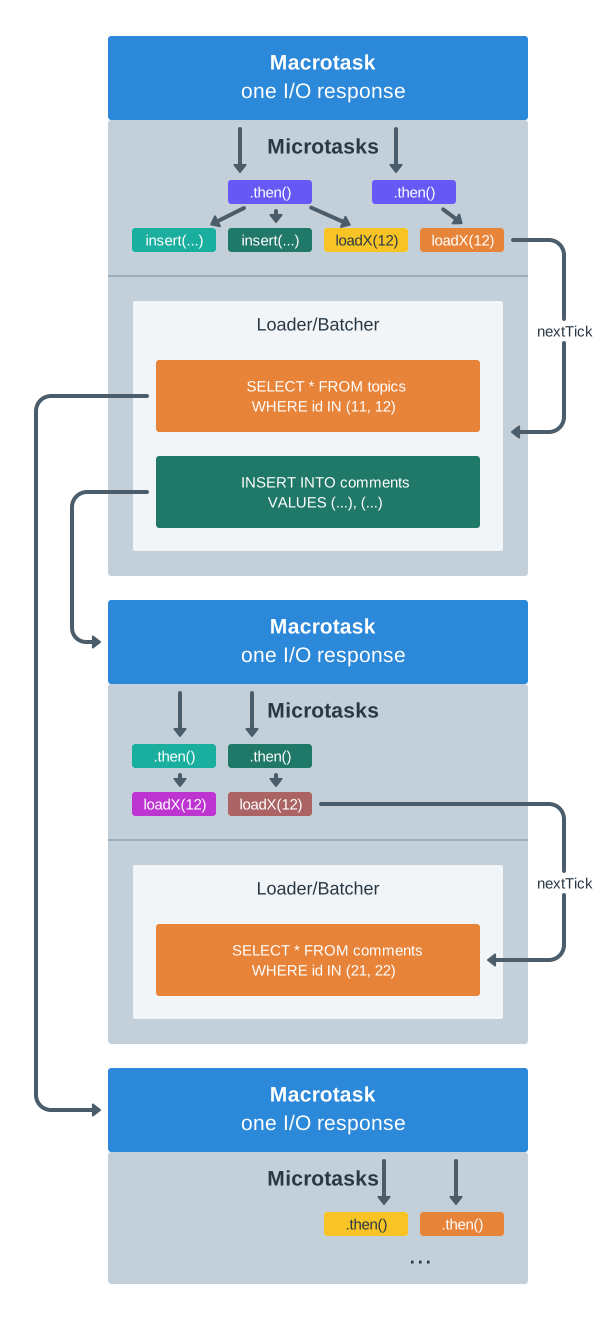
To learn more about batching, "parallel Promises", and how event loop works in Node, check out [loaders-and-custom-batching](https://docs.ent-framework.net/advanced/loaders-and-custom-batching "mention") article.

## Helper Loading Methods

Each Ent is an immutable object, which means that you can't change its fields after loading from the DB. But you can add helper methods to simplify things like loading.

Let's optimize the above example even further by adding `topic()` and `creator()` helper methods into Ent classes directly.

```typescript
class EntComment extends ... {
  async topic() {
    return EntTopic.loadX(this.vc, this.topic_id);
  }

  async creator() {
    return EntUser.loadX(this.vc, this.creator_id);
  }
}

class EntTopic extends ... {
  async creator() {
    return EntUser.loadX(this.vc, this.creator_id);
  }
}

app.get("/comments", async (req, res) => {
  const commentIDs = String(req.query.ids).split(",");
  res.json(
    await mapJoin(commentIDs, async (commentID) => {
      const comment = await EntComment.loadX(req.vc, commentID);
      const topic = await comment.topic();
      const [commentCreator, topicCreator] = await Promise.all([
        comment.creator(),
        topic.creator(),
      ]);
      return { comment, commentCreator, topic, topicCreator };
    })
  );
});
```

{% hint style="info" %}
`mapJoin(arr, fn)` is a simple wrapper which calls `Promise.all(arr.map(fn))`.
{% endhint %}

Now it's responsibility of each Ent to load the related data.

This will, as previously, produce the same exact 3 DB queries:

```sql
SELECT * FROM comments WHERE id IN(...);
SELECT * FROM topics WHERE id IN(...);
SELECT * FROM users WHERE id IN(...);
```

In traditional ORMs, such helper loading methods are added to the classes automatically. Ent Framework doesn't do it and requires you to write a bit of boilerplate. Why? For general purpose use cases, we may need not one, but 2 method for each field, like `creator()` and `creatorNullable()`, which is not elegant. This is because foreign keys do not work reliably enough across microshards, so in some cases, we should always be ready that some Ent is not in the database, even when its field is technically non-nullable. Luckily, in practice, it is not hard at all to add such methods manually, so we don't lose too much here.

## Batching vs. JOINs

In traditional SQL and in many ORMs, people use JOINs to minimize the number of queries they send to the database engine. Despite the JOINs having advantages, they are also problematic:

1. One cannot do JOINs across microshards or machines.
2. JOINs encourage people to write highly coupled code, similar to the 1st example on this page.
3. JOINs generally can't run their subqueries in parallel.

Ent Framework's automatic batching can be treated as an alternative to JOINs. It doesn't have any of the above problems, plus (and more importantly), the calls are batched across the entire async functions call stack, which means that you can split the code into independent abstraction layers easily.

Stop thinking in terms of lists. Start thinking in terms of an individual Ent and its behavior.

{% hint style="info" %}
Of course, in some cases, we still want to run JOINs. Ent Framework exposes low-level API to get access to the underlying DB, so you can craft and run arbitrary queries. It also provides you with a `Loader` abstraction and framework to build your own custom batching strategies. We'll discuss it all in details in the advanced section.
{% endhint %}


# Automatic Batching Examples

In the previous chapter, we talked about Ent Framework calls batching. Let's provide some more examples.

## Batching of load\*() Calls

The following code will produce only one SQL  query:

```typescript
await Promise.all([
  EntTopic.loadX(vc, "123"),
  EntTopic.loadX(vc, "456"),
  EntTopic.loadX(vc, "789"),
]);
```

SQL query produced under the hood:

```sql
SELECT * FROM topics WHERE id IN(...)
```

## Batching of insert\*() Calls

Since `insertReturning()` first inserts the Ent into the database and then loads the inserted data back, the following code will produce 2 SQL queries.

```typescript
await Promise.all([
  EntTopic.insertReturning(vc, { ... }),
  EntTopic.insertReturning(vc, { ... }),
  EntTopic.insertReturning(vc, { ... }),
]);
```

SQL queries produced:

```sql
INSERT INTO topics (...) VALUES ... RETURNING id;
SELECT * FROM topics WHERE id IN(...);
```

Even if `insertReturning()` is called in nested functions, Ent Framework will still batch them properly and produce just 2 queries:

```typescript
async function insertTopicsBatch(n: number) {
  await mapJoin(range(n), async (i) => EntTopic.insertReturning(vc, { ... }));
}
...
await Promise.all([
  insertTopicsBatch(42),
  insertTopicsBatch(101),
]);
```

## Batching of Update, Delete and all Other Calls

All Ent Framework API calls are subject for batching the way --described above.

## De-batching and Deadlocks

As in most of MVCC databases, In PostgreSQL, reads never block writes, and writes never block reads. Still, if two clients update the same row in the database, one client has to wait for another one to finish.

If the order of row updates is different in two clients, there is a change of [deadlocks](https://www.postgresql.org/docs/current/runtime-config-locks.html). E.g. imagine Alice updates row A and then row B in the same transaction, whilst Bob first updates B and then A. In this case, Alice will wait until Bob finishes updating row B, but at the same time, Bob will wait until Alice commits the transaction updating A. Thus, they would wait for each other infinitely, and PostgreSQL will cancel one of the transactions. (Notice that this situation never happens when both Alice and Bob update rows A and B in the same order.)

Deadlocks may occur during the automatic queries batching. It is rare (especially since Ent Framework always orders the updating rows in a consistent way, by e.g. id), but may still happen.

In case of a rare deadlock, when Ent Framework knows that it's safe to retry the write, it performs *de-batching*: splits the batched query into individual queries and runs them in parallel, independently. This solves the problem of deadlocks entirely, in an exchange of very rare slowdown of the mass insert, update or delete operations.


# Ent API: select() by Expression

The previous chapters explained how to load an Ent by its ID: `load*()` API. Loading by ID is the most basic operation, and it is usually the most common one in the code as well. Now, let's talk about some more complicated ways of loading.

TL;DR:

```typescript
const comments = await EntComment.select(
  vc,
  {
    topic_id: "123",
    created_at: { $gte: new Date(Date.now() - 1000 * 3600 * 24) },
  },
  100, // limit
  [{ created_at: "ASC" }] // order by
);
```

## Dry Boring Theory

Below, there will be a bit of theory, fasten your seatbelt.

In graph terms, where each Ent is a **node**, an Ent's field that points to the ID of another Ent represents an **edge**. (Or, in relational databases, people typically use "foreign key" term.) We often refer to it as **field edge**; traversing such edges is typically straightforward: you simply load another Ent by the ID obtained from a field of the current Ent. For example, `EntComment#topic_id` or `EntTopic#creator_id` are field edges.

From a different perspective, traversing a field edge can be seen as "going from a child Ent to a parent Ent" (for example, from `EntComment` to its owning `EntTopic`). In other words, it’s a **child-to-parent traversal**, or a **many-to-one relationship:**

{% @mermaid/diagram content="classDiagram
direction BT
class EntComment\["EntComment<br><small>(child)</small>"]
EntComment : topic\_id
EntComment : creator\_id
class EntTopic\["EntTopic<br><small>(parent)</small>"]
EntTopic : creator\_id
class EntUser\["EntUser<br><small>(grandparent)</small>"]
EntComment --> EntTopic : <small>field<br>edge</small>
EntTopic --> EntUser : <small>field<br>edge</small>
EntComment --> EntUser : <small>field<br>edge</small>" %}

Nothing too new yet, right? Just a regular relational theory so far.

How do we go in the opposite direction, performing a **parent-to-children traversal** in a **one-to-many relationship**?

To accomplish this, Ent Framework provides (surprise!) a `select()` primitive. It allows you to fetch Ents from the database using any arbitrary expression, including those that specify constraints on which parent Ent's ID the selected Ents should have:

```typescript
const comments = await EntComment.select(
  vc,
  { topic_id: "123" }, // "load all children comments of topic 123"
  100, // limit
  [{ created_at: "ASC" }] // order by
);
```

In production databases with millions of Ents, it's assumed that the relevant table has a necessary index to run such queries efficiently; in the above example,

```sql
CREATE INDEX ON comments_topic_id_created_at ON comments(topic_id, created_at);
```

Nothing new again. Or there is something?..

{% @mermaid/diagram content="classDiagram
direction BT
class EntComment1\["EntComment<br><small>(child)</small>"]
EntComment1 : topic\_id
class EntComment2\["EntComment<br><small>(child)</small>"]
EntComment2 : topic\_id
class EntComment3\["EntComment<br><small>(child)</small>"]
EntComment3 : topic\_id
class EntTopic\["EntTopic<br><small>(parent)</small>"]
EntTopic : id
EntComment1 <-- EntTopic : <small>???</small>
EntComment1 --> EntTopic : <small>field<br>edge</small>
EntComment2 <-- EntTopic : <small>???</small>
EntComment2 --> EntTopic : <small>field<br>edge</small>
EntComment3 <-- EntTopic : <small>???</small>
EntComment3 --> EntTopic : <small>field<br>edge</small>" %}

Let's think about those `???` on the diagram. To traverse edges in a graph in both directions, the edges must be bi-directional (or, there should be pairs of edges, which is the same). In the graph with bi-directional edges we discussed earlier, the child-to-parent direction of an edge is represented by an "Ent field edge". But what corresponds to `???`, the opposite **parent-to-children direction** of that edge?

This `???`, dear friends, is the **automatic database index** (or an index prefix, which is `topic_id` in the example). In fact, as we hinted above, without such an index, the queries will just blow up.

This distinction between graph edge directions is crucial to understand: for free traversal of the graph, both **field edges** and **indexes** are absolutely essential.

* By defining a DB foreign key on an Ent, you define a field edge, which represents child-to-parent direction in the graph.
* By defining a DB index, you define the opposite direction of that edge, which is parent-to-children direction.

Modern database engines are pretty good at managing indexes. You can add them without acquiring write locks on the tables (`CREATE INDEX CONCURRENTLY`), and you can also add more field edges (aka fields with foreign keys) on a table with no downtime, to refer some other Ent from an existing one.

## What About Microsharding and Horizontal Scaling?

The point of view described above works straightforwardly when your database is monolithic. Scaling your app introduces more complexity though due to the involvement of microshards in the traversal process.

Luckily, we can still rely on the parent-to-children indices mainly. And this is where the theory pays off.

When loading children of a parent Ent, the children might be distributed across multiple microshards. A naive way would thus be to just query all microshards using the exact same query (Ent IDs are globally unique) and then merge the results, but of course it would blow up the DB nodes.

Therefore, before Ent Framework executes the actual SELECT queries in parallel on multiple nodes to merge their results later, it first determines the **minimal set of microshards** that needs to be queried; in the vast majority of cases, this is just **one microshard**. Those mechanisms are known as [Inverses](https://docs.ent-framework.net/scalability/inverses-cross-shard-foreign-keys) and [Ent Colocation](https://docs.ent-framework.net/scalability/shard-affinity-ent-colocation) correspondingly, and we’ll explore them in detail later, in advanced sections.

For now, all you need to know is that there is a magical subsystem in Ent Framework called Inverses which, given a parent ID (e.g. EntTopic ID), returns the list of microshards where the children Ents (e.g. EntComment) may **or may not** reside. This "may not" is important: cross-shard writes are not transactional, so sometimes (rarely), slightly more candidate microshards may be returned, but **never less**. In reality it produces no problems for business logic: the "excess" microshards, when queried, will just return 0 children Ents.

## Ent.select(vc, { ... }, limit, order): Ent\[]

The `select()` API uses a simple query language.

If a plain object is passed, it combines all the specified field constraints using an AND operation:

```typescript
const comments = await EntComment.select(
  vc,
  {
    topic_id: ["123", "456"],
    created_at: { $gte: new Date(Date.now() - 1000 * 3600 * 24) },
  },
  100, // limit
  [{ created_at: "ASC" }] // order by
);
```

The full list of operations include:

* equality and "one of array element" implicit operators (see examples above)
* logical: `$or`, `$and`, `$not`
* binary: `$lte`, `$lt`, `$gte`, `$gt`
* `$overlap` (useful for array fields, typically backed by a PostgreSQL GIN index)
* `$isDistinctFrom` (for NULL-safe comparisons)
* `$literal` (to run a custom SQL sub-expression)

These operations can be nested in any way, but it's important to ensure that the actual SQL engine uses an appropriate database index for efficiency.

If your project uses microsharding, one of the top-level fields in the `select()` expression must match a parent ID or an array of parent IDs to help Ent Framework identify the relevant microshards. Notice that we used `topic_id` for this purpose in the example above. There’s no magic here: sometimes, it has to determine, which microshards are involved. Alternatively, you can use the special `$shardOfID` operator to explicitly provide this hint in the query.

For illustrative purposes, below is a giant `select()` expression from one of Ent Framework's unit tests. It is generally obvious, how the operations work (as opposed to e.g. Elasticsearch query language BTW):

```typescript
const ents = await EntSome.select(
  vc,
  {
    name: ["aa", "bb"], // matches one of
    some_flag: true,
    $or: [
      { name: "aa" },
      { name: "bb" },
      { url_name: [] }, // will never match
      { url_name: [null, "zzz"] }, // null-safe
    ],
    $and: [
      { name: ["aa", "bb"] },
      { name: { $ne: "kk" } },
      { name: { $isDistinctFrom: "dd" } },
      { url_name: { $isDistinctFrom: null } }, // null-safe !=
      { url_name: { $ne: ["kk", null] } }, // null-safe too
      { url_name: { $ne: [] } }, // will always match
      { $literal: ["? > '2'", "5"] },
      { name: { $lte: "y", $gte: "a" } },
      { $overlap: [id1, id2, id3] } // most likely you want a GIN index here!
    ],
    $not: {
      name: "yy",
      $literal: ["length(name) < ?", 5], // custom SQL expression
    },
    // Optional; it's for the cases when you don't really have a field edge,
    // so Ent Framework can't infer microshards from the query.
    $shardOfID: "12345",
  },
  100,
  [{ name: "ASC" }, { url_name: "DESC" }, { $literal: ["1=?", 2] }]
);
```

For more details, see TypeScript `Where<...>` definition in [types.ts](https://github.com/clickup/ent-framework/blob/main/src/types.ts).

## Batching of select() Calls

As everything in Ent Framework, when multiple `select()` calls run in parallel, they are batched into one giant SQL `UNION ALL` query.

The following code will produce only one SQL query:

```typescript
await Promise.all([
  EntComment.select(vc, { topic_id: "42" }, 10),
  EntComment.select(vc, { creator_id: "101" }, 20),
]);
```

SQL query produced under the hood (with some simplifications):

```sql
SELECT * FROM topics WHERE topic_id='42'
UNION ALL
SELECT * FROM topics WHERE creator_id='101'
```

Sometimes, `select()` calls are meant to be relatively slow, and we don't want to batch them; instead, we prefer to run them in parallel, in different DB connections. To do so, you can just inject an "event loop spin" barrier:

```typescript
// Never produces a UNION ALL SQL query.
await Promise.all([
  EntComment.select(vc, { topic_id: "42" }, 10),
  new Promise(setImmediate).then(
    async () => EntComment.select(vc, { creator_id: "101" }, 20),
  ),
]);
```

## JOIN, WITH, FROM and Subqueries, Planner Hints

In addition to database-independent features, `select()` call also supports engine-specific customizations using its last optional argument:

```typescript
const comments = await EntComment.select(
  vc,
  { creator_id: "101" },
  20, // limit
  undefined, // order
  { joins, ctes, from, hints }, // untyped, but of type SelectInputCustom
);
```

Read more in:

* [postgresql-specific-features](https://docs.ent-framework.net/advanced/postgresql-specific-features "mention")
* [query-planner-hints](https://docs.ent-framework.net/advanced/query-planner-hints "mention")


# Ent API: loadBy\*() Unique Key

Each Ent usually has an `id` field, serving as its primary key. This enables other Ents to reference it and allows for the use of the highly optimized `loadX(vc, id)` method to load by ID.

Some Ents may also have a **secondary unique key**. This could be a single text field or a combination of multiple fields. For example, `EntUser` might have an `email` field that must be unique across all `EntUser` rows in the database:

To use a unique key, define it in the Ent's schema and ensure that the corresponding unique index exists in the database:

```typescript
const schema = new PgSchema(
  "users",
  {
    id: { type: ID, autoInsert: "nextval('users_id_seq')" },
    email: { type: String },
  },
  ["email"]
);
```

Once set up, you can use the following methods to load by a unique key.

## **Ent.loadByX(vc, { email: "..." }): Ent**

Loads an Ent by its unique key defined in the schema.

If no matching row is found in the table, throws an `EntNotFound` error.

## **Ent.loadByNullable(vc, { email: "..." }): Ent | null**

**W**orks the same way as the above method, but returns `null` if no matching Ent is found.

## Batching and by-Prefix Grouping

As always, if multiple `loadBy*()` calls occur in parallel, Ent Framework batches them into a single SQL query to save on the connections utilization, latency and index usage.

If the unique key consists of a single field (e.g., `email`), the batched query for:

```typescript
const [user1, user2] = await Promise.all([
  EntUser.loadByX(vc, { email: "test1@example.com" }),
  EntUser.loadByX(vc, { email: "test2@example.com" }),
]);
```

looks like this:

```sql
SELECT * FROM table WHERE email IN('test1@example.com', 'test2@example.com');
```

For a composite unique key (e.g., `creator_id` and `slug`), the batched query for:

```typescript
const topics = await Promise.all([
  EntTopic.loadByX(vc, { creator_id: "123", slug: "abc" }),
  EntTopic.loadByX(vc, { creator_id: "123", slug: "def" }),
  EntTopic.loadByX(vc, { creator_id: "456", slug: "ghi" }),
  EntTopic.loadByX(vc, { creator_id: "456", slug: "jkl" }),
]);
```

is more complex:

```sql
SELECT * FROM table WHERE
  (creator_id='123' AND slug IN('abc', 'def')) OR
  (creator_id='456' AND slug IN('ghi', 'jkl'));
```

In other words, the engine groups the requests by the **prefix of the unique key, excluding the last field**, and then uses an `IN` clause for the values of the last field. This strategy allows the database to utilize its B-tree unique indexes efficiently. Just make sure that the column order in the database index matches the field order in the unique key in Ent's schema, and that columns with the lowest cardinality appear first in the unique index prefix.


# Ent API: update\*()

Previously, we looked at Ent Framework APIs which were "per Ent class", represented as Ent static methods.

In contrast, `update*()` calls are Ent instance methods. It means that, to update an Ent, you first need to load that Ent in memory. This achieves 2 goals:

1. It brings some extra privacy protection, since to load an Ent, the VC needs to have permissions to do so.
2. It enables you to build sophisticated "mutation" privacy checks, since Ent Framework has access to both the old (before update) and the new (after update) Ent fields.

There is one caveat though: Ent instances are immutable, so `update*()` methods do not change their fields in memory. Instead, they act similarly to "GraphQL mutations" by modifying the data in the database, and then, if you request so, loading the updated rows back and returning them to you.

This is why all `update*()` methods have vernose suffixes in their names.

## **ent.updateOriginal({ field: "...", ... }): boolean**

Updates the row in the database corresponding to `ent.id` ID. Does not modify any fields of `ent` instance, since it's immutable.&#x20;

Runs all the needed privacy checks and Ent Framework triggers (we'll discuss both topics later in advanced chapters). In case there are no `privacyUpdate` rules defined in the Ent class configuration, delegates privacy checking to `privacyInsert` rules.

Returns true if the row existed in the database at the moment of the update and false otherwise.

As always, when multiple `update*()` calls run in parallel, Ent Framework batches them into a single SQL query:

```typescript
const [updated1, updated2] = await Promise.all([
  topic1.updateOriginal({ subject: "some" }),
  topic2.updateOriginal({ subject: "text" }),
]);
```

**This results into the following batched query sent to the database (the actual query is even more complicated actually, but you can see the general idea below):**

```sql
WITH rows(id, subject) AS (VALUES(
  ('123', 'some'),
  ('456', 'text'))
  UPDATE topics SET subject=rows.subject
  FROM rows WHERE topic.id=rows.id
  RETURNING rows.id
```

{% hint style="info" %}
All `update*()` functions also support a special `$cas` property; read more about it in [atomic-updates-and-cas](https://docs.ent-framework.net/advanced/atomic-updates-and-cas "mention") advanced article.
{% endhint %}

## **ent.updateReturningX({ field: "...", ... }): Ent**

Updates the row in the database,  then **loads the Ent back** using `loadX()` and returns it to you. In case there was no such row in the database, throws `EntNotFound` error (this is what "X" stands for, "eXception").

Since this methods runs 2 database queries under the hood, any side effects applied by e.g. native PostgreSQL triggers will refect in the loaded Ent.

As of batching, it also results into running  just 2 SQL queries, no matter how many Ents are updated in parallel. The first query is the batched `updateOriginal()`, and the second one is the batched `loadX() for the resulting Ents`:

```sql
WITH rows(id, subject) AS (VALUES(
  ('123', 'some'),
  ('456', 'text'))
  UPDATE topics SET subject=rows.subject
  FROM rows WHERE topic.id=rows.id
  RETURNING rows.id;

SELECT * FROM topics WHERE id IN('123', '456');
```

## **ent.updateReturningNullable({ field: "...", ... }): Ent | null**

Similarly to `updateReturningX()`, updates the row in the database and loads the updated Ent back, but doesn't throw in case you are trying to update a row which doesn't exist at the moment.

## **ent.updateChanged({ field1: "...", field2: "...", ... }): string\[] | null | false**

Same as `updateOriginal()`, but updates only the fields which are different in the method's input and in the current Ent instance in memory.

* If there is no such row in the database, returns false, the same way as `updateOriginal()` does.
* If no changed fields were detected, returns null as an indication (it's still falsy, but is different from the parent `updateOriginal()'s` false).&#x20;
* Otherwise, when an update happened, returns the list of fields which were different and triggered that change (a truthy value).

## **ent.updateChangedReturningX({ field: "...", ... }): Ent**

This is probably the longest method name in Ent API. Acts similarly to `updateChanged()`, but returns the modified Ent back (or the original Ent if no fields were actully changed).

## Using $literal Instead of Fields

In addition to updating particular fields by their names, you can also pass an arbitrary SQL piece containing one more comma separated `field = value` expressions:

```typescript
await topic.updateOriginal(vc, {
  subject: "some",
  $literal: [
    "tags = ARRAY(SELECT DISTINCT unnest FROM unnest(array_append(tags, ?)))",
    "my-tag",
  ]
});
```

In the final SQL query generated, what you pass in `$literal` will appear as it is:

```sql
UPDATE topics
SET
  subject = 'some',
  tags = ARRAY(SELECT DISTINCT unnest FROM unnest(array_append(tags, 'my-tag')))
WHERE id = 1004200047373526525
```

There are several downsides of this approach though:

1. Calls of this kind can't be batched, so if you run multiple of them in parallel, Ent Framework will send independent queries.
2. The syntax is engine-specific; e.g. the above example works for PostgreSQL only.


# Ent API: deleteOriginal()

Similar to `update*()` calls, `deleteOriginal()` is a method of Ent instance.

## ent.deleteOriginal(): boolean

Deletes a row in the database whose ID equals to `ent.id`. Returns true if the object was found.&#x20;

Before deleting the row, `deleteOriginal()` runs all privacy checks defined in the Ent class configuration, making sure `ent.vc` has permissions to delete the Ent. In case there are no privacy checks defined for deletion (no `privacyDelete`), uses `privacyUpdate` rules for the verification, and if it's also undefined, delegates to `privacyInsert`.

Since all Ent instances are immutable, the call keeps the current Ent instance unchanged. This is why it's called `deleteOriginal()` and not just `delete()` — because it's basically a mutation of the source.

And yes, to delete an Ent, you first need to load it (using e.g. `loadX()`, `select()` or any other call). Also, there is intentionally no way to delete Ents in bulk: you can only delete a single Ent (concurrent deletion calls are batched into one SQL query as usual though, so it's efficient).


# Ent API: count() by Expression

Count API is similar to `select()`, but instead of loading the matching Ents, it counts them.

## **Ent.count(vc, { field: "...", ... }): number**

Returns the number of Ents matching the `where` condition. Works across multiple microshards.

As usual, if multiple `count()` calls for the same Ent are run in parallel, they are internally batched into a single SQL query:

```typescript
const [count1, count2] = await Promise.all([
  EntTopic.count(vc, { creator_id: "123" }),
  EntTopic.count(vc, { updated_at: { $gt: new Date("2024-01-01") } }),
]);
```

This sends the following SQL query to the underlying database:

```sql
SELECT count(1) FROM topics WHERE creator_id='123'
  UNION ALL
SELECT count(1) FROM topics WHERE created_at>'...'
```

As opposed to `select()`, `load*()` and `loadBy*()` calls, `count()` is privacy-unaware: it does not run privacy checks. This is partially a technical limitation (to recheck privacy, one needs to load the actual rows from the database, and count() doesn’t do it). But also, it’s an intended behavior: with `count()`, it’s convenient to build custom privacy checks and avoid "chicken and egg" problem (to build a privacy check, you eventually need to run a privacy-unaware calls at the very bottom of the stack).


# Ent API: exists() by Expression

This is another privacy-unaware API call, similar to `count()`.

## **Ent.exists(vc, { field: "...", ... })**: boolean

Returns true if there isat least one Ent in the database matching the `where` condition. Works across multiple microshards too.

In terms of the logic, `exists()` call is similar to `count() > 0` check, with two performance optimizations:

1. It uses `EXISTS` SQL clause, which doesn’t read more tuples from the database than needed (as opposed to `count()` aggregate).
2. During the run, it severely reduces the weight (basically, the probability) of seqscan to happen (with `SET enable_seqscan=off` directive merged with the query). I.e. it implies that you must have a good index covering the `where` condition.

As all API calls in Ent Framework, multiple parallel `exists()` calls are batched into a single SQL query:

```typescript
const [exists1, exists2] = await Promise.all([
  EntTopic.exists(vc, { creator_id: "123" }),
  EntTopic.exists(vc, { updated_at: { $gt: new Date("2024-01-01") } }),
]);
```

This sends the following SQL query to the underlying database:

```sql
SET enable_seqscan=off;
SELECT EXISTS (SELECT true FROM topics WHERE creator_id='123')
  UNION ALL
SELECT EXISTS (SELECT true FROM topics WHERE created_at>'...')
```

The `exists()` call is even more useful to build custom privacy checks than `count()`, because it’s faster and almost guarantees using an index.


# Ent API: selectBy() Unique Key Prefix

Similar to how `loadBy()` loads a single Ent by its unique key, `selectBy()` call loads *multiple* ents by their **unique key prefix**.

## Ent.selectBy(vc, { field: "...", ... }): Ent\[]

Loads the Ents matching the predicate, considering the predicate is a list of fields from your unique key prefix.

Logically, you can load the same Ents by just `select()` call, but then, while batching, it will produce a `UNION ALL` clause, which is less efficient and may cause performance problems when a large number of calls are batched. In contrast, `selectBy()` never produces a `UNION ALL` clause, but the price we pay for it is the implication that we can only select by the unique key *prefix*, not by an arbitrary predicate.

All in all, you’ll rarely need to use `selectBy()` in your code. It is used interally though to fetch [Inverses](https://docs.ent-framework.net/architecture/ent-framework-metas-tao-entgo#no-explicit-assocs) efficiently.&#x20;

Let’s actually use Inverses to illustrate, how `selectBy()` works. Internally, the Inverses Ent schema looks like this:

```typescript
const schema = new PgSchema(
  name,
  {
    id: { type: ID },
    created_at: { type: Date, autoInsert: "now()" },
    type: { type: String },
    id1: { type: ID },
    shard2: { type: Number },
  },
  ["type", "id1", "shard2"],
)
```

## Simple Batching

Sometimes, when Ent Framework needs to discover the full list of microshards on the opposite end of some field edge, it internally runs the following calls in parallel:

<pre class="language-typescript"><code class="lang-typescript">await Promise.all([
  EntInverse.selectBy(vc, { type: "user2topics", id1: "123" }),
  EntInverse.selectBy(vc, { type: "user2topics", id1: "456" }),
<strong>]);
</strong></code></pre>

Notice that in this example, all parallel calls use the same prefix (`type: "user2topics"`), but the very last selection field varies. For such a case (which is actually pretty common), to produce the most optimal PostgreSQL execution plan, Ent Framework builds the following batched SQL query:

```sql
SELECT * FROM inverses
WHERE type='user2topics' AND id1 IN('123', '456')
```

## Complex Batching

Unfortunately, the above query stops being optimal when the prefix differs across multiple parallel calls. Consider this example:

<pre class="language-typescript"><code class="lang-typescript">await Promise.all([
  EntInverse.selectBy(vc, { type: "user2topics", id1: "123" }),
  EntInverse.selectBy(vc, { type: "user2topics", id1: "456" }),
  EntInverse.selectBy(vc, { type: "topic2comments", id1: "789" }),
<strong>]);  
</strong></code></pre>

Assume we try to build the batched query using the same approach as above:

```sql
-- DON'T DO IT!
SELECT * FROM inverses WHERE
  (type='user2topics' AND id1 IN('123', '456')) OR
  (type='topic2comments' AND id1 IN('789'))
```

In this case, PostgreSQL will often times produce a suboptimal plan with "bitmap index scan" instead of "index scan". This is partially due to the fact that our DB unique index is by `(type, id1, shard2)`, and we only utilize its prefix `(type, id1)`.

Luckily, there is another query plan which is used by Ent Framework in such a case:

```sql
-- Good plan!
SELECT * FROM inverses WHERE (type, id1) IN(VALUES(
  ('user2topics', '123'),
  ('user2topics', '456'),
  ('topic2comments', '789')
))
```

It produces an optimal query plan for the cases when prefixes differ. (BTW, it loses in the situations when the prefix is common, for which `AND id1 IN(...)` clause plays better.)


# Ent API: upsert\*()

The `upsert*()`  call is a mix of INSERT and UPDATE operation, based on an Ent unique key.

## Ent.upsert(vc, { field: "...", ... }): string

This call tries to update an existing row in the database (i.e. a row with the same unique key **defined in Ent schema**). In case there is no such row yet, it inserts the new one.

Returns ID of the updated (or inserted) row.

You can rely on the behavior of `autoInsert`  and `autoUpdate`  fields: they work the same way as in regular `insert*()` and `update*()` calls.

Upsert can't work if some triggers are defined for the Ent, because we don't know Ent ID in advance (whether the upsert succeeds or skips on duplication).

Also, `upsert()` will refuse to run if there are Inverses defined on some Ent fields (same reason: Inverses operations run in a different microshard strictly before the main Ent operation, and they must know the row's ID in advance).

## Ent.upsertReturning(vc, { ... }): Ent

This call is very similar to `upsert()`, but in the end, it loads the updated (or inserted) Ent back from the datbase using `loadX()`.

Since `upsert()` is meant to always succeed (except when there is a transport error, or when some database constraint check unrelated to the main Ent's unique key fails), there are no "X" and "Nullable" variations of this method.

## Batching

Multiple `upsert*()` calls running in parallel are batched by Ent Framework:

```typescript
await Promise.all([
  EntTopic.upsert(vc, { 
    slug: "s1",
    creator_id: "123",
    subject: "test1",
  }),
  EntTopic.upsert(vc, {
    slug: "s2",
    creator_id: "456",
    subject: "test2",
  }),
]);
```

The batched query will look like this:

```sql
WITH rows(...) AS (VALUES
  ('s1', '123', 'test1'),
  ('s2', '456', 'test2')),
  updates AS (
    UPDATE topics SET ...
    FROM rows WHERE topics.slug=rows.slug
    RETURNING rows._key, topics.id AS id),
  inserts AS (
    INSERT INTO topics (id, ...)
    SELECT id_gen(), ...
    FROM rows WHERE _key NOT IN (SELECT _key FROM updates)
    ON CONFLICT (slug) DO UPDATE SET ...
    RETURNING NULL AS _key, id)
  SELECT _key, id FROM updates UNION ALL SELECT _key, id FROM inserts
```

It is complicated! In fact, the query runs UPDATE-INSERT-UPDATE sequence, to ensure that it doesn't  call `id_gen()`  in case the row already exists in the database (to not exhaust the sequence).


# Privacy Rules

A crucial reason on why Ent Framework exists at all is its privacy layer. No data exits the API unless it's rechecked against a set of explicitly defined security predicates. In other words, when you have multiple users in your service, you can enforce the strict guarantees that one user can't see other user's data even in theory.

In relational databases world, the concept of per-row security rechecking is called "row-level security".&#x20;

## PostgreSQL Built-in Row Level Security?

Before we continue, we must mention that some support for row-level security is [built in to PostgreSQL](https://www.postgresql.org/docs/current/ddl-rowsecurity.html), but it has several drawbacks that makes it almost useless in web development:

1. It is expensive and, at the same time, too "sloppy" and low-level (the amount of DDL code you need to write is large, and there is no framework in place to help you with it).
2. There is no support for "per-transaction variables" in PostgreSQL (no per-session variables as well), so if you want to pass an "acting user ID" (similar to Ent Framework VC's Principal), other than the database DDL user/role, into the query, then you can't.
3. PostgreSQL doesnt't support microsharding, so you basically can't recheck security against the data living in a different microshard.

## How Ent Framework Privacy Rules Work

In each Ent class, you need to define an explicit set of rules and determine, can a VC read that Ent (`privacyLoad`), create a new Ent (`privacyInsert`), update the Ent (`privacyUpdate`) and delete the Ent (`privacyDelete`):

```typescript
const schema = new PgSchema(
  "comments",
  {
    id: { type: ID, autoInsert: "nextval('comments_id_seq')" },
    created_at: { type: Date, autoInsert: "now()" },
    topic_id: { type: ID },
    creator_id: { type: ID },
    message: { type: String },
  },
  []
);

export class EntComment extends BaseEnt(cluster, schema) {
  static override configure() {
    return new this.Configuration({
      shardAffinity: ["topic_id"],
      privacyInferPrincipal: async (_vc, row) => row.creator_id,
      privacyLoad: [
        new AllowIf(new OutgoingEdgePointsToVC("creator_id")),
        new AllowIf(new CanReadOutgoingEdge("topic_id", EntTopic)),
      ],
      privacyInsert: [
        new Require(new OutgoingEdgePointsToVC("creator_id")),
        new Require(new CanReadOutgoingEdge("topic_id", EntTopic))
      ],
      // privacyUpdate and privacyDelete derive from privacyInsert
      // if they are not explicitly specified.
    });
  }
}
```

### privacyLoad Rules and Graph Reachability

When you run e.g. `EntComment.loadX(vc, "123")` or any other API call, like `loadBy*()` or `select()`, Ent Framework runs `privacyLoad` rules for each Ent.

Typically, a **Rule** class used in `privacyLoad` is `AllowIf`: it allows reading the Ent immediately as soon as the passed **Predicate**  succeeds. There are several pre-defined Predicate classes, and you can also create your own predicates, or just pass an async boolean function; we'll discuss it a bit later.

So, the logic in the example is following:

1. `new OutgoingEdgePointsToVC("creator_id")`: if `comment.creator_id` equals to `vc.principal`, then the read is immediately allowed. It means that you (`vc`) are trying to read a commend which you created (its `creator_id` is your user ID).
2. `new CanReadOutgoingEdge("topic_id", EntTopic)`:  if `vc.principal` is able to run `EntTopic.loadX(vc, comment.topic_id)` successfully, then reading of the comment is immediately allowed. This is an extremely powerful construction, the essence of Ent Framework's privacy layer: you can **delegate** privacy checks to other Ents in the graph. And since the engine does batching and caching aggressively, this all will be performance efficient.

Idiomatically, `privacyLoad` defines access permissions in terms of **graph edges reachability**: typically, if there is **at least one** path in the graph originating from the VC and ending at the target Ent, then this VC is allowed to read the Ent.

### privacyLoad is a Safety Net, not a Filter

As opposed to [Meta's Ent Framework](https://docs.ent-framework.net/architecture/ent-framework-metas-tao-entgo), privacy rules *do not post-filter* the loaded Ents. They only recheck and throw.

I.e. if you run a `select()` call, it will either return you all of the loaded Ents (if they all pass privacy checks) or throw a detailed error (if some of them don't). This applies to all other API calls as well.

There are several reasons for such behavior:

1. **Performance.** Ent Framework sits close to the underlying relational database. If you run a call that returns multiple Ents (e.g. `select()`), you most likely want to make sure that the query matches an existing database index. So you *have to* encode the filtering logic in your `where` condition directly, not just "bulk-load everything and then post-filter". It also applies to other aspects of fetching like pagination, `limit` clause etc.
2. **Debugging simplicity.** In Meta (where privacy rules actually *did* filter), it was a severe pain to figure out, why some query returns you an empty (or incomplete) response. This is because privacy rules were implicitly filtering "invisible" Ents, and once the Ents are hidden, you don't even know whether they are filtered out or do not exist.

Let's consider a common example: an Ent class with `is_archived` boolean field. You obviously want the archived Ents to fail the privacy checks of a regular VC. In Ent Framework, it is not enough: you also have to modify your `select()` calls to explicitly mention `is_archived: false`, otherwise your queries will start throwing `EntNotReadableError` when trying to load an archived Ent. Add a static helper method to your Ent class if you don't want to repear `is_archived` over and over again. (BTW, to still enable archived Ents reading, you may create a `VCReadArchive` [flavor](https://docs.ent-framework.net/advanced/vc-flavors).)

### privacyLoad and load\*() Calls

The way privacy rules interact with [load\*()](https://docs.ent-framework.net/getting-started/ent-api-load-by-id) and [loadBy\*()](https://docs.ent-framework.net/getting-started/ent-api-loadby-unique-key) API calls is following:

* `loadX()` and `loadByX()`: they obviously throw `EntNotReadable` error (derived from `EntAccessError` base class) if the privacy checks fails.
* `loadNullable()`  and `loadByNullable()`: they will also throw `EntNotReadableError`, not just return null! This greatly helps with debugging of privacy rules violations.
* `loadIfReadableNullable()`: this is what you want to use in an unlikely case when you *really* need to treat an unavailable Ent as absent. The method name is long intentionally: the best practice is to not use it too often.

### privacyInsert and Referential Permissions

As opposed to `privacyLoad`, where a single succeeded rule allows the read, for `privacyInsert` (as well as `privacyUpdate` and `privacyDelete`), **all of them** must pass typically.

This is because the ability to insert an Ent means that the VC has permissions to reference other Ents in **all** field edges. In reality, for every field edge (foreign key) defined in the Ent, there should be at least one associated **Require** privacy rule.

Having permissions to insert an Ent is almost always the same as having permissions to reference other Ents in its foreign key fields. If we forget to check some of the field edges, then it is possible that the user will be able to create an Ent "belonging" to someone else (by e.g. referencing someone else's ID).

The logic in the example above:

1. `new Require(new OutgoingEdgePointsToVC("creator_id"))`: it is **required** that the value of `comment.creator_id` is equal to `vc.principal`. I.e. you can only reference yourself as a creator of the just inserted comment.
2. `new Require(new CanReadOutgoingEdge("topic_id", EntTopic))`: it is **required** that, to create a comment on some topic, you must have at least read access to that topic. I.e. you can create comments on someone else's topics too, as soon as you can read those topics.

Notice that here we again use delegation: instead of introducing complicated boilerplate in comments privacy rules, we say: "I fully trust the way how privacy is implemented at EntTopic, and I don't want to know details about it at EntComment level". Basically, you build a **chain of trust**.

### privacyUpdate and privacyDelete

`privacyUpdate/Delete` rules are similar to `privacyInsert`, but they are checked by `update*()` and `delete*()` calls correspondingly.

If there is no `privacyUpdate` block defined, then the rules are inherited from `privacyInsert` array.

If there is no `privacyDelete` block mentioned in the configuration, then Ent Framework uses `privacyUpdate` rules for it. (And if there are no `privacyUpdate` rules, then `privacyInsert`).

## Rule Classes

Item in `privacyLoad/Insert/Update/Delete` arrays are called a **Rules**. There are several built-in rules:

* `new AllowIf(predicate)`:  if `predicate` resolves to true and doesn't throw, allows the access immediately, without checking the next rules. Commonly, `AllowIf` is used in `privacyLoad` rules. It checks that there is **at least one** path in the graph originating at the user denoted by the VC and ending at the target Ent. Also, you may use `AllowIf` in the prefix of `privacyInsert/Update/Delete` rules to e.g. allow an admin VC access the Ent early, without checking all other rules.
* `new Require(predicate)`: if `predicate`resolves to true and doesn't throw, tells Ent Framework to go to the next rule in the array to continue. If that was the last `Require` rule in the array, allows access. This rule is commonly used in `privacyInsert/Update/Delete` blocks, where the goal is to insure that **all** rules succeed.
* `new DenyIf(predicate)`: if `predicate` returns true **or throws an error**, then the access is immediately rejected. This rule is rarely useful, but you can try to utilize it for ealy denial of access in any of the privacy arrays.

## Predicates

**Predicate** is like a function which accepts an acting VC and a database row. It returns true/false or throws an error.

### Custom Functional Predicates

The simplest way to define a predicate is exactly that, pass it as an async function:

```typescript
privacyLoad: [
  new AllowIf(new OutgoingEdgePointsToVC("id")),
  new AllowIf(async function CommentIsInPublicTopic(vc, row) {
    const topic = await EntTopic.loadX(vc, row.topic_id);
    return topic.published_at !== null;
  }),
]
```

Notice that we gave this function an inline name, `CommentIsInPublicTopic`. If the predicate returns false or throws an error, that name will be used as a part of the error message. Of course we could just use an anonymous lambda (like `async (vc) => {}`), but if we did so and the predicate returned false, then the error won't be much descriptive.

Here, `row` is strongly-typed: you can use Ent data fields. It is not an Ent instance though, which is currently a TypeScript limitation: you can't self-reference a class in its mixin.

### Custom Class Predicates

You can also define preticates as classes, to make them more friendly for debugging. In fact, Ent Framework's built-in predicates are implemented as classes.

As an example, let's see how a built-in predicate `CanReadOutgoingEdge` works:

```typescript
export class CanReadOutgoingEdge<TField extends string>
  implements Predicate<Record<TField, string | null>>
{
  readonly name;

  constructor(
    public readonly field: TField,
    public readonly toEntClass: EntClass,
  ) {
    this.name = `${this.constructor.name}(${this.field})`;
  }

  async check(vc: VC, row: Record<TField, string | null>): Promise<boolean> {
    const toID = row[this.field];
    if (!toID) {
      return false;
    }
    const cache = vc.cache(IDsCacheReadable);
    if (cache.has(toID)) {
      return true;
    }
    await this.toEntClass.loadX(vc, toID);
    // sill here and not thrown? save to the cache
    cache.add(toID);
    return true;
  }
}
```

Each predicate class must be defined with `implements Predicate` which requires the method `check(vc, row)` to be implemented, as well as the `name` property to exist.

In the class constructor, you accept any predicate configuration parameters and build a more descriptive `name` for the predicate instance than just the predicate name.

And in `check()` method, you implement your predicate's logic, the same way as you would do it in a functional predicate.

### Built-in Predicates

For convenience, Ent Framework already includes some of the most useful predicates. This set is constantly growing, so check [src/ent/predicates](https://github.com/clickup/ent-framework/tree/main/src/ent/predicates) for the most up-to-date list.

#### **new** [**True**](https://github.com/clickup/ent-framework/blob/main/src/ent/predicates/True.ts)**()**

This is the simplest possible predicate, since it always returns true. It is useful when you want to create an Ent class which can be read by anyone.

#### **new** [**OutgoingEdgePointsToVC**](https://github.com/clickup/ent-framework/blob/main/src/ent/predicates/OutgoingEdgePointsToVC.ts)**(field)**

Checks that `ent[field]` is equal to `vc.principal`. This is useful for fields like `created_by` or `user_id` or some similar cases, when you want to make sure that the VC's acting user is mentioned in the Ent field to make this field readable (or writable).

#### **new** [**CanReadOutgoingEdge**](https://github.com/clickup/ent-framework/blob/main/src/ent/predicates/CanReadOutgoingEdge.ts)**(field, ToEntClass)**

Delegates the  privacy check to another Ent Class (`ToEntClass`) considering that `toEnt.id` is equal to `ent[field]` . Sounds complicated, but in proactice it means the the VC has permissions to read another Ent that is parent to the current Ent, and is pointed by `field` . A good example is a predicate on EntComment: `privacyLoad: [new CanReadOutgoindEdge("topic_id", EntTopic)]` means that, to read this comment, the VC must be able to read its parent topic.

#### **new** [**CanUpdateOutgoingEdge**](https://github.com/clickup/ent-framework/blob/main/src/ent/predicates/CanUpdateOutgoingEdge.ts)**(field, ToEntClass)**

Similar to `CanReadOutgoingEdge` above, but delegates the check to the parent Ent's `privacyUpdate` rules.

#### **new** [**CanDeleteOutgoingEdge**](https://github.com/clickup/ent-framework/blob/main/src/ent/predicates/CanDeleteOutgoingEdge.ts)**(field, ToEntClass)**

Same as `CanUpdateOutgoingEdge`, but for `privacyDelete` delegation to the parent Ent.

#### **new** [**IncomingEdgeFromVCExists**](https://github.com/clickup/ent-framework/blob/main/src/ent/predicates/IncomingEdgeFromVCExists.ts)**(EntEdge, entEdgeVCField, entEdgeFKField, entEdgeFilter?)**

Checks that there is a **child** Ent in the graph (`EntEdge`) that points to both  `vc.principal` and to our current Ent. In other words, checks that there is a direct junction Ent sitting in between the VC and our current Ent. Optionally, you can provide an `entEdgeFilter` callback which is fed with that junction Ent (of `EntEdge` class) and should return true or false for filtering purposes.

Imagine you have `EntUser` and `EntOrganization` Ents, and also `EntEmployment` junction Ent with `(organization_id, user_id)` field edges (foreign keys). You want to check that some `EntOrganization` is readable by a VC:

```typescript
const employmentsSchema = new PgSchema(
  "employments",
  {
    id: { type: ID, autoInsert: "nextval('employments_id_seq')" },
    organization_id: { type: ID },
    user_id: { type: ID },
  },
  ["organization_id", "user_id"],
);

export class EntEmployment extends BaseEnt(cluster, employmentsSchema) {
  ...
}

...

export class EntOrgainzation extends BaseEnt(cluster, organizationsSchema) {
  static override configure() {
    return new this.Configuration({
      privacyLoad: [
        new AllowIf(
          new IncomingEdgeFromVCExists(
            EntEmployment,     // junction Ent
            "user_id",         // points to vc.principal
            "organization_id", // ponts to this.id
          ),
        ),
      ],
      ...
    });
  }
}
```

You use `IncomingEdgeFromVCExists` just once in `EntOrganization`, and then for all other children Ents, you delegate permission checks to their parent organization, using `OutgoingEdgePointsToVC` typically.

#### new [Or](https://github.com/clickup/ent-framework/blob/main/src/ent/predicates/Or.ts)(predicate1, predicate2, ...)

This is a composite predicate, allowing to call other predicates in pallel. It returns true if any of the predicates returned true and no predicates threw an error.

Notice that you likely don't need this predicate when working with `privacyLoad`, since it's typically a chain of `AllowIf` rules. The `AllowIf` rule already works in an "or-fashion". But for `privacyUpdate/Delete` rules, the `Or` predicate may be useful (`Require` rule is "and-ish" on its nature).

#### new [VCHasFlavor](https://github.com/clickup/ent-framework/blob/main/src/ent/predicates/VCHasFlavor.ts)(FlaviorClass)

This predicate returns true if there is flavor of a particular class added to the acting VC.

[Flavors](https://docs.ent-framework.net/advanced/vc-flavors) will be discussed later in details. For now, we can just mentioned that it's some kind of a "flag" which can be added to a VC instance for later rechecking or to carry some auxiliary information (more precisely, you can derive a new VC with a flavor added to it, since VC itself is an immutable object).

A very common case is to define your own `VCAdmin` flavor which is added to a VC very early in the request cycle with `vc = vc.withFlavor(new VCAdmin())`, when the corresponding user is an admin and can see any data in the database. Then, in `privacyLoad/Insert/Update/Delete` of the Ent classes, you can add `new AllowIf(new VCHasFlavor(VCAdmin))` to allow an admin to read that Ent unconditionally.

## Running Privacy Rules Manually

Every Ent class exposes a special "constant" `VALIDATION` static property that allows you to run privacy rules and fields validators manually if needed. Read more about this in [ent-api-configuration-and-types](https://docs.ent-framework.net/ent-api-configuration-and-types "mention").


# Validators

Validators are predicates, similar to what you use in  `privacyInsert/Update` [privacy-rules](https://docs.ent-framework.net/getting-started/privacy-rules "mention"). They are called at the same time, and the error messages (if any) are accumulated to build and throw a compound `EntValidationError` instance.

## Field Validators

Field validators are executed on every `insert*()`  and `upsert*()` call.

Also, they are fired when an `update*()` call touches the fields that the validators are attached to. The untouched fields do not trigger re-validation.

```typescript
export class EntComment extends BaseEnt(cluster, schema) {
  static override configure() {
    return new this.Configuration({
      privacyLoad: [...],
      privacyInsert: [...],
      validators: [
        new FieldIs(
          "message",
          (value, _row, _vc) => value.trim().length > 0,
          "Please provide comment text",
        ),
        new FieldIs(
          "topic_id",
          async (value, _row, vc) => {
            const topic = await EntTopic.loadX(vc, value);
            return Date.now() - topic.created_at.getTime() < 1000 * 3600 * 24;
          },
          "You can only leave comments on topics created today",
        ),
        ...
      ]
    });
  }
}
```

If you want to build your own custom validation predicate similar to `FieldIs`, make sure that it implements `AbstractIs` interface. Otherwise, you won't be able to use it in `validators` block.

Validators have so much in common with privacy rules that internally, the whole Ent Framework's privacy engine is called `Validation`.

The use case for validators is enforcing some early integrity checks on Ent fields before saving the Ent to the database. Putting this logic as close to the database layer as possible brings expra firmness to the architecture.

```typescript
try {
  const comment = EntComment.insertReturning(vc, {
    topic_id: topic.id,
    creator_id: vc.principal,
    message: request.body.message,
  });
  ...
} catch (e: unknown) {
  if (e instanceof EntValidationError) {
    return res.json({
      errors: e.errors.map((e) => ({
        field: e.field, // null if relates to the whole row
        message: e.message,
      })),
    });
  } else {
    throw e;
  }
}
```

## Whole-Row Validators

You can also define `RowIs` validators that operate with the entire row to be inserted or updated. As opposed to `FiledIs`, such validators are fired independently on which fields you are modifying.

```typescript
export class EntComment extends BaseEnt(cluster, schema) {
  static override configure() {
    return new this.Configuration({
      privacyLoad: [...],
      privacyInsert: [...],
      validators: [
        new RowIs(
          async (row, vc) => checkForSpam(vc, row),
          "Comment spam checking failed",
        ),
        ...
      ]
    });
  }
}
```

## Using with Zod or Standard Schema

You can also use [Zod](https://zod.dev) or any validation library compatibe with [Standard Schema](https://standardschema.dev):

```typescript
import { z } from "zod";

validators: [
  // Use Zod's default generated message
  new FieldIs(
    "message",
    async (value) => z.string().min(10).safeParseAsync(value),
  ),
  // Custom error message.
  new FieldIs(
    "message",
    (value) => z.string()
      .min(10, "Text must be longer than 10 characters")
      .safeParse(value),
  ),
  // Validation of the entire row.
  new RowIs(
    (row) => z.object({
      title: z.string().min(1),
      message: z.string().min(10),
    }).safeParse(row),
  ),
  ...
]
```

Basically, when you omit the last `message` parameter of `FieldIs` or `RowIs` constructors, then it's expected that your validator callback returns an object compatible with Zod's [safeParse()](https://zod.dev/?id=safeparse) or Standard Schema's [validate()](https://standardschema.dev) result shape.

## Running Validators Manually

Every Ent class exposes a special "constant" `VALIDATION` static property that allows you to run fields validators manually if needed. Read more about this in [ent-api-configuration-and-types](https://docs.ent-framework.net/ent-api-configuration-and-types "mention").


# Triggers

Triggers are hooks that Ent Framework executes right before or after a mutation (insert, update or delete). They can modify the table row before it's got saved, and also load or update other Ents.

The word "hook" also draws the analogy with React Hooks (from frontend world), since update-triggers in Ent Framework have several traits in common with React's `useEffect()` hook.

Triggers are defined in the Ent Class configuration, near [privacy-rules](https://docs.ent-framework.net/getting-started/privacy-rules "mention").

## Before-Triggers

In before-triggers, you can:

1. Make changes in the fields right before they are saved to the database.
2. Load or even mutate other Ents.

```typescript
const schema = new PgSchema(
  "topics",
  {
    id: { type: ID, autoInsert: "nextval('topics_id_seq')" },
    created_at: { type: Date, autoInsert: "now()" },
    updated_at: { type: Date, autoUpdate: "now()" },
    slug: { type: String, autoInsert: "NULL" },
    creator_id: { type: ID },
    subject: { type: String, allowNull: true },
  },
  ["slug"]
);

export class EntTopic extends BaseEnt(cluster, schema) {
  static override configure() {
    return new this.Configuration({
      ...
      beforeInsert: [...],
      beforeUpdate: [...],
      beforeDelete: [...],
      beforeMutation: [...],
    });
  }
}
```

### beforeInsert Triggers

Let's start with an example:

```typescript
...
beforeInsert: [
  async (vc, { input }) => {
    let slug = slugufy(input.subject);
    if (await EntTopic.exists(vc, { slug })) {
      slug += `-${Date.now()}`;
    }
    input.slug = slug;
  },
],
...
const topic = await EntTopic.insertReturning(vc, {
  creator_id: "123",
  subject: "My Topic",
});  
```

Here, we automatically assign the value to `slug` field of the inserted row based on the topic's subject.

Notice that it requires a little quirk though: `slug` field in the schema needs to be defined with `autoInsert` attribute, otherwise Ent Framework TypeScript typing will make `slug` as a required property in \``insertReturning()` call.

As everything in Ent Framework, all arguments of the trigger functions are strongly typed.

* It will respect the field types defined in the schema exactly.
* Nullability is respected (fields defined with `allowNull: true` will be nullable in the `input` argument).
* It will pay attention to required and optional fields (the optional fields are the ones defined with `autoInsert` or `autoUpdate`).

### Accessing Ent ID in beforeInsert Trigger

Despite the insert operation has not yet been applied to the database, in all `beforeInsert` triggers, you can already read the ID of the Ent to be inserted.

This is very convenient to organize eventually consist logic in your code: in Ent Framework, there are no transactions exposed (and there can be no transactions even in theory when working across microshards or across different storage services), so you must pay attention to the order of the writes, to make sure your don't lose eventual consistency behavior:

```typescript
...
beforeInsert: [
  async (vc, { input }) => {
    await addToKafka(this.name, input.id);
  },
],
...
```

Here we assume that you have a `addToKafka()` function which accepts the Ent class name and the Ent ID. After the write to Kafka succeeds, you proceed with saving the Ent to the database. Using this apprpach, you can e.g. implement eventually-consistent pipelining of the Ent data to some other storage using an external bus (like Kafka or Redis Streams), despite this system "bus+PostgreSQL" being not transactionally safe as a whole.

### beforeUpdate Triggers

Update is a more complicated operation, since you have the old row and the new row versions at the same time.

```typescript
...
beforeUpdate: [
  async (vc, { oldRow, input, newRow }) => {
    await addToKafka(this.name, newRow.id);
    if (newRow.subject !== oldRow.subject) {
      // Notice that newRow.subject is a non-optional
      // string property, whilst input.slug is optional
      // (i.e. string | undefined).
      let slug = slugufy(newRow.subject);
      if (await EntTopic.exists(vc, { slug })) {
        slug += `-${Date.now()}`;
      }
      input.slug = slug;
    }
  },
],
...
await topic.updateReturningX({ subject: "Hello" });
```

Notice that the code here is very similar to the `beforeInsert` trigger we discussed above. To avoid boilerplate in such cases, you can use `beforeMutation` instead; we'll describe it a little later.

In the trigger functions, Ent Framework gives you the following arguments:

* `oldRow`: the row with Ent fields right before the update. This object is immutable.
* `input`: properties passed to `update*()` method as they are. Notice that it includes **not** all Ent fields, but only the fields you are mutating (in other words, all properties of `input` object are *optional* in their TypeScript typing). You need to  modify this object if you want the trigger to make changes in the Ent before the update happens.
* `newRow`: the result of applying `input` over `oldRow` . This is an immutable object.

### Immutable Fields

Using `beforeUpdated`, you can force some Ent field to be *immutable*, so any `update*()` call will not change it:

```typescript
...
beforeUpdate: [
  function SlugIsImmutable(vc, { oldRow, input }) => {
    input.slug = oldRow.slug;
  },
],
...
// This value won't be saved.
await topic.updateReturningX({ slug: "new-value" });
```

### beforeDelete Triggers

This kind of triggers is the simplest:

```typescript
...
beforeDelete: [
  async (vc, { oldRow }) => {
    await addToKafka(this.name, oldRow.id);
    await mapJoin(
      await EntComment.select(vc, { topic_id: oldRow.id }, 1000000),
      async (comment) => comment.deleteOriginal(),
    );
  },
],
...
await topic.deleteOriginal();
```

In this example, we do two things:

1. We call `addToKafka()` function to e.g. publish the deletion event to our event bus, so we can replay that deletion to some other data store in an eventually consistent manner. If publishing to Kafka fails, them the trigger will throw an error, and no deletion will happen in the database. If deletion succeeds, then we can be sure that it also got replayed to Kafka (since it's done prior to the deletion). And if deletion fails... then the user will see it and retry later.
2. We delete all children comments when the topic is deleted. This is a kind of `ON DELETE CASCADE` clause in relational database's foreign keys, but with an important difference: it calls Ent Framework triggers on the comments as well.

### beforeMutation Triggers

Notice that we have some boilerplate in our triggers:

* We call `addToKafka()` in 3 places: `beforeInsert/Update/Delete` triggers.
* We have the exact same logic to calculate `slug` field in 2 places: `beforeInsert/Update` .

To eliminate that, there is a special feature: `beforeMutation` triggers, which are called before *any* mutation (be it insert, update or delete), in a TypeScript-safe way for the arguments.

```typescript
...
beforeMutation: [
  async (vc, { newOrOldRow }) => {
    await addToKafka(this.name, newOrOldRow.id);
  },
  async (vc, { op, newOrOldRow, input }) => {
    if (
      op === "INSERT" ||
      (op === "UPDATE" && "subject" in input && newOrOldRow.subject !== input.subject)
    ) {
      let slug = slugufy(newOrOldRow.subject);
      if (await EntTopic.exists(vc, { slug })) {
        slug += `-${Date.now()}`;
      }
      input.slug = slug;
    }
  },
],
beforeDelete: [
  async (vc, { oldRow }) => mapJoin(
    await EntComment.select(vc, { topic_id: oldRow.id }, 1000000),
    async (comment) => comment.deleteOriginal(),
  ),
],
...
const topic = await EntTopic.insertReturning(vc, {
  creator_id: "123",
  subject: "My Topic",
});
await topic.updateReturningX({ subject: "Hello" });
await topic.deleteOriginal();
```

There are 2 gotchas here:

1. We split one big trigger into two independent ones. The triggers are run sequentially, and the next trigger in the list is not called if the previous one throws an error.
2. TypeScript is smart enough to understand that, when you check `op` against `"INSERT"` or `"UPDATE"` strings, the typing of `newOrOldRow` and `input` arguments will be according to the operation types (i.e. it will respect optional properties for instance).

### Changed Fields Tracking and React's useEffect() Analogy

But you are probably still not satisfied with that long `if` clause in the example above. We can improve the code:

```typescript
...
beforeMutation: [
  async (vc, { newOrOldRow }) => {
    await addToKafka(this.name, newOrOldRow.id);
  },
  [
    (vc, row) => [row.subject], // "deps builder"
    async (vc, { op, newOrOldRow, input }) => {
      if (op !== "DELETE") {
        let slug = slugufy(newOrOldRow.subject);
        if (await EntTopic.exists(vc, { slug })) {
          slug += `-${Date.now()}`;
        }
        input.slug = slug;
      }
    },
  ],
],
...
```

Here we pass a tuple with 2 lambdas:

1. The 1st lambda, `(vc, row) => [row.subject]`, is called "deps builder". It extracts some part of the row, and Ent Framework will call the trigger code **only if** that part has actually changed on an update (and also on insert/delete, since those are also considered as "changes")
2. The 2nd lambda is your trigger code. Ent Framework will run it only if the 1st callback returned a value different between the old and the new rows (or it's an insert or delete operation).  If you are familiar with React, you can notice that this mechanism is similar to how its `useEffect()` hook works.

In the trigger code, you still need to check that the operation is not `DELETE`, but it is way better still than having a boilerplate in the previous example.

The "deps builder" lambda can be async, so you can run other database queries in it and make decisions based on their results.

Notice that "deps builder" tuple also works for `beforeUpdate`, as well as for `afterUpdate` and `afterMutation` triggers we'll discuss below.

## After-Triggers

After-triggers are called seqentially, as soon as an insert/update/delete mutation succeeds in the database.

### afterInsert Triggers

Triggers of this kind act exactly as `beforeInsert`, but they are called after a successful database operation, not before. There, you can do some auxiliary work, but keep in mind that, if this work fails, the Ent will remain created in the database still. There are no (and cannot be) built-in transactions across multiple independent IO services and multiple different microshards.

```typescript
...
afterInsert: [
  async (vc, { input }) => {
    ...
  },
],
...
```

### afterUpdate Triggers

The only difference with `beforeUpdate` triggers here is that there is no `input` argument passed: the only things you have are `oldRow` and `newRow` :

```typescript
...
afterUpdate: [
  async (vc, { oldRow, newRow }) => {
    ...
  },
],
...
```

You can also use "deps builder" syntax in `afterUpdate`, to run the trigger code only if some particular fields change:

```typescript
...
afterUpdate: [
  ...
  [
    (vc, row) => [row.subject], // "deps builder"
    async (vc, { oldRow, newRow }) => {
      ...
    },
  ],
],
...
```

### afterDelete Triggers

In `afterDelete`, you can run some optional cleanup of other resources associated to the just-deleted Ent. Keep in mind though that it's all non-transactional: if your cleanup fails, it won't be retried, and the row will already be deleted in the database.

```typescript
...
afterDelete: [
  async (vc, { oldRow }) => {
    ...
  },
],
...
```

### afterMutation Triggers

Similarly to `beforeMutation` triggers, `afterMutation` triggers allow you to react on any of insert/update/delete operations. but only after this operation succeeds in the database.&#x20;

There is also no `input` argument available in this kind of triggers, only `newOrOldRow`.

```typescript
...
afterMutation: [
  async (vc, { op, newOrOldRow }) => {
    ...
  },
],
...
```

You can use "deps builder" syntax too if you want to react only when some particular fields change on an update (or on insert and delete unconditionally):

```typescript
...
afterMutation: [
  [
    (vc, row) => [row.subject], // "deps builder"
    async (vc, { op, newOrOldRow }) => {
      ...
    },
  ],
],
...
```


# Custom Field Types

In addition to [built-in-field-types](https://docs.ent-framework.net/getting-started/built-in-field-types "mention"), you can also defined custom strongly-typed fields.

The values stored in custom fields will be serialized before storing to the database, and on read, deserealized back. Typically, the serialization format is JSON (so you can use PostgreSQL column types like `jsonc` or `json`), but you can also use other formats (like array of `bigint`, array of `varchar` or anything else).

## JSON-Serialized Fields

Let's first consider the simplest and the most common case of custom field types, where a fied is stored as a `jsonc` value in a PostgreSQL Ent table.

Imagine we want to add a new custom field `actors` to `topics` table, internally stored as a JSON:

```sql
CREATE TABLE topics(
  id bigserial PRIMARY KEY,
  ...
  actors: jsonc NOT NULL
);
```

You define a custom type by providing an object with 3 callbacks:

```typescript
type Actors = {
  editor_ids: string[];
  // will add more fields later
};

const ActorsType = {
  dbValueToJs(v: unknown): Actors {
    // node-postgres already parses jsonc internally,
    // so we don't need anything more here
    return v;
  },
  
  stringify(obj: Actors): string {
    return JSON.stringify(v);
  },
  
  parse(v: string): Actors {
    return JSON.parse(v);
  },
}
```

* `dbValueToJS(v)`: given a value from node-postgres row, converts it to a strongly typed TypeScript value. (Notice that node-postgres already does some conversions internally: e.g. an array field, `v` returned by the engine is already an array of things, so `dbValueToJs` for it will just do nothing.) The return type of this callback will automatically become the custom field's TypeScript type. Ent Framework will execute this callback every time you load an Ent from the database.
* `stringify(obj)`: given a value of your custom type, converts it into a string representation compatible with PostgreSQL value. Ent Framework will run this callback every time you use the custom field in any query (e.g. insert/update/delete or even when selecting Ents).
* `parse(str)`: this callback is the opposite of `stringify()`. Ent Framework doesn't call it (since it uses `dbValueToJs` instead), but for convenience and completeness of the interface, it's still here.

Once the above 3 callbacks are defined, you can declare a field of custom type in your schema:

```typescript
const schema = new PgSchema(
  "topics",
  {
    ...
    actors: { type: ActorsType },    
  },
  ["slug"]
);
...
const topic = await EntTopic.insertReturning(vc, {
  ...,
  actors: { editor_ids: ["42"] },
});
...
console.log(topic.actors.editor_ids);
...
await topic.updateChanged({
  actors: { editor_ids: ["101"] },
});
```

## Adding an Optional Property to Custom Type

When you have a custom type, you'll most likely want to modify it in the future.

The simplest possible modification is adding an optional property:

```typescript
type Actors = {
  editor_ids: string[];
  viewer_ids?: string[]; // <-- added; optional
};
```

You don't need to change anything else:&#x20;

* Your existing rows in the database (without `viewer_ids`) will be readable by the new code, since the property is optional.
* When your code assigns a value to `viewer_ids`, it will also be written to the database, and it won't conflict with the old code that can still be running somewhere in the cluster.

## Adding a Required Property to Custom Type

Optional propertied are good (and in fact they are the only "officially recommended" way of adding properties in serialization protocols like [protobuf](https://protobuf.dev)), but optionality adds a technical debt spaghetti everywhere in your code where you work with your new properties. A better variant would be to make the property **required**.

```typescript
type Actors = {
  editor_ids: string[];
  viewer_ids: string[]; // <-- added; required
};

const ActorsType = {
  dbValueToJs(v: /* a little lie */ Actors): Actors {
    v.viewer_ids ??= []; // <-- added
    return v;
  },
  
  stringify(obj: Actors): string {
    return JSON.stringify(v);
  },
  
  parse(v: string): Actors {
    return this.dbValueToJs(JSON.parse(v));
  },
}
```

The only change you need to make in `ActorsType` is to default-assign `[]` to `viewer_ids` property. Notice that we lie to TypeScript here a little: `v` argument of `dbValueToJs(v)` is in fact of type `Actors & { viewer_ids?: string[] }`, not of type `Actors`. But for simplicity, it's acceptable.

## Changing the Shape Significantly

See [custom-field-refactoring](https://docs.ent-framework.net/advanced/custom-field-refactoring "mention") in Advanced section.


# Ent API: Configuration and Types

Every Ent class exposes several static "constant" properties that you can use to get access to various Ent configuration features.

## Ent Class Static Properties

Consider having the following Ent class defined:

```typescript
const schema = new PgSchema(
  "users",
  {
    id: { type: ID, autoInsert: "nextval('users_id_seq')" },
    email: { type: String },
  },
  ["email"],
);

export class EntUser extends BaseEnt(cluster, schema) {
  static override configure() {
    return new this.Configuration({
      shardAffinity: GLOBAL_SHARD,
      privacyInferPrincipal: async (_vc, row) => row.id,
      privacyLoad: [new AllowIf(new OutgoingEdgePointsToVC("id"))],
      privacyInsert: [],
    });
  }
}
```

### EntClass.SCHEMA

In the example above, `EntUser.SCHEMA`  it is equal to `BaseEnt`'s `schema` parameter. Each Schema has the following properties:

* `name`: name of the underlying Ent table ("users" in the above example)
* `table`: an stronly typed object that defines the table's shape. In our example it is `{ id: ..., email: ... }` ,  exactly as defined in `new PgSchema(...)` code above.
* `uniqueKey`: a strongly typed array of fields composing the Ent Schema's unique key. Again, exactly as defined in `PgSchema` above.

Examples:

```typescript
// ["id", "email"]
const fields = Object.keys(EntUser.SCHEMA.table);

// Using the Row type and table name.
const master = await EntUser.CLUSTER.globalShard().client(MASTER);
const rows = await master.query<Row<typeof EntUser.SCHEMA.table>>({
  query: [`SELECT * FROM ${EntUser.SCHEMA.name} WHERE id=?`, userID],
  isWrite: false,
  annotations: [vc.toAnnotation()],
  op: "MY_SELECT",
  table: "users",
});

// Build a custom WHERE condition.
const where: Where<typeof EntUser.SCHEMA.table> = { 
  email: { $not: "test@example.com" },
};
await EntUser.select(vc, where, 100);
```

Notice how we used `typeof EntUser.SCHEMA.table` in the example above: it's a common pattern in Ent Framework. Most of the types it exposes (like `Row`, `Where` etc.) accept a generic `TTable` argument that can be obtained with this construction.

### Helper (Input) Types

Ent Framework API methods like `insert*()`, `update*()`, `load*()`, `select*()`  etc. accept strongly-typed input and return strongly typed Ents. Here are some examples:

* `InsertInput<typeof EntUser.SCHEMA.table>`: the shape of the argument that `insert*()`  and `upsert*()`  methods accept. This type plays nice with e.g. optional fields (the fields that have `autoInsert`  in their definition), nulls etc.
* `UpdateInput<typeof EntUser.SCHEMA.table>`: methods like `update*()`  accept this shape. Since you can choose, which fields to update, all of the properties of that type are optional.
* `Row<typeof EntUser.SCHEMA.table>` : that's a general shape of Ents returned from `load*()`  and  `select*()`  calls. Notice that the type is very different from `InsertInput`, because it never has any optional fields. Optionality is the concept related to *mutations*; once you load something *existing* from the database, all of the fields are present, so they will all be "required". Don't mix up `Row`  and `InsertInput` types in your code!
* `Where<typeof EntUser.SCHEMA.table>`: a query that `select()`  call accepts. It supports rich query language features like `$not`, `$and`, `$lt`  etc. See more details in [ent-api-select-by-expression](https://docs.ent-framework.net/getting-started/ent-api-select-by-expression "mention").

There are some other, less frequently, used types as well. See the docblocks in Ent Framework source code for more details and examples.

### EntClass.VALIDATION

This static Ent property allows you to manually run  privacy and validation rules on an Ent without triggering an insert/update/delete. It is convenient if you want do a "dry-run" before applying an actual operation, to e.g. enable or disable some form controls or buttons in the user interface.

```typescript
try {
  await EntUser.VALIDATION.validateUpdate(vc, user, {
    email: "new@example.com"
  });
} catch (e: unknown) {
  if (e instanceof EntAccessError) {
    // It's a top-level base class for all access related errors.
    if (e instanceof EntNotUpdatableError) {
      // Privacy rules failure with details.
      console.log(e.message);
    } else if (e instanceof EntValidatonError) {
      // Fields validation error.
      console.log(e.errors);
      console.log(e.toStandardSchemaV1()); // https://standardschema.dev
    } else {
      ...
    }
  } else {
    throw e;
  }
}
```

The methods available on `VALIDATION` property are:

* `validateInsert(vc, input: InsertInput<TTable>)`: checks what would happen if you try to insert a new Ent with such properties.&#x20;
* `validateUpdate(vc, old: Row<TTable>, input: UpdateInput<TTable>, privacyOnly: boolean)`: we already mentioned this method in the example above. You can also pass the last `privacyOnly` parameter as `true` if you do not want to run user-defined fields validators and only need to recheck the privacy rules. Otherwise, by default, it runs both privacy rules and fields validators, which is almost always what we want.
* `validateDelete(vc, row: Row<TTable>)`: rarely used, checks what would happen if you try to delete that Ent.&#x20;

Notice that `Row<TTable>` is not the same as an instance of your Ent (although you can pass an Ent to the functions that accept a `Row` type). Rows are a lower level concept: `Row<TTable>` represents a plain object, it's basically a strongly-typed TypeScript `Record` of fields and their values (including nullability concept, custom field types etc.). Rows don't have `vc` property, nor do they have any Ent specific methods.&#x20;

And as mentioned above, `TTable` is derived from the Ent schema, e.g.  `typeof EntUser.SCHEMA.table`.

### EntClass.CLUSTER

This static property simply equals to `cluster` parameter of `BaseEnt` you are extending when defining your Ent class. Use it in case you need to access some low-level Cluster API:

```typescript
const master = await EntUser.CLUSTER.globalShard().client(MASTER);
```

### EntClass.SHARD\_AFFINITY and .SHARD\_LOCATOR

The `SHAR_AFFINITY` static property simply returns the value of `shardAffinity` configuration option.

The `SHARD_LOCATOR` property is pretty low-level: it exposes an Ent Framework object that allows to infer the affected microshards based on various criteria (like from an ID, or from a `Where<TTable>` clause, or from a list of IDs etc.): `singleShardForInsert()`, `multiShardsFromInput()`, `singleShardFromID()` etc. Those methods are aware of the Ent's Inverses (see [inverses-cross-shard-foreign-keys](https://docs.ent-framework.net/scalability/inverses-cross-shard-foreign-keys "mention")), but we won't discuss them here much.

It also exposes a useful method `allShards()`:

```typescript
const userShards = EntUser.SHARD_LOCATOR.allShards();
for (const shard of userShards) {
  // do something with users on this shard
}
```

Depending on the Ent's `shardAffinity`, this method will return either one shard (if it's `GLOBAL_SHARD`) or all shards of the cluster (in case it's `RANDOM_SHARD` or some other affinity), thus, allowing you to iterate over all Ents of this type in the cluster. Read more about sharding in [shard-affinity-ent-colocation](https://docs.ent-framework.net/scalability/shard-affinity-ent-colocation "mention").

### EntClass.TRIGGERS&#x20;

This static property exposes a `Triggers` objects that allows you to enumerate all of the Ent's trggers. It is almost never used externally, so we'll skip the details (see the source code if you want to learn more).

## EntClass and Ent Interfaces

Sometimes you want to write a generic function that accepts *any* Ent of a particular shape, or *any* Ent class. You can use EntClass and Ent interfaces (type shapes) for this. Here are some pretty artificial examples:

```typescript
async function fancyDelete<TTable extends Table & { key: String }>(
  ent: Ent<TTable>,
): Promise<void> {
  ...
  await deleteExternalResource(ent.key);
  await ent.deleteOriginal();
}

async function loadAny<TTable extends Table>(
  vc: VC,
  EntCls: EntClass<TTable>,
  id: string,
): Promise<Ent<TTable>> {
  return EntCls.loadIfReadableNullable(vc, id);
}
```

Unfortunately, due to some TypeScript limitations (incomplete mixins support and a lack of class static properties typing), the functionality of EntClass and Ent interfaces is limited. But keep them in mind still, since they may be useful.


# Replication and Automatic Lag Tracking

Replication (vertical scaling) and microsharding (horizontal scaling) are the two key features that define Ent Framework—without them, the library would lose its core purpose.

In this article, we’ll focus on replication.

“Replication” means you can write data to a single database machine and, after a short (but noticeable) delay, read the same data from one or more replica machines. PostgreSQL’s built-in replication ensures that all data written to the master database eventually appears on every replica.

There are 2 main reasons why replicatiomn has to be used in pretty much every serious service:

1. **Fault tolerance.** The service should survive (ideally with no downtime) in case one single database node goes down. So for every database, you must have at least 2 copies on 2 independent hardware nodes.
2. **Scaling reads.** In most of the projects, there are way more reads than writes happen. Since we need replicas for fault tolerance anyways, it makes sense to also use them for read queries.

{% hint style="info" %}
By data propagation method, there are asynchronous and synchronous replication approaches. And by node roles, there are singe-master and multi-master configurations. They all have different trade-offs. In this article, by "replication" we mean the most popular setup: "asynchronous single-master replication".
{% endhint %}

## Terminology

Before we continue, let's agree on a common terminology.

* **Master and Replica**: you commit data to the master node, and it eventually appears on all replica nodes. Transactions are remained atomic: multiple rows committed in one transaction to the master also appear "simultaneously" at replicas.
* **Replication lag**: time passed between the moment the data is committed to the master and the moment when this data can be read from a replica. Each replica has its own replication lag, since they all replay transactions from the master independently.
* **Read-After-Write Consistency**: if you write data in some "context" and then can read it back immediately *in the same context*, the read-write API is called "read-after-write consistent". Of course, "write to master, read from replica" workflow is not read-after-write consistent (but "write to master, read from master" is). Despite that, Ent Framework's API *is* read-after-write consistent (we'll discuss it in details below).
* **Eventual consistency**: you write data, and then *eventually*, after some delay (possibly large), you can read it back. "Write to master, read from replica" is an example of an eventually consistent workflow (which is not read-after-write consistent).
* **Write-Ahead Log (WAL)**: when you commit data to the master node, transactional databases (like PostgreSQL) first write it to a special "append-only" file called WAL. Once it's done, they save the rows to the database files. (In practice it's way more complicated, but for simplicity, we can stop on the simple definition.) WAL is also replayed on all replicas, so it's guaranteed that the replicas *eventually* follow the master bit by bit.
* **Log Sequence Number (LSN)**: on master, a position in WAL after some transaction commit; on replica, a position in WAL up to which the replica has already replayed the commits from master. To check that a replica is "good enough" for reading the data previously written to the master, you can compare the replica's current LSN with the master's LSN after the write: if it's greater or equal, then you'll read the data back.

## Setting up Replication in PostgreSQL

Ent Framework is just a client library, which means that you need to configure PostgreSQL replication before we continue.

You have 2 options:

1. Use low-level tools like [repmgr](https://www.repmgr.org) or [Patroni](https://github.com/patroni/patroni) to connect your master DB with your replica DBs.
2. Pay more money and use a PaaS solution like [AWS RDS for PostgreSQL](https://aws.amazon.com/rds/postgresql/) or [AWS RDS Aurora](https://aws.amazon.com/rds/aurora/). They have replication set up out of the box.

## Replication Lag

OK, you have a master database where you write the data to, and you have replica databases where you read from. It's just that simple, right?

Not so fast.

Consider the following code:

```typescript
await query(MASTER, "INSERT INTO comments(text) VALUES('Hello')");
return res.redirect("/comments");
```

And on your `/comments` page:

```typescript
const comments = await query(REPLICA, "SELECT * FROM comments");
return res.render("comments.tpl", { comments });
```

Unfortunately, you won't see the just-added comment on that rendered page, because there is a **replication lag issue**: the data written to a `MASTER` DB doesn't appear on the `REPLICA` DB immediately, there is 10-500 ms latency (and sometimes more, it depends on the database load, network stability etc.).

This issue appears independently on the database engine you use, be it Aurora, RDS or vanilla PostgreSQL replication. The only difference between the engines is the average lag duration, but the lag always exists.

To solve the replication lag issue, there are 2 options:

1. Read from the master DB. The question is, how do we know, should we read from master or from replica at a particular moment.
2. Read from replica, but *if the data is not yet there*, wait a bit and retry. If there is no luck, fallback to master. The main question here is how do we understand that "the data is not there yet".

Addressing replication lag problem improperly can quickly turn your codebase into a boilerplate mess.

Luckily, Ent Framework takes care of this all automatically. In most of the cases, you don't need to think about the replication lag at all: the engine will choose, should it read from master or from replicas, transparently for your code.

## Cluster Configuration

First, you need to tell Ent Framework, where can it find the master database and all replicas:

```typescript
export const cluster = new Cluster({
  islands: async () => [ // sync or async
    {
      no: 0,
      nodes: [
        { name: "pg-001a", host: "pg-001a.your-domain.com", ... },
        { name: "pg-001b", host: "pg-001b.your-domain.com", ... },
        { name: "pg-001c", host: "pg-001c.your-domain.com", ... },
      ],
    },
  ],
  createClient: ({ name, ...config }) => new PgClient({ name, config }),
  ...,
});
```

Notice that we don't tell it, what endpoint is master and what endpoints are replicas: Ent Framework will detect it automatically.

In fact, master and one of replicas may switch roles in real time (when you do some PostgreSQL maintenance, or when a master node fails, and you promote a replica to be the new master). Ent Framework handles such switches automatically and with no downtime.

### AWS RDS Writer and Reader Endpoints

If you use Amazon's RDS or Aurora, it provides you with 2 hostnames:

* **Writer** (master) endpoint. When there is an outage on the master node, RDS automatically promotes one of the replicas to be a new master, and changes the writer endpoint routing to point to the new master.
* **Reader** (random replica) endpoint. If there are multiple replicas in the cluster, RDS routes the connections to a "random" replica (i.e. it's unpredictable, to which one).

From the first glance, it looks like having just 2 endpoints is a pretty useful feature. There are several downsides though:

* **Writer endpoint switch latency**: if there is a master outage, then, even after the new master is promoted in the cluster, the writer endpoint switches to it not immediately: there is some artificial latency,
* **Reader endpoint routing is unpredictable**: often times, one replica can already be "in sync" with the master (relative to the current user; we'll talk about it a bit later), whilst another replica is not yet. The engine like Ent Framework needs to know exactly, which replica does it connect to, to properly track its replication lag and metrics.

So, although you can use writer and reader endpoints in your `Cluster` instance (especially when you don't need Ent Framework's built-in mechanism for replication lag tracking), it's discouraged. Instead, you'd better tell the engine the exact list of nodes in the cluster, and let it decide the rest.

In Ent Framework, you can even modify the list of nodes in real time, without restarting the Node app. I.e. if you have a periodic timer loop that reads the up-to-date list of cluster nodes and returns it to Ent Framework, it will work straight away and with no downtime. Nodes may appear and disappear from the cluster, and the master may switch roles with replicas: Ent Framework will take care of it all and do the needed transparent retries.

This is why in `Cluster` configuration, the list of islands (nodes) is returned by a callback. You can tell this callback to return a different list once the cluster layout changes:

```typescript
export const cluster = new Cluster({
  islands: async () => [ // <-- sync or async callback
    {
      no: 0,
      nodes: [
        {
          name: "abc-instance-1",
          host: "abc-instance-1.abcd.us-west-2.rds.amazonaws.com",
          ...,
        },
        {
          name: "abc-instance-3",
          host: "abc-instance-2.efgh.us-west-2.rds.amazonaws.com",
          ...,
        },
      ],
    },
  ],
  ...,
});
```

## Automatic Replication Lag Tracking

Once you set up the `Cluster` instance, Ent Framework is able to automatically discover, which exact node is master and what nodes are replicas.

Imagine you run the following series of calls:

```typescript
await EntComment.insert(vc, { ... });
... // short delay (like 10 ms)
const comments = await EntComment.select(vc, {...}, 100); // <-- master or replica?
```

The 1st call will be executed against the master node, but will a replica be used for the 2nd call? No, it won't: the 2nd call will also run against the master node. 10 ms is a too short time interval for the replica to receive the update from master. If it was queried from a replica, we would not receive the just-inserted comment in the list of all comments returned by `select()` call.

Ent Framework knows that in should use the master for reading, because for the VC used, it remembers the LSN (write-ahead log position) after each write. For replicas, it also knows their LSNs, so before sending a query to some replica, Ent Framework compares the master LSN at the time of the last write **in this VC** with the LSN at the replica.

### Timelines, Einstein and Special Relativity

So, Ent Framework provides a "read-after-write consistency" guarantee within the context of the same VC's principal.

The context within which a read-after-write consistency is guaranteed is called a **Timeline**. Timeline is a special property of VC which remembers, what were LSNs on the master node after each write to each microshard+table. It's like a temporal state of the database related to the operations in a particular VC (basically, by a particular user).

Here is a physics analogy to help you better understand, what a timeline is: **frame of reference in special relativity.** It is well known that the order of 2 events happened in one frame of reference [is not necessarily the same ](https://en.wikipedia.org/wiki/Ladder_paradox)as the order of the same exact events in another frame of reference. E.g. events "light bulb A blinked" and "bulb B blinked" separated by 1 mln miles may happen at the same time in one frame of reference, or "first A then B" in another frame or reference, or "first B then A" in a 3rd frame of reference. The order is strictly defined only in case when the light (the fastest speed of signal propagation possible) is able to travel between A and B (then, it will be "first A then B"). I.e. some information needs to be passed from A to B, and only then we can tell for sure that "B happened after A" and not vice versa.

The same thing applies to timelines in Ent Framework: read-after-write consistency is only guaranteed within the same timeline. Also, one timeline can send a "signal" to another timeline propagating the knowledge about the change (which is called "causality"). After that signal is received, the read-after-write consistency will apply across those timelines.

### Propagating Timelines via Session

Consider the following pseudo-code:

```typescript
app.post("/comments", async (req, res) => {
  await EntComment.insert(req.vc, { ... });
  req.session.timelines = req.vc.serializeTimelines();
  return res.redirect("/comments");
});

app.get("/comments", async (req, res) => {
  req.vc.deserializeTimelines(req.session.timelines);
  const comments = await EntComment.select(req.vc, {...}, 100);
  return res.render("comments.tpl", { comments });
});
```

The browser sends a `POST /comments` request, so a new comment is inserted in the database, and the browser is immediately redirected to a `GET /comments` endpoint. Since we serialize all VC's timelines in the POST endpoint ("1st frame of reference") and then deserialize them in the GET endpoint ("2nd frame of reference"), the second VC receives a "↯-signal" from the first VC, and it establishes a strong read-after-write consistency between them. Thus, the 2nd request will be served by the master node and read the recent data.

<div data-full-width="false"><figure><img src="https://844702935-files.gitbook.io/~/files/v0/b/gitbook-x-prod.appspot.com/o/spaces%2FNRmYySpdaO8NqIAEQYuO%2Fuploads%2Fgit-blob-11875e8cbf5652846c6f33e741d02eb675db57a9%2Fsvg%20(9).svg?alt=media" alt=""><figcaption><p>The changes happened at "W" will be visible at "R"</p></figcaption></figure></div>

### Independent Timelines Use Case

Notice that the above way of timelines propagation (via session) only works in the context of a single user (single session), when we're able to send a "↯-signal" from the write event to the read event moments.

Now let's see what happens when we have two independent users, Alice and Bob.

1. Alice calls `POST /comments` and adds a comment to the master database.
2. Immediately "after" that, Bob calls `GET /comments` to see the list of comments.

<figure><img src="https://844702935-files.gitbook.io/~/files/v0/b/gitbook-x-prod.appspot.com/o/spaces%2FNRmYySpdaO8NqIAEQYuO%2Fuploads%2Fgit-blob-a3611a94a745dc4751130a24a1bb615bfb284f67%2Fsvg%20(10).svg?alt=media" alt=""><figcaption><p>At "R", Bob will likely <strong>not</strong> see Alice's changes made at "W"</p></figcaption></figure>

Since the timelines of Bob are in another "frame of reference" than Alice's, and we did not send any signal from Alice to Bob, the request will likely be served from a replica node (not from the master), which means that Bob will likely see the old data.

The same way as there is no absolute sequentiality in special relativity, there is also no guarantee regarding read-after-write consistency between different timelines. And it is generally fine: we don't care whether Bob loaded the old or the new data. Even if he is lucky and got the new data, he could instead have had just a little higher network latency, or pressed Reload button a little earlier, so he could have seen the old data even in the case there was no replicas in the cluster at all, and all requests would have been served by the master node only.

### Propagating Timelines via a Pub-Sub Engine

There are still cases where we want one user to immediately see the data modified by another user, i.e. establish some cross-user read-after-write consistency.

If we think about it, we realize that it happens only in one use case: when a data modification made by Alice causes other users (Bob, Charlie etc.) to "unfreeze and re-render". I.e. we must already have a transport to propagate that "fanout-unfreeze" signal. So all we need is to just add a payload (with serialized timelines) as a piggy-back to this signal, and then, Bob, Charlie etc. will establish a read-after-write consistency with Alice's prior write.

```typescript
// Ran by Alice who adds a comment.
app.post("/:topic_id/comments", async (req, res) => {
  const topicID = req.params.topic_id;
  const commentID = await EntComment.insert(req.vc, { topic_id: topicID, ... });
  await pubSub.publish(topicID, {
    commentID,
    timelines: req.vc.serializeTimelines(),
  });
});

// Ran by each user (Bob, Charlie etc.) to receive updates related
// to a particular topic (rough pseudo-code).
wsServer.on("subscribe", (ws, message) => {
  return pubSub.subscribe(message.topicID, async (payload) => {
    ws.vc.deserializeTimelines(payload.timelines);
    const comments = await EntComment.select(
      ws.vc,
      { topic_id: message.topicID, ... }, 
      100,
    );
    ws.send(comments);
  });
});
```

<figure><img src="https://844702935-files.gitbook.io/~/files/v0/b/gitbook-x-prod.appspot.com/o/spaces%2FNRmYySpdaO8NqIAEQYuO%2Fuploads%2Fgit-blob-2324708237ec0b7499ffa854b94fd8444d939780%2Fsvg%20(15).svg?alt=media" alt=""><figcaption><p>Bob and Charlie at "R" will see Alice's changes made at "W"</p></figcaption></figure>

VC's method `deserializeTimelines()` **merges** the received timelines signal into the current VC's timelines. You can call call it as many times as needed, when you receive a pub-sub signal.

### Saving Timelines in TimelineStorage

If you can't easily use sessions in your app, there is a `TimelineStorage`  abstraction to store the timelines in an external database.

Ent Framework has one built-in implementation to save timelines on the master nodes in PostgreSQL (microsharded by `vc.principal`):

```typescript
export const cluster = new Cluster({ ... });
export const timelineStorage = new PgTimelineStorage({ cluster });
...
// In the beginning of the request processing:
vc = await vc.loadTimelines(timelineStorage);
// Right before the response is sent to the browser:
await vc.saveTimelines(timelineStorage);
```

When using `PgTimelineStorage`, the timelines are saved in the following table in all microshards (you need to create it using [database-schema-migrations](https://docs.ent-framework.net/advanced/database-schema-migrations "mention") or somehow else):

```sql
CREATE UNLOGGED TABLE timelines(
  id bigserial PRIMARY KEY,
  principal text NOT NULL,
  data text NOT NULL,
  created_at timestamptz NOT NULL
);
CREATE INDEX timelines_principal ON timelines (principal);
```

The table is append-only (with idempotent compaction step happening from time to time), so multiple clients can write to it using `saveTimelines()`  without having any race conditions.

You can also build your own `TimelineStorage`  implementation (e.g. based off Redis) by extending `TimelineStorage`  base class. Just make sure about taking care of race conditions when saving.

```typescript
export class RedisTimelineStorage extends TimelineStorage {
  ...
  async load(principal: string): Promise<string[]> { ... }
  async save(principal: string, dataStr: string): Promise<void> { ... }
}
```

### What Data is Stored In a Timeline

VC timelines are basically an array of the following structures:

* **shard**: microshard number where a write happened;
* **table**: the name of the table experienced a write in that microshard;
* **LSN**: a write-ahead log position after the above write;
* **expiration time**: a timestamp when the above information stops making sense, so Ent Framework can forget about it (typically, 60 seconds; defined in `maxReplicationLagMs` option of `PgClient`).

There is no magic here: to propagate the minimal read-after-write consistency signal, we must know, which table at which microshard experienced a write.

Notice one important thing: since there are no JOINs in Ent Framework, we read data from different microshards and track their timelines independently. That allows to assemble a read-after-write consistent snapshot from multiple microshards when reading.

## Forced Master

Besides the automatic replication lag tracking, you can also tell Ent Framework explicitly that you want to use only the master nodes for some particular calls.

```typescript
const topic = await EntTopic.loadX(
  vc.withTransitiveMasterFreshness(),
  topicID,
);
const comments = await EntComment.select(
  topic.vc,
  { topic_id: topic.id },
  100,
);
```

Calling to `vc.withTransitiveMasterFreshness()` derives you a new VC that, when used, will force the utilization of a "special" timeline. All the Ents loaded in this VC will be read from the corresponding island's master node. This mechanism is called "VC freshness"; in our case, `vc.freshness` equals to `MASTER` (the default freshness is `null` meaning "use timelines tracking engine").

Also, in the example above, `topic.vc` keeps master freshness, so any other Ents loaded with it will be read from master nodes as well. This is why it's called "transitive": once enabled on a VC, the freshness propagates to the further loaded Ents if you use your Ent's `vc` property. Be careful to not abuse the VC master freshness, otherwise you may introduce bottlenecks in your app's performance.

## Forced Replica

You can ask Ent Framework to always use a replica for a particular call:

```typescript
const topic = await EntTopic.loadX(
  vc.withOneTimeStaleReplica(),
  topicID,
);
const comments = await EntComment.select(
  topic.vc, // <-- it does NOT remember withOneTimeStaleReplica()!
  { topic_id: topic.id },
  100,
);
```

Notice that the replica freshness is *not transitive (*"one time"*)*: in the example above, you tell Ent Framework to load EntTopic with it, but `topic.vc` will have a regular (default) freshness. I.e.  comments will be loaded using the regular timelines engine (from a replica if there were no recent writes to EntComment, or from master if there were).

To highlight that you may likely read out-of-date rows from the database (replica is always lagging behind master), the method is named `withOneTimeStaleReplica()`: notice the word "stale".

If you try to write some Ent using a VC with `STALE_REPLICA` freshness, then an interesting thing will happen: the write will still go to the master node, but the Ent's timeline won't remember that. This is convenient when you want to have some "insignificant write in background": i.e. you need your write to not affect the further reads going to replicas.

## Conclusion

In the examples above, we called `serializeTimelines()` and `deserializeTimelines()` methods manually on every endpoint. In real projects though, you most likely don't want to call them explicitly, since it produces too much boilerplate in the code.

Instead, a recommended approach is to embed the above calls into your higher-level framework. E.g. a middleware can call `deserializeTimelines()` very early in the request processing lifecycle (and for all requests), and another middleware may call `serializeTimelines()` right before the response is flushed back to the browser. You may also want to store the timelines not in the session, but in some other ephemeral storage, like Redis. Each framework has its own way of processing the requests, so it's up to you, how you want to use those low-level Ent Framework methods.


# Sharding and Microsharding

[replication-and-automatic-lag-tracking](https://docs.ent-framework.net/scalability/replication-and-automatic-lag-tracking "mention") is not a silver bullet: you get fault tolerance and linear reads scaling, but there are limitations too:

1. **You can't scale writes.** Eventually, your single master CPU will become a bottleneck.
2. **Single master disk throughput and IOPS have their limits.** Even in AWS, you can't scale them infinitely, there are hard caps on both.
3. **Physical replication in PostgreSQL is single-threaded.** Which means that at some point, single core CPU utilization on replicas will become a bottleneck: the master will still happily cope with writes, but the replicas won't catch up, having 100% CPU utilization in WAL replay process.
4. **You can't upgrade PostgreSQL across major versions** (e.g. from v16 to v17) without stopping the entire cluster or using logical replication (which is slower and is hard to manage).

Microsharding (horizontal scaling) solves all of the above downsides. And it is an Ent Framework's built-in feature.

## Sharding

Sharding means that your table (including its structure, indexes etc.) exists on multiple PostgreSQL nodes (typically, on multiple master+replicas groups, which we call "islands" in Ent Framework). The data is split across the nodes though: no two islands share the same data.

* When you insert a new row, the engine first needs to decide, what will be the destination island. It may be a random selection, or a selection based on some heuristics (e.g. we may want all the data of a particular customer live on the same island).
* When you update or delete a row, you also first locate its island, and then route the update/delete request there.

## Microsharding

Microsharding is a practical approach to do sharding:

1. There are way more microshards in the cluster than islands or even physical nodes. For instance, in Ent Framework, each microshard is a PostgreSQL schema. Each schema (microshard) has identical tables structure, but the data in different microshards differ.
2. At logical level, island is a group of microshards. And at physical level, island is a set of master + replica nodes serving that group of microshards.
3. Microshards are typically small, so they can migrate from one island to another with no downtime. This allows to rebalance the load evenly, plus enables PostgreSQL upgrades across major releases with no downtime (i.e. you add new islands to the cluster and then tell the migration tool to evacuate the microshards from the old nodes).

In Ent Framework, the words "shard" and "microshard" mean the same thing, we will use them interchangeably.


# Sharding Terminology

Naming things is [one of two hardest problems in computer science](https://martinfowler.com/bliki/TwoHardThings.html), so before we continue, let's agree on terminology.

## Node

We use the word "node" to mean "a dabase server running on some machine, available in the network via a separate host:port pair". It may be a physical computer, a virtual machine, an AWS instance, an AWS RDS or Aurora PostgreSQL instance.

## Island

In Ent Framework, "island" is a group of nodes (machines): 1 master and N replicas (where N may be zero). Each node on some island effectively holds the same set of data as all other nodes on that island. Data replication across the nodes may be done using the standard database physical replication mechanisms:

* managed by [repmgr](https://www.repmgr.org/) or other high level tools, to introduce failover/switchover;
* managed by AWS RDS/Aurora (in RDS terminology, "island" is called "database");
* ...

Every vendor uses different words to name what we call "island" here:

* in PostgreSQL documentation, there is no common term; the closest one is probably "replication cluster"
* in AWS RDS and Aurora, they call it "database"
* in AWS Elasticsearch or OpenSearch services, it is "domain"
* in AWS Elasticache Redis, they call it "cluster"

The name "island" is a common way to refer any of the above concepts. We also emphasize the logical nature of the island and that microshards can be migrated from one island to another (the same way as people sail between islands in the ocean).

## Microshard (Shard)

Microshard is a minimal unit of data rebalancing. Each shard is a PostgreSQL schema, example naming: `sh0001`, `sh4242`, `sh0000`. Typically, there are multiple microshards (say, \~50) on each island, and microshards are randomly distributed across islands (uniformly by the total size).&#x20;

* Once some data rows are written to a microshard, those data rows never move to another microshard. I.e. microshard is first determined at row creation time and then never changes. (This denotes a small flavor difference between "microshard" and "shard" terms: typically, rows are allowed to change their "macro shard", but are always nailed down to their microshards.)
* Microshards can be moved **as a whole** from one island to another without downtime. Since each microshard is small, it's a fast and granular process.
* Additional microshards can be added to the cluster with no downtime. E.g. if we have 300 microshards already, we can add 200 more and distribute them across the existing islands uniformly, so the newly created Ents will start being put there. You can't delete microshards once they are allocated though, because otherwise you'll lose the data.
* There can be up to 10000 microshards (the limit is arbitrary, you can make it larger if needed). The maximum number of microshards is determined by the PostgreSQL schemas naming convention: e.g. `sh1235` or `sh0012` names mean that there may only be up to 10000 microshards.
* A microshard schema in the database can be **inactive** or **active**. If it's inactive, it is in the process of allocation, or it has just been moved from one island to another. The schema gets "activated" on the new island and gets inactivated on an old island.

## **Cluster**

Cluster is a set of islands used by the same app. E.g. there can be a cluster which consists of 2 islands, and each island has 1 master and 2 replica nodes: 2\*(1+2) = 6 PostgreSQL machines. New island can be added to the cluster, or existing island can be removed from the cluster (after all microshards are moved out of it).

<div data-full-width="false"><figure><img src="https://844702935-files.gitbook.io/~/files/v0/b/gitbook-x-prod.appspot.com/o/spaces%2FNRmYySpdaO8NqIAEQYuO%2Fuploads%2Fgit-blob-e4362b0bcdd9dc2f0133500ecc1c5fbc1f105851%2Fsvg%20(3).svg?alt=media" alt=""><figcaption></figcaption></figure></div>

It's important to understand that there are 2 points of view on a cluster:

* **Physical:** cluster is a set of islands (it doesn't matter, which microshards are on each island).
* **Logical:** cluster is a set of microshards (it doesn't matter, which islands the microshards live on).

{% hint style="info" %}
Notice that in PostgreSQL documentation, "cluster" means a smaller thing (a PostgreSQL installation on a particular machine, what we call "node" above). Even "replication cluster" is smaller there (a group of master + replica nodes, what we call "island"). In Ent Framework, "cluster" is a more overall concept: "group of islands" and "group of shards".
{% endhint %}

## **Global Microshard, Shard 0**

Typically, there is a "special" global microshard, which lives on a separate (with more CPU and more replicas) **island 0**. Tables in shard 0 do not exist in other microshards and have a low number of rows with rare writes and frequent reads (e.g. organizations, workspace metadata etc.).

<div data-full-width="false"><figure><img src="https://844702935-files.gitbook.io/~/files/v0/b/gitbook-x-prod.appspot.com/o/spaces%2FNRmYySpdaO8NqIAEQYuO%2Fuploads%2Fgit-blob-d43d8e78e77f24ef417078b2d5c0e017ab2e0546%2Fsvg%20(4).svg?alt=media" alt=""><figcaption></figcaption></figure></div>

This setup is not mandatory though: it's perfectly fine to have the global microshard 0 located on an island together with other microshards; it's just a matter of load balancing.

## **Logical and Physical Tables**

Imagine our cluster has 3 "logical tables": `users`, `topics` and `comments` .

A logical table (e.g. `users`) can be "sharded": in this case, there are effectively M physical tables in M microshards, all having the same DDL structure. Thus, physical table is a regular PostgreSQL table living on some master+replicas of an island in some microshard.&#x20;

To ensure that all M physical tables for the same logical table have the identical schema, a database migration tool (such as pg-mig) needs to be used; that is beyond the scope of Ent Framework, but the tools work in tandem.

<figure><img src="https://844702935-files.gitbook.io/~/files/v0/b/gitbook-x-prod.appspot.com/o/spaces%2FNRmYySpdaO8NqIAEQYuO%2Fuploads%2Fgit-blob-dbcab07ea9627a4e9a6b6801089b8f4e3c77d856%2Fsvg%20(5).svg?alt=media" alt=""><figcaption></figcaption></figure>

On the picture, there are 3 logical tables (`users`, `topics` and `comments`). The corresponding physical tables live in 4 microshards, and the microshards live on 2 islands. E.g. logical table `users` is represented by 4 physical tables `users` in 4 microshards. Since microshards lives on some island, and island consists of master and replica nodes, there are essentially replicas for every physical table in the cluster.

## **Discovery Workflow**

In Ent Framework, the engine needs to determine, which island each microshard is located on. This process is called "shards discovery". It happens at run-time, automatically. If a microshard has just been moved to another island, then the framework picks up this information immediately (with retries if needed).

Another kind of workflow is "master-replica discovery". Master node of some island may fail at any time, and in this case, one of the replicas will be promoted to become the new master. Although the failover and replica promotion is not a part of Ent Framework (it's a feature of the replication toolset, like repmgr or AWS RDS), Ent Framework needs to react on the promotion promptly and with no downtime.

## **Microshards Rebalancing**

During the reblancing, the tool (such as pg-microsharding) determines, what would be an optimal distribution of microshards across islands (based on microshard sizes), and then performs a set of moves, in a controlled parallel way.

* Rebalancing needs to run when you add a new island to the cluster, to evenly distribute microshards among islands.
* Rebalancing is used to upgrade between the major PostgreSQL versions. First, all microshards are moved away from an island, then an empty island gets re-created from scratch, and then microshards are rebalanced back. (Or both of the above processes run in parallel.)

Although shards rebalancing is not a part of Ent Framework (you can use e.g. pg-microsharding tool), the engine still needs to be aware of a temporary "blip" which appears when a shard is deactivated on an old island, but is not yet activated on a new one.


# Locating a Shard and ID Format

To enable microshardig support, we first need to configure the instance of `Cluster` class:

```typescript
export const cluster = new Cluster({
  islands: async () => [ // sync or async
    {
      no: 0,
      nodes: [
        { name: "abc-instance-1", config: { host: "...", ... } },
        { name: "abc-instance-2", config: { host: "...", ... } },
      ],
    },
    {
      no: 1,
      nodes: [
        { name: "abc-instance-3", config: { host: "...", ... } },
        { name: "abc-instance-4", config: { host: "...", ... } },
      ],
    },
  ],
  createClient: (node) => new PgClient(node),
  shardNamer: new ShardNamer({
    nameFormat: "sh%04d",
    discoverQuery:
      "SELECT unnest FROM unnest(microsharding.microsharding_list_active_shards())",
  }),
  ...,
});
```

## Shards Discovery

Notice the `shards` configuration property above.

* `nameFormat`: this sprintf-style template defines, how Ent Framework should build the microshard schema name when it knows the microshard number. In our case, the schema names will look like `sh0123` or `sh0000`, and there will be up to 10000 microshards allowed.
* `discoverQuery`: Ent Framework will run this query on all islands from time to time to figure out, what shards are located where. It will also run this query immediately in several conditions, like "table not found" error (which may mean that a microshard has just been moved from one island to another, so Ent Framework needs to rediscover).

There is also pg-microsharding library which allows you to manipulate microshard schemas: create them, activate, move and rebalance microshards across islands. When this library is used, you can utilize `SELECT * FROM unnest(microsharding.list_active_shards())` as a value for `discoverQuery`.

As of the islands in the cliuster, just enumerate them and their nodes. Ent Framework will figure out, what nodes are masters and whan nodes are replicas. You can also change the list of islands and nodes in real-time, without restarting the app: Ent Framework is smart enough to pick up the changes if `islands` callback returns a different value (it is called from time to time).

## Format of IDs

Assume we have the following call:

```typescript
const user = EntUser.loadX(vc, id);
```

When users are distributed across multiple microshards, Ent Framework decides, which microshard should it query the data from. The decision is made based on the ID prefix:

<figure><img src="https://844702935-files.gitbook.io/~/files/v0/b/gitbook-x-prod.appspot.com/o/spaces%2FNRmYySpdaO8NqIAEQYuO%2Fuploads%2FVhajSuw2QDAvMHfO2UxS%2Fimage.png?alt=media&#x26;token=f38501ba-f90f-4bfb-b3fc-7737b53cd71a" alt="" width="282"><figcaption></figcaption></figure>

To use the default microshard location strategy, there is a convention on ID format, it must consist of 3 parts:

* `"1"` (Environment Number): you may want to make your IDs globally unique across the entire world, so all IDs in dev environment will start from e.g. 1, IDs in staging with 2, and IDs in production with 3.
* `"0246"` (Shard Number): this is where the microshard number reside in the ID structure. In the code, it is also referred as "Shard No".
* `"57131744498804"` (Entropy): a "never-repeating random-looking" part of the ID. It may not necessarily be random (other strategies are "auto-incremental" and "timestamp-based"), i.e. the concrete generation algorithm it's up to the library which generates the new IDs.

Ent ID (and thus, its microshard number) is determined once, at the time when the Ent is inserted. Typically, each microshard schema has its own function that build the IDs, fills the environment and shard number, generates the "never-repeating random-looking" part:

```typescript
const schema = new PgSchema(
  "users",
  {
    id: { type: ID, autoInsert: "id_gen()" },
    email: { type: String },
  },
  ["email"]
);
```

Here, we use `id_gen()` function from [pg-id](https://www.npmjs.com/package/@clickup/pg-id) library, which by default generates the IDs in the format we mentioned above:

```
EssssRRRRRRRRRRRRRR
 ^   ^^^^^^^^^^^^^^
 4   14
```

## Stored Functions in pg-id Library

The complete list of `id_gen*()` functions in [pg-id](https://www.npmjs.com/package/@clickup/pg-id) library are:

* `id_gen()`: generates next globally-unique randomly-looking id. The main idea is to not let external people infer the rate at which the ids are generated, even when they look at some ids sample. The function implicitly uses a sequence to get the information about the next available number, and then uses [Feistel cipher](https://en.wikipedia.org/wiki/Feistel_cipher) to generate a randomly-looking non-repeating ID based off it.
* `id_gen_timestampic()`: similar to `id_gen()`, but instead of generating randomly looking ids, prepends the "sequence" part of the id with the current timestamp.
* `id_gen_monotonic()`: the simplest and fastest function among the above: generates next globally-unique monotonic id, without using any timestamps as a prefix. Monotonic ids are more friendly to heavy INSERTs since they maximize the chance for btree index to reuse the newly created leaf pages.
* `id_gen_uuid()`: returns an ID in UUID format (PostgreSQL `uuid` type) with first several digits assigned to `Essss` prefix as in all other functions above.

## Using UUID v4 for ID Fields

You can also use `id_gen_uuid()` function if you want your primary keys to be in UUID v4 format (or utilize the built-in PostgreSQL function [`gen_random_uuid()`](https://www.postgresql.org/docs/current/functions-uuid.html)  in case you don't need microsharding support).

The UUID generated by that function looks like this:

```
10246xxx-xxxx-4xxx-Nxxx-xxxxxxxxxxxx
```

Here, as in the previous examples, `1` is environment number (e.g. production), `0246` is microshard number, `4` is the UUID version field, and `N` is a so-called "variant". All other digits are randomly generated.&#x20;

Notice that `id_gen_uuid()` replaces the first several digits in the string representation of UUID with the information regarding environment and microshard numbers. This trick doesn't cut too much of the UUID's entropy (UUID is 16 bytes; compare it to 8 bytes of `bigint`), but allows to use UUIDs in microsharded environment.

Also, you need to use type `String` and not `ID` for the fields that hold an UUID data. This applies to `id` property and to all "foreign key like" fields.

## Why Using Database Generated IDs?

Let's get back to the previous example of an ID field definition:

```typescript
const schema = new PgSchema(
  "users",
  {
    id: { type: ID, autoInsert: "id_gen()" },
    ...
  },
  ...
);
```

Also, the corresponding SQL table schema in every microshard is:

```sql
CREATE TABLE users(
  id bigint PRIMARY KEY DEFAULT id_gen(),

  ...
)
```

(In case you want IDs as UUID, use the built-in PostgreSQL type `uuid` instead of `bigint`.)

### id\_gen() is Mentioned in Two Places

Technically, you don't have to include `DEFAULT id_gen()` clause in your SQL table definition. For Ent Framework to operate, it's fully enough to define just `autoInsert="id_gen()"`.

But we strongly advise to have both. Otherwise, you won't be able to e.g. connect to a node with `psql` and run `INSERT INTO users ...` safely, without thinking of IDs generation. It will also be hard to build database triggers if they insert `users` rows.&#x20;

### autoInsert is a String Property, not a Callback

You probably wondered, why doesn't Ent Framework support `autoInsert` being a TypeScript callback? Why do we always ask the *database* to generate IDs, why don't we support application code ID generation (especially for UUIDs)?

There are several reasons for this.

1. As mentioned above, the best practice is to have the `autoInsert` expression defined in both Ent Framework schema and in the SQL table definition. Thus, we need an approach available in both TypeScript and SQL worlds; that is using an SQL expression as a string. (BTW, for non-ID fields, other available values for `autoInsert` are: `"now()"`, `"NULL"` or even `"'{}'"` for e.g. an empty array.)
2. When building batched INSERTs, Ent Framework uses the expression from `autoInsert` directly in the batched SQL queries.
3. If an Ent class has `beforeInsert` triggers, Ent Framework runs the expressions from `autoInsert` in a separate query, so the generated IDs are available in `beforeInsert` triggers early, even though the row is not yet inserted into the table. This allows to build "eventually consistent" logic without transactions. See more details about this in [triggers](https://docs.ent-framework.net/getting-started/triggers "mention") article.


# Sharding Low-Level API

In [locating-a-shard-id-format](https://docs.ent-framework.net/scalability/locating-a-shard-id-format "mention") article we discussed, how Ent Framework automatically determines, which shard to use for a particular Ent, based on the Ent ID.

But there is also a lower level set of methods in `Cluster` class, for the following use cases:

* when you want to manipulate the shards manually;
* when you don't want to encode the shard number in an ID for some reason;
* when you need to use transactions (`acquireConn()` API).

The API described below is exposed by `Cluster` class, see [locating-a-shard-id-format](https://docs.ent-framework.net/scalability/locating-a-shard-id-format "mention").

```typescript
import pg from "pg";

export const cluster = new Cluster({
  islands: async () => [ // sync or async
    {
      no: 0,
      nodes: [
        { name: "abc-writer-1", config: { host: "...", ... } },
        { name: "abc-reader-2", config: { host: "...", ... } },
      ],
    },
    {
      no: 1,
      nodes: [
        { name: "abc-writer-3", config: { host: "...", ... } },
        { name: "abc-reader-4", config: { host: "...", ... } },
      ],
    },
  ],
  createClient: (node) => new PgClient({
    ...node,
    // you can use your own Pool class here instead of node-postgres
    createPool: (config) => new pg.Pool(config), 
  } satisfies PgClientOptions),
  shardNamer: new ShardNamer({
    nameFormat: "sh%04d",
    discoverQuery:
      "SELECT unnest FROM unnest(microsharding.microsharding_list_active_shards())",
  }),
  ...,
});
```

## Substituting the Default node-postgres Pool

Instead of the default [node-postgres Pool](https://node-postgres.com/apis/pool) class, you can tell `PgClient`  to use the custom one you built. Create that class and derive it from `pg.Pool` , then pass `createPool()`  property that creates an instance of it.

This is a rarely used feature: in most of the cases, you can just skip passing the `createPool`  property, and `PgClient`  will use the built-in node-postgres `Pool` class.

## cluster.shardByNo(): Get a Shard by its Number

This is the simplest way to get an instance of `Shard` class (representing a microshard) by its number:

```typescript
import { MASTER } from "ent-framework";

const shard = cluster.shardByNo(42);
const pgClient = await shard.client(MASTER);
```

{% hint style="info" %}
Notice that `shardByNo()` is synchronous: it doesn't even check that such shard exists in the cluster. Instead, all errors are processed later, at the time when `shard.client()` is called.
{% endhint %}

Having a `Shard` object, you obtain a `Client` instance (in our case, `pgClient`) which enbles access to one of the nodes backing that shard.&#x20;

As of the client's node role, you can pass `MASTER` (to access the master database client) or `STALE_REPLICA` (to access a random and arbitrarily lagging replica).

You can also pass an instance of `Timeline` object to utilize the automatic replication lag tracking and let Ent Framework decide, whether it can choose a replica, or it should use the master this time:

```typescript
const timeline = vc.timeline(shard, "users");
const pgClient = await shard.client(timeline);
```

## Sending SQL Queries via a Shard Client

`PgClient` class exposes 2 ways of sending queries to the database. (This applies to PostgreSQL; for other databases, especially non-SQL, the API is up to that `Client` class implementation.)

Internally, `PgClient` maintains a pool of open connections and reuses them automatically. It also works great together with [pgbouncer](https://www.pgbouncer.org) (or any other conections pooler for PostgreSQL) in both "transaction pooling" and "connection pooling" modes. (In real projects, you'll most likely want to use "transaction pooling".)

### pgClient.query(): Send a Single SQL Query

You can use `query()` method of `PgClient` to send singular SQL queries:

```typescript
const rows = await pgClient.query({
  query: ["SELECT email FROM users WHERE id=?", userID],
  isWrite: false,
  annotations: [vc.toAnnotation()],
  op: "MY_SELECT",
  table: "users",
  // Optional properties.
  hints: { enable_seqscan: "off" },
  batchFactor: 1,
});
```

Notice that `query()` API is pretty verbose: it is not meant to be used in the code directly, introduce your own wrapper if you find yourself sending raw SQL queries frequently. (But better use Ent Framework's calls which hide all of the complexity behind a graph-like language.)

Before the query is executed, Ent Framework basically prepends it with `SET search_path TO sh0123` clause within the same "implicit transaction" of the "simple multi-query protocol". I.e. if you access some table without providing its schema name, then the table will be searched in the current shard's schema (`sh0123` in the above example).

Some properties like `annotations`, `op` and `table` are used for instrumentation purposes only. It is highly recommended to pass them, since it will make the built-in Ent Framework logging meaningful.

{% hint style="info" %}
Overall, `query()` works similarly to "session pooling" mode in popular PostgreSQL poolers like pgbouncer. It's the exact method which Ent Framework higher level calls (like `loadX()` or `insert()`) use.
{% endhint %}

### pgClient.acquireConn(): Get a Low-Level node-postgres Client

If you want to access the native [node-postgres](https://node-postgres.com) library API (Node module: "pg") to use transactions, streaming etc., use the following code:

```typescript
import { PoolClient } from "pg";

const conn: PoolClient = await client.acquireConn();
try {
  await conn.query("BEGIN");
  const res = await conn.query(
    "INSERT INTO users(email) VALUES($1) RETURNING id",
    ["test@example.com"],
  );
  await conn.query(
    "INSERT INTO photos(user_id, photo_url) VALUES ($1, $2)",
    [res.rows[0].id, "s3.bucket.foo"],
  );
  await conn.query("COMMIT");
} catch (e) {
  await conn.query("ROLLBACK");
  throw e;
} finally {
  // Don't forget to ALWAYS call release() to put the connection
  // back to the pool, including when an error happened, otherwise
  // it will all explode badly.
  conn.release();
}
```

This example is also pretty verbose: try not to use this API in your code directly; instead, introduce some higher-level wrappers.

## Other Ways of Accessing Shards

There are other methods in `Cluster` that allow you to access shards.

### cluster.globalShard(): Access a Global Shard

There is a special microshard in the cluster with number 0. It is called "global shard". Typically, the global shard lives on a separate island with more replicas, since it is used to store shared low cardinal data (like organizations, workspaces, user accounts etc.) that doesn't need to be sharded.

Calling `globalShard()` is the same as calling `shardByNo(0)`.

### cluster.nonGlobalShards(): Get the List of All Shards

This async method returns all microshard instances except the global shard:

```typescript
const shards = await cluster.nonGlobalShards();
```

### cluster.randomShard(): Get a Random Shard in the Cluster

When you insert a new row to the database, Ent Framework calls this method to choose a shard for the insertion. This happens for Ents with `shardAffinity` equals to `RANDOM_SHARD` (i.e. when the Ent is not colocated with some other parent Ent).

### cluster.shard(id): Get a Shard from the ID prefix

Earlier in [locating-a-shard-id-format](https://docs.ent-framework.net/scalability/locating-a-shard-id-format "mention") article we disussed, what format an ID should have to work in microsharding environment:

<figure><img src="https://844702935-files.gitbook.io/~/files/v0/b/gitbook-x-prod.appspot.com/o/spaces%2FNRmYySpdaO8NqIAEQYuO%2Fuploads%2FVhajSuw2QDAvMHfO2UxS%2Fimage.png?alt=media&#x26;token=f38501ba-f90f-4bfb-b3fc-7737b53cd71a" alt="" width="282"><figcaption></figcaption></figure>

If you have such an ID in a variable, a call to `cluster.shard(id)` will parse it and return a shard instance which you can then use to send low-level SQL queries to that shard.

## Working with Islands

Sometimes you want to work with even lower primitive than a microshard, with an island itself.&#x20;

This is helpful when your app has some background worker (or crawler) that needs to traverst through all records of a particular table, in all shards, and you want to control the processing parallelism: not more than 1 worker process per each island (to not overload the database with concurrent queries).

### cluster.islands(): Get All Islands of the Cluster

The method allows you to enumerate all islands of the cluster to e.g. spawn worker processes per each of them:

```typescript
const islands = await cluster.islands();
for (const island of islands) {
  await spawnWorkerIfNotRunningAlready(island.no);
}
```

Since Ent Framework supports real-time reconfiguration, the list of islands may change after the call to `islands()`, so be careful to run the above code from time to time.

### cluster.island(no): Get One Island by its Number

Then, in each worker process, you may want to get an instance of an isand with the number corresponding to that worker:

```typescript
async function worker(islandNo: number) {
  const island = await cluster.island(islandNo);
  const shardsOfIsland = island.shards();
  const master = island.master();
  const aliveReplica = island.replica();
  ...
}
```

### island.master(): Get a Client for Island Master Node

Previously, we learned that the queries sent to a "shard client" are delivered in the context of that shard's PostgreSQL schema (i.e. they run as if they are prefixed with `SET search_path TO sh0123` clause).

The queries sent to an "island client" are executed in the context of PostgreSQL schema `public`. In most of the cases, you'll want to override this and provide a particular schema name as a prefix of the table name:

```typescript
const master = island.master();
await master.query({
  query: ["SELECT email FROM sh0123.users WHERE id=?", userID],
  //                         ^^^^^^
  ...
});
```

### island.shards(): Get the Currently Known Shards on an Island

Island clients are typically used to build "cross-shard" queries on a particular island. The most common example is building a UNION ALL query that allows to load the data from multiple shards on the same island more effectively than going "shard after shard":

```typescript
const shards = island.shards();
const masters = await mapJoin(
  shards,
  async (shard) => shard.client(MASTER),
);
const query = masters
  .map((client) => `
    (SELECT id FROM ${client.shardName}.users
    WHERE needs_processing
    LIMIT 100)
  `.trim())
  .join("\n  UNION ALL\n`);
const ids = await island.master().query({
  query: [query],
  ...
});
```

Here, we ask the database to return us the users that "need to be processed" by the background job, from all shards of a particular island. From each shard, we return not more than 100 IDs. Considering that we have an index on the `WHERE` condition, such approach of crawling the users will be more effective than going "shard after shard".


# Shard Affinity and Ent Colocation

When designing your Ent graph, it's important to think in advance, how will sharding strategy look like for those Ents: what microshard will be chosen once a new Ent is created.&#x20;

The strategy is defined by the reqired `shardAffinity` configuration property:

```typescript
export class EntTopic extends BaseEnt(cluster, schema) {
  static override configure() {
    return new this.Configuration({
      shardAffinity: ...,
      ...
    });
  }
}
```

You have 3 options described below.

## Global Shard: shardAffinity=GLOBAL\_SHARD

This is the simplest strategy possible: all new Ents created are just placed to "shard 0" (aka "global shard"). By doing this, you essentially disable sharding for the Ent.

Using the global shard works best for the Ents which have relatively low cardinality in the database (like workspaces, sometimes user accounts etc.). That Ent must also experience not too many writes (comparing to the number of reads), i.e. it should have no strict needs for horizontal scaling.

## Colocate With Parent: shardAffinity=\["parent1", "parent2", ...]

Another commonly used strategy is to place the newly created Ent to the same microshard as some of this Ent's parent have. By doing this, you tell Ent Framework that your child Ent is located "near" its parent (or parents).

E.g. we may want to put all comments of a particular topic to the same microshard as this topic has:

```typescript
const schema = new PgSchema(
  "comments",
  {
    id: { type: ID, ... },
    topic_id: { type: ID },
    ...,
  },
  []
);

export class EntComment extends BaseEnt(cluster, schema) {
  static override configure() {
    return new this.Configuration({
      shardAffinity: ["topic_id"],
      ...,
    });
  }
}

// Creates the comment in the microshard whose number
// is parsed out of topicID prefix.
await EntComment.insert(vc, { topic_id: topicID });
```

Sometimes Ents have nullable field edges. If you still want to use parent colocation in this case, you can provide multiple field names in `shardAffinity`: Ent Framework will try to infer the microshard number from them in order of appearance, from the first non-null field.

Since Ent Framework does batching of the calls by microshards, having more children Ents in the same microshard significantly improves performance when e.g. doing `select()` calls.

Also, if you have colocation based on some parent pointing field edge (foreign key), Ent Framework is able to infer the microshards to query:

```typescript
// The queries will be sent only to the microshards
// where topicID1, topicID2 etc. live.
const comments = await EntComment.select(
  vc,
  { topic_id: [topicID1, topicID2, ...] },
  100,
);
```

I.e. the main reason to use colocation is that you don't need to have inverses (cross-shard foreign keys) defined in the Ent to query, if the call arguments includes knowledge about the parent Ent IDs.

## Random Shard on Insert: shardAffinity=\[]

This strategy creates Ents in a randomly chosen microshard. It works best only for a small number of Ent classes, the ones that define "roots" of "colocation hierarchies" (like users).

The idea is that you may e.g. defined EntWorkspace as having `shardAffinity=[]`, so it will be created in a random shard. Then, all other Ents that are "children" to EntWorkspace (e.g. EntUser), may have `shardAffinity` pointing to the parent's field edge (like `workspace_id`). Consequently, other may be colocated to their own parents (e.g. EntTopic colocated to EntUser, and EntComment colocated to EntTopic). This way, all the data related to the same EntWorkspace will appear in the same microshard, and no inverses will be needed. (Of course, such approach only works for relatively small workspaces.)


# Inverses and Cross Shard Foreign Keys

We have already touched the topic of inverses and loading Ents across multiple microshards in [ent-api-select-by-expression](https://docs.ent-framework.net/getting-started/ent-api-select-by-expression "mention") article. We also noted that in many cases, it's better to colocate "related" Ents in one microshard: [shard-affinity-ent-colocation](https://docs.ent-framework.net/scalability/shard-affinity-ent-colocation "mention").

Now, it's time to discuss how inverses work in details.

## Ents with Random Shard Affinity

Let's first build a pretty artificial "family" of the Ents (EntUser—EntTopic—EntComment), where each Ent is created in a random shard at insert time. (In real life, you'll likely want most of your Ents to be [colocated](https://docs.ent-framework.net/scalability/shard-affinity-ent-colocation) to their parents, but for the best illustration,  we'll make the opposite assumption).

```typescript
export class EntUser extends BaseEnt(
  cluster, 
  new PgSchema("users", {
    id: { type: ID, autoInsert: "id_gen()" },
    ...
  }),
) {
  static override configure() {
    return new this.Configuration({
      shardAffinity: [],
      ...
    });
  }
}

export class EntTopic extends BaseEnt(
  cluster, 
  new PgSchema("topics", {
    id: { type: ID, autoInsert: "id_gen()" },
    // Reference to parent 1.
    creator_id: { type: ID },
    // Reference to parent 2 (optional).
    last_commenter_id: { type: ID, allowNull: true },
    ...
  }),
) {
  static override configure() {
    return new this.Configuration({
      shardAffinity: [],
      inverses: {
        creator_id: { name: "inverses", type: "topic2creators" },
        last_commenter_id: { name: "inverses", type: "topic2last_commenters" },
      },
      ...
    });
  }
}

export class EntComment extends BaseEnt(
  cluster, 
  new PgSchema("comments", {
    id: { type: ID, autoInsert: "id_gen()" },
    // Reference to parent.
    topic_id: { type: ID },
    ...
  }),
) {
  static override configure() {
    return new this.Configuration({
      shardAffinity: [],
      inverses: {
        topic_id: { name: "inverses", type: "comment2topics" },
      },
      ...
    });
  }
}
```

Notice the following:

1. `shardAffinity=[]` for all of the above Ents. It means that, at insert time, the target microshard will be chosen randomly.
2. There is `inverses` configuration property, which tells Ent Framework, how it can find children Ents located in other microshards than the parent Ents (e.g. how to find all topics related to a particular creator).

## SQL Tables for Inverses

Before we continue, let's look at the tables structure we need to have in **all microshards** of the database.

```sql
-- All of sh0001, sh0002 etc. schemas must have this:
CREATE TABLE users(
  id bigint PRIMARY KEY DEFAULT id_gen(),
  ...
);

CREATE TABLE topics(
  id bigint PRIMARY KEY DEFAULT id_gen(),
  creator_id bigint NOT NULL,
  last_commenter_id bigint,
  ...
);
CREATE INDEX topics_creator_id ON topics(creator_id);
CREATE INDEX topics_last_commenter_id ON topics(last_commenter_id);

CREATE TABLE comments(
  id bigint PRIMARY KEY DEFAULT id_gen(),
  topic_id bigint,
  ...
);
CREATE INDEX comments_topic_id ON comments(topic_id);

-- And the main table for this article...
CREATE TABLE inverses(
  id bigint PRIMARY KEY DEFAULT id_gen(),
  created_at timestamptz NOT NULL DEFAULT now(),
  type varchar(64) NOT NULL,
  id1 bigint,
  id2 bigint,
  UNIQUE(type, id1, id2)
);
```

Tables `users`, `topics` and `comments` are not much special, except that their `*_id` fields are not declared as `FOREIGN KEY`. No surprise: there can be no SQL-enforced foreign keys across microshards, so we just keep the fields being of the regular `bigint` type. We still define indexes for those fields though, for faster selection.

Now, notice the `inverses` table. It is treated by Ent Framework in a special way.

When you e.g. insert an EntTopic row, Ent Framework first chooses the target microshard randomly and then creates a row in `inverses` table in the parent's shard. It then inserts the row to the destination microshard. Thus, Ent Framework remembers, what are the children microshards (encoded in `inverses.id2`) for each parent ID (`inverses.id1`).

## An Example of What's Actually Inserted

Probably the simplest way to understand inverses is to look at a particular example, what's inserted and where when creating the Ents.

Consider the following "family" Ents creation.

```typescript
//
// Remember that we had the following inverses defined for EntTopic:
//   inverses: {
//     creator_id: { name: "inverses", type: "topic2creators" },
//     last_commenter_id: { name: "inverses", type: "topic2last_commenters" },
//   },
//
// And for EntComment:
//   inverses: {
//     topic_id: { name: "inverses", type: "comment2topics" },
//   },
//
const creatorID = await EntUser.insert(vc, { ... });
const commenterID = await EntUser.insert(vc, { ... });
const topicID = await EntTopic.insert(vc, {
  creator_id: creatorID,
  last_commenter_id: commenterID,
  ...
});
const commentID = await EntComment.insert(vc, {
  topic_id: topicID,
  ...
});
```

Internally, Ent Framework will run the following SQL queries (pseudo-code):

```sql
-- Microshard for the user is randomly chosen as sh0888.
INSERT INTO sh0888.users(id) VALUES(id_gen())
  RETURNING id INTO $creatorID;

-- Microshard for anotjer user is randomly chosen as sh0999.
INSERT INTO sh0999.users(id) VALUES(id_gen())
  RETURNING id INTO $commenterID;

-- Microshard for the topic is randomly chosen as sh0123.
$topicID := sh0123.id_gen();
INSERT INTO sh0888.inverses(type, id1, id2) VALUES
  ('topic2creators', $creatorID, $topicID);
INSERT INTO sh0999.inverses(type, id1, id2) VALUES
  ('topic2last_commenters', $commenterID, $topicID);
INSERT INTO sh0123.topics(id, creator_id, last_commenter_id) VALUES
  ($topicID, $creatorID, $commenterID);

-- Microshard for the comment is randomly chosen as sh0456.
$commentID := sh0456.id_gen();
INSERT INTO sh0123.inverses(type, id1, id2) VALUES
  ('comment2topics', $topicID, $commentID);
INSERT INTO sh0456.comments(id, topic_id) VALUES
  ($commentID, $topicID);
```

Notice that, because of `{ name: "inverses", type: "topic2creators" }` inverse specifier, Ent Framework knows that the inverses table name is `inverses`, and the value of the `type` field there is `"topic2creators"`.  You can choose your own values for both of those options: the above example is just a convention.

<figure><img src="https://844702935-files.gitbook.io/~/files/v0/b/gitbook-x-prod.appspot.com/o/spaces%2FNRmYySpdaO8NqIAEQYuO%2Fuploads%2Fgit-blob-d4486d91a65b0dbfd2e1df66e82eb2650064c61d%2Finverses.svg?alt=media" alt=""><figcaption></figcaption></figure>

Inverses are always inserted to the parent's shard (not to the child's shard) and **before** the actual row (`id_gen()` defined in `autoInsert` option is called in a separate database query). This guarantees that there will be no situation when there is a row in some shard, but its corresponding inverse does not exist in another shard. I.e. there are always **not less** inverses in the cluster than the Ent rows.

And to maintain the "not less" invariant, when an Ent is deleted, the corresponding inverses are deleted **after** it (not before). So even if the inverse deletion query fails, it will still be okay for us: we'll just have a "hanging inverse".

As a result, the following rows will appear in the database tables:

```
sh0888 - creator's shard:
- users(id:10888001)
- inverses(type:topic2creators  id1:10888001    id2:10123002)
                                    $creatorID      $topicID
sh0999 - commenter's shard:
- users(id:10999001)
- inverses(type:topic2last_commenters  id1:10999001      id2:10123002)
                                           $commenterID      $topicID
sh0123 - topic's shard:
- topics(id:10123002 creator_id:10888001 last_commenter_id:10999001)
- inverses(type:comment2topics  id1:10123002  id2:10456003)
                                    $topicID      $commentID
sh0456 - comment's shard:
- comments(id:10456003 topic_id:10123002)
```

## Children Ent Microshard Hints

So, inverses allow Ent Framework to find all children Ents related to a particular parent ID, like all topics by a last commenter ID:

```typescript
const topics = await EntTopic.select(
  vc,
  { last_commenter_id: "10999001" },
  100,
);
```

This would send the following SQL queries to the database (pseudo-code):

```sql
SELECT id2 FROM sh0999.inverses
  WHERE type='topic2last_commenters' AND id1='10999001'
  INTO $id2s;

FOR $shard IN shards_from_ids($id2s) LOOP
  SELECT * FROM $shard.topics
    WHERE last_commenter_id='10999001'
    LIMIT 100;
END LOOP;
```

(Of curse, as everything in Ent Framework, the above will be batched into compound SQL queries when multiple `select()` calls are happening in parallel.)

Notice that, despite inverses hold the full ID of the child Ent in `id2` field, only the microshard number from `id2` is used in Ent Framework logic (see `shard_from_id()` in the above pseudo-code). I.e. `id2` is used to get "covering hints" about what microshards should be queried when loading the data.

This is a really powerful approach. It solves the problem of cross-shard consistency. Since we have not less inverses than the children rows, Ent Framework just collects all unique microshards from those inverses `id2` fields and then queries them using a regular SELECT. If there were some hanging (excess) inverses in the database, it is not a big deal: the engine will just query a little bit more microshards than it needs to, but the SELECTs from those extra microshards will just come empty.

It makes sense to delete the hanging inverses in background from time to time ("inverses fixer" infra), since they may accumulate slowly. Currently, Ent Framework doesn't have any logic to help with this, but in the future, such functionality may appear. Since inverses are treated as just covering hints, not cleaning them up is generally fine.

## Unique Keys

When `shardAffinity=[]`, the microshard is chosen randomly at insert time.

But if the Ent has a unique key defined in its schema, *this randomness is not absolute*. The seed of the random number generator is assigned based on the value of the Ent's unique key, so all `insert()` calls with the same unique key will essentially choose the same microshard for insertion.

Let's consider an example.

```typescript
export class EntTopic extends BaseEnt(
  cluster, 
  new PgSchema(
    "topics",
    {
      id: { type: ID, autoInsert: "id_gen()" },
      creator_id: { type: ID },
      slug: { type: String },
    },
    ["slug"], // <-- unique key
  ),
) {
  static override configure() {
    return new this.Configuration({
      shardAffinity: [],
      ...
    });
  }
}
```

Imagine you have a web server route which creates a new topic with a particular slug:

```typescript
app.post("/topics", async (req, res) => {
  const topicID = await EntTopic.insert(req.vc, {
    creator_id: req.vc.principal,
    slug: String(req.body.slug),
  });
});
```

The user clicks the button in the browser, and the topic creation POST request is sent to the server.

Now imagine that there is some network issue happened between the backend and the database after the INSERT query is sent, but before the response is received. Or the database is overloaded, so it accepted the INSERT query, but failed to respond within the allocated time. In this case, there will be a "non-idempotent query timeout": the backend will see the error, but it will not know, whether the INSERT query succeeded (and thus, the topic is created), or it failed internally.

In case of an error, the user will likely press the button again, and it will cause another POST request to insert the topic with the same slug.

If we chose the microshard trully randomly, then the 2nd INSERT would create the topic row in another shard, and there would be a possiblilty to create 2 topics with the same slug in 2 different microshard. This would be really bad: we would violate the unique key constraint across shards (there is nothing in inverses engine preventing from creating duplicates).

This is why the microshard is chosen pseudo-randomly, based on the Ent's unique key (it it is defined). Thus, an attempt to create a duplicated Ent would fail with a unique key constraint error, and the app would be able to handle it. In the above example, `insert()` would've thrown an error, but you could use `insertIfNotExists()` call which would just return null; see [ent-api-insert](https://docs.ent-framework.net/getting-started/ent-api-insert "mention").


# Shards Rebalancing and pg-microsharding Tool

Ent Framework by itself does not include a tool that allows to create new microshards or move them from one island to another. As we earlier discussed in [locating-a-shard-id-format](https://docs.ent-framework.net/scalability/locating-a-shard-id-format "mention"), for the engine, a microshard is just a PostgreSQL schema located on some island. You, as a user, define the naming convention to be used for such schemas:

```typescript
export const cluster = new Cluster({
  shardNamer: new ShardNamer({
    nameFormat: "sh%04d",
    discoverQuery:
      "SELECT nspname FROM pg_namespace WHERE nspname ~ 'sh[0-9]+'",
  }),
  ...
});
```

The above means that your microshard schemas are named like `sh0000`, `sh0123` etc., and also you provided a query that enumerates all microshard schemas available on a particular island.

To manage the actual schemas, an external tool needs to be used.

Below is the README content of [pg-microsharding](https://www.npmjs.com/package/@clickup/pg-microsharding) tool.

## pg-microsharding: Microshards Support for PostgreSQL

See also [TypeScript API documentation](https://github.com/clickup/pg-microsharding/blob/master/docs/globals.md).

[![CI run](https://github.com/clickup/pg-microsharding/actions/workflows/ci.yml/badge.svg?branch=main)](https://github.com/clickup/pg-microsharding/actions/workflows/ci.yml/badge.svg?branch=main)

The [pg-microsharding](https://www.npmjs.com/package/@clickup/pg-microsharding) CLI tool enables microshard schemas management across multiple PostgreSQL servers. You can do the following:

* Add and remove microshard schemas.
* Move a microshard from one PostgreSQL server to another with no downtime.
* Automatically rebalance microshards among multiple servers, so that each server will become of approximately the same size.
* Copy regular PostgreSQL schemas (unrelated to microshards) from one host to another without downtime (think of no-downtime dump-restore workflow).
* Activate and deactivate microshards.
* Enumerate active microshard schemas.
* View the entire cluster layout: what microshard schemas are where, of what size, and how many reads/writes do the experience.
* Weighted rebalancing: when one server looks overloaded, you can "dissolve out" some shards from it to other servers to achieve equal load.

Each microshard is a PostgreSQL schema with numeric suffix. Microshard schemas have the same set of tables with same names; it's up to the higher-level tools to keep the schemas of all those tables in sync (e.g. see [pg-mig](https://www.npmjs.com/package/@clickup/pg-mig) tool).

## Usage

```
pg-microsharding install
  [--schema-name-fmt=SCHEMA_NAME_FMT]
  [--dsn=DSN | --dsns=DNS1,DSN2,...]

pg-microsharding list | ls
  [--weight-sql='SELECT returning weight with optional unit']
  [--verbose]
  [--dsn=DSN | --dsns=DNS1,DSN2,...]
  [--json]

pg-microsharding allocate
  --shard=N | --shards=N-M
  --migrate-cmd='shell command to run migrations'
  --activate={yes | no}
  [--dsn=DSN | --dsns=DNS1,DSN2,...]

pg-microsharding factor
  --shard=N | --shards=N,M,... | --shards=DSN-PREFIX
  --factor=P|+P.Q|-P.Q|"*P.Q"
  [--dsn=DSN | --dsns=DNS1,DSN2,...]

pg-microsharding move
  --shard=N
  --from=DSN-OR-DSN-PREFIX-OR
  --to=DSN-OR-DSN-PREFIX
  --activate-on-destination={yes | no}
  [--wait]
  [--validate-fks]
  [--max-replication-lag-sec=N]
  [--dsns=DNS1,DSN2,...]
  [--deactivate-sql='SQL $1 SQL']

pg-microsharding rebalance
  --activate-on-destination={yes | no}
  [--wait]
  [--validate-fks]
  [--deactivate-sql='SQL $1 SQL']
  [--weight-sql='SELECT returning weight with optional unit']
  [--decommission=DSN1,DSN2,...]
  [--max-replication-lag-sec=N]
  [--parallelism=N]
  [--dsn=DSN | --dsns=DNS1,DSN2,...]

pg-microsharding cleanup
  [--dsn=DSN | --dsns=DNS1,DSN2,...]

pg-microsharding copy
  --schema=SCHEMA-NAME
  --from=DSN-OR-DSN-PREFIX-OR
  --to=DSN-OR-DSN-PREFIX
  [--wait]
  [--validate-fks]
  [--max-replication-lag-sec=N]
  [--dsns=DNS1,DSN2,...]
```

## Environment Variables

The tool receives parameters from command line option, but allows to set defaults for most of them using environment variables.

Some variables are standard for psql command:

* `PGUSER`: default database user
* `PGPASSWORD`: default database password
* `PGHOST`: default database host (or multiple hosts, comma-separated)
* `PGPORT`: default database port
* `PGDATABASE`: default database name
* `PGSSLMODE`: default SSL mode (e.g. "prefer")
* `PGOPTIONS`: options (like `-c maintenance_work_mem=500MB`) used when creating indexes

Custom variables of the tool itself:

* `DSNS` or `PGDSNS` or `PGHOST`: default value for `--dsns` option, comma-separated list of DSNs (see below)
* `MIGRATE_CMD`: default value for `--migrate-cmd` option
* `WEIGHT_SQL`: default value for `--weight-sql` option
* `DEACTIVATE_SQL`: default value for `--deactivate-sql` option
* `PARALLELISM`: default value for `--parallelism` option
* `MAX_REPLICATION_LAG_SEC`: default value for `--max-replication-lag-sec` option
* `SCHEMA_NAME_FMT`: default value for `--schema-name-fmt` (applies only\
  to install action; if not passed, `"sh%04d"` is used)

## Configuration File: pg-microsharding.config.ts

Instead of setting the environment variables, you can export the same exact values in `pg-microsharding.config.ts` file by e.g. deriving them directly from the [Ent Framework](https://ent-framework.org/) cluster configuration:

```javascript
import { cluster } from "ents/cluster";

export default async function(action: "apply" | "undo" | string) {
  const islands = cluster.options.islands();
  return {
    PGDSNS: islands
      .map((island) => island.nodes.map(({ host }) => host)
      .flat()
      .join(","),
    PGPORT: 5432, // we don't want to use pgbouncer port here
    PGUSER: firstNode.user,
    PGPASSWORD: firstNode.password,
    PGDATABASE: firstNode.database,
    PGSSLMODE: firstNode.ssl ? "prefer" : undefined,
    MIGRATE_CMD: "yarn -s pg-mig",
  };
}
```

Unless `--skip-config` flag is passed, the file `pg-microsharding.config.ts` is searched in all parent folders starting from the current working directory when `pg-microsharding` is run (typically you want to have it in the root of your project, near the other configuration files).

You can export-default a regular function, an async function, or even a plain constant object.

## DSN and Addressing Databases

Option `--dsns`, if required, should be a comma separated list of DSNs.

Also, you may pass duplicated DSNs and even DSNs of replicas: the tool will filter them out and remain only master DSNs in the list.

DSN format examples (parts defaults are from environment variables):

* `postgresql://user:pass@hostname/db?options` (all parts are optional)
* `hostname:port/db` (all parts except the hostname are optional

## Command Line Tool

The `pg-microsharding` library consists of 2 parts:

1. A CLI tool allowing you to manipulate with microshards.
2. A set of PostgreSQL stored functions to call them from your app.

### Show Cluster Layout: pg-microsharding list

```bash
pg-microsharding list
```

This action prints the list of all PostgreSQL islands (pointed by DNSn), microshards and some statistics.

If `--json` flag is passed, prints a JSON version of the output. Otherwise, prints a pseudo-graphic representation.

In `--verbose` mode, also prints detailed statistics about insert/update/delete, index scans and seqscans.

<div align="center"><figure><img src="https://844702935-files.gitbook.io/~/files/v0/b/gitbook-x-prod.appspot.com/o/spaces%2FNRmYySpdaO8NqIAEQYuO%2Fuploads%2FcCMU7UFqdigMArNj3uPn%2Fpg-microsharding-list.png?alt=media&#x26;token=80b6e333-0cdf-4fff-aeed-fad287902f83" alt="" width="563"><figcaption></figcaption></figure></div>

### Allocate New Microshards: pg-microsharding allocate

```typescript
pg-microsharding allocate --shards=301-309 --activate=yes
```

This action allows you to create more microshard schemas in the cluster. The microshards are created on PostgreSQL the host pointed by the 1st DSN, so after it's done, run `pg-microsharding rebalance` to spread that new schemas across other nodes.

Each microshard can either be "active" or "inactive". When you create them, you tell the tool, should the microshards become active immediately (and thus, visible to `microsharding_list_active_shards()` API) or not. You can always activate the schemas later using the same exact command (it is idempotent).

The tool runs `--migrate-cmd` command right after creating the inactive microshards, assuming that your migration tool will initialize them properly.

<figure><img src="https://844702935-files.gitbook.io/~/files/v0/b/gitbook-x-prod.appspot.com/o/spaces%2FNRmYySpdaO8NqIAEQYuO%2Fuploads%2FW1DOAyMNIVIbmja5ab6m%2Fpg-microsharding-allocate.png?alt=media&#x26;token=810db62a-a42a-487f-936c-ec1d65ee2e48" alt=""><figcaption></figcaption></figure>

<figure><img src="https://844702935-files.gitbook.io/~/files/v0/b/gitbook-x-prod.appspot.com/o/spaces%2FNRmYySpdaO8NqIAEQYuO%2Fuploads%2FjfQc7W2oXBoF6JAtVQAI%2Fpg-microsharding-allocate-list.png?alt=media&#x26;token=6c667628-e828-4d4e-bbeb-f9b2a1fbe825" alt="" width="375"><figcaption></figcaption></figure>

### Move One Microshard: pg-microsharding move

```bash
pg-microsharding move \
  --shard=42 --from=host1 --to=host2 \
  --activate-on-destination=yes \
  --max-replication-lag-sec=20
```

Microshards can be moved from one PostgreSQL node to another. There is no need to stop writes while moving microshards: the tool uses PostgreSQL logical replication to stream each microshard table's data, and in the very end, acquires a quick write lock to finalize the move.

There are many aspects and corner cases addressed in the move action, here are some of them:

* The move is fast even for large microshards. The tool internally uses the same approach for data copying as `pg_dump`. First recreates the tables structure on the destination, except most of the indexes and foreign key constraints (only the primary key indexes or REPLICA IDENTITY indexes are created at this stage, since they are required for the logical replication to work). Then, it copies the data, utilizing the built-in PostgreSQL tablesync worker; this process is fast, since it inserts the data in bulk and doesn't update indexes. In the end, the tool creates the remaining indexes and foreign key constraints (this is where you may want to increase [maintenance\_work\_mem](https://www.postgresql.org/docs/current/runtime-config-resource.html) and [max\_parallel\_maintenance\_workers](https://www.postgresql.org/docs/current/runtime-config-resource.html#GUC-MAX-PARALLEL-MAINTENANCE-WORKERS) for the role you pass to pg-microsharding, or use `PGOPTIONS`  environment variable, since it directly affects the indexes creation time). Overall, this approach speeds up the copying by \~10x comparing to the naive way of using logical subscriptions.
* At each long running step, the tool shows a descriptive progress information: how many tuples are copied so far, what is the elapsed %, how much time is left, what are the SQL queries it executes (dynamically updatable block in console) etc.
* It also shows replication lag statistics for all physical replicas of the source and the destination, plus the logical replication lag of the temporary subscription.
* By default, foreign keys on the destination node are created with `NOT VALID`  clause. This speeds up the move severely, because we assume that the foreign keys are valid on the source, and we don't want to spend time re-validating them. You can amend this behavior by passing `--validate-fks`  flag: the move will take more time though.
* In the end, the tool activates the microshard on the destination and deactivates on the source, but it does it only when the replication lag in seconds dropped below some reasonable threshold (defaults to 20 seconds, but you can pass a lower value to be on a safe side). So the write lock is guaranteed to be acquired for only a brief moment.
* The tool runs it all in an automatically created tmux session. If you accidentally disconnect, then just connect back and rerun the same command line: instead of running another move action, if will jump you back in the existing session.

If you're unsure, you can practice with the move without activating the microshard on the destination (and without deactivating it on the source) by passing `--activate-on-destination=no` option. This is like a "dry-run" mode, where the tool does all the work, except the very last step. The moved schema on the destination won't be activated, and it will also be renamed using some long descriptive prefix (including the move date).

At any moment, you can abort the move with ^C. It is safe: half-moved data will remain on the destination, but the microshard schema will remaim invisible there for e.g. `microsharding_list_active_shards()` API (see below). If you then rerun the `move` action, it will start from scratch.

<figure><img src="https://844702935-files.gitbook.io/~/files/v0/b/gitbook-x-prod.appspot.com/o/spaces%2FNRmYySpdaO8NqIAEQYuO%2Fuploads%2F05fxFKrH4zlEhmMRca7g%2Fpg-microsharding-move.png?alt=media&#x26;token=4c541106-d0d3-411a-a405-830f0bf1845e" alt=""><figcaption></figcaption></figure>

In addition to printing to console, `move` action also writes the same output to a log file in `/tmp/pg-microsharding.$uid` directory. Each individual move creates its own file prefixed with a timestamp and including the microshard number moved.

### Clean Old Moved Copies: pg-microsharding cleanup

```bash
pg-microsharding cleanup
```

When you move one or more microshards, pg-microsharding doesn't delete the old copy from the source host. Instead, it renames the schema (using some long descriptive prefix with date) and deactivates it.

Later, when you are sure that everything went well, you can remove such "backup" copies by running the cleanup action. It is interactive: it will tell you, what it wants to delete, and ask for an explicit confirmation.

### Rebalance All Islands: pg-microsharding rebalance

```bash
pg-microsharding rebalance --activate-on-destination=yes
```

This action runs multiple "move" sub-actions in parallel, utilizing [tmux](https://github.com/tmux/tmux/wiki) panes. Notice that tmux is required: it allows to resume the rebalancing if your SSH console on the server gets disconnected (in this case, just run the `rebalance` action again, and you'll "jump into" the existing session).

Before running the moves, the action calculates weights of each shard (by default, the weight is the microshard tables size in bytes, mutuplied by per-shard "weight factor"; see below). Then, it estimates, which microshards need to be moved to what islands, to achieve a more or less uniform distribution. The algorithm is complicated: among other heuristics, it tries to make sure that each island gets approximately the same number of microshards with comparable sizes (e.g. if you allocate 100 new empty microshards, then rebalancing will spread them across islands uniformly).

<figure><img src="https://844702935-files.gitbook.io/~/files/v0/b/gitbook-x-prod.appspot.com/o/spaces%2FNRmYySpdaO8NqIAEQYuO%2Fuploads%2FVdeVsCO0p2L7lY6XWV92%2Fpg-microsharding-rebalance-plan.png?alt=media&#x26;token=e59c32e1-36ee-4cb1-95bf-5e543ec22060" alt="" width="563"><figcaption></figcaption></figure>

Once the rebalancing plan is ready, the tool will print it to you and ask for your confirmation. You can always run `pg-microsharding rebalance` and then press ^C to just see, what *would* happen if you rebalance.

After rebalancing, the result may look like:

<figure><img src="https://844702935-files.gitbook.io/~/files/v0/b/gitbook-x-prod.appspot.com/o/spaces%2FNRmYySpdaO8NqIAEQYuO%2Fuploads%2FqML7dUDPaRhTcUPrrk48%2Fpg-microsharding-rebalance-after.png?alt=media&#x26;token=e9d1eda3-289f-440c-af66-cf295abaa2e0" alt="" width="375"><figcaption></figcaption></figure>

At any time, you can abort the rebalancing with ^C in any of the tmux panes. It is as safe as aborting the `move` action.

### Evacuate All Microshards from an Island (Decommissioning)

```bash
pg-microsharding rebalance \
  --decommission=host2 --activate-on-destination=yes
```

This mode of "rebalance" action allows you to remove a PostgreSQL host from the cluster, or even upgrade PostgreSQL to the next major version with no downtime. It moves all the microshards from the provided DSN, so the host becomes "empty".&#x20;

E.g. after decommissioning, the result may look like (notice that one node became empty):

<figure><img src="https://844702935-files.gitbook.io/~/files/v0/b/gitbook-x-prod.appspot.com/o/spaces%2FNRmYySpdaO8NqIAEQYuO%2Fuploads%2F4y0iyi0FBb2Lk9guWVp2%2Fpg-microsharding-decommission.png?alt=media&#x26;token=1cd8d594-91e3-4c95-af29-3c63e4a5449a" alt="" width="375"><figcaption></figcaption></figure>

Now, you can remove the host from the cluster or upgrade PostgreSQL, then rebalance the microshards back (rebalancing works fine across different major PostgreSQL versions).

### Tweak Island Weights: pg-microsharding factor

```bash
pg-microsharding factor --shards=host1 --factor="*1.2"
```

Imagine you have 10 PostgreSQL islands with rebalanced microshards, and you see on your monitoring charts that some island is loaded more than all other islands. E.g. it may experience higher CPU load, higher disk throughput etc.

Such situation typically happens, because one microshard became too large, or there is a customer data in some microshard that causes more load than the data of an average customer. In case you don't want to investigate this case too much, you can "duct tape" it by artificially "dissolving" a fraction of microshards from that overloaded island to other islands.

When you run `pg-microsharding factor --factor="*1.2"`, the tool artificially increases the "weight" of each microshard on the provided host (in this example, the increase is by 1.2, i.e. by 20%). This information is then remembered in the microshards themselves (and is displayed in `list` action), so you can run rebalancing and "dissolve" some of the microshards among other hosts. As a result, your target island will become less loaded (on average), and by repeating this step several times, you can achieve a more fair load distribution.

The "weight increase factor" is technically stored as a SQL comment on the microshard schema, and it travels along with the microshard when you move it.

### Dump-Restore a Schema with no Downtime: pg-microsharding copy

```bash
pg-microsharding copy \
  --schema=my-schema --from=host1 --to=host2 \
  --wait \
  --max-replication-lag-sec=20
```

This action works very similarly to the move action, but it doesn't deactivate/activate microshards, so it may be used for other regular PostgreSQL schemas. Unlike when using regular `pg_dump` and restoring, you may continue sending writes to the source host, and the changes will eventually be replayed on the destination while the action is running.

It is very convenient to run this action with `--wait` flag: in this case, it will ask for the user confirmation right before removing the logical subscription, so you'll have a chance to stop writes on the source host and quickly reroute the traffic to destination before finishing the action and removing the logical subscription.

### Replication Lag Prevention

The tool tries hard to not affect the replication lag of the destination nodes when moving or rebalancing microshards. It waits until the lag drops below `--max-replication-lag-sec` seconds before running heavy operations (or until the user presses Shift+S to force-continue).

Also, if you want the tool to pause explicitly and wait until the user presses Shift+S before activating the shard on the destination node, you can use the `--wait` option.

### Tuning Indexes Creation Performance

When moving or rebalancing microshards, indexes creation may take a substantial amount of time. You can tell pg-microsharding to use more memory and run faster by passing `PGOPTIONS` environment variable to the tool, similar to how you would do it in psql:

```bash
PGOPTIONS="-c maintenance_work_mem=500MB -c max_parallel_maintenance_workers=4" \\
  pg-microsharding rebalance ...
```

Some options you may want to increase:

* [maintenance\_work\_mem](https://www.postgresql.org/docs/current/runtime-config-resource.html)
* [max\_parallel\_maintenance\_workers](https://www.postgresql.org/docs/current/runtime-config-resource.html#GUC-MAX-PARALLEL-MAINTENANCE-WORKERS)&#x20;
* [work\_mem](https://www.postgresql.org/docs/current/runtime-config-resource.html#GUC-WORK-MEM) (not clear whether it affects index creation time, but you can try)

It's generally safe to set high values in those options, because they are applied only in the session that runs queries like `CREATE INDEX`  and do not affect other database sessions/queries.

## PostgreSQL Stored Functions API

This is the second part of pg-microsharding tool: a set of stored functions you add to your database.

### Installing into the Database

To manually install or upgrade the library's stored functions in the database without a migration tool, run the `install` action:

```bash
pg-microsharding install
```

<figure><img src="https://844702935-files.gitbook.io/~/files/v0/b/gitbook-x-prod.appspot.com/o/spaces%2FNRmYySpdaO8NqIAEQYuO%2Fuploads%2FpYIbviU5whoGKxo5z2o8%2Fpg-microsharding-install.png?alt=media&#x26;token=70b3ae1c-1827-4831-b635-0dc74da1b035" alt="" width="563"><figcaption></figcaption></figure>

Otherwise, run the following SQL files in your up- and down-migrations to install (or upgrade) and uninstall the tool:

* sql/pg-microsharding-up.sql: to install/upgrade the library
* sql/pg-microsharding-down.sql: to uninstall

E.g.:

```sql
-- mig/20250628100000.add-pg-microsharding.public.up.sql
CREATE SCHEMA microsharding;
SET search_path TO microsharding;
\ir ../pg-microsharding/sql/pg-microsharding-up.sql
```

```sql
-- mig/20250628100000.add-pg-microsharding.public.dn.sql
SET search_path TO microsharding;
\ir ../pg-microsharding/sql/pg-microsharding-down.sql
DROP SCHEMA microsharding;
```

In the above example, we create a separtate schema for the library, but it is not mandatory: you can also install it into schema `public` (all of the API functions have `microsharding_` prefix).

### List Active Shards: microsharding.list\_active\_shards()

This function returns the list of active microshard schemas in the current PostgreSQL database. When using the tool with [Ent Framework](https://ent-framework.org/), mention it in your `Cluster` object:

```typescript
export const cluster = new Cluster({
  shards: {
    nameFormat: "sh%04d",
    discoverQuery:
      "SELECT unnest FROM unnest(microsharding.microsharding_list_active_shards())",
  },
  ...
});
```

### Microsharding Debug Views

The `microsharding_migration_after()` function creates so-called "debug views" for each sharded table in your cluster:

```sql
SELECT microsharding.microsharding_migration_after();
```

For instance, it you have `sh0001.users`, `sh0002.users` etc. tables, then it will create a debug view `public.users` with the definition like:

```sql
-- This is what pg-microsharding creates automatically.
CREATE VIEW public.users AS
  SELECT * FROM sh0001.users
  UNION ALL
  SELECT * FROM sh0002.users
  UNION ALL
  ...;
```

Even more, if you pass the list of all PostgreSQL hosts, and those hosts can access each other without a password (e.g. they have  `/var/lib/postgresql/N/.pgpass` files), then those debug views will work **across all shards on all nodes, including the remote ones** (using [foreign-data wrapper](https://www.postgresql.org/docs/current/postgres-fdw.html) functionality):

```sql
SELECT microsharding.microsharding_migration_after('host1,host2,host3');
```

So **for debugging purposes**, you'll be able to run queries *across all microshards on all hosts* in your `psql` sessions.

Of course those **debug views are not suitable for production traffic**: cross-node communication in PostgreSQL, as well as query planning, work not enough inefficiently. Do not even try, use application-level microshards routing, like e.g. [Ent Framework](https://ent-framework.org/) provides.

```
$ psql
postgres=# SELECT shard, email FROM users
  WHERE created_at > now() - '1 hour'::interval;
-- Prints all recent users from all microshards, including
-- the microshards on other PosgreSQL nodes! Use for
-- debugging purposes only.
```

As of `microsharding_migration_before()`, you must call it before any changes are applied to your microsharded tables:

```sql
SELECT microsharding.microsharding_migration_before();
```

The function drops all of the debug views mentioned above. E.g. if you remove a column from a table, PostgreSQL would not allow you to do it it this column is mentioned in any of the views, so it's important to drop the views and re-create them afterwards.

Typically, you just call `microsharding_migration_before()` in your pre-migration sequence and then call `microsharding_migration_after()` in your post-migration steps.


# Connection Pooling

When `min` client option is provided in the [cluster configuration](https://docs.ent-framework.net/getting-started/connect-to-a-database), Ent Framework maintains up to this number of established database connections ("pre-warmed"), even when there are no queries coming. This allows for the new queries to execute quickly: establishing a new connectioon is an expensive process that may take tens of milliseconds and involve multiple round-trips to the server (especially when using SSL-encryption).

At the same time, having many persistent connection in some databases is expensive as well. For instance, PostgreSQL architecture implies that there is one independent OS process behind every single active connection. So setting PostgreSQL config's [max\_connections](https://www.postgresql.org/docs/current/runtime-config-connection.html) to a value larger than \~100 (varies depending on the number of CPU cores on the server and available memory) is not the best idea.

## Direct Connections

Imagine you have one database server and 20 Node app processes running in your cluster. If each app opens 5 persistent connections to the database, you'll have 20\*5 = 100 database processes, idle most of the time, which exhausts that 100 cap mentioned above. And it's not even considered a large cluster.

<figure><img src="https://844702935-files.gitbook.io/~/files/v0/b/gitbook-x-prod.appspot.com/o/spaces%2FNRmYySpdaO8NqIAEQYuO%2Fuploads%2Fgit-blob-fc0d66fb20b09a044849feed3b7bde92ab0f8790%2Fconnections-direct.svg?alt=media" alt="" width="333"><figcaption></figcaption></figure>

It's obvious that this picture doesn't scale: you can't launch more Node apps in case you experience heavier traffic, because those processes will overload the database by too many connections.

## Connection Pooler

A classical solution for this is to inject a so-called "connection pooler" (like PgBouncer for PostgreSQL).

* It handles thousands of incoming app's connections, so you can have as many Node processes as needed.
* It keeps a small and limited number of open outgoing connections to the database server.
* It receives client queries (transactions)  from the incoming connections, then figure out, is there an "idle" outgoing database connection. If so, it proxies the transaction to that connection; if not, then it waits toll some database connections become available again.

<figure><img src="https://844702935-files.gitbook.io/~/files/v0/b/gitbook-x-prod.appspot.com/o/spaces%2FNRmYySpdaO8NqIAEQYuO%2Fuploads%2Fgit-blob-9f99e1798985794e5ade02fdb49fa56314238e36%2Fconnections-pgbouncer.svg?alt=media" alt="" width="477"><figcaption></figcaption></figure>

Now, you can have thousands (ane even tens of thousands) persistent incoming connections per database, and if they are mostly idle (which is the case), then it will all work the right way.

Often times, when the database server is installed on a regular machine, people setup the connection pooler (such as PgBouncer) on the same machine, just to protect the database from overloading with the number of connections (processes). If you use AWS RDS or Aurora, then it may make sense to setup PgBouncer on a separate set of the machines (or containers) in the cluster, in the same availability zone as the RDS/Aurora databases. Despite Aurora is more tolerant to the number of incoming connections than vanilla PostgreSQL, it still does not handle tens of thousands of them, so a separate connection pooler is always preferred.

## Ent Framework and PgBouncer

Generally, Ent Framework doesn't care, what you put to the nodes configuration, be it a direct PostgreSQL connection or a reference to some connection pooler like PgBouncer. If you use a pooler, then make sure to:

1. Set it up in "transaction pooling" mode. In this mode, if a transaction is started in some connection, then the pooler makes sure that all of the queries within this transaction are proxied to the same PostgreSQL server connection as the transaction `BEGIN` statement itself.
2. Prefer PgBouncer. This is because PgBouncer sometimes emits its own error codes (related to connections or queries time out, disconnects etc.), which Ent Framework understands in addition to the vanilla PostgreSQL client library error codes. This improves the engine behavior in case it loses a node due to network errors or a restart, and speeds up the master/replica rediscovery process.


# Database Migrations and pg-mig Tool

As opposed to classical ORMs (like [Prisma](https://www.prisma.io) or [Drizzle](https://orm.drizzle.team)), Ent Framework does not include any built-in database migration tool, and it doesn't infer SQL tables schema for you from the TypeScript schema definition.

In terms of the storage layer, Ent Framework operates at a lower level than the ORMs mentioned above. Ent abstraction is in fact very close to PostgreSQL layer. Such approach is the exact sweet spot and the exact trade-off between being flexible (e.g. to expose all bleeding edge PostgreSQL features without hiding them) and being useful in practice.

Database migration is a complicated process with many details. You can use any existing tools (like Liquibase) to organize it, or you can plug in Ent Framework to your existing database (considering you are already doing migrations for that database somehow).

There is one important aspect though: the most popular solutions you may have heard of do not support microsharding out of the box. They are targeting just the most common use case: a single database on a single host.

## Migrations in Microsharding Environment

When working with [microsharding](https://docs.ent-framework.net/scalability/sharding-microsharding), you'll have hundreds of PostgreSQL schemas (with names like `sh01234`) living on multiple islands and PostgreSQL nodes. All those schemas (microshards) have exactly the same set of tables, indexes, stored functions etc. At the same time, you don't want to sacrifice any of the PosrgreSQL built-in features when adding microsharding to your project.

So, database migration gets several important aspects:

1. It should track database schema version per each microshard individually. I.e. imagine that you add a column to some table, run the migration to apply it to all physical tables in microshards, and it fails in the middle. Next time you run the migration process, it must continue from the microshard where it left off.
2. It shoud apply the changes to multiple PostgreSQL nodes and microshards in a controlled-parallel way, otherwise the migration will take forever to finish. I.e. the migration tool must know the entire cluster configuration, not only one PostgreSQL node.

The [pg-mig](https://www.npmjs.com/package/@clickup/pg-mig) tool solves all of the above, and it helps to organize the migration for databases backed by Ent Framework.

Below is the content of pg-mig tool README file.

## pg-mig: PostgreSQL schema migration tool with microsharding and clustering support

See also [Full API documentation](https://github.com/clickup/pg-mig/blob/master/docs/globals.md).

<div align="left"><img src="https://github.com/clickup/pg-mig/actions/workflows/ci.yml/badge.svg?branch=main" alt="" width="188"></div>

The [pg-mig](https://www.npmjs.com/package/@clickup/pg-mig) tool allows to create a PostgreSQL database schema (with tables, indexes, sequences, functions etc.) and apply it consistently *across multiple PostgreSQL nodes*, also *across multiple microshard schemas* on multiple hosts. The behavior is transactional per each microshard per migration version ("all or nothing").

In other words, pg-mig helps to keep your database clusters' schemas identical (each microshard schema will have exactly the same DDL structure as any other schema on all other hosts).

In case your project doesn't have microsharding and uses just 1 database, you can use pg-mig too: just tell it to target only 1 schema (e.g. `public`).

## Usage

```
pg-mig
  [--migdir=path/to/my-migrations/directory]
  [--hosts=host1,host2,...]
  [--hosts=host[:port][/db],...]
  [--hosts=postgres://[user][:password][@]host[:port][/db],...]
  [--port=5432]
  [--user=user-that-can-apply-ddl]
  [--pass=password]
  [--db=my-database-name]
  [--createdb]
  [--undo=20191107201239.my-migration-name.sh]
  [--make=my-migration-name@sh]
  [--list | --list=digest]
  [--parallelism=8]
  [--dry]
```

All of the command line arguments are optional, the tool uses defaults from environment variables or `pg-mig.config.ts` (or `.js`) file; see details below.

## Environment Variables

There are variables standard for `psql` tool:

* `PGHOST`: database server hostname, or `host:port/db` string, or `postgres://user:password@host:port/db` string (all parts except of `host` are optional). When the cluster has multiple nodes in it, separate them here with commas. You may also include both master and replica hosts in the list: the tool is smart enough to only use the master nodes and ignore everything else.
* `PGPORT`: default database servers port.
* `PGUSER`: default database user.
* `PGPASSWORD`: default database password.
* `PGDATABASE`: default database name.

Other variables:

* `PGMIGDIR`: the default value for `--migdir` option, a directory with migration version files.
* `PGCREATEDB`: if 1, assumes that `--createdb` flag is passed. It forces pg-mig to try creating the database if it doesn't exist, which is very convenient in dev (and test) environment. Also, it PostgreSQL servers are down or booting, this flag will tell pg-mig to wait for them.

## Configuration File

Instead of setting the environment variables, you can export the same exact values in `pg-mig.config.ts` (or `pg-mig.config.js`) file by e.g. deriving them directly from the [Ent Framework](https://ent-framework.org/) cluster configuration:

```javascript
import { cluster } from "ents/cluster";

export default async function(action: "apply" | "undo" | string) {
  const islands = cluster.options.islands();
  const firstNode = islands[0].node[0];
  return {
    PGHOST: islands
      .map((island) => island.nodes.map(({ host }) => host)
      .flat()
      .join(","),
    PGPORT: 5432, // we don't want to use pgbouncer port here
    PGUSER: firstNode.user,
    PGPASSWORD: firstNode.password,
    PGDATABASE: firstNode.database,
    PGSSLMODE: firstNode.ssl ? "prefer" : undefined,
    PGMIGDIR: `${__dirname}/mig`,
    PGCREATEDB: process.env.NODE_ENV === "development",
    after: async () => {
      // Will be called after the migrations succeed. Here, you can e.g.
      // upsert some initial objects in the database if they don't exist.
    },
  };
}
```

The file `pg-mig.config.*` is searched in all parent folders starting from the current working directory when `pg-mig` is run (typically you want to have it in the root of your project, near the other configuration files).

You can export-default a regular function, an async function, or even a plain constant object.

## Migration Version Files

When running in default mode, `pg-mig` tool reads (in order) the migration versions `*.up.sql` files from the migration directory and applies them all on the hosts passed (of course, checking whether the version file has already been applied before or not).

The migration version file name has the following format (examples):

```
mig/
  before.sql
  20231017204837.do-something.sh.up.sql
  20231017204837.do-something.sh.dn.sql
  20241107201239.add-table-abc.sh0000.up.sql
  20241107201239.add-table-abc.sh0000.dn.sql
  20241201204837.change-other-thing.sh.up.sql
  20241201204837.change-other-thing.sh.dn.sql
  20251203493744.install-pg-extension.public.up.sql
  20251203493744.install-pg-extension.public.dn.sql
  after.sql
```

Here,

* The 1st part is a UTC timestamp when the migration version file was created.
* The 2nd part is a descriptive name of the migration (can be arbitrary). Think of it as of the commit title.
* The 3rd part is the "schema name prefix" (microshard name prefix). The SQL operations in the file will be applied only to the schemas whose names start with that prefix.
* The 4th part is either "up" ("up" migration) or "dn" ("down" migration). Up-migrations roll the database schema version forward, and down-migrations allow to undo the changes.
* There are 2 optional special files: `before.sql` and `after.sql`. They are executed on every PostgreSQL hosts once per each pg-mig run, in independent transactions. It is convent to run some common initialization or maintenance there, especially when working with microsharding (there will be an example provided later in Advanced section).

It is your responsibility to create up- and down-migration SQL files. Basically, you provide the DDL SQL queries on how to roll the database schema forward and how to roll it backward.

You can use any `psql`-specific instructions in `*.sql` files: they are fed to `psql` tool directly. E.g. you can use environment variables, `\echo`, `\ir` for inclusion etc. See [psql documentation](https://www.postgresql.org/docs/current/app-psql.html) for details.

## Apply the Migrations

To run the up migration, simply execute one of:

```
pnpm pg-mig
yarn pg-mig
npm exec pg-mig
deno run pg-mig
```

(To run in Deno v2+, you first need to add `"pg-mig": "pg-mig"` to `scripts` section in your `package.json`.)

Technically, pg-mig doesn't know anything about microsharding; instead, it recognizes the databasde schemas. Each migration version will be applied (in order) to all PostgreSQL schemas (aka microshards) on all hosts. The schema names should start from the prefix provided in the migration version file name.

If multiple migration files match some schema, then only the file with the **longest prefix** will be used; in the above example, prefix "sh" effectively works as "sh\* except sh0000", because there are other migration version files with "sh0000" prefix.

E.g. imagine you have the following migration version files:

```
before.sql
20231017204837.do-something.sh.up.sql              # .sh.
20241107201239.add-table-abc.sh0000.up.sql         # .sh0000.
20241201204837.change-other-thing.sh.up.sql        # .sh.
20251203493744.install-pg-extension.public.up.sql  # .public.
after.sql
```

Then, the following will happen in parallel on all hosts and for all microshards:

* On every PostgreSQL host, `before.sql` will run. Until it succeeds, no other migration versions will even start running.
* For every `shNNNN` schema (basically, all schemas starting with "sh" prefix) except `sh0000`, the version `do-something.sh` will be applied first, and then, if it succeeds, the `change-other-thing.sh` will be run. Notice that `sh0000` is excluded, because there exist other migration file versions targeting `sh0000` precisely (and "sh0000" prefix is longer than "sh").
* For `sh0000` schema, `add-table-abc.sh0000` will be run.
* For `pubic` schema, `install-pg-extension.public` will be run.
* In the end, on each host, `after.sql` will run (in case the migration succeeds).

All in all, the behavior here is pretty intuitive: if you want to target a concrete schema, just use its full name; if you want multiple schemas to be considered, then use their common prefix.

If the migration file application succeeds, it will be remembered on the corresponding PostgreSQL host, in the corresponding schema (microshard) itself. So next time when you run the tool, it will understand that the migration version has already been applied, and won't try to apply it again.

Each migration version file is applied atomically, in a single transaction. Also, it't the same exact transaction where pg-mig remembers that the version has been applied, so there is no chance that your version will run out of sync with the database.

When the tool runs, it prints a live-updating information about what migration version file is in progress on which host in which schema (microshard). In the end, it prints the final versions map across all of the hosts and schemas.

If you have multiple PostgreSQL hosts and/or multiple target schemas, you can control the level of parallelism with `--parallelism=N` command line option (defaults to 10).

## Undo the Migrations

With e.g. `--undo=20231017204837.do-something.sh` argument, the tool will run the down-migration for the corresponding version on all nodes. If it succeeds, it will remember that fact on the corresponding node in the corresponding schema. Only the very latest migration version applied can be undone, and you can undo multiple versions one after another of course.

Undoing migrations in production is not recommended (since the application code may rely on its new structure), although you can do it of course. The main use case for undoing the migrations is **during development**: you may want to test your DDL statements multiple times, or you may pull from Git and get someone else's migration before yours, so you'll need to undo your migration and then reapply it.

## Create a New Migration Version File

With `--make=my-migration-name@sh` argument, pg-mig creates a new pair of empty files in the migration directory. E.g. if you run:

```
pg-mig --make=my-migration-name@sh
```

then it will create a pair of empty files which looks like `my-dir/20251203493744.my-migration-name.sh.up.sql` and `my-dir/20251203493744.my-migration-name.sh.dn.sql` which you can edit further.

Of course, you can also create such a pair of files manually.

New migration version files can only be appended in the end of the list (lexicographically, or by timestamp, which is the same). If pg-mig detects that you try to apply some migrations conflicting with what's remembered in the database, it will print the error and refuse to continue. This is similar to "fast-forward" mode in Git, and we'll talk about it in details later in the article.

## The Initial Migration

When you start using pg-mig tool, run it with `--make` to create your initial migration:

```
pg-mig --make=initial@public
```

Since almose every PostgreSQL database has schema `public` pre-created, it's convenient to target this schema in your initial migration version. If you need microsharding support, then that initial (or the following) migration version may create the desired number of microshard schemas.

### In a New Project

If you use pg-mig in a brand new project, then just edit the created `*.initial.public.up.sql` and \``*.initial.public.dn.sql` files in your text editor and run `pg-mig` to apply the versions.

```sql
-- 20251203493744.initial.public.up.sql
CREATE TABLE users(
  id bigserial PRIMARY KEY,
  email varchar(256) NOT NULL
);
```

And the corresponding down-file:

```sql
-- 20251203493744.initial.public.dn.sql
DROP TABLE users;
```

During the execution of the above files, pg-mig will set the corresponding shema as current; in the above example, with the implicit `SET search_path=public` query.

For debugging purposes, while building the SQL DDL statements, it's convenient to undo and apply the version in one command line:

```bash
pg-mig --undo=20251203493744.initial.public; pg-mig
```

### In an Existing Project

If you plug in pg-mig to an existing project, to start using the tool for all further database migrations, just use `pg_dump` and put its output to the initial version file:

```bash
pg_dump --schema-only --schema=public your-db-name \
  > mig/20251203493744.initial.public.up.sql  
```

If your database has multiple schemas, but no microsharding, you have 2 options:

1. If the schemas are completely independent on each other, so the changes may apply in parallel, use `*.schema1.{up,down}.sql` and `*.schema2.{up,down}.sql` files.
2. Otherwise (and it would be the most frequent case), just use `*.public.{up,down}.sql` version files targeting schema `public` . In most of PostgreSQL databases, schema `public` pre-exists and is mentioned in the default `search_path`, so targeting this schema in your migration version files will guarantee that the versions will be applied strictly sequentially, with no parallelism.

## Use Standard psql Meta-Commands

The real power of pg-mig that many other migration tools don't have is that the migration version files are processed through the [standard `psql` tool](https://www.postgresql.org/docs/current/app-psql.html), so you can use its [meta-commands](https://www.postgresql.org/docs/current/app-psql.html) there. Each file is also applied atomically: "all or nothing", in a single transaction.

Below are several examples (see `psql` documentation for more).

### Include Other \*.sql Files

You can include other `*.sql` files (even using relative paths):

```sql
-- mig/20231017204837.do-something.sh.up.sql
\ir ../vendor/path/to/another/file.sql
ALTER TABLE ...
```

### Echo Diagnostics

Use `\echo` for debugging

```sql
-- mig/20231017204837.do-something.sh.up.sql
\echo Running a dangerous query...
ALTER TABLE ...
```

### Assign and Use Variables

The `psql` tool allows to define macros and use them as variables:

```sql
-- mig/20231017204837.do-something.sh.up.sql
SELECT 'hello' AS var1 \gset
\echo :var1
UPDATE my_table SET some=:'var1';
```

### Use Environment Variables

If you assign e.g. `process.env.VAR = "a,b,c"` (or return it) in your `pg-mig.config.ts` file, you can use that value in all of the version files using the standard `psql` feature:

```sql
-- mig/20231017204837.initial.public.up.sql
\set HOSTS `echo "$VAR"`
SELECT my_function(:'VAR');
```

### More Meta-Commands

See the [official psql documentation](https://www.postgresql.org/docs/current/app-psql.html) for more meta-commands.

## Transactions, CREATE INDEX CONCURRENTLY

Every migration version file is executed in a separate transaction, but sometimes you'll want to make an exception.

E.g. it is highly discouraged to create indexes in transactions using the plain `CREATE INDEX` query, especially when the table is large. The query acquires a write lock on the table, so no data can be written to it until the index creation finishes, which may take many minutes.

Luckily, PostgreSQL supports a non-blocking version of this query, `CREATE INDEX CONCURRENTLY`. It allows writes when the index is creating. The query has its downsides though:

1. It may be 2 times slower than the regular `CREATE INDEX`.
2. In rare cases, it may fail and leave the index in a "broken" state. Nothing too bad will happen in terms of the database health though: you'll just need to drop that broken index and retry.
3. It must run outside of `BEGIN...COMMIT` transaction block.

Use the following up-migration file to deal with the downsides above:

```sql
-- $parallelism_per_host = 2
COMMIT;
DROP INDEX IF EXISTS users_email;
CREATE UNIQUE INDEX CONCURRENTLY users_email ON users(email);
BEGIN;
```

And the down-migration file:

```sql
COMMIT;
DROP INDEX CONCURRENTLY IF EXISTS users_email;
BEGIN;
```

Here, we first tell pg-mig that it should not run this script with concurrency higher than `$parallelism_per_host=2` (for instance, if you have multiple microshard schemas `shNNNN` on that host, then it will apply the query not to all of them simultaneously, but slower). This is a good practice to not max out the database server CPU (PostgreSQL also has a built-in protection against running too many maintenance queries in parallel, but often times it's better to be explicit).

Then, we close the transaction that pg-mig automatically opens for each migration version file, run `CREATE INDEX CONCURRENTLY` and, in the end, open a new transaction to let pg-mig commit the new version update fact to the database. It makes this migration version non-transactional, so there is a nonzero chance that it may fail. Also, as `CREATE INDEX CONCURRENTLY` may legally fail as well and produce a "broken index", we use `DROP INDEX IF EXISTS` query before creating the index, to remove any leftovers in case you manually retry.

In a rare case when the migration fails, you'll be able to just rerun pg-mig: it will just continue from the place where it failed. (In fact, when using microsharding, it will only continue with the schemas that failed, so the rerun will be way quicker than the initial run.)

## Parallelism Limiting Options

Here is the complete list of `-- $` pseudo comments that pg-mig supports in the migration version files:

* `$parallelism_per_host=N`: as mentioned above, this option forces the parallel migrations for schemas on the same host to wait for each other, not allowing to run more than N of then at the same time.
* `$parallelism_global=N`: limits parallelism of this particular version *within the same schema prefix* across all hosts.
* `$delay=M`: introduces a delay (in ms) between each migration. You can use it with `$parallelism_global` to reduce load on the database even further.
* `$run_alone=1`: if set to 1, no other migrations, *including other schema prefixes*, will run on any other host while this one is running. I.e. it introduces a global ordering of the migration files application across schemas. This option is useful when you want to e.g. install a PostgreSQL extension used in other schemas, so you want all other schemas to wait until the installation finishes.

## Advanced: Use With pg-microsharding Library

Overall, there are many popular alternatives to pg-mig for managing a single database without sharding. But when it comes to migrating an entire cluster with multiple nodes or working with microsharding, pg-mig shines.

The recommended library to manage the microshards schemas is [pg-microsharding](https://www.npmjs.com/package/@clickup/pg-microsharding). To couple it with pg-mig, create the following before/after scripts:

```sql
-- mig/before.sql
CREATE SCHEMA IF NOT EXISTS microsharding;
SET search_path TO microsharding;
\ir ../pg-microsharding/sql/pg-microsharding-up.sql
SELECT microsharding.microsharding_migration_before();
```

```sql
-- mig/after.sql
\set PG_MIG_HOSTS `echo "$PG_MIG_HOSTS"`
SELECT microsharding.microsharding_migration_after(:'PG_MIG_HOSTS');
```

The `PG_MIG_HOSTS` environment variable is automatically assigned by pg-mig tool with the value like: `host1:port/db,host2:port/db,...`.

The `microsharding_migration_after()` function from pg-microsharding creates so-called "debug views", which are giant `UNION ALL` across all tables in all shards on all PostgreSQL nodes. This allows to query the sharded tables for the data, as if they are not sharded. Of course, it is slow and should only be used for debugging purposes (don't use the debug views from your app). See more details in pg-microsharding documentation.

## Advanced: Merge Conflicts

Migration version files are applied in strict order per each schema, and the same way as Git commits, they form a dependency **append-only** chain.

### Happy Path: Version is Appended

The scenario below will happen most of the times.

Imagine that on your local dev environmant (e.g. on your laptop) you have already applied the following migration versions to particular schemas in your local database:

```
20231017204837.do-something.sh
20241201204837.change-other-thing.sh
20241202001000.and-one-more-thing.sh
```

Then, another developer pushes the code with a new version file:

```
20241202002000.their-thing.sh.up.sql
```

And you pull it to your local working copy:

```
20231017204837.do-something.sh.up.sql
20241201204837.change-other-thing.sh.up.sql
20241202001000.and-one-more-thing.sh.up.sql
20241202002000.their-thing.sh.up.sql    <-- new version pulled
```

Here, if you run pg-mig tool, it will happily apply that new version, since its timestamp comes after all of the versions you already have in your database.

Since the changes in the database are relatively rare, in most of the cases, you'll experience this "happy" behavior.

### Unhappy Path: Explicit Merge Conflict

Now imagine you still had the same versions in your local database:

```
20231017204837.do-something.sh
20241201204837.change-other-thing.sh
20241202001000.and-one-more-thing.sh  <-- you work on this
```

But when you pulled, you got the new version file sitting in the middle:

```
20231017204837.do-something.sh.up.sql
20241201204837.change-other-thing.sh.up.sql
20241202000000.middle-thing.sh.up.sql  <-- new version pulled
20241202001000.and-one-more-thing.sh.up.sql
```

If you then run pg-mig tool locally, it will refuse to work:

```
Migration timeline violation: you're asking to apply
version 20241202000000.middle-thing.sh, although
version 20241202001000.and-one-more-thing.sh has already
been applied. Hint: make sure that you've rebased on
top of the main branch, and new migration versions are
still the most recent.
```

So what you'll need to do is to undo your latest migration version and then rerun pg-mig:

```
pg-mig --undo=20241202001000.and-one-more.sh
pg-mig
```

### Unhappy Path: Implicit Conflict

Imagine you added a new version file:

```
20231017204837.do-something.sh.up.sql
20241202001000.your-new-thing.sh.up.sql  <-- not yet pushed
```

You tested everything locally and are now ready to push to Git. But right before, you must pull from Git and ensure that your new verson file is still in the very end of the list of migration version files. Because if you don't do it, and some other developer appended another version file, the following trouble will appear:

```
20231017204837.do-something.sh.up.sql
20241202001000.your-new-thing.sh.up.sql     <-- not yet pushed
20241202002000.other-dev-thing.sh.up.sql    <-- just pulled
```

If you blindly push this, then there is a risk that anyone (or any environment) where `20231017204837.do-something.sh` and `20241202002000.other-dev-thing.sh` are already applied, will not be able to migrate anymore: they will get the error mentioned above.

I.e. right before pushing, you must ensure that all migration version files you add within the new commits really appear in the end of the versions in Git. If not, then you'll need to rename your files using the latest timestamp:

```
mv 20241202001000.your-new-thing.sh.up.sql \
  20241202002200.your-new-thing.sh.up.sql
```

In practice, the situation is not as bad as it sounds:

1. If it breaks, it's easy to fix: just rename one file and push a new commit.
2. Database changes are relatively rare, and deployments also don't typically happen immediately after each pushed commit (unless you are very lucky), so the chance of catching such an ordering conflict are low.

## Advanced: Migration Versions Digest

Often times, when deploying the application code, we need to ensure that the database cluster schema is "good enough" for this code. Which means that all of the migrations have fully succeeded before the further code deployment (it's assumed that migrations produce backward compatible database schemas, otherwise it all makes not a lot of sense).

To help with this check, pg-mig exposes the concept called "version digest". It's like a database schema version, but appended with a hashcode of the migration version files combined.

Digest is a string, and by comparing 2 digests lexicographically, you may make a decision, which one is "better" (or, if you don't want "better/worse" comparison, you can also compare them for strict equality). If the database's digest is **greater or equal to** the application code's digest, then the code is compatible to the currently existing cluster schema, so the code can be deployed ("your database is ahead of the code").

* Run `pg-mig --list=digest` to print the digest of the current migration files on disk (i.e. "code digest"), like `20250114061047.1552475c743aac01`.
* Use `loadDBDigest()` function exported by pg-mig Node library to extract the digest from the current databases used by the app (i.e. "database digest"). E.g. you can call it from your app's `/health` endpoint to allow querying the current database version digest from a deployment script or pipeline.

Every time the whole migration process succeeds, the digest is saved to *all database nodes*, so it can be later retrieved with `loadDBDigest()`. If you have multiple nodes managed by pg-mig, and they happen to appear out of sync, then this function will take care of choosing the most "sane" digest from those nodes, to let you compare it with the "code digest", with no single point of failure.

If you initiated an undo process earlier, and your database is currently in an "intermediate" state, then the digest loaded will be "lower" than any "code digest", so it will conflict with any code digest you're trying to deploy; you'll need to fix and finish the DB migration before you could proceed with any code deployment.


# Ephemeral (Symbol) Fields

Sometimes we want to pass auxiliary information into [triggers](https://docs.ent-framework.net/getting-started/triggers "mention"), but there is really no field in the Ent schema corresponding to it. We need some temporary place to put the data to, to let the trigger read it and run some additional logic (like another Ent creation or update).

At the same time, you may want that "temporary place" to be non-optional on inserts. I.e. if you create a new Ent in the database, that piece of information must be treated as required.

**Ephemeral fields** provide such kind of a storage.

As an example, let's consider that you want to store EntComment's message encrypted, and in a separate Ent named EntText, with the same ID as EntComment's ID (possibly in a separate DB cluster). You don't want to deal with EntText directly though, and you don't want to let the developer forget about EntText creation as well. You need to incapsulate the encryption logic in EntComment class completely and let the trigger do encryption work on insert/update.

```typescript
const $MESSAGE = Symbol("$MESSAGE");

const schemaComments = new PgSchema(
  "comments",
  {
    id: { type: ID, autoInsert: "nextval('comments_id_seq')" },
    topic_id: { type: ID },
    // This becomes a required and non-nullable ephemeral field.
    [$MESSAGE]: { type: String },
  },
  []
);

export class EntComment extends BaseEnt(cluster, schema) {
  static override configure() {
    return new this.Configuration({
      ...
      beforeMutation: [
        async (vc, { op, newOrOldRow }) => {
          if (op !== "DELETE") {
            const text = await encrypt(newOrOldRow[$MESSAGE]);
            await EntText.upsertReturning(
              vc,
              { id: newOrOldRow.id, text },
            ); 
          }
        },
      ],
      afterDelete: [
        async (vc, { oldRow }) => {
          const text = await EntText.loadNullable(vc, oldRow.id);
          await text?.deleteOriginal();
        }
      ],
    });
  }
}
...
const comment = await EntComment.insertReturning(vc, {
  topic_id: "123",
  [$MESSAGE]: "Hello", // required property!
});
```

From Ent Framework's point of view, `$MESSAGE` is a regular field: you can provide a type for it in the schema and, if there is no `autoInsert` specified, the property will be required (non-optional). Also, `allowNull` plays its regular role here.

But since `$MESSAGE` is an ephemeral (symbol) field, it won't be stored in the database. The data is **only available in your triggers**. The analogy on why it won't be stored is simple:

* When you run `JSON.stringify(obj)`, it skips all of the symbol fields.
* By default, `Object.keys(obj)` also doesn't return symbol keys.

(The above is just an analogy and a convention of course.)

TypeScript doesn't let you forget passing `$MESSAGE` field: it will raise an error saying that `$MESSAGE` is a required property of the `insertReturning()` argument. Also, in your triggers, the type of `input[$MESSAGE]` will be `string` and not `string | undefined`, so you can assume that the value is always passed.


# Atomic Updates and CAS

Ent Framework does not expose transactions in its top-level APIs: it's a trade-off made towards supporting automatic queries batching and built-in microsharding. Of course, each individual write to the database is still transactional, but you can't have a notion of "all or nothing" when updating multiple Ents. (Those Ents may also reside in different microshards, so a robust transactional update for them is impossible even in theory.)

Except when you build a billing solution or a banking app, transactions are rarely needed in practice: probably in less than 1% of cases. Occasionally, you may want to transactionally update multiple Ents still, or (more often) update a single Ent in "read-modify-write" fashion, when it's guaranteed that there are no concurrent writes happened in between. To do this, you have the following options:

1. Use [PgClient's low level API](https://docs.ent-framework.net/scalability/sharding-low-level-api), `acquireConn()` and `release()`. It exposes the vanilla [node-postgres](https://www.npmjs.com/package/pg) client object, which you can use directly: run transactions, streaming operations etc. You'll have to write raw SQL in this case though.
2. Incapsulate your multi-table update logic in a PostgreSQL stored procedure or in a [PostgreSQL trigger](https://www.postgresql.org/docs/17/sql-createtrigger.html). (In fact, out of the 1% mentioned above, probably 80% can be covered with a native PostgreSQL trigger.) Ent Framework is very friendly to allowing the developer use built-in underlying database's features. The main idea is that both stored functions and triggers are atomic in PostgreSQL, so if you call them, you'll get the transactional behavior without using `BEGIN...COMMIT` statements. Of course, it's possible only for Ents living in the same microshard.
3. For "read-modify-write" cases, use Ent Framework's `$cas` feature which is described below.

The truth is that, even without full `BEGIN...COMMIT` transactions, it's surprising how far can you go with just having a CAS primitive. (People typically tend to over-use classical transactions.)

### Compare And Swap ($cas) in update\*() Calls

{% hint style="info" %}
Strictly speaking, this feature is not a classical "compare and swap": there is no "swap" step, it's more like a "conditional assignment" or "compare and update" pattern. But in the industry, the group of algorithms like that are typically named CAS, so we name it the same way in Ent Framework.
{% endhint %}

Let's start with a classical read-modify-write code example:

```typescript
while (true) {
  const topic = await EntTopic.loadX(vc, topicID);
  const newTags = uniq([...topic.tags, "my-tag"]);
  const didUpdate = await topic.updateOriginal({
    tags: newTags,
    $cas: { tags: topic.tags },
  });
  if (didUpdate) {
    break;
  }
}
```

Here, we want to append a tag to EntTopic, but we want to be protected against concurrent overwrites: if someone else is adding another tag to the same topic right now, in between our own read and write, we don't want to lose that update.

Here, `$cas` allows us to perform the update only if the values passed to its properties have not changed **in the database** since our earlier read. If they did in fact change, then we do an in-app retry of the read-modify-write sequence.

### Short Syntax: Pass Only Field Names

The pattern above is so common that the code can be shortened:

```typescript
const didUpdate = await topic.updateOriginal({
  tags: newTags,
  $cas: ["tags"], // same as $cas: { tags: topic.tags }
});
```

Here, we tell Ent Framework that it should grab the "original" values for the `$cas` fields from the Ent's properties: in this case, from `topic.tags`.

### Short Syntax: All Updating Fields

The practice shows that in the absolute most of the cases, you are updating exactly the same set of fields that you want to protect with `$cas`. It is not mandatory (e.g. you may `$cas` on a timestamp or version field and update way more than that), but often, it's what you want.

There is a "shorter" syntax for this:

```typescript
const didUpdate = await topic.updateOriginal({
  tags: newTags,
  $cas: "skip-if-someone-else-changed-updating-ent-props",
});
```

Don't worry that `skip-if-someone-else-changed-updating-ent-props` is so intentionally long: it's type-safe (enforced by TypeScript). It is so long just to be explicitly-descriptive.

### Don't Mix Up $cas and updateChanged()!

In [ent-api-update](https://docs.ent-framework.net/getting-started/ent-api-update "mention") article we mentioned another call, `updateChanged()`:

```typescript
const result = topic.updateChanged({
  title: newTitle,
});
```

Be aware that its behavior is very different from what `$cas` feature provides: it does not guarantee read-after-write consistency, it just compares the updating fields with the original values in the Ent (not in the database)! The catch is that in the Ent, the field values may be outdated in comparison what's stored in the database right now.

Let's compare those 2 calls side by side.

Without `$cas`:

```typescript
const result = topic.updateChanged({
  tags: newTags,
});
```

1. Cancels the update in case `newTags === topic.tags` in memory (i.e. may send 0 or 1 SQL query to the database).
2. Does not protect from concurrent changes made by some other Node process in the cluster.
3. After the update, `result` is either an array of actually updated field names (truthy value), `null` if the update got cancelled (no changed fields), or `false` if there is no such Ent in the database anymore.

And with `$cas`:

```typescript
const result = topic.updateOriginal({
  tags: newTags,
  $cas: "skip-if-someone-else-changed-updating-ent-props", // <-- added $cas
});
```

1. Always sends 1 UPDATE query to the master node, since `$cas` checks the condition on the destination database, not in memory. This means that it almost always doesn't matter, whether the Ent was initially loaded from master or from a replica: in both cases, `$cas` will protect against any improper change.
2. Protects againt concurrent changes made by some other Node process in the cluster.
3. Returns `true` if the update succeeded and `false` in case `$cas` comparison failed or there was no Ent in the database (it's easy to see that both variants can be considered as CAS expectation failures).

Notice that `updateChanged()` can also work with `$cas`:

```typescript
const result = topic.updateChanged({
  tags: newTags,
  $cas: "skip-if-someone-else-changed-updating-ent-props", // <-- added $cas
});
```

It will give you the mix of both worlds: cancelling the query in case `newTags` is unchanged in comparison to `topic.tags` (which is more a syntax sugar in your code), plus protecting against the concurrent changes.

## Using $literal in updateOriginal() Call

There is another way of doing a conflict-free update (like appending to an array field) in Ent Framework:

```typescript
await topic.updateOriginal(vc, {
  $literal: [
    "tags = ARRAY(SELECT DISTINCT unnest FROM unnest(array_append(tags, ?)))",
    "my-tag",
  ]
});
```

Here, we use `$literal` feature that enables you to pass a raw SQL expression, so the query will look like:

```sql
UPDATE topics
SET tags = ARRAY(SELECT DISTINCT unnest FROM unnest(array_append(tags, 'my-tag')))
WHERE id = 1004200047373526525
```

There are several downsides in this approach though:

1. Calls of this kind can't be batched, so if you run multiple of them in parallel, Ent Framework will send independent queries.
2. It is engine-specific and uses PostgreSQL stored functions under the hood.


# Custom Field Refactoring

In [custom-field-types](https://docs.ent-framework.net/getting-started/custom-field-types "mention") article, we discussed, how you can add Ent fields of an arbitrary shape to your Ent class.&#x20;

You also learned, how easy it is to modify the custom type when you add new properties.

Although adding optional and required properties to custom types covers the absolute most of cases, sometimes we want to do a larger refactoring, changing the *shape* of the data *entirely*. It's harder to do, since you need to deal with both the old DB format and the new format at all times (unless you want to rewrite all the rows in your database).

There are some best practices still, and TypeScript helps here a lot.

## Backward/Forward Compatibility Aspects

When modifying custom types, it's crucial to think about the database schema migration and backward compatibility aspects, especially when you add non-optional properties to your type, or when you change inner types of the properties.

The hardest thing here is that you need to care not only about backward compatibility (when you must be ready to read the old data format from the existing database rows), but also about forward compatibility (i.e. be ready to **write** the data in an old format), because there may still be the readers in the cluster running the old code and expecting the old data format.

Let's get back to the type which we defined previously:

```typescript
type ActorsV1 = {
  editor_ids: string[];
  viewer_ids: string[];
};
...
const topic = await EntTopic.insertReturning(vc, {
  ...,
  actors: { editor_ids: ["42"], viewer_ids: [] },
});
```

Here, we stored a row to the database, so it remains there:

```
ROW(id="123", ..., actors='{"editor_ids":["42"],"viewer_ids":[]}')
```

Imagine now that we want to significantly change the type: instead of storing just user IDs, we also want to store the timestamps when those users performed an action last time:

```typescript
type Actors = {
  editor_ids: Array<{ id: string; ts: number; }>;
  viewer_ids: Array<{ id: string; ts: number; }>;
};
```

## Deployment 1: New Format in Code, Old Format in Database

As a preliminary step, we need to rename `Actors` to `ActorsV1`, to declare it as an "old data format". This, newest format that we'll introduce will always be named as just `Actors`.

To transition between the custom type formats, we then need to update the code to let it work with `Actors`. But the code must still **write** the data in the old `ActorsV1` format: the deployment is not an immediate process, so there are periods of time when Node processes with the new code and Node processes with the old code run at the same time.

```typescript
function typecheck<T>(v: T): T {
  return v;
}

const ActorsType = {
  // Accepts BOTH the old format and the new format. Returns new format.
  dbValueToJs(obj: ActorsV1 | Actors): Actors {
    return {
      editor_ids: obj.editor_ids.map(
        (v) => typeof v === "string" ? { id: v, ts: Date.now() } : v,
      ),
      ...
    };
  },
  
  // Accepts only new format. Stringifies to the old format.
  stringify(obj: Actors): string {
    return JSON.stringify(typecheck<ActorsV1>({
      editor_ids: obj.editor_ids.map((v) => v.id),
      ...
    }));
  },
  
  // Auxiliary counter-part to stringify().
  parse(v: string): Actors {
    return this.dbValueToJs(JSON.parse(v));
  },
}
```

The idea is following:

1. In our code, we always work with the new format, `Actors`.
2. When writing to the database, we use the old format, `ActorsV1`.
3. When reading from the database, we are able to recognize both the old format `ActorsV1` and the new format `Actors`. This behavior will remain with us forever, becuse we'll keep having the data stored in the database in old format.

Notice how much TypeScript does help us here: it ensures that we won't return nor accept a mismatched type in both `dbValueToJs()` and `stringify()` (try returning some different shape, and you'll see a compile-time error):

* `dbValueToJs(obj: ActorsV1 | Actors)` allows us to work with a union type, which is safer than working with e.g. `any`.
* `return JSON.stringify(typecheck<ActorsV1>({ ... }))` doesn't let us to return data in a wrong format and ensures that it conforms the `ActorsV1` shape.

This change in the code needs to be deployed, and we must be sure that there is no old code running anywhere before continuing.

## Deployment 2: New Format in Writes, Ability to Read Old Format Still

Once we're sure that the code can read both the old data format `ActorsV1` and the new format `Actors`, we can proceed with the 2nd step: switch to writing the new data in the new format. We can do so, because there are no old readers in the cluster anymore.

The final permanent code will be:

```typescript
function typecheck<T>(v: T): T {
  return v;
}

// Internal to this file (not exported).
type ActorsV1 = {
  editor_ids: string[];
  viewer_ids: string[];
};

export type Actors = {
  editor_ids: Array<{ id: string; ts: number; }>;
  viewer_ids: Array<{ id: string; ts: number; }>;
};

export const ActorsType = {
  // Accepts BOTH the old format and the new format.
  // This code about ActorsV1 will remain here forever.
  dbValueToJs(obj: ActorsV1 | Actors): Actors {
    return {
      editor_ids: obj.editor_ids.map(
        (v) => typeof v === "string" ? { id: v, ts: Date.now() } : v,
      ),
      ...
    };
  },
  
  // Accepts only new format. Stringifies to the new format.
  stringify(obj: Actors): string {
    return JSON.stringify(obj);
  },
  
  // Auxiliary counter-part to stringify().
  parse(v: string): Actors {
    return this.dbValueToJs(JSON.parse(v));
  },
}
```

In the future, if we need to change the format one more time in an incompatible way, we'll need to introduce `ActorsV2` (as an initial copy of `Actors`) and do 2 deployments again.


# VC Flavors

VC (stands for "Viewer Context") is one of Ent Framework's core abstractions. As described in [vc-viewer-context-and-principal](https://docs.ent-framework.net/getting-started/vc-viewer-context-and-principal "mention") article, it represents an "acting user". More precisely, it is actually an "acting principal", since it may not necessarily be a user: for e.g. background jobs, people often use other "owning" objects, like a company or a workspace, depending on the app's business logic.

## VC Principal

Early in a request cycle, you create an instance of VC and then use it everywhere else in the code to load Ents:

```typescript
// Early in your request processing lifecycle:
const guestVC = VC.createGuestPleaseDoNotUseCreationPointsMustBeLimited();
const user = await EntUser.loadX(guestVC.toOmniDangerous(), {
  email: session.user.email,
});

// Every Ent carries the VC that was used to load it. In case
// we used an omni VC, then it is "downgraded" to a "less
// powerfull" VC right after loading; see privacyInferPrincipal
// configuration option on Ent classes.
vc = user.vc;

// Later in all other code:
const user = await EntUser.loadX(vc, vc.principal);
const topic = await EntTopic.loadX(user.vc, topicID);
const comments = await EntComment.select(topic.vc, ...);
```

Every VC instance has `principal` property, a raw string that identifies, who's acting. Here are some common values for it:

1. `"10042000123456789"`, i.e. some Ent's ID: used in absolute most of the cases (like user ID or company ID). It is more a convention rather than a rule though.
2. `"omni"`: if you call `vc.toOmniDangerous()`, the returned VC will have that value in its `principal` property. (The original VC remains immutable.) Omni VCs bypass all privacy rules.
3. `"guest"`: such VC is created by `vc.toGuest()` call or with `createGuestPleaseDoNotUseCreationPointsMustBeLimited()`  static method. It cannot load or update anything by default, unless explicitly allowed with e.g. `AllowIf(new True())` privacy rule.

When you want to get s VC with particular principal in your code, you typically *derive* it from some existing VC by using the methods mentioned above. This enables keeping the knowledge about the derivation chain.

## Flavors

In addition to `vc.principal` property, it is often times convenient to store some auxiliary information in a VC. You can do it by adding *flavors*, instances of classes derived from `VCFlavor`:

```typescript
/**
 * A flavor that carries an auxiliary email.
 */
export class VCEmail extends VCFlavor {
  constructor(public readonly value: string) {
    super();
  }

  override toDebugString() {
    return this.value;
  }
}

/**
 * A flag-like flavor that enables reading of soft-deleted
 * Ents (e.g. Ents with deleted_at set to non-null).
 */
export class VCCanReadSoftDeletedEnts extends VCFlavor {
  override toDebugString() {
    return "read-soft-deleted";
  }
}

/**
 * A flag-like flavor that our app may check to allow reading
 * or writing of any Ent.
 */
export class VCAdmin extends VCFlavor {
  override toDebugString() {
    return "admin";
  }
}
```

Typically, you store any arbitrary properties in your flavor instance and then derive a new VC by attaching the flavor:

```typescript
const derivedVC = vc.withFlavor(
  new VCEmail("test@example.com"),
  new VCCanReadSoftDeletedEnts(),
);
const topic = EntTopic.loadX(derivedVC, softDeletedTopicID);
```

You can then read the flavor back in your code (e.g. in privacy rule predicates) to make decisions:

```typescript
import { VCHasFlavor } from "ent-framework";
...
privacyLoad: [
  new AllowIf(new VCHasFlavor(VCAdmin)),
  new AllowIf(async function CanReadSoftDeletedEnt(vc, row) {
    const flavor = vc.flavor(VCCanReadSoftDeletedEnts);
    return row.deleted_at !== null && flavor !== null;
  }),
  ...
],
...
```

Notice that `vc.flavor(Class)` returns an instance of `Class` flavor associated with the VC, or `null` if there was no such flavor attached.

## VC#toString() and Flavors

Each class derived from `VCFlavor` may have a `toDebugString()` method overridden. When you call `vc.toString()` or `vc.toAnnotation()` , all the flavors in the VC are enumerated, and the values returned by `toDebugString()` are glued together, so the final result looks like:

```typescript
console.log(derivedVC.toString());
console.log(derivedVC.toAnnotation().vc);
// Both print:
// vc:10042000123456789(test@example.com,read-soft-deleted)
```

This is extremely convenient: in your query logs, you likely save the result of `vc.toAnnotation()`, so with e.g. `VCEmail`, you immediately see, who is sending the queries.

## Example: Attaching Flavors in a Next App

In [vc-viewer-context-and-principal](https://docs.ent-framework.net/getting-started/vc-viewer-context-and-principal "mention") article, we provided the code for `getServerVC()` helper function that can be used in a Next app to derive the request VC. Let's amend it to include `VCEmail` helper flavor.

```typescript
import { VC } from "ent-framework";
import { getServerSession } from "next-auth";
import { headers } from "next/headers";
import { EntUser } from "./EntUser";

const vcStore = new WeakMap<object, VC>();

export async function getServerVC(): Promise<VC> {
  const [heads, session] = await Promise.all([headers(), getServerSession()]);
  let vc = vcStore.get(heads);
  if (!vc) {
    vc = VC.createGuestPleaseDoNotUseCreationPointsMustBeLimited();
    if (session?.user?.email) {
      const vcOmni = vc.toOmniDangerous();
      let user = await EntUser.loadByNullable(vcOmni, {
        email: session.user.email,
      });
      if (!user) {
        // User did not exist: upsert the Ent.
        await EntUser.insertIfNotExists(vcOmni, {
          email: session.user.email,
          is_admin: false,
        });
        user = await EntUser.loadByX(vcOmni, {
          email: session.user.email,
        });
      }
      // Thanks to EntUser's privacyInferPrincipal rule, user.vc is
      // automatically assigned to a new derived VC with principal
      // equals to user.id. We also attach flavors here.
      vc = user.vc.withFlavor(
        new VCEmail(user.email),
        user.is_admin ? new VCAdmin() : undefined,
      );
    }
    vcStore.set(heads, vc);
  }
  return vc;
}
```

## Flavors and Security

Flavors engine is not limited to auxiliary or debug purposes only: it may also be used on the app's privacy checking critical path.

E.g. a flavor can be used as a *proof of identity*. In all previous examples, we used `vc.toOmniDangerous()` to load the very first EntUser in our request lifecycle, to avoid the "chicken and an egg" problem ("to load a user, you need a VC that can do it, and to derive that VC, you need an EntUser instance loaded"). Once the above is done, we wrote the user's ID to `vc.principal` and then *assumed* that the VC is allowed to behave on behalf of that user, fully trusting the value in `vc.principal`.

It is not the only way to create the initial acting VC though. Ask yourself: what kind of *proof* do we need to load an arbitrary EntUser? How does the backend do it naturally? The answer is that you must have some kind of a *secret* in hands, like the user's password salted hash, or the user's token stored in a cookie, or an OAuth2 token. If you put that "proof" in a favor, then you can use it in EntUser's privacy rules to unlock the loading without ever calling to `vc.toOmniDangerous()`:

```typescript
class VCIdentityProof extends VCFlavor {
  #cookieToken: string;
  
  constructor(
    public readonly email: string,
    cookieToken: string,
  ) {
    super();
    this.#cookieToken = cookieToken;
  }
  
  override toDebugString() {
    // Do NOT expose #cookieToken!
    return this.email;
  }
}

class EntUser extends ... {
  ...
  privacyLoad: [
    new AllowIf(async function HasValidIdentityProof(vc, row) {
      const flavor = vc.flavor(VCIdentityProof);
      return row.email === flavor.email &&
        row.cookie_token === flavor.cookieToken;
    }),
    ...
  ],
  ...
}
```

So instead of using `toOmniDangerous()` in your initialization code, you may just attach the proof of identity flavor to a VC:

```typescript
// Pseudo-code:
const cookieStore = await cookies();
const guestVC = VC.createGuestPleaseDoNotUseCreationPointsMustBeLimited()
  .withFlavor(new VCIdentityProof(email, cookieStore.get("token")));
const user = await EntUser.loadByX(vc, { email });
return user.vc;
```

If you want even more or security, you may store a HMAC of the cookie token in `VCIdentityProof` flavor instead of the token itself, and then use *HMAC verification* instead of `===` operator. In that case, even if the flavor payload is leaked, you'll face no harm.

Then, in privacy rules of the rest of your Ents, you delegate checking to the privacy rules of the parent EntUser (or of a parent Ent, considering that it delegates the checks to its owning EntUser). I.e. proceed with utilizing the standard privacy chain supported by Ent Framework.

A slight downside of this approach is that you'll always be having `vc.principal` equal to `"guest"`  in this case, but it also makes sense: until "a guest" really "proves" that the VC has permissions to load an EntUser, it can't load the Ent.


# Query Cache and VC Caches

Ent Framework supports *in-VC LRU query caching* for all read API calls (like `loadX()`, `loadBy*()`, `select()` etc.):

```typescript
// Somewhere in early stage of the request lifecycle:
// enable Ent query caching.
const vc = user.vc.withFlavor(new VCWithQueryCache({
  maxQueries: 1000,
}));

const topic1 = await EntTopic.loadX(vc, topicID);
const topic2 = await EntTopic.loadX(vc, topicID); // no DB queries sent!
```

By default, the cache is not enabled: to activate it, add a VC flavor `VCWithQueryCache` early  in the request lifecycle.

* Once enabled, all of the read results will be saved in an internal store associated with the VC.
* Since VC is immutable, the store is not inherited when you derive a VC from the current VC, e.g. with `toOmniDangerous()` or `withFlavor()`. I.e. the new VC will appear with empty caches.
* Every write (like `insert*()`, `update*()` or `deleteOriginal()` calls) will also invalidate the caches. Ent Framework tries to do it intelligently: if you e.g. update a particular Ent, only the `load*()` cache related to the same ID will be cleaned.
* Writes happened in one VC do not affect caches stored in other VCs (even derived ones). Be careful.
* You can create a derived VC with empty caches and no other changes, by using `newVC = vc.withEmptyCache()`.

Overall, query caching works the way you expect it to work. As a concept, reading through the cache is sligtly similar to reading from a replica DB (see [replication-and-automatic-lag-tracking](https://docs.ent-framework.net/scalability/replication-and-automatic-lag-tracking "mention")): you may get the stale data, but Ent Framework does its best to prevent that when possible.

Notice that the VC caches are very short-lived: they are not stored externally (no files, no Redis etc.) and exist in Node process memory only.

## Enable Query Cache in a Next App

Earlier in [vc-flavors](https://docs.ent-framework.net/advanced/vc-flavors "mention"), we updated our `getServerVC()` function example to attach additional flavors to the per-request VC. Let's modify it further to enable query caching.

```typescript
import { VC } from "ent-framework";
import { getServerSession } from "next-auth";
import { headers } from "next/headers";
import { EntUser } from "./EntUser";

const vcStore = new WeakMap<object, VC>();

export async function getServerVC(): Promise<VC> {
  const [heads, session] = await Promise.all([headers(), getServerSession()]);
  let vc = vcStore.get(heads);
  if (!vc) {
    vc = VC.createGuestPleaseDoNotUseCreationPointsMustBeLimited();
    if (session?.user?.email) {
      const vcOmni = vc.toOmniDangerous();
      let user = await EntUser.loadByNullable(vcOmni, {
        email: session.user.email,
      });
      if (!user) {
        // User did not exist: upsert the Ent.
        await EntUser.insertIfNotExists(vcOmni, {
          email: session.user.email,
          is_admin: false,
        });
        user = await EntUser.loadByX(vcOmni, {
          email: session.user.email,
        });
      }
      // Thanks to EntUser's privacyInferPrincipal rule, user.vc is
      // automatically assigned to a new derived VC with principal
      // equals to user.id. We also attach flavors here and enable
      // the built-in query caching.
      vc = user.vc.withFlavor(
        new VCWithQueryCache({ maxQueries: 1000 }), // <--
        new VCEmail(user.email),
        user.is_admin ? new VCAdmin() : undefined,
      );
    }
    vcStore.set(heads, vc);
  }
  return vc;
}
```

## Custom Caches

In addition to built-in query caching, you may utilize your own in-VC caches with `VC#cache()` API. This is convenient when Ent Framework's built-in capabilities are not enough, or you want to cache the data related to other databases.

First, define the *cache store* for your use case. Often times, the simplest way is to just extend the JS built-in `Map` class, but you can use any other store (like [quick-lru](https://www.npmjs.com/package/quick-lru)) or even implement your own store the way you want.

```typescript
export class MyStore extends Map<string, string> {
  constructor(private vc: VC) {
    super();
  }
}
```

Once you have a store class with a constructor that accepts a VC insrance, you can use it with `cache()` API:

```typescript
const store = vc.cache(MyStore);
if (!store.has(myKey)) {
  store.set(myKey, myValue);
}
return store.get(myKey)!;
```

When you call `vc.cache(MyStore)` the very 1st time for the VC, Ent Framework will create an instance of `MyStore` class and save it in the VC itself. Next time you run `vc.cache(MyStore)`, it will find that store instance and return it to you.

The store class itself plays the role of the store identification within the VC. So if you have 2 independent store classes, they will not collide.

If you don't like classes, use a special *tagged* version of `cache()` call:

```typescript
const $MY_STORE = Symbol("$MY_STORE");
...
myMethod() {
  const store = vc.cache(
    $MY_STORE,
    () => new Map<string, string>(),
  );
  if (!store.has(myKey)) {
    store.set(myKey, myValue);
  }
  return store.get(myKey)!;
}
```

Here, `$MY_STORE` symbol will play the same identification role as `MyStore` class itself in the previous example.

Overall, `cache()` call does nothing more than "memoizing" an instance of your store container in a particular VC. It's up to you, how to utilize that store instance, be it a key-value container or something else.

## Privacy Rules Caching

At this point, it won't be a surprise for you that Ent Framework privacy checking layer (see [privacy-rules](https://docs.ent-framework.net/getting-started/privacy-rules "mention")) uses the VC caching engine described above. In particular, once some Ent ID is determined to be readable in a VC (`privacyLoad` rules), then all future checks within that VC are bypassed. The same applies to `privacyUpdate` and `privacyDelete`. Since Ents and VCs are immutable, we can safely rely on that machinery.

In practice, the caching for privacy rules works quite effectively: you'll rarely see too many additional database requests that Ent Framework issues for privacy checking.

Privacy caching also enables one interesting feature: if you, say, load an Ent in a VC and then soft-delete it (by setting its `deleted_at` field to the current time or to `true`, depending on your business logic), then you will still be able to reload that Ent in the same VC, even if its privacy rules block reading of soft-deleted rows. This is because when you read an Ent, you have already "proven" that you have access to it, so Ent Framework will bypass all the further checks related to the same VC.


# Loaders and Custom Batching

One of the key features of Ent Framework is a holistic [n+1-selects-solution](https://docs.ent-framework.net/getting-started/n+1-selects-solution "mention"). When you address a single row in the database (read or write), the engine batches that calls into compound SQL queries, which allows to save a lot on round trip time.

The core of that idea lies in Meta's [DataLoader](https://github.com/graphql/dataloader) pattern, which initially was invented for just one case: loading an object by its ID. Ent Framework generalizes DataLoader to *all* read and write operations.

In Ent Framework, this layer of abstraction is called Loader. It's an advanced concept. You'll rarely need to create your own Loaders, but once you do, your Loader will inevitably appear on the critical path of your app, since it's a performance optimization pattern.

## Node Event Loop

Event loop, Promises and I/O in Node are complicated topics with many nuances, best described in the [official documentation](https://nodejs.org/en/learn/asynchronous-work/event-loop-timers-and-nexttick).

Here, we'll only give a rough and inprecise overview, enough to understand the Loader abstraction better.

Event loop consists of multiple "phases", each phase is a sequence of Macrotasks, and after each macrotask, all pending Microtasks are executed.&#x20;

1. In every phase, Node first picks the oldest pending macrotask (like callbacks waiting for I/O results, timers etc.).&#x20;
2. Then, once the macrotask finishes, it run the pending microtasks (like `Promise#then()` invocations or callbacks scheduled with `process.nextTick()`), until there are no more microtasks pending.
3. Microtasks may schedule new macrotasks (for the next phase or the next spin) of new microtasks (for the same phase), and then eventually it all starts from the beginning.

The main idea behind Loader is to accumulate all Ent Framework calls (like `loadX()`, `insert()` etc.) within one microtasks block, group them together and then flush as one large SQL query towards the resolution in the next macrotask I/O processing. Only the calls of the same type are batched together (e.g. load with load, insert with insert); the calls of different types relate to independent I/O macrotasks, and thus, almost always resolve in different microtask blocks.

<figure><img src="https://844702935-files.gitbook.io/~/files/v0/b/gitbook-x-prod.appspot.com/o/spaces%2FNRmYySpdaO8NqIAEQYuO%2Fuploads%2Fgit-blob-229c43bbb800f50786d1ad2e993592a1baa71686%2Floader-event-loop.svg?alt=media" alt="" width="417"><figcaption></figcaption></figure>

## Simple Loader Example

Loader class allows you to build your own batching logic, for the cases when Ent Framework internal batching is not enough.

Let's first build a very simple Loader, similar to what the built-in `loadNullable()` uses internally.

```typescript
class TopicSimpleLoader {
  private ids = new Set<string>();
  private results = new Map<string, EntTopic>();

  constructor(private vc: VC) {}

  onCollect(id: string): void {
    this.ids.add(id);
  }

  async onFlush(): Promise<void> {
    const topics = await EntTopic.select(
      this.vc,
      { id: [...this.ids] },
      Number.MAX_SAFE_INTEGER, // limit
    );
    for (const topics of topic) {
      this.results.set(topic.id, topic);
    }
  }
  
  onReturn(id: string): EntTopic | null {
    return this.results.get(id) ?? null;
  }
}
```

The main beauty of Loaders is that your code still looks like you're working with single objects (or sincle IDs), not with lists:

```typescript
async function getTopic(vc: VC, id: string) {
  const topic = await vc.loader(TopicSimpleLoader).load(id);
  return topic;
}
...
// The following calls will be batched into 1 SELECT query.
await mapJoin([id1, id2, ...], async (id) => getTopic(vc, id));
```

I.e. Loader is that exact abstraction that allows you to write a "single-object" code and have free I/O batching under the hood.

Each Loader is a class with at least the following methods:

* `onCollect(arg1, arg2, ...)`: it's simply called when you run `vc.loader(MyLoader).load(arg1, arg2, ...)`. Your goal here is to accumulate all of the incoming requests in some private property (typically, in a Set or in a Map).
* `onFlush()`:  this method is called in the end of microtasks block on the diagram above. By that time, you can assume that all of the incoming requests are accumulated already. So you build a final batched query, read its response and save it to another private property (typically, a Map, where keys are those `arg1`, `arg2` etc. that we used above.
* `onReturn(arg1, arg2, ...)`: it's called right before `vc.loader(MyLoader).load(arg1, arg2, ...)` returns in the caller's code. Here, you just read from your accumulated results and return the value to the client.
* Also, you may defined a constructor, to receive and store a VC. VC is passed to each Loader, for the cases when your `onFlush()` logic requires it. (Your Loader may work with any other I/O service, not necessarily with Ent Framework. E.g. you may read from Redis or DynamoDB directly.)

So, you can see that the arguments type of `onCollect()` and `onReturn()` methods become the argument types of \``` .load(..)` `` exactly, and the return type of `onReturn()` becomes the return type of `.load()`. The engine uses TypeScript inference, and it will warn you in case some types mismatch somewhere.

Overall, Loader is not a rocket science: it just splits the lifetime of `.load()` call into 2 phases: `onCollect` and `onReturn`, effectively deferring the response to the caller up to the moment when `onFlush` has a chance to trigger. From the point of view of the caller code, imagine it as a short interruption between calling `.load()` and getting the results back.

## Real Life Loader Example

Once you understand, how the above code works, we can move on to a more realistic example.

Imagine that in your `topics` table, you have `tags text[]` field, which is an array of strings:

```sql
CREATE TABLE topics(
  id bigserial PRIMARY KEY,
  tags text[] NOT NULL DEFAULT '{}',
  slug varchar(64) NOT NULL UNIQUE,
  creator_id bigint NOT NULL,
  subject text DEFAULT NULL
);
CREATE INDEX topics_tags ON topics USING gin(tags);
```

PostgreSQL has reach support for arrays, JSON and GIN indexes to quickly SELECT from the fields of such types, so no surprise we want to use this little denormalization here.

In your app utility library API, you often times query for topics with one particular tag:

```typescript
async function loadTopicsByTag(vc: VC, tag: string) {
  return EntTopic.select(vc, { $literal: ["? = ANY(tags)", tag] }, 100);
}
```

You prevent an engineer from abusing this API though:

```typescript
const topicGroups = await mapJoin(
  ["tag1", "tag2", ...100 other tags], 
  async (tag) => loadTopicsByTag(vc, tag),
);
```

If someone runs this, then Ent Framework will build a large UNION ALL clause with individual SELECTs, which will be far from efficient. I.e. we need a better batching strategy for this particular case.

Let's build a Loader:

```typescript
class TopicsTagLoader {
  private tags = new Set<string>();
  private results = new Map<string, EntTopic[]>();

  constructor(private vc: VC) {}

  onCollect(tag: string): void {
    this.tags.add(tag);
  }

  async onFlush(): Promise<void> {
    const topics = await EntTopic.select(
      this.vc,
      { tags: { $overlap: [...this.tags] } },
      Number.MAX_SAFE_INTEGER, // limit
    );
    for (const topics of topic) {
      for (const tag of topics.tags) {
        if (!this.results.has(tag)) {
          this.results.set(tag, []);
        }
        this.results.get(tag)!.push(topic);
      }
    }
  }
  
  onReturn(tag: string): EntTopic[] {
    return this.results.get(tag) ?? [];
  }
}
```

Now, you can rewrite `loadTopicsByTag()`, so anyone can use it without thinking about parallel calls:

```typescript
async function loadTopicsByTag(vc: VC, tag: string) {
  return vc.loader(TopicsTagLoader).load(tag);
}

// Now, this works well, only one SQL query:
const topicGroups = await mapJoin(
  ["tag1", "tag2", ...100 other tags], 
  async (tag) => loadTopicsByTag(vc, tag),
);
```

## Loader for INSERT/UPDATE/DELETE Queries

The main purpose of Loader is to do bathing for individual single-row queries, so they work perfectly not only for reads from the database, but also for writes. This abstraction is agnostic on the type of the operation: the only requirement is that it must be *idempotent*: calling it once is no different from calling it several times successively.

## Loader for Other Databases

Overall, Ent Framework already has good enough internal batching mechanism, so you won't use Loaders for your man database frequently.

More often, Loader is useful for external API calls or for querying the external databases.

Assume that you have `viewCount()` method in EntTopic which queries Redis for the counter value. There is also a `render()` method that returns a text representation of the topic with comments.

```typescript
class EntTopic extents BaseEnt(...) {
  ...
  async viewCount() {
    const count = redis.get(this.id);
    return parseInt(count) || 0;
  }
  
  async render() {
    const [viewCount, comments] = await Promise.all([
      this.viewCount(),
      EntComment.select(this.vc, { topic_id: this.id }, 10),
    ]);
    const commentWidgets = await mapJoin(
      comment,
      async (comment) => comment.render(),
    );
    return `${topic.title}: ${viewCount}\n` + commentWidgets.join("\n");
  }
}

class EntComment extents BaseEnt(...) {
  ...
  async render() {
    const creator = await EntUser.loadX(this.vc, this.author_id);
    return `${creator.name}: ${comment.message}`;
  }
}
```

And then in your code, you have the following logic:

```typescript
const topics = await EntTopic.select(vc, {}, 10, [{ created_at: "DESC" });
const widgets = await mapJoin(topics, async (topic) => topic.render());
```

In [#node-event-loop](#node-event-loop "mention") section above, we discussed, how Ent Framework batching works together with Node event loop machinery. **If only `viewCount()` was querying the counter from Ent Framework as well**, then we'd have just 4 queries to the database:

<figure><img src="https://844702935-files.gitbook.io/~/files/v0/b/gitbook-x-prod.appspot.com/o/spaces%2FNRmYySpdaO8NqIAEQYuO%2Fuploads%2Fgit-blob-fce77051f248af6ad92a63faf31c72bcd8591930%2Floader-other-db-1.svg?alt=media" alt="" width="504"><figcaption><p>If only viewCount() was running against the main database, not Redis...</p></figcaption></figure>

On the picture above, the horizontal line denotes the "spin" of event loop (more precisely, it's a barrier between one I/O macrotask and another). We can see that `view_counts` and `comments` queries run in parallel, and after they both resolve, the batched `users` query starts to run. I.e. batching for `users` works fine: no matter how many comments there are, there will be just one SQL query to that table.

But the reality is that `viewCount()` calls into Redis, and Redis client doesn't support query batching by default (it uses *pipelining*, a different concept). Thus, individual `redis.get()` calls will resolve independently on each other, in different macrotasks, so the sequence of "event loop spins" (aka I/O macrotasks) will be this:

<figure><img src="https://844702935-files.gitbook.io/~/files/v0/b/gitbook-x-prod.appspot.com/o/spaces%2FNRmYySpdaO8NqIAEQYuO%2Fuploads%2Fgit-blob-aea5e88004b3c3ae3f3498c90eafce02768c26be%2Floader-other-db-2.svg?alt=media" alt="" width="512"><figcaption><p>redis.get() calls resolbe in different macrotasks...</p></figcaption></figure>

So, Ent Framework batching got completely broken: since tens of `redis.get()` invocations resolve in different macrotasks, the consequent `EntUser.loadX()` calls are also scheduled independently: the engine can only batch the calls issued within the same macrotask.

To fix it, we need to make sure that all high-frequent calls to other I/O subsystems and databases (like Redis) pass through some Loader. I.e., you may want to build a `RedisGetLoader` or some other similar abstraction, turning multiple Redis [GET](https://redis.io/docs/latest/commands/get/) calls into one [MGET](https://redis.io/docs/latest/commands/mget/) call. Typically, it's even better for performance: you get batching in the places where you used to send individual queries.


# PostgreSQL Specific Features

Earlier we described the engine-independent features of [select() API call](https://docs.ent-framework.net/getting-started/ent-api-select-by-expression).

The default `select()` call (as all other Ent API calls) is generic and engine independent, be it PostgreSQL or any other database. In addition to that, `select()` allows to pass the last optional engine-specific argument, to let you use the most of PostgreSQL features without falling back to vanilla SQL queries prematurely.

```typescript
const comments = await EntComment.select(
  vc,
  { creator_id: "101" },
  20,
  undefined, // order
  custom, // untyped, but of type SelectInputCustom
);
```

Despite the last optional parameter is an untyped object, it in fact accepts the following structure:

```typescript
type SelectInputCustom ={
  ctes?: Literal[];
  joins?: Literal[];
  from?: Literal;
  hints?: Record<string, string>;
}
```

An artificial usage example:

```typescript
const comments = await EntComment.select(
  vc,
  { created_at: { $gt: yesterdayDate } },
  10,
  [{ created_at: "DESC" }],
  {
    // WITH clauses (Common Table Expressions).
    ctes: [
      [
        "recent_topics AS (SELECT * FROM topics WHERE created_at > ?)",
        yesterdayDate,
      ],
      [
        "recent_comments AS (SELECT * FROM comments WHERE created_at > ?)",
        yesterdayDate,
      ],
    ],
    // A replacement for the entire FROM clause.
    from: ["recent_comments"],
    // Clauses after FROM.
    joins: [
      [
        "JOIN recent_topics t ON t.id = topic_id AND comment_count > ?",
        minComments,
      ],
    ],
    // Parameters like enable_seqscan, enable_bitmapscan etc.
    hints: {
      enable_seqscan: "off",
    }
);
```

Of course, this all works only within one microshard. You can't use JOINS or WITH statements targeting different microshards.

Continue reading: [query-planner-hints](https://docs.ent-framework.net/advanced/query-planner-hints "mention").


# Query Planner Hints

Another PostgreSQL specific feature (probably the most popular one among the [other custom options](https://docs.ent-framework.net/advanced/postgresql-specific-features)) is giving the PostgreSQL planner some hints on how you prefer the query to be executed.

## GUC (Grand Unified Configuration) Settings

E.g. if your table contains data with very different cardinality of a particular field, and you see that PostgreSQL runs a seqscan sometimes, you may try to lower the seqscan priority:

```typescript
const comments = await EntComment.select(
  vc,
  { topic_id: topicID },
  100,
  [{ created_at: "DESC" }],
  { hints: { enable_seqscan: "off" } },
);
```

The planner settings like [enable\_seqscan](https://www.postgresql.org/docs/current/runtime-config-query.html#GUC-ENABLE-SEQSCAN) do not fully prevent sequential scan, but they greatly reduce its probability, in case you know what you're doing.

If your query is intentionally a sequential scan or just works with lots of rows in the table, does [JOINs uses WITH custom clauses](https://docs.ent-framework.net/advanced/postgresql-specific-features), then you may also want to increase `work_mem` for it, to lower the chance of using temporary files:

```typescript
const comments = await EntComment.select(
  vc,
  { topic_id: topicID },
  100,
  [{ created_at: "DESC" }],
  { hints: { work_mem: "100MB" } },
);
```

Of course, Ent Framework changes the GUC settings during the query execution period only, and guarantees that they are restored after. Internally, `SET LOCAL ... RESET` are used for that (running within the same transaction of the multi-query).

Also, batching is done with respect to the planner hints. Only the SELECT queries having the same set of hints are potentially batched together with `UNION ALL` clause, as explained in [ent-api-select-by-expression](https://docs.ent-framework.net/getting-started/ent-api-select-by-expression "mention") article.

See [PostgreSQL documentation](https://www.postgresql.org/docs/current/runtime-config.html) for the full list of settings you can customize per query (notice that not all of them allow per-query changing: some require a database restart).

## Using pg\_hint\_plan Extension

There is a special hint with `""` (empty string) name. It allows to raw-prepend an arbitrary string in front of the query that Ent Framework sends to the database.

The raw-prepend hint is useful when e.g. working with PostgreSQL extensions like [pg\_hint\_plan](https://github.com/ossc-db/pg_hint_plan). This extension enables a **way** greater level of planning customization. You can even tell PostgreSQL, which exact index it must use for your query:

```typescript
const comments = await EntComment.select(
  vc,
  { topic_id: topicID },
  100,
  [{ created_at: "DESC" }],
  {
    hints: {
      [""]: "/*+IndexScan(comments comments_created_at_idx)*/",
      work_mem: "10MB",
      statement_timeout: "20s",
    },
  },
);
```

The resulting SQL multi-query (one transaction) sent to the server will then look like:

```sql
/*+IndexScan(comments comments_created_at_idx)*/
SET LOCAL search_path TO sh0123;
SET LOCAL work_mem TO 10MB;
SET LOCAL statement_timeout TO 20s;
SELECT ... FROM comments WHERE topic_id=?
  ORDER BY created_at DESC LIMIT 100;
RESET statement_timeout;
RESET work_mem;
SELECT pg_last_wal_replay_lsn();
```

Since it's a multi-query, there will be only one round-trip to the server and one transaction.

The use of raw-prepend hint turns off Ent Framework's SELECT query batching. I.e. your query is guaranteed to run alone, not in a `UNION ALL` construction.


# Cluster Maintenance Queries

During its work, Ent Framework cluster runs various queries in background, invisible to the user.

## Connectons Prewarming

In [connect-to-a-database](https://docs.ent-framework.net/getting-started/connect-to-a-database "mention") article, we briefly mentioned `cluster.prewarm()` call. The goal of this feature is to let Ent Framework keep the minimal number of open database connections per each client pool (e.g. per each `PgClient`). Having ready open connections means that the queries can be processed immediately (connection establishment is expensive, especially when it uses SSL and/or a proxy solution like pgbouncer).

Prewarming is done by sending a simple `SELECT 1` SQL query to the pool from time to time (`PgClientOptions#prewarmIntervalMs`, defaults to 5 seconds), in controlled parallel bursts. You can customize the query Ent Framework sends with `PgClientOptions#prewarmQuery` property (to e.g. prewarm full-text search dictionaries if you use them).

When Ent Framework boots, it does not start sending all those prewarm queries immediately. Instead, it waits for a random time period (passed as a parameter to `prewarm()` method). And, Ent Framework first prewarms 1 connection, then 2, then 3 etc. until it reaches the `min` value passed to the client's config.

Notice that the default value of `prewarmIntervalMs` is chosen intentionally: adding its jitter `prewarmIntervalJitter` (which is +0.5x), the interval is lower than node-postgres'es `idleTimeoutMillis` value that is 10 seconds by default. Thus, Ent Framework is able to keep the desired number of open connections and not risk them being closed on an idle condition.

## Cluster Islands Reconfiguration

From time to time (`ClusterOptions#reloadIslandsIntervalMs`, defaults to 500 ms if it is sync function or 10 seconds if it's an async function), Ent Frameworks calls `islands()` callback from Cluster object options, to figure out whether some new islands or nodes were added to the cluster, or some nodes were removed. This allows you to dynamically change the cluster configuration without restarting Node process.

You may also use an async function for `islands()`: in this case, Ent Framework will take care of proper caching and error handling. If the callback starts failing, it won't cause any downtime: instead, it will be retried, until it succeeds (and the Cluster's configuration will remain unchanged). If your function fails at the very 1st attempt, right after the process boot, then the error will be propagated back to the client code.

## Shards Rediscovery

From time to time (`CusterOptions#shardsDiscoverIntervalMs`, defaults to 10 seconds), Ent Framework polls all of the Cluster nodes to get the list of active microshards on those nodes.

It also runs such a poll immediately in the following rare cases:

1. When the very 1st query arrives, and there is no yet info about the microshards in the cluster.
2. When a query fails with "table not found" exception. It is often times the case when a microshard has just [moved](https://docs.ent-framework.net/scalability/shards-rebalancing-and-pg-microsharding-tool) from one island to another, so the cluster needs to be rediscovered.

## Jitter

All of the periodic maintenance operations are done with slightly different and randomized time intervals between them. This approach is called "jitter".

Imagine that you have, say, 500 Node processes in the cluster running Ent Framework, and you boot all 500 processes at the same time when deploying your app. (This may easily happen in automatic deployment environment like Kubernetes or AWS ECS.) If not the jitter, then those 500 processes would start hammering all your databases with new connections and maintenance queries at the same time. And worse, they would continue doing it in spike, on each new "tick" of the maintenance loops.

It is especially deadly when using SSL and [pgbouncer](https://www.pgbouncer.org) : since pgbouncer is single-threaded, when it receives a burst of new connections, it severely overloads the CPU core, which causes the connections and queries to timeout and be retried.

Having jitter helps in this situation perfectly.

## Tweaking Maintenance Operations

Normally, you don't need to tweak any of the parameters (time intervals and jitters) mentioned above, since Ent Framework has sane defaults for them. In case you still have to, then look at `PgClientOptions` and `ClusterOptions` interfaces.


# Logging and Diagnostic Tools

Ent Framework includes reach instrumentation features that allows you to see, what exactly is happening in the cluster right now.

## Loggers

In [connect-to-a-database](https://docs.ent-framework.net/getting-started/connect-to-a-database "mention") article we defined our cluster the following way:

```typescript
export const cluster = new Cluster<PgClient, PgClientOptions>({
  ...,
  loggers: {
    clientQueryLogger: (props) => console.debug(props.msg),
    swallowedErrorLogger: (props) => console.log(props),
  },
});
```

This is of course sub-optimal: e.g. Ent Framework will start printing all SQL queries it runs to the script console, which is not what you want.

So instead, plug in your own logging solution, like [Datadog](https://www.datadoghq.com), [Elasticsearch APM](https://www.elastic.co/observability/application-performance-monitoring) or any solution based on OpenTelemetry standard (like [Prometheus](https://prometheus.io)). Of course, you also don't have to log every single SQL query: you may just log errors, and even do it to a file or to the console.

Logger properties are defined in [Loggers.ts](https://github.com/clickup/ent-framework/blob/main/src/abstract/Loggers.ts) file.

### clientQueryLogger(props: ClientQueryLoggerProps)

This logger is called after each batched SQL query sent to the database. Here are the most important properties of `ClientQueryLoggerProps`:

* `msg`: the query sent to the database.
* `error`: in case an error happened, its `string` representation (or `undefined` otherwise).
* `output`: raw results of the database driver library for the query. Don't log it entirely, since it may be too large.
* `elapsed`: an object with the number of milliseconds the query execution took, as 2 sub-properties: `total` (total time) and `acquire` (how much time the engine spent waiting for a connection becoming available in the pool).
* `annotations`: some information related to the [VC](https://docs.ent-framework.net/getting-started/vc-viewer-context-and-principal) that made the request. It's an array of objects, not noticeable sub-properties are: `vc` (text representation of VC principal and flavors) and `trace` (random-looking trace ID which is unique per each VC hierarchy).

See Loggers.ts for more properties.

In case an error is delivered to this logger, it means that the error was severe: it caused the Ent Framework to throw an exception to the client code.

## swallowedErrorLogger(props: SwallowedErrorLoggerProps)

As opposed to `clientQueryLogger`, this logger is called on non-critical (recoverable) errors, which likely did not cause the engine to throw an exception back to the client code. Such errors include: shard discovery retries, master-replica discovery failed attempts, connection failures, various recoverable timeouts and slowdowns etc.

Treat such events as "warnings": better log them and monitor them, but to not trigger a panic in case they appear.

Here are the most important properties of `SwallowedErrorLoggerProps`:

* `error`: the original error (of type `unknown`) caused this logger to trigger.
* `where`: a `string` hint on where the error happened.
* `elapsed`: the time of the subject operation; if the error is related to some condition and not to action lasting over time, you'll get a null here.
* `importance`: either "low" or "high" strings.

## Scoreboard Tool

In [cluster-maintenance-queries](https://docs.ent-framework.net/advanced/cluster-maintenance-queries "mention") article we mentioned that Ent Framework runs a number of periodic internal queries across the cluster that are invisible to the user. Also, in case one node goes down or times out, the engine runs a series of retries, and it also tries to run cluster rediscovery to find a good replacement node.

Doesn't it all look too opaque for you?

The Scoreboard tool is to remove this opacity and expose, what exactly happens under the hood when there is a stream of queries coming to all nodes of the cluster.

Scoreboard prints all nodes in the cluster (masters and replicas) as lines on the screen. It sends test "ping" queries to every node and displays, what happens. Also, if you shut down a node, it will start showing its state on the same timeline (and what rediscovery operations does it run), plus what errors does it observe.

To run the tool (depending on your package manager):

```
pnpm exec ent-scoreboard
```

Parameters:

* `--pingExecTimeMs`: when it sends a ping query (which is `pg_sleep()`), how long do you want this test query to run (by default, 0 ms, which is "as fast as possible").
* `--pingParallelism`: how many pings to send in parallel (by default, it is 1).
* `--pingPollMs`: how often to send the ping messages (200 ms).
* `--maxQueries`: how many last pings to show on each line
* `--refreshMs`: how often to repaint the screen

## Ping Tool

As opposed to Scoreboard tool that sends test queries to all nodes of the cluster in parallel, the Ping tool only does it to one chosen shard client (master or replica), but it prints more detailed messages about what's happening.

To run the tool (depending on your package manager):

```
pnpm exec ent-ping
```

Parameters:

* `--shard`: the shard number to ping.
* `--pingExecTimeMs`: how long you want each ping query to take (each ping is a call to `pg_sleep()`).
* `--pingPollMs`: delay between pings (default: 500 ms).
* `--pingIsWrite` : if true, the pings will be sent to the master node, not to a random shard replica.


# Composite Primary Keys

In each Ent instance, there is always a property named `id`.&#x20;

Ent Framework follows the pattern "convention over configuration" to simplify the most frequent use cases. In the world of database, the approach of having an explicit primary key `id` field (typically, generated based on some sequence) is considered a best practice.

There are still databases where it's not the case though. You can use Ent Framework for them by utilizing the composite (or custom) primary keys feature.

{% hint style="info" %}
It is strongly recommended to define an explicit `id` column on your tables though, since it solves many other problems and is just convenient in practice. Do not over-engineer, use the standard approaches.
{% endhint %}

## Multi-Column Composite Primary Key

Let's start with an example:

```sql
CREATE TABLE memberships(
  group_id bigint NOT NULL,
  member_id bigint NOT NULL,
  created_at timestamptz NOT NULL,
  PRIMARY KEY (group_id, member_id)
);
```

And the corresponding Ent class:

```typescript
const schema = new PgSchema(
  "memberships",
  {
    group_id: { type: ID },
    member_id: { type: ID },
    created_at: { type: Date, autoInsert: "now()" },
  },
  ["group_id", "member_id"],
);

export class EntMembership extends BaseEnt(cluster, schema) {
  static override configure() {
    return new this.Configuration({
      shardAffinity: GLOBAL_SHARD,
      privacyInferPrincipal: async (_vc, row) => row.member_id,
      privacyLoad: [...],
      privacyInsert: [...],
    });
  }
}
```

This Ent schema doesn't have an `id` property, and thus, Ent Framework understands that it should use the Ent's unique key `group_id, user_id` instead.

So, it's that simple: if you don't define `id` field in the schema, then your schema's unique key becomes the primary key.&#x20;

Despite not defining an `id` field in the schema, your Ent instances will have it!

```typescript
const membership = await EntMembership.insertReturning(vc, {
  group_id: "100001001",
  member_id: "100001002",
});
// This prints "(100001001,100001002)"
console.log(membership.id);
// This also works!
const reloaded = EntMembership.loadX(vc, "(100001001,100001002)");
// All other Ent calls work too.
await membership.deleteOriginal();
```

Basically, if you don't have an `id` field in the schema, Ent Framework will create it for you and put a PostgreSQL unique key tuple in it. Tuples are a standard PostgreSQL syntax, and they look like: `(100001001,100001002)`.

There is no way to define both a composite primary key and a different unique key in an Ent class. It's also impossible to have more than 1 unique key in a particular Ent schema. But it doesn't mean you can't define more right in your database itself (at SQL table level) and then use them in custom `select()` queries: of course you can. It is just considered an anti-pattern for most of the cases.

## Single-Column Custom Primary Key

If your unique key includes only 1 field, and there is no `id` property defined in the schema, that field becomes the value of Ent instance's `id` field. This is what you would naturally expect.

```sql
CREATE TABLE users(
  email varchar(64) NOT NULL PRIMARY KEY,
  name varchar(128) NOT NULL,
  created_at timestamptz NOT NULL
);
```

And the corresponding Ent class:

```typescript
const schema = new PgSchema(
  "users",
  {
    email: { type: String },
    name: { type: String },
    created_at: { type: Date, autoInsert: "now()" },
  },
  ["email"],
);

export class EntUser extends BaseEnt(cluster, schema) {
  static override configure() {
    return new this.Configuration({
      shardAffinity: GLOBAL_SHARD,
      privacyInferPrincipal: async (_vc, row) => row.email,
      privacyLoad: [...],
      privacyInsert: [...],
    });
  }
}
```

Now notice how it's used:

```typescript
const user = await EntUser.insertReturning(vc.toOmniDangerous(), {
  email: "test@example.com",
  name: "Alice",
});
// This prints "test@example.com" (no parentheses).
console.log(user.id);
// VC's principal is also "test@example.com".
console.log(user.vc.principal);
// This also works!
const reloaded = EntMembership.loadX(vc, "test@example.com");
// All other Ent calls work too.
await membership.deleteOriginal();
```

Still, it's highly discouraged to do such things when you add a new table to your service. Better follow the best practices and add a regular `id` field. You can still use a custom primary key, but then you lose an ability to use other field(s) as a separate unique key in your schema.


# Passwords Rotation

If your company regularly undergoes security audits (like SOC2), you know how challenging it is to rotate database passwords while keeping the service running without downtime.

The goal of password rotation is to ensure that, at any given time, two login-password pairs exist in the database—"previous" and "current"—both functional. When rotating the password, you assign the new password to the "previous" login and then swap them. On startup, the app always uses the "current" login-password pair.

Alternatively, you can use a single login while maintaining "previous" and "current" passwords for it. The app must be able to check both passwords and, if one stops working, quickly reconnect using the other. This approach would only work if your connection pooler (like PgBouncer) uses a "pass-through" mode (see [auth\_query](https://www.pgbouncer.org/config.html#auth_query) feature) and doesn't have a separate userlist.txt config with login-password pairs (otherwise, it's impossible to update the password for the same login transactionally and simultaneously in multiple places).

Ent Framework supports both approaches:

```typescript
import type { PoolConfig } from "pg";

export const cluster = new Cluster<PgClient, PgClientOptions>({
  islands: () => [
    {
      no: 0,
      nodes: [
        {
          name: "island0-master",
          config: {
            connectionString: myConfig.DATABASE_URL_1,
            ...,
          } satisfies PoolConfig,
        },
        {
          name: "island0-master", // same name!
          config: {
            connectionString: myConfig.DATABASE_URL_2,
            ...,
          } satisfies PoolConfig,
        },
        ...,
      ],
    },
  ],
  createClient: (node) => new PgClient(node),
  ...,
});
```

If the engine sees that there are more than one island in the cluster having the same name, it will probe all connection config for the duplicates sequentially, until it finds the working one. Then, it will remember, which config is best, so next time a reconnect happens, it will start the probing from it (and most likely, it'll immediately hit the success).

## Config Hot Reloading

Unlikely your real code will look like the above example though. You'll probably want to iterate over some array in your hot-reloadable config instead of hardcoding `DATABASE_URL_1`, `DATABASE_URL_2` etc.

Consider that in your app, you have a `config` object looking like this:

```typescript
config = {
  islands: [
    ["postgres://pg-001a/database", "postgres://pg-001b/database"],
    ["postgres://pg-002a/database", "postgres://pg-002b/database"],
    ["postgres://pg-003a/database", "postgres://pg-003b/database"],
    ...
  ],
  secrets: [
    { login: "app_20380902123218", password: "<password1>" },
    { login: "app_20381002121152", password: "<password2>" },
    // Can also be the same login, but typically, you rotate
    // BOTH login and password, such that the passwords for
    // the existing logins are immutable.
  },
}
```

Here, we define 3 islands with 2 PostgreSQL nodes on each (one master and one replica; Ent Framework will decide on its own, which is what). We also define several login+password pairs to probe. The tool that you use to rotate the password must guarantee that at any given time, at least 1 login+password pair in this list is working.

Given the config structure above, let's build an Ent Framework `Cluster` instance:

```typescript
import type { PoolConfig } from "
import { config } from "./config";

export const cluster = new Cluster({
  islands: () => config.islands.map((islandNodes, no) => ({
    no,
    nodes: islandNodes.flatMap((connectionString) =>
      config.secrets.map((secret) => ({
        name: connectionString,
        config: {
          connectionString,
          user: secret.login,
          password: secret.password,
          ...,
        } satisfies PoolConfig,
      }))
    )
  })),
  createClient: (node) => new PgClient(node),
  ...,
});
```

And now the main part: the values in `config` object don't have to be constant! Notice that `islands` property in `Cluster` constructor options accepts a callback. This callback is run by Ent Framework from time to time to pull the most up-to-date cluster configuration.

You can have a background code that reloads the config properties from some service(s) periodically:

```typescript
setInterval(async () => {
  config.islands = await enumerateFromAWSParameterStore();
  config.secrets = await enumerateAndLoadFromAWSSecretsManager();
}, 10000);
// In real code, you'll likely want some logging and try-catch around.
```

This way, you can dynamically change the cluster topology and rotate passwords without downtime or even app reloading.


# Abstraction Layers

<figure><img src="https://844702935-files.gitbook.io/~/files/v0/b/gitbook-x-prod.appspot.com/o/spaces%2FNRmYySpdaO8NqIAEQYuO%2Fuploads%2Fgit-blob-fb0f62f8a3417bb9510171f76ade7b1d9168c813%2Fsvg%20(8).svg?alt=media" alt=""><figcaption></figcaption></figure>

Ent Framework consists of 3 abstraction layers:

1. **Discovery & Connectivity Layer.** Includes such abstractions as Cluster, Island, Shard. Automatically detects changes in the cluster configuration and applies them (e.g. when a Shard is moved from one Island to another; when a new Node becomes available; when a replica is promoted to master or vice versa).
2. **Low-Level Queries Layer.** At this layer, low-level underlying DB driver features (such as connection pool or being able to send a raw SQL query) are exposed. Also, this layer provides services to the next abstraction, like building batched SQL queries or exposing replication lag tracking APIs.
3. **Ent API Layer.** Allows to define Ent classes with privacy rules, triggers, methods, composite fields. It also exposes an ORM-like query language in TypeScript, plus orchestrates parallel-executing queries batching and query caching.


# Ent Framework, Meta’s TAO, entgo

At this point, it’s time to discuss the origins of Ent Framework, how it came to be, and what it has evolved from.

The name "Ent Framework" originated at Meta (formerly Facebook), where it was used for an internal storage service. Since then, it has been referenced in numerous public articles across the Internet.

At Facebook, Ent Framework was primarily a query language layer built on top of another storage service called [TAO](https://engineering.fb.com/2013/06/25/core-infra/tao-the-power-of-the-graph/) which stands for "The Associations and Objects".&#x20;

## Meta's TAO

TAO provides a very low-level API for interacting with a graph. The nodes in this graph are called **Objects**, while the edges are referred to as **Assocs** (associations).

Each Object in TAO has a globally unique ID and can contain an arbitrary number of named fields. For simplicity, you can think of it like a JSON object with an ID. The fields themselves are opaque to TAO, meaning it always operates on the Object as a whole. For example, if you load an Object by its ID, you retrieve all of its attributes at once. This is also how an Object is stored—in a key-value-like table, where the key is the ID, and the value is a serialized blob containing all the fields.

As for what an Assoc is, it’s simply a pair of IDs (referred to as id1 and id2, representing the “source” and “destination” Objects). Assocs represent unidirectional edges in the graph, essentially defining an “arrow” from one Object to another. They are stored in a regular table with columns (id1, id2). In reality, this table also includes a timestamp column, and you can define a small number of “custom fields” for each Assoc, stored as a serialized blob.

There is exactly one compound index defined on this table: (id1, timestamp), which allows for fast selection of all Assocs originating from the same id1, ordered by timestamp.

When it comes to sharding, Objects are distributed across multiple shards, and the ID of an Object is sufficient to determine which shard it belongs to. Similarly, Assocs are sharded by their id1, meaning that for a given id1, you can quickly load all the id2s that are pointed to by a particular Assoc type. All these Assocs will reside in the same shard as id1.

These are essentially all the core primitives relevant to the scope of this article. (There are a few additional features, such as Assoc Counters, which allow you to track the number of id2s for a given id1 of a particular Assoc type, and Keys, which enable finding Objects by unique strings instead of IDs, but those details are beyond the scope here.)

By nature, Assocs are unidirectional. Even though each Assoc has both id1 and id2, you can only fetch them by id1 due to shard colocation based on id1. Now, imagine you wanted to load all Assocs where id2 equals a specific value. How would you identify all the shards that store those Assocs? Since they would be spread across different shards, and the number of involved shards would likely be too large to query efficiently, this becomes impractical.

This is why, in many cases, instead of just creating one Assoc between a pair of Objects, two are used: one from ObjectA.id to ObjectB.id and another from ObjectB.id to ObjectA.id. This way, establishing a relationship between ObjectA and ObjectB results in two Assoc inserts, in two different shards, allowing traversal of the bi-directional edge in both directions.

The opposite Assoc for a “forward” Assoc is called an “inverse Assoc” in TAO. There is a large infrastructure dedicated to keeping inverse Assocs in sync with "forward" Assocs and "field edges". This includes things like "assoc fixers", a distributed crawler that ensures data integrity, and a system that subscribes to the Write-Ahead Log (WAL) of databases to replay forward Assoc creations in order to create inverse Assocs, and similarly, handle deletions. Since there are no transactions possible across multiple shards, and forward and inverse Assocs naturally live in different shards, this synchronization is crucial.

**In fact, the main reason for the existence of inverse Assocs is that related Objects may live in different shards.** Without sharding, we could simply query the Assocs table by id2. Keep this idea in mind.

## What TypeScript’s Ent Framework Does Differently

Although the TypeScript Ent Framework discussed in this tutorial shares the same name as Meta’s engine, it handles many aspects quite differently.

### No Intermediate Layer Like TAO

The main difference is that the TypeScript Ent Framework doesn’t rely on a lower-level abstraction like TAO; instead, it directly interacts with relational database tables. Ent Framework doesn’t try to obscure the underlying database mechanics (like PostgreSQL internals). It doesn’t generate DDL or manage schema migrations, nor does it create indexes. Instead, it works directly with relational databases (such as PostgreSQL), where an Ent corresponds to a table and fields map to columns, without the need for an intermediate layer like TAO.

This approach is based on the observation that modern databases are feature-rich enough to eliminate the need for an intermediate layer. They also don’t require object field serialization for storage, since `ALTER TABLE` DDL queries are fast (e.g. adding or removing a column is cheap even on large tables; indexes creation is also cheap and can be done without blocking writes on a table).

### No Explicit Assocs

Comparing to Meta’s TAO, each Object (Ent Framework’s Ent) corresponds to a row in a table with the same name, and each Assoc (more precisely, each field edge) is represented as a column (foreign key field) in that table. What’s different it that inverse Assocs are just *indexes* on the relevant fields, automatically managed by the database, plus *something else*.

This “something else” is an **Inverse**: a record similar to an inverse Assoc in TAO, but instead of storing an (id1, id2) pair, it stores an (id1, shard2) pair.

To understand it better, consider an example:&#x20;

* EntTopic(id, title): conversation topics
* EntComment(id, topic\_id, text): comments of a particular topic
* All EntComment Ents live in different microshards

In the microshard which holds EntTopic with id=topic\_id, there is an `inverses` table, which effectively stores (topic\_id, shard\_of\_comment) records. Ent Framework automatically keeps this table up to date each time a new EntComment is inserted.

Now assume that we want to load all EntComment objects for a particular topic ID:

<pre class="language-typescript"><code class="lang-typescript"><strong>await EntComment.select(vc, { topic_id: "123" }, 1000);
</strong></code></pre>

Ent Framework first loads the list of microshards where EntComment with the particular value of topic\_id reside; to do so, it uses the Inverses table in the microshard of the corresponding EntTopic:

```sql
SELECT shard FROM inverses WHERE id1='123' AND type='topic2comments';
```

Then, having the list of microshards, Ent Framework queries them all for all EntComment records and merges the results:

```sql
run_on_each_microshard_in_parallel {
  SELECT * FROM comments WHERE topic_id='123' LIMIT 1000;
}
```

Those last queries use an index on `topic_id` of course, ensuring the operation is efficient within each microshard.

In other words, Ent Framework simplifies the concept of Assocs by only storing information about the destination shards, rather than the destination id2s of a relationship. So, Inverses and database indexes work in tandem to help you load the data from multiple microshards.

The motivation here is that representing edges in a graph using an artificial Assoc concept is often unnecessary and too complex for most people, who are accustomed to edges being represented by standard relational table fields. The only small exception is the use of Inverses, which must be defined explicitly. However, their role is quite different: instead of pointing directly to an Ent on the other side of an edge, Inverses serve as *hints* to the engine about which microshards might contain those Ents. In this sense, Inverses are completely hidden from the user when making `select()` calls to Ent Framework and are used purely to *query only a smaller subset of microshards*, not all of them. In other words, Inverses are treated as a performance optimization, so you don’t need to think much about edges—since, for the most part, edges are just regular table fields.

### Junction Ents vs. TAO Assocs

Here’s an important observation regarding “many-to-many” relationships. In classical relational databases, these relationships are represented using “junction tables.” For example, if you have User and Group objects, where users can belong to many groups and groups can have many users, you would define an additional table (e.g., Membership) with user\_id and group\_id columns. This table, along with regular foreign keys and constraints, expresses the relationship.

This schema is straightforward and easily understood by most people. The junction table typically has a clear noun meaning, and it can also include extra columns (like a timestamp or “friendship type”). So, it makes perfect sense to represent it as an EntMembership in Ent Framework as well. In contrast, in TAO, entgo, or Meta’s Ent Framework, that relationship would be modeled with “an Assoc with extra attributes and an inverse Assoc”, which adds complexity. Moreover, this Assoc isn’t just a regular one—it has additional custom fields, which starts to resemble an Object itself. This can feel like a leaking abstraction, and Ent Framework simplifies that.

As a result, Ent Framework imposes a constraint on the abstract data graph: there are no direct “many-to-many” edges:<br>

<figure><img src="https://844702935-files.gitbook.io/~/files/v0/b/gitbook-x-prod.appspot.com/o/spaces%2FNRmYySpdaO8NqIAEQYuO%2Fuploads%2Fgit-blob-f9c249ec6f2ffa74195d883c4d8fe347253c5394%2Fsvg%20(14).svg?alt=media" alt=""><figcaption><p>There is no such thing...</p></figcaption></figure>

Instead, the only type of edges are “many-to-one”. When a “many-to-many” relationship is needed, an intermediate junction node (like EntMembership) is required:

<figure><img src="https://844702935-files.gitbook.io/~/files/v0/b/gitbook-x-prod.appspot.com/o/spaces%2FNRmYySpdaO8NqIAEQYuO%2Fuploads%2Fgit-blob-6a99ea649954c9e6d5040beb781a32d1442f281c%2Fsvg%20(13).svg?alt=media" alt=""><figcaption><p>...This is what it we do instead</p></figcaption></figure>

Notice that "one to one" and "at most one to one" special cases are treated as special cases of "many to one" with unique index.

### No 9 Kinds of Edges as in entgo, Since There are no Assocs

If you read [entgo's docs about edges](https://entgo.io/docs/schema-edges/), you probably noticed that **entgo has 9 types of edges**.&#x20;

In Ent Framework, edges in the graph are basically just foreign key fields on Ents (with optional Inverses maintained automatically when needed). So, it is much simpler.

### Ent Framework and entgo

[Entgo](https://entgo.io) is, as it’s stated on the website, “An entity framework for Go. Simple, yet powerful ORM for modeling and querying data”.  It is a library developed and open-sourced by Meta.

It is not the same as Meta’s Ent Framework though:

1. entgo is in Go, whilst Meta’s Ent Framework is in Hack
2. entgo does not support sharding, deferring it to the underlying database layer at best
3. there is nothing much about automatic replication lag tracking in entgo
4. no batching for the underlying SQL queries (i.e. no solution for “N+1 Select” problem)
5. despite being open-sourced, entgo is not used actively in Meta, which is very different with Meta’s Ent Framework, backing the entire facebook.com service

So all in all, entgo is mostly an ORM-like wrapping library around a single database instance (e.g. PostgreSQL), with no attempts to do horizontal or vertical scaling.

Thus, it is not quite correct to compare TypeScript Ent Framework described here with entgo: the more straight analogy would be ”it’s like a Meta’s Ent Framework, but without TAO and explicit assocs”.


# JIT in SQL Queries Batching

One of the core Ent Framework's features is that it batches multiple concurrently running calls into a single SQL query. It also doesn't use JOIN for good, to enable seamless microsharding support and allow you to write your application code as if there is no "N+1 Selects" problem existing at all. In a typical workload, there are **lots** of concurrent queries running even for a single web request, and the batching factor is high.

Batching greatly reduces the database connections utilization. Open connections are one of the most expensive resources in the cluster, even when some proxy service (like pgbouncer) sits between the backend and PostgreSQL.

In fact, even in a small backend cluster, you **must** use something like [pgbouncer](https://www.pgbouncer.org), [pgcat](https://github.com/postgresml/pgcat) or other alternative.

To do batching of multiple calls efficiently, we need to be able to build the resulting large SQL query as fast as possible, with the minimal Node CPU utilization.

Notice that PostgreSQL and other relational databases have the concept of "prepared statements": if you run multiple queries of the same shape (e.g. multiple INSERTs to the same table), you can create a "prepared statement" once with `PREPARE` (which will build and cache the execution plan), and then run it multiple times with `EXECUTE`, passing different values for different rows.

Ent Framework utilizes the same approach, but in Node.JS land. When receiving calls for batching, it recognizes their structure and dynamically builds ("compiles") a JS code for each unique input shape. This JS code is then materialized into a function (with `new Function(...)` which is essentially similar to JS `eval()` call under the hood), and that function is cached in memory. Notice that the function itself knows nothing about the actual data you're putting to the database: it is built based on the metadata only (like Ent field names and their types, DB table name etc.).

Then, instead of "glueing" the SQL query from pieces and lots of `if` statements on each input row, Ent Framework calls the cached function passing each data row there.

After several calls, the function becomes "hot", and Node.JS JITs (just-in-time compiles) it into machine code for the fastest execution possible.

Essentially, it's a "codegen without codegen", or "codegen at runtime with caching", or "JIT-compiling into JS".

Also, this approach lowers the risk of security vulnerabilities, since the SQL query "skeleton" is always built statically, and the actual values are injected there after the guaranteed escaping.

If you want to learn more, a good starting point is [PgRunner](https://github.com/clickup/ent-framework/blob/2665ffa319134f35df8e883d8923c4c554b20220/src/pg/PgRunner.ts) class and its:

* `createAnyBuilder()` method: builds long SQL expressions like `ANY('{aaa,bbb,ccc}')`
* `createInBuilder()` method: builds SQL expressions like `IN('aaa', 'bbb', 'ccc')`
* `createEscapeCode()` method: it knows the types and the explicit list of fields in advance, so it can avoid running multiple `if` statements at runtime and instead make decisions statically


# To JOIN or not to JOIN

Ent Framework design *discourages* people from using SQL JOINs. Instead, it relies on the in-app parallel Promises merging and automatic queries batching, for 2 main reasons:

1. It allows to work with microshards seamlessly (no JOINs can be run across the database boundaries efficiently).
2. It holistically solves [N+1 Selects problem](https://docs.ent-framework.net/getting-started/n+1-selects-solution).

## Types of Joins

In web development, JOINs are often times abused heavily. There are 3 main use cases when people use JOINs traditionaly, and only 2 of them are legit.

### Type 1: Statistical Queries and OLAP

When you have a large database, you sometimes need to pull some statistical information out of it. E.g. to answer a question, how many users registered and performed some action within a time frame, or how much money did the service earn, etc. Often times, building an SQL query with JOINs and running it *over a replica database* is the easiest solution.

This use case is not so much frequent though. Although it's a fully legit use for the JOINs, it is relatively rare. Also, the larger your service becomes, the higher are the chances that you'll need to use some data warehouse solution instead for offline analysis (like Snowflake or a Presto-backed service).

What distinguishes such a use case is that you run a small number of very heavy queries (OLAP pattern).

### Type 2: Precise Query Optimization

Sometimes you just want to squeeze the maximum performance from your database when running an OLTP load (i.e. when running a large number of very fast queries). I.e. you use JOINs for computational performance reasons: instead of transmitting 2 large lists from the database and intersecting them at the client (throwing away the absolute most of the transferred and non-matched rows), you ask the database server to do it internally utilizing indexes.

But again, although it's a fully legit use case for JOINs, the need for it is relatively rare.

### Type 3: Parent-Children Loading and N+1 Selects Problem

And here coms the most frequent use cases when JOINs are traditionally used (actually, abused) in all mainstream ORMs. It is not related to slow queries, and not related to intersecting large lists throwing away non-matching items. The use case is purely about loading some objects and then their parents (or children), i.e. loading a sub-graph from a graph-like structure.

In fact, such a simple use case composes the absolute most of the queries in real life.

Let's see how it's done in Prisma:

```typescript
const commentsWithDetails = await prisma.comment.findMany({
  where: {
    id: {
      in: commentIDs,
    },
  },
  include: {
    author: true, // Include the author of the comment.
    topic: {
      include: {
        creator: true, // Include the creator of the topic.
      },
    },
  },
});
```

This query produces a JOIN, and it does it for only one sole purpose: to work-around the [N+1 Selects](https://docs.ent-framework.net/getting-started/n+1-selects-solution) problem.

Why is it suboptimal? Because such approaches force us to maka an assumption that at this level of abstraction, we have the complete list of comment IDs, and it is almost always not the case.

Consider that we only know *one* comment ID at a time, but still want to pull the objects related to that comment:

```typescript
async function loadCommentWithDetails(id: string) {
  return prisma.comment.findUnique({
    where: {
      id
    },
    include: {
      author: true, // Include the author of the comment.
      topic: {
        include: {
          creator: true, // Include the creator of the topic.
        },
      },
    },
  });
}
```

Such an API has 2 fundamental flaws when using traditional ORMs without built-in query batching:

1. If you need to load 100 comment—what would you even do? Try using `Promise.all()` with `loadCommentWithDetails()` for 100 IDs, an you'll get 100 database queries with JOINs.
2. "Load comments with details"—with what exact details? In one place of the code you'll need authors and topics, and in another one, you may only need the direct comment creator. Would you build a separate function with boilerplate for that?

## Painful Boilerplate Analogy

The above "type 3" of JOINs is not quite what JOINs are designed for: people use it to "duct tape" the real problem in a boilerplatish way.

This reminds the early days of Web, when people were emitting their HTML as plain text, escaping values in every place explicitly:

```html
<-- PHP code from 1990x. Beware: your eyes will bleed! -->
<p>Hellow, <?php echo htmlspecialchars($first); ?>
<?php echo htmlspecialchars($last); ?>!</p>
```

Thousands of projects were written this way.

Type 3 JOIN is not much different conceptually.

Think about the data duplication such JOINs produce over the wire. Consider the following query:

```sql
SELECT
  comments.id,
  comments.text,
  users.id AS author_id,
  users.name AS author_name
FROM comments
JOIN users ON users.id = comments.author_id
```

The resulting data that is sends from the database server is:

| id | text    | author\_id | author\_name |
| -- | ------- | ---------- | ------------ |
| 1  | hello   | 42         | Alice        |
| 2  | my      | 42         | Alice        |
| 3  | dear    | 42         | Alice        |
| 4  | friend  | 101        | Bob          |
| 5  | bye now | 101        | Bon          |

Does it hurt your sense of engineering perfection? Does it smell to you?

1. The author\_id+author\_name pair of values (42+Alice) is repeated 3 times in the payload for the first 3 comments, and then 101+Bob is repeated 2 times for the last 2 comments. Imagine now that `users` table has way more columns in practice.
2. Another smell is that "author\_" prefix: although being minor, it's clearly a naming boilerplate. You need to introduce some naming mapping convention between the column names in the JOIN result and in your ORM objects (be it glueing parts with "\_" or with "." or whatever).

Such things are more related not to real resources utilization (the difference is marginal), but to the design and architecture smells.

## Round Trip Latency Consideration

To be fair, there is still one benefit in using type 3 JOINs: when you fetch comments, topics and users all at once, you only have 1 round-trip to the database server:

```sql
-- Traditional ORM's way: 1 round-trip.
SELECT *
FROM comments
JOIN topics ON topics.id = comments.topic_id
JOIN users authors ON authors.id = comments.author_id
JOIN users creators ON creators.id = topics.creator_id
```

I.e. you send 1 request and get 1 response (with duplicated data, but anyways).

If your backend-to-database network connection is slow (like one query takes 50 ms, which happens in commerical and highly vendor-lock-in prone solutions), then such consideration is significant.

So, in slow networks, JOINs win over the Ent Framework's automatic batching approach:

```sql
-- Ent Framework's way: 3 round-trips.
SELECT * FROM comments WHERE id IN(...);
SELECT * FROM topics WHERE id IN(...);
SELECT * FROM users WHERE id IN(...);
```

What's the catch?

50 ms for a database query round trip is not a norm. That's the catch.

In real life (and since 1990x), your network to the database is **not** slow. Quite the opposite, it is very fast, and you have sub-millisecond latency. Otherwise your entire backend becomes just so painfully slow in all other places that you can't manage it.

Databases are designed to serve queries, do it fast, and with low latency at high concurrency. This is what the databases are for. Let's use the microscope for science and not to hammer nails.

* False assumption: 50 ms database query is a norm; JOINs are to minimize round trips and solve [N+1 Selects](https://docs.ent-framework.net/getting-started/n+1-selects-solution) problem; take my money dear Vercel & Co.
* Reality: you have troubles with your app design if the query latency is longer than 1-2 ms; round trip time does not affect latency much in case the queries are batched.

To learn more about batching, "parallel calls", and how event loop works in Node, check out [loaders-and-custom-batching](https://docs.ent-framework.net/advanced/loaders-and-custom-batching "mention") article.