Cocreate-actions : Is a library that we use to chain any number of events to a single button
npm i @cocreate/apiOr you can use cdn link:
<script>https://cdn.cocreate.app/stripe/latest/CoCreate-api.min.js</script>According to the usage of the official documentation of stripe CREATE_CUSTOMER and CREATE_CARD
Name-file : index-connect.html

<form>
  <input type="text" stripe="description" value="descripcion Test Customer" >
  <input type="text" stripe="email" value="customertest@cocreate.com" >
  <input type="text" stripe="source" value="tok_amex" >
  <button type="button" actions="registerCustomerStripe, registerCardStripe" id="register">create</button>
</form>
An important aspect to take into account is the data attribute actions here the events that will be executed in an orderly manner are defined
Name-file : index-connect.html

<script type="text/javascript" >

var SessionStorage = window.sessionStorage

function sendDataWebSocket(type,idCustomer=null){
  var btn = object.querySelector('button#register');
  let dataToSend = cocreateStripeRegisterAPi.getDataJSON(btn,cocreateStripeRegisterAPi);
  dataToSend['type'] = type;
  if (idCustomer!=null){
	  dataToSend['customer_id'] = idCustomer;
	  //for create CARD
	  delete dataToSend['description'];
	  delete dataToSend['email'];
  }
  cocreateStripeRegisterAPi.socket(dataToSend,cocreateStripeRegisterAPi);
}

function fnRegisterCustomer(){
  sendDataWebSocket('.createCustomerBtn');
}

function fnRegisterCard(){
  sendDataWebSocket('.createCardBtn',SessionStorage['customer_id']);
}

CoCreate.actions.registerEvent('registerCustomerStripe', fnRegisterCustomer, window, 'eventRegisterCustomer')
CoCreate.actions.registerEvent('registerCardStripe', fnRegisterCard, window, 'eventRegisterCard')
</script>
The events previously defined in the button must be declared in the javascript code and define the appropriate logic for each event, cocreateActions always waits for an event to finish to start the second event, so we will see the second step below in overwriting the setResult
Name-file WebSocketServer = Cocreate-stripe.js

........
switch (type) {
    case '.createCustomerBtn':
        const customer = await stripe.customers.create(data);
        utils.send_response(that.wsManager,socket,{"type":type,"response":customer},send_response)
    break;
    case '.createCardBtn':
        let customer-id = data['customer_id'];
        delete data['customer_id'];
        const card = await stripe.customers.createSource(
          customer-id,
          data
        );
        utils.send_response(that.wsManager,socket,{"type":type,"response":card},send_response)
    break;
}
........
Dispatch events to tell cocreate-actions when an event ends
Name-file FrontEnd = Cocreate-stripe.js

var CocreateStripeAPi = function() {
...........
    this.setResult = function(data) {
        let type = data["type"];
        switch(type){
            case '.createCustomerBtn':
                var localstorage = window.sessionStorage;
                localstorage['customer_id'] = data['response']["id"];
                if (data['response']){
                    object.dispatchEvent(new CustomEvent('eventRegisterCustomer'));
                }
            break;
            case '.createCardBtn':
                object.dispatchEvent(new CustomEvent('eventRegisterCard'));
            break;
        }

    }
...........
}
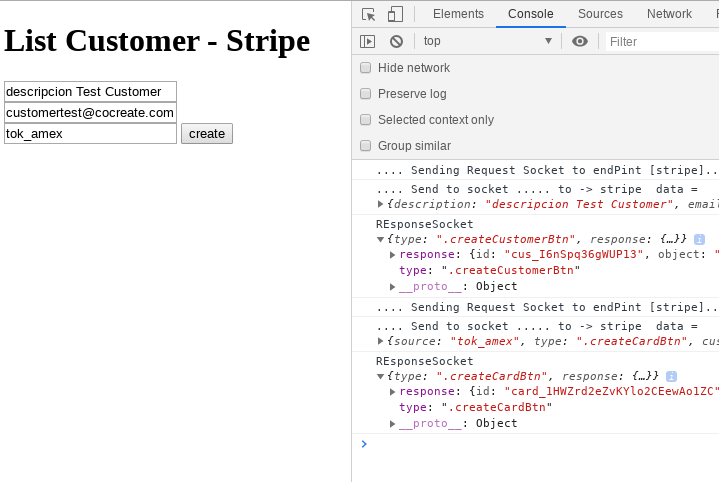
finally we observe a response, in the console that shows that the events were executed in a chained and correct way using the cocreate-actions bridge