# Colorful 🌈 Semantic 📖 Logger 🔢 for Node.js
## Overview
Fast and simple log service, which can highlight important words, types & tags. 👨🏻💻
[](https://www.npmjs.com/package/@dmantsevich/colorful-semantic-logger)
## Features
- [x] Colorful 🌈
- [x] Highlight reserved words
- [x] Highlight types
- [x] Highlight tags
- [x] Color by tags
- [x] Custom formatting
- [x] Configurable
- [x] Different log levels
- [x] Shortcodes
- [x] etc.
## How to use
### Install
1) Install **[NodeJs](https://nodejs.org/en/)** (This will also install **npm**)
2) Install [@dmantsevich/colorful-semantic-logger](https://www.npmjs.com/package/@dmantsevich/colorful-semantic-logger) as dependency for your project (👍):
```shell script
npm i @dmantsevich/colorful-semantic-logger --save
```
### Usages
#### Simple
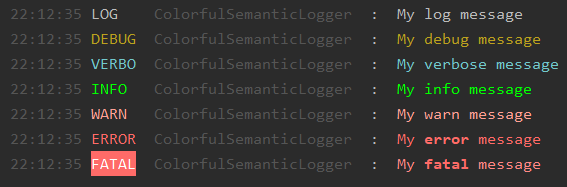
```js
const { logger } = require('@dmantsevich/colorful-semantic-logger');
logger.log(`My log message`);
logger.debug(`My debug message`);
logger.verbose(`My verbose message`);
logger.info(`My info message`);
logger.warn(`My warn message`);
logger.error(`My error message`);
logger.fatal(`My fatal message`);
```
### With name
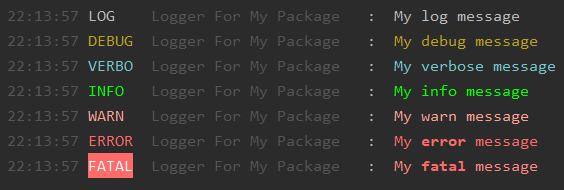
```js
const { Logger } = require('@dmantsevich/colorful-semantic-logger');
const logger = new Logger('Logger For My Package');
logger.log(`My log message`);
logger.debug(`My debug message`);
logger.verbose(`My verbose message`);
logger.info(`My info message`);
logger.warn(`My warn message`);
logger.error(`My error message`);
logger.fatal(`My fatal message`);
```
### With options
```js
const { Logger, LEVELS } = require('@dmantsevich/colorful-semantic-logger');
const logger = new Logger('MyPackage', { level: LEVELS.WARN }); // filter by only WARN+ criteria
logger.log(`My log message`);
logger.debug(`My debug message`);
logger.verbose(`My verbose message`);
logger.info(`My info message`);
logger.warn(`My warn message`);
logger.error(`My error message`);
logger.fatal(`My fatal message`);
```

### Sub logger
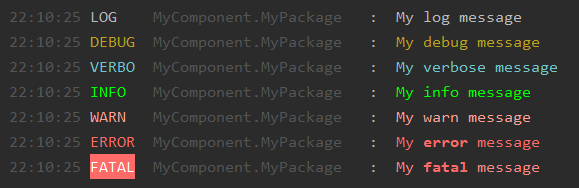
```js
const { Logger, LEVELS } = require('@dmantsevich/colorful-semantic-logger');
const packageLogger = new Logger('MyPackage', { level: LEVELS.DEBUG });
const logger = packageLogger.createNew('MyComponent', { level: LEVELS.FATAL }); // name will be: MyComponent.MyPackage
logger.log(`My log message`);
logger.debug(`My debug message`);
logger.verbose(`My verbose message`);
logger.info(`My info message`);
logger.warn(`My warn message`);
logger.error(`My error message`);
logger.fatal(`My fatal message`);
```
### Tags
Tag is a text between ``..that text will be processed..``. It helps to format & paint your message. Tags & their formats are configurable. **[See configuration](#configuration)**.
### Reserved words
Colorful Semantic Logger can highlights important words in your logs. **[See configuration](#configuration)**.
## API
### Package
Default module exports next objects:
- **ColorfulSemanticLogger(name, options)**: Main logger class. {_name_} - name/group for your custom logger. {_options_} - see **[configuration](#configuration)**.
- **Logger**: the same as ColorfulSemanticLogger. Just shortname.
- **logger**: default instance of ColorfulSemanticLogger class with default options.
- **LEVELS**: Log levels. Levels: DEBUG, LOG, INFO, WARN, FATAL, ERROR, VERBOSE
- unpacked **LEVELS** object
## Logger instance
For creating new logger, you need to create new instance:
```js
const { Logger } = require('@dmantsevich/colorful-semantic-logger');
const logger = new Logger('My New Logger', {});
logger.log('I want to say: Hello World!');
```

### Methods
- **logger.debug(msg, ...)**: Print ``debug`` message
- **logger.verbose(msg, ...)**: Print ``verbose`` message
- **logger.info(msg, ...)**: Print ``info`` message
- **logger.log(msg, ...)**: Print ``log`` message. The same as ``info``, but white.
- **logger.warn(msg, ...)**: Print ``warn`` message.
- **logger.error(msg, ...)**: Print ``error`` message.
- **logger.throwError(msg, ...)**: Print ``error`` message and then throw new Error.
- **logger.fatal(msg, ...)**: Print ``fatal`` message.
- **logger.throwFatal(msg, ...)**: Print ``fatal`` message and then throw new Error.
- **logger.print(infoMsg, verboseMsg)**: Easy way to print different messages for ``INFO`` & ``VERBOSE`` levels.
- **logger.createNew(name[, options])**: create new sublogger. Sublogger uses namespace(split by dot) and same configuration.
- **logger.removeTags(msg, ...)**: remove tags(only tags, not content) from message.
- **Logger.LEVELS** (static property in the class): Contains levels: LOG, INFO, DEBUG, VERBOSE, FATAL, ERROR, WARN
## Configuration
Options for ``ColorfulSemanticLogger(name, options) or Logger(name, options)`` class.
| Param | Type | Default Value | Description |
|-------- |:------: |:---------------: |-------------|
| ``level`` | *{object}* | **LEVELS.INFO** | Default log level. Can be overrided with commandline: --log-level=error |
| ``colorful`` | *{bool}* | **true** | Output should be colored or not|
| ``semanticData`` | *{object}* | See: **lib/options.js** | Configuration for semantic parser |
| ``semanticData.tags`` | *{object}* | See: **lib/options.js** | Predefined tags. Key is "tagName". Value is _function_ or string _hex color_. Function retrieve 2 argumentas: **innerTagText**, **logger** instance |
| ``semanticData.reservedWords`` | *{array}* | See: **lib/options.js** | Array with objects. _words_: array of reserved words. _color_: _function_ or string _hex color_. Function retrieve 2 argumentas: **reservedWord**, **logger** instance |
| ``shortCodes`` | *{object}* | See: **lib/options.js** | Object with shortcodes. Key is shortcode. Value is _function_. Function retrieve: **logger** instance |
| ``headerFormat`` | *{string/function}* | ** \ \:** | Header format. Can be string or function. String supports **options.shortCodes**. Function retrive **logger** instance |
## Semantic Data - Tags
Predefined tags: **number**, **key**, **value**, **!** (important!), **path**.
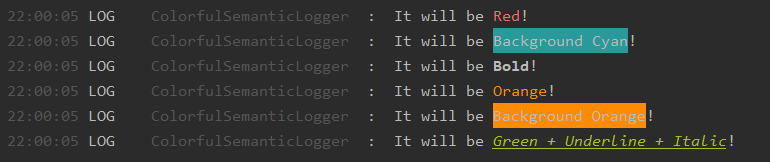
Also possible to use [chalk](https://www.npmjs.com/package/chalk) API as tags. Example:
```js
const { Logger } = require('@dmantsevich/colorful-semantic-logger');
const logger = new Logger('My Test Logger');
logger.log('It will be Red!');
logger.log('It will be Background Cyan!');
logger.log('It will be Bold!');
logger.log('It will be <#FF8C00>Orange!');
logger.log('It will be Background Orange!');
logger.log('It will be Green + Underline + Italic!');
```
### How to use:
```js
const { Logger } = require('@dmantsevich/colorful-semantic-logger');
const logger = new Logger('My Test Logger');
logger.log(`PI is 3.14`); // 3.14 will be highlighted
logger.log(`Key: myKey. Values: null, 3.14, true, hello.`); // null, 3.14, true, hello will be highlighted
logger.log(`Path to module: ${__dirname}.`); // __dirname value will be highlighted and parsed as path(relative for cwd).
```

### How to define new
```js
{
makeRed: '#ff00ff', // tag is makeRed. color will be "#ff00ff" Hello World
status: (v, logger) => 'Status:' + logger._paint(v, '#40e0d0') // tag is "status". Use: 200 -> Status: 200 (where 200 will be green).
}
```
## Semantic Data - Reserved Words
Reserved words helps to highlight important words in your logs.
Predefined reserved words:
- group "ok": **'success', 'successful', 'ok', 'done', 'fine', 'connected', 'resolved', 'cool'** : underlined + green
- group "not ok": **'fail', 'error', 'errors', 'fatal', 'reject', 'rejected', 'issue', 'disconnect', 'disconnected', 'issue', 'bug', 'problem', 'problems', 'exception', 'exceptions', 'throw'** : bold + red
### How to use
```js
logger.log(`Connection is ok!`); // ok will be highlighted
logger.log(`Request was successful`); // successful will be highlighted
logger.log(`Promise was resolved & connected to DB`); // resolved & connected will be highlighted
logger.log(`Connection is fail!`); // fail will be highlighted
logger.log(`Some problems with your code.`); // problems will be highlighted
```

### How to define new
```js
[{
words: ['start', 'begin'], // start action
color: (value, logger) => logger._paint(value, 'cyan')
}, {
words: ['end', 'complete'], // end action
color: (value, logger) => logger._paint(value, 'magenta')
}]
```
## ShortCodes
ShortCodes uses for head formating (example: `` (): ``).
Default ShortCodes: **, , \, \**
Example:
```js
{
'random': (logger) => Math.random(),
'random.color': 'gray'
}
```
## Links
[](https://www.npmjs.com/package/@dmantsevich/colorful-semantic-logger)
[](https://github.com/dmantsevich/colorful-semantic-logger)
🧰
---
**2021**