[](https://github.com/flowr-analysis/flowr/wiki)\
[](https://github.com/flowr-analysis/flowr/actions/workflows/qa.yaml)
[](https://codecov.io/gh/flowr-analysis/flowr)
[](https://hub.docker.com/r/eagleoutice/flowr)
[](https://github.com/flowr-analysis/flowr/releases/latest)
[](https://marketplace.visualstudio.com/items?itemName=code-inspect.vscode-flowr)
[](https://open-vsx.org/extension/code-inspect/vscode-flowr)
[](https://zenodo.org/doi/10.5281/zenodo.13319290)
_flowR_ is a sophisticated, static [dataflow analyzer](https://en.wikipedia.org/wiki/Data-flow_analysis) for the [R programming language](https://www.r-project.org/),
available for [VSCode](https://marketplace.visualstudio.com/items?itemName=code-inspect.vscode-flowr), [Positron](https://open-vsx.org/extension/code-inspect/vscode-flowr), [RStudio](https://github.com/flowr-analysis/rstudio-addin-flowr),
and [Docker](https://hub.docker.com/r/eagleoutice/flowr).
It offers a wide variety of features, for example:
* 🐞 **code linting**\
Analyze your R scripts for common issues and potential bugs (see the [wiki page](https://github.com/flowr-analysis/flowr/wiki/Linter) for more information on the currently supported linters).
Example: Linting code with flowR
To lint your code, you can use the [REPL](https://github.com/flowr-analysis/flowr/wiki/Interface#using-the-repl) or the [Visual Studio Code extension](https://marketplace.visualstudio.com/items?itemName=code-inspect.vscode-flowr) (see [vscode-flowr#283](https://github.com/flowr-analysis/vscode-flowr/pull/283)).
```shell
$ docker run -it --rm eagleoutice/flowr # or npm run flowr
flowR repl using flowR v2.4.6, R v4.5.0 (r-shell engine)
R> :query @linter "read.csv(\"/root/x.txt\")"
```
Output
```text
Query: �[;1mlinter�[0m (2 ms)
╰ **Deprecated Functions** (deprecated-functions):
╰ _Metadata_: {"totalDeprecatedCalls":0,"totalDeprecatedFunctionDefinitions":0,"searchTimeMs":0,"processTimeMs":0}
╰ **File Path Validity** (file-path-validity):
╰ certain:
╰ Path `/root/x.txt` at 1.1-23
╰ _Metadata_: {"totalReads":1,"totalUnknown":0,"totalWritesBeforeAlways":0,"totalValid":0,"searchTimeMs":1,"processTimeMs":0}
╰ **Seeded Randomness** (seeded-randomness):
╰ _Metadata_: {"consumerCalls":0,"callsWithFunctionProducers":0,"callsWithAssignmentProducers":0,"callsWithNonConstantProducers":0,"searchTimeMs":0,"processTimeMs":0}
╰ **Absolute Paths** (absolute-file-paths):
╰ certain:
╰ Path `/root/x.txt` at 1.1-23
╰ _Metadata_: {"totalConsidered":1,"totalUnknown":0,"searchTimeMs":0,"processTimeMs":0}
╰ **Unused Definitions** (unused-definitions):
╰ _Metadata_: {"totalConsidered":0,"searchTimeMs":0,"processTimeMs":0}
╰ **Naming Convention** (naming-convention):
╰ _Metadata_: {"numMatches":0,"numBreak":0,"searchTimeMs":0,"processTimeMs":0}
╰ **Dataframe Access Validation** (dataframe-access-validation):
╰ _Metadata_: {"numOperations":0,"numAccesses":0,"totalAccessed":0,"searchTimeMs":0,"processTimeMs":1}
╰ **Dead Code** (dead-code):
╰ _Metadata_: {"consideredNodes":5,"searchTimeMs":0,"processTimeMs":0}
╰ **Useless Loops** (useless-loop):
╰ _Metadata_: {"numOfUselessLoops":0,"searchTimeMs":0,"processTimeMs":0}
�[;3mAll queries together required ≈2 ms (1ms accuracy, total 8 ms)�[0m�[0m
```
The linter will analyze the code and return any issues found.
Formatted more nicely, this returns:
```json
[ { "type": "linter" } ]
```
(This query can be shortened to `@linter` when used within the REPL command `:query`).
_Results (prettified and summarized):_
Query: **linter** (13 ms)\
╰ **Deprecated Functions** (deprecated-functions):\
╰ _Metadata_: {"totalDeprecatedCalls":0,"totalDeprecatedFunctionDefinitions":0,"searchTimeMs":2,"processTimeMs":0}\
╰ **File Path Validity** (file-path-validity):\
╰ certain:\
╰ Path `/root/x.txt` at 1.1-23\
╰ _Metadata_: {"totalReads":1,"totalUnknown":0,"totalWritesBeforeAlways":0,"totalValid":0,"searchTimeMs":4,"processTimeMs":1}\
╰ **Seeded Randomness** (seeded-randomness):\
╰ _Metadata_: {"consumerCalls":0,"callsWithFunctionProducers":0,"callsWithAssignmentProducers":0,"callsWithNonConstantProducers":0,"searchTimeMs":0,"processTimeMs":0}\
╰ **Absolute Paths** (absolute-file-paths):\
╰ certain:\
╰ Path `/root/x.txt` at 1.1-23\
╰ _Metadata_: {"totalConsidered":1,"totalUnknown":0,"searchTimeMs":2,"processTimeMs":0}\
╰ **Unused Definitions** (unused-definitions):\
╰ _Metadata_: {"totalConsidered":0,"searchTimeMs":0,"processTimeMs":1}\
╰ **Naming Convention** (naming-convention):\
╰ _Metadata_: {"numMatches":0,"numBreak":0,"searchTimeMs":0,"processTimeMs":0}\
╰ **Dataframe Access Validation** (dataframe-access-validation):\
╰ _Metadata_: {"numOperations":0,"numAccesses":0,"totalAccessed":0,"searchTimeMs":0,"processTimeMs":2}\
╰ **Dead Code** (dead-code):\
╰ _Metadata_: {"consideredNodes":5,"searchTimeMs":1,"processTimeMs":0}\
╰ **Useless Loops** (useless-loop):\
╰ _Metadata_: {"numOfUselessLoops":0,"searchTimeMs":0,"processTimeMs":0}\
_All queries together required ≈13 ms (1ms accuracy, total 210 ms)_
Show Detailed Results as Json
The analysis required _210.1 ms_ (including parsing and normalization and the query) within the generation environment.
In general, the JSON contains the Ids of the nodes in question as they are present in the normalized AST or the dataflow graph of flowR.
Please consult the [Interface](https://github.com/flowr-analysis/flowr/wiki/Interface) wiki page for more information on how to get those.
```json
{
"linter": {
"results": {
"deprecated-functions": {
"results": [],
".meta": {
"totalDeprecatedCalls": 0,
"totalDeprecatedFunctionDefinitions": 0,
"searchTimeMs": 2,
"processTimeMs": 0
}
},
"file-path-validity": {
"results": [
{
"range": [
1,
1,
1,
23
],
"filePath": "/root/x.txt",
"certainty": "certain"
}
],
".meta": {
"totalReads": 1,
"totalUnknown": 0,
"totalWritesBeforeAlways": 0,
"totalValid": 0,
"searchTimeMs": 4,
"processTimeMs": 1
}
},
"seeded-randomness": {
"results": [],
".meta": {
"consumerCalls": 0,
"callsWithFunctionProducers": 0,
"callsWithAssignmentProducers": 0,
"callsWithNonConstantProducers": 0,
"searchTimeMs": 0,
"processTimeMs": 0
}
},
"absolute-file-paths": {
"results": [
{
"certainty": "certain",
"filePath": "/root/x.txt",
"range": [
1,
1,
1,
23
]
}
],
".meta": {
"totalConsidered": 1,
"totalUnknown": 0,
"searchTimeMs": 2,
"processTimeMs": 0
}
},
"unused-definitions": {
"results": [],
".meta": {
"totalConsidered": 0,
"searchTimeMs": 0,
"processTimeMs": 1
}
},
"naming-convention": {
"results": [],
".meta": {
"numMatches": 0,
"numBreak": 0,
"searchTimeMs": 0,
"processTimeMs": 0
}
},
"dataframe-access-validation": {
"results": [],
".meta": {
"numOperations": 0,
"numAccesses": 0,
"totalAccessed": 0,
"searchTimeMs": 0,
"processTimeMs": 2
}
},
"dead-code": {
"results": [],
".meta": {
"consideredNodes": 5,
"searchTimeMs": 1,
"processTimeMs": 0
}
},
"useless-loop": {
"results": [],
".meta": {
"numOfUselessLoops": 0,
"searchTimeMs": 0,
"processTimeMs": 0
}
}
},
".meta": {
"timing": 13
}
},
".meta": {
"timing": 13
}
}
```
Example: Slicing with flowR
The simplest way to retrieve slices is with flowR's [Visual Studio Code extension](https://marketplace.visualstudio.com/items?itemName=code-inspect.vscode-flowr).
However, you can slice using the [REPL](https://github.com/flowr-analysis/flowr/wiki/Interface#using-the-repl) as well.
This can help you if you want to reuse specific parts of an existing analysis within another context or if you want to understand
what is happening in the code.
For this, let's have a look at the example file, located at [test/testfiles/example.R](https://github.com/flowr-analysis/flowr/tree/main//test/testfiles/example.R):
```r
sum <- 0
product <- 1
w <- 7
N <- 10
for (i in 1:(N-1)) {
sum <- sum + i + w
product <- product * i
}
cat("Sum:", sum, "\n")
cat("Product:", product, "\n")
```
Let's suppose we are interested only in the `sum` which is printed in line 11.
To get a slice for this, you can use the following command:
```shell
$ docker run -it --rm eagleoutice/flowr # or npm run flowr
flowR repl using flowR v2.4.6, R v4.5.0 (r-shell engine)
R> :slicer test/testfiles/example.R --criterion "11@sum"
```
Output
```text
sum <- 0
w <- 7
N <- 10
for(i in 1:(N-1)) sum <- sum + i + w
sum
```
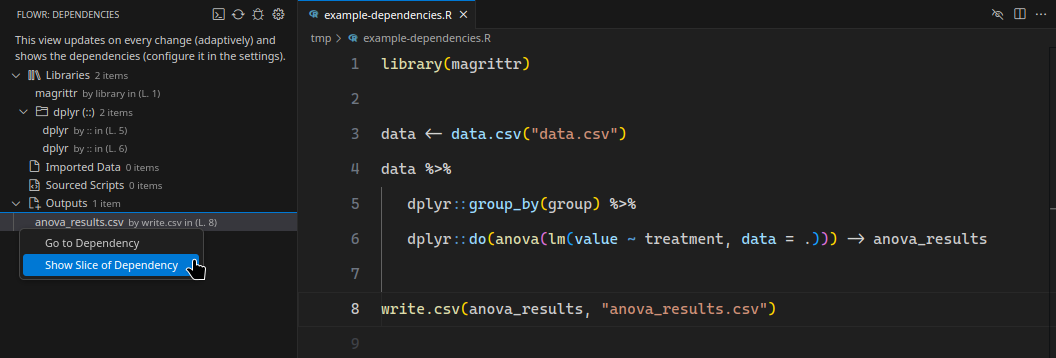
Example: Dependency Analysis with flowR
The following showcases the dependency view of the [Visual Studio Code extension](https://marketplace.visualstudio.com/items?itemName=code-inspect.vscode-flowr):
Example: Generating a dataflow graph with flowR
You can investigate flowR's analyses using the [REPL](https://github.com/flowr-analysis/flowr/wiki/Interface#using-the-repl).
Commands like `:dataflow*` allow you to view a dataflow graph for a given R script.
Let's have a look at the following example:
```r
sum <- 0
product <- 1
w <- 7
N <- 10
for (i in 1:(N-1)) {
sum <- sum + i + w
product <- product * i
}
cat("Sum:", sum, "\n")
cat("Product:", product, "\n")
```
To get the dataflow graph for this script, you can use the following command:
```shell
$ docker run -it --rm eagleoutice/flowr # or npm run flowr
flowR repl using flowR v2.4.6, R v4.5.0 (r-shell engine)
R> :dataflow* test/testfiles/example.R
```
Output
```text
https://mermaid.live/view#base64:eyJjb2RlIjoiZmxvd2NoYXJ0IEJUXG4gICAgMChbXCJgIzkxO1JTeW1ib2wjOTM7IHRlc3RcbiAgICAgICgwKVxuICAgICAgKjEuMS00KmBcIl0pXG4gICAgMShbXCJgIzkxO1JTeW1ib2wjOTM7IHRlc3RmaWxlc1xuICAgICAgKDEpXG4gICAgICAqMS42LTE0KmBcIl0pXG4gICAgMltbXCJgIzkxO1JCaW5hcnlPcCM5MzsgL1xuICAgICAgKDIpXG4gICAgICAqMS4xLTE0KlxuICAgICgwLCAxKWBcIl1dXG4gICAgYnVpbHQtaW46X1tcImBCdWlsdC1Jbjpcbi9gXCJdXG4gICAgc3R5bGUgYnVpbHQtaW46XyBzdHJva2U6Z3JheSxmaWxsOmxpZ2h0Z3JheSxzdHJva2Utd2lkdGg6MnB4LG9wYWNpdHk6Ljg7XG4gICAgMyhbXCJgIzkxO1JTeW1ib2wjOTM7IGV4YW1wbGUuUlxuICAgICAgKDMpXG4gICAgICAqMS4xNi0yNCpgXCJdKVxuICAgIDRbW1wiYCM5MTtSQmluYXJ5T3AjOTM7IC9cbiAgICAgICg0KVxuICAgICAgKjEuMS0yNCpcbiAgICAoMiwgMylgXCJdXVxuICAgIDIgLS0+fFwicmVhZHMsIGFyZ3VtZW50XCJ8IDBcbiAgICAyIC0tPnxcInJlYWRzLCBhcmd1bWVudFwifCAxXG4gICAgMiAtLi0+fFwicmVhZHMsIGNhbGxzXCJ8IGJ1aWx0LWluOl9cbiAgICBsaW5rU3R5bGUgMiBzdHJva2U6Z3JheTtcbiAgICA0IC0tPnxcInJlYWRzLCBhcmd1bWVudFwifCAyXG4gICAgNCAtLT58XCJyZWFkcywgYXJndW1lbnRcInwgM1xuICAgIDQgLS4tPnxcInJlYWRzLCBjYWxsc1wifCBidWlsdC1pbjpfXG4gICAgbGlua1N0eWxlIDUgc3Ryb2tlOmdyYXk7IiwibWVybWFpZCI6eyJhdXRvU3luYyI6dHJ1ZX19
```
Following the link output should show the following:
```mermaid
flowchart LR
1{{"`#91;RNumber#93; 0
(1)
*1.8*`"}}
0["`#91;RSymbol#93; sum
(0)
*1.1-3*`"]
2[["`#91;RBinaryOp#93; #60;#45;
(2)
*1.1-8*
(0, 1)`"]]
built-in:_-["`Built-In:
#60;#45;`"]
style built-in:_- stroke:gray,fill:lightgray,stroke-width:2px,opacity:.8;
4{{"`#91;RNumber#93; 1
(4)
*2.12*`"}}
3["`#91;RSymbol#93; product
(3)
*2.1-7*`"]
5[["`#91;RBinaryOp#93; #60;#45;
(5)
*2.1-12*
(3, 4)`"]]
7{{"`#91;RNumber#93; 7
(7)
*3.6*`"}}
6["`#91;RSymbol#93; w
(6)
*3.1*`"]
8[["`#91;RBinaryOp#93; #60;#45;
(8)
*3.1-6*
(6, 7)`"]]
10{{"`#91;RNumber#93; 10
(10)
*4.6-7*`"}}
9["`#91;RSymbol#93; N
(9)
*4.1*`"]
11[["`#91;RBinaryOp#93; #60;#45;
(11)
*4.1-7*
(9, 10)`"]]
12["`#91;RSymbol#93; i
(12)
*6.6*`"]
13{{"`#91;RNumber#93; 1
(13)
*6.11*`"}}
16(["`#91;RSymbol#93; N
(16)
*6.14*`"])
17{{"`#91;RNumber#93; 1
(17)
*6.16*`"}}
18[["`#91;RBinaryOp#93; #45;
(18)
*6.14-16*
(16, 17)`"]]
built-in:-["`Built-In:
#45;`"]
style built-in:- stroke:gray,fill:lightgray,stroke-width:2px,opacity:.8;
19[["`#91;RExpressionList#93; (
(19)
*6.13*
(18)`"]]
built-in:_["`Built-In:
(`"]
style built-in:_ stroke:gray,fill:lightgray,stroke-width:2px,opacity:.8;
20[["`#91;RBinaryOp#93; #58;
(20)
*6.11-17*
(13, 19)`"]]
built-in::["`Built-In:
#58;`"]
style built-in:: stroke:gray,fill:lightgray,stroke-width:2px,opacity:.8;
24(["`#91;RSymbol#93; sum
(24, :may:36+)
*7.10-12*`"])
25(["`#91;RSymbol#93; i
(25, :may:36+)
*7.16*`"])
26[["`#91;RBinaryOp#93; #43;
(26, :may:36+)
*7.10-16*
(24, 25)`"]]
27(["`#91;RSymbol#93; w
(27, :may:36+)
*7.20*`"])
28[["`#91;RBinaryOp#93; #43;
(28, :may:36+)
*7.10-20*
(26, 27)`"]]
23["`#91;RSymbol#93; sum
(23, :may:)
*7.3-5*`"]
29[["`#91;RBinaryOp#93; #60;#45;
(29, :may:36+)
*7.3-20*
(23, 28)`"]]
31(["`#91;RSymbol#93; product
(31, :may:36+)
*8.14-20*`"])
32(["`#91;RSymbol#93; i
(32, :may:36+)
*8.24*`"])
33[["`#91;RBinaryOp#93; #42;
(33, :may:36+)
*8.14-24*
(31, 32)`"]]
30["`#91;RSymbol#93; product
(30, :may:)
*8.3-9*`"]
34[["`#91;RBinaryOp#93; #60;#45;
(34, :may:36+)
*8.3-24*
(30, 33)`"]]
35[["`#91;RExpressionList#93; #123;
(35, :may:36+)
*6.20*
(29, 34)`"]]
36[["`#91;RForLoop#93; for
(36)
*6.1-9.1*
(12, 20, 35)`"]]
built-in:for["`Built-In:
for`"]
style built-in:for stroke:gray,fill:lightgray,stroke-width:2px,opacity:.8;
38{{"`#91;RString#93; #34;Sum#58;#34;
(38)
*11.5-10*`"}}
40(["`#91;RSymbol#93; sum
(40)
*11.13-15*`"])
built-in:sum["`Built-In:
sum`"]
style built-in:sum stroke:gray,fill:lightgray,stroke-width:2px,opacity:.8;
42{{"`#91;RString#93; #34;
#34;
(42)
*11.18-21*`"}}
44[["`#91;RFunctionCall#93; cat
(44)
*11.1-22*
(38, 40, 42)`"]]
built-in:cat["`Built-In:
cat`"]
style built-in:cat stroke:gray,fill:lightgray,stroke-width:2px,opacity:.8;
46{{"`#91;RString#93; #34;Product#58;#34;
(46)
*12.5-14*`"}}
48(["`#91;RSymbol#93; product
(48)
*12.17-23*`"])
50{{"`#91;RString#93; #34;
#34;
(50)
*12.26-29*`"}}
52[["`#91;RFunctionCall#93; cat
(52)
*12.1-30*
(46, 48, 50)`"]]
0 -->|"defined-by"| 1
0 -->|"defined-by"| 2
2 -->|"argument"| 1
2 -->|"returns, argument"| 0
2 -.->|"reads, calls"| built-in:_-
linkStyle 4 stroke:gray;
3 -->|"defined-by"| 4
3 -->|"defined-by"| 5
5 -->|"argument"| 4
5 -->|"returns, argument"| 3
5 -.->|"reads, calls"| built-in:_-
linkStyle 9 stroke:gray;
6 -->|"defined-by"| 7
6 -->|"defined-by"| 8
8 -->|"argument"| 7
8 -->|"returns, argument"| 6
8 -.->|"reads, calls"| built-in:_-
linkStyle 14 stroke:gray;
9 -->|"defined-by"| 10
9 -->|"defined-by"| 11
11 -->|"argument"| 10
11 -->|"returns, argument"| 9
11 -.->|"reads, calls"| built-in:_-
linkStyle 19 stroke:gray;
12 -->|"defined-by"| 20
16 -->|"reads"| 9
18 -->|"reads, argument"| 16
18 -->|"reads, argument"| 17
18 -.->|"reads, calls"| built-in:-
linkStyle 24 stroke:gray;
19 -->|"returns, argument"| 18
19 -.->|"reads"| built-in:_
linkStyle 26 stroke:gray;
20 -->|"reads, argument"| 13
20 -->|"reads, argument"| 19
20 -.->|"reads, calls"| built-in::
linkStyle 29 stroke:gray;
24 -->|"reads"| 0
24 -->|"reads"| 23
24 -->|"CD-True"| 36
linkStyle 32 stroke:gray,color:gray;
25 -->|"reads"| 12
25 -->|"CD-True"| 36
linkStyle 34 stroke:gray,color:gray;
26 -->|"reads, argument"| 24
26 -->|"reads, argument"| 25
26 -.->|"reads, calls"| built-in:_
linkStyle 37 stroke:gray;
26 -->|"CD-True"| 36
linkStyle 38 stroke:gray,color:gray;
27 -->|"reads"| 6
27 -->|"CD-True"| 36
linkStyle 40 stroke:gray,color:gray;
28 -->|"reads, argument"| 26
28 -->|"reads, argument"| 27
28 -.->|"reads, calls"| built-in:_
linkStyle 43 stroke:gray;
28 -->|"CD-True"| 36
linkStyle 44 stroke:gray,color:gray;
23 -->|"defined-by"| 28
23 -->|"defined-by"| 29
29 -->|"argument"| 28
29 -->|"returns, argument"| 23
29 -.->|"reads, calls"| built-in:_-
linkStyle 49 stroke:gray;
29 -->|"CD-True"| 36
linkStyle 50 stroke:gray,color:gray;
31 -->|"reads"| 3
31 -->|"reads"| 30
31 -->|"CD-True"| 36
linkStyle 53 stroke:gray,color:gray;
32 -->|"reads"| 12
32 -->|"CD-True"| 36
linkStyle 55 stroke:gray,color:gray;
33 -->|"reads, argument"| 31
33 -->|"reads, argument"| 32
33 -.->|"reads, calls"| built-in:_
linkStyle 58 stroke:gray;
33 -->|"CD-True"| 36
linkStyle 59 stroke:gray,color:gray;
30 -->|"defined-by"| 33
30 -->|"defined-by"| 34
34 -->|"argument"| 33
34 -->|"returns, argument"| 30
34 -.->|"reads, calls"| built-in:_-
linkStyle 64 stroke:gray;
34 -->|"CD-True"| 36
linkStyle 65 stroke:gray,color:gray;
35 -->|"argument"| 29
35 -->|"returns, argument"| 34
35 -.->|"reads, calls"| built-in:_
linkStyle 68 stroke:gray;
35 -->|"CD-True"| 36
linkStyle 69 stroke:gray,color:gray;
36 -->|"argument"| 12
36 -->|"reads, argument"| 20
36 -->|"argument, non-standard-evaluation"| 35
36 -.->|"reads, calls"| built-in:for
linkStyle 73 stroke:gray;
40 -->|"reads"| 0
40 -->|"reads"| 23
40 -.->|"reads"| built-in:sum
linkStyle 76 stroke:gray;
44 -->|"argument"| 38
44 -->|"reads, argument"| 40
44 -->|"argument"| 42
44 -.->|"reads, calls"| built-in:cat
linkStyle 80 stroke:gray;
48 -->|"reads"| 3
48 -->|"reads"| 30
52 -->|"argument"| 46
52 -->|"reads, argument"| 48
52 -->|"argument"| 50
52 -.->|"reads, calls"| built-in:cat
linkStyle 86 stroke:gray;
```
(The analysis required _14.2 ms_ (including parse and normalize, using the [r-shell](https://github.com/flowr-analysis/flowr/wiki/Engines) engine) within the generation environment.)
Example REPL session

## 📜 More Information
For more details on how to use _flowR_ please refer to the [wiki pages](https://github.com/flowr-analysis/flowr/wiki),
as well as the deployed [code documentation](https://flowr-analysis.github.io/flowr/doc/).
## 🚀 Contributing
We welcome every contribution! Please check out the [developer onboarding](https://github.com/flowr-analysis/flowr/wiki/Onboarding) section in the wiki for all the information you will need.
### Contributors
 ----
*flowr* is actively developed by [Florian Sihler](https://eagleoutice.github.io/portfolio/) under the
[GPLv3 License](LICENSE).\
It is partially supported by the German Research Foundation (DFG) under the grant [504226141](https://gepris.dfg.de/gepris/projekt/504226141) ("CodeInspector").
----
### Generation Notice
Please notice that this file was generated automatically using the file [src/documentation/print-readme.ts](https://github.com/flowr-analysis/flowr/tree/main//src/documentation/print-readme.ts) as a source.\
If you want to make changes please edit the source file (the CI will take care of the rest).
In fact, many files in the [wiki](https://github.com/flowr-analysis/flowr/wiki) are generated, so make sure to check for the source file if you want to make changes.
----
*flowr* is actively developed by [Florian Sihler](https://eagleoutice.github.io/portfolio/) under the
[GPLv3 License](LICENSE).\
It is partially supported by the German Research Foundation (DFG) under the grant [504226141](https://gepris.dfg.de/gepris/projekt/504226141) ("CodeInspector").
----
### Generation Notice
Please notice that this file was generated automatically using the file [src/documentation/print-readme.ts](https://github.com/flowr-analysis/flowr/tree/main//src/documentation/print-readme.ts) as a source.\
If you want to make changes please edit the source file (the CI will take care of the rest).
In fact, many files in the [wiki](https://github.com/flowr-analysis/flowr/wiki) are generated, so make sure to check for the source file if you want to make changes.