/**
* egjs-conveyer
* Copyright (c) 2022-present NAVER Corp.
* MIT license
*/
import Axes from "@egjs/axes";
import Component from "@egjs/component";
import { ReactiveSubscribe, Ref } from "@cfcs/core";
import { ConveyerEvents, ConveyerItem, ConveyerOptions, FindItemOptions, ConveyerReactiveState, ScrollIntoViewOptions } from "./types";
/**
* Conveyer adds Drag gestures to your Native Scroll.
* @ko Conveyer는 네이티브 스크롤에 드래그 제스처를 추가합니다.
* @extends Component
* @support {"ie": "9+(with polyfill)", "ch" : "latest", "ff" : "latest", "sf" : "latest", "edge" : "latest", "ios" : "7+", "an" : "4.X+"}
* @example
```html
```
*/
declare class Conveyer extends Component {
protected _scrollAreaElement: HTMLElement;
protected _axes: Axes | null;
protected _items: ConveyerItem[];
protected _size: number;
protected _scrollSize: number;
protected _options: ConveyerOptions;
protected _animateParam: {
expectedPos: number;
offset: number;
} | null;
private _resizeObserver;
private _scrollTimer;
private _isWheelScroll;
private _isDragScroll;
private _isAnimationScroll;
private _scrollArea;
private _panInput;
private _wheelInput;
/**
* Whether the scroll has reached the start.
* @ko 스크롤이 시작에 닿았는지 여부.
* @name Conveyer#isReachStart
* @type {boolean}
* @default true
* @readonly
* @example
* ```js
* import { Conveyer } from "@egjs/conveyer";
*
* const conveyer = new Conveyer(".container");
*
* conveyer.isReachStart
* ```
*/
private _isReachStart;
/**
* Whether the scroll has reached the end.
* @ko 스크롤이 끝에 닿았는지 여부.
* @name Conveyer#isReachEnd
* @type {boolean}
* @default false
* @readonly
* @example
* ```js
* import { Conveyer } from "@egjs/conveyer";
*
* const conveyer = new Conveyer(".container");
*
* conveyer.isReachEnd
* ```
*/
private _isReachEnd;
/**
* the scroll position of the container
* @ko 컨테이너의 스크롤 위치
* @name Conveyer#scrollPos
* @type {number}
* @default 0
* @readonly
* @example
* ```js
* import { Conveyer } from "@egjs/conveyer";
*
* const conveyer = new Conveyer(".container");
*
* conveyer.scrollPos
* ```
*/
protected _pos: number;
/**
* @param - A base element for a module 모듈을 적용할 기준 엘리먼트
* @param - The option object of the InfiniteGrid module eg.InfiniteGrid 모듈의 옵션 객체
*/
constructor(scrollArea: string | HTMLElement | Ref, options?: ConveyerOptions);
/**
* Finds an element for that direction.
* @ko 해당 방향에 대해 엘리먼트를 찾는다.]
* @see {@link /docs/examples/Methods direction's example} page for detailed information
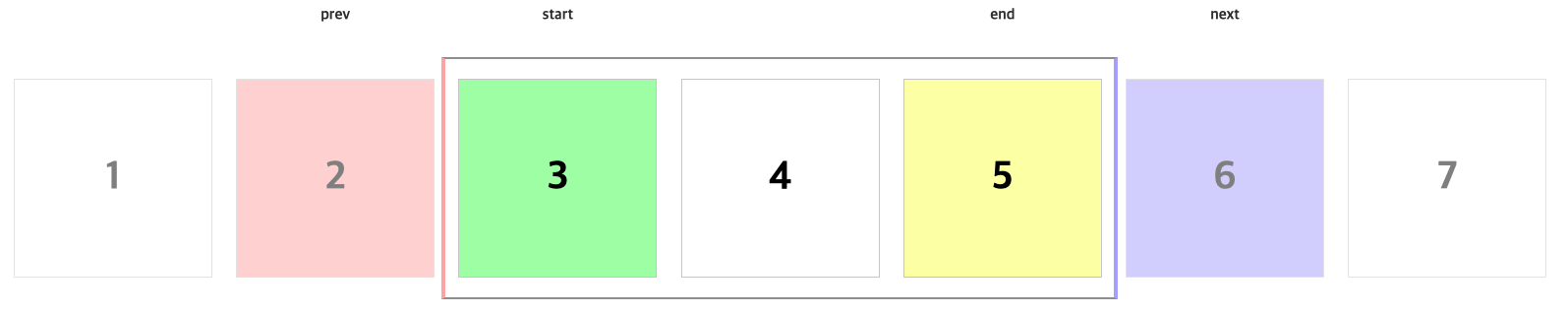
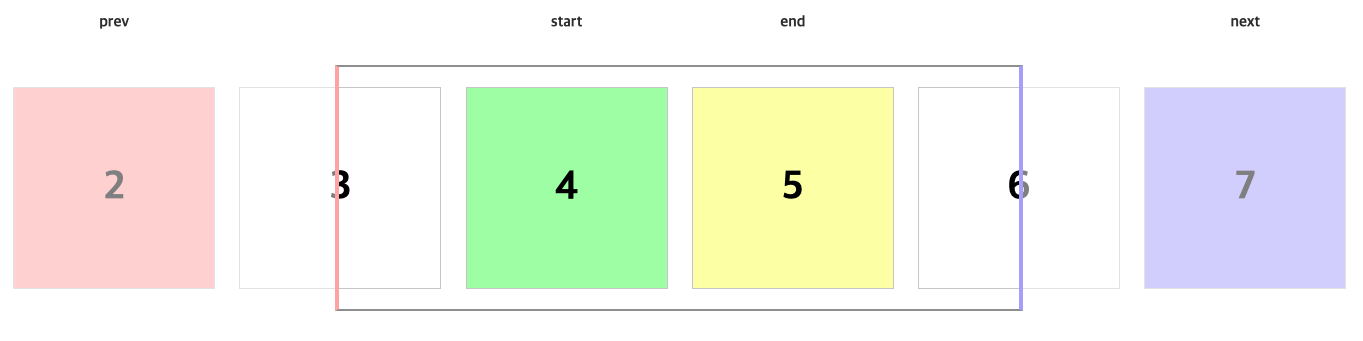
* @param - direction of the element. "start" and "end" find inside. "prev" and "next" find outside. 엘리먼트의 방향. "start", "end"는 안쪽으로 찾는다. "prev", "next"는 바깥쪽으로 찾는다.
* @param - Options for the `findElement` method. findElement 메서드의 옵션
* @example
*
*  *
*
*
*  *
*
*/
findElement(direction: "start" | "end" | "prev" | "next", options?: FindItemOptions): HTMLElement;
/**
* Finds an item for an element or its direction.
* @ko 엘리먼트 또는 해당 방향에 대해 아이템을 찾는다.
* @see {@link /docs/examples/Methods direction's example} page for detailed information
* @param - direction of the element. "start" and "end" find inside. "prev" and "next" find outside. 엘리먼트의 방향. "start", "end"는 안쪽으로 찾는다. "prev", "next"는 바깥쪽으로 찾는다.
* @param - Options for the `findItem` method. `findItem` 메서드의 옵션
* @example
*
*
*
*
*
*
*/
findItem(target: HTMLElement | "start" | "end" | "prev" | "next", options?: FindItemOptions): ConveyerItem | null;
/**
* Scrolls an element or an item in that direction into the view.
* @ko 엘리먼트나 해당 방향에 있는 아이템을 뷰안으로 스크롤을 한다.
* @see {@link /docs/examples/Methods target's example} page for detailed information
* @param - direction of the element. "start" and "end" find inside. "prev" and "next" find outside. 엘리먼트의 방향. "start", "end"는 안쪽으로 찾는다. "prev", "next"는 바깥쪽으로 찾는다.
* @param - Options for the `scrollIntoView` method. `scrollIntoView` 메서드의 옵션
* @example
*
*
*
*
*
*
*/
scrollIntoView(target: HTMLElement | "start" | "end" | "prev" | "next", options?: ScrollIntoViewOptions): void;
/**
* Scrolls by the given position amount.
* @ko 주어진 위치 양만큼 스크롤한다.
* @param - Amount of position to scroll by. 스크롤할 위치의 양.
* @param - Duration to scroll by that position. 해당 위치만큼 스크롤하는 시간
*/
scrollBy(pos: number, duration?: number): void;
/**
* Scroll to the given position.
* @ko 주어진 위치로 스크롤한다.
* @param - Amount of position to scroll to. 스크롤할 위치의 양.
* @param - Duration to scroll to that position. 해당 위치로 스크롤하는 시간
*/
scrollTo(pos: number, duration?: number): void;
/**
* Set the items directly to the Conveyer.
* @ko Conveyer에 아이템들을 직접 설정한다.
* @param - Items to set on Conveyer Conveyer에 설정할 아이템들
*/
setItems(items: ConveyerItem[]): void;
/**
* Update the position and size information of items.
* @ko 아이템들의 포지션, 사이즈 정보를 업데이트 한다.
*/
updateItems(): void;
/**
* Update container size and scroll size.
* @ko 컨테이너의 크기, 스크롤 사이즈를 업데이트 한다.
*/
updateContainer(): void;
/**
* Updating containers and items.
* @ko 컨테이너와 아이템들을 업데이트 한다.
* @method
*/
update: () => void;
/**
* Enables PanInput and WheelInput operations in mouse case.
* @ko mouse 케이스에서 PanInput, WheelInput의 동작을 활성화한다.
*/
enableInput(): void;
/**
* Disables PanInput and WheelInput operations in mouse case.
* @ko mouse 케이스에서 PanInput, WheelInput의 동작을 비활성화한다.
*/
disableInput(): void;
/**
* If you use the autoInit option as false, you can initialize it directly through the init method.
* @ko autoInit 옵션을 false로 사용하는 경우 직접 init 메서드를 통해 초기화 할 수 있다.
*/
init(): void;
/**
* Releases the instnace and events.
* @ko 인스턴스와 이벤트를 해제한다.
*/
destroy(): void;
private _refreshScroll;
private _getItem;
private _getNativeEvent;
private _getNextScrollPos;
private _isMixedWheel;
private _checkNestedMove;
private _onScroll;
private _debounceScroll;
private _createAnimationParam;
}
interface Conveyer extends ConveyerReactiveState, ReactiveSubscribe {
}
export default Conveyer;