# flyline.js
用 canvas 实现 HTML 元素之间相互连接飞线 支持vue2/vue3/原生
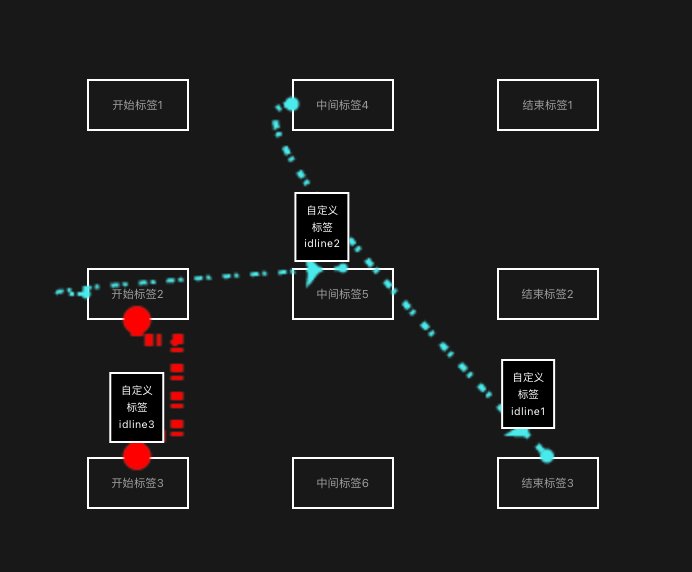
## 安装
```bash
npm install @furious_whale/flyline
```
## 使用(vue 例子)
```css
.flyBox {
position: absolute;
top: 0;
left: 0;
right: 0;
bottom: 0;
}
.point {
position: absolute;
font-size: 14px;
color: #fff;
text-align: center;
z-index: 10;
.card {
display: block;
position: absolute;
bottom: 10px;
left: 0;
transform: translateX(-50%);
border: 1px solid #fff;
background-color: #000;
padding: 10px;
&.none {
opacity: 0.2;
}
}
}
.heihgt_full {
height: 100%;
}
.labelbox {
margin-top: 180px;
padding: 20px;
border: 1px solid #fff;
text-align: center;
}
```
```html
开始标签1
开始标签2
开始标签3
中间标签4
中间标签5
中间标签6
结束标签1
结束标签2
结束标签3
```
```javascript
import { ref,onMounted, onUnmounted } from 'vue'
import FlyLine from "@furious_whale/flyline"
const flyBox = ref(null)
const flylineDatas =ref([])//接收内部飞线数据
const flyElDom = new FlyLine({
responseData:flylineDatas.value,//外部接受飞线数据数组
arrowSize:25,//箭头大小(值为0时 = 25)
lineMax:6,//飞线最大宽度(所有飞线中width最大值的飞线宽度,默认值5)
lineMin:2,//飞线最小宽度(所有飞线中width最小值的飞线宽度,默认值1)
})
flyElDom.loop = (data) => {
//箭头动画回掉
// console.log(data)
}
flyElDom.click = (data) => {
//飞线点击事件
console.log(data)
}
flyElDom.move = (data) => {
//鼠标移动到飞线事件
console.log(data)
}
onMounted(()=>{
//容器大小变化需要手动重新调用init
flyElDom.init(flyBox.value,"lineid")
//容器大小变化需要重新调用draw
flyElDom.draw([
{
id: 'idline1',// 线id(可以重复,点击事件和移动事件要注意效果会共同触发)
from: '1',// 起点lineid
to: '9',// 终点lineid
type: 'curve',// 线类型 curve 曲线 angle直角线 default 直线
color: '#48EAEC',// 线颜色
width: 4,// 线宽度
start: 'left',// 开始元素方向 top left right bottom topLeft...
end: 'top',// 结束元素方向 top left right bottom topLeft...
dash: [4, 2, 2, 6],// 虚线样式
speed: 0.0045,// 速度
},
{
id: 'idline2',// 线id(可以重复,点击事件和移动事件要注意效果会共同触发)
from: '3',// 起点lineid
to: '5',// 终点lineid
type: 'curve',// 线类型 curve 曲线 angle直角线 default 直线
color: '#48EAEC',// 线颜色
width: 2,// 线宽度
start: 'left',// 开始元素方向 top left right bottom topLeft...
end: 'top',// 结束元素方向 top left right bottom topLeft...
dash: [4, 2, 2, 6],// 虚线样式
speed: 0.0045,// 速度
},
{
id: 'idline3',// 线id(可以重复,点击事件和移动事件要注意效果会共同触发)
from: '3',// 起点lineid
to: '4',// 终点lineid
type: 'angle',// 线类型 curve 曲线 angle直角线 default 直线
color: '#ff0000',// 线颜色
width: 10,// 线宽度
start: 'bottom',// 开始元素方向 top left right bottom topLeft topRight bottomLeft bottomRight
end: 'top',// 结束元素方向 top left right bottom topLeft topRight bottomLeft bottomRight
dash: [4, 2, 2, 6],// 虚线样式
speed: 0.0045,// 速度
path: [['i','i+10'],['i+20','i+10'],['i+20','i+20%'],['e+20','e-10'],['e','e-10%']],// 自定义路径(该参数在 type 为 angle | default 时有效) i 为起点之,e为终点值, 百分比兑换值为 = max( abs(起点x-终点x),abs(起点y-终点y) )*百分比
}
])
})
onUnmounted(()=>{
flyElDom.destroy()//组件销毁时调用
})
```
## API