# 安装依赖
## 安装依赖
### npm
`npm install @glodon-aiot/bot-client-ui`
### yarn
`yarn add @glodon-aiot/bot-client-ui`
# 配置
## 初始化
```javascript
import BotClientUI from '@glodon-aiot/bot-client-ui';
new BotClientUI({
token: 'aiot_resource_token_goes_here',
getContainer: () => document.getElementById('client-ui'),
mode: 'inlay',
errorHandlers: {
token: (error) => {
console.error(error);
},
},
})
// 弃用之前的create方式
// // dialog - 对话型应用 | agent - Agent应用
// // 根据平台上应用的类型来创建对应类型的BotClient
// const BotClient = botClientUI.create("agent"); // 接受 agent 或者 dialog
// new BotClient({
// token: 'aiot_resource_token_goes_here',
// getContainer: () => document.getElementById('agent-ui'),
// mode: 'inlay',
// errorHandlers: {
// token: (error) => {
// console.error(error);
// },
// },
// })
```
## 创建一个客户端程序的助手
```javascript
import BotClientUI from '@glodon-aiot/bot-client-ui';
new BotClientUI({
token: 'aiot_resource_token_goes_here',
getContainer: () => document.getElementById('agent-ui'),
mode: 'inlay',
plugins: {
pluginACode: window.pluginACode
},
errorHandlers: {
token: (error) => {
console.error(error);
},
},
})
// 弃用之前的create方式
// dialog - 对话型应用 | agent - Agent应用
// 根据平台上应用的类型来创建对应类型的BotClient
// const BotClient = botClientUI.create("agent"); // 接受 agent | dialog
// new BotClient({
// token: 'aiot_resource_token_goes_here',
// getContainer: () => document.getElementById('agent-ui'),
// mode: 'inlay',
// plugins: {
// pluginACode: window.pluginACode
// },
// errorHandlers: {
// token: (error) => {
// console.error(error);
// },
// },
// })
```
## Demo工程
1. 完整的demo代码:(待完善)
:::info
- [ ] demo工程 [@阿如娜](undefined/aruna-1oru6)
:::
2. 在线预览:
1. 对话型应用Demo [https://code.juejin.cn/pen/7436299391344607286](https://code.juejin.cn/pen/7436299391344607286)
2. Agent Demo [https://code.juejin.cn/pen/7372449505322467363](https://code.juejin.cn/pen/7372449505322467363)
# 配置
## 通用配置
| 名称 | 类型 | 必填 | 默认值 | 说明 |
| --- | --- | --- | --- | --- |
| token | string | 是 | - | aiot 行业AI平台的AI应用的resource token。详情查看[链接](https://www.reapi.com/gallery/xAkNoUQjAREnxtgJ/cwyipHfE1wRR7nhN#post-v1-resourceToken) |
| getContainer | () => Element | 否 | document.body | |
| mode | 'float' | 'inlay' | 否 | 'float' | 悬浮按钮模式,或者嵌入模式 |
| header | Element|string | boolean | 否 | 应用名称 | 应用名称 |
| footer | Element|string | boolean | 否 | | |
| size | {
width?: number | string;
height?: number | string;
maxWidth?: number | string;
maxHeight?: number | string;
minWidth?: number | string;
minHeight?: number | string;
} | 否 | {width: 450} | float模式下:窗体大小 |
| open | boolean | 否 | false | float模式下:默认打开状态 |
| triggerButton | ```typescript { style: string; visible: boolean; } ``` | 否 | {visible: true} | triggerButton设置 |
| history(即将弃用) | boolean | 否 | true | 是否展示session列表, features.sessionList代替 |
| features (待完成) | ```typescript interface Feature { greeting?: boolean; sessionList?: boolean; newSession?: boolean;// dialog only fileUpload?: boolean;// dialog only imageUpload?: boolean;//agent only userMessageBox?: {// dialog only copy?: boolean; editAgain?: boolean; }; botMessageBox?: {// dialog only referenceFirst?: boolean; reference?: { file?: boolean; itemExpanded?: boolean; }; relatedQuesions: boolean; footer: { items: { componentName: 'AnswerAgain' | 'Copy' | 'Comments'; position: 'left' | 'right' }[]; }; }; prompts?: boolean; knowledges?: boolean | {visible: boolean, default: Knowledge[]}; promptVariables?: boolean | {visible: boolean, default: SessionPrompt[]}; footer?: HTMLDivElement | string | boolean; } ``` | 否 | ```javascript const FEATURE_DEFAULT = { greeting: true, sessionList: true, newSession: true, fileUpload: true,//dialog only imageUpload: true,//agent only userMessageBox: { copy: true, editAgain: true }, botMessageBox: { referenceFirst: false,//dialog only reference: { file: true, itemExpanded: false }, relatedQuesions: true,// dialog only footer: { items: [{ componentName: 'AnswerAgain', position: 'left', iconOnly: true, visible: true }, { componentName: 'Copy', position: 'right' iconOnly: true, visible: true }, { componentName: 'Comments', position: 'right' iconOnly: true, visible: true }] } }, prompts: true, knowledges: true, promptVariables: true } ``` | 功能配置 |
| debug | boolean | 否 | false | 1. 控制log输出。
2. promptValues变为非必填项;
3. Agent类型应用下,控制是否开启,debug模式,由于收到权限限制,可能会配置失败。 |
| eventListeners(待完成) | ```typescript { comment: (payload: { applicationId: string, sessionId: string, comment: Comment }) => void; sessionload: (payload: { applicationId: string, sessionId: string, session: SessionInfo,sessionInstance: Session }) => void; message: (payload: { applicationId: string, sessionId: string, message: Message }) => void; } ``` | | | comment, 用户提交评论
sessionload,加载会话, sessionInstance,请参考`[Session](https://glodon-cv-help.yuque.com/lzh2bp/vit0x5/mgtsbugixgqppqa7#p2B8C)`API。
message,对话内容
|
| errorHandlers | {
token: (error) => void, promptValues:(error, {key:string,value: string}[]) => void
} | 否 | - | errorHandlers.token 是token验证失败后的处理器;
errorHandlers.promptValues 非debug模式下,检测空值 |
## 只适用于对话应用的配置(即将弃用)
| 名称 | 类型 | 必填 | 默认值 | 说明 |
| --- | --- | --- | --- | --- |
| transform(即将弃用, features代替) | ```typescript { greating?: boolean; sessionList?: boolean; sessionOpen?: boolean; fileUpload?: boolean; connectNetwork?: boolean; userCopy?: boolean; userEdit?: boolean; userPrompt?: booleam prompt?: boolean; relate?: boolean; again?: boolean; metadata?: boolen; reference?: { iconVisible?: boolean, referenceFirst?: boolean, isExpand?: boolean, }, }, } ``` | 否 | ```plain { greating: true, // 问候语 sessionList: true, // 会话历史记录 sessionOpen: true, // 打开新会话 fileUpload: true, // 文件上传 connectNetwork: true, // 联网回答 userCopy: true, // 复制 userEdit: true, // 编辑 userPrompt: true, // 添加到prompt prompt: true, // 常用prompt relate: true, // 相关问题 again: true, // 再次回答 metadata: true, // 參考名称来源 reference: { iconVisible: true, // 参考来源icon referenceFirst: false, // 配置参考来源无联网模式下引用顺序 isExpand: false, // 配置参考来源在物联网模式下展开 }, }, } ``` | 对话应用适用,是否支持去除功能 (connectNetwork /metadata 待确认?) |
## 只适用于Agent应用的配置
| 名称 | 类型 | 必填 | 默认值 | 说明 |
| --- | --- | --- | --- | --- |
| plugins | {[pluginCode:string]:{ [function Code:string]: Function }} | 否 | - | Agent应用适用。
插件列表,`pluginCode`与`functionCode`要与平台中注册的插件标识和API名称保持一致 |
# API
| 名称 | 类型 | 说明 |
| --- | --- | --- |
| create | (appType: "agent" | "dialog") => `AgentClientUI` | `DialogClientUI` | 创建指定类型的应用UI,配置说明参考[本文第2部分](#qIfRd) |
| reload | `() => void` | |
| activeSession | `Session` | 当前活跃的会话信息 |
| input | `(message:string) => void` | 填充输入框内容 |
| getMessageList | `(sessionId?: string) => Promise` | 获取历史对话列表 |
| on(待完成) | | |
| off(待完成) | | |
## 数据结构
```typescript
interface SessionInfo {
id: string;
name: string;
}
```
```typescript
interface Message {
messageId: string;
content: string;
role: ChatMessageRole;
sessionId: string;
reference: IReference[];
searchReference: ISearchRefernce[];
messageTime: string;
}
enum ChatMessageRole {
Robot = 1,
User = 2,
System = 3
}
interface IReference {
text: string;
docId: string;
fileId: string;
fileName: string;
knowledgeId: string;
knowledgeName: string;
score: number;
nickname: string;
knowledgeSourceName: string;
}
interface ISearchRefernce {
link: string;
title: string;
snippet: string;
}
interface SessionPrompt {
id?: string;
key: string;
name?: string;
value: string;
status?: PromptStatus;
}
interface Knowledge {
id: string;
}
```
# Features
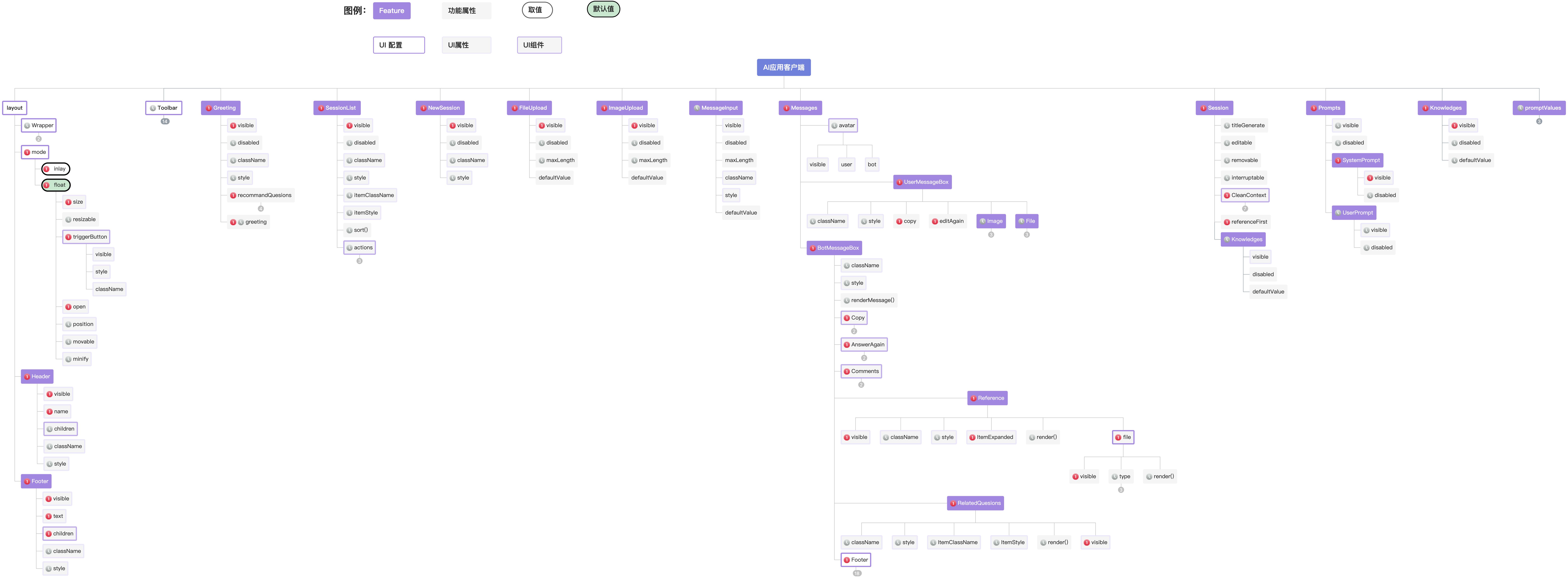
功能与配置关系如下图所示。
当前支持的配置项;
有这个标识的配置项是还在计划中。
# 客户端Agent类型应用的特别说明
由于该类型应用一般被当作某个软件的助手使用,需要主体软件在浏览器上注册一些方法,作为与浏览器交互的桥梁。
例如,有客户端`Plugin A`,注册插件如下代码。
其中,`pluginACode`是`插件标识`,可以在[行业AI平台](https://copilot.glodon.com/)的【插件管理 - 插件详情】中获得,不支持自定义。`functionCode`对应的是`API名称`,可自定义。
```javascript
window.pluginACode = {
functionCode1: (params,cb) => {
console.log(`模拟pluginA function1 执行\n执行入参\n${JSON.stringify(arguments)}`);
setTimeout(() => {
console.log(`模拟pluginA function1 执行完成`);
cb({
code: 0,
message: 'function1运行成功',
data: {
a: 'a',
b: 2,
},
});
}, 5000)
},
functionCode2: (params,cb) => {
console.log(`模拟pluginA function2 执行\n执行入参\n${JSON.stringify(arguments)}`);
setTimeout(() => {
console.log(`模拟pluginA function2 执行完成`);
cb({
code: 0,
message: 'function2运行成功',
data: {
a: 'a',
b: 2,
},
});
}, 10000)
}
}
```
创建Agent应用UI的时候,配置`plugins`属性。完整代码如下:
```javascript
import BotClientUI from '@glodon-aiot/bot-client-ui';
new BotClientUI({
token: 'aiot_resource_token_goes_here',
getContainer: () => document.getElementById('agent-ui'),
mode: 'inlay',
plugins: {
pluginACode: window.pluginACode
},
errorHandlers: {
token: (error) => {
console.error(error);
},
},
})
```