# ej2-dropdowns
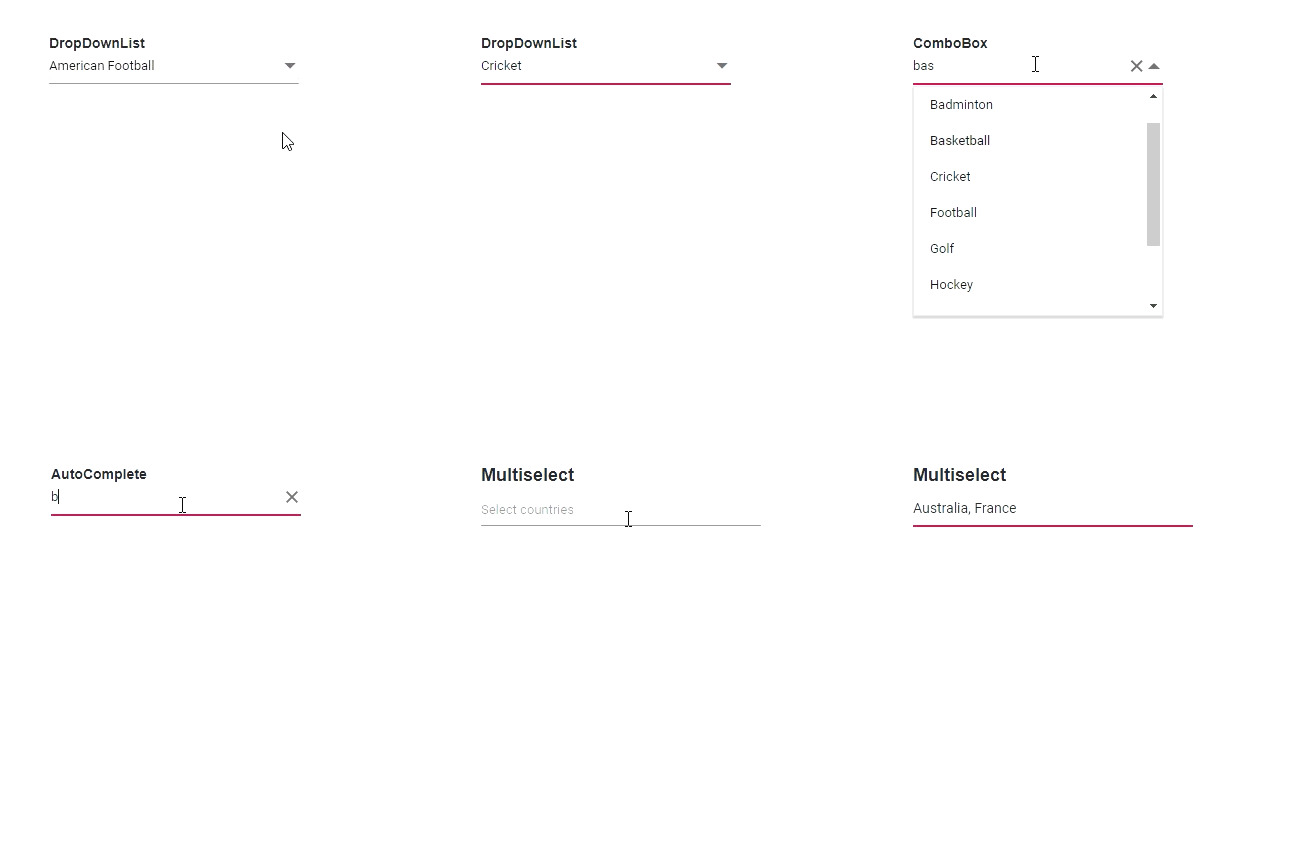
Superset of HTML select box contains specific features such as data binding, grouping, sorting, filtering, and templates.
>Note: This is a commercial product and requires a paid license for possession or use. Syncfusion’s licensed software, including this component, is subject to the terms and conditions of Syncfusion's EULA (https://www.syncfusion.com/eula/es/). To acquire a license, you can purchase one at https://www.syncfusion.com/sales/products or start a free 30-day trial here (https://www.syncfusion.com/account/manage-trials/start-trials).
>A free community license (https://www.syncfusion.com/products/communitylicense) is also available for companies and individuals whose organizations have less than $1 million USD in annual gross revenue and five or fewer developers..
## 1. Setup To install this package and its dependent packages, use the following command
Use the following command to install drop-down components and its dependent packages
```
npm install @syncfusion/ej2-dropdowns
```
## 2. Components included
* DropDownList - A textbox component that allows users to select a non-editable single value from the list of predefined values.
* [GettingStarted](https://ej2.syncfusion.com/documentation/drop-down-list/getting-started.html?lang=typescript)
* [View Online Demos](https://ej2.syncfusion.com/javascript/demos/#/material/drop-down-list/default.html)
* [Product Page](https://www.syncfusion.com/products/javascript/dropdownlist)
* ComboBox - A textbox component that allows users to type a value or choose an option from the list of predefined options.
* [GettingStarted](https://ej2.syncfusion.com/documentation/combo-box/getting-started.html?lang=typescript)
* [View Online Demos](https://ej2.syncfusion.com/javascript/demos/#/material/combo-box/default.html)
* [Product Page](https://www.syncfusion.com/products/javascript/combobox)
* Autocomplete - A textbox component that provides a list of suggestions to select based on the text typed by the users.
* [GettingStarted](https://ej2.syncfusion.com/documentation/auto-complete/getting-started.html?lang=typescript)
* [View Online Demos](https://ej2.syncfusion.com/javascript/demos/#/material/auto-complete/default.html)
* [Product Page](https://www.syncfusion.com/products/javascript/autocomplete)
* MultiSelect - A textbox component that allows users to type or choose multiple values from the list of predefined options.
* [GettingStarted](https://ej2.syncfusion.com/documentation/multi-select/getting-started.html?lang=typescript)
* [View Online Demos](https://ej2.syncfusion.com/javascript/demos/#/material/multi-select/default.html)
* [Product Page](https://www.syncfusion.com/products/javascript/multiselect)
* ListBox - ListBox is a graphical user interface component used to display a list of items. Users can select one or more items in the list using a checkbox or by keyboard selection. It supports sorting, grouping, reordering, and drag and drop of items.
* [GettingStarted](https://ej2.syncfusion.com/documentation/list-box/getting-started.html?lang=typescript)
* [View Online Demos](https://ej2.syncfusion.com/javascript/demos/#/material/list-box/default.html)
* [Product Page](https://www.syncfusion.com/products/javascript/listbox)
## 3. Supported frameworks
Drop-down components also supports the following frameworks:
1. [Angular](https://ej2.syncfusion.com/angular/demos/#/material)
2. [React](https://ej2.syncfusion.com/react/demos/#/material)
3. [Vue.js](https://ej2.syncfusion.com/vue/demos/#/material)
4. [ASP.NET Core](https://ej2.syncfusion.com/aspnetcore/)
5. [ASP.NET MVC](https://ej2.syncfusion.com/aspnetmvc/)
6. [JavaScript (ES5)](https://ej2.syncfusion.com/javascript/demos/#/material)
## 4. Use-case samples / Showcase samples
* Expanse Tracker ([Source](https://github.com/syncfusion/ej2-showcase-ts-expensetracker), [Live Demo](https://ej2.syncfusion.com/showcase/typescript/expensetracker/?utm_source=npm&utm_campaign=dropdown#/dashboard))
* Loan Calculator ([Source](https://github.com/syncfusion/ej2-showcase-ts-loancalculator), [Live Demo](https://ej2.syncfusion.com/showcase/typescript/loancalculator/?utm_source=npm&utm_campaign=dropdwonlist#/default))
* Web Mail ([Source](https://github.com/syncfusion/ej2-showcase-ts-webmail), [Live Demo](https://ej2.syncfusion.com/showcase/typescript/webmail/#/home))
## 5. Key features
* DropDownList
* [Data binding](https://ej2.syncfusion.com/demos/#/material/drop-down-list/data-binding.html): Binds and accesses the list of items from the local or server-side data source.
* [Grouping](https://ej2.syncfusion.com/demos/#/material/drop-down-list/grouping-icon.html): Groups the logically related items under a single or specific category.
* [Sorting](https://ej2.syncfusion.com/documentation/api/drop-down-list#sortorder): Sorts the list items in alphabetical order (either ascending or descending).
* [Filtering](https://ej2.syncfusion.com/demos/#/material/drop-down-list/filtering.html): Filters the list items based on a character typed in the search box.
* [Templates](https://ej2.syncfusion.com/demos/#/material/drop-down-list/template.html): Customizes the list items, selected value, header, footer, category group header, and no records content.
* [Accessibility](https://ej2.syncfusion.com/documentation/drop-down-list/accessibility): Provided with built-in accessibility support used to access all the DropDownList component features using keyboard, screen readers, or other assistive technology devices.
* ComboBox
* [Data binding](https://ej2.syncfusion.com/demos/#/material/combo-box/data-binding.html): Binds and accesses the list of items from local or server-side data source.
* [Custom values](https://ej2.syncfusion.com/demos/#/material/combo-box/custom-value.html): Sets user-defined values that is not in the pop-up list.
* [Grouping](https://ej2.syncfusion.com/demos/#/material/combo-box/grouping-icon.html): Groups the logically related items under a single or specific category.
* [Sorting](https://ej2.syncfusion.com/documentation/api/combo-box#sortorder): Sorts the list items in alphabetical order (either ascending or descending).
* [Filtering](https://ej2.syncfusion.com/demos/#/material/combo-box/filtering.html): Filters the list items based on a character typed in the component.
* [Templates](https://ej2.syncfusion.com/demos/#/material/combo-box/template.html): Customizes the list items, selected value, header, footer, category group header, and no records content.
* [Accessibility](https://ej2.syncfusion.com/documentation/combo-box/accessibility): Provided with built-in accessibility support that helps to access all the ComboBox component features using the keyboard, screen readers, or other assistive technology devices.
* AutoComplete
* [Data binding](https://ej2.syncfusion.com/demos/#/material/auto-complete/data-binding.html): Binds and accesses the list of items from local or server-side data source.
* [Grouping](https://ej2.syncfusion.com/demos/#/material/auto-complete/grouping-icon.html): Groups the logically related items under a single or specific category.
* [Sorting](https://ej2.syncfusion.com/documentation/api/auto-complete#sortorder): Sorts the list items in alphabetical order (either ascending or descending).
* [Highlight search](https://ej2.syncfusion.com/demos/#/material/auto-complete/highlight.html): Highlights the typed text in the suggestion list.
* [Templates](https://ej2.syncfusion.com/demos/#/material/auto-complete/template.html): Customizes the list item, header, footer, category group header, no records, and action failure content.
* [Accessibility](https://ej2.syncfusion.com/documentation/auto-complete/accessibility): Provided with built-in accessibility support that helps to access all the AutoComplete component features using keyboard, on-screen readers, or other assistive technology devices.
* MultiSelect
* [Data binding](https://ej2.syncfusion.com/demos/#/material/multi-select/data-binding.html): Binds and accesses the list of items from local or server-side data source.
* [Grouping](https://ej2.syncfusion.com/demos/#/material/multi-select/grouping-icon.html): Groups the logically related items under a single or specific category.
* [Templates](https://ej2.syncfusion.com/demos/#/material/multi-select/template.html): Customizes the list items, selected value, header, footer, category group header, and no records content.
* [Sorting](https://ej2.syncfusion.com/documentation/api/multi-select#sortorder): Sorts the list items in alphabetical order (either ascending or descending).
* [Filtering](https://ej2.syncfusion.com/demos/#/material/multi-select/filtering.html): Filters the list items based on a character typed in the search box.
* [Custom value](https://ej2.syncfusion.com/demos/#/material/multi-select/custom-value.html): Allows users to select a new custom value.
* [Accessibility](https://ej2.syncfusion.com/documentation/multi-select/accessibility): Provided with built-in accessibility support that helps to access all the DropDownList component features using the keyboard, screen readers, or other assistive technology devices.
* ListBox
* **Data binding**: Binds and accesses the list of items from local or server-side data source.
* **Dual ListBox**: Allows transferring and reordering the list item between two ListBoxes.
* **Drag and Drop**: Allows drag and drop the list item with the same/multiple ListBox.
* **Grouping**: Groups the logically related items under a single or specific category.
* **Templates**: Customizes the list items.
* **Sorting**: Sorts the list items in alphabetical order (either ascending or descending).
* **Accessibility**: Provided with built-in accessibility support that helps to access all the ListBox component features using the keyboard, screen readers, or other assistive technology devices.
## 6. Support
Product support can be obtained through the following mediums:
* Creating incident in Syncfusion [Direct-trac](https://www.syncfusion.com/support/directtrac/incidents?utm_source=npm&utm_campaign=dropdwon) support system or [Community forum.](https://www.syncfusion.com/forums/essential-js2?utm_source=npm&utm_campaign=dropdwon)
* New [GitHub issue.](https://github.com/syncfusion/ej2-javascript-ui-controls/issues/new)
* Ask your query in Stack Overflow with tag ‘syncfusion’, ‘ej2’.
## 7. License
Check the license details [here.](https://github.com/syncfusion/ej2/blob/master/license?utm_source=npm&utm_campaign=dropdown)
## 8. Change log
Check the changelog [here](https://github.com/syncfusion/ej2-javascript-ui-controls/blob/master/controls/dropdowns/CHANGELOG.md)
© Copyright 2021 Syncfusion, Inc. All Rights Reserved. The Syncfusion Essential Studio license and copyright applies to this distribution.