# Cardinal Prescription Angular Component 🇧🇪
This is a **Belgian-specific** Angular application for healthcare professionals to **manage electronic prescriptions**.
It integrates iCure's APIs — `@icure/be-fhc-lite-api`, `@icure/cardinal-be-sam-sdk`, and `@icure/medication-sdk` — to streamline:
- Practitioner certificate management
- Medication search
- Electronic prescription creation & editing
- Prescription overview & sending
- Printing of prescriptions
**This component is designed for integration with [Belgium’s SAM platform](https://www.samportal.be/nl/sam/documentation)** and can easily be embedded into other medical software projects as a drop-in feature for prescription management.
## Table of Contents
- [About iCure and Cardinal](#about-icure-and-cardinal)
- [Features](#features)
- [Technologies](#technologies)
- [Prerequisites](#prerequisites)
- [Getting Started](#getting-started)
- [Available Components and How to Use Them](#available-components-and-how-to-use-them)
- [Available Services and How to Use Them](#available-services-and-how-to-use-them)
- [SAM and Recip-e Requirements](#sam-and-recip-e-requirements)
- [Medications of Interest for Tests](#medications-of-interest-for-tests)
- [Example Demo Application](#example-demo-application)
- [Documentation for an End-User](#documentation-for-an-end-user)
## About iCure and Cardinal

[iCure](https://icure.com/en/) is the company that provides a **secure, end-to-end encrypted backend-as-a-service** for Health-Tech, allowing companies to build fully compliant medical solutions faster.

[Cardinal](https://cardinalsdk.com/en) is iCure’s backend platform that provides data management, security, and interoperability features. *In this project, we do not use the Cardinal backend directly — we integrate with iCure's public API to access its SAM and FHC features.*
[Free Health Connector (FHC)](https://icure.com/en/products/cardinal-free-health-connector/)
The Cardinal Free Health Connector (FHC) is iCure’s open-source implementation of Belgium’s eHealth infrastructure. It
enables secure, standards-based connections to government and regional healthcare systems
## Features
- Designed specifically for Belgian healthcare professionals
- Practitioner certificate upload & verification
- Medication search powered by iCure's SAM SDK
- Create, edit, list, send, and print prescriptions
- Structured and unstructured posology support
- Interacts with Recip-e to send prescriptions
- Ready to integrate into medical apps
- Secure token and certificate storage in IndexedDB
- Fully internationalized with on-demand translation (French, Dutch, German, English)
## Technologies
- **Angular 19.x Standalone components**
- **iCure SDKs** ( `@icure/be-fhc-lite-api`, `@icure/cardinal-be-sam-sdk`, `@icure/medication-sdk`)
- **RxJS** for reactive data handling
- **IndexedDB** for token & certificate persistence
- **SCSS** for component styles
- **TypeScript** for strict typing
- **ESLint + Prettier** for code style & linting
- **UUID.js** for unique identifiers
- **jsBarcode** for barcode generation in printed prescriptions
## Prerequisites
Before starting, make sure you have:
- **Node.js v16+ and Yarn** installed
- A **valid Belgian practitioner certificate file** that you can load into the app
- The **practitioner credentials** for iCure authentication — these must be generated on your side.
You can do this inside your application using the `@icure/cardinal-sdk` for a more scalable approach (we will add How-To), or via the iCure Cockpit (we recommend this only for testing purposes or for very small projects):
- [Create a HCP in Cockpit](https://docs.icure.com/cockpit/how-to/how-to-manage-hcp#creating-an-hcp)
- [Generate the authentication token for the HCP](https://docs.icure.com/cockpit/how-to/how-to-manage-hcp#generating-an-authentication-token)
Once generated, you will need the HCP’s email address and the authentication token.
- **Patient** and **healthcare professional** information to populate prescriptions
- A valid **Free Health Connector URL**, which depends on the certificate you use: for the acceptance certificate, use `https://fhcacc.icure.cloud`, and for the production certificate, use `https://fhcprd.icure.cloud`.
- A valid **iCure URL** that will be used for SAM. You should use: `https://api.icure.cloud`.
- **Vendor** and **SamPackage**
```html
const practitionerCredentials = {
username: 'xxx@xxx.com',
password: 'xxxxxxxxxxx',
}
const ICURE_URL = 'https://api.icure.cloud'
const FHC_URL = 'https://fhcacc.icure.cloud'
const CARDINAL_PRESCRIPTION_LANGUAGE = 'fr'
const vendor = {
vendorName: 'vendorName',
vendorEmail: 'support@test.be',
vendorPhone: '+3200000000',
}
const samPackage = {
packageName: 'test[test/1.0]-freehealth-connector',
packageVersion: '1.0]-freehealth-connector',
}
```
## Getting started
### Install the library:
```bash
yarn add @icure/cardinal-prescription-be-angular
```
```bash
npm i @icure/cardinal-prescription-be-angular
```
## Available Components and How to Use Them
This library provides modular, standalone Angular components to integrate Belgian prescription workflows into your app.
### ``
Handles practitioner certificate upload, decryption, and validation.
```html
```
### ``
Displays a medication search interface using SAM. Triggers an event when a medication is selected for prescription.
```html
```
### ``
Lists created prescriptions and exposes actions to send, modify, print, or delete them.
```html
```
### ``
Modal for creating or modifying prescriptions with structured/unstructured posology.
```html
```
### ``
Generates a printable PDF view of one or more prescriptions.
```html
```
## Available Services and How to Use Them
These services can be injected in your Angular components or other services to handle backend logic, certificates, and translation.
### `SamSdkService`
Wraps the iCure SAM SDK. Manages SDK instance and exposes SAM search/version APIs.
```ts
import { CardinalBeSamSdk, Credentials } from '@icure/cardinal-be-sam-sdk';
constructor(private samSdkService: SamSdkService) {}
const instance = await CardinalBeSamSdk.initialize(
undefined,
this.ICURE_URL,
new Credentials.UsernamePassword(
USER_NAME,
PASSWORD
)
);
await samSdkService.setSdk(instance.sam);
const samVersion = await samSdkService.getSamVersion();
```
### `FhcService`
Handles interactions with the iCure Free Health Connector (FHC) API, including certificate verification and prescription sending.
```ts
constructor(private fhcService: FhcService) {}
await fhcService.sendRecipe(
FHC_URL,
samVersion!,
vendor,
package,
hcp,
patient,
medication,
passphrase!,
indexedDbTokenStore!
);
```
### `UploadPractitionerCertificateService`
Provides helper methods for encrypting, decrypting, saving, and validating practitioner certificates using IndexedDB.
```ts
constructor(private certificateService: UploadPractitionerCertificateService) {}
const db = await this.certificateService.openCertificatesDatabase();
await this.certificateService.loadCertificateInformation(
this.db,
this.hcp.ssin!
);
```
### `TranslationService`
Handles translations based on a predefined dictionary and active language. Set and get the app’s language. Supports `fr - French`, `en - English`, `nl - Dutch`, and `de - German`.
```ts
constructor(private translationService: TranslationService) {}
ngOnInit() {
this.translationService.setLanguage('fr');
const lang = this.translationService.getCurrentLanguage();
}
const label = translationService.translate('prescription.createTitle');
```
## SAM and Recip-e requirements
When the prescriber selects a medication, this application integrates with the SAMv2 database to provide all up-to-date metadata. This includes:
* Links to the leaflet & SPC.
* Special status indicators:
* Black triangle (additional monitoring).
* RMA material links.
* DHPC communications.
* Temporary supply problems.
* End of commercialization or future commercialization.
* VMP group information and switch statuses.
* Conditions of delivery/prescription and risk minimization messages.
* Reimbursement details (chapters, categories, extra reimbursement for youth contraception).
More information is available on the [SAM portal](https://www.samportal.be/nl/sam/documentation).
## Medications of interest for tests
#### Commercialization & supply problems
* `Polydexa 10 mg/ml`
* `Crestor`
* `Cisplatine Teva 1 mg/ml inf. sol. (conc.) i.v. vial 50 ml`
#### Future commercialization
* `Kaftrio` (black triangle)
* `Increlex` (black/orange triangle)
#### Doping status
* `Ultiva`
* `Rapifen`
#### Black triangle (additional monitoring), RMA
* `Increlex`
> 💡**Note:**
> This module is built for integration with [Belgium’s SAM platform](https://www.samportal.be/nl/sam/documentation), is modular, and can be easily adapted for use in other medical solutions.
## Example: Demo Application
To see the full working version, you can clone the GitHub repository and run the included demo app.
``` bash
git clone https://github.com/icure/cardinal-prescription-angular
cd cardinal-prescription-angular
yarn install
ng serve
```
>Make sure to set up your .env variables or hardcode your credentials and HCP/Patient data for testing.
# Documentation for an End-User
This guide explains how to use the **Cardinal Prescription Angular Component** step by step.
Here is a little video guide on how to do that 🎥
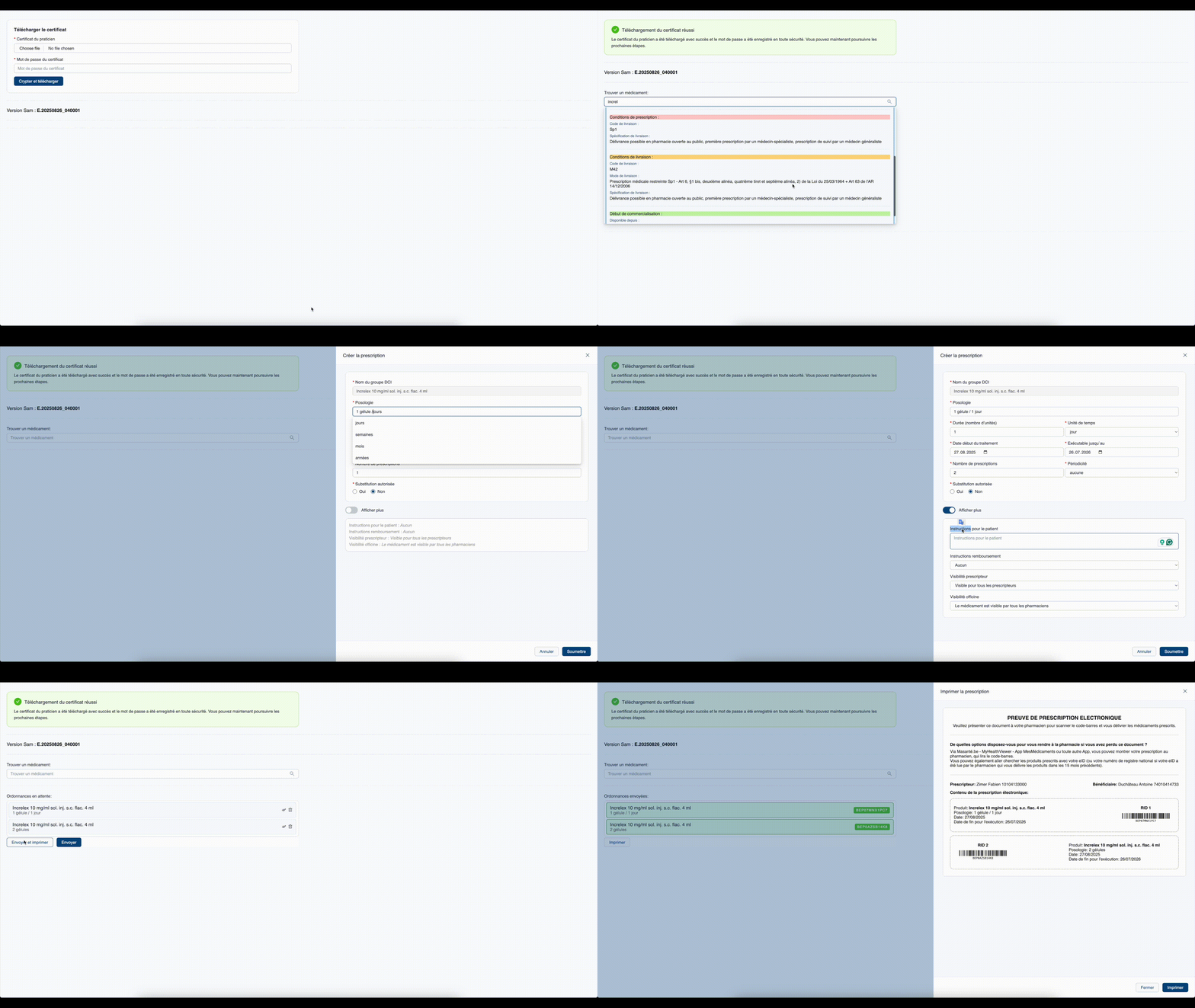
---
## How to Use the Cardinal Prescription Angular Component
This module allows you to search for medications, create prescriptions, and provide patients with printed copies.
---
## Main Components
The interface includes:
- **eHealth certificate upload** (to securely sign prescriptions)
- **Drug search** (by medication name)
- **List of search results** (medications, molecules, or homeopathic products)
- **Prescription form** (create or edit a prescription)
- **Prescription list** (all created or sent prescriptions)
- **Print window** (generate a patient copy)
---
## Searching for a Drug
1. Enter the **drug name** in the search bar.
2. The system will show a list of matching products.
Each result includes **short information** (if available):
- Label and active substance
- Price
- Icons with explanations, e.g.:
- Black triangle → additional monitoring
- Risk minimisation measures
- Doping / narcotic status
- Generic substitution required
- Temporary supply problem
- Start or end of commercialisation
- Supply and prescribing conditions
- Reimbursement status
You can also open **extended information**:
- Active substance(s)
- Drug group
- References (CBIP, patient leaflet, SPC, RMA, DHPC)
- Reimbursement, delivery terms, supply issues, commercialisation dates
---
## Creating a Prescription
To create a new prescription:
1. **Upload your eHealth certificate** and enter your password.
2. **Search** for the medication by name.
3. **Select** the correct drug from the results.
4. A prescription form will open.
**Required fields:**
- Drug name
- Dosage
- Duration (number of units)
- Start date of treatment
- End date (if applicable)
- Number of prescriptions (how many repeats)
- Permitted substitution (yes/no)
**Optional fields:**
- Patient instructions (e.g. “take after meals”)
- Reimbursement instructions
- Visibility options (for doctor or pharmacy)
5. Click **Save**.
6. To **send** the prescription, click **Edit → Send**.
7. To **print** a patient copy, click **Print → Confirm**.
---
## Prescription List
- Shows both **new** and **sent** prescriptions.
- Sent prescriptions include a **RID code** for identification.
---
👉 With these steps, you can quickly search, prescribe, and provide patients with the necessary documentation.