
Development (internal developer guide)
Quick Links
Overview: http://oil.axelspringer.com
Hub Deployment
To deploy the hub you need to deploy the project with an index.html loading the hub.[version].min.js
For compatibility with Internet Explorer 9+ you need to add the following header to the server response to allow 3rd party cookies for POI.
"p3p": "CP=\"IDC DSP COR ADM DEVi TAIi PSA PSD IVAi IVDi CONi HIS OUR IND CNT\""Tealium Deployment
For our PoC we decided to use Tealium to deliver our Javascript artefact to client browsers. To achieve this you have to follow some steps:
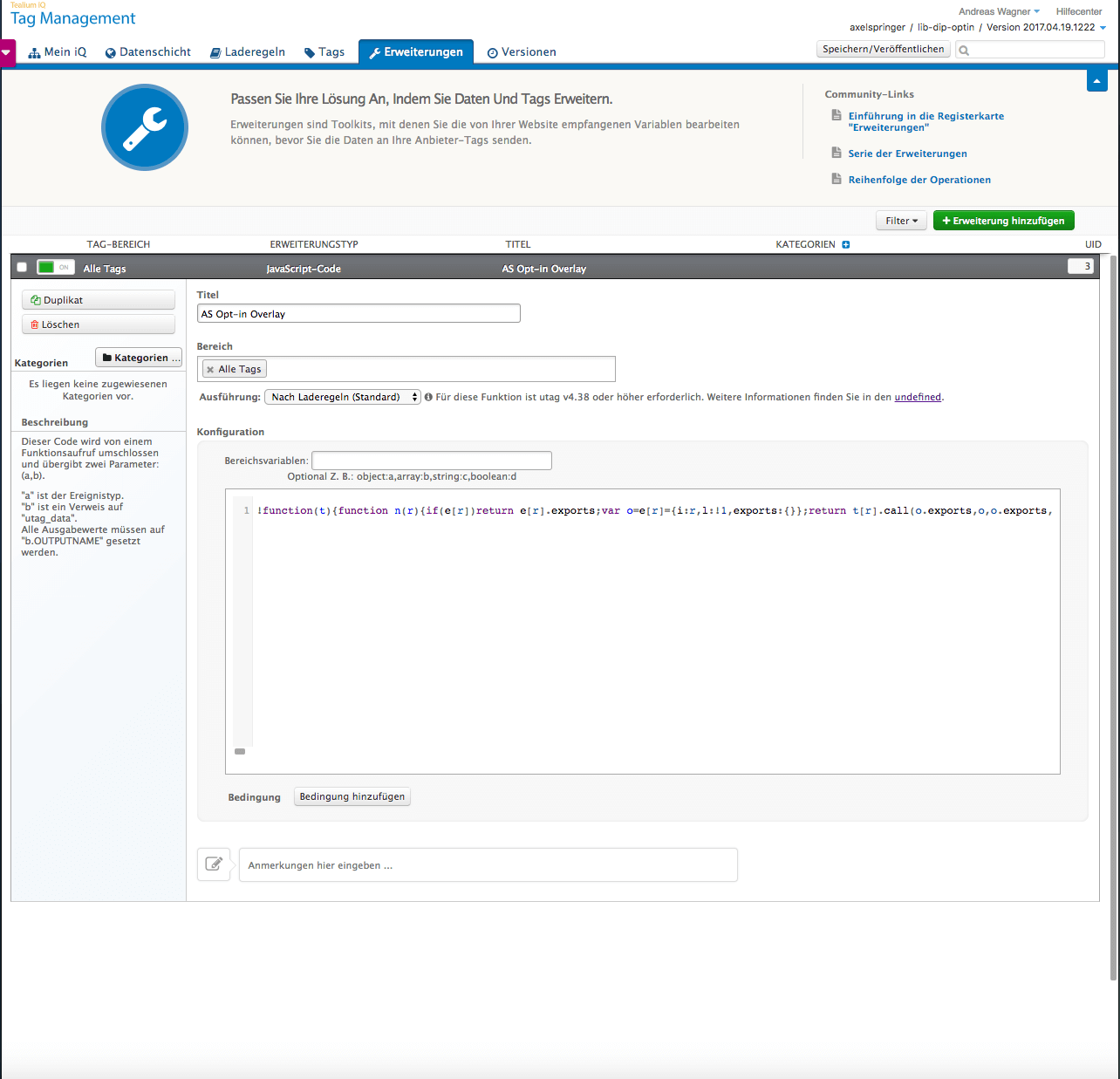
As a developer of Oil.js (see image below)
-
Open your Tealium lib profile and move to extensions
-
Open the predefined Javascript extension "AS Opt-in Overlay"
-
Some forms will show up, paste your code (release/oil.[version].min.js) in the "configuration" section
-
Save and publish your Tealium configuration changes to your desired stages (Dev, QA, Prod)
Please note that once published, your code will be delivered to all Tealium clients automatically. Tealium clients will be informed of your changes and need to publish/deploy their profile to activate your changes.
Locale configuration
Texts and labels shown by the Opt-In Layer are provided by the OIL Backend. This server application uses a PostgreSQL database to store texts and labels for different languages and variants. A REST service is provided that allows to request them and to add new ones.
The REST service documentation can be found here: https://oil-backend.herokuapp.com/oil/swagger-ui.html
Note: Adding new languages and variants is allowed for authorized users only.
Deprecated Label Configurations:
| Config Parameter | Default value |
|---|---|
label_button_yes_soi |
Yes |
label_button_yes_poi |
Yes for all |
label_intro_start |
We’re using cookies, read |
label_intro_end |
and please confirm. |
label_button_privacy |
more information |
label_later_heading |
|
label_later |
|
label_later_start |
|
label_later_end |
|
label_button_no |
|
privacy_page_url |
Deprecated Advanced Settings aka Cookie Preference Center
| Config Parameter | Default value [OIL_LABELS.ATTR_LABEL_ADVANCED_SETTINGS_HEADING]: 'Bitte wähle eine Datenschutzeinstellung aus:', [OIL_LABELS.ATTR_LABEL_ADVANCED_SETTINGS_TEXT]: '', [OIL_LABELS.ATTR_LABEL_ADVANCED_SETTINGS_ESSENTIAL_TEXT]: 'Nur erforderliche Cookies', [OIL_LABELS.ATTR_LABEL_ADVANCED_SETTINGS_ESSENTIAL_VERBOSE]: 'Diese Cookies sind für die grundlegenden Funktionen der Website erforderlich.', [OIL_LABELS.ATTR_LABEL_ADVANCED_SETTINGS_FUNCTIONAL_TEXT]: 'Funktionelle Cookies', [OIL_LABELS.ATTR_LABEL_ADVANCED_SETTINGS_FUNCTIONAL_VERBOSE]: 'Diese Cookies ermöglichen uns die Analyse der Website-Nutzung, damit wir deren Leistung messen und verbessern können.', [OIL_LABELS.ATTR_LABEL_ADVANCED_SETTINGS_ADVERTISING_TEXT]: 'Marketing-Cookies', [OIL_LABELS.ATTR_LABEL_ADVANCED_SETTINGS_ADVERTISING_VERBOSE]: 'Diese Cookies werden von Werbeagenturen verwendet, um Ihnen Werbung zu unterbreiten, die für Ihre Interessen relevant ist.', |
|---|
FYI: Cross-Origin Messaging
The postMessage() method lifts this restriction by providing a way to securely pass messages across domains. The postMessage() method accepts two parameters.
When a call to postMessage() is executed successfully a MessageEvent will be fired on the receiving window. You can use a standard event listener to watch for this event and execute some code when it occurs.
The event passed into the listener callback has a property called data that can be used to access the string or object that was sent by postMessage().
So on the OIL hub side an event listener is added:
window.addEventListener('message', (e) => {
  let data = e.data;
  if (parsedMessage) {
    if (parsedMessage.event && parsedMessage.event.indexOf('oil-') !== -1) {

      let event = parsedMessage.event,
        origin = parsedMessage.origin,
        payload = parsedMessage.payload,
        groupName = parsedMessage.group_name;

      switch (event) {
        case 'oil-poi-activate':
          logInfo('OIL Hub - activating POI ');
          logInfo('Using groupName:', groupName);
          logInfo('Using payload:', JSON.stringify(payload));
          setPoiCookie(groupName, payload);
          break;
        case 'oil-status-read':
          poiOptin = getPoiCookie(groupName);
          logInfo('OIL Hub - read the following poi status:', poiOptin.power_opt_in);
          parent.postMessage(JSON.stringify(poiOptin) || false, origin);
          break;
        case 'oil-poi-delete':
          logInfo('OIL Hub - remove POI cookie.');
          removeHubCookie(groupName);
          break;
        default:
          break;
      }
    }
});
At the subscriber side the postMessage happens to trigger an action on the hub:
      // see https://developer.mozilla.org/en-US/docs/Web/API/Window/postMessage#Syntax
      // MSIE needs Strings in postMessage
      let message = JSON.stringify({event: eventName, origin: origin, group_name: groupName, payload: payload});
      iframe.contentWindow.postMessage(message, hubDomain);
Now the subscriber can listen to messages from the hub:
window.addEventListener('message', (event) => {
      // only listen to our hub
      let hubOrigin = getHubOrigin();
      if (hubOrigin && hubOrigin.indexOf(event.origin) !== -1) {
        let message = typeof event.data !== 'object' ? JSON.parse(event.data) : event.data;
        logInfo('Message from hub received...', event.origin, message);
        removeMessageListener(handler);
        frameListenerRegistered = false;
        resolve(message);
      }
});