# vue-picture-swipe-control
the forked version vue-picture-swipe with the new events, additional control of vue instance and changed props with dynamic control inside the modal (using 'is' attribute - the feature will be realized a bit later). Original link: https://github.com/rap2hpoutre/vue-picture-swipe
# Vue Picture Swipe Gallery
[](https://app.codacy.com/app/rap2hpoutre/vue-picture-swipe?utm_source=github.com&utm_medium=referral&utm_content=rap2hpoutre/vue-picture-swipe&utm_campaign=badger)
[](https://www.npmjs.com/package/vue-picture-swipe)
[](https://www.npmjs.com/package/vue-picture-swipe)
[](http://packagequality.com/#?package=vue-picture-swipe)
[](https://vuejs.org/)
[](https://github.com/rap2hpoutre/vue-picture-swipe/blob/master/LICENSE)
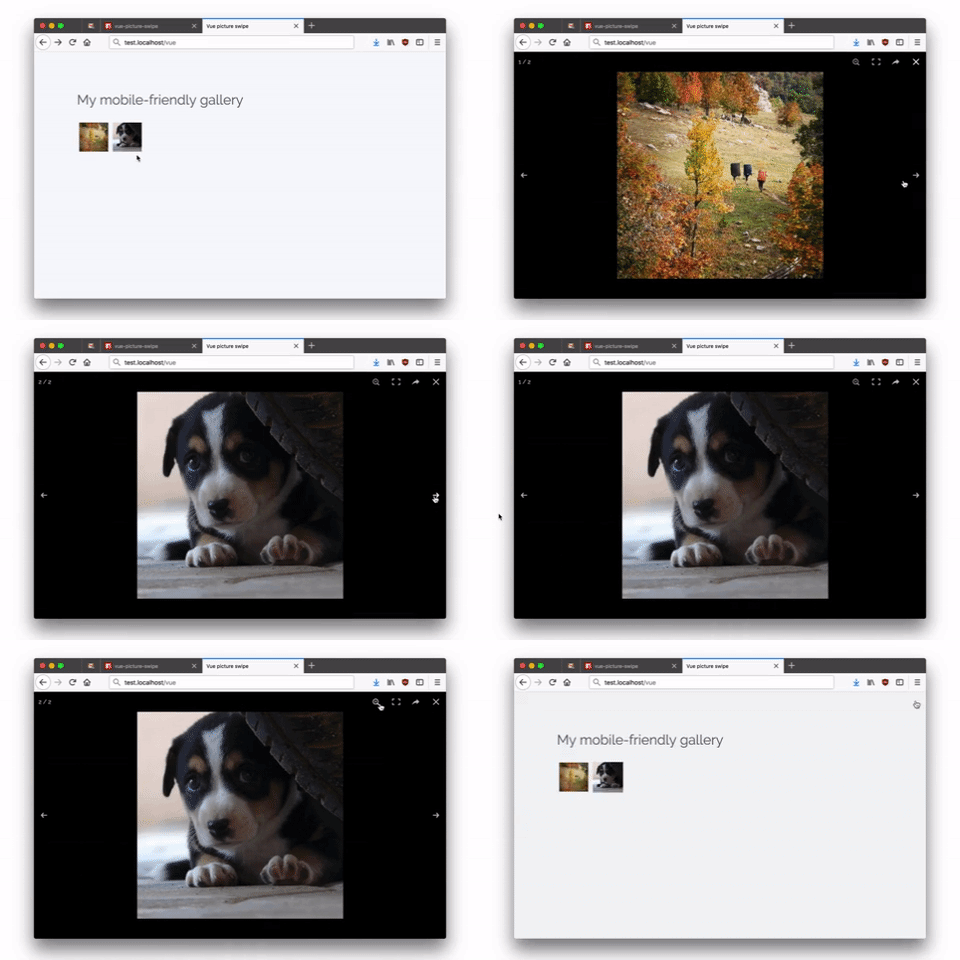
This component is a simple wrapper for the awesome [Photoswipe](http://photoswipe.com/).
It's a [Vue](https://vuejs.org/) plugin that displays a gallery of image with swipe function (and more).
Includes lazy (smart) loading (mobile friendly) and thumbnails.
## Demo
 ## Install
```bash
npm i @kalligator/vue-picture-swipe-control
```
## Usage
You can use it as you want. Here are some examples if you want to use it inline, or in a `.vue` file component or even with Laravel.
### Inline usage
You can using it inline:
```html
```
Just remember to register the component:
```javascript
import VuePictureSwipe from '@kalligator/vue-picture-swipe-control';
Vue.component('vue-picture-swipe', VuePictureSwipe);
new Vue({
el: '#app'
})
```
### Usage in another component
Create a component `Example.vue`. Then paste this:
```vue
```
The attrs 'w' and 'h' are not required now (Hooray!!!) (default w = 0; h = 0)
### Usage with Laravel
Edit `resources/assets/js/app.js` and add this just before the `new Vue` lines.
```javascript
import VuePictureSwipe from '@kalligator/vue-picture-swipe-control';
Vue.component('vue-picture-swipe', VuePictureSwipe);
```
Then run your watcher:
```sh
npm run watch
```
## Advanced usage
### PhotoSwipe options
Use `options` for [Photoswipe options](http://photoswipe.com/documentation/options.html).
```html
```
### PhotoSwipe instance
You can access the PhotoSwipe instance via setting a ref, the instance object is exposed as `pswp`.
```html
```
```js
// active only after the slide has opened.
// This behavior is inherited from the parent library and will be fixed a little later
this.$refs.pictureSwipe.pswp
```
### Events (the list will be upgraded a bit later)
| open | Attributes | Listen to | Description |
| --- | --- | --- | --- |
| Open | none | @open | Emitted after gallery opens |
| Close | none | @close | Emitted after gallery closes |
| beforeChange | none | @before-change | Emitted before the content is changed, but after navigation|
| afterChange | none | @after-change | Emitted after slides changed |
| Item removed | none | @removed | Emitted after slides has been removed. The event returns a removed index and full object|
## Why?
The original version did not have enough events and programmable methods for my project, even though the original library supports them. I decided that it would be easier to slightly update the already unsupported library for myself. I will be glad if it comes in handy too :) I will try to supplement it with my own features and features of the original library
## Install
```bash
npm i @kalligator/vue-picture-swipe-control
```
## Usage
You can use it as you want. Here are some examples if you want to use it inline, or in a `.vue` file component or even with Laravel.
### Inline usage
You can using it inline:
```html
```
Just remember to register the component:
```javascript
import VuePictureSwipe from '@kalligator/vue-picture-swipe-control';
Vue.component('vue-picture-swipe', VuePictureSwipe);
new Vue({
el: '#app'
})
```
### Usage in another component
Create a component `Example.vue`. Then paste this:
```vue
```
The attrs 'w' and 'h' are not required now (Hooray!!!) (default w = 0; h = 0)
### Usage with Laravel
Edit `resources/assets/js/app.js` and add this just before the `new Vue` lines.
```javascript
import VuePictureSwipe from '@kalligator/vue-picture-swipe-control';
Vue.component('vue-picture-swipe', VuePictureSwipe);
```
Then run your watcher:
```sh
npm run watch
```
## Advanced usage
### PhotoSwipe options
Use `options` for [Photoswipe options](http://photoswipe.com/documentation/options.html).
```html
```
### PhotoSwipe instance
You can access the PhotoSwipe instance via setting a ref, the instance object is exposed as `pswp`.
```html
```
```js
// active only after the slide has opened.
// This behavior is inherited from the parent library and will be fixed a little later
this.$refs.pictureSwipe.pswp
```
### Events (the list will be upgraded a bit later)
| open | Attributes | Listen to | Description |
| --- | --- | --- | --- |
| Open | none | @open | Emitted after gallery opens |
| Close | none | @close | Emitted after gallery closes |
| beforeChange | none | @before-change | Emitted before the content is changed, but after navigation|
| afterChange | none | @after-change | Emitted after slides changed |
| Item removed | none | @removed | Emitted after slides has been removed. The event returns a removed index and full object|
## Why?
The original version did not have enough events and programmable methods for my project, even though the original library supports them. I decided that it would be easier to slightly update the already unsupported library for myself. I will be glad if it comes in handy too :) I will try to supplement it with my own features and features of the original library