# ableton-copilot-mcp

<div align="center">
  <img src="https://img.shields.io/badge/Ableton%20Live-12-9cf" alt="Ableton Live Version">
  <img src="https://img.shields.io/badge/Node.js-20%2B-green" alt="Node.js Version">
  <img src="https://img.shields.io/badge/TypeScript-5.8.2-blue" alt="TypeScript Version">
  <img src="https://img.shields.io/badge/License-MIT-yellow" alt="License">
</div>

> An MCP (Model Context Protocol) server based on [ableton-js](https://github.com/leolabs/ableton-js) for real-time interaction and control with Ableton Live, dedicated to assisting music producers in music creation.

## 🚀 Features

### 🎵 Song Control
- Get basic song information (root note, scale name, tempo, song length, etc.)
- Get a list of all tracks
- Create MIDI, audio, and return tracks
- Delete and duplicate tracks

### 🎹 Track Management
- Get all clips in a track
- Create empty MIDI clips
- Set track properties (mute, color, name, arm, solo, etc.)
- Duplicate MIDI clips to specified tracks

### 🎼 Clip Operations
- Get clips in the piano roll view
- Get and manage all notes in a clip
- Add, delete, and replace notes in clips
- Set clip properties (name, color, looping, loop_start, loop_end, etc.)

### 🎧 Audio Operations
- Supports recording track content based on time range

## 📥 Installation

1. Install **Node.js**: Make sure the npx command is available. It's recommended to install the latest stable version from the [Node.js official website](https://nodejs.org/)
2. Install **MIDI Remote Scripts**: Follow the instructions from the [ableton-js](https://github.com/leolabs/ableton-js) project to install AbletonJS MIDI Remote Scripts to your Ableton Live

## 🔧 Usage

1. Ensure that Ableton Live is launched and running
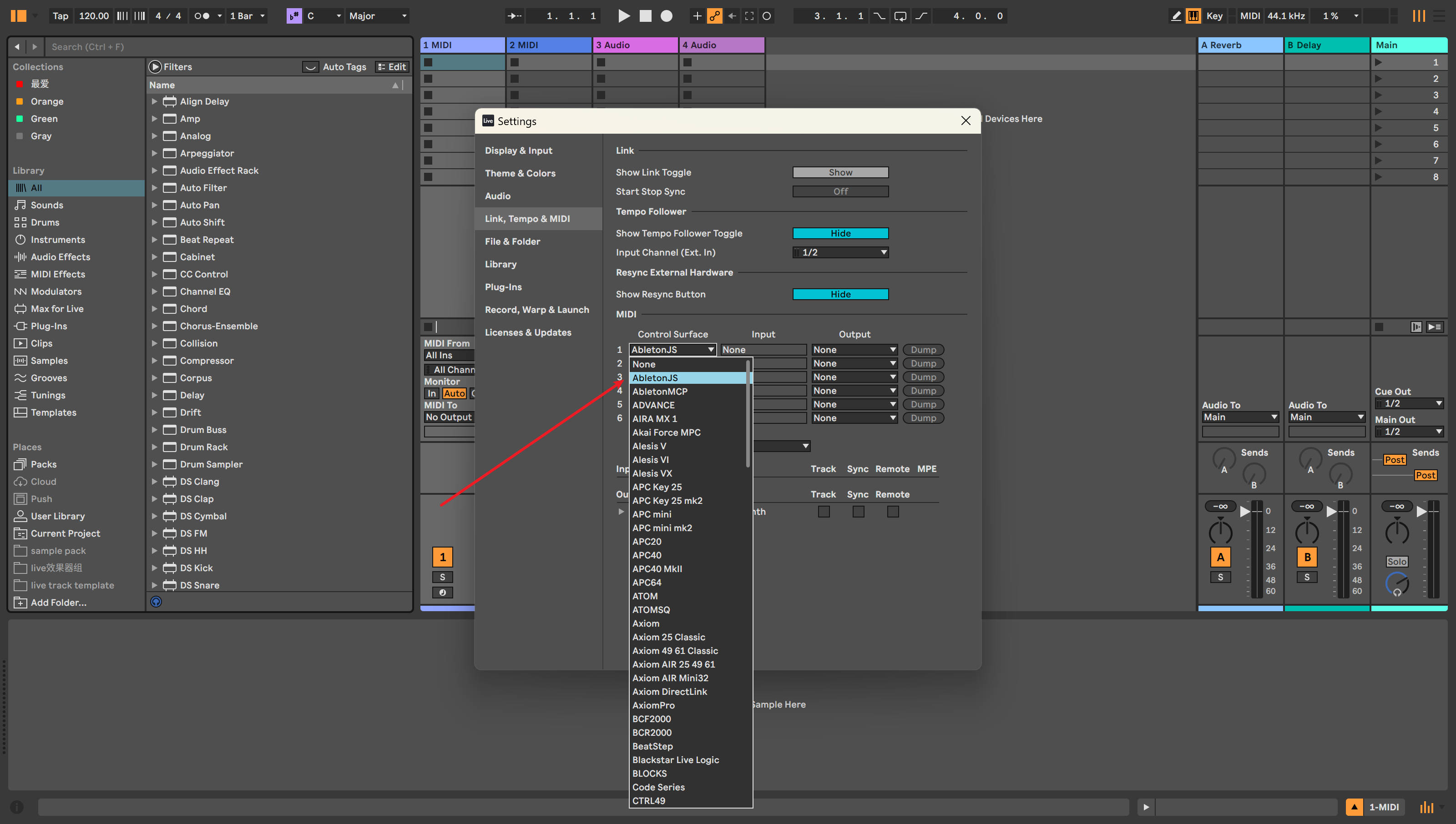
2. Make sure AbletonJS Control Surface is enabled in your configuration:
   > **Path**: Settings -> Link, Tempo & MIDI -> MIDI -> Control Surface

   <div align="center">
     <img src="./assets/images/setting.jpg" alt="Ableton Live MIDI Remote Scripts Configuration" width="80%" style="border-radius: 8px; box-shadow: 0 4px 8px rgba(0,0,0,0.1);">
     <p><em>Figure 1: Enabling AbletonJS Control Surface in Ableton Live</em></p>
   </div>

3. Connect using an MCP client, including but not limited to:
   - [Cursor](https://www.cursor.com)
   - [Cherry Studio](https://github.com/CherryHQ/cherry-studio)
   - Claude Desktop

### Cursor Configuration Example

Configure ableton-copilot-mcp in Cursor:

```json
"ableton-js-mcp": {
    "command": "npx",
    "args": [
        "-y",
        "ableton-copilot-mcp"
    ]
}
```

## ✅ Compatibility Testing

Compatibility primarily depends on the version support of the [ableton-js](https://github.com/leolabs/ableton-js) library.

| Ableton Live Version | Test Status |
| -------------------- | ----------- |
| 12.1.10              | ✅ Tested and working |
| 11.x                 | ⚠️ Not tested yet |
| 10.x                 | ⚠️ Not tested yet |

## 🤝 Contributing

Issues and contributions are welcome. Please submit issues or suggestions through [GitHub Issues](https://github.com/xiaolaa2/ableton-copilot-mcp/issues).

## 📄 License

This project is licensed under the [MIT License](./LICENSE).