# Dip Switch
An HTML representation of a dipswitch.
## Default usage
Import the dipswitch to your project:
```javascript
// ES6
import { dipswitch } from '@navelpluisje/pcb-components/src';
// Or for example an Electron project
const { dipswitch } = require('@navelpluisje/pcb-components/dist/umd');
// Then call the function. This will make the component avalable in the DOM
dipswitch();
```
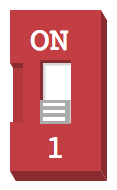
When included you can use the `np-dipswitch` tag to use it in your code. By default there will always be 1 switch.
```
```
This will generate the next switch:
## Value
The switches represent a binary value. When toggled `on` it is `1` and `0` otherwise. The value of the dip switch on the other hand is the decimal representation of the switches so when having 3 dips the results will look like:
* `000` => 0
* `001` => 1
* `010` => 2
* `011` => 3
* ...etc
The max value will always be `(2 ** n) - 1`, where n is the number of switches.
## Attributes
* `dips`: The number of switches you need
* `color`: The default color for the switch. This is the first parameter of the `hsl`-color, the color in degrees. ([More on HSL](https://developer.mozilla.org/en-US/docs/Web/CSS/color_value#hsl()))
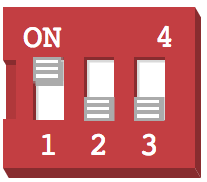
* `show-value`: Shows the value in the top-right corner of the switch
> An example with 3 'dips' and the show-value attribute set:
> ```html
> dips="3"
> show-value
> />
> ```
>
## Events
The dip switch has one event you can listen to: The `change` event. This works like the change event of any input-element. The current value of the dip switch is the value property of the event target.
```
document.querySelector('np-dipswitch')
.addEventListener(
'change',
(evt) => console.log(evt.target.value)
);
```
This will print the current value of the switch in the console