import "scroll-timeline-polyfill/dist/scroll-timeline.js";
import { Behaviour } from "../Component.js";
import { EventList } from "../EventList.js";
type ScrollFollowEvent = {
/** Event type */
type: "change";
/** Current scroll value */
value: number;
/** ScrollFollow component that raised the event */
component: ScrollFollow;
/** Call to prevent invocation of default (e.g. updating targets) */
preventDefault: () => void;
defaultPrevented: boolean;
};
/**
* The [ScrollFollow](https://engine.needle.tools/docs/api/ScrollFollow) component allows you to link the scroll position of the page (or a specific element) to one or more target objects.
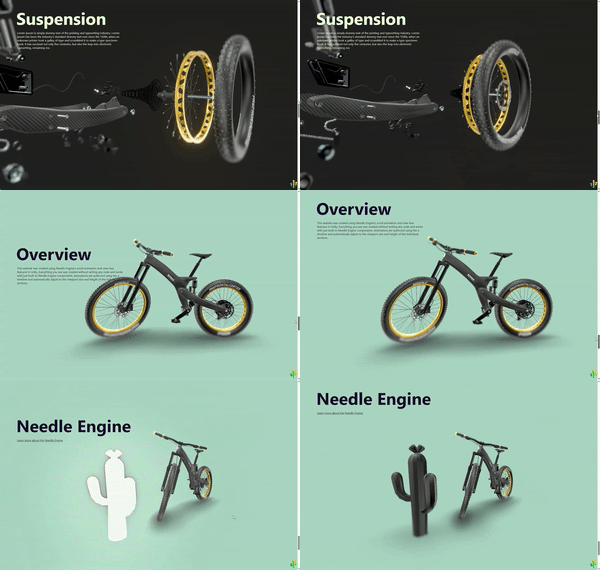
* This can be used to create scroll-based animations, audio playback, or other effects. For example you can link the scroll position to a timeline (PlayableDirector) to create scroll-based storytelling effects or to an Animator component to change the animation state based on scroll.
*
* 
* 
*
* Assign {@link target} objects to the component to have them updated based on the current scroll position (check the 'target' property for supported types).
*
* @link Example at https://scrollytelling-2-z23hmxby7c6x-u30ld.needle.run/
* @link Template at https://github.com/needle-engine/scrollytelling-template
* @link [Scrollytelling Bike Demo](https://scrollytelling-bike-z23hmxb2gnu5a.needle.run/)
*
* ## How to use with an Animator
* 1. Create an Animator component and set up a float parameter named "scroll".
* 2. Create transitions between animation states based on the "scroll" parameter (e.g. from 0 to 1).
* 3. Add a ScrollFollow component to the same GameObject or another GameObject in the scene.
* 4. Assign the Animator component to the ScrollFollow's target property.
*
* ## How to use with a PlayableDirector (timeline)
* 1. Create a PlayableDirector component and set up a timeline asset.
* 2. Add a ScrollFollow component to the same GameObject or another GameObject in the scene.
* 3. Assign the PlayableDirector component to the ScrollFollow's target property.
* 4. The timeline will now scrub based on the scroll position of the page.
* 5. (Optional) Add ScrollMarker markers to your HTML to define specific points in the timeline that correspond to elements on the page. For example:
* ```html
* Start of Timeline
* Middle of Timeline
* End of Timeline
* ```
*
* @summary Links scroll position to target objects
* @category Web
* @category Interaction
* @group Components
* @component
*/
export declare class ScrollFollow extends Behaviour {
/**
* Target object(s) to follow the scroll position of the page.
*
* Supported target types:
* - PlayableDirector (timeline), the scroll position will be mapped to the timeline time
* - Animator, the scroll position will be set to a float parameter named "scroll"
* - Animation, the scroll position will be mapped to the animation time
* - AudioSource, the scroll position will be mapped to the audio time
* - SplineWalker, the scroll position will be mapped to the position01 property
* - Light, the scroll position will be mapped to the intensity property
* - Object3D, the object will move vertically based on the scroll position
* - Any object with a `scroll` property (number or function)
*/
target: object[] | object | null;
/**
* Damping for the movement, set to 0 for instant movement
* @default 0
*/
damping: number;
/**
* If true, the scroll value will be inverted (e.g. scrolling down will result in a value of 0)
* @default false
*/
invert: boolean;
/**
* **Experimental - might change in future updates**
* If set, the scroll position will be read from the specified element instead of the window.
* Use a CSS selector to specify the element, e.g. `#my-scrollable-div` or `.scroll-container`.
* @default null
*/
htmlSelector: string | null;
mode: "window";
/**
* Event fired when the scroll position changes
*/
changed: EventList;
/**
* Current scroll value in "pages" (0 = top of page, 1 = bottom of page)
*/
get currentValue(): number;
private _current_value;
private _target_value;
private _appliedValue;
private _needsUpdate;
private _firstUpdate;
awake(): void;
/** @internal */
onEnable(): void;
/** @internal */
onDisable(): void;
/** @internal */
lateUpdate(): void;
private _lastSelectorValue;
private _lastSelectorElement;
private updateCurrentScrollValue;
private applyScroll;
private handleTimelineTarget;
}
declare global {
interface ViewTimeline {
axis: 'block' | 'inline';
currentTime: {
unit: 'seconds' | 'percent';
value: number;
};
duration: {
unit: 'seconds' | 'percent';
value: number;
};
source: Element | null;
}
}
export {};