import { Vector2 } from "three";
import { NEPointerEvent } from "../../engine/engine_input.js";
import { onStart } from "../../engine/engine_lifecycle_api.js";
import { addAttributeChangeCallback } from "../../engine/engine_utils.js";
import { Behaviour } from "../Component.js";
// Automatically add ClickThrough component if "clickthrough" attribute is present on the needle-engine element
onStart(ctx => {
const attribute = ctx.domElement.getAttribute("clickthrough");
if (clickthroughEnabled(attribute)) {
const comp = ctx.scene.addComponent(ClickThrough);
addAttributeChangeCallback(ctx.domElement, "clickthrough", () => {
const attribute = ctx.domElement.getAttribute("clickthrough");
comp.enabled = clickthroughEnabled(attribute);
});
}
function clickthroughEnabled(val: string | null) {
return val !== null && val !== "0" && val !== "false";
}
});
/**
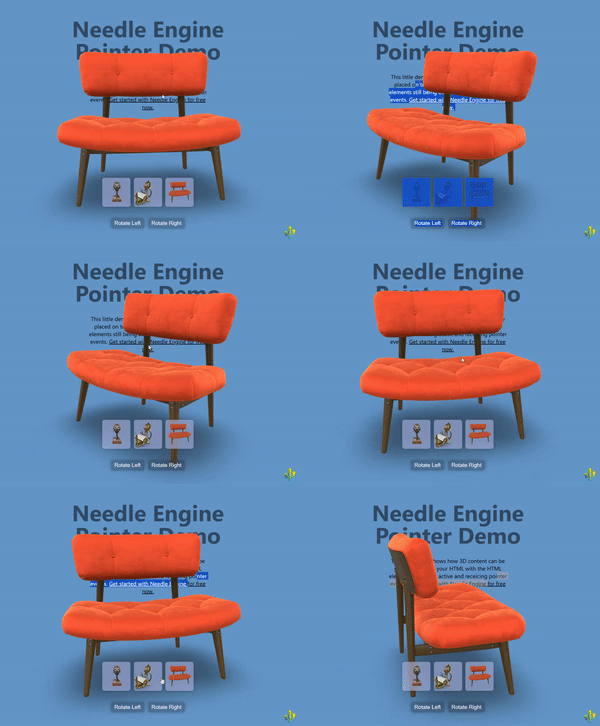
* [ClickThrough](https://engine.needle.tools/docs/api/ClickThrough) enables pointer events to pass through the 3D canvas to HTML elements positioned behind it.
* This component dynamically toggles `pointer-events: none` on the canvas when no 3D objects are hit by raycasts, allowing interaction with underlying HTML content.
*
* 
*
* **How It Works:**
* The component listens to pointer events and performs raycasts to detect if any 3D objects are under the cursor:
* - **When 3D objects are hit**: Canvas has `pointer-events: all` (normal 3D interaction)
* - **When nothing is hit**: Canvas has `pointer-events: none` (clicks pass through to HTML)
*
* This creates a seamless experience where users can interact with both 3D objects and underlying HTML elements
* through the same canvas area, depending on what's under the cursor.
*
* **Key Features:**
* - Automatic pointer event routing based on 3D hit detection
* - Works with both mouse and touch input
* - Supports transparent or semi-transparent canvases
* - Can be enabled via component or HTML attribute
* - No performance impact when disabled
* - Handles multi-touch scenarios correctly
*
* **Common Use Cases:**
* - Overlaying 3D elements on top of HTML content (headers, hero sections)
* - Creating "floating" 3D objects that don't block underlying UI
* - Mixed 2D/3D interfaces where both need to be interactive
* - Transparent 3D overlays on websites
* - Product showcases with clickable text/buttons beneath the 3D view
* - Interactive storytelling with mixed HTML and 3D content
*
* **Setup Options:**
*
* **Option 1: Component-based** (programmatic setup)
* ```ts
* // Add to any GameObject in your scene
* scene.addComponent(ClickThrough);
* ```
*
* **Option 2: HTML attribute** (declarative setup, recommended)
* ```html
*
*
*
*
*
*
* ```
*
* @example Basic transparent canvas over HTML
* ```html
*
*
*
*
*
Click me!
*
*
*
*
* ```
*
* @example Programmatic setup with toggle
* ```ts
* const clickthrough = scene.addComponent(ClickThrough);
*
* // Toggle clickthrough based on some condition
* function setInteractiveMode(mode: 'html' | '3d' | 'mixed') {
* switch(mode) {
* case 'html':
* clickthrough.enabled = false; // 3D blocks HTML
* break;
* case '3d':
* clickthrough.enabled = false; // 3D only
* break;
* case 'mixed':
* clickthrough.enabled = true; // Smart switching
* break;
* }
* }
* ```
*
* @example 3D header with clickable logo beneath
* ```html
*
*
* ```
*
* **Technical Notes:**
* - The component uses `pointer-events` CSS property for passthrough
* - Touch events are handled separately with a special timing mechanism
* - Only pointer ID 0 is tracked to avoid multi-touch issues
* - The component stores the previous `pointer-events` value and restores it on disable
* - Raycasts are performed on both `pointerdown` and `pointermove` events
*
* **Troubleshooting:**
* - Ensure your canvas has a transparent background if you want to see HTML beneath
* - Make sure 3D objects have colliders or are raycastable
* - If clicks aren't passing through, check that no invisible objects are blocking raycasts
* - HTML elements must be properly positioned (z-index) behind the canvas
*
* **Live Example:**
* - [3D Over HTML Sample on Stackblitz](https://stackblitz.com/~/github.com/needle-engine/sample-3d-over-html)
*
* @see {@link Context.input} - The input system used for pointer event detection
* @see {@link Context.physics.raycast} - Used to detect 3D object hits
* @see {@link ObjectRaycaster} - Controls which objects are raycastable
* @see {@link PointerEvents} - For more complex pointer interaction handling
* @see {@link NEPointerEvent} - The pointer event type used internally
*
* @summary Enables pointer events to pass through canvas to HTML elements behind it
* @category Web
* @group Components
* @component
*/
export class ClickThrough extends Behaviour {
private _previousPointerEvents: string = 'all';
onEnable() {
// Register for pointer down and pointer move event
this.context.input.addEventListener('pointerdown', this.onPointerEvent);
this.context.input.addEventListener('pointermove', this.onPointerEvent, {
queue: 100,
});
window.addEventListener("touchstart", this.onTouchStart, { passive: true });
window.addEventListener("touchend", this.onTouchEnd, { passive: true });
this._previousPointerEvents = this.context.domElement.style.pointerEvents;
}
onDisable() {
this.context.input.removeEventListener('pointerdown', this.onPointerEvent);
this.context.input.removeEventListener('pointermove', this.onPointerEvent);
window.removeEventListener("touchstart", this.onTouchStart);
window.removeEventListener("touchend", this.onTouchEnd);
this.context.domElement.style.pointerEvents = this._previousPointerEvents;
}
onPointerEnter() {
/** do nothing, necessary to raycast children */
}
private onPointerEvent = (evt: NEPointerEvent) => {
if (evt.pointerId > 0) return;
const intersections = evt.intersections;
// If we don't had any intersections during the 3D raycasting then we disable pointer events for the needle-engine element so that content BEHIND the 3D element can receive pointer events
if (intersections?.length <= 0) {
this.context.domElement.style.pointerEvents = 'none';
} else {
this.context.domElement.style.pointerEvents = 'all';
}
};
// #region Touch hack
private _touchDidHitAnything = false;
private onTouchStart = (_evt: TouchEvent) => {
const touch = _evt.touches[0];
if (!touch) return;
const ndx = touch.clientX / window.innerWidth * 2 - 1;
const ndy = -(touch.clientY / window.innerHeight) * 2 + 1;
// console.log(ndx, ndy);
const hits = this.context.physics.raycast({
screenPoint: new Vector2(ndx, ndy),
})
if (hits.length > 0) {
this._touchDidHitAnything = true;
}
}
private onTouchEnd = (_evt: TouchEvent) => {
const _didHit = this._touchDidHitAnything;
this._touchDidHitAnything = false;
setTimeout(() => {
if (_didHit) this.context.domElement.style.pointerEvents = 'all';
}, 100);
}
}