#  Canvas API for Angular
[](https://npmjs.com/package/@ng-web-apis/canvas)
[](https://bundlephobia.com/result?p=@ng-web-apis/canvas)
[](https://codecov.io/github/taiga-family/ng-web-apis/tree/main/libs/canvas)
This is a library for declarative use of [Canvas API](https://developer.mozilla.org/en-US/docs/Web/API/Canvas_API) with
Angular.
## Install
If you do not have [@ng-web-apis/common](https://github.com/taiga-family/ng-web-apis/tree/main/libs/common):
```bash
npm i @ng-web-apis/common
```
Now install the package:
```bash
npm i @ng-web-apis/canvas
```
## Usage
Add `WaCanvas` to your imports and use `waCanvas2d` directive on a
[`canvas`](https://developer.mozilla.org/en-US/docs/Web/HTML/Element/canvas) element to declare 2D context scope. Then
use other directives to draw inside [`canvas`](https://developer.mozilla.org/en-US/docs/Web/HTML/Element/canvas):
```html
```
Context directive supports the following attributes (see
[contextAttributes](https://developer.mozilla.org/en-US/docs/Web/API/HTMLCanvasElement/getContext) for 2D context):
- **`opaque`** — `boolean` attribute to set `alpha` to `false`
- **`desynchronized`** — `boolean` attribute to set `desynchronized` to `true`
## Directives
There are 3 types of directives you can use:
1. **Method** directives
2. **Properties** directives
3. **Path** directives
### Method
These are basic directives to draw things on `canvas`.
- [`canvas-clip-path`](https://developer.mozilla.org/en-US/docs/Web/API/CanvasRenderingContext2D/clip)
- [`canvas-draw-image`](https://developer.mozilla.org/en-US/docs/Web/API/CanvasRenderingContext2D/drawImage)
- [`canvas-text`](https://developer.mozilla.org/en-US/docs/Web/API/Canvas_API/Tutorial/Drawing_text)
- [`canvas-path`](https://developer.mozilla.org/en-US/docs/Web/API/Canvas_API/Tutorial/Drawing_shapes)
- You can use `path` input to pass [`Path2D`](https://developer.mozilla.org/en-US/docs/Web/API/Path2D)
### Properties
These directives set properties of
[`CanvasRenderingContext2D`](https://developer.mozilla.org/en-US/docs/Web/API/CanvasRenderingContext2D). They must be
applied to a method directive and they change context property before calling the method. They also restore default
value after drawing is performed so it will not interfere with the rest of picture.
- [`clip`](https://developer.mozilla.org/en-US/docs/Web/API/CanvasRenderingContext2D/clip)
- Either pass a reference to `canvas-clip-path` directive or a
[`Path2D`](https://developer.mozilla.org/en-US/docs/Web/API/Path2D) object
- [`clipFillRule`](https://developer.mozilla.org/en-US/docs/Web/API/CanvasRenderingContext2D/clip)
- [`direction`](https://developer.mozilla.org/en-US/docs/Web/API/CanvasRenderingContext2D/direction)
- [`fillStyle`](https://developer.mozilla.org/en-US/docs/Web/API/CanvasRenderingContext2D/fillStyle)
- [`filter`](https://developer.mozilla.org/en-US/docs/Web/API/CanvasRenderingContext2D/filter)
- [`imageSmoothingEnabled`](https://developer.mozilla.org/en-US/docs/Web/API/CanvasRenderingContext2D/imageSmoothingEnabled)
- [`imageSmoothingQuality`](https://developer.mozilla.org/en-US/docs/Web/API/CanvasRenderingContext2D/imageSmoothingQuality)
- [`font`](https://developer.mozilla.org/en-US/docs/Web/API/CanvasRenderingContext2D/font)
- [`globalAlpha`](https://developer.mozilla.org/en-US/docs/Web/API/CanvasRenderingContext2D/globalAlpha)
- [`globalCompositeOperation`](https://developer.mozilla.org/en-US/docs/Web/API/CanvasRenderingContext2D/globalCompositeOperation)
- [`lineCap`](https://developer.mozilla.org/en-US/docs/Web/API/CanvasRenderingContext2D/lineCap)
- [`lineDashOffset`](https://developer.mozilla.org/en-US/docs/Web/API/CanvasRenderingContext2D/lineDashOffset)
- [`lineJoin`](https://developer.mozilla.org/en-US/docs/Web/API/CanvasRenderingContext2D/lineJoin)
- [`lineWidth`](https://developer.mozilla.org/en-US/docs/Web/API/CanvasRenderingContext2D/lineWidth)
- [`lineDash`](https://developer.mozilla.org/en-US/docs/Web/API/CanvasRenderingContext2D/setLineDash)
- [`miterLimit`](https://developer.mozilla.org/en-US/docs/Web/API/CanvasRenderingContext2D/miterLimit)
- [`strokeStyle`](https://developer.mozilla.org/en-US/docs/Web/API/CanvasRenderingContext2D/strokeStyle)
- [`textAlign`](https://developer.mozilla.org/en-US/docs/Web/API/CanvasRenderingContext2D/textAlign)
- [`textBaseline`](https://developer.mozilla.org/en-US/docs/Web/API/CanvasRenderingContext2D/textBaseline)
- [`shadowBlur`](https://developer.mozilla.org/en-US/docs/Web/API/CanvasRenderingContext2D/shadowBlur)
- [`shadowColor`](https://developer.mozilla.org/en-US/docs/Web/API/CanvasRenderingContext2D/shadowColor)
- [`shadowOffsetX`](https://developer.mozilla.org/en-US/docs/Web/API/CanvasRenderingContext2D/shadowOffsetX)
- [`shadowOffsetY`](https://developer.mozilla.org/en-US/docs/Web/API/CanvasRenderingContext2D/shadowOffsetY)
- [`transform`](https://developer.mozilla.org/en-US/docs/Web/API/CanvasRenderingContext2D/setTransform)
### Path
You can use following directives to draw path on Canvas. They must be children of `canvas-path` directive:
- [`canvas-arc`](https://developer.mozilla.org/en-US/docs/Web/API/CanvasRenderingContext2D/arc)
- [`canvas-arc-to`](https://developer.mozilla.org/en-US/docs/Web/API/CanvasRenderingContext2D/arcTo)
- [`canvas-bezier-curve-to`](https://developer.mozilla.org/en-US/docs/Web/API/CanvasRenderingContext2D/bezierCurveTo)
- [`canvas-ellipse`](https://developer.mozilla.org/en-US/docs/Web/API/CanvasRenderingContext2D/ellipse)
- [`canvas-line-to`](https://developer.mozilla.org/en-US/docs/Web/API/CanvasRenderingContext2D/lineTo)
- [`canvas-move-to`](https://developer.mozilla.org/en-US/docs/Web/API/CanvasRenderingContext2D/moveTo)
- [`canvas-quadratic-curve-to`](https://developer.mozilla.org/en-US/docs/Web/API/CanvasRenderingContext2D/quadraticCurveTo)
- [`canvas-rect`](https://developer.mozilla.org/en-US/docs/Web/API/CanvasRenderingContext2D/rect)
### Example
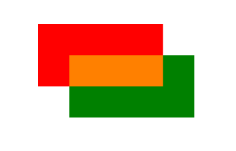
Combining properties, method and path directives can be examined on the following case. Consider drawing two rectangles
with native commands:
```ts
function drawTwoRectangles(context) {
context.beginPath();
context.fillStyle = 'red';
context.rect(0, 0, 100, 50);
context.fill();
context.beginPath();
context.fillStyle = 'green';
context.globalCompositeOperation = 'screen';
context.rect(25, 25, 100, 50);
context.fill();
context.fillStyle = '#000';
context.globalCompositeOperation = 'source-over';
}
```
This is equivalent to the following HTML
```html
```
And both will give you this result:
[](https://postimg.cc/7b4QWChS)
## Pipes
You can use [Pipes](https://angular.io/guide/pipes) to create some of the classes, required for particular Canvas
operations:
- `gradient` to create [CanvasGradient](https://developer.mozilla.org/en-US/docs/Web/API/CanvasGradient)
- `path` to create [Path2D](https://developer.mozilla.org/en-US/docs/Web/API/Path2D)
- `pattern` to create [CanvasPattern](https://developer.mozilla.org/en-US/docs/Web/API/CanvasPattern)
- `rad` to convert degrees into radians
- `transform` to convert CSS transform string into
[DOMMatrix](https://developer.mozilla.org/en-US/docs/Web/API/DOMMatrix/DOMMatrix)
## Notes
- Performance-wise it would of course be slower than performing imperative commands and optimizing them manually. But
unless you are making a video game with heavy render cycle this shouldn't be noticeable.
- Unlike raw canvas, default stroke color is transparent to align behavior with SVG.
## See also
Other [Web APIs for Angular](https://taiga-family.github.io/ng-web-apis/) by
[@ng-web-apis](https://github.com/taiga-family/ng-web-apis)