import { AbstractClient } from "../../../common/abstract_client";
import { ClientConfig } from "../../../common/interface";
import { DescribePersonCertificateResponse, CreateSealRequest, ModifyIntegrationDepartmentResponse, CancelFlowResponse, DescribeFlowEvidenceReportRequest, UpdateIntegrationEmployeesResponse, CreatePreparedPersonalEsignRequest, DescribeIntegrationDepartmentsResponse, DeleteExtendedServiceAuthInfosResponse, CreateFlowApproversResponse, DescribeFileUrlsResponse, CreateExtendedServiceAuthInfosRequest, ModifyApplicationCallbackInfoResponse, CreateMultiFlowSignQRCodeResponse, DescribeThirdPartyAuthCodeResponse, DisableUserAutoSignResponse, CancelUserAutoSignEnableUrlResponse, BindEmployeeUserIdWithClientOpenIdResponse, CreateIntegrationEmployeesRequest, DescribeIntegrationRolesRequest, CreateFlowEvidenceReportRequest, StartFlowResponse, CreateBatchQuickSignUrlResponse, CreateIntegrationRoleRequest, DeleteIntegrationRoleUsersResponse, CreateConvertTaskApiRequest, DeleteIntegrationEmployeesResponse, CreateBatchSignUrlResponse, CreateFlowRemindsResponse, DescribeOrganizationGroupOrganizationsRequest, CreateFlowGroupByFilesRequest, DescribeFlowComponentsResponse, DescribeFlowEvidenceReportResponse, DeleteSealPoliciesRequest, CreateFlowGroupByTemplatesResponse, CreateDocumentResponse, DescribeIntegrationEmployeesRequest, CreateIntegrationUserRolesResponse, CreateFlowRequest, CreateSchemeUrlRequest, DeleteIntegrationDepartmentResponse, DescribeThirdPartyAuthCodeRequest, UnbindEmployeeUserIdWithClientOpenIdResponse, CreateReleaseFlowResponse, CreateWebThemeConfigResponse, BindEmployeeUserIdWithClientOpenIdRequest, CreateOrganizationInfoChangeUrlResponse, DescribeFlowBriefsResponse, CreateIntegrationDepartmentResponse, DescribeFlowTemplatesRequest, DeleteSealPoliciesResponse, DescribeUserAutoSignStatusResponse, CreateUserAutoSignSealUrlResponse, CreatePersonAuthCertificateImageResponse, CreateBatchCancelFlowUrlResponse, CreateSealPolicyResponse, DisableUserAutoSignRequest, DescribeIntegrationEmployeesResponse, CreateConvertTaskApiResponse, CreateFlowSignReviewRequest, UnbindEmployeeUserIdWithClientOpenIdRequest, CreateSchemeUrlResponse, CreateFlowByFilesRequest, CreateFlowSignUrlResponse, DescribeFileUrlsRequest, CreateUserAutoSignSealUrlRequest, CreateFlowApproversRequest, ModifyIntegrationRoleResponse, CreateFlowEvidenceReportResponse, CreateIntegrationRoleResponse, DescribeFlowComponentsRequest, CreateIntegrationDepartmentRequest, CreateDocumentRequest, CreatePreparedPersonalEsignResponse, DescribeOrganizationSealsResponse, CreateEmbedWebUrlRequest, DeleteIntegrationEmployeesRequest, GetTaskResultApiRequest, ModifyIntegrationRoleRequest, CreateFlowGroupByFilesResponse, CreateIntegrationEmployeesResponse, DeleteIntegrationRoleUsersRequest, CreateFlowSignUrlRequest, CreateReleaseFlowRequest, CreateIntegrationUserRolesRequest, CreatePersonAuthCertificateImageRequest, CreateFlowByFilesResponse, UploadFilesResponse, VerifyPdfRequest, CreateFlowSignReviewResponse, ModifyIntegrationDepartmentRequest, CreateUserAutoSignEnableUrlRequest, CreateOrganizationBatchSignUrlResponse, CancelUserAutoSignEnableUrlRequest, CreateExtendedServiceAuthInfosResponse, CreateWebThemeConfigRequest, CreateOrganizationBatchSignUrlRequest, CreatePrepareFlowResponse, GetTaskResultApiResponse, CancelMultiFlowSignQRCodeRequest, DeleteIntegrationDepartmentRequest, ModifyApplicationCallbackInfoRequest, StartFlowRequest, CreateSealResponse, CreatePrepareFlowRequest, CreateEmbedWebUrlResponse, CreateSealPolicyRequest, DescribeOrganizationSealsRequest, CancelFlowRequest, DescribeExtendedServiceAuthInfosRequest, DescribeIntegrationRolesResponse, CreateBatchSignUrlRequest, CreateFlowRemindsRequest, UpdateIntegrationEmployeesRequest, DescribeFlowBriefsRequest, CreateFlowGroupByTemplatesRequest, DescribeBillUsageDetailResponse, CreateUserAutoSignEnableUrlResponse, VerifyPdfResponse, DescribeBillUsageDetailRequest, DescribeFlowTemplatesResponse, UploadFilesRequest, DescribePersonCertificateRequest, CreateBatchCancelFlowUrlRequest, CreateMultiFlowSignQRCodeRequest, DescribeFlowInfoRequest, DeleteExtendedServiceAuthInfosRequest, DescribeIntegrationDepartmentsRequest, DescribeFlowInfoResponse, CancelMultiFlowSignQRCodeResponse, CreateFlowResponse, DescribeUserAutoSignStatusRequest, CreateBatchQuickSignUrlRequest, CreateOrganizationInfoChangeUrlRequest, DescribeOrganizationGroupOrganizationsResponse, DescribeExtendedServiceAuthInfosResponse } from "./ess_models";
/**
 * ess client
 * @class
 */
export declare class Client extends AbstractClient {
    constructor(clientConfig: ClientConfig);
    /**
     * 该接口用于发起合同后，生成个人用户的批量签署链接, 暂时不支持企业端签署。
**注意：**
1. 该接口目前仅支持签署人类型是**个人签署方的批量签署场景**(ApproverType=1)。
2. 该接口可生成批量签署链接的C端签署人**必须仅有手写签名和时间类型的签署控件**，**不支持填写控件** 。
3. 请确保C端签署人在批量签署合同中**为待签署状态**，如需顺序签署请待前一位参与人签署完成后，再创建该C端用户的签署链接。
4. 该签署链接**有效期为30分钟**，过期后将失效，如需签署可重新创建批量签署链接 。
5. 该接口返回的签署链接适用于APP集成的场景，支持APP打开或浏览器直接打开，**不支持微信小程序嵌入**。
跳转到小程序的实现，参考微信官方文档(分为<a href="https://developers.weixin.qq.com/miniprogram/dev/api/navigate/wx.navigateToMiniProgram.html">全屏</a>、<a href="https://developers.weixin.qq.com/miniprogram/dev/framework/open-ability/openEmbeddedMiniProgram.html">半屏</a>两种方式)，如何配置也可以请参考: <a href="https://qian.tencent.com/developers/company/openwxminiprogram">跳转电子签小程序配置</a>。
6. 因h5涉及人脸身份认证能力基于慧眼人脸核身，对Android和iOS系统均有一定要求， 因此<font color='red'>App嵌入H5签署合同需要按照慧眼提供的<a href="https://cloud.tencent.com/document/product/1007/61076">慧眼人脸核身兼容性文档</a>做兼容性适配</font>。
     */
    CreateBatchQuickSignUrl(req: CreateBatchQuickSignUrlRequest, cb?: (error: string, rep: CreateBatchQuickSignUrlResponse) => void): Promise<CreateBatchQuickSignUrlResponse>;
    /**
     * 此接口用于查询合同流程的详情信息，支持查询多个（数量不能超过100）。

适用场景：可用于主动查询某个合同详情信息。
     */
    DescribeFlowInfo(req: DescribeFlowInfoRequest, cb?: (error: string, rep: DescribeFlowInfoResponse) => void): Promise<DescribeFlowInfoResponse>;
    /**
     * 新增/删除企业应用集成中的回调配置。
新增回调配置只会增加不存在的CallbackUrl；删除操作将针对找到的相同CallbackUrl的配置进行删除。
请确保回调地址能够接收并处理 HTTP POST 请求，并返回状态码 200 以表示处理正常。
更多回调相关的说明参考文档[回调通知能力](https://qian.tencent.com/developers/company/callback_types_v2)
     */
    ModifyApplicationCallbackInfo(req: ModifyApplicationCallbackInfoRequest, cb?: (error: string, rep: ModifyApplicationCallbackInfoResponse) => void): Promise<ModifyApplicationCallbackInfoResponse>;
    /**
     * 此接口用于启动流程。它是模板发起合同的最后一步。
在[创建签署流程](https://qian.tencent.com/developers/companyApis/startFlows/CreateFlow)和[创建电子文档](https://qian.tencent.com/developers/companyApis/startFlows/CreateDocument)之后，用于开始整个合同流程,  推进流程进入到签署环节。

<svg id="SvgjsSvg1077" width="304" height="505" xmlns="http://www.w3.org/2000/svg" version="1.1" xmlns:xlink="http://www.w3.org/1999/xlink" xmlns:svgjs="http://svgjs.com/svgjs"><defs id="SvgjsDefs1078"><pattern patternUnits="userSpaceOnUse" id="pattern_mark_0" width="300" height="300"><text x="150" y="100" fill="rgba(229,229,229,0.8)" font-size="18" transform="rotate(-45, 150, 150)" style="dominant-baseline: middle; text-anchor: middle;"></text></pattern><pattern patternUnits="userSpaceOnUse" id="pattern_mark_1" width="300" height="300"><text x="150" y="200" fill="rgba(229,229,229,0.8)" font-size="18" transform="rotate(-45, 150, 150)" style="dominant-baseline: middle; text-anchor: middle;"></text></pattern><marker id="SvgjsMarker1096" markerWidth="12" markerHeight="8" refX="9" refY="4" viewBox="0 0 12 8" orient="auto" markerUnits="userSpaceOnUse" stroke-dasharray="0,0"><path id="SvgjsPath1097" d="M0,0 L12,4 L0,8 L0,0" fill="#323232" stroke="#323232" stroke-width="1"></path></marker><marker id="SvgjsMarker1108" markerWidth="12" markerHeight="8" refX="9" refY="4" viewBox="0 0 12 8" orient="auto" markerUnits="userSpaceOnUse" stroke-dasharray="0,0"><path id="SvgjsPath1109" d="M0,0 L12,4 L0,8 L0,0" fill="#323232" stroke="#323232" stroke-width="1"></path></marker><marker id="SvgjsMarker1120" markerWidth="12" markerHeight="8" refX="9" refY="4" viewBox="0 0 12 8" orient="auto" markerUnits="userSpaceOnUse" stroke-dasharray="0,0"><path id="SvgjsPath1121" d="M0,0 L12,4 L0,8 L0,0" fill="#323232" stroke="#323232" stroke-width="1"></path></marker><marker id="SvgjsMarker1140" markerWidth="12" markerHeight="8" refX="9" refY="4" viewBox="0 0 12 8" orient="auto" markerUnits="userSpaceOnUse" stroke-dasharray="0,0"><path id="SvgjsPath1141" d="M0,0 L12,4 L0,8 L0,0" fill="#323232" stroke="#323232" stroke-width="1"></path></marker></defs><rect id="svgbackgroundid" width="304" height="505" fill="transparent"></rect><rect id="SvgjsRect1080" width="304" height="505" fill="url(#pattern_mark_0)"></rect><rect id="SvgjsRect1081" width="304" height="505" fill="url(#pattern_mark_1)"></rect><g id="SvgjsG1082" transform="translate(58,121)"><path id="SvgjsPath1083" d="M 0 0L 221 0L 221 262L 0 262Z" stroke-dasharray="3,4" stroke="rgba(33,41,48,1)" stroke-width="1" fill-opacity="1" fill="#ffffff"></path><g id="SvgjsG1084"><text id="SvgjsText1085" font-family="微软雅黑" text-anchor="middle" font-size="13px" width="201px" fill="#323232" font-weight="400" align="middle" lineHeight="125%" anchor="middle" family="微软雅黑" size="13px" weight="400" font-style="" opacity="1" y="120.375" transform="rotate(0)"></text></g></g><g id="SvgjsG1086" transform="translate(88,140.00000000000006)"><path id="SvgjsPath1087" d="M 0 0L 161 0L 161 48L 0 48Z" stroke="rgba(86,146,48,1)" stroke-width="1" fill-opacity="1" fill="#e7ebed"></path><g id="SvgjsG1088"><text id="SvgjsText1089" font-family="微软雅黑" text-anchor="middle" font-size="13px" width="141px" fill="#323232" font-weight="400" align="middle" lineHeight="125%" anchor="middle" family="微软雅黑" size="13px" weight="400" font-style="" opacity="1" y="4.875" transform="rotate(0)"><tspan id="SvgjsTspan1090" dy="16" x="80.5"><tspan id="SvgjsTspan1091" style="text-decoration:;fill: rgb(28, 30, 33);">CreateFlow</tspan></tspan><tspan id="SvgjsTspan1092" dy="16" x="80.5"><tspan id="SvgjsTspan1093" style="text-decoration:;">创建签署流程</tspan></tspan></text></g></g><g id="SvgjsG1094"><path id="SvgjsPath1095" d="M168.5 188.50000000000006L168.5 200.83333333333337L168.5 200.83333333333337L168.5 211.86666666666667" stroke="#323232" stroke-width="1" fill="none" marker-end="url(#SvgjsMarker1096)"></path></g><g id="SvgjsG1098" transform="translate(104.25,213.66666666666669)"><path id="SvgjsPath1099" d="M 0 0L 128.5 0L 128.5 55L 0 55Z" stroke="rgba(86,146,48,1)" stroke-width="1" fill-opacity="1" fill="#e7ebed"></path><g id="SvgjsG1100"><text id="SvgjsText1101" font-family="微软雅黑" text-anchor="middle" font-size="13px" width="109px" fill="#323232" font-weight="400" align="middle" lineHeight="125%" anchor="middle" family="微软雅黑" size="13px" weight="400" font-style="" opacity="1" y="8.375" transform="rotate(0)"><tspan id="SvgjsTspan1102" dy="16" x="64.5"><tspan id="SvgjsTspan1103" style="text-decoration:;fill: rgb(28, 30, 33);">CreateDocument</tspan></tspan><tspan id="SvgjsTspan1104" dy="16" x="64.5"><tspan id="SvgjsTspan1105" style="text-decoration:;">创建电子文档</tspan></tspan></text></g></g><g id="SvgjsG1106"><path id="SvgjsPath1107" d="M168.5 269.16666666666674L168.5 281.5L168.5 281.5L168.5 292.5333333333334" stroke="#323232" stroke-width="1" fill="none" marker-end="url(#SvgjsMarker1108)"></path></g><g id="SvgjsG1110" transform="translate(96.75,294.33333333333337)"><path id="SvgjsPath1111" d="M 0 0L 143.5 0L 143.5 65L 0 65Z" stroke="rgba(86,146,48,1)" stroke-width="1" fill-opacity="1" fill="#e7ebed"></path><g id="SvgjsG1112"><text id="SvgjsText1113" font-family="微软雅黑" text-anchor="middle" font-size="13px" width="124px" fill="#323232" font-weight="400" align="middle" lineHeight="125%" anchor="middle" family="微软雅黑" size="13px" weight="400" font-style="" opacity="1" y="13.375" transform="rotate(0)"><tspan id="SvgjsTspan1114" dy="16" x="72"><tspan id="SvgjsTspan1115" style="text-decoration:;fill: rgb(28, 30, 33);">StartFlow</tspan></tspan><tspan id="SvgjsTspan1116" dy="16" x="72"><tspan id="SvgjsTspan1117" style="text-decoration:;">发起签署流程</tspan></tspan></text></g></g><g id="SvgjsG1118"><path id="SvgjsPath1119" d="M168.5 359.83333333333337L168.5 392.16666666666674L168.5 392.16666666666674L168.5 423.20000000000005" stroke="#323232" stroke-width="1" fill="none" marker-end="url(#SvgjsMarker1120)"></path></g><g id="SvgjsG1122" transform="translate(106.25,425)"><path id="SvgjsPath1123" d="M 0 0L 124.5 0L 124.5 55L 0 55Z" stroke="rgba(33,41,48,1)" stroke-width="1" fill-opacity="1" fill="#ffffff"></path><g id="SvgjsG1124"><text id="SvgjsText1125" font-family="微软雅黑" text-anchor="middle" font-size="13px" width="105px" fill="#323232" font-weight="400" align="middle" lineHeight="125%" anchor="middle" family="微软雅黑" size="13px" weight="400" font-style="" opacity="1" y="8.375" transform="rotate(0)"><tspan id="SvgjsTspan1126" dy="16" x="62.5"><tspan id="SvgjsTspan1127" style="text-decoration:;">开始签署</tspan></tspan><tspan id="SvgjsTspan1128" dy="16" x="62.5"><tspan id="SvgjsTspan1129" style="text-decoration:;">(小程序/H5等)</tspan></tspan></text></g></g><g id="SvgjsG1130" transform="translate(120.5,25)"><path id="SvgjsPath1131" d="M 0 0L 96 0L 96 54L 0 54Z" stroke="rgba(33,41,48,1)" stroke-width="1" fill-opacity="1" fill="#ffffff"></path><g id="SvgjsG1132"><text id="SvgjsText1133" font-family="微软雅黑" text-anchor="middle" font-size="13px" width="76px" fill="#323232" font-weight="400" align="middle" lineHeight="125%" anchor="middle" family="微软雅黑" size="13px" weight="400" font-style="" opacity="1" y="7.875" transform="rotate(0)"><tspan id="SvgjsTspan1134" dy="16" x="48"><tspan id="SvgjsTspan1135" style="text-decoration:;">控制台创建</tspan></tspan><tspan id="SvgjsTspan1136" dy="16" x="48"><tspan id="SvgjsTspan1137" style="text-decoration:;">模板</tspan></tspan></text></g></g><g id="SvgjsG1138"><path id="SvgjsPath1139" d="M168.5 79.5L168.5 109.5L168.5 109.5L168.5 138.20000000000005" stroke="#323232" stroke-width="1" fill="none" marker-end="url(#SvgjsMarker1140)"></path></g><g id="SvgjsG1142" transform="translate(25,114)"><path id="SvgjsPath1143" d="M 0 0L 100 0L 100 40L 0 40Z" stroke="none" fill="none"></path><g id="SvgjsG1144"><text id="SvgjsText1145" font-family="微软雅黑" text-anchor="middle" font-size="13px" width="100px" fill="#323232" font-weight="400" align="middle" lineHeight="125%" anchor="middle" family="微软雅黑" size="13px" weight="400" font-style="" opacity="1" y="9.375" transform="rotate(0)"><tspan id="SvgjsTspan1146" dy="16" x="50"><tspan id="SvgjsTspan1147" style="text-decoration:;">API</tspan></tspan></text></g></g></svg>
     */
    StartFlow(req: StartFlowRequest, cb?: (error: string, rep: StartFlowResponse) => void): Promise<StartFlowResponse>;
    /**
     * 用于撤销合同流程<br/>
适用场景：如果某个合同流程当前至少还有一方没有签署，则可通过该接口取消该合同流程。常用于合同发错、内容填错，需要及时撤销的场景。<br/>

注:
`如果合同流程中的参与方均已签署完毕，则无法通过该接口撤销合同，`签署完毕的合同需要双方走解除流程将合同作废，可以参考<a href="https://qian.tencent.com/developers/companyApis/operateFlows/CreateReleaseFlow" target="_blank">发起解除合同流程</a>接口。
     */
    CancelFlow(req: CancelFlowRequest, cb?: (error: string, rep: CancelFlowResponse) => void): Promise<CancelFlowResponse>;
    /**
     * 此接口（DescribeFlowTemplates）用于查询本企业模板列表信息。


**适用场景**
该接口常用来配合<a href="https://qian.tencent.com/developers/companyApis/startFlows/CreateDocument" target="_blank">模板发起合同-创建电子文档</a>接口，作为创建电子文档的前置接口使用。
通过此接口查询到模板信息后，再通过调用创建电子文档接口，指定模板ID，指定模板中需要的填写控件内容等，完成电子文档的创建。

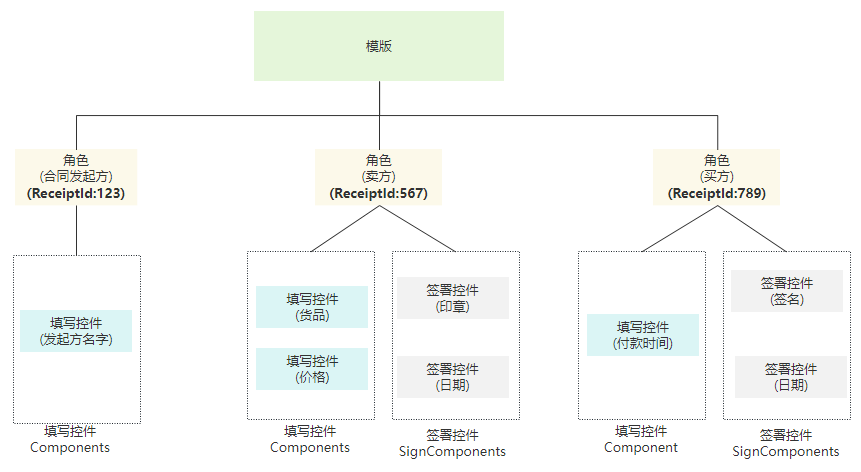
**一个模板通常会包含以下结构信息**

- 模板模板ID, 模板名字等基本信息
- 发起方参与信息Promoter、签署参与方 Recipients，后者会在模板发起合同时用于指定参与方
- 发起方和签署方的填写控件 Components
- 签署方的签署控件 SignComponents
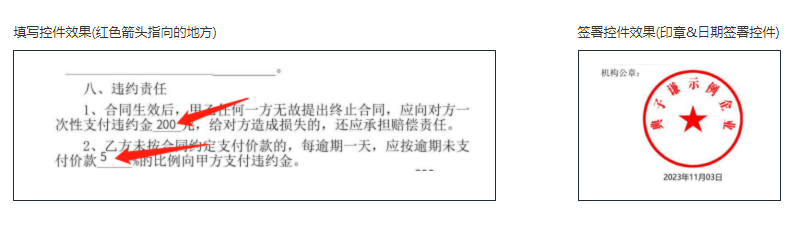
![image](https://qcloudimg.tencent-cloud.cn/raw/ab81fa948a0a6fea14f48cac91d0e36a/channel_DescribeTemplates.png)

模板中各元素的层级关系, 所有的填写控件和签署控件都归属某一个角色(通过控件的ComponentRecipientId来关联)
![image](https://qcloudimg.tencent-cloud.cn/raw/45c638bd93f9c8024763add9ab47c27f.png)
     */
    DescribeFlowTemplates(req: DescribeFlowTemplatesRequest, cb?: (error: string, rep: DescribeFlowTemplatesResponse) => void): Promise<DescribeFlowTemplatesResponse>;
    /**
     * 本接口（DeleteSealPolicies）用于撤销企业员工持有的印章权限
     */
    DeleteSealPolicies(req: DeleteSealPoliciesRequest, cb?: (error: string, rep: DeleteSealPoliciesResponse) => void): Promise<DeleteSealPoliciesResponse>;
    /**
     * 本接口（DescribeFileUrls）用于查询文件的下载URL。
适用场景：通过传参合同流程编号，下载对应的合同PDF文件流到本地。
     */
    DescribeFileUrls(req: DescribeFileUrlsRequest, cb?: (error: string, rep: DescribeFileUrlsResponse) => void): Promise<DescribeFileUrlsResponse>;
    /**
     * 获取设置自动签印章小程序链接。

注意：
<ul><li>需要<code>企业开通自动签</code>后使用。</li>
<li>仅支持<code>已经开通了自动签的个人</code>更换自动签印章。</li>
<li>链接有效期默认7天，<code>最多30天</code>。</li>
<li>该接口的链接适用于<code>小程序</code>端。</li>
<li>该接口不会扣除您的合同套餐，暂不参与计费。</li></ul>
     */
    CreateUserAutoSignSealUrl(req: CreateUserAutoSignSealUrlRequest, cb?: (error: string, rep: CreateUserAutoSignSealUrlResponse) => void): Promise<CreateUserAutoSignSealUrlResponse>;
    /**
     * 获取个人用户自动签的开通链接。

注意: `处方单等特殊场景专用，此接口为白名单功能，使用前请联系对接的客户经理沟通。`
     */
    CreateUserAutoSignEnableUrl(req: CreateUserAutoSignEnableUrlRequest, cb?: (error: string, rep: CreateUserAutoSignEnableUrlResponse) => void): Promise<CreateUserAutoSignEnableUrlResponse>;
    /**
     * 此接口（CreateIntegrationRole）用来创建企业自定义的SaaS角色或集团角色。

适用场景1：创建当前企业的自定义SaaS角色或集团角色，并且创建时不进行权限的设置（PermissionGroups 参数不传），角色中的权限内容可通过控制台编辑角色或通过接口 ModifyIntegrationRole 完成更新。

适用场景2：创建当前企业的自定义SaaS角色或集团角色，并且创建时进行权限的设置（PermissionGroups 参数要传），权限树内容 PermissionGroups 可参考接口 DescribeIntegrationRoles 的输出。此处注意权限树内容可能会更新，需尽量拉取最新的权限树内容，并且权限树内容 PermissionGroups 必须是一颗完整的权限树。

适用场景3：创建集团角色时可同时设置角色管理的子企业列表，可通过设置 SubOrganizationIds 参数达到此效果。

适用场景4：主企业代理子企业操作的场景，需要设置Agent参数，并且ProxyOrganizationId设置为子企业的id即可。

注意事项：SaaS角色和集团角色对应的权限树是不一样的。
     */
    CreateIntegrationRole(req: CreateIntegrationRoleRequest, cb?: (error: string, rep: CreateIntegrationRoleResponse) => void): Promise<CreateIntegrationRoleResponse>;
    /**
     * 本接口（CreateEmbedWebUrl）用于创建嵌入Web的链接，支持以下类型的Web链接创建：
1. 创建印章
2. 创建模板
3. 修改模板
4. 预览模板
5. 预览合同流程

用户可以通过这些链接快速将其集成到自己的系统中。
     */
    CreateEmbedWebUrl(req: CreateEmbedWebUrlRequest, cb?: (error: string, rep: CreateEmbedWebUrlResponse) => void): Promise<CreateEmbedWebUrlResponse>;
    /**
     * 对合同流程文件进行数字签名验证，判断数字签名是否有效，合同文件内容是否被篡改。
     */
    VerifyPdf(req: VerifyPdfRequest, cb?: (error: string, rep: VerifyPdfResponse) => void): Promise<VerifyPdfResponse>;
    /**
     * 此接口（UnbindEmployeeUserIdWithClientOpenId）用于解除电子签系统员工UserId与客户系统员工OpenId之间的绑定关系。

注：`在调用此接口时，需确保OpenId已通过调用`<a href="https://qian.tencent.com/developers/companyApis/staffs/BindEmployeeUserIdWithClientOpenId" target="_blank">BindEmployeeUserIdWithClientOpenId</a>`接口与电子签系统的UserId绑定过。若OpenId未经过绑定，则无法使用此接口进行解绑操作。`
     */
    UnbindEmployeeUserIdWithClientOpenId(req: UnbindEmployeeUserIdWithClientOpenIdRequest, cb?: (error: string, rep: UnbindEmployeeUserIdWithClientOpenIdResponse) => void): Promise<UnbindEmployeeUserIdWithClientOpenIdResponse>;
    /**
     * 注：此接口将会废弃，请使用撤销单个签署流程（CancelFlow）接口。
指定需要批量撤回的签署流程Id，获取批量撤销链接。
客户指定需要撤回的签署流程Id，最多100个，超过100不处理；接口调用成功返回批量撤回合同的链接，通过链接跳转到电子签小程序完成批量撤回。
     */
    CreateBatchCancelFlowUrl(req: CreateBatchCancelFlowUrlRequest, cb?: (error: string, rep: CreateBatchCancelFlowUrlResponse) => void): Promise<CreateBatchCancelFlowUrlResponse>;
    /**
     * 此接口（DeleteIntegrationDepartment）用于删除企业的部门信息。
     */
    DeleteIntegrationDepartment(req: DeleteIntegrationDepartmentRequest, cb?: (error: string, rep: DeleteIntegrationDepartmentResponse) => void): Promise<DeleteIntegrationDepartmentResponse>;
    /**
     * 此接口（BindEmployeeUserIdWithClientOpenId）用于将电子签系统员工UserId与客户系统员工OpenId进行绑定。
     */
    BindEmployeeUserIdWithClientOpenId(req: BindEmployeeUserIdWithClientOpenIdRequest, cb?: (error: string, rep: BindEmployeeUserIdWithClientOpenIdResponse) => void): Promise<BindEmployeeUserIdWithClientOpenIdResponse>;
    /**
     * 本接口（CreatePreparedPersonalEsign）用于创建导入个人印章（处方单场景专用，使用此接口请与客户经理确认）。
     */
    CreatePreparedPersonalEsign(req: CreatePreparedPersonalEsignRequest, cb?: (error: string, rep: CreatePreparedPersonalEsignResponse) => void): Promise<CreatePreparedPersonalEsignResponse>;
    /**
     * 适用场景：
当通过模板或文件发起合同时，若未指定企业签署人信息，则可调用此接口补充或添加签署人。同一签署人可补充多个员工作为或签署人，最终实际签署人取决于谁先领取合同完成签署。

限制条件：
1. 本企业（发起方企业）企业微信签署人仅支持通过企业微信UserId或姓名+手机号进行补充。
2. 本企业（发起方企业）非企业微信签署人仅支持通过姓名+手机号进行补充。
3. 他方企业仅支持通过姓名+手机号进行补充。
     */
    CreateFlowApprovers(req: CreateFlowApproversRequest, cb?: (error: string, rep: CreateFlowApproversResponse) => void): Promise<CreateFlowApproversResponse>;
    /**
     * 此接口（ModifyIntegrationDepartment）用于更新企业的部门信息，支持更新部门名称、客户系统部门ID和部门序号等信息。
     */
    ModifyIntegrationDepartment(req: ModifyIntegrationDepartmentRequest, cb?: (error: string, rep: ModifyIntegrationDepartmentResponse) => void): Promise<ModifyIntegrationDepartmentResponse>;
    /**
     * 解绑员工与对应角色的关系，如需绑定请使用 CreateIntegrationUserRoles 接口。
     */
    DeleteIntegrationRoleUsers(req: DeleteIntegrationRoleUsersRequest, cb?: (error: string, rep: DeleteIntegrationRoleUsersResponse) => void): Promise<DeleteIntegrationRoleUsersResponse>;
    /**
     * 提交签署流程审批结果的适用场景包括：
1. 在使用模板（CreateFlow）或文件（CreateFlowByFiles）创建签署流程时，若指定了参数NeedSignReview为true，且发起方企业作为签署方参与了流程签署，则可以调用此接口提交企业内部签署审批结果。自动签署也需要进行审核通过才会进行签署。
2. 若签署流程状态正常，同一签署流程可以多次提交签署审批结果，签署时的最后一个“审批结果”有效。
     */
    CreateFlowSignReview(req: CreateFlowSignReviewRequest, cb?: (error: string, rep: CreateFlowSignReviewResponse) => void): Promise<CreateFlowSignReviewResponse>;
    /**
     * 创建发起流程web页面
<br/>适用场景：通过该接口（CreatePrepareFlow）传入合同文件/模板编号及签署人信息，可获得发起流程的可嵌入页面，在页面完成签署控件等信息的编辑与确认后，快速发起流程。
<br/>注：该接口包含模板/文件发起流程的全部功能，调用接口后不会立即发起，需在可嵌入页面点击按钮进行发起流程。
     */
    CreatePrepareFlow(req: CreatePrepareFlowRequest, cb?: (error: string, rep: CreatePrepareFlowResponse) => void): Promise<CreatePrepareFlowResponse>;
    /**
     * 创建签署流程电子文档<br />
适用场景：见创建签署流程接口。<br />
点击查看<a href="https://qian.tencent.com/developers/startFlows/CreateFlow" target="_blank">通过模板创建签署流程</a>
<a href="https://qian.tencent.com/developers/startFlows/CreateFlowByFiles" target="_blank">用PDF文件创建签署流程</a>。<br />
注：该接口需要给对应的流程指定一个模板id，并且填充该模板中需要补充的信息。需要配置<a href="https://qian.tencent.com/developers/companyApis/startFlows/CreateFlow" target="_blank">创建签署流程</a>和<a href="https://qian.tencent.com/developers/companyApis/startFlows/StartFlow" target="_blank">发起签署流程</a>接口使用。具体逻辑可以参考下图:

<svg id="SvgjsSvg1077" width="304" height="505" xmlns="http://www.w3.org/2000/svg" version="1.1" xmlns:xlink="http://www.w3.org/1999/xlink" xmlns:svgjs="http://svgjs.com/svgjs"><defs id="SvgjsDefs1078"><pattern patternUnits="userSpaceOnUse" id="pattern_mark_0" width="300" height="300"><text x="150" y="100" fill="rgba(229,229,229,0.8)" font-size="18" transform="rotate(-45, 150, 150)" style="dominant-baseline: middle; text-anchor: middle;"></text></pattern><pattern patternUnits="userSpaceOnUse" id="pattern_mark_1" width="300" height="300"><text x="150" y="200" fill="rgba(229,229,229,0.8)" font-size="18" transform="rotate(-45, 150, 150)" style="dominant-baseline: middle; text-anchor: middle;"></text></pattern><marker id="SvgjsMarker1096" markerWidth="12" markerHeight="8" refX="9" refY="4" viewBox="0 0 12 8" orient="auto" markerUnits="userSpaceOnUse" stroke-dasharray="0,0"><path id="SvgjsPath1097" d="M0,0 L12,4 L0,8 L0,0" fill="#323232" stroke="#323232" stroke-width="1"></path></marker><marker id="SvgjsMarker1108" markerWidth="12" markerHeight="8" refX="9" refY="4" viewBox="0 0 12 8" orient="auto" markerUnits="userSpaceOnUse" stroke-dasharray="0,0"><path id="SvgjsPath1109" d="M0,0 L12,4 L0,8 L0,0" fill="#323232" stroke="#323232" stroke-width="1"></path></marker><marker id="SvgjsMarker1120" markerWidth="12" markerHeight="8" refX="9" refY="4" viewBox="0 0 12 8" orient="auto" markerUnits="userSpaceOnUse" stroke-dasharray="0,0"><path id="SvgjsPath1121" d="M0,0 L12,4 L0,8 L0,0" fill="#323232" stroke="#323232" stroke-width="1"></path></marker><marker id="SvgjsMarker1140" markerWidth="12" markerHeight="8" refX="9" refY="4" viewBox="0 0 12 8" orient="auto" markerUnits="userSpaceOnUse" stroke-dasharray="0,0"><path id="SvgjsPath1141" d="M0,0 L12,4 L0,8 L0,0" fill="#323232" stroke="#323232" stroke-width="1"></path></marker></defs><rect id="svgbackgroundid" width="304" height="505" fill="transparent"></rect><rect id="SvgjsRect1080" width="304" height="505" fill="url(#pattern_mark_0)"></rect><rect id="SvgjsRect1081" width="304" height="505" fill="url(#pattern_mark_1)"></rect><g id="SvgjsG1082" transform="translate(58,121)"><path id="SvgjsPath1083" d="M 0 0L 221 0L 221 262L 0 262Z" stroke-dasharray="3,4" stroke="rgba(33,41,48,1)" stroke-width="1" fill-opacity="1" fill="#ffffff"></path><g id="SvgjsG1084"><text id="SvgjsText1085" font-family="微软雅黑" text-anchor="middle" font-size="13px" width="201px" fill="#323232" font-weight="400" align="middle" lineHeight="125%" anchor="middle" family="微软雅黑" size="13px" weight="400" font-style="" opacity="1" y="120.375" transform="rotate(0)"></text></g></g><g id="SvgjsG1086" transform="translate(88,140.00000000000006)"><path id="SvgjsPath1087" d="M 0 0L 161 0L 161 48L 0 48Z" stroke="rgba(86,146,48,1)" stroke-width="1" fill-opacity="1" fill="#e7ebed"></path><g id="SvgjsG1088"><text id="SvgjsText1089" font-family="微软雅黑" text-anchor="middle" font-size="13px" width="141px" fill="#323232" font-weight="400" align="middle" lineHeight="125%" anchor="middle" family="微软雅黑" size="13px" weight="400" font-style="" opacity="1" y="4.875" transform="rotate(0)"><tspan id="SvgjsTspan1090" dy="16" x="80.5"><tspan id="SvgjsTspan1091" style="text-decoration:;fill: rgb(28, 30, 33);">CreateFlow</tspan></tspan><tspan id="SvgjsTspan1092" dy="16" x="80.5"><tspan id="SvgjsTspan1093" style="text-decoration:;">创建签署流程</tspan></tspan></text></g></g><g id="SvgjsG1094"><path id="SvgjsPath1095" d="M168.5 188.50000000000006L168.5 200.83333333333337L168.5 200.83333333333337L168.5 211.86666666666667" stroke="#323232" stroke-width="1" fill="none" marker-end="url(#SvgjsMarker1096)"></path></g><g id="SvgjsG1098" transform="translate(104.25,213.66666666666669)"><path id="SvgjsPath1099" d="M 0 0L 128.5 0L 128.5 55L 0 55Z" stroke="rgba(86,146,48,1)" stroke-width="1" fill-opacity="1" fill="#e7ebed"></path><g id="SvgjsG1100"><text id="SvgjsText1101" font-family="微软雅黑" text-anchor="middle" font-size="13px" width="109px" fill="#323232" font-weight="400" align="middle" lineHeight="125%" anchor="middle" family="微软雅黑" size="13px" weight="400" font-style="" opacity="1" y="8.375" transform="rotate(0)"><tspan id="SvgjsTspan1102" dy="16" x="64.5"><tspan id="SvgjsTspan1103" style="text-decoration:;fill: rgb(28, 30, 33);">CreateDocument</tspan></tspan><tspan id="SvgjsTspan1104" dy="16" x="64.5"><tspan id="SvgjsTspan1105" style="text-decoration:;">创建电子文档</tspan></tspan></text></g></g><g id="SvgjsG1106"><path id="SvgjsPath1107" d="M168.5 269.16666666666674L168.5 281.5L168.5 281.5L168.5 292.5333333333334" stroke="#323232" stroke-width="1" fill="none" marker-end="url(#SvgjsMarker1108)"></path></g><g id="SvgjsG1110" transform="translate(96.75,294.33333333333337)"><path id="SvgjsPath1111" d="M 0 0L 143.5 0L 143.5 65L 0 65Z" stroke="rgba(86,146,48,1)" stroke-width="1" fill-opacity="1" fill="#e7ebed"></path><g id="SvgjsG1112"><text id="SvgjsText1113" font-family="微软雅黑" text-anchor="middle" font-size="13px" width="124px" fill="#323232" font-weight="400" align="middle" lineHeight="125%" anchor="middle" family="微软雅黑" size="13px" weight="400" font-style="" opacity="1" y="13.375" transform="rotate(0)"><tspan id="SvgjsTspan1114" dy="16" x="72"><tspan id="SvgjsTspan1115" style="text-decoration:;fill: rgb(28, 30, 33);">StartFlow</tspan></tspan><tspan id="SvgjsTspan1116" dy="16" x="72"><tspan id="SvgjsTspan1117" style="text-decoration:;">发起签署流程</tspan></tspan></text></g></g><g id="SvgjsG1118"><path id="SvgjsPath1119" d="M168.5 359.83333333333337L168.5 392.16666666666674L168.5 392.16666666666674L168.5 423.20000000000005" stroke="#323232" stroke-width="1" fill="none" marker-end="url(#SvgjsMarker1120)"></path></g><g id="SvgjsG1122" transform="translate(106.25,425)"><path id="SvgjsPath1123" d="M 0 0L 124.5 0L 124.5 55L 0 55Z" stroke="rgba(33,41,48,1)" stroke-width="1" fill-opacity="1" fill="#ffffff"></path><g id="SvgjsG1124"><text id="SvgjsText1125" font-family="微软雅黑" text-anchor="middle" font-size="13px" width="105px" fill="#323232" font-weight="400" align="middle" lineHeight="125%" anchor="middle" family="微软雅黑" size="13px" weight="400" font-style="" opacity="1" y="8.375" transform="rotate(0)"><tspan id="SvgjsTspan1126" dy="16" x="62.5"><tspan id="SvgjsTspan1127" style="text-decoration:;">开始签署</tspan></tspan><tspan id="SvgjsTspan1128" dy="16" x="62.5"><tspan id="SvgjsTspan1129" style="text-decoration:;">(小程序/H5等)</tspan></tspan></text></g></g><g id="SvgjsG1130" transform="translate(120.5,25)"><path id="SvgjsPath1131" d="M 0 0L 96 0L 96 54L 0 54Z" stroke="rgba(33,41,48,1)" stroke-width="1" fill-opacity="1" fill="#ffffff"></path><g id="SvgjsG1132"><text id="SvgjsText1133" font-family="微软雅黑" text-anchor="middle" font-size="13px" width="76px" fill="#323232" font-weight="400" align="middle" lineHeight="125%" anchor="middle" family="微软雅黑" size="13px" weight="400" font-style="" opacity="1" y="7.875" transform="rotate(0)"><tspan id="SvgjsTspan1134" dy="16" x="48"><tspan id="SvgjsTspan1135" style="text-decoration:;">控制台创建</tspan></tspan><tspan id="SvgjsTspan1136" dy="16" x="48"><tspan id="SvgjsTspan1137" style="text-decoration:;">模板</tspan></tspan></text></g></g><g id="SvgjsG1138"><path id="SvgjsPath1139" d="M168.5 79.5L168.5 109.5L168.5 109.5L168.5 138.20000000000005" stroke="#323232" stroke-width="1" fill="none" marker-end="url(#SvgjsMarker1140)"></path></g><g id="SvgjsG1142" transform="translate(25,114)"><path id="SvgjsPath1143" d="M 0 0L 100 0L 100 40L 0 40Z" stroke="none" fill="none"></path><g id="SvgjsG1144"><text id="SvgjsText1145" font-family="微软雅黑" text-anchor="middle" font-size="13px" width="100px" fill="#323232" font-weight="400" align="middle" lineHeight="125%" anchor="middle" family="微软雅黑" size="13px" weight="400" font-style="" opacity="1" y="9.375" transform="rotate(0)"><tspan id="SvgjsTspan1146" dy="16" x="50"><tspan id="SvgjsTspan1147" style="text-decoration:;">API</tspan></tspan></text></g></g></svg>
     */
    CreateDocument(req: CreateDocumentRequest, cb?: (error: string, rep: CreateDocumentResponse) => void): Promise<CreateDocumentResponse>;
    /**
     * 此接口（CreateMultiFlowSignQRCode）用于创建一码多扫流程签署二维码。

**适用场景**:
签署人可通过扫描二维码补充签署信息进行实名签署。常用于提前不知道签署人的身份信息场景，例如：劳务工招工、大批量员工入职等场景。

**注意**:
1. 本接口适用于**发起方没有填写控件的 B2C或者单C模板**,  若是B2C模板,还要满足以下任意一个条件
    - 模板中配置的签署顺序是无序
    - B端企业的签署方式是静默签署
    - B端企业是非首位签署
2. 通过一码多扫二维码发起的合同，合同涉及到的回调消息可参考文档[合同发起及签署相关回调
]( https://qian.tencent.com/developers/company/callback_types_contracts_sign)
3. 用户通过签署二维码发起合同时，因企业额度不足导致失败 会触发签署二维码相关回调,具体参考文档[签署二维码相关回调](https://qian.tencent.com/developers/company/callback_types_commons#%E7%AD%BE%E7%BD%B2%E4%BA%8C%E7%BB%B4%E7%A0%81%E7%9B%B8%E5%85%B3%E5%9B%9E%E8%B0%83)

二维码的样式如下图:
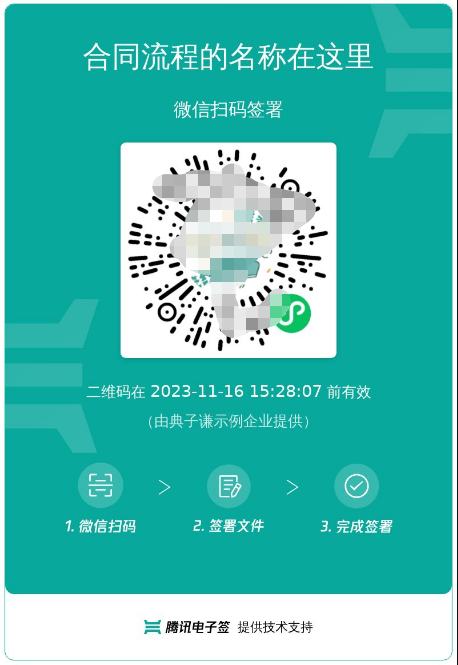
![image](https://qcloudimg.tencent-cloud.cn/raw/27317cf5aacb094fb1dc6f94179a5148.png )
     */
    CreateMultiFlowSignQRCode(req: CreateMultiFlowSignQRCodeRequest, cb?: (error: string, rep: CreateMultiFlowSignQRCodeResponse) => void): Promise<CreateMultiFlowSignQRCodeResponse>;
    /**
     * 提交申请出证报告任务并返回报告ID。

注意：
<ul><li>使用此功能`需搭配出证套餐` ，使用前请联系对接的客户经理沟通。</li>
<li>操作人必须是`发起方或者签署方企业的(非走授权书认证)法人或者超管`。</li>
<li>合同流程必须所有参与方`已经签署完成`。</li>
<li>出证过程需一定时间，建议在`提交出证任务后的24小时之后`，通过<a href="https://qian.tencent.com/developers/companyApis/certificate/DescribeFlowEvidenceReport" target="_blank">获取出证报告任务执行结果</a>接口进行查询执行结果和出证报告的下载URL。</li></ul>

<svg id="SvgjsSvg1006" width="262" height="229" xmlns="http://www.w3.org/2000/svg" version="1.1" xmlns:xlink="http://www.w3.org/1999/xlink" xmlns:svgjs="http://svgjs.com/svgjs"><defs id="SvgjsDefs1007"><pattern patternUnits="userSpaceOnUse" id="pattern_mark_0" width="300" height="300"><text x="150" y="100" fill="rgba(229,229,229,0.8)" font-size="18" transform="rotate(-45, 150, 150)" style="dominant-baseline: middle; text-anchor: middle;"></text></pattern><pattern patternUnits="userSpaceOnUse" id="pattern_mark_1" width="300" height="300"><text x="150" y="200" fill="rgba(229,229,229,0.8)" font-size="18" transform="rotate(-45, 150, 150)" style="dominant-baseline: middle; text-anchor: middle;"></text></pattern><marker id="SvgjsMarker1021" markerWidth="12" markerHeight="8" refX="9" refY="4" viewBox="0 0 12 8" orient="auto" markerUnits="userSpaceOnUse" stroke-dasharray="0,0"><path id="SvgjsPath1022" d="M0,0 L12,4 L0,8 L0,0" fill="#323232" stroke="#323232" stroke-width="1"></path></marker></defs><rect id="svgbackgroundid" width="262" height="229" fill="transparent"></rect><rect id="SvgjsRect1009" width="262" height="229" fill="url(#pattern_mark_0)"></rect><rect id="SvgjsRect1010" width="262" height="229" fill="url(#pattern_mark_1)"></rect><g id="SvgjsG1011" transform="translate(31.75,25)"><path id="SvgjsPath1012" d="M 0 0L 198 0L 198 59L 0 59Z" stroke="rgba(86,146,48,1)" stroke-width="1" fill-opacity="1" fill="#e7ebed"></path><g id="SvgjsG1013"><text id="SvgjsText1014" font-family="微软雅黑" text-anchor="middle" font-size="13px" width="178px" fill="#323232" font-weight="400" align="middle" lineHeight="125%" anchor="middle" family="微软雅黑" size="13px" weight="400" font-style="" opacity="1" y="10.375" transform="rotate(0)"><tspan id="SvgjsTspan1015" dy="16" x="99"><tspan id="SvgjsTspan1016" style="text-decoration:;fill: rgb(28, 30, 33);">CreateFlowEvidenceReport</tspan></tspan><tspan id="SvgjsTspan1017" dy="16" x="99"><tspan id="SvgjsTspan1018" style="text-decoration:;fill: rgb(51, 51, 51);">提交申请出证报告任务</tspan></tspan></text></g></g><g id="SvgjsG1019"><path id="SvgjsPath1020" d="M130.75 84.5L130.75 114.5L130.75 114.5L130.75 143.2" stroke="#323232" stroke-width="1" fill="none" marker-end="url(#SvgjsMarker1021)"></path></g><g id="SvgjsG1023" transform="translate(25,145)"><path id="SvgjsPath1024" d="M 0 0L 211.5 0L 211.5 59L 0 59Z" stroke="rgba(86,146,48,1)" stroke-width="1" fill-opacity="1" fill="#e7ebed"></path><g id="SvgjsG1025"><text id="SvgjsText1026" font-family="微软雅黑" text-anchor="middle" font-size="13px" width="192px" fill="#323232" font-weight="400" align="middle" lineHeight="125%" anchor="middle" family="微软雅黑" size="13px" weight="400" font-style="" opacity="1" y="10.375" transform="rotate(0)"><tspan id="SvgjsTspan1027" dy="16" x="106"><tspan id="SvgjsTspan1028" style="text-decoration:;fill: rgb(28, 30, 33);">DescribeFlowEvidenceReport</tspan></tspan><tspan id="SvgjsTspan1029" dy="16" x="106"><tspan id="SvgjsTspan1030" style="text-decoration:;fill: rgb(51, 51, 51);">获取出证报告任务执行结果</tspan></tspan></text></g></g></svg>
     */
    CreateFlowEvidenceReport(req: CreateFlowEvidenceReportRequest, cb?: (error: string, rep: CreateFlowEvidenceReportResponse) => void): Promise<CreateFlowEvidenceReportResponse>;
    /**
     * 通过模板创建签署流程<br/>
适用场景：在标准制式的合同场景中，可通过提前预制好模板文件，每次调用模板文件的id，补充合同内容信息及签署信息生成电子合同。

注：配合<a href="https://qian.tencent.com/developers/companyApis/startFlows/CreateDocument" target="_blank">创建电子文档</a>和<a href="https://qian.tencent.com/developers/companyApis/startFlows/StartFlow" target="_blank">发起签署流程</a>接口使用。整体的逻辑如下图

<svg id="SvgjsSvg1077" width="304" height="505" xmlns="http://www.w3.org/2000/svg" version="1.1" xmlns:xlink="http://www.w3.org/1999/xlink" xmlns:svgjs="http://svgjs.com/svgjs"><defs id="SvgjsDefs1078"><pattern patternUnits="userSpaceOnUse" id="pattern_mark_0" width="300" height="300"><text x="150" y="100" fill="rgba(229,229,229,0.8)" font-size="18" transform="rotate(-45, 150, 150)" style="dominant-baseline: middle; text-anchor: middle;"></text></pattern><pattern patternUnits="userSpaceOnUse" id="pattern_mark_1" width="300" height="300"><text x="150" y="200" fill="rgba(229,229,229,0.8)" font-size="18" transform="rotate(-45, 150, 150)" style="dominant-baseline: middle; text-anchor: middle;"></text></pattern><marker id="SvgjsMarker1096" markerWidth="12" markerHeight="8" refX="9" refY="4" viewBox="0 0 12 8" orient="auto" markerUnits="userSpaceOnUse" stroke-dasharray="0,0"><path id="SvgjsPath1097" d="M0,0 L12,4 L0,8 L0,0" fill="#323232" stroke="#323232" stroke-width="1"></path></marker><marker id="SvgjsMarker1108" markerWidth="12" markerHeight="8" refX="9" refY="4" viewBox="0 0 12 8" orient="auto" markerUnits="userSpaceOnUse" stroke-dasharray="0,0"><path id="SvgjsPath1109" d="M0,0 L12,4 L0,8 L0,0" fill="#323232" stroke="#323232" stroke-width="1"></path></marker><marker id="SvgjsMarker1120" markerWidth="12" markerHeight="8" refX="9" refY="4" viewBox="0 0 12 8" orient="auto" markerUnits="userSpaceOnUse" stroke-dasharray="0,0"><path id="SvgjsPath1121" d="M0,0 L12,4 L0,8 L0,0" fill="#323232" stroke="#323232" stroke-width="1"></path></marker><marker id="SvgjsMarker1140" markerWidth="12" markerHeight="8" refX="9" refY="4" viewBox="0 0 12 8" orient="auto" markerUnits="userSpaceOnUse" stroke-dasharray="0,0"><path id="SvgjsPath1141" d="M0,0 L12,4 L0,8 L0,0" fill="#323232" stroke="#323232" stroke-width="1"></path></marker></defs><rect id="svgbackgroundid" width="304" height="505" fill="transparent"></rect><rect id="SvgjsRect1080" width="304" height="505" fill="url(#pattern_mark_0)"></rect><rect id="SvgjsRect1081" width="304" height="505" fill="url(#pattern_mark_1)"></rect><g id="SvgjsG1082" transform="translate(58,121)"><path id="SvgjsPath1083" d="M 0 0L 221 0L 221 262L 0 262Z" stroke-dasharray="3,4" stroke="rgba(33,41,48,1)" stroke-width="1" fill-opacity="1" fill="#ffffff"></path><g id="SvgjsG1084"><text id="SvgjsText1085" font-family="微软雅黑" text-anchor="middle" font-size="13px" width="201px" fill="#323232" font-weight="400" align="middle" lineHeight="125%" anchor="middle" family="微软雅黑" size="13px" weight="400" font-style="" opacity="1" y="120.375" transform="rotate(0)"></text></g></g><g id="SvgjsG1086" transform="translate(88,140.00000000000006)"><path id="SvgjsPath1087" d="M 0 0L 161 0L 161 48L 0 48Z" stroke="rgba(86,146,48,1)" stroke-width="1" fill-opacity="1" fill="#e7ebed"></path><g id="SvgjsG1088"><text id="SvgjsText1089" font-family="微软雅黑" text-anchor="middle" font-size="13px" width="141px" fill="#323232" font-weight="400" align="middle" lineHeight="125%" anchor="middle" family="微软雅黑" size="13px" weight="400" font-style="" opacity="1" y="4.875" transform="rotate(0)"><tspan id="SvgjsTspan1090" dy="16" x="80.5"><tspan id="SvgjsTspan1091" style="text-decoration:;fill: rgb(28, 30, 33);">CreateFlow</tspan></tspan><tspan id="SvgjsTspan1092" dy="16" x="80.5"><tspan id="SvgjsTspan1093" style="text-decoration:;">创建签署流程</tspan></tspan></text></g></g><g id="SvgjsG1094"><path id="SvgjsPath1095" d="M168.5 188.50000000000006L168.5 200.83333333333337L168.5 200.83333333333337L168.5 211.86666666666667" stroke="#323232" stroke-width="1" fill="none" marker-end="url(#SvgjsMarker1096)"></path></g><g id="SvgjsG1098" transform="translate(104.25,213.66666666666669)"><path id="SvgjsPath1099" d="M 0 0L 128.5 0L 128.5 55L 0 55Z" stroke="rgba(86,146,48,1)" stroke-width="1" fill-opacity="1" fill="#e7ebed"></path><g id="SvgjsG1100"><text id="SvgjsText1101" font-family="微软雅黑" text-anchor="middle" font-size="13px" width="109px" fill="#323232" font-weight="400" align="middle" lineHeight="125%" anchor="middle" family="微软雅黑" size="13px" weight="400" font-style="" opacity="1" y="8.375" transform="rotate(0)"><tspan id="SvgjsTspan1102" dy="16" x="64.5"><tspan id="SvgjsTspan1103" style="text-decoration:;fill: rgb(28, 30, 33);">CreateDocument</tspan></tspan><tspan id="SvgjsTspan1104" dy="16" x="64.5"><tspan id="SvgjsTspan1105" style="text-decoration:;">创建电子文档</tspan></tspan></text></g></g><g id="SvgjsG1106"><path id="SvgjsPath1107" d="M168.5 269.16666666666674L168.5 281.5L168.5 281.5L168.5 292.5333333333334" stroke="#323232" stroke-width="1" fill="none" marker-end="url(#SvgjsMarker1108)"></path></g><g id="SvgjsG1110" transform="translate(96.75,294.33333333333337)"><path id="SvgjsPath1111" d="M 0 0L 143.5 0L 143.5 65L 0 65Z" stroke="rgba(86,146,48,1)" stroke-width="1" fill-opacity="1" fill="#e7ebed"></path><g id="SvgjsG1112"><text id="SvgjsText1113" font-family="微软雅黑" text-anchor="middle" font-size="13px" width="124px" fill="#323232" font-weight="400" align="middle" lineHeight="125%" anchor="middle" family="微软雅黑" size="13px" weight="400" font-style="" opacity="1" y="13.375" transform="rotate(0)"><tspan id="SvgjsTspan1114" dy="16" x="72"><tspan id="SvgjsTspan1115" style="text-decoration:;fill: rgb(28, 30, 33);">StartFlow</tspan></tspan><tspan id="SvgjsTspan1116" dy="16" x="72"><tspan id="SvgjsTspan1117" style="text-decoration:;">发起签署流程</tspan></tspan></text></g></g><g id="SvgjsG1118"><path id="SvgjsPath1119" d="M168.5 359.83333333333337L168.5 392.16666666666674L168.5 392.16666666666674L168.5 423.20000000000005" stroke="#323232" stroke-width="1" fill="none" marker-end="url(#SvgjsMarker1120)"></path></g><g id="SvgjsG1122" transform="translate(106.25,425)"><path id="SvgjsPath1123" d="M 0 0L 124.5 0L 124.5 55L 0 55Z" stroke="rgba(33,41,48,1)" stroke-width="1" fill-opacity="1" fill="#ffffff"></path><g id="SvgjsG1124"><text id="SvgjsText1125" font-family="微软雅黑" text-anchor="middle" font-size="13px" width="105px" fill="#323232" font-weight="400" align="middle" lineHeight="125%" anchor="middle" family="微软雅黑" size="13px" weight="400" font-style="" opacity="1" y="8.375" transform="rotate(0)"><tspan id="SvgjsTspan1126" dy="16" x="62.5"><tspan id="SvgjsTspan1127" style="text-decoration:;">开始签署</tspan></tspan><tspan id="SvgjsTspan1128" dy="16" x="62.5"><tspan id="SvgjsTspan1129" style="text-decoration:;">(小程序/H5等)</tspan></tspan></text></g></g><g id="SvgjsG1130" transform="translate(120.5,25)"><path id="SvgjsPath1131" d="M 0 0L 96 0L 96 54L 0 54Z" stroke="rgba(33,41,48,1)" stroke-width="1" fill-opacity="1" fill="#ffffff"></path><g id="SvgjsG1132"><text id="SvgjsText1133" font-family="微软雅黑" text-anchor="middle" font-size="13px" width="76px" fill="#323232" font-weight="400" align="middle" lineHeight="125%" anchor="middle" family="微软雅黑" size="13px" weight="400" font-style="" opacity="1" y="7.875" transform="rotate(0)"><tspan id="SvgjsTspan1134" dy="16" x="48"><tspan id="SvgjsTspan1135" style="text-decoration:;">控制台创建</tspan></tspan><tspan id="SvgjsTspan1136" dy="16" x="48"><tspan id="SvgjsTspan1137" style="text-decoration:;">模板</tspan></tspan></text></g></g><g id="SvgjsG1138"><path id="SvgjsPath1139" d="M168.5 79.5L168.5 109.5L168.5 109.5L168.5 138.20000000000005" stroke="#323232" stroke-width="1" fill="none" marker-end="url(#SvgjsMarker1140)"></path></g><g id="SvgjsG1142" transform="translate(25,114)"><path id="SvgjsPath1143" d="M 0 0L 100 0L 100 40L 0 40Z" stroke="none" fill="none"></path><g id="SvgjsG1144"><text id="SvgjsText1145" font-family="微软雅黑" text-anchor="middle" font-size="13px" width="100px" fill="#323232" font-weight="400" align="middle" lineHeight="125%" anchor="middle" family="微软雅黑" size="13px" weight="400" font-style="" opacity="1" y="9.375" transform="rotate(0)"><tspan id="SvgjsTspan1146" dy="16" x="50"><tspan id="SvgjsTspan1147" style="text-decoration:;">API</tspan></tspan></text></g></g></svg>
     */
    CreateFlow(req: CreateFlowRequest, cb?: (error: string, rep: CreateFlowResponse) => void): Promise<CreateFlowResponse>;
    /**
     * 发起解除协议的主要应用场景为：基于一份已经签署的合同（签署流程），进行解除操作。
解除协议的模板是官方提供 ，经过提供法务审核，暂不支持自定义。

注意：
<ul><li><code>原合同必须签署完</code>成后才能发起解除协议。</li>
<li>只有原合同企业类型的参与人才能发起解除协议，<code>个人参与方不能发起解除协议</code>。</li>
<li>原合同个人类型参与人必须是解除协议的参与人，<code>不能更换其他第三方个人</code>参与解除协议。</li>
<li>如果原合同企业参与人无法参与解除协议，可以指定同企业具有同等权限的<code>企业员工代为处理</code>。</li>
<li>发起解除协议同发起其他企业合同一样，也会参与合同<code>扣费</code>，扣费标准同其他类型合同。</li>
<li>在解除协议发起之后，原合同的状态将转变为解除中。一旦解除协议签署完毕，原合同及解除协议均变为已解除状态。</li></ul>
     */
    CreateReleaseFlow(req: CreateReleaseFlowRequest, cb?: (error: string, rep: CreateReleaseFlowResponse) => void): Promise<CreateReleaseFlowResponse>;
    /**
     * 获取跳转至腾讯电子签小程序的签署链接

适用场景：如果需要签署人在自己的APP、小程序、H5应用中签署，可以通过此接口获取跳转腾讯电子签小程序的签署跳转链接。

跳转到小程序的实现，参考微信官方文档（分为<a href="https://developers.weixin.qq.com/miniprogram/dev/api/navigate/wx.navigateToMiniProgram.html">全屏</a>、<a href="https://developers.weixin.qq.com/miniprogram/dev/framework/open-ability/openEmbeddedMiniProgram.html">半屏</a>两种方式），如何配置也可以请参考: <a href="https://qian.tencent.com/developers/company/openwxminiprogram">跳转电子签小程序配置</a>

注：
`1. 如果签署人是在PC端扫码签署，可以通过生成跳转链接自主转换成二维码，让签署人在PC端扫码签署`
`2. 签署链接的有效期为90天，超过有效期链接不可用`
`3. 如果需跳转详情页（即PathType值为1）进行填写或签署合同，需指定签署方信息：姓名、手机号码、企业名称等，才能生成正确的跳转链接`

其中小程序的原始Id如下，或者查看小程序信息自助获取。

| 小程序 | AppID | 原始ID |
| ------------ | ------------ | ------------ |
| 腾讯电子签（正式版） | wxa023b292fd19d41d | gh_da88f6188665 |
| 腾讯电子签Demo | wx371151823f6f3edf | gh_39a5d3de69fa |
     */
    CreateSchemeUrl(req: CreateSchemeUrlRequest, cb?: (error: string, rep: CreateSchemeUrlResponse) => void): Promise<CreateSchemeUrlResponse>;
    /**
     * 通过此接口获取个人用户自动签的开通状态。

注意: `处方单等特殊场景专用，此接口为白名单功能，使用前请联系对接的客户经理沟通。`
     */
    DescribeUserAutoSignStatus(req: DescribeUserAutoSignStatusRequest, cb?: (error: string, rep: DescribeUserAutoSignStatusResponse) => void): Promise<DescribeUserAutoSignStatusResponse>;
    /**
     * 此接口（CreateFlowGroupByTemplates）可用于通过多个模板创建合同组签署流程。

适用场景：该接口适用于需要一次性完成多份合同签署的情况，多份合同一般具有关联性，用户以目录的形式查看合同。
     */
    CreateFlowGroupByTemplates(req: CreateFlowGroupByTemplatesRequest, cb?: (error: string, rep: CreateFlowGroupByTemplatesResponse) => void): Promise<CreateFlowGroupByTemplatesResponse>;
    /**
     * 查询企业扩展服务的开通和授权情况，当前支持查询以下内容：
1. 企业自动签
2. 企业与港澳台居民签署合同
3. 使用手机号验证签署方身份
4. 骑缝章
5. 批量签署能力
6. 拓宽签署方年龄限制
     */
    DescribeExtendedServiceAuthInfos(req: DescribeExtendedServiceAuthInfosRequest, cb?: (error: string, rep: DescribeExtendedServiceAuthInfosResponse) => void): Promise<DescribeExtendedServiceAuthInfosResponse>;
    /**
     * 此接口（UploadFiles）文件上传。<br/>

适用场景：用于合同，印章的文件上传。文件上传以后，
如果是PDF格式文件可配合<a href="https://qian.tencent.com/developers/companyApis/startFlows/CreateFlowByFiles" target="_blank">用PDF文件创建签署流程</a>接口进行合同流程的发起
如果是其他类型可以配合<a href="https://qian.tencent.com/developers/companyApis/templatesAndFiles/CreateConvertTaskApi" target="_blank">创建文件转换任务</a>接口转换成PDF文件

注:
1. `图片类型(png/jpg/jpeg)限制大小为5M以下, PDF/word/excel等其他格式限制大小为60M以下`
2. `联调开发环境调用时需要设置Domain接口请求域名为 file.test.ess.tencent.cn，正式环境需要设置为file.ess.tencent.cn，代码示例`
```
HttpProfile httpProfile = new HttpProfile();
httpProfile.setEndpoint("file.test.ess.tencent.cn");
```
     */
    UploadFiles(req: UploadFilesRequest, cb?: (error: string, rep: UploadFilesResponse) => void): Promise<UploadFilesResponse>;
    /**
     * 获取出证报告任务执行结果，返回报告 URL。


注意：
<ul><li>使用此功能`需搭配出证套餐` ，使用前请联系对接的客户经理沟通。</li>
<li>需调用创建并返回出证报告接口<a href="https://qian.tencent.com/developers/companyApis/certificate/CreateFlowEvidenceReport" target="_blank">提交申请出证报告任务</a>获取报告编号后调用当前接口获取报告链接。</li></ul>

<svg id="SvgjsSvg1006" width="262" height="229" xmlns="http://www.w3.org/2000/svg" version="1.1" xmlns:xlink="http://www.w3.org/1999/xlink" xmlns:svgjs="http://svgjs.com/svgjs"><defs id="SvgjsDefs1007"><pattern patternUnits="userSpaceOnUse" id="pattern_mark_0" width="300" height="300"><text x="150" y="100" fill="rgba(229,229,229,0.8)" font-size="18" transform="rotate(-45, 150, 150)" style="dominant-baseline: middle; text-anchor: middle;"></text></pattern><pattern patternUnits="userSpaceOnUse" id="pattern_mark_1" width="300" height="300"><text x="150" y="200" fill="rgba(229,229,229,0.8)" font-size="18" transform="rotate(-45, 150, 150)" style="dominant-baseline: middle; text-anchor: middle;"></text></pattern><marker id="SvgjsMarker1021" markerWidth="12" markerHeight="8" refX="9" refY="4" viewBox="0 0 12 8" orient="auto" markerUnits="userSpaceOnUse" stroke-dasharray="0,0"><path id="SvgjsPath1022" d="M0,0 L12,4 L0,8 L0,0" fill="#323232" stroke="#323232" stroke-width="1"></path></marker></defs><rect id="svgbackgroundid" width="262" height="229" fill="transparent"></rect><rect id="SvgjsRect1009" width="262" height="229" fill="url(#pattern_mark_0)"></rect><rect id="SvgjsRect1010" width="262" height="229" fill="url(#pattern_mark_1)"></rect><g id="SvgjsG1011" transform="translate(31.75,25)"><path id="SvgjsPath1012" d="M 0 0L 198 0L 198 59L 0 59Z" stroke="rgba(86,146,48,1)" stroke-width="1" fill-opacity="1" fill="#e7ebed"></path><g id="SvgjsG1013"><text id="SvgjsText1014" font-family="微软雅黑" text-anchor="middle" font-size="13px" width="178px" fill="#323232" font-weight="400" align="middle" lineHeight="125%" anchor="middle" family="微软雅黑" size="13px" weight="400" font-style="" opacity="1" y="10.375" transform="rotate(0)"><tspan id="SvgjsTspan1015" dy="16" x="99"><tspan id="SvgjsTspan1016" style="text-decoration:;fill: rgb(28, 30, 33);">CreateFlowEvidenceReport</tspan></tspan><tspan id="SvgjsTspan1017" dy="16" x="99"><tspan id="SvgjsTspan1018" style="text-decoration:;fill: rgb(51, 51, 51);">提交申请出证报告任务</tspan></tspan></text></g></g><g id="SvgjsG1019"><path id="SvgjsPath1020" d="M130.75 84.5L130.75 114.5L130.75 114.5L130.75 143.2" stroke="#323232" stroke-width="1" fill="none" marker-end="url(#SvgjsMarker1021)"></path></g><g id="SvgjsG1023" transform="translate(25,145)"><path id="SvgjsPath1024" d="M 0 0L 211.5 0L 211.5 59L 0 59Z" stroke="rgba(86,146,48,1)" stroke-width="1" fill-opacity="1" fill="#e7ebed"></path><g id="SvgjsG1025"><text id="SvgjsText1026" font-family="微软雅黑" text-anchor="middle" font-size="13px" width="192px" fill="#323232" font-weight="400" align="middle" lineHeight="125%" anchor="middle" family="微软雅黑" size="13px" weight="400" font-style="" opacity="1" y="10.375" transform="rotate(0)"><tspan id="SvgjsTspan1027" dy="16" x="106"><tspan id="SvgjsTspan1028" style="text-decoration:;fill: rgb(28, 30, 33);">DescribeFlowEvidenceReport</tspan></tspan><tspan id="SvgjsTspan1029" dy="16" x="106"><tspan id="SvgjsTspan1030" style="text-decoration:;fill: rgb(51, 51, 51);">获取出证报告任务执行结果</tspan></tspan></text></g></g></svg>
     */
    DescribeFlowEvidenceReport(req: DescribeFlowEvidenceReportRequest, cb?: (error: string, rep: DescribeFlowEvidenceReportResponse) => void): Promise<DescribeFlowEvidenceReportResponse>;
    /**
     * 此接口（CreateFlowByFiles）用来通过上传后的pdf资源编号来创建待签署的合同流程。<br/>
适用场景1：适用非制式的合同文件签署。一般开发者自己有完整的签署文件，可以通过该接口传入完整的PDF文件及流程信息生成待签署的合同流程。<br/>
适用场景2：可通过该接口传入制式合同文件，同时在指定位置添加签署控件。可以起到接口创建临时模板的效果。如果是标准的制式文件，建议使用模板功能生成模板ID进行合同流程的生成。<br/>
注意事项：该接口需要依赖“多文件上传”接口生成pdf资源编号（FileIds）进行使用。<br/>
     */
    CreateFlowByFiles(req: CreateFlowByFilesRequest, cb?: (error: string, rep: CreateFlowByFilesResponse) => void): Promise<CreateFlowByFilesResponse>;
    /**
     * 本接口（CreateSeal）用于创建企业电子印章，支持创建企业公章，合同章，财务专用章和人事专用章创建。

1. 可以**通过图片**创建印章，图片最大5MB
2. 可以**系统创建**创建印章, 系统创建的印章样子下图(样式可以调整)
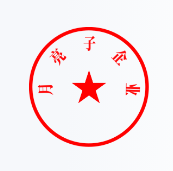
![image](https://dyn.ess.tencent.cn/guide/capi/CreateSealByImage.png)
     */
    CreateSeal(req: CreateSealRequest, cb?: (error: string, rep: CreateSealResponse) => void): Promise<CreateSealResponse>;
    /**
     * 此接口（DescribeIntegrationRoles）用于分页查询企业角色列表，列表按照角色创建时间升序排列。
     */
    DescribeIntegrationRoles(req: DescribeIntegrationRolesRequest, cb?: (error: string, rep: DescribeIntegrationRolesResponse) => void): Promise<DescribeIntegrationRolesResponse>;
    /**
     * 此接口（CreateIntegrationDepartment）用于创建企业的部门信息，支持绑定客户系统部门ID。
     */
    CreateIntegrationDepartment(req: CreateIntegrationDepartmentRequest, cb?: (error: string, rep: CreateIntegrationDepartmentResponse) => void): Promise<CreateIntegrationDepartmentResponse>;
    /**
     * 此接口（GetTaskResultApi）用来查询转换任务的状态。如需发起转换任务，请使用<a href="https://qian.tencent.com/developers/companyApis/templatesAndFiles/CreateConvertTaskApi" target="_blank">创建文件转换任务接口</a>进行资源文件的转换操作<br />
前提条件：已调用 <a href="https://qian.tencent.com/developers/companyApis/templatesAndFiles/CreateConvertTaskApi" target="_blank">创建文件转换任务接口</a>进行文件转换，并得到了返回的转换任务Id。<br />

适用场景：已创建一个文件转换任务，想查询该文件转换任务的状态，或获取转换后的文件资源Id。<br />
注：
1. `大文件转换所需的时间可能会比较长`
     */
    GetTaskResultApi(req: GetTaskResultApiRequest, cb?: (error: string, rep: GetTaskResultApiResponse) => void): Promise<GetTaskResultApiResponse>;
    /**
     * 创建企业扩展服务授权，当前仅支持授权 “企业自动签” 和 “批量签署” 给企业员工。
该接口作用和电子签控制台 企业设置-扩展服务-企业自动签署和批量签署授权 两个模块功能相同，可通过该接口授权给企业员工。

注：“企业自动签授权”支持集团代子企业操作，请联系运营开通此功能。
     */
    CreateExtendedServiceAuthInfos(req: CreateExtendedServiceAuthInfosRequest, cb?: (error: string, rep: CreateExtendedServiceAuthInfosResponse) => void): Promise<CreateExtendedServiceAuthInfosResponse>;
    /**
     * 此接口（CancelMultiFlowSignQRCode）用于废除一码多扫流程签署二维码。
该接口所需的二维码ID，源自[创建一码多扫流程签署二维码](https://qian.tencent.com/developers/companyApis/startFlows/CreateMultiFlowSignQRCode)生成的。
如果该二维码尚处于有效期内，可通过本接口将其设置为失效状态。
     */
    CancelMultiFlowSignQRCode(req: CancelMultiFlowSignQRCodeRequest, cb?: (error: string, rep: CancelMultiFlowSignQRCodeResponse) => void): Promise<CancelMultiFlowSignQRCodeResponse>;
    /**
     * 此接口（DescribeIntegrationEmployees）用于分页查询企业员工信息列表，支持设置过滤条件以筛选员工查询结果。
     */
    DescribeIntegrationEmployees(req: DescribeIntegrationEmployeesRequest, cb?: (error: string, rep: DescribeIntegrationEmployeesResponse) => void): Promise<DescribeIntegrationEmployeesResponse>;
    /**
     * 该接口用于发起合同后，生成个人用户的签署链接, 暂时不支持企业端签署 <br/>

**注意**
1. 该接口目前**仅支持签署人类型是个人签署方**的场景(PERSON)。
2. 该接口可生成签署链接的C端签署人必须仅有手写签名和时间类型的签署控件，**不支持填写控件** 。
3. 该签署**链接有效期为30分钟**，过期后将失效，如需签署可重新创建签署链接 。
4. 该接口返回的签署链接适用于APP集成的场景，支持APP打开或浏览器直接打开，**不支持微信小程序嵌入**。
跳转到小程序的实现，参考微信官方文档（分为<a href="https://developers.weixin.qq.com/miniprogram/dev/api/navigate/wx.navigateToMiniProgram.html">全屏</a>、<a href="https://developers.weixin.qq.com/miniprogram/dev/framework/open-ability/openEmbeddedMiniProgram.html">半屏</a>两种方式），如何配置也可以请参考: <a href="https://qian.tencent.com/developers/company/openwxminiprogram">跳转电子签小程序配置</a>。
5. 因h5涉及人脸身份认证能力基于慧眼人脸核身，对Android和iOS系统均有一定要求， 因此<font color='red'>App嵌入H5签署合同需要按照慧眼提供的<a href="https://cloud.tencent.com/document/product/1007/61076">慧眼人脸核身兼容性文档</a>做兼容性适配</font>。
     */
    CreateFlowSignUrl(req: CreateFlowSignUrlRequest, cb?: (error: string, rep: CreateFlowSignUrlResponse) => void): Promise<CreateFlowSignUrlResponse>;
    /**
     * 获取个人用户认证证书图片下载URL

个人用户认证证书图片样式如下图
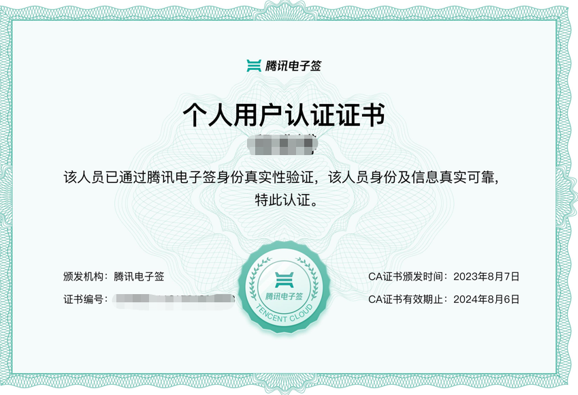
![image](https://dyn.ess.tencent.cn/guide/capi/CreatePersonAuthCertificateImage.png)

注:
<ul>
<li>只能获取个人用户证明图片, 企业员工的暂不支持</li>
<li>处方单等特殊场景专用，此接口为白名单功能，使用前请联系对接的客户经理沟通。  </li>
</ul>
     */
    CreatePersonAuthCertificateImage(req: CreatePersonAuthCertificateImageRequest, cb?: (error: string, rep: CreatePersonAuthCertificateImageResponse) => void): Promise<CreatePersonAuthCertificateImageResponse>;
    /**
     * 此接口（CreateConvertTaskApi）用来将word、excel、html、图片、txt类型文件转换为PDF文件。<br />
前提条件：源文件已经通过 <a href="https://qian.tencent.com/developers/companyApis/templatesAndFiles/UploadFiles" target="_blank">文件上传接口</a>完成上传，并得到了源文件的资源Id。<br />
适用场景1：已经上传了一个word文件，希望将该word文件转换成pdf文件后发起合同
适用场景2：已经上传了一个jpg图片文件，希望将该图片文件转换成pdf文件后发起合同<br />
转换文件是一个耗时操作，若想查看转换任务是否完成，可以通过<a href="https://qian.tencent.com/developers/companyApis/templatesAndFiles/GetTaskResultApi" target="_blank">查询转换任务状态</a>接口获取任务状态。<br />
注:
1. `支持的文件类型有doc、docx、xls、xlsx、html、jpg、jpeg、png、bmp、txt`
2. `可通过发起合同时设置预览来检查转换文件是否达到预期效果`
     */
    CreateConvertTaskApi(req: CreateConvertTaskApiRequest, cb?: (error: string, rep: CreateConvertTaskApiResponse) => void): Promise<CreateConvertTaskApiResponse>;
    /**
     * 查询流程基础信息
适用场景：可用于主动查询某个合同流程的签署状态信息。可以配合回调通知使用。

注: `每个企业限制日调用量限制：100W，当日超过此限制后再调用接口返回错误`
     */
    DescribeFlowBriefs(req: DescribeFlowBriefsRequest, cb?: (error: string, rep: DescribeFlowBriefsResponse) => void): Promise<DescribeFlowBriefsResponse>;
    /**
     * 此接口用于赋予员工指定的角色权限，如需解绑请使用 DeleteIntegrationRoleUsers 接口。
     */
    CreateIntegrationUserRoles(req: CreateIntegrationUserRolesRequest, cb?: (error: string, rep: CreateIntegrationUserRolesResponse) => void): Promise<CreateIntegrationUserRolesResponse>;
    /**
     * 此接口（ModifyIntegrationRole）用来更新企业自定义的SaaS角色或集团角色。

适用场景1：更新当前企业的自定义SaaS角色或集团角色，并且更新时不进行角色中权限的更新（PermissionGroups 参数不传）。

适用场景2：更新当前企业的自定义SaaS角色或集团角色，并且更新时进行角色中权限的设置（PermissionGroups 参数要传），权限树内容 PermissionGroups 可参考接口 DescribeIntegrationRoles 的输出。此处注意权限树内容可能会更新，需尽量拉取最新的权限树内容，并且权限树内容 PermissionGroups 必须是一颗完整的权限树。

适用场景3：更新集团角色管理的子企业列表，可通过设置 SubOrganizationIds 参数达到此效果。

适用场景4：主企业代理子企业操作的场景，需要设置Agent参数，并且ProxyOrganizationId设置为子企业的id即可。

注意事项：SaaS角色和集团角色对应的权限树是不一样的。
     */
    ModifyIntegrationRole(req: ModifyIntegrationRoleRequest, cb?: (error: string, rep: ModifyIntegrationRoleResponse) => void): Promise<ModifyIntegrationRoleResponse>;
    /**
     * 通过此接口，创建小程序批量签署链接，个人/企业员工点击此链接即可跳转小程序进行批量签署。
请确保生成链接时候的身份信息和签署合同参与方的信息保持一致。

注：
- 参与人点击链接后需短信验证码才能查看合同内容。
- 企业用户批量签署，需要传OrganizationName（参与方所在企业名称）参数生成签署链接，`请确保此企业已完成腾讯电子签企业认证`。
- 个人批量签署，签名区`仅支持手写签名`。
     */
    CreateBatchSignUrl(req: CreateBatchSignUrlRequest, cb?: (error: string, rep: CreateBatchSignUrlResponse) => void): Promise<CreateBatchSignUrlResponse>;
    /**
     * 使用此接口，您可以创建企业批量签署链接，员工只需点击链接即可跳转至控制台进行批量签署。<br/>
附注：
- 员工必须在企业下完成实名认证，且需作为批量签署合同的签署方。
- 如有UserId，应以UserId为主要标识；如果没有UserId，则必须填写Name和Mobile信息。
     */
    CreateOrganizationBatchSignUrl(req: CreateOrganizationBatchSignUrlRequest, cb?: (error: string, rep: CreateOrganizationBatchSignUrlResponse) => void): Promise<CreateOrganizationBatchSignUrlResponse>;
    /**
     * 指定需要批量催办的签署流程ID，批量催办合同，最多100个。需要符合以下条件的合同才可被催办：

1. 发起合同时，签署人的NotifyType需设置为sms
2. 合同中当前状态为“待签署”的签署人是催办的对象
3. 每个合同只能催办一次

注意：该接口无法直接调用，请联系客户经理申请使用。
     */
    CreateFlowReminds(req: CreateFlowRemindsRequest, cb?: (error: string, rep: CreateFlowRemindsResponse) => void): Promise<CreateFlowRemindsResponse>;
    /**
     * 查询流程填写控件内容，可以根据合同流程ID查询该合同流程相关联的填写控件信息和填写内容。
     */
    DescribeFlowComponents(req: DescribeFlowComponentsRequest, cb?: (error: string, rep: DescribeFlowComponentsResponse) => void): Promise<DescribeFlowComponentsResponse>;
    /**
     * 通过此接口可以关闭个人用户自动签功能。
无需对应的用户刷脸等方式同意即可关闭。

注意:

<ul><li>处方单等特殊场景专用，此接口为白名单功能，使用前请联系对接的客户经理沟通。</li>
<li>如果此用户在开通时候绑定过个人自动签账号许可,  关闭此用户的自动签不会归还个人自动签账号许可的额度。</li></ul>
     */
    DisableUserAutoSign(req: DisableUserAutoSignRequest, cb?: (error: string, rep: DisableUserAutoSignResponse) => void): Promise<DisableUserAutoSignResponse>;
    /**
     * 此接口（DescribePersonCertificate）用于查询个人数字证书信息。<br />注：`1.目前仅用于查询开通了医疗自动签署功能的个人数字证书。`<br />`2.调用此接口需要开通白名单，使用前请联系相关人员开通白名单。`
     */
    DescribePersonCertificate(req: DescribePersonCertificateRequest, cb?: (error: string, rep: DescribePersonCertificateResponse) => void): Promise<DescribePersonCertificateResponse>;
    /**
     * 通过AuthCode查询个人用户是否实名


注意:
<ul>
<li>此接口为合作引流场景使用，使用`有白名单限制`，使用前请联系对接的客户经理沟通。</li>
<li>`AuthCode 只能使用一次`，查询一次再次查询会返回错误</li>
</ul>
     */
    DescribeThirdPartyAuthCode(req: DescribeThirdPartyAuthCodeRequest, cb?: (error: string, rep: DescribeThirdPartyAuthCodeResponse) => void): Promise<DescribeThirdPartyAuthCodeResponse>;
    /**
     * 用来设置本企业嵌入式页面个性化主题配置（例如是否展示电子签logo、定义主题色等），设置后获取的web签署界面都会使用此配置进行展示。

如果多次调用，会以最后一次的配置为准
     */
    CreateWebThemeConfig(req: CreateWebThemeConfigRequest, cb?: (error: string, rep: CreateWebThemeConfigResponse) => void): Promise<CreateWebThemeConfigResponse>;
    /**
     * 查询企业印章的列表，需要操作者具有查询印章权限
客户指定需要获取的印章数量和偏移量，数量最多100，超过100按100处理；入参InfoType控制印章是否携带授权人信息，为1则携带，为0则返回的授权人信息为空数组。接口调用成功返回印章的信息列表还有企业印章的总数。
     */
    DescribeOrganizationSeals(req: DescribeOrganizationSealsRequest, cb?: (error: string, rep: DescribeOrganizationSealsResponse) => void): Promise<DescribeOrganizationSealsResponse>;
    /**
     * 该接口（DeleteIntegrationEmployees）用于移除企业员工，同时可选择是否进行离职交接。
-  如果不设置交接人的ReceiveUserId或ReceiveOpenId，则该员工将被直接移除而不进行交接操作。
-  如果设置了ReceiveUserId或ReceiveOpenId，该员工未处理的合同将会被系统交接给设置的交接人，然后再对该员工进行离职操作。

注：`1. 超管或法人身份的员工不能被删除。2. 员工存在待处理合同且无人交接时不能被删除。`
     */
    DeleteIntegrationEmployees(req: DeleteIntegrationEmployeesRequest, cb?: (error: string, rep: DeleteIntegrationEmployeesResponse) => void): Promise<DeleteIntegrationEmployeesResponse>;
    /**
     * 此接口（CreateOrganizationInfoChangeUrl）用于创建企业信息变更链接，支持创建企业超管变更链接或企业基础信息变更链接，通过入参ChangeType指定。


<h3 id="1-企业超管变更">1. 企业超管变更</h3>

<p>换成企业的其他员工来当超管</p>

<h3 id="2-企业基础信息变更">2. 企业基础信息变更</h3>

<h4 id="可以变动">可以变动</h4>

<ul>
<li>企业名称<br>
</li>
<li>法定代表人姓名(新法人有邀请链接)<br>
</li>
<li>企业地址和所在地</li>
</ul>

<h4 id="不可变动">不可变动</h4>

<ul>
<li>统一社会信用代码<br>
</li>
<li>企业主体类型</li>
</ul>

<p>如果企业名称变动会引起下面的变动</p>

<ul>
<li>合同:   老合同不做任何处理,   新发起的合同需要用新的企业名字作为签署方, 否则无法签署</li>
<li>印章:   会删除所有的印章所有的机构公章和合同专用章,  然后用新企业名称生成新的机构公章 和合同专用章,  而法人章, 财务专用章和人事专用章不会处理</li>
<li>证书:   企业证书会重新请求CA机构用新企业名称生成新的证书</li>
</ul>
     */
    CreateOrganizationInfoChangeUrl(req: CreateOrganizationInfoChangeUrlRequest, cb?: (error: string, rep: CreateOrganizationInfoChangeUrlResponse) => void): Promise<CreateOrganizationInfoChangeUrlResponse>;
    /**
     * 用来撤销<a href="https://qian.tencent.com/developers/companyApis/users/CreateUserAutoSignEnableUrl" target="_blank">获取个人用户自动签的开通状态</a>生成的开通链接，撤销生成的链接失效。

注:
<ul><li>若个人用户已经用生成的完成自动签署的开通，撤销链接无效不会对开通结果产生影响(此情况接口会报错)。</li>
<li>处方单等特殊场景专用，此接口为白名单功能，使用前请联系对接的客户经理沟通。</li></ul>
     */
    CancelUserAutoSignEnableUrl(req: CancelUserAutoSignEnableUrlRequest, cb?: (error: string, rep: CancelUserAutoSignEnableUrlResponse) => void): Promise<CancelUserAutoSignEnableUrlResponse>;
    /**
     * 通过此接口（DescribeBillUsageDetail）查询该企业的套餐消耗详情。
     */
    DescribeBillUsageDetail(req: DescribeBillUsageDetailRequest, cb?: (error: string, rep: DescribeBillUsageDetailResponse) => void): Promise<DescribeBillUsageDetailResponse>;
    /**
     * 此接口（DescribeIntegrationDepartments）用于查询企业的部门信息列表，支持查询单个部门节点或单个部门节点及一级子节点部门列表。
     */
    DescribeIntegrationDepartments(req: DescribeIntegrationDepartmentsRequest, cb?: (error: string, rep: DescribeIntegrationDepartmentsResponse) => void): Promise<DescribeIntegrationDepartmentsResponse>;
    /**
     * 此接口（CreateFlowGroupByFiles）可用于通过多个文件创建合同组签署流程。

适用场景：该接口适用于需要一次性完成多份合同签署的情况，多份合同一般具有关联性，用户以目录的形式查看合同。

注意事项：使用该接口需要先依赖[多文件上传](https://qian.tencent.com/developers/companyApis/templatesAndFiles/UploadFiles)接口返回的FileIds。
     */
    CreateFlowGroupByFiles(req: CreateFlowGroupByFilesRequest, cb?: (error: string, rep: CreateFlowGroupByFilesResponse) => void): Promise<CreateFlowGroupByFilesResponse>;
    /**
     * 此API接口用来查询加入集团的成员企业信息
适用场景：子企业在加入集团后，主企业可能通过此接口获取到所有的子企业列表，方便进行展示和统计
     */
    DescribeOrganizationGroupOrganizations(req: DescribeOrganizationGroupOrganizationsRequest, cb?: (error: string, rep: DescribeOrganizationGroupOrganizationsResponse) => void): Promise<DescribeOrganizationGroupOrganizationsResponse>;
    /**
     * 本接口（CreateSealPolicy）用于对企业员工进行印章授权
     */
    CreateSealPolicy(req: CreateSealPolicyRequest, cb?: (error: string, rep: CreateSealPolicyResponse) => void): Promise<CreateSealPolicyResponse>;
    /**
     * 删除企业扩展服务授权，当前仅支持 “企业自动签” 和“批量签署”  的取消授权。
该接口作用和电子签控制台 企业设置-扩展服务-企业自动签署和批量签署授权 两个模块功能相同，可通过该接口取消企业员工授权。

注：支持集团代子企业操作，请联系运营开通此功能。
     */
    DeleteExtendedServiceAuthInfos(req: DeleteExtendedServiceAuthInfosRequest, cb?: (error: string, rep: DeleteExtendedServiceAuthInfosResponse) => void): Promise<DeleteExtendedServiceAuthInfosResponse>;
    /**
     * 此接口（CreateIntegrationEmployees）用于创建企业员工。调用成功后会给员工发送提醒员工实名的短信。若通过手机号发现员工已经创建，则不会重新创建，但会发送短信提醒员工实名。另外，此接口还支持通过企微组织架构的openid 创建员工（将WeworkOpenId字段设置为企微员工明文的openid，但需确保该企微员工在应用的可见范围内），该场景下，员工会接收到提醒实名的企微消息。
     */
    CreateIntegrationEmployees(req: CreateIntegrationEmployeesRequest, cb?: (error: string, rep: CreateIntegrationEmployeesResponse) => void): Promise<CreateIntegrationEmployeesResponse>;
    /**
     * 更新员工信息(姓名，手机号，邮件、部门)，用户实名后无法更改姓名与手机号。
可进行批量操作，Employees中的userID与openID二选一必填
     */
    UpdateIntegrationEmployees(req: UpdateIntegrationEmployeesRequest, cb?: (error: string, rep: UpdateIntegrationEmployeesResponse) => void): Promise<UpdateIntegrationEmployeesResponse>;
}
