<div align="center">
<h1>
  <img src="https://raw.githubusercontent.com/open-audio-stack/open-audio-stack-registry/refs/heads/main/src/assets/open-audio-stack-logo.svg" alt="Open Audio Stack Logo"><br />
  Open Audio Stack
</h1>
<p>Audio registry specification and API with searchable list of packages</p>
  <p>
    <a href="specification.md">Manager Specification</a>
    ⦁︎
    <a href="https://open-audio-stack.github.io/open-audio-stack-registry">Registry API</a>
    ⦁︎
    <a href="https://github.com/orgs/open-audio-stack/projects">Roadmap</a>
  </p>
<p>

![Test](https://github.com/open-audio-stack/open-audio-stack-core/workflows/Test/badge.svg)
![Release](https://github.com/open-audio-stack/open-audio-stack-core/workflows/Release/badge.svg)
<a href="https://discord.com/invite/9D94f98PxP" target="_blank"><img src="https://img.shields.io/badge/chat-on%20discord-7289DA.svg" alt="Join the chat at Discord"></a>

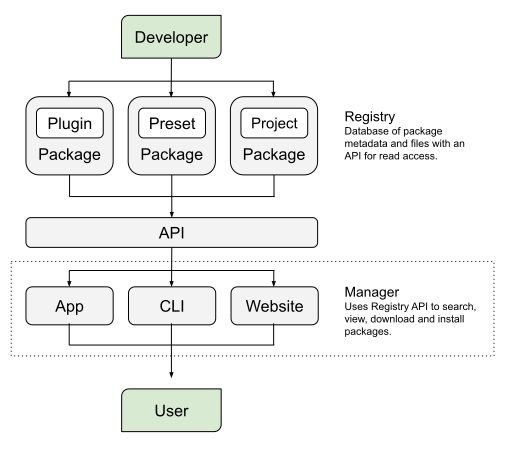
![Open Audio Stack - Manager - Specification 1.0.0](https://raw.githubusercontent.com/open-audio-stack/open-audio-stack-registry/refs/heads/main/src/assets/open-audio-stack-diagram-manager.svg)

</div>

# open-audio-stack-core

Common package shared across Open Audio Stack compatible registries, command-line tools, apps and websites for handling installing DAW VST plugin dependencies.

## Features

High-level classes enable use without writing business-logic:

- Config - Set and get common configuration types, formats, values, paths and urls.
- ConfigLocal - All the Config functionality including ability to load and save configuration to a json file.
- Manager - Search, filter and get packages from a registry.
- ManagerLocal - Scan directories for existing packages locally and install/uninstall packages.
- Package - Create a new package to add to a registry.
- Registry - Create an audio package registry with packages and files.
- RegistryLocal - Scan directories for existing packages locally.

Low-level methods/utilities for more custom/advanced implementations:

- api - get different types of data using web requests
- config - default config options
- file - directory and file helper functions
- package - validation and recommendation functions
- registry - default registry config
- utils - various other utilities

## Installation

To install the common package, run the command:

    npm install @open-audio-stack/core

Import the package using:

    import { Registry } from '@open-audio-stack/core';

Then use the available methods as normal.

## Badges

If your project utilizes the Open Stack Audio specification or API, we encourage linking back to this project using a badge:

```

<a href="https://github.com/open-audio-stack" target="_blank"><img src="https://raw.githubusercontent.com/open-audio-stack/open-audio-stack-registry/refs/heads/main/src/assets/powered-by-open-audio-stack.svg" alt="Powered by Open Audio Stack"></a>
```

Example:

<a href="https://github.com/open-audio-stack" target="_blank"><img src="https://raw.githubusercontent.com/open-audio-stack/open-audio-stack-registry/refs/heads/main/src/assets/powered-by-open-audio-stack.svg" alt="Powered by Open Audio Stack"></a>

## Developer information

Open Audio Stack Core was built using:

- NodeJS 20.x
- TypeScript 5.x
- eslint 9.x
- prettier 3.x
- vitest 1.x

## Developer installation

To install, build and run code locally, first install dependencies:

    npm install

## Developer usage

Run dev commands using:

    npm run lint
    npm run format
    npm run dev
    npm test

Create a production build using:

    npm run build

## Developer deployment

This package is versioned using git tags:

    npm version patch
    git push && git push origin --tags

GitHub Actions will automatically publish the package to npm:

    https://www.npmjs.com/package/@open-audio-stack/core

## Contact

For more information please contact kmturley