**A set of Node-RED nodes for interacting with Seqera Platform.**
- 📚 Documentation: [https://seqeralabs.github.io/node-red-seqera/](https://seqeralabs.github.io/node-red-seqera/)
- Node-RED Flows library: [@seqera/node-red-seqera](https://flows.nodered.org/node/@seqera/node-red-seqera)
- npm package: [@seqera/node-red-seqera](https://www.npmjs.com/package/@seqera/node-red-seqera)
- Seqera Platform: [https://seqera.io/platform/](https://seqera.io/platform/)
Gives new Node-RED node types for your automation workflows, which are designed to work together:
- [Launch a workflow](https://seqeralabs.github.io/node-red-seqera/seqera_nodes/launch_workflow/)
- [Monitor a workflow](https://seqeralabs.github.io/node-red-seqera/seqera_nodes/monitor_workflow/)
- [Poll Workflows](https://seqeralabs.github.io/node-red-seqera/seqera_nodes/poll_workflows/)
- [Add Dataset](https://seqeralabs.github.io/node-red-seqera/seqera_nodes/add_dataset/)
- [List Files from Data Explorer](https://seqeralabs.github.io/node-red-seqera/seqera_nodes/list_files/)
- [Poll Data Link Files](https://seqeralabs.github.io/node-red-seqera/seqera_nodes/poll_files/)
- [Add a Seqera Studio](https://seqeralabs.github.io/node-red-seqera/seqera_nodes/add_studio/)
- [Monitor a Seqera Studio](https://seqeralabs.github.io/node-red-seqera/seqera_nodes/monitor_studio/)
> [!IMPORTANT]
> This is an open-source project for community benefit. It is provided as-is and is not part of Seqera's officially supported toolset.
# Typical Use cases
- 🛠️ Integration with events _coming from_ and _going to_ third-party services (AWS, Slack, and [>5000 others](https://flows.nodered.org/search?type=node) supported by Node-RED)
- 🎨 Link triggers and actions to build automation logic using a graphical builder
- 🔗 Chain workflows, launching downstream automatically
- 🪩 (Bonus) Use with [Home Assistant](https://community.home-assistant.io/t/home-assistant-community-add-on-node-red/55023) to make your office go into disco mode when a pipeline completes 🕺🏻 🎉
## Examples
This package includes several example flows which you can import and repurpose:
- 💡 **Simple launch & monitor**
- Chan your first workflow Launch and Monitor nodes
- 📂 **Launch on file upload**
- Launch a pipeline run when new files are detected using Data Link polling
- ♻️ **Auto-resume on workflow failure**
- Automatically resume failed workflows to recover from transient errors
- 🔗 **Pipeline chaining**
- Chain nf-core/rnaseq and nf-core/differentialabundance pipelines together
- 🐛 👩🏻💻 **Studio on pipeline fail + Slack webhook**
- Create a debugging Studio and send Slack notifications on workflow failure
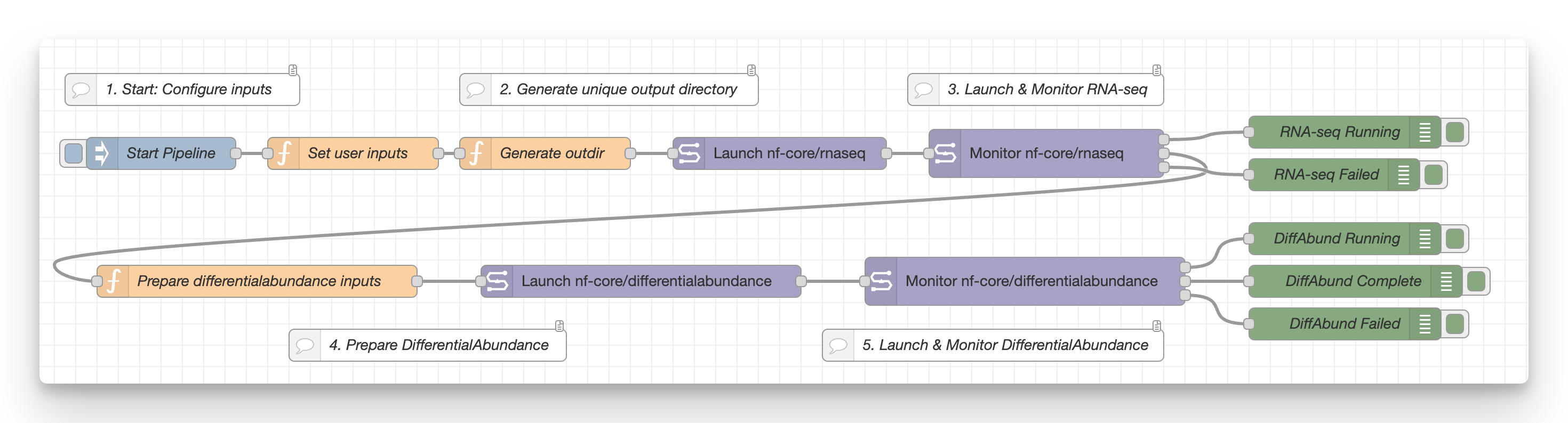
Use via the Node-RED menu under _Import_ > _Examples_ > _@seqera/node-red-seqera_.
See the [example docs](https://seqeralabs.github.io/node-red-seqera/examples/) for more information.
## Video tutorials
Prefer video to text? Check out the [YouTube Playlist of tutorial videos](https://youtube.com/playlist?list=PL_mgzF8qwHud1pOSurWKO8eDJIqE-_NHi&si=StMNRsyMa9JOjBa8), taking you through installation, Node-RED fundamentals and the different examples!
# Quick start
> [!NOTE]
> For more information, please read the [installation docs](https://seqeralabs.github.io/node-red-seqera/installation)
## Seqera Studios
The fastest way to get started is by using [Seqera Studios](https://seqera.io/platform/studios/).
Add a new Studio with the _Template_ set to _Prebuilt container image_ and enter:
```
ghcr.io/seqeralabs/node-red-seqera-studios:latest
```
Make sure that the studio is set to _Always keep the session running_.
Your new Studio should launch with a complete Node-RED instance that's ready for you to customise and use with Seqera automation.
## Within Node-RED
Alternatively Node-RED can be installed just about anywhere. Once installed, grab the Seqera nodes by going to _File_ > _Manage Palette_, then the _Install_ tab.
Search for `@seqera/node-red-seqera` (or just "seqera") and you should find this package. Click _Install_ and the nodes will be available.
# Contributing
Contributions are welcome! If you'd like to contribute to this project, please see [CONTRIBUTING.md](CONTRIBUTING.md).
# License
Apache-2.0 license

 Node-RED Flows library: [@seqera/node-red-seqera](https://flows.nodered.org/node/@seqera/node-red-seqera)
-
Node-RED Flows library: [@seqera/node-red-seqera](https://flows.nodered.org/node/@seqera/node-red-seqera)
-  npm package: [@seqera/node-red-seqera](https://www.npmjs.com/package/@seqera/node-red-seqera)
-
npm package: [@seqera/node-red-seqera](https://www.npmjs.com/package/@seqera/node-red-seqera)
-  Seqera Platform: [https://seqera.io/platform/](https://seqera.io/platform/)
Gives new Node-RED node types for your automation workflows, which are designed to work together:
Seqera Platform: [https://seqera.io/platform/](https://seqera.io/platform/)
Gives new Node-RED node types for your automation workflows, which are designed to work together:
 - [Launch a workflow](https://seqeralabs.github.io/node-red-seqera/seqera_nodes/launch_workflow/)
- [Monitor a workflow](https://seqeralabs.github.io/node-red-seqera/seqera_nodes/monitor_workflow/)
- [Poll Workflows](https://seqeralabs.github.io/node-red-seqera/seqera_nodes/poll_workflows/)
- [Add Dataset](https://seqeralabs.github.io/node-red-seqera/seqera_nodes/add_dataset/)
- [List Files from Data Explorer](https://seqeralabs.github.io/node-red-seqera/seqera_nodes/list_files/)
- [Poll Data Link Files](https://seqeralabs.github.io/node-red-seqera/seqera_nodes/poll_files/)
- [Add a Seqera Studio](https://seqeralabs.github.io/node-red-seqera/seqera_nodes/add_studio/)
- [Monitor a Seqera Studio](https://seqeralabs.github.io/node-red-seqera/seqera_nodes/monitor_studio/)
> [!IMPORTANT]
> This is an open-source project for community benefit. It is provided as-is and is not part of Seqera's officially supported toolset.
# Typical Use cases
- 🛠️ Integration with events _coming from_ and _going to_ third-party services (AWS, Slack, and [>5000 others](https://flows.nodered.org/search?type=node) supported by Node-RED)
- 🎨 Link triggers and actions to build automation logic using a graphical builder
- 🔗 Chain workflows, launching downstream automatically
- 🪩 (Bonus) Use with [Home Assistant](https://community.home-assistant.io/t/home-assistant-community-add-on-node-red/55023) to make your office go into disco mode when a pipeline completes 🕺🏻 🎉
## Examples
This package includes several example flows which you can import and repurpose:
- 💡 **Simple launch & monitor**
- Chan your first workflow Launch and Monitor nodes
- 📂 **Launch on file upload**
- Launch a pipeline run when new files are detected using Data Link polling
- ♻️ **Auto-resume on workflow failure**
- Automatically resume failed workflows to recover from transient errors
- 🔗 **Pipeline chaining**
- Chain nf-core/rnaseq and nf-core/differentialabundance pipelines together
- 🐛 👩🏻💻 **Studio on pipeline fail + Slack webhook**
- Create a debugging Studio and send Slack notifications on workflow failure

Use via the Node-RED menu under _Import_ > _Examples_ > _@seqera/node-red-seqera_.
See the [example docs](https://seqeralabs.github.io/node-red-seqera/examples/) for more information.
## Video tutorials
Prefer video to text? Check out the [YouTube Playlist of tutorial videos](https://youtube.com/playlist?list=PL_mgzF8qwHud1pOSurWKO8eDJIqE-_NHi&si=StMNRsyMa9JOjBa8), taking you through installation, Node-RED fundamentals and the different examples!
- [Launch a workflow](https://seqeralabs.github.io/node-red-seqera/seqera_nodes/launch_workflow/)
- [Monitor a workflow](https://seqeralabs.github.io/node-red-seqera/seqera_nodes/monitor_workflow/)
- [Poll Workflows](https://seqeralabs.github.io/node-red-seqera/seqera_nodes/poll_workflows/)
- [Add Dataset](https://seqeralabs.github.io/node-red-seqera/seqera_nodes/add_dataset/)
- [List Files from Data Explorer](https://seqeralabs.github.io/node-red-seqera/seqera_nodes/list_files/)
- [Poll Data Link Files](https://seqeralabs.github.io/node-red-seqera/seqera_nodes/poll_files/)
- [Add a Seqera Studio](https://seqeralabs.github.io/node-red-seqera/seqera_nodes/add_studio/)
- [Monitor a Seqera Studio](https://seqeralabs.github.io/node-red-seqera/seqera_nodes/monitor_studio/)
> [!IMPORTANT]
> This is an open-source project for community benefit. It is provided as-is and is not part of Seqera's officially supported toolset.
# Typical Use cases
- 🛠️ Integration with events _coming from_ and _going to_ third-party services (AWS, Slack, and [>5000 others](https://flows.nodered.org/search?type=node) supported by Node-RED)
- 🎨 Link triggers and actions to build automation logic using a graphical builder
- 🔗 Chain workflows, launching downstream automatically
- 🪩 (Bonus) Use with [Home Assistant](https://community.home-assistant.io/t/home-assistant-community-add-on-node-red/55023) to make your office go into disco mode when a pipeline completes 🕺🏻 🎉
## Examples
This package includes several example flows which you can import and repurpose:
- 💡 **Simple launch & monitor**
- Chan your first workflow Launch and Monitor nodes
- 📂 **Launch on file upload**
- Launch a pipeline run when new files are detected using Data Link polling
- ♻️ **Auto-resume on workflow failure**
- Automatically resume failed workflows to recover from transient errors
- 🔗 **Pipeline chaining**
- Chain nf-core/rnaseq and nf-core/differentialabundance pipelines together
- 🐛 👩🏻💻 **Studio on pipeline fail + Slack webhook**
- Create a debugging Studio and send Slack notifications on workflow failure

Use via the Node-RED menu under _Import_ > _Examples_ > _@seqera/node-red-seqera_.
See the [example docs](https://seqeralabs.github.io/node-red-seqera/examples/) for more information.
## Video tutorials
Prefer video to text? Check out the [YouTube Playlist of tutorial videos](https://youtube.com/playlist?list=PL_mgzF8qwHud1pOSurWKO8eDJIqE-_NHi&si=StMNRsyMa9JOjBa8), taking you through installation, Node-RED fundamentals and the different examples!