# GrapesJs Notifications Plugin
Centralized notification system for GrapesJS plugins. Displays errors, warnings and activity messages in a consistent UI.
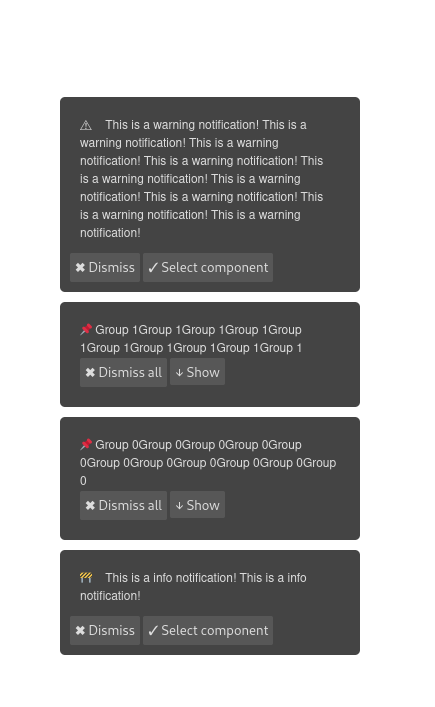
It displays various types of notifications including errors, warnings, and activities, thereby facilitating a more interactive and responsive interface. The most important feature is probably that it allows users to interact with the notifications by clicking on them to select a specific component in the editor, go to a page or scroll to the component.
> This code is part of a larger project: [about Silex v3](https://www.silexlabs.org/silex-v3-kickoff/)
Here is a [demo page on codepen](https://codepen.io/lexoyo/full/mdgzKQb)
Here is a screenshot of the notifications in action:
Features
* [x] Notification types with corresponding icons
* [x] Select component attached to the notification (supports components on different pages)
* [x] Customizable notification style
* [x] Internationalization
* [x] Local storage for persistent notifications
* [x] Maximum number of notifications to display
* [x] Notification timeout
* [x] Custom notification container
* [x] Notification events
* [x] Notification commands
* [x] editor.NotificationManager API
* [x] Group notifications
* [x] Support pages
## Usage
### HTML
```html
```
### JS
```js
const editor = grapesjs.init({
container: '#gjs',
height: '100%',
fromElement: true,
storageManager: false,
plugins: ['@silexlabs/grapesjs-notifications'],
});
// Add notifications using commands
editor.runCommand('notifications:add', {
type: 'info',
message: 'Hello world!',
})
// Add a notification with a unique id (will replace itself if triggered again)
editor.runCommand('notifications:add', {
id: 'unique-notif',
type: 'info',
message: 'This notification will not duplicate!',
})
// Listen to events
editor.on('notifications:changed', (notifications) => {
console.log('Notifications have changed', notifications)
})
```
### CSS
```css
body, html {
margin: 0;
height: 100%;
}
```
## Summary
Plugin name: `@silexlabs/grapesjs-notifications`
## API
### Commands
```js
// Add a notification
editor.runCommand('notifications:add', {
type: 'error' | 'warning' | 'success' | 'info',
message: 'string',
timeout: 5000, // optional timeout in ms
componentId: 'comp-123', // optional component to select
group: 'validation' // optional group name
})
// Remove a notification
editor.runCommand('notifications:remove', notification)
// Clear all notifications
editor.runCommand('notifications:clear')
```
### Events
Listen to notification events:
```js
editor.on('notifications:changed', (notifications) => {
// Triggered when any notification change occurs
// notifications parameter contains all current notifications
})
editor.on('notifications:added', (notification) => {
// Triggered when a notification is added
})
editor.on('notifications:removed', (notification) => {
// Triggered when a notification is removed
})
editor.on('notifications:cleared', () => {
// Triggered when all notifications are cleared
})
```
### Constants
```js
import {
NOTIFICATION_ADD,
NOTIFICATION_REMOVE,
NOTIFICATION_CLEAR,
NOTIFICATION_CHANGED,
NOTIFICATION_ADDED,
NOTIFICATION_REMOVED,
NOTIFICATION_CLEARED
} from '@silexlabs/grapesjs-notifications'
// Use with commands
editor.runCommand(NOTIFICATION_ADD, { /* ... */ })
// Use with events
editor.on(NOTIFICATION_CHANGED, () => { /* ... */ })
```
### NotificationOptions Interface
```ts
export interface NotificationOptions {
/**
* Optional unique id for the notification.
* If provided, notifications with the same id will be replaced instead of duplicated.
*/
id?: string
message: string
group?: string
timeout?: number
componentId?: string
type: 'info' | 'warning' | 'error' | 'success'
icons?: {
info?: string
warning?: string
error?: string
success?: string
}
}
```
## Options
| Option | Description | Type | Default |
|-|-|-|-
| `timeout` | Default timeout for the notification in ms | `number` | No timeout |
| `id` | Unique id for the notification. If set, notifications with the same id will be replaced instead of duplicated | `string` | No id (notifications will stack) |
| `container` | Container for the notifications | `HTMLElement` | `document.body` |
| `storeKey` | Store notifications in local storage under this key | `string` | No storage |
| `icons` | Icons for the notification types | `object` | `{error: '\u2716', warning: '\u26A0', success: '\u2714', info: '\u2139'}` |
| `i18n` | Internationalization | `object` | Check the values in locale/en.js |
| `maxNotifications` | Maximum number of notifications to display | `number` | 50 |
| `reverse` | Reverse the order of the notifications | `boolean` | `false` |
| `style` | Optional styles to add to the component | `string` | `''` |
## Styling
Note that you are free to style the container since you provide it in the options. You also can change the icons from the options.
The notifications are styled using the following CSS classes:
* `.gjs-notification` - The notification container
* `.gjs-notification__group` - The notification group container
* `.gjs-notification__item` - The notification item
* `.gjs-notification__error` - The error notification
* `.gjs-notification__warning` - The warning notification
* `.gjs-notification__success` - The success notification
* `.gjs-notification__info` - The info notification
* `.gjs-notification__message` - The notification message
* `.gjs-notification__close` - The close button for the notification
```css
.gjs-notification {
padding: 10px;
margin: 10px;
border-radius: 5px;
box-shadow: 0 0 5px rgba(0,0,0,.3);
}
```
## Download
* CDN
* `https://unpkg.com/@silexlabs/grapesjs-notifications`
* NPM
* `npm i @silexlabs/grapesjs-notifications`
* GIT
* `git clone https://github.com/silexlabs/grapesjs-notifications.git`
## Usage
Directly in the browser
```html
```
Modern javascript
```js
import grapesjs from 'grapesjs';
import plugin from '@silexlabs/grapesjs-notifications';
import 'grapesjs/dist/css/grapes.min.css';
const editor = grapesjs.init({
container : '#gjs',
// ...
plugins: [plugin],
pluginsOpts: {
[plugin]: { /* options */ }
}
// or
plugins: [
editor => plugin(editor, { /* options */ }),
],
});
```
## Development
Clone the repository
```sh
$ git clone https://github.com/silexlabs/grapesjs-notifications.git
$ cd @silexlabs/grapesjs-notifications
```
Install dependencies
```sh
$ npm i
```
Start the dev server
```sh
$ npm start
```
Build the source
```sh
$ npm run build
```
## License
AGPL-3.0