Sogni Creative Agent Skill
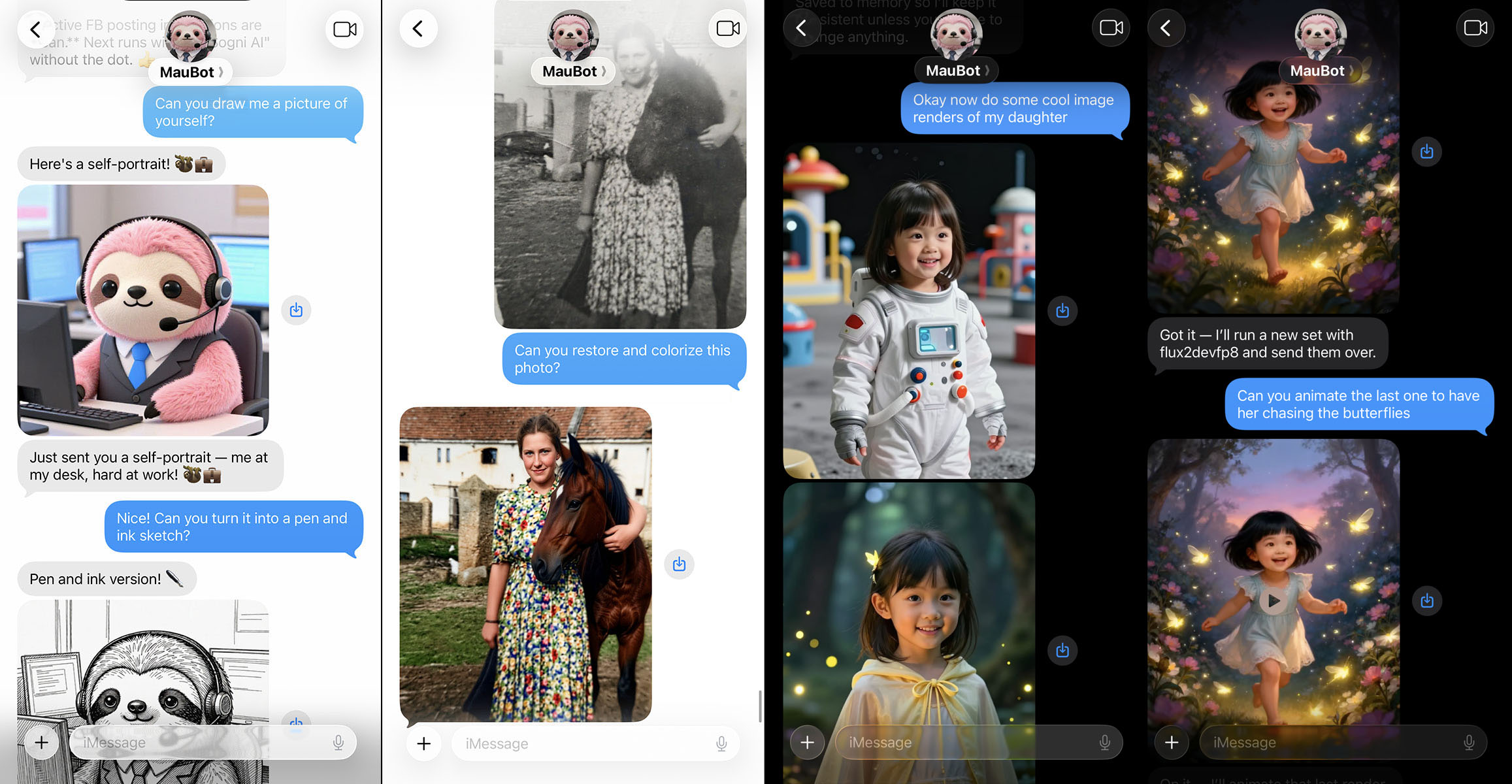
Image, video, and music generation for AI agents — powered by Sogni AI's decentralized GPU network.




---
**Sogni Creative Agent Skill** plugs into the agent runtime you already use — Claude Code, [OpenClaw](https://github.com/OpenClaw/OpenClaw), [Hermes Agent](https://hermes-agent.nousresearch.com/), [Manus AI](https://manus.im), and others — and gives it production-quality image, video, and music generation through a single CLI: `sogni-agent`.
It ships three ways:
- a standalone Node.js CLI (`sogni-agent`)
- a skill source that any [`SKILL.md`](./SKILL.md)-aware agent can load
- a published [OpenClaw](https://github.com/OpenClaw/OpenClaw) plugin
With this skill, an agent can:
- generate images from prompts and edit/restyle existing images
- create videos from text, images, audio, or reference video (LTX-2.3, WAN 2.2, Seedance 2.0)
- generate instrumental music or full songs with lyrics
- run hosted creative workflows including storyboard-driven video
- save personas, preferences, and last-render state across sessions
- check balances, list models, and refine previous results
> **Fastest install:** paste this repo's GitHub URL into your agent and ask it to "install this skill".
---
## Table of Contents
- [Quick Start](#quick-start)
- [Requirements](#requirements)
- [Installation](#installation)
- [Node CLI (default)](#node-cli-default)
- [Claude Code plugin](#claude-code-plugin)
- [OpenAI Codex CLI](#openai-codex-cli)
- [Hermes Agent](#hermes-agent)
- [OpenClaw plugin](#openclaw-plugin)
- [ChatGPT (Custom GPT)](#chatgpt-custom-gpt)
- [Manus / other SKILL.md frameworks](#manus--other-skillmd-frameworks)
- [Manual install from source](#manual-install-from-source)
- [Verify your install](#verify-your-install)
- [Upgrading safely from inside an agent](#upgrading-safely-from-inside-an-agent)
- [Setup (Sogni API key)](#setup-sogni-api-key)
- [Usage](#usage)
- [CLI Reference](#cli-reference)
- [Common options](#common-options)
- [Quality presets](#quality-presets)
- [Recommended models](#recommended-models)
- [Video Sizing & Aspect Ratios](#video-sizing--aspect-ratios)
- [LTX-2.3 Prompting Guide](#ltx-23-prompting-guide)
- [Photobooth (Face Transfer)](#photobooth-face-transfer)
- [Personas, Memory, and Personality](#personas-memory-and-personality)
- [Hosted API Modes](#hosted-api-modes)
- [Dynamic Prompt Variations](#dynamic-prompt-variations)
- [Token Auto-Fallback](#token-auto-fallback)
- [Error Reporting & Output](#error-reporting--output)
- [For AI Agents](#for-ai-agents)
- [Development](#development)
- [License](#license)
---
## Quick Start
1. Get a Sogni API key from [dashboard.sogni.ai](https://dashboard.sogni.ai) (open the account menu) and save it — see [Setup](#setup-sogni-api-key).
2. Install (one command):
```bash
npx setup-sogni-agent-skill
```
This auto-detects Claude Code, OpenAI Codex CLI, and Hermes Agent; installs the
CLI globally; registers the skill into each detected runtime; prompts for your
API key; and prints ChatGPT Custom-GPT setup instructions. (It does **not**
configure OpenClaw — see the [OpenClaw plugin](#openclaw-plugin) section.)
Prefer to do it manually? Install the CLI directly:
```bash
npm install -g @sogni-ai/sogni-creative-agent-skill@latest
sogni-agent --version
```
Then point your agent runtime at this repository's [`SKILL.md`](./SKILL.md).
3. Verify the install:
```bash
sogni-agent doctor
```
Then ask your agent to do something:
- "Generate an image of a sunset over mountains"
- "Edit this image to add a rainbow"
- "Make a video of a cat playing piano"
- "Generate a 30 second synthwave product-launch theme"
- "Turn my selfie into James Bond using photobooth"
- "Refine the last image at higher quality"
---
## Requirements
- **Node.js ≥ 22.11.0**
- **Sogni API key** ([dashboard.sogni.ai](https://dashboard.sogni.ai))
- **`ffmpeg`** *(optional)* — required for local utilities such as `--angles-360-video`, `--concat-videos`, and `--extract-last-frame`. Set `FFMPEG_PATH` to override discovery.
- macOS, Linux, or Windows
---
## Installation
### Node CLI (default)
For most agents and human users:
```bash
npm install -g @sogni-ai/sogni-creative-agent-skill@latest
sogni-agent --version
```
Then point your agent/runtime at this repository's [`SKILL.md`](./SKILL.md). When an install request is ambiguous, install the CLI and skill source together — that's the supported default.
### Claude Code plugin
The Claude Code plugin shells out to the `sogni-agent` CLI installed above, so both steps are required. From inside Claude Code, register the marketplace and install the plugin:
```text
/plugin marketplace add Sogni-AI/sogni-creative-agent-skill
/plugin install sogni-creative-agent@sogni
```
The first command registers a `sogni` marketplace with one plugin entry (`sogni-creative-agent`) backed by a lean Claude-Code-focused [`plugin-skills/sogni-creative-agent/SKILL.md`](./plugin-skills/sogni-creative-agent/SKILL.md); the second installs the plugin into Claude Code. The full skill spec still lives at the repository root [`SKILL.md`](./SKILL.md).
> **Pick one registration per machine.** Install either this plugin **or** the personal skill that `npx setup-sogni-agent-skill` writes to `~/.claude/skills/` — not both. With both installed, Claude Code lists two near-identical skills, which wastes context and makes skill selection ambiguous.
### OpenAI Codex CLI
The `npx` installer writes the skill to `~/.codex/skills/sogni-creative-agent-skill/`, which the Codex CLI discovers automatically:
```bash
npm install -g @sogni-ai/sogni-creative-agent-skill@latest
npx setup-sogni-agent-skill --only=codex
```
Restart Codex (or start a new session) and ask it to "generate an image of a sunset" — the skill shells out to the globally installed `sogni-agent`. To remove it later: `npx setup-sogni-agent-skill --uninstall --only=codex`.
### Hermes Agent
[Hermes Agent](https://hermes-agent.nousresearch.com/) loads skills from `~/.hermes/skills///SKILL.md`. The `npx` installer places this skill at `~/.hermes/skills/media/sogni-creative-agent-skill/`:
```bash
npm install -g @sogni-ai/sogni-creative-agent-skill@latest
npx setup-sogni-agent-skill --only=hermes
```
Then `/reset` your Hermes session so it picks up the new skill. (You can also install manually: copy [`SKILL.md`](./SKILL.md) into `~/.hermes/skills/media/sogni-creative-agent-skill/SKILL.md`, or use `hermes skills install` if your build supports it.)
### OpenClaw plugin
The skill is published on ClawHub, so the simplest install is:
```bash
openclaw skills install sogni-creative-agent-skill
```
To install as a code plugin instead, use OpenClaw's `npm:` source prefix (the npm package is scoped, so a bare `openclaw plugins install sogni-creative-agent-skill` will not resolve it):
```bash
openclaw plugins install npm:@sogni-ai/sogni-creative-agent-skill
```
The installed plugin loads its behavior from [`SKILL.md`](./SKILL.md) via [`openclaw.plugin.json`](./openclaw.plugin.json). The `npx setup-sogni-agent-skill` installer does **not** configure OpenClaw — use the command above (or the local-link flow below) instead.
> **API key under OpenClaw:** the plugin config holds non-secret defaults only (models, timeouts, paths) — it does **not** carry your API key. Provide `SOGNI_API_KEY` via the environment the OpenClaw gateway passes to the CLI, or save it to `~/.config/sogni/credentials` (`SOGNI_API_KEY=`). This keeps your key out of plugin config files.
For a local checkout that you want to update continuously, link the minimal OpenClaw surface (`.openclaw-link/`) — not the repository root, which contains development tests that OpenClaw correctly blocks during plugin safety scanning:
```bash
cd /path/to/sogni-creative-agent-skill
npm install
npm link
npm run openclaw:sync
openclaw plugins install -l "$PWD/.openclaw-link"
openclaw gateway restart
```
To update the linked install later:
```bash
cd /path/to/sogni-creative-agent-skill
git pull --ff-only
npm install
npm link
npm run openclaw:sync
openclaw gateway restart
```
The generated `.openclaw-link/` directory is only for OpenClaw; Hermes, Manus, and other skill-based agents should continue using the root [`SKILL.md`](./SKILL.md).
#### OpenClaw configuration
When loaded through OpenClaw, this skill reads plugin defaults from OpenClaw config; CLI flags always override them. The supported config schema is defined in [`openclaw.plugin.json`](./openclaw.plugin.json) and includes default models, video workflow models, hosted API defaults (`apiBaseUrl`, `defaultLlmModel`, `defaultTaskProfile`, `defaultApiMaxTokens`, `defaultApiThinking`, `defaultApiToolMode`, workflow cost defaults), token type, seed strategy, timeouts, and media paths. If your OpenClaw config lives elsewhere, set `OPENCLAW_CONFIG_PATH`.
### ChatGPT (Custom GPT)
Running `npx setup-sogni-agent-skill` also prints step-by-step instructions for creating a ChatGPT Custom GPT whose Instructions embed this skill. Note that ChatGPT cannot run the local CLI; the Custom GPT path covers prompt-side behavior only.
### Manus / other SKILL.md frameworks
Point the agent at this repository's [`SKILL.md`](./SKILL.md) for behavior guidance and [`llm.txt`](https://raw.githubusercontent.com/Sogni-AI/sogni-creative-agent-skill/main/llm.txt) for install/setup help. The agent should invoke the globally installed `sogni-agent` CLI by default.
### Manual install from source
```bash
gh repo clone Sogni-AI/sogni-creative-agent-skill
cd sogni-creative-agent-skill
npm install
```
### Verify your install
Every install path above ends the same way — run the built-in health check:
```bash
sogni-agent doctor
```
It verifies the Node version, API credentials (and their file permissions), config-dir writability, `ffmpeg` availability, live authentication, and whether a newer version is available. `sogni-agent doctor --json` emits the same checks for agents. If anything is marked `✗`, the detail line says exactly how to fix it.
### Upgrading safely from inside an agent
When upgrading from inside an agent runtime, prefer direct package-manager or existing-checkout commands. Avoid asking the agent to build a clone-or-pull shell bootstrap script with `set -e`, `bash -c`, `sh -c`, or an inline repository URL — some sandboxes correctly route those through approval and the install will stall.
For a global CLI:
```bash
npm install -g @sogni-ai/sogni-creative-agent-skill@latest
sogni-agent --version
```
For an existing local checkout:
```bash
DEST="$HOME/Documents/git/sogni/sogni-creative-agent-skill"
git -C "$DEST" pull --ff-only
npm --prefix "$DEST" install
```
If the checkout is missing, use the npm install path above or explicitly approve a clone.
---
## Setup (Sogni API key)
1. Get your API key from [dashboard.sogni.ai](https://dashboard.sogni.ai) (open the account menu).
2. Save it to a credentials file:
```bash
mkdir -p ~/.config/sogni
cat > ~/.config/sogni/credentials << 'EOF'
SOGNI_API_KEY=your_api_key
EOF
chmod 600 ~/.config/sogni/credentials
```
You can also skip the file and export `SOGNI_API_KEY` in your environment.
### Filesystem path overrides
Defaults live under `~/.config/sogni/` for credentials, last-render metadata, personas, memories, and personality. Override individual paths with:
| Variable | Purpose |
|----------|---------|
| `SOGNI_CREDENTIALS_PATH` | Custom credentials file |
| `SOGNI_LAST_RENDER_PATH` | Where last-render state is persisted |
| `SOGNI_MEDIA_INBOUND_DIR` | Directory used by `--list-media` |
| `OPENCLAW_CONFIG_PATH` | OpenClaw config file location |
| `FFMPEG_PATH` | Custom `ffmpeg` binary |
---
## Usage
```bash
# Image generation
sogni-agent -Q hq -o dragon.png "a dragon eating tacos"
# Edit an image
sogni-agent -c subject.jpg "add a neon cyberpunk glow"
# Photobooth face transfer
sogni-agent --photobooth --ref face.jpg "80s fashion portrait"
# Text-to-video (t2v) with native dialogue
sogni-agent --video 'A narrator says "welcome to the story" as ocean waves crash'
# Short-side resolution targeting (preserves the inherited aspect ratio)
sogni-agent --video --target-resolution 768 \
"A calm cinematic shot of lanterns drifting across a night lake"
# Seedance 2.0 (4-15s vendor video path with native audio)
sogni-agent --video -m seedance2 --duration 8 \
"A polished product reveal with native ambient sound"
# Seedance multimodal context with public HTTPS references
sogni-agent --video -m seedance2 --workflow t2v \
--ref https://cdn.example.com/product.png \
--ref-video https://cdn.example.com/motion.mp4 \
--ref-audio https://cdn.example.com/music.m4a \
"Use @Image1 for product identity, @Video1 for camera movement, and @Audio1 for music rhythm"
# Image-to-video (i2v)
sogni-agent --video --ref cat.jpg "gentle camera pan"
# Image+audio-to-video (auto-routes to LTX-2.3 ia2v)
sogni-agent --video --ref cover.jpg --ref-audio song.mp3 \
"music video with synchronized motion"
# Direct music generation
sogni-agent --music --duration 30 \
"uplifting cinematic synthwave theme for a product launch"
# Song with lyrics and musical controls
sogni-agent --music --lyrics "Rise with the morning light" --bpm 128 \
--keyscale "C major" --output-format mp3 "bright indie pop chorus"
# LTX-2.3 voice identity / persona
sogni-agent --video --reference-audio-identity voice.webm \
'NARRATOR: "This is my voice."'
# Hosted chat with Sogni creative-agent tools (/v1/chat/completions)
sogni-agent --api-chat \
"Create a 4-shot product video concept for a red sneaker"
# Hosted chat with image vision plus media-reference metadata
sogni-agent --api-chat --ref product.jpg \
"Turn this into a launch poster and describe the edit plan"
# Hosted chat controls and model discovery
sogni-agent --api-chat --task-profile reasoning --no-thinking \
"Plan a concise multi-step product launch workflow"
sogni-agent --list-api-models
# Durable hosted chat run with SSE progress events
SOGNI_SKILL_USE_SDK_TRANSPORT=1 sogni-agent --durable-chat \
"Create a product launch storyboard and render the first hero image"
# Durable hosted workflow (/v1/creative-agent/workflows)
sogni-agent --api-workflow \
--video-prompt "The camera slowly pushes in as the sketch comes alive" \
"A graphite robot sketch on a drafting table"
# Durable workflow with a media reference and a cost ceiling
sogni-agent --api-workflow --ref https://cdn.example.com/sketch.png \
--workflow-max-cost 25 --confirm-cost \
--video-prompt "The camera slowly pushes in as the sketch comes alive" \
"Animate the referenced sketch"
# Exact durable workflow input
sogni-agent --api-workflow --workflow-input @workflow.json
# Storyline -> GPT Image 2 storyboard sheet -> Seedance video sequence
sogni-agent --api-workflow storyboard-video --storyboard-frames 6 --duration 12 -Q hq \
"Create a 9:16 bakery launch video with a neon street-window reveal"
# Sogni Intelligence replay records
sogni-agent --list-replays 20
sogni-agent --get-replay run_abc123 --json
# Opt in to SDK transport for hosted operations (durable workflows + chat).
# Validates restEndpoint/socketEndpoint via the skill's SSRF guard, then
# calls the SDK workflow/chat methods directly.
# Falls back to the legacy SSRF-validated fetch path when the env is unset.
export SOGNI_SKILL_USE_SDK_TRANSPORT=1
sogni-agent --api-workflow storyboard-video "10s neon city flyover"
# Local segment + concat with external soundtrack
sogni-agent --video --workflow v2v --ref-video dance.mp4 \
--video-start 10 --duration 8 --controlnet-name pose -o ./clip-2.mp4 \
"robot dancing"
sogni-agent --concat-videos ./final.mp4 ./clip-1.mp4 ./clip-2.mp4 \
--concat-audio song.mp3 --concat-audio-start 0
# Balances and help
sogni-agent --balance
sogni-agent --help
```
> Prefer `.webm`, `.m4a`, or `.mp3` voice clips. Local `.wav` clips are normalized to `.m4a` before upload when `ffmpeg` is available.
>
> For local multi-clip workflows, use the built-in FFmpeg wrappers (`--video-start`, `--audio-start`, `--audio-duration`, `--concat-videos`, `--concat-audio`) over raw shell commands — they produce safer, more reproducible results.
---
## CLI Reference
Run `sogni-agent --help` for the full CLI. Below are the options and tables most agents and users reach for first.
### Common options
| Option | Use |
|--------|-----|
| `-Q fast\|hq\|pro` | Pick image quality without memorizing model IDs |
| `-o ` | Save output locally |
| `-c ` | Provide image context for edits |
| `--video` | Generate video instead of image |
| `--music` | Generate music/audio instead of image |
| `--lyrics`, `--bpm`, `--keyscale`, `--timesig` | Music generation controls |
| `--ref`, `--ref-audio`, `--ref-video` | Image/audio/video references; HTTPS refs are forwarded as URL context for Seedance |
| `--target-resolution ` | Target the short side, preserving aspect ratio |
| `--workflow ` | Force `t2v`, `i2v`, `s2v`, `ia2v`, `a2v`, `v2v`, or animate workflows |
| `--api-chat` | Use `/v1/chat/completions` with Sogni creative-agent tools |
| `--api-workflow` | Start a `/v1/creative-agent/workflows` durable workflow with explicit `input.steps`; optional `storyboard-video` preset |
| `--workflow-input ` | Explicit durable workflow input JSON. Use `@path` to load JSON from a file. |
| `--workflow-max-cost `, `--confirm-cost`, `--no-confirm-cost` | Set durable workflow capacity ceiling and explicit cost confirmation |
| `--storyboard-frames ` | Beat count for `--api-workflow storyboard-video` |
| `--video-prompt`, `--negative-prompt`, `--generate-audio`, `--expand-prompt` | Generated-keyframe durable workflow step controls |
| `--watch-workflow`, `--list-workflows`, `--get-workflow `, `--workflow-events `, `--stream-workflow `, `--cancel-workflow `, `--resume-workflow ` | Manage durable workflows |
| `--api-tools `, `--no-api-tool-execution`, `--llm-model `, `--task-profile `, `--max-tokens `, `--thinking` / `--no-thinking`, `--api-base-url ` | Tune hosted API requests |
| `--list-api-models`, `--get-api-model ` | Inspect Sogni Intelligence LLM models |
| `--list-replays [n]`, `--get-replay `, `--ingest-replay ` | Manage Sogni Intelligence replay records (use `@path` to load JSON from a file) |
| `--persona ` | Use a saved persona |
| `--concat-videos ` | Stitch clips locally with FFmpeg |
| `--last`, `--last-image` | Inspect last render / reuse last image as context or video reference |
| `--strict-size` | Fail instead of auto-adjusting video size |
| `--json` | Emit structured output for agents |
| `-n ` | Multiple outputs per call (safety-capped at 16; raise deliberately with `SOGNI_MAX_COUNT`) |
| `doctor` / `--doctor` | Install health check: Node, credentials, ffmpeg, auth, version (`--json` for agents) |
| `self-update` | Upgrade the CLI via the detected package manager |
| `--whats-new [version]` | Show bundled CHANGELOG entries (everything after `` if given) |
| `--snooze-update` | Snooze the pending-update reminder (1 day → 2 days → 1 week) |
| `--no-update-check` | Disable the background update check for this run (`SOGNI_NO_UPDATE_CHECK=1` to disable always) |
| `--video-model ` | Override the i2v model used by `--angles-360-video` |
| `--memory-category ` | Category for `--memory-set`: `preference` (default), `fact`, or `context` |
### Quality presets
Skip remembering model IDs — `--quality` / `-Q` selects the right model, steps, and dimensions for image generation:
| Preset | Model | Steps | Size | Speed |
|--------|-------|-------|------|-------|
| `fast` | `z_image_turbo_bf16` | 8 | 512×512 | ~5–10s |
| `hq` | `z_image_turbo_bf16` | default | 768×768 | ~10–15s |
| `pro` | `flux2_dev_fp8` | 40 | 1024×1024 | ~2 min |
Explicit `--model` overrides the preset's model. Explicit `-w`/`-h` overrides dimensions.
### Recommended models
Prefer `-Q fast|hq|pro` for images and automatic workflow routing for video. Pass `-m` only when you need a specific model family.
| Need | Recommended selector |
|------|----------------------|
| Default images | `z_image_turbo_bf16` |
| OpenAI GPT Image generation, editing, or strong text rendering | `gpt-image-2` |
| Highest-quality images | `flux2_dev_fp8` (or `-Q pro`) |
| Image editing | `qwen_image_edit_2511_fp8_lightning` |
| Photobooth face transfer | `coreml-sogniXLturbo_alpha1_ad` |
| Direct music generation | `ace_step_1.5_turbo` (or `--music-model turbo`) |
| Music with stronger lyric handling | `ace_step_1.5_sft` (or `--music-model sft`) |
| Text-to-video with native dialogue/audio | `ltx23-22b-fp8_t2v_distilled` |
| Image+audio-to-video | `ltx23-22b-fp8_ia2v_distilled` |
| Audio-to-video | `ltx23-22b-fp8_a2v_distilled` |
| Video-to-video with ControlNet | `ltx23-22b-fp8_v2v_distilled` |
| Seedance text-to-video | `seedance2` or `seedance2-fast` |
| Seedance video-to-video without ControlNet | `seedance2-v2v` |
| Face lip-sync with uploaded audio | `wan_v2.2-14b-fp8_s2v_lightx2v` |
`gpt-image-2` supports flexible OpenAI image sizes up to 3840 px on either edge, max 3:1 aspect ratio, and total pixels from 655,360 to 8,294,400; the API snaps dimensions to valid multiples of 16. For image editing with `gpt-image-2`, you can pass up to 16 context images.
Music generation uses `--music` and outputs `mp3` by default. `--audio` remains the video-reference alias for `--ref-audio`; use `--music` or `--generate-music` for direct audio-only generation.
---
## Video Sizing & Aspect Ratios
- **WAN models** use dimensions divisible by 16, min 480 px, max 1536 px.
- **LTX family** (`ltx2-*`, `ltx23-*`) uses dimensions divisible by 64. The current wrapper caps non-WAN video dimensions at 2048 px on the long side.
- **Seedance** runs at fixed 24 fps and supports 4–15 s durations. Other default/WAN paths support up to 10 s; LTX and WAN animate workflows support up to 20 s.
- For spoken dialogue, budget roughly 3 words per second plus about 1 second for each meaningful acting beat or pause. Keep quoted speech under the model's hard per-clip word budget.
- The script auto-normalizes video sizes to satisfy these constraints.
- Use `--target-resolution ` for bare resolution requests like "720p" — it targets the short side and preserves the inherited aspect ratio.
- Natural-language aspect requests like "portrait", "square", "16:9", or "9:16" are inferred when width/height aren't explicitly set. Combined requests like "720p 9:16" keep the requested short side while applying the requested shape.
- For i2v (and any workflow using `--ref` / `--ref-end`), the client wrapper resizes the reference image with strict aspect-fit (`fit: inside`) and uses the *resized* dimensions as the final video size. Because that resize uses rounding, a "valid" requested size can still produce an invalid final size (example: `1024×1536` requested, but ref becomes `1024×1535`). `sogni-agent` detects this for local refs and auto-adjusts to a nearby safe size.
- Pass `--strict-size` to fail instead — the script will print a suggested size.
V2V defaults mirror Sogni Chat workflow tuning: `canny`, `pose`, and `depth` use ControlNet strength `0.85` with detailer assist; `detailer` uses strength `1.0`. Use `-m seedance2-v2v` for Seedance V2V without ControlNet. Seedance accepts public HTTPS image, video, and audio references that pass CLI URL safety checks; localhost and private-network URLs are rejected before forwarding. Audio references must be paired with an image or video reference.
---
## LTX-2.3 Prompting Guide
When you use `ltx23-22b-fp8_t2v_distilled`, do **not** feed it short tag prompts like `"cinematic drone shot over tropical cliffs"`. LTX-2.3 renders more reliably from a dense natural-language scene description.
- Write one unbroken paragraph — no line breaks, bullets, headers, or tag blocks.
- Use 4–8 flowing present-tense sentences describing one continuous shot, not a montage.
- Start with shot scale and scene identity, then cover environment, time of day, textures, and named light sources.
- Keep characters and objects concrete and stable; describe one main action thread from start to finish.
- For dialogue, include the exact spoken words in double quotes with the speaker and delivery identified inline.
- Express mood through visible behavior, motion, and sound cues — not vague adjectives.
- Use positive phrasing. Avoid script formatting, negative prompts, on-screen text/logo requests, and filler words like "beautiful" or "nice".
- Match scene density to clip length. For short clips, describe one main beat, not several actions.
**Example rewrite:**
```text
User ask: "make a 4k video of a woman in a neon alley"
LTX-2.3 prompt: "A medium cinematic shot frames a woman in her 30s standing in a rain-soaked neon alley at night, violet and amber signs reflecting across the wet pavement while warm steam drifts from street vents. She wears a dark trench coat with damp strands of black hair clinging near her cheek as light glances across the fabric texture and the brick walls behind her. She turns toward the camera and steps forward with measured focus, one hand tightening around the strap of her bag while rain taps softly on the metal fire escape and a distant train hum rolls through the block. The camera performs a slow push-in as her jaw sets and her breathing steadies, maintaining smooth stabilized motion and a tense urban-thriller mood."
```
---
## Photobooth (Face Transfer)
Generate new stylized portraits from a face photo using InstantID ControlNet:
```bash
sogni-agent --photobooth --ref face.jpg "80s fashion portrait"
sogni-agent --photobooth --ref face.jpg -n 4 "LinkedIn professional headshot"
```
Uses SDXL Turbo (`coreml-sogniXLturbo_alpha1_ad`) at 1024×1024 by default. The face image is passed via `--ref` and styled by the prompt. Cannot be combined with `--video` or `-c` / `--context`.
`--photobooth` is face-reference generation, not full-image editing. If the request is "same image, different style" — for example an anime version that must keep the same face, pose, clothing, background, framing, and composition — use Qwen image editing with `-c/--context` instead.
Multi-angle mode (`--multi-angle` / `--angles-360`) auto-builds the `` prompt and applies the `multiple_angles` LoRA. `--angles-360-video` generates i2v clips between consecutive angles (including last → first) and concatenates them with `ffmpeg` into a seamless loop.
`--balance` / `--balances` does not require a prompt and prints current `SPARK` and `SOGNI` balances before exiting.
---
## Personas, Memory, and Personality
### Personas
Named people with saved reference photos and optional voice clips for identity-preserving generation:
```bash
# Add a persona
sogni-agent --persona-add "Mark" --ref face.jpg --relationship self --description "30s male, brown hair"
# Add with voice clip for video voice cloning
sogni-agent --persona-add "Sarah" --ref sarah.jpg --relationship partner --voice-clip voice.webm
# Generate using a persona (auto-injects photo as context)
sogni-agent --persona "Mark" -o hero.png "superhero in dramatic lighting"
# Video using a persona photo + saved voice identity
sogni-agent --video --persona "Sarah" 'SARAH: "This is my voice."'
# List / remove
sogni-agent --persona-list
sogni-agent --persona-remove "Mark"
```
Stored at `~/.config/sogni/personas/`. Personas resolve by explicit saved name, id, or tag/alias; relationship phrases are not treated as persona identifiers.
### Memory (persistent preferences)
Save preferences that agents respect across sessions:
```bash
sogni-agent --memory-set preferred_style "watercolor and soft lighting"
sogni-agent --memory-set aspect_ratio "16:9"
sogni-agent --memory-list
sogni-agent --memory-remove preferred_style
```
Stored at `~/.config/sogni/memories.json`.
### Personality (custom agent instructions)
Tell the agent how it should behave:
```bash
sogni-agent --personality-set "Be concise, always use cinematic lighting"
sogni-agent --personality-get
sogni-agent --personality-clear
```
Stored at `~/.config/sogni/personality.txt`.
---
## Hosted API Modes
Hosted API modes require `SOGNI_API_KEY`.
**Choosing a mode.** Whatever is driving this CLI is usually a more capable planner than Sogni's hosted model, so prefer to plan yourself and let the server execute: direct-to-SDK flags for one-shot work, and `--api-workflow` with an explicit `--workflow-input` step graph for multi-step/durable work (you author the plan; the server runs it durably with replay — no hosted re-planning). Use `--api-chat` / `--durable-chat` when you deliberately want the hosted model to own a long server-side loop, or when several local files must be uploaded for one turn.
- **`--api-chat`** targets `/v1/chat/completions` with Sogni creative-agent tools and **delegates planning/tool-selection to the hosted model** — reach for it when the caller is a thin client, when you want the hosted model to drive a long server-side tool loop, or when several local files must be uploaded for one turn. The CLI sanitizes prompt-injection markers before forwarding messages and can use the current server-side creative-agent media tools, including video extension, segment replacement, overlays, subtitles, stitch/orbit/dance composition, and generated artifact indexing. Tune with `--api-tools creative-agent|creative-tools|none`, `--no-api-tool-execution`, `--llm-model`, and `--system`.
- **Sogni Intelligence controls** include `--task-profile general|coding|reasoning`, `--max-tokens`, and `--thinking` / `--no-thinking`, which forward to `/v1/chat/completions` as `task_profile`, `max_tokens`, and `chat_template_kwargs.enable_thinking`. Use `--list-api-models` or `--get-api-model ` to inspect `/v1/models`.
- **`--durable-chat`** starts a hosted `/v1/chat/runs` record through the SDK transport. Set `SOGNI_SKILL_USE_SDK_TRANSPORT=1` before using it. The CLI streams assistant deltas and de-duplicated per-job progress / ETA / result lines from hosted run events.
- **`--api-workflow`** targets `/v1/creative-agent/workflows` for durable, async workflow records with event streaming and cancellation. Requests carry `input.steps` plus snake_case controls such as `token_type`, `media_references`, `max_estimated_capacity_units`, and `confirm_cost`.
- **`--workflow-input`** forwards exact durable workflow JSON (`{ title?, steps: [...] }`). Use this when you need exact multi-step behavior such as repeated `replace_video_segment` steps with `replacementStartSeconds` / `replacementEndSeconds` for interleaved video slices.
- **`--api-workflow storyboard-video`** generates a storyline, creates a single GPT Image 2 storyboard sheet, then passes that artifact into Seedance as the video reference. The `-Q fast|hq|pro` preset maps to GPT Image 2 low/medium/high quality for that storyboard sheet.
- **Media references** from `-c`, `--ref`, `--ref-end`, `--ref-audio`, `--reference-audio-identity`, and `--ref-video` are forwarded as `media_references` metadata in hosted API requests. API chat also attaches image refs as vision inputs. Local file references are uploaded to Sogni media storage first, then forwarded as retrievable URLs so durable executors do not depend on `data:` URI support. Durable workflow JSON can bind those references into step arguments with `sourceStepId: "$input_media"`. Use direct CLI mode for private media that must not leave the local machine.
- **Cost controls** use `--workflow-max-cost ` to reject workflow starts above a capacity-unit ceiling, and `--confirm-cost` / `--no-confirm-cost` to forward explicit billing confirmation.
- Manage runs with `--watch-workflow`, `--workflow-events`, `--stream-workflow`, `--list-workflows`, `--get-workflow`, `--cancel-workflow`, and `--resume-workflow`. Use `--workflow-input` to provide exact durable workflow JSON.
- **Replay records** use `/v1/replay/records`: `--list-replays [limit]`, `--get-replay `, and `--ingest-replay ` expose redacted RunRecord storage for Sogni Intelligence replay/debug viewers.
Override the API origin with `--api-base-url`, `SOGNI_API_BASE_URL`, or `SOGNI_REST_ENDPOINT`.
Hosted API credentials are only sent to `https://api.sogni.ai` by default. Add trusted custom
hosts with `SOGNI_API_ALLOWED_HOSTS`; loopback or non-HTTPS local testing requires
`SOGNI_ALLOW_UNSAFE_API_BASE_URL=1`.
---
## Dynamic Prompt Variations
Generate diverse images in a single call with `{option1|option2|option3}` syntax:
```bash
# 3 images: "a red car", "a blue car", "a green car"
sogni-agent -n 3 "a {red|blue|green} car"
# Multiple groups cycle independently
sogni-agent -n 4 "a {cat|dog} in a {garden|kitchen}"
# -> "a cat in a garden", "a dog in a kitchen", "a cat in a garden", "a dog in a kitchen"
```
Options cycle sequentially per image. Without `{...}` syntax, `-n` produces multiple images with the same prompt.
For video, use the same pattern when every output shares the same source/end assets and settings and only the prompt text varies:
```bash
sogni-agent --video --ref hero.png -n 3 --duration 5 \
"{the subject smiles and waves|the subject turns toward the window|the subject raises a hand in greeting}"
```
If each clip needs different source images, end frames, durations, audio slices, or other per-output settings, keep those as separate per-clip workflow arguments instead of collapsing them into a Dynamic Prompt branch.
---
## Token Auto-Fallback
Use `--token-type auto` to retry native Sogni models with SOGNI tokens when SPARK is insufficient:
```bash
sogni-agent --token-type auto "a dragon eating tacos"
```
Tries SPARK first, then falls back to SOGNI if the balance is too low. Vendor models such as Seedance and GPT Image 2 require Premium Spark eligibility and never use SOGNI fallback. If usable balance is still insufficient, buy Spark Packs at https://docs.sogni.ai/pricing/#spark-packs.
---
## Error Reporting & Output
- **Exit codes:** failures use a non-zero exit code with human-readable stderr.
- **Structured output:** add `--json` when an agent needs machine-parseable success/error data, or `--last` to inspect the last render. JSON failures include canonical `errorType`, `errorCategory`, and `retryable` fields where the shared runtime can classify the error.
- **stdout stays parseable in `--json` mode:** progress lines, SSE workflow frames, and warnings go to stderr; stdout carries exactly one JSON object. `--last --json` wraps the record in a `{ "success": true, ... }` envelope and exits 1 with `errorCode: "NO_LAST_RENDER"` when nothing has been rendered yet.
- **Output files:** use `-o ` to save locally; otherwise the CLI prints a result URL.
- **Quiet mode:** `-q` / `--quiet` suppresses progress output without changing exit semantics.
- **Interrupts:** Ctrl-C exits with the conventional signal code and cleans up the CLI's temporary files.
---
## For AI Agents
This skill is designed to be loaded into agent runtimes as a first-class capability.
1. **Behavior contract — [`SKILL.md`](./SKILL.md)**
The canonical instructions for how the agent should call `sogni-agent`. Load this as the skill source.
2. **Install/setup hints — [`llm.txt`](./llm.txt)**
A condensed install/setup reference for agents that fetch `llm.txt` over HTTPS:
`https://raw.githubusercontent.com/Sogni-AI/sogni-creative-agent-skill/main/llm.txt`
3. **OpenClaw manifest — [`openclaw.plugin.json`](./openclaw.plugin.json)**
Plugin metadata, config schema, and defaults for OpenClaw-aware runtimes.
4. **Structured output — `--json`**
Use `--json` for machine-readable success/error payloads. Use `--last` to read the previous render's metadata.
5. **Agent-safe install/upgrade**
Prefer the `npm install -g` and `git -C "$DEST" pull --ff-only` paths above. Avoid generating clone-or-pull bootstrap scripts with `set -e`, `bash -c`, `sh -c`, or inline repository URLs — agent sandboxes correctly route those through approval and the install will stall.
6. **Verify with `doctor`**
After any install or upgrade, run `sogni-agent doctor --json` and confirm `"success": true` before reporting the install as working.
7. **Update notices for agents**
When a newer version exists, any command may print one advisory stderr line — `[sogni-agent] Update available: -> ...` — at most once per day (stdout JSON is never touched). Agents should relay it to the user and offer `sogni-agent self-update`, or run `sogni-agent --snooze-update` if the user declines. Interactive TTY users get a banner instead. Each failed check carries a `detail` string with the fix.
8. **SSRF / URL safety**
The CLI validates every HTTP(S) media reference with an SSRF guard ([`ssrf-guard.mjs`](./ssrf-guard.mjs)) and re-validates each redirect hop on download. Localhost and private-network URLs are rejected; only public HTTPS references are forwarded as Seedance multimodal context.
---
## Development
Run the unit test suite (works without any Sogni credentials or private repos):
```bash
npm test
```
Paid integration tests are opt-in: `npm run test:integration` (requires a Sogni API key and submits real GPU jobs).
Architecture notes, the private-runtime sync workflow, code-placement policy, and the release process live in [`CONTRIBUTING.md`](./CONTRIBUTING.md).
Issues and feature requests: [github.com/Sogni-AI/sogni-creative-agent-skill/issues](https://github.com/Sogni-AI/sogni-creative-agent-skill/issues).
---
## License
[MIT](./LICENSE) © Sogni AI