 # @switchbot/homebridge-switchbot
[](https://www.npmjs.com/package/@switchbot/homebridge-switchbot)
[](https://www.npmjs.com/package/@switchbot/homebridge-switchbot)
[](https://discord.gg/5wYTbwP4ha)
# @switchbot/homebridge-switchbot
[](https://www.npmjs.com/package/@switchbot/homebridge-switchbot)
[](https://www.npmjs.com/package/@switchbot/homebridge-switchbot)
[](https://discord.gg/5wYTbwP4ha)
The Homebridge SwitchBot plugin allows you to access your SwitchBot Device(s) from HomeKit with
Homebridge.
## Installation
1. Search for "SwitchBot" on the plugin screen of [Homebridge Config UI X](https://github.com/oznu/homebridge-config-ui-x)
2. Find: `@switchbot/homebridge-switchbot`
- See noble [prerequisites](https://github.com/abandonware/noble#prerequisites) for your OS. (This is used for BLE connection.)
3. Click **Install**
## Configuration
- ### If using OpenAPI Connection
1. Download SwitchBot App on App Store or Google Play Store
2. Register a SwitchBot account and log in into your account
3. Generate an Token within the App
- Click Bottom Profile Tab
- Click Preference
- Click App version 10 Times, this will enable Developer Options
- Click Developer Options
- Click Copy `token` to Clipboard
4. Input your `token` into the config parameter
5. Generate an Secret within the App
- Click Bottom Profile Tab
- Click Preference
- Click App version 10 Times, this will enable Developer Options
- Click Developer Options
- Click Copy `secret` to Clipboard
6. Input your `secret` into the config parameter
- ### If using BLE Connection
1. Download SwitchBot App on App Store or Google Play Store
2. Register a SwitchBot account and log in into your account
3. Click on Device wanting to connect too plugin
- Click the Settings Gear
- Click Device Info
- Copy BLE Mac aka `deviceId`
4. Input your `deviceId` into the Device Config
## Troubleshooting
- ### If using Linux / Raspberry Pi OS
1. `bluetoothctl` must be installed on the device, otherwise it cannot communicate via Bluetooth. Enable it with `sudo bluetoothctl power on`.
2. If errors occur, while enabling it, restart the process:
- `rfkill block bluetooth`
- `rfkill unblock bluetooth`
3. Also make sure, that the computer can discover the SwitchBot device:
- `sudo bluetoothctl`
- `scan on`
This lists all discovered Bluetooth devices. The BLE address of the SwitchBot device should be included in this list, otherwise your computer does not discover it.
- ### If using MacOS
1. Manually grant Bluetooth access in System Settings UI for `Security & Privacy -> Privacy` to the node executable, eg `/usr/local/bin/node`
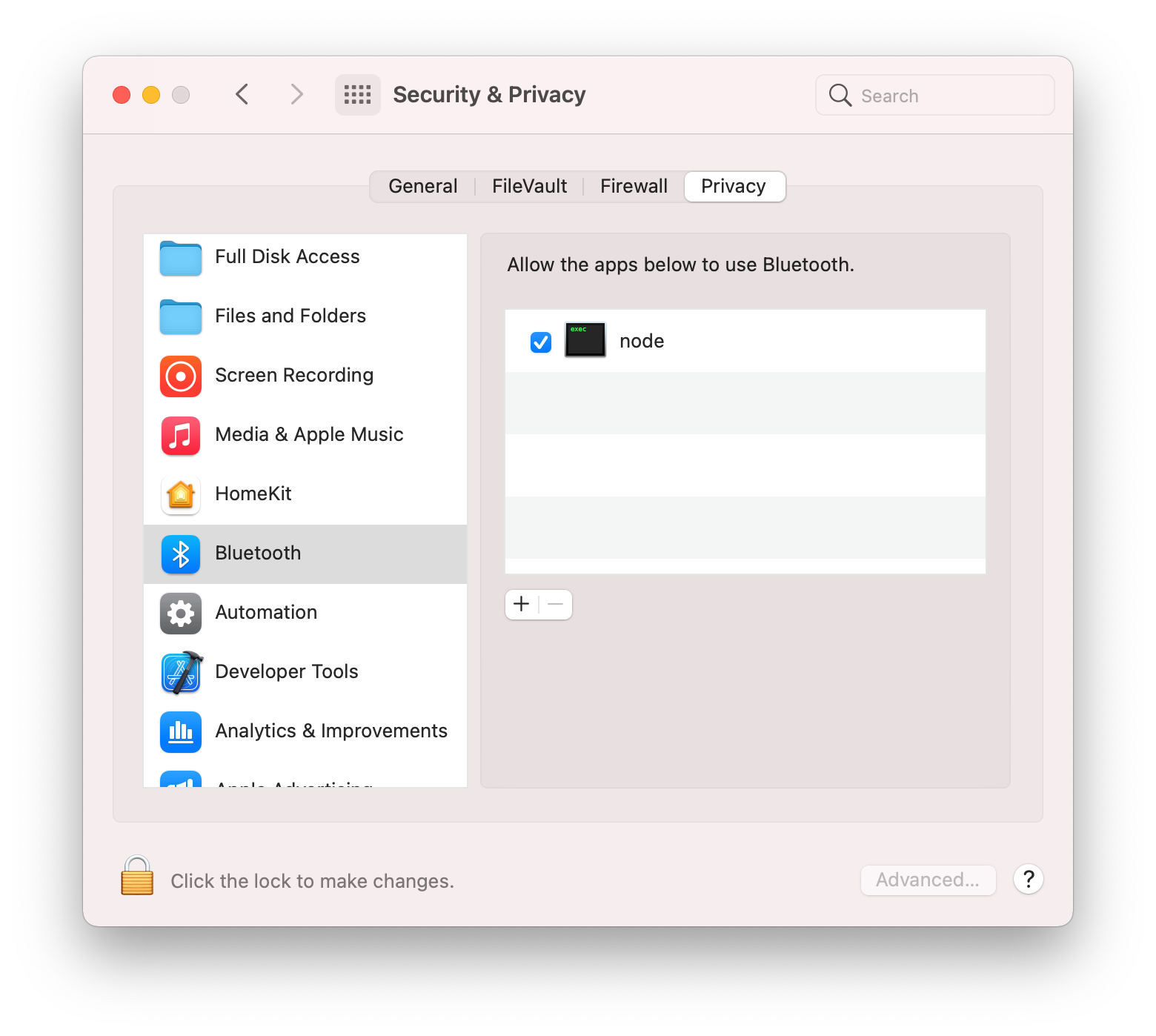
(This is what is intended in documentation for the noble bluetooth package [prerequisites](https://github.com/abandonware/noble#prerequisites) by "Add terminal app", however for HomeBridge it is `node` that needs the permission granted, not `terminal`.
Without this step, then you will receive the following error when the swichbot plugin launches, which will cause Homebridge or the child bridge process to restart:
```
Error: Failed to initialize the Noble object: unauthorized
at Noble. (file:///usr/local/lib/node_modules/@switchbot/homebridge-switchbot/node_modules/node-switchbot/src/switchbot.ts:244:19)
at Object.onceWrapper (node:events:629:26)
at Noble.emit (node:events:514:28)
at Noble.onStateChange (/usr/local/lib/node_modules/@switchbot/homebridge-switchbot/node_modules/@stoprocent/noble/lib/noble.js:92:8)
at NobleMac.emit (node:events:514:28)
```
## Supported SwitchBot Devices
- [SwitchBot Humidifier](https://www.switch-bot.com/products/switchbot-smart-humidifier)
- Supports OpenAPI & Bluetooth Low Energy (BLE) Connections
- Can Push Updates over OpenAPI
- Can Receive Updates over BLE and OpenAPI
- [SwitchBot Evaporative Humidifier (Auto-refill)](https://www.switch-bot.com/products/switchbot-evaporative-humidifier-auto-refill)
- [SwitchBot Meter](https://www.switch-bot.com/products/switchbot-meter)
- [SwitchBot Meter Plus (US)](https://www.switch-bot.com/products/switchbot-meter-plus)
- [SwitchBot Meter Plus (JP)](https://www.switchbot.jp/products/switchbot-meter-plus)
- [SwitchBot Indoor/Outdoor Thermo-Hygrometer](https://www.switch-bot.com/products/switchbot-indoor-outdoor-thermo-hygrometer)
- Supports OpenAPI & Bluetooth Low Energy (BLE) Connections
- If using OpenAPI:
- [SwitchBot Hub Mini](https://www.switch-bot.com/products/switchbot-hub-mini) or [SwitchBot Hub 2](https://us.switch-bot.com/products/switchbot-hub-2) Required
- Enable Cloud Services for Device on SwitchBot App
- If using Bluetooth Low Energy (BLE) only:
- Must supply `deviceId` & `deviceName` to Device Config
- Check `Enable Bluetooth Low Energy (BLE) Connection` on Device Config
- [SwitchBot Motion Sensor](https://www.switch-bot.com/products/motion-sensor)
- Supports OpenAPI & Bluetooth Low Energy (BLE) Connections
- If using OpenAPI:
- [SwitchBot Hub Mini](https://www.switch-bot.com/products/switchbot-hub-mini) or [SwitchBot Hub 2](https://us.switch-bot.com/products/switchbot-hub-2) Required
- Enable Cloud Services for Device on SwitchBot App
- If using Bluetooth Low Energy (BLE) only:
- Must supply `deviceId` & `deviceName` to Device Config
- Check `Enable Bluetooth Low Energy (BLE) Connection` on Device Config
- [SwitchBot Contact Sensor](https://www.switch-bot.com/products/contact-sensor)
- Supports OpenAPI & Bluetooth Low Energy (BLE) Connections
- If using OpenAPI:
- [SwitchBot Hub Mini](https://www.switch-bot.com/products/switchbot-hub-mini) or [SwitchBot Hub 2](https://us.switch-bot.com/products/switchbot-hub-2) Required
- Enable Cloud Services for Device on SwitchBot App
- If using Bluetooth Low Energy (BLE) only:
- Must supply `deviceId` & `deviceName` to Device Config
- Check `Enable Bluetooth Low Energy (BLE) Connection` on Device Config
- [SwitchBot Curtain](https://www.switch-bot.com/products/switchbot-curtain)
- [SwitchBot Curtain 3](https://www.switch-bot.com/products/switchbot-curtain-3)
- Supports OpenAPI & Bluetooth Low Energy (BLE) Connections
- If using OpenAPI:
- [SwitchBot Hub Mini](https://www.switch-bot.com/products/switchbot-hub-mini) or [SwitchBot Hub 2](https://us.switch-bot.com/products/switchbot-hub-2) Required
- Enable Cloud Services for Device on SwitchBot App
- If using Bluetooth Low Energy (BLE) only:
- Must supply `deviceId` & `deviceName` to Device Config
- Check `Enable Bluetooth Low Energy (BLE) Connection` on Device Config
- [SwitchBot Blind Tilt](https://us.switch-bot.com/products/switchbot-blind-tilt)
- Supports OpenAPI & partial Bluetooth Low Energy (BLE) Connections
- If using OpenAPI:
- [SwitchBot Hub Mini](https://www.switch-bot.com/products/switchbot-hub-mini) or [SwitchBot Hub 2](https://us.switch-bot.com/products/switchbot-hub-2) Required
- Enable Cloud Services for Device on SwitchBot App
- [SwitchBot Bulb](https://www.switch-bot.com/products/switchbot-color-bulb)
- [SwitchBot Ceiling Light](https://www.switchbot.jp/collections/all/products/switchbot-ceiling-light)
- [SwitchBot Ceiling Light Pro](https://www.switchbot.jp/collections/all/products/switchbot-ceiling-light)
- [SwitchBot Light Strip](https://www.switch-bot.com/products/switchbot-light-strip)
- Supports OpenAPI & partial Bluetooth Low Energy (BLE) Connections
- If using OpenAPI:
- [SwitchBot Hub Mini](https://www.switch-bot.com/products/switchbot-hub-mini) or [SwitchBot Hub 2](https://us.switch-bot.com/products/switchbot-hub-2) Required
- Enable Cloud Services for Device on SwitchBot App
- [SwitchBot Lock](https://us.switch-bot.com/products/switchbot-lock)
- [SwitchBot Lock Pro](https://www.switchbot.jp/products/switchbot-lock-pro)
- Supports OpenAPI & Bluetooth Low Energy (BLE) Connections
- If using OpenAPI:
- [SwitchBot Hub Mini](https://www.switch-bot.com/products/switchbot-hub-mini) or [SwitchBot Hub 2](https://us.switch-bot.com/products/switchbot-hub-2) Required
- Enable Cloud Services for Device on SwitchBot App
- US: [SwitchBot Mini Robot Vacuum K10+](https://www.switch-bot.com/products/switchbot-mini-robot-vacuum-k10)
- US: [SwitchBot Floor Cleaning Robot S10](https://www.switch-bot.com/products/switchbot-floor-cleaning-robot-s10)
- JP: [SwitchBot Robot Vacuum Cleaner S1](https://www.switchbot.jp/products/switchbot-robot-vacuum-cleaner)
- JP: [SwitchBot Robot Vacuum Cleaner S1 Plus](https://www.switchbot.jp/products/switchbot-robot-vacuum-cleaner)
- Supports OpenAPI Connection Only
- [SwitchBot Plug](https://www.switch-bot.com/products/switchbot-plug)
- [SwitchBot Plug Mini (US)](https://www.switch-bot.com/products/switchbot-plug-mini)
- [SwitchBot Plug Mini (JP)](https://www.switchbot.jp/products/switchbot-plug-mini)
- Supports OpenAPI & Bluetooth Low Energy (BLE) Connections
- If using OpenAPI:
- [SwitchBot Hub Mini](https://www.switch-bot.com/products/switchbot-hub-mini) or [SwitchBot Hub 2](https://us.switch-bot.com/products/switchbot-hub-2) Required
- Enable Cloud Services for Device on SwitchBot App
- [SwitchBot Bot](https://www.switch-bot.com/products/switchbot-bot)
- Supports OpenAPI & Bluetooth Low Energy (BLE) Connections
- If using OpenAPI:
- [SwitchBot Hub Mini](https://www.switch-bot.com/products/switchbot-hub-mini) or [SwitchBot Hub 2](https://us.switch-bot.com/products/switchbot-hub-2) Required
- Enable Cloud Services for Device on SwitchBot App
- You must set your Bot's Device ID for either Press Mode or Switch Mode in Plugin Config (SwitchBot Device Settings > Bot Settings)
- Press Mode - Turns on then instantly turn it off
- Switch Mode - Turns on and keep it on until it is turned off
- This can get out of sync, since API doesn't give me a status
- To Correct you must go into the SwitchBot App and correct the status of either `On` or `Off`
- If using Bluetooth Low Energy (BLE) only:
- Must supply `deviceId` & `deviceName` to Device Config
- Check `Enable Bluetooth Low Energy (BLE) Connection` on Device Config
- [SwitchBot Hub 2](https://us.switch-bot.com/products/switchbot-hub-2)
- Supports OpenAPI & Bluetooth Low Energy (BLE) Connections
- Enables Humidity, Temperature, and Light Sensor
- [SwitchBot Battery Circulator Fan](https://us.switch-bot.com/products/switchbot-battery-circulator-fan)
- Supports OpenAPI Connection Only
- [SwitchBot Water Leak Detector](https://us.switch-bot.com/products/switchbot-water-leak-detector)
- Supports OpenAPI & Bluetooth Low Energy (BLE) Connections
## Supported IR Devices
### _(All IR Devices require [SwitchBot Hub 2](https://us.switch-bot.com/products/switchbot-hub-2) or [Hub Mini](https://www.switch-bot.com/products/switchbot-hub-mini))_
- TV
- Allows for On/Off and Volume Controls
- Optional Disable Sending Power Command
- Projector (Displayed as TV)
- Allows for On/Off and Volume Controls
- Set Top Box (Displayed as Set Top Box)
- Allows for On/Off and Volume Controls
- DVD (Displayed as Set Top Box)
- Allows for On/Off and Volume Controls
- Streamer (Displayed as Streaming Stick)
- Allows for On/Off and Volume Controls
- Speaker (Displayed as Speaker)
- Allows for On/Off and Volume Controls
- Fans
- Allows for On/Off Controls
- Optional Rotation Speed
- Optional Swing Mode
- Lights
- Allows for On/Off Controls
- Air Purifiers
- Allows for On/Off Controls
- Air Conditioners
- Allows for On/Off, Tempeture, and Mode Controls
- Optional Disable Auto Mode
- Cameras
- Allows for On/Off Controls
- Vacuum Cleaners
- Allows for On/Off Controls
- Water Heaters
- Allows for On/Off Controls
- Others
- Option to Display as differenet Device Type
- Supports Fan Device Type
- Allows for On/Off Controls
## SwitchBot APIs
- [OpenWonderLabs/node-switchbot](https://github.com/OpenWonderLabs/node-switchbot)
- [OpenWonderLabs/SwitchBotAPI](https://github.com/OpenWonderLabs/SwitchBotAPI)
- [OpenWonderLabs/SwitchBotAPI-BLE](https://github.com/OpenWonderLabs/SwitchBotAPI-BLE)
## Community
- [SwitchBot (Official website)](https://www.switch-bot.com/)
- [Facebook @SwitchBotRobot](https://www.facebook.com/SwitchBotRobot/)
- [Twitter @SwitchBot](https://twitter.com/switchbot)