# 
[](https://www.npmjs.com/package/@thi.ng/text-canvas)

[](https://mastodon.thi.ng/@toxi)
> [!NOTE]
> This is one of 205 standalone projects, maintained as part
> of the [@thi.ng/umbrella](https://github.com/thi-ng/umbrella/) monorepo
> and anti-framework.
>
> 🚀 Please help me to work full-time on these projects by [sponsoring me on
> GitHub](https://github.com/sponsors/postspectacular). Thank you! ❤️
- [About](#about)
- [Status](#status)
- [Related packages](#related-packages)
- [Installation](#installation)
- [Dependencies](#dependencies)
- [Usage examples](#usage-examples)
- [API](#api)
- [Canvas creation](#canvas-creation)
- [Format identifiers](#format-identifiers)
- [Colors](#colors)
- [Variations](#variations)
- [Combined formats](#combined-formats)
- [String conversion format presets](#string-conversion-format-presets)
- [Stroke styles](#stroke-styles)
- [Clipping](#clipping)
- [Drawing functions](#drawing-functions)
- [Image functions](#image-functions)
- [Text functions](#text-functions)
- [Bars & bar charts](#bars--bar-charts)
- [Tables](#tables)
- [3D wireframe cube example](#3d-wireframe-cube-example)
- [Multiple bar plots with additive blending](#multiple-bar-plots-with-additive-blending)
- [Authors](#authors)
- [License](#license)
## About
Text based canvas, drawing, plotting, tables with arbitrary formatting (incl. ANSI/HTML).
## Status
**STABLE** - used in production
[Search or submit any issues for this package](https://github.com/thi-ng/umbrella/issues?q=%5Btext-canvas%5D+in%3Atitle)
## Related packages
- [@thi.ng/text-format](https://github.com/thi-ng/umbrella/tree/develop/packages/text-format) - Customizable color text formatting with presets for ANSI & HTML
## Installation
```bash
yarn add @thi.ng/text-canvas
```
ESM import:
```ts
import * as tc from "@thi.ng/text-canvas";
```
Browser ESM import:
```html
```
[JSDelivr documentation](https://www.jsdelivr.com/)
For Node.js REPL:
```js
const tc = await import("@thi.ng/text-canvas");
```
Package sizes (brotli'd, pre-treeshake): ESM: 6.23 KB
## Dependencies
- [@thi.ng/api](https://github.com/thi-ng/umbrella/tree/develop/packages/api)
- [@thi.ng/arrays](https://github.com/thi-ng/umbrella/tree/develop/packages/arrays)
- [@thi.ng/checks](https://github.com/thi-ng/umbrella/tree/develop/packages/checks)
- [@thi.ng/errors](https://github.com/thi-ng/umbrella/tree/develop/packages/errors)
- [@thi.ng/geom-clip-line](https://github.com/thi-ng/umbrella/tree/develop/packages/geom-clip-line)
- [@thi.ng/math](https://github.com/thi-ng/umbrella/tree/develop/packages/math)
- [@thi.ng/strings](https://github.com/thi-ng/umbrella/tree/develop/packages/strings)
- [@thi.ng/text-format](https://github.com/thi-ng/umbrella/tree/develop/packages/text-format)
- [@thi.ng/transducers](https://github.com/thi-ng/umbrella/tree/develop/packages/transducers)
Note: @thi.ng/api is in _most_ cases a type-only import (not used at runtime)
## Usage examples
Three projects in this repo's
[/examples](https://github.com/thi-ng/umbrella/tree/develop/examples)
directory are using this package:
| Screenshot | Description | Live demo | Source |
|:-------------------------------------------------------------------------------------------------------------------------|:------------------------------------------------------------------|:--------------------------------------------------------|:-------------------------------------------------------------------------------------|
| 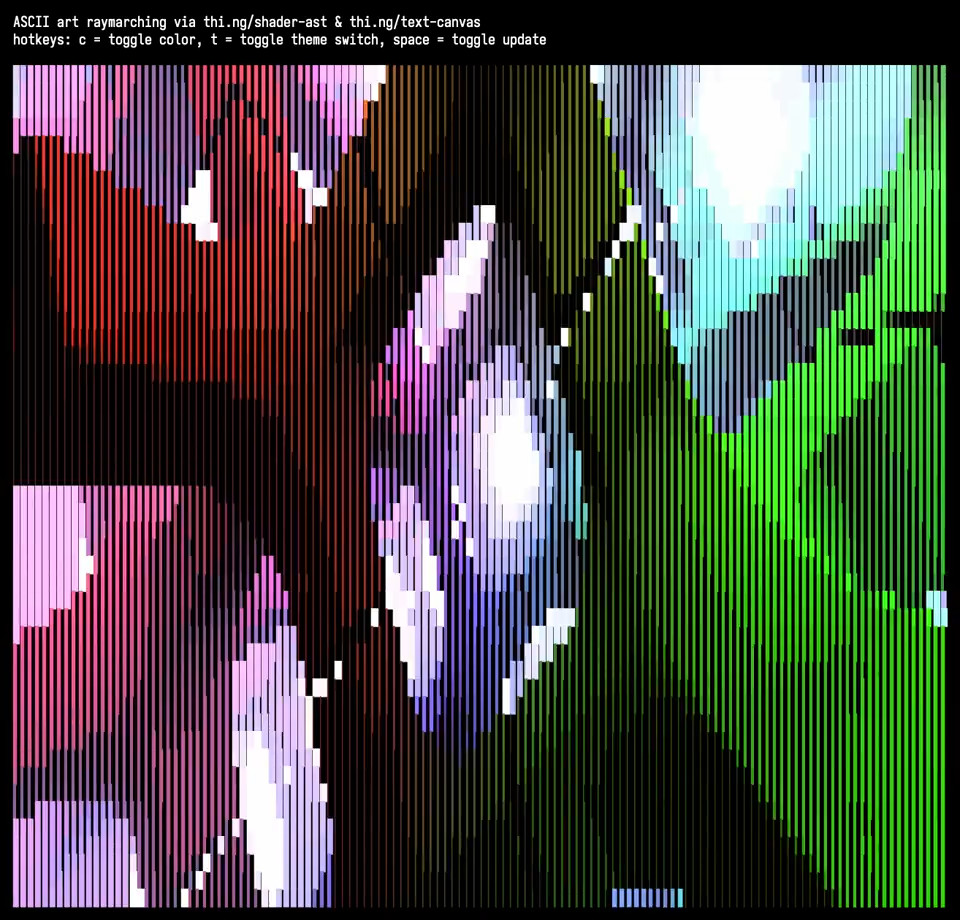 | ASCII art raymarching with thi.ng/shader-ast & thi.ng/text-canvas | [Demo](https://demo.thi.ng/umbrella/ascii-raymarch/) | [Source](https://github.com/thi-ng/umbrella/tree/develop/examples/ascii-raymarch) |
|
| ASCII art raymarching with thi.ng/shader-ast & thi.ng/text-canvas | [Demo](https://demo.thi.ng/umbrella/ascii-raymarch/) | [Source](https://github.com/thi-ng/umbrella/tree/develop/examples/ascii-raymarch) |
| 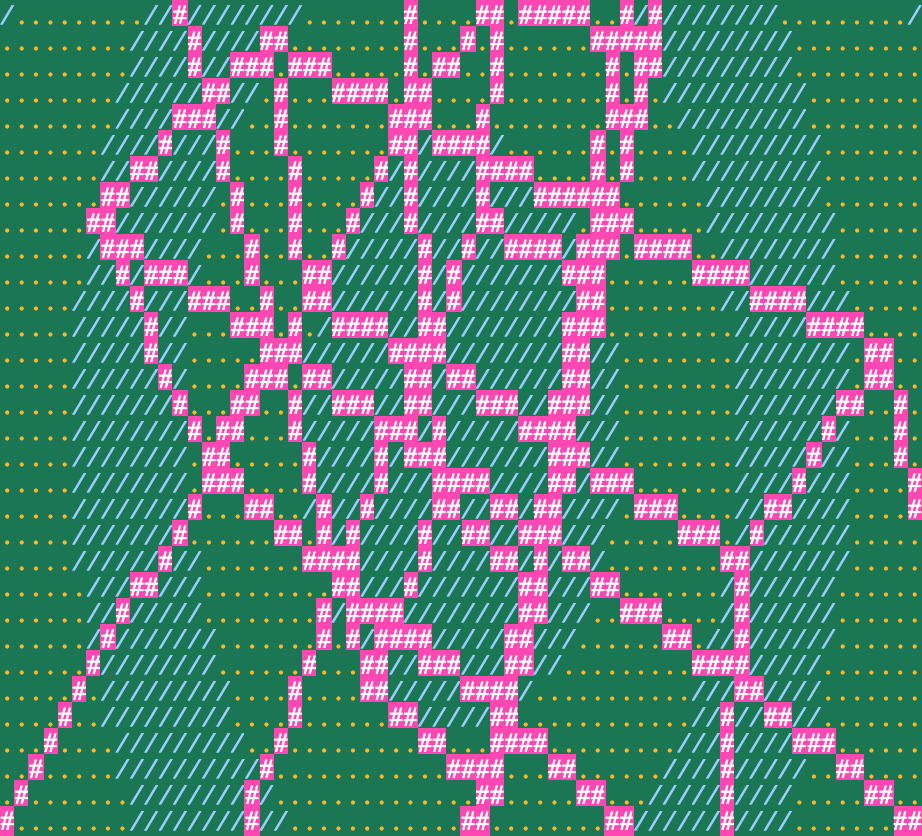 | 3D wireframe textmode demo | [Demo](https://demo.thi.ng/umbrella/text-canvas/) | [Source](https://github.com/thi-ng/umbrella/tree/develop/examples/text-canvas) |
|
| 3D wireframe textmode demo | [Demo](https://demo.thi.ng/umbrella/text-canvas/) | [Source](https://github.com/thi-ng/umbrella/tree/develop/examples/text-canvas) |
| 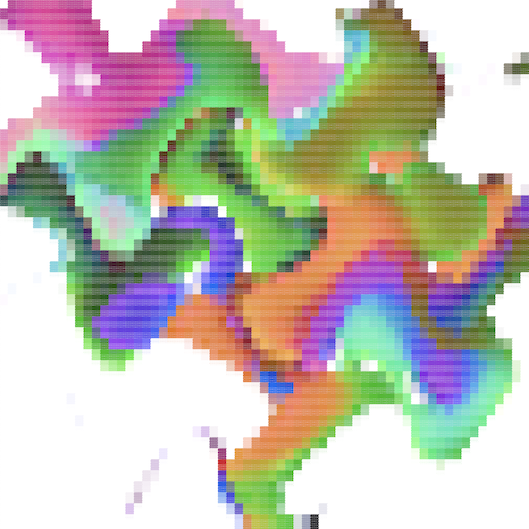 | Textmode image warping w/ 16bit color output | [Demo](https://demo.thi.ng/umbrella/text-canvas-image/) | [Source](https://github.com/thi-ng/umbrella/tree/develop/examples/text-canvas-image) |
## API
[Generated API docs](https://docs.thi.ng/umbrella/text-canvas/)
### Canvas creation
```ts
import { canvas } from "@thi.ng/text-canvas";
const c = canvas(width, height, format?, style?);
```
### Format identifiers
The text canvas stores all characters in a `Uint32Array` with the lower 16 bits
used for the UTF-16 code and the upper 16 bits for **abitrary** formatting data.
The package utilizes [format identifier constants and formatters from the
@thi.ng/text-format
package](https://github.com/thi-ng/umbrella/blob/develop/packages/text-format/),
which are tailored for the included ANSI & HTML formatters, but users are free to
choose use any other system (but then will also need to implement a custom
string formatter impl).
The default format ID layout used by text canvas is as shown:
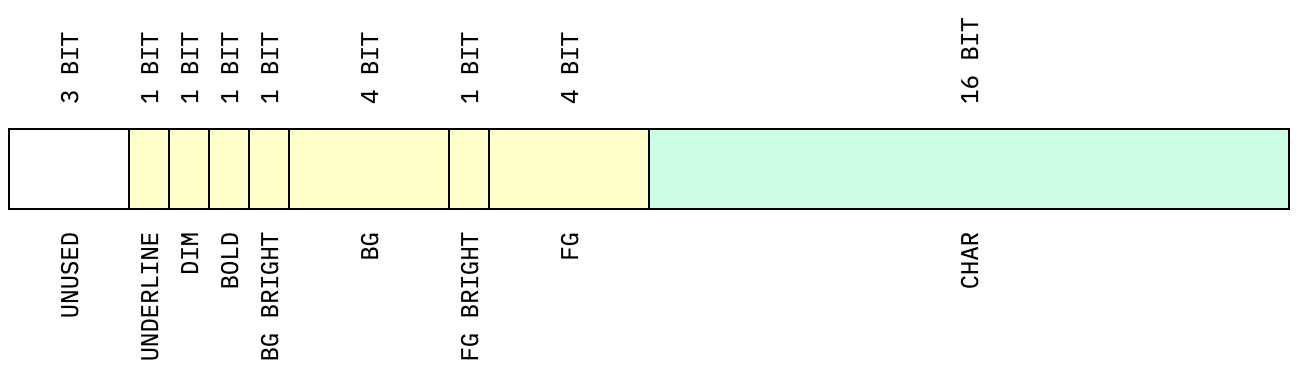
Most drawing functions accept an optional `format` arg, but a default
format can also be set via `setFormat(canvas, formatID)`.
The format IDs defined in @thi.ng/text-format are only compatible with these
formatters (also supplied by that package):
- `FMT_ANSI16`
- `FMT_HTML_INLINE_CSS`
- `FMT_HTML_TACHYONS`
**All constants and other formatters are also discussed in detail in the
[@thi.ng/text-format
readme](https://github.com/thi-ng/umbrella/blob/develop/packages/text-format/README.md).**
#### Colors
These color IDs MUST be prefixed with either `FG_` (foreground) or `BG_`
(background):
- `BLACK`
- `RED`
- `GREEN`
- `YELLOW`
- `BLUE`
- `MAGENTA`
- `CYAN`
- `GRAY`
- `WHITE`
- `LIGHT_GRAY`
- `LIGHT_RED`
- `LIGHT_GREEN`
- `LIGHT_YELLOW`
- `LIGHT_BLUE`
- `LIGHT_MAGENTA`
- `LIGHT_CYAN`
#### Variations
- `BOLD`
- `DIM`
- `UNDERLINE`
#### Combined formats
Format IDs can be combined via the binary OR operator (`|`), e.g.:
```ts
import { setFormat } from "@thi.ng/text-canvas";
import * as tf from "@thi.ng/text-format";
setFormat(canvas, tf.FG_BLACK | tf.BG_LIGHT_CYAN | tf.BOLD | tf.UNDERLINE);
```
### String conversion format presets
Canvas-to-string conversion is completely customizable via the [`StringFormat`
interface](https://docs.thi.ng/umbrella/text-format/interfaces/StringFormat.html).
Currently the following presets are supplied (in the
[@thi.ng/text-format](https://github.com/thi-ng/umbrella/tree/develop/packages/text-format)
package):
- `FMT_ANSI16` - translate built-in format IDs to 4-bit ANSI escape sequences
- `FMT_ANSI256` - uses all 16 format bits for fg & bg colors (ANSI esc sequences)
- `FMT_ANSI565` - uses all 16 format bits for RGB565 fg colors (ANSI esc sequences)
- `FMT_ANSI_RAW` - verbatim use of format IDs to ANSI sequences
- `FMT_HTML_INLINE_CSS` - HTML `` elements with inline CSS
- `FMT_HTML_TACHYONS` - HTML `` elements with [Tachyons
CSS](http://tachyons.io/) class names
- `FMT_HTML565` - HTML `` elements with RGB565 color coding
- `FMT_NONE` - dummy formatter outputting plain text only (all format
information discarded, e.g. for [`NO_COLOR`](https://no-color.org/) support)
```ts
import { formatCanvas } from "@thi.ng/text-canvas";
import { FMT_ANSI16, FMT_HTML_TACHYONS } from "@thi.ng/text-format";
// Terminal
process.stdout.write(formatCanvas(canvas, FMT_ANSI16));
// or
console.log(formatCanvas(canvas, FMT_ANSI16));
// Browser
const el = document.createElement("pre");
el.innerHTML = formatCanvas(canvas, FMT_HTML_TACHYONS);
```
### Stroke styles
Built-in style presets:
- `STYLE_ASCII`
- `STYLE_THIN`
- `STYLE_THIN_ROUNDED`
- `STYLE_DASHED`
- `STYLE_DASHED_ROUNDED`
- `STYLE_DOUBLE`
Functions:
- `beginStyle(canvas, style)`
- `endStyle(canvas)`
### Clipping
All drawing operations are constrained to the currently active clipping rect (by
default full canvas). The canvas maintains a stack of such clipping regions,
each newly pushed one being intersected with the previous top-of-stack rect:
- `beginClip(canvas, x, y, w, h)` - push new clip rect
- `endClip(canvas)` - restore previous clip rect
```text
┌──────────────────┐
│ A │
│ ╔════════╗─────────┐
│ ║ ║ │
│ ║ A & B ║ │
│ ║ ║ │
└─────────╚════════╝ │
│ B │
└──────────────────┘
```
### Drawing functions
- `line()`
- `hline()`
- `vline()`
- `circle()`
- `clear()`
- `fillRect()`
- `strokeRect()`
### Image functions
- `blit()` / `blitMask()` / `blitBarsV()`
- `image()` / `imageRaw()` / `imageCanvas565()` / `imageString565()`
- `imageBraille()` / `imageCanvasBraille()` / `imageStringBraille()`
- `resize()` / `extract()`
- `scrollV()`
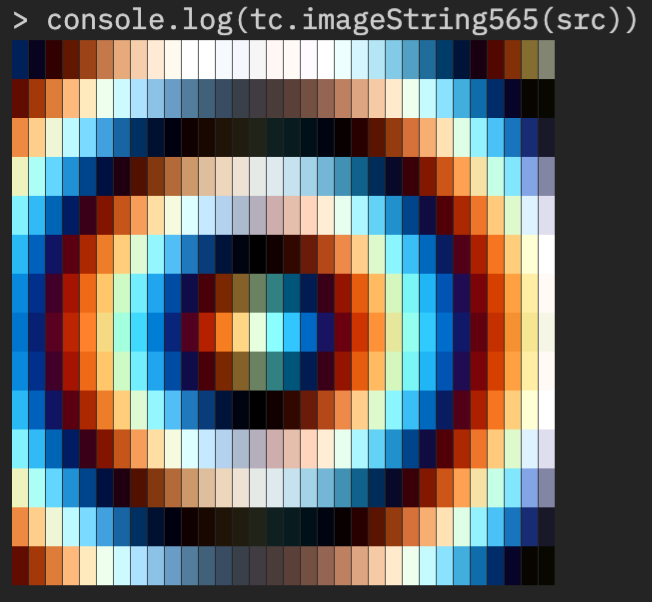
```ts
import { RGB565 } from "@thi.ng/pixel";
import { read } from "@thi.ng/pixel-io-netpbm";
// resize non-proportionally (to compensate
// for character aspect ratio, YMMV)
const img = read(readFileSync("chroma-rings.ppm"))
.resize(32, 32 / 2.25)
.as(RGB565)
// requires an ANSI 24bit compatible terminal
console.log(imageString565(img));
```
### Text functions
- `textLine()`
- `textLines()`
- `textColumn()` (word wrapped)
- `textBox()` (word wrapped)
### Bars & bar charts
The following are string builders only, draw result via [text functions](#text-functions):
- `barHorizontal()`
- `barVertical()`
- `barChartHStr()`
- `barChartVStr()`
### Tables
Tables support individual column width, automatic (or user defined) row
heights, cell padding, as well as global and per-cell formats and the
following border style options:
| Border style | Result |
|------------------|-----------------------------------------------------------------------------------------------------------------|
| `Border.ALL` | 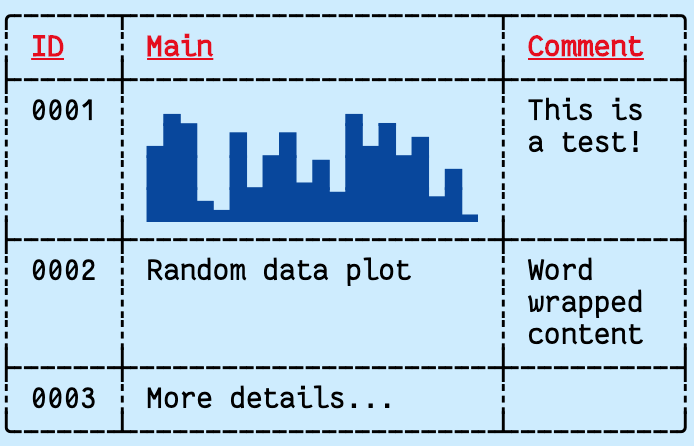 |
| `Border.NONE` | 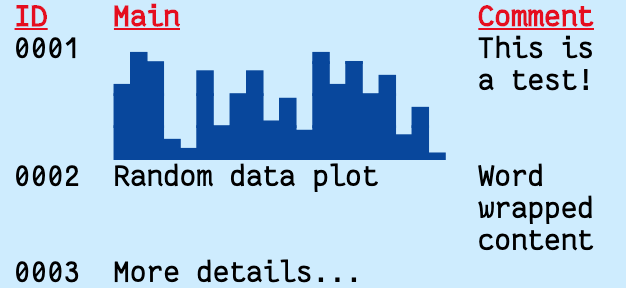 |
| `Border.H` | 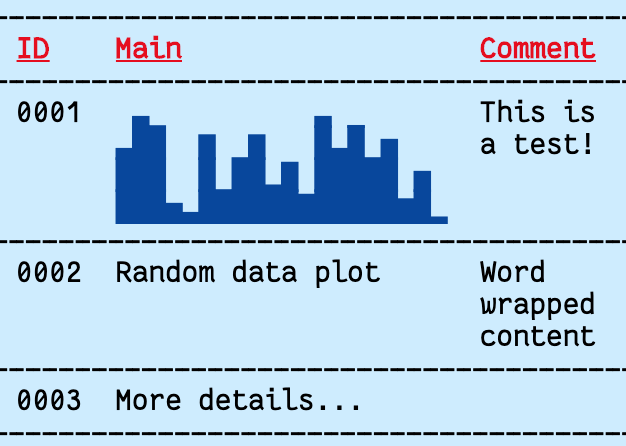 |
| `Border.V` | 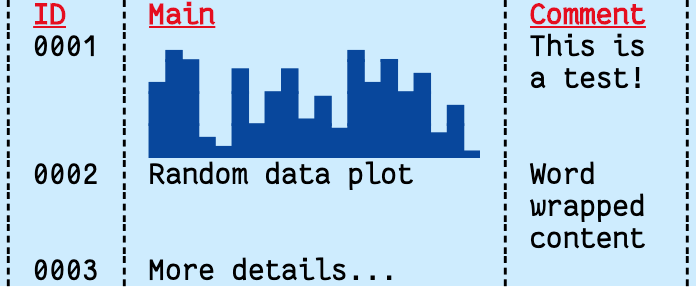 |
| `Border.FRAME` | 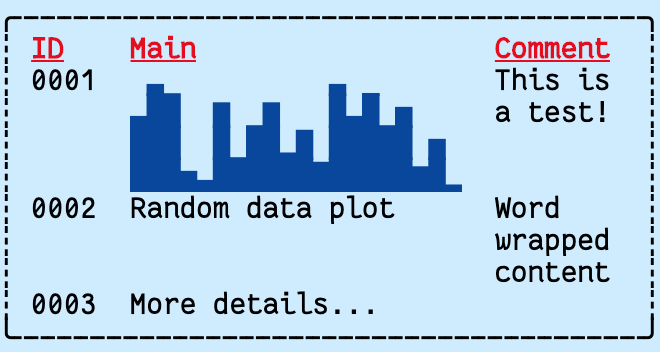 |
| `Border.FRAME_H` | 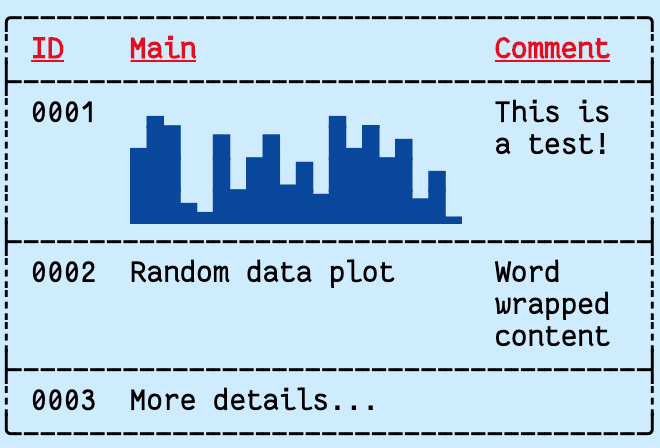 |
| `Border.FRAME_V` | 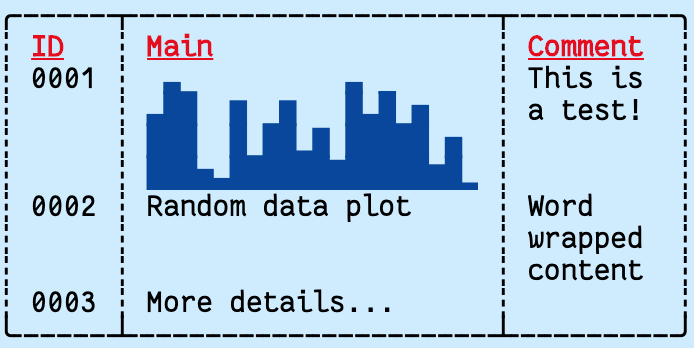 |
Table cell contents will be word-wrapped. By default, individual words longer
than the configured cell width will be truncated, but can be forced to wrap by
enabling the `hard` option (see example below).
```ts tangle:export/readme-table.ts
import { repeatedly } from "@thi.ng/transducers";
import * as tc from "@thi.ng/text-canvas";
import * as tf from "@thi.ng/text-format";
// generate 20 random values
const data = repeatedly(() => Math.random(), 20)
// format as bar chart string
const chart = tc.barChartVStr(4, data, 0, 1);
// create text canvas
const canvas = new tc.Canvas(64, 20);
// create table
tc.table(
canvas,
0,
0,
{
// column defs
cols: [{ width: 4 }, { width: 20 }, { width: 8 }],
// default cell format
format: tf.FG_BLACK | tf.BG_LIGHT_CYAN,
// default format for header cells (1st row)
formatHead: tf.FG_RED | tf.BG_LIGHT_CYAN | tf.BOLD | tf.UNDERLINE,
// border line style
style: tc.STYLE_DASHED_ROUNDED,
// border mode
border: tc.Border.ALL,
// internal cell padding [h,v]
padding: [1, 0],
// hard word wrap
hard: true,
},
// table contents (row major)
// each cell either a string or RawCell object
[
["ID", "Main", "Comment"],
[
"0001",
{ body: chart, format: tf.FG_BLUE | tf.BG_LIGHT_CYAN },
"This is a test!"
],
["0002", "Random data plot", "Word wrapped content"],
["0003", { body: "More details...", height: 4 }, ""]
]
);
// output as ANSI formatted string
console.log(tc.formatCanvas(canvas, tf.FMT_ANSI16));
```
For even more detailed control, tables can also be pre-initialized prior
to creation of the canvas via
[`initTable()`](https://github.com/thi-ng/umbrella/blob/develop/packages/text-canvas/src/table.ts#L29)
and then drawn via
[`drawTable()`](https://github.com/thi-ng/umbrella/blob/develop/packages/text-canvas/src/table.ts#L97).
The `initTable` function returns an object also containing the computed
table size (`width`, `height` keys) which can then be used to create a
canvas with the required size...
For convenience, the `tableCanvas()` function can be used to combine
these steps and to create an auto-sized canvas with the rendered table
as content.
### 3D wireframe cube example
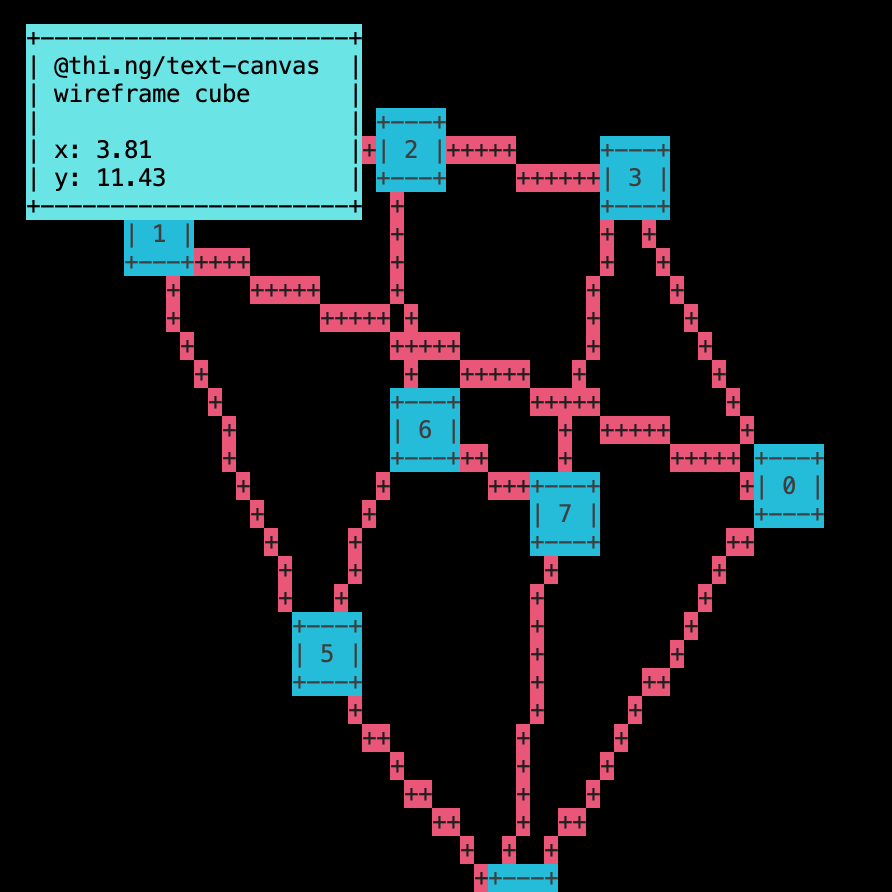
Code for this above example output (CLI version):
```ts tangle:export/readme-cube.ts
import * as geom from "@thi.ng/geom";
import * as mat from "@thi.ng/matrices";
import * as tc from "@thi.ng/text-canvas";
import * as tf from "@thi.ng/text-format";
const W = 64;
const H = 32;
// create text canvas
const canvas = new tc.Canvas(W, H, tf.BG_BLACK, tc.STYLE_THIN);
// cube corner vertices
const cube = geom.vertices(geom.center(geom.aabb(1))!);
// edge list (vertex indices)
const edges = [
[0, 1], [1, 2], [2, 3], [3, 0], [4, 5], [5, 6],
[6, 7], [7, 4], [0, 4], [1, 5], [2, 6], [3, 7]
];
// animated parameters
let rotx = 0;
let roty = 0;
// 3D transformation matrices
const view = mat.lookAt([], [0, 0, 1], [0, 0, 0], [0, 1, 0]);
const proj = mat.perspective([], 90, W / H, 0.1, 10);
const viewp = mat.viewport([], 0, W, H, 0);
setInterval(() => {
tc.clear(canvas, true);
// model rotation matrix
const model = mat.concat(
[],
mat.rotationX44([], rotx += 0.01),
mat.rotationY44([], roty += 0.03)
);
// combined model-view-projection matrix
const mvp = mat.concat([], proj, view, model);
// draw cube instances
// project 3D points to 2D viewport (canvas coords)
const pts = cube.map((p) => mat.project3([], mvp, viewp, p)!);
// draw cube edges
for (let e of edges) {
const a = pts[e[0]];
const b = pts[e[1]];
tc.line(canvas, a[0], a[1], b[0], b[1], "+", tf.FG_WHITE | tf.BG_RED);
}
// draw vertex labels
canvas.format = tf.FG_WHITE | tf.BG_BLUE;
for (let i = 0; i < 8; i++) {
const p = pts[i];
tc.textBox(canvas, p[0] - 1, p[1] - 1, 5, 3, ` ${i} `);
}
tc.textBox(
canvas,
2, 1, 24, -1,
`@thi.ng/text-canvas wireframe cube\n\nx: ${rotx.toFixed(2)}\ny: ${roty.toFixed(2)}`,
{
format: tf.FG_BLACK | tf.BG_LIGHT_CYAN,
padding: [1, 0]
}
);
// output as ANSI formatted string
process.stdout.write(
tf.ANSI_SYNC_START +
tf.ANSI_CLEAR_SCREEN +
tf.ANSI_HOME +
tc.formatCanvas(canvas, tf.FMT_ANSI16) +
tf.ANSI_SYNC_END
);
// ...our output as plain text
// console.log(tc.formatCanvas(canvas));
}, 16);
```
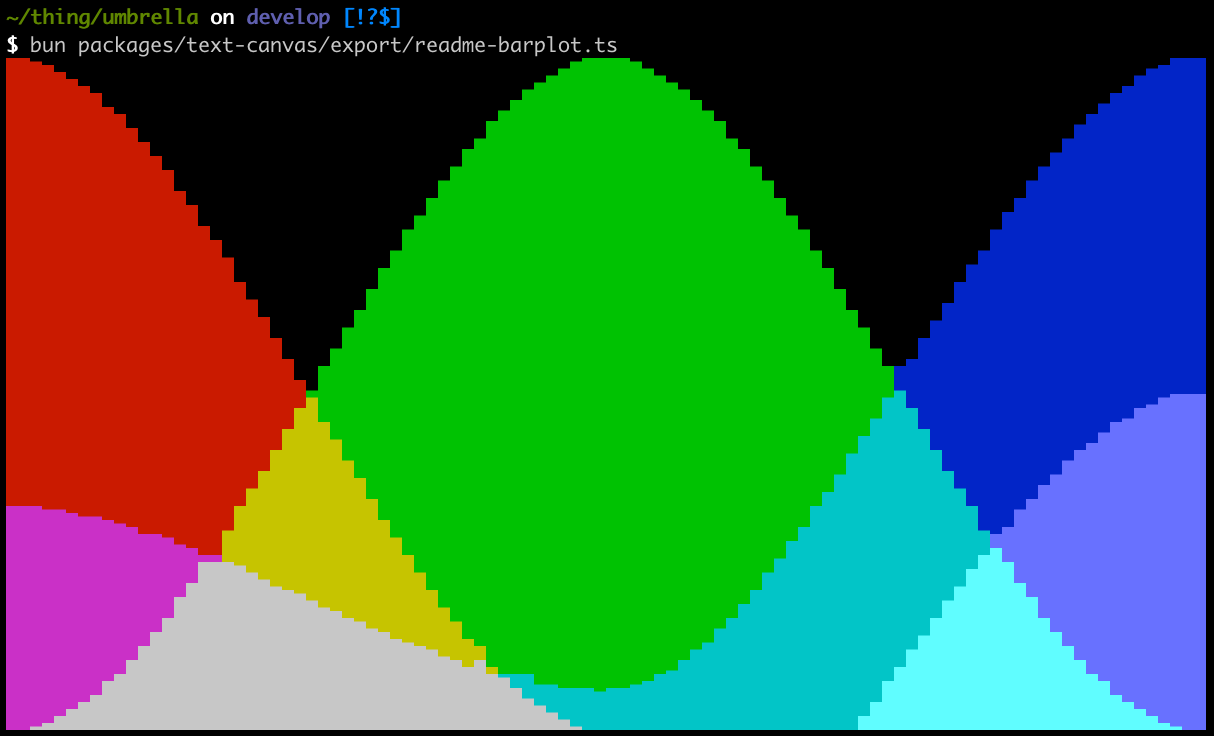
### Multiple bar plots with additive blending
```ts tangle:export/readme-barplot.ts
import { HERMITE_V, VEC4, ramp } from "@thi.ng/ramp";
import { canvas, formatCanvas, plotBarChartV } from "@thi.ng/text-canvas";
import { FG_BLUE, FG_GRAY, FG_GREEN, FG_RED, FMT_ANSI16 } from "@thi.ng/text-format";
// define curves for 4 params which will be computed via
// cubic hermite interpolation
const curves = ramp(
// use VEC4 interpolation preset
HERMITE_V(VEC4),
// keyframes
[
[0.0, [1, 0, 0.33, 0]],
[0.5, [0, 1, 0.06, -0.3]],
[1.0, [0, 0, 1, 0.5]],
]
);
const W = 100;
const H = 24;
const samples: number[][] = [];
// sample curves
for (let i = 0; i < W; i++) {
samples.push(curves.at(i / (W - 1)));
}
// create empty canvas
const plot = canvas(W, H);
// create all 4 bar plots in the same canvas, by default uses additive blending
// to composite each plot layer
plotBarChartV(
plot,
{ min: 0, max: 1 },
{ data: samples.map((x) => x[0]), color: FG_RED },
{ data: samples.map((x) => x[1]), color: FG_GREEN },
{ data: samples.map((x) => x[2]), color: FG_BLUE },
{ data: samples.map((x) => x[3]), color: FG_GRAY }
);
// format & print canvas using ANSI colors
console.log(formatCanvas(plot, FMT_ANSI16));
```
## Authors
- [Karsten Schmidt](https://thi.ng)
If this project contributes to an academic publication, please cite it as:
```bibtex
@misc{thing-text-canvas,
title = "@thi.ng/text-canvas",
author = "Karsten Schmidt",
note = "https://thi.ng/text-canvas",
year = 2020
}
```
## License
© 2020 - 2025 Karsten Schmidt // Apache License 2.0
| Textmode image warping w/ 16bit color output | [Demo](https://demo.thi.ng/umbrella/text-canvas-image/) | [Source](https://github.com/thi-ng/umbrella/tree/develop/examples/text-canvas-image) |
## API
[Generated API docs](https://docs.thi.ng/umbrella/text-canvas/)
### Canvas creation
```ts
import { canvas } from "@thi.ng/text-canvas";
const c = canvas(width, height, format?, style?);
```
### Format identifiers
The text canvas stores all characters in a `Uint32Array` with the lower 16 bits
used for the UTF-16 code and the upper 16 bits for **abitrary** formatting data.
The package utilizes [format identifier constants and formatters from the
@thi.ng/text-format
package](https://github.com/thi-ng/umbrella/blob/develop/packages/text-format/),
which are tailored for the included ANSI & HTML formatters, but users are free to
choose use any other system (but then will also need to implement a custom
string formatter impl).
The default format ID layout used by text canvas is as shown:

Most drawing functions accept an optional `format` arg, but a default
format can also be set via `setFormat(canvas, formatID)`.
The format IDs defined in @thi.ng/text-format are only compatible with these
formatters (also supplied by that package):
- `FMT_ANSI16`
- `FMT_HTML_INLINE_CSS`
- `FMT_HTML_TACHYONS`
**All constants and other formatters are also discussed in detail in the
[@thi.ng/text-format
readme](https://github.com/thi-ng/umbrella/blob/develop/packages/text-format/README.md).**
#### Colors
These color IDs MUST be prefixed with either `FG_` (foreground) or `BG_`
(background):
- `BLACK`
- `RED`
- `GREEN`
- `YELLOW`
- `BLUE`
- `MAGENTA`
- `CYAN`
- `GRAY`
- `WHITE`
- `LIGHT_GRAY`
- `LIGHT_RED`
- `LIGHT_GREEN`
- `LIGHT_YELLOW`
- `LIGHT_BLUE`
- `LIGHT_MAGENTA`
- `LIGHT_CYAN`
#### Variations
- `BOLD`
- `DIM`
- `UNDERLINE`
#### Combined formats
Format IDs can be combined via the binary OR operator (`|`), e.g.:
```ts
import { setFormat } from "@thi.ng/text-canvas";
import * as tf from "@thi.ng/text-format";
setFormat(canvas, tf.FG_BLACK | tf.BG_LIGHT_CYAN | tf.BOLD | tf.UNDERLINE);
```
### String conversion format presets
Canvas-to-string conversion is completely customizable via the [`StringFormat`
interface](https://docs.thi.ng/umbrella/text-format/interfaces/StringFormat.html).
Currently the following presets are supplied (in the
[@thi.ng/text-format](https://github.com/thi-ng/umbrella/tree/develop/packages/text-format)
package):
- `FMT_ANSI16` - translate built-in format IDs to 4-bit ANSI escape sequences
- `FMT_ANSI256` - uses all 16 format bits for fg & bg colors (ANSI esc sequences)
- `FMT_ANSI565` - uses all 16 format bits for RGB565 fg colors (ANSI esc sequences)
- `FMT_ANSI_RAW` - verbatim use of format IDs to ANSI sequences
- `FMT_HTML_INLINE_CSS` - HTML `` elements with inline CSS
- `FMT_HTML_TACHYONS` - HTML `` elements with [Tachyons
CSS](http://tachyons.io/) class names
- `FMT_HTML565` - HTML `` elements with RGB565 color coding
- `FMT_NONE` - dummy formatter outputting plain text only (all format
information discarded, e.g. for [`NO_COLOR`](https://no-color.org/) support)
```ts
import { formatCanvas } from "@thi.ng/text-canvas";
import { FMT_ANSI16, FMT_HTML_TACHYONS } from "@thi.ng/text-format";
// Terminal
process.stdout.write(formatCanvas(canvas, FMT_ANSI16));
// or
console.log(formatCanvas(canvas, FMT_ANSI16));
// Browser
const el = document.createElement("pre");
el.innerHTML = formatCanvas(canvas, FMT_HTML_TACHYONS);
```
### Stroke styles
Built-in style presets:
- `STYLE_ASCII`
- `STYLE_THIN`
- `STYLE_THIN_ROUNDED`
- `STYLE_DASHED`
- `STYLE_DASHED_ROUNDED`
- `STYLE_DOUBLE`
Functions:
- `beginStyle(canvas, style)`
- `endStyle(canvas)`
### Clipping
All drawing operations are constrained to the currently active clipping rect (by
default full canvas). The canvas maintains a stack of such clipping regions,
each newly pushed one being intersected with the previous top-of-stack rect:
- `beginClip(canvas, x, y, w, h)` - push new clip rect
- `endClip(canvas)` - restore previous clip rect
```text
┌──────────────────┐
│ A │
│ ╔════════╗─────────┐
│ ║ ║ │
│ ║ A & B ║ │
│ ║ ║ │
└─────────╚════════╝ │
│ B │
└──────────────────┘
```
### Drawing functions
- `line()`
- `hline()`
- `vline()`
- `circle()`
- `clear()`
- `fillRect()`
- `strokeRect()`
### Image functions
- `blit()` / `blitMask()` / `blitBarsV()`
- `image()` / `imageRaw()` / `imageCanvas565()` / `imageString565()`
- `imageBraille()` / `imageCanvasBraille()` / `imageStringBraille()`
- `resize()` / `extract()`
- `scrollV()`
```ts
import { RGB565 } from "@thi.ng/pixel";
import { read } from "@thi.ng/pixel-io-netpbm";
// resize non-proportionally (to compensate
// for character aspect ratio, YMMV)
const img = read(readFileSync("chroma-rings.ppm"))
.resize(32, 32 / 2.25)
.as(RGB565)
// requires an ANSI 24bit compatible terminal
console.log(imageString565(img));
```

### Text functions
- `textLine()`
- `textLines()`
- `textColumn()` (word wrapped)
- `textBox()` (word wrapped)
### Bars & bar charts
The following are string builders only, draw result via [text functions](#text-functions):
- `barHorizontal()`
- `barVertical()`
- `barChartHStr()`
- `barChartVStr()`
### Tables
Tables support individual column width, automatic (or user defined) row
heights, cell padding, as well as global and per-cell formats and the
following border style options:
| Border style | Result |
|------------------|-----------------------------------------------------------------------------------------------------------------|
| `Border.ALL` |  |
| `Border.NONE` |  |
| `Border.H` |  |
| `Border.V` |  |
| `Border.FRAME` |  |
| `Border.FRAME_H` |  |
| `Border.FRAME_V` |  |
Table cell contents will be word-wrapped. By default, individual words longer
than the configured cell width will be truncated, but can be forced to wrap by
enabling the `hard` option (see example below).
```ts tangle:export/readme-table.ts
import { repeatedly } from "@thi.ng/transducers";
import * as tc from "@thi.ng/text-canvas";
import * as tf from "@thi.ng/text-format";
// generate 20 random values
const data = repeatedly(() => Math.random(), 20)
// format as bar chart string
const chart = tc.barChartVStr(4, data, 0, 1);
// create text canvas
const canvas = new tc.Canvas(64, 20);
// create table
tc.table(
canvas,
0,
0,
{
// column defs
cols: [{ width: 4 }, { width: 20 }, { width: 8 }],
// default cell format
format: tf.FG_BLACK | tf.BG_LIGHT_CYAN,
// default format for header cells (1st row)
formatHead: tf.FG_RED | tf.BG_LIGHT_CYAN | tf.BOLD | tf.UNDERLINE,
// border line style
style: tc.STYLE_DASHED_ROUNDED,
// border mode
border: tc.Border.ALL,
// internal cell padding [h,v]
padding: [1, 0],
// hard word wrap
hard: true,
},
// table contents (row major)
// each cell either a string or RawCell object
[
["ID", "Main", "Comment"],
[
"0001",
{ body: chart, format: tf.FG_BLUE | tf.BG_LIGHT_CYAN },
"This is a test!"
],
["0002", "Random data plot", "Word wrapped content"],
["0003", { body: "More details...", height: 4 }, ""]
]
);
// output as ANSI formatted string
console.log(tc.formatCanvas(canvas, tf.FMT_ANSI16));
```
For even more detailed control, tables can also be pre-initialized prior
to creation of the canvas via
[`initTable()`](https://github.com/thi-ng/umbrella/blob/develop/packages/text-canvas/src/table.ts#L29)
and then drawn via
[`drawTable()`](https://github.com/thi-ng/umbrella/blob/develop/packages/text-canvas/src/table.ts#L97).
The `initTable` function returns an object also containing the computed
table size (`width`, `height` keys) which can then be used to create a
canvas with the required size...
For convenience, the `tableCanvas()` function can be used to combine
these steps and to create an auto-sized canvas with the rendered table
as content.
### 3D wireframe cube example

Code for this above example output (CLI version):
```ts tangle:export/readme-cube.ts
import * as geom from "@thi.ng/geom";
import * as mat from "@thi.ng/matrices";
import * as tc from "@thi.ng/text-canvas";
import * as tf from "@thi.ng/text-format";
const W = 64;
const H = 32;
// create text canvas
const canvas = new tc.Canvas(W, H, tf.BG_BLACK, tc.STYLE_THIN);
// cube corner vertices
const cube = geom.vertices(geom.center(geom.aabb(1))!);
// edge list (vertex indices)
const edges = [
[0, 1], [1, 2], [2, 3], [3, 0], [4, 5], [5, 6],
[6, 7], [7, 4], [0, 4], [1, 5], [2, 6], [3, 7]
];
// animated parameters
let rotx = 0;
let roty = 0;
// 3D transformation matrices
const view = mat.lookAt([], [0, 0, 1], [0, 0, 0], [0, 1, 0]);
const proj = mat.perspective([], 90, W / H, 0.1, 10);
const viewp = mat.viewport([], 0, W, H, 0);
setInterval(() => {
tc.clear(canvas, true);
// model rotation matrix
const model = mat.concat(
[],
mat.rotationX44([], rotx += 0.01),
mat.rotationY44([], roty += 0.03)
);
// combined model-view-projection matrix
const mvp = mat.concat([], proj, view, model);
// draw cube instances
// project 3D points to 2D viewport (canvas coords)
const pts = cube.map((p) => mat.project3([], mvp, viewp, p)!);
// draw cube edges
for (let e of edges) {
const a = pts[e[0]];
const b = pts[e[1]];
tc.line(canvas, a[0], a[1], b[0], b[1], "+", tf.FG_WHITE | tf.BG_RED);
}
// draw vertex labels
canvas.format = tf.FG_WHITE | tf.BG_BLUE;
for (let i = 0; i < 8; i++) {
const p = pts[i];
tc.textBox(canvas, p[0] - 1, p[1] - 1, 5, 3, ` ${i} `);
}
tc.textBox(
canvas,
2, 1, 24, -1,
`@thi.ng/text-canvas wireframe cube\n\nx: ${rotx.toFixed(2)}\ny: ${roty.toFixed(2)}`,
{
format: tf.FG_BLACK | tf.BG_LIGHT_CYAN,
padding: [1, 0]
}
);
// output as ANSI formatted string
process.stdout.write(
tf.ANSI_SYNC_START +
tf.ANSI_CLEAR_SCREEN +
tf.ANSI_HOME +
tc.formatCanvas(canvas, tf.FMT_ANSI16) +
tf.ANSI_SYNC_END
);
// ...our output as plain text
// console.log(tc.formatCanvas(canvas));
}, 16);
```
### Multiple bar plots with additive blending
```ts tangle:export/readme-barplot.ts
import { HERMITE_V, VEC4, ramp } from "@thi.ng/ramp";
import { canvas, formatCanvas, plotBarChartV } from "@thi.ng/text-canvas";
import { FG_BLUE, FG_GRAY, FG_GREEN, FG_RED, FMT_ANSI16 } from "@thi.ng/text-format";
// define curves for 4 params which will be computed via
// cubic hermite interpolation
const curves = ramp(
// use VEC4 interpolation preset
HERMITE_V(VEC4),
// keyframes
[
[0.0, [1, 0, 0.33, 0]],
[0.5, [0, 1, 0.06, -0.3]],
[1.0, [0, 0, 1, 0.5]],
]
);
const W = 100;
const H = 24;
const samples: number[][] = [];
// sample curves
for (let i = 0; i < W; i++) {
samples.push(curves.at(i / (W - 1)));
}
// create empty canvas
const plot = canvas(W, H);
// create all 4 bar plots in the same canvas, by default uses additive blending
// to composite each plot layer
plotBarChartV(
plot,
{ min: 0, max: 1 },
{ data: samples.map((x) => x[0]), color: FG_RED },
{ data: samples.map((x) => x[1]), color: FG_GREEN },
{ data: samples.map((x) => x[2]), color: FG_BLUE },
{ data: samples.map((x) => x[3]), color: FG_GRAY }
);
// format & print canvas using ANSI colors
console.log(formatCanvas(plot, FMT_ANSI16));
```
## Authors
- [Karsten Schmidt](https://thi.ng)
If this project contributes to an academic publication, please cite it as:
```bibtex
@misc{thing-text-canvas,
title = "@thi.ng/text-canvas",
author = "Karsten Schmidt",
note = "https://thi.ng/text-canvas",
year = 2020
}
```
## License
© 2020 - 2025 Karsten Schmidt // Apache License 2.0