VibeAd
Your AI agent thinks. You get paid.




Website · Releases · Issues · X · LinkedIn
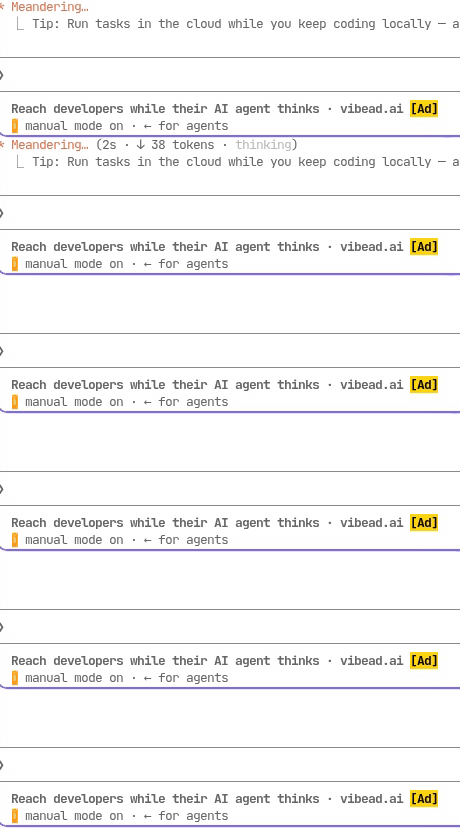
Real capture: Claude Code
## Quick start
Installing VibeAd turns on a short sponsored line in Claude Code, Codex and OpenCode on this computer. The line is labelled [Ad] and appears in the agent's status line, working indicator or notification area while it works. It does not read or change your prompts, code or replies. Turn it off at any time with: vibead disable
```sh
npm i -g @vibead/cli # connects your agents on install, or on your first vibead run
vibead # finishes setup if npm skipped the install script (npm 12, CI)
claude # or opencode, or codex: use your agent as usual
vibead disable # turn ads off and restore your settings
```
**Codex** gets a `codex` alias for `vibead codex`; `vibead disable` removes it.
- A short, labelled `[Ad]` line appears while your agent thinks: in the status line (Claude Code, OpenCode 1.19+) or a labelled toast (OpenCode 1.18).
- VibeAd never reads or changes your prompts, code or agent output.
- Journals every file it changes; `vibead disable` restores them exactly.
Works with **Claude Code, Codex and OpenCode** on **macOS (Apple Silicon, Intel)** and **Linux x64 (glibc 2.34+)**. Linux arm64 is not supported yet.
**Uninstall:** `vibead uninstall` (restores your settings, then removes VibeAd's files and this package, so `vibead` is gone)
---
What install (or vibead enable) changes
Install connects the agents it finds. `vibead enable` (to turn ads back on after `vibead disable`) lists every file it will change and asks before touching anything. Use `--dry-run` to preview only.
- **Claude Code:** adds a status line and turn hooks to `~/.claude/settings.json`. The hooks print nothing, so nothing reaches the model.
- **OpenCode:** adds a plugin that shows a labelled toast when a turn starts.
- **Codex:** a `codex` shell function in your shell's rc file (`~/.bashrc` or `~/.zshrc`) that runs `vibead codex`, and plain `codex` if VibeAd is gone.
Ads are labelled `[Ad]` and appear only in status or notification UI. `vibead disable` removes only VibeAd's changes and keeps yours; `vibead uninstall` also removes VibeAd's files and the `vibead` command.
npm 11 prints `npm warn install-scripts` lines for `@vibead/cli`: that is npm noting the package has an install script (it connects your agents); it is safe to ignore, and npm 12, which skips install scripts, leaves setup to your first `vibead` run.
VibeAd counts how many times ads are shown, nothing else. Never your prompts or code. Stop it anytime with `vibead disable`.
Install with Homebrew
```sh
brew install vibead/tap/vibead && vibead # installs, then connects the agents it finds
```
Includes its own runtime, so Node.js is not needed. See [vibead/homebrew-tap](https://github.com/vibead/homebrew-tap).
Manual download
Download the archive for your computer and its `.sha256` file from the [latest release](https://github.com/vibead/cli/releases/latest), verify the checksum, extract it, and run `/path/to/vibead-beta enable`. See the [beta guide](https://github.com/vibead/cli/blob/main/BETA.md#1-download).
Settings and other commands
```sh
vibead enable claude opencode codex # choose agents
vibead disable [agent...] # undo for some or all agents
vibead uninstall # undo everything and remove data
vibead claude # wrapper mode, without enable
vibead --help
```
npm needs Node.js 20+ and `tar`. The first run downloads the release and verifies its SHA-256 checksum.
Troubleshooting
- **Claude Code asks whether you trust the folder:** choose **Yes, I trust this folder**. If you exit by mistake, run `claude` again.
- **No ad on the first turn:** very short turns can end before an ad shows; the first turn may show a VibeAd house ad.
- **macOS:** builds are ad hoc signed, not Apple-notarized.
- Something wrong? [Open an issue](https://github.com/vibead/cli/issues) with your OS and agent version.
Full guide: [BETA.md](https://github.com/vibead/cli/blob/main/BETA.md). Publisher demo: [ENTERPRISE-DEMO.md](https://github.com/vibead/cli/blob/main/ENTERPRISE-DEMO.md).
For developers
This repo holds public releases and the npm launcher in [`npm/`](https://github.com/vibead/cli/tree/main/npm). Source and server code are private. [Release notes](https://github.com/vibead/cli/releases/latest).