# InspectorControls
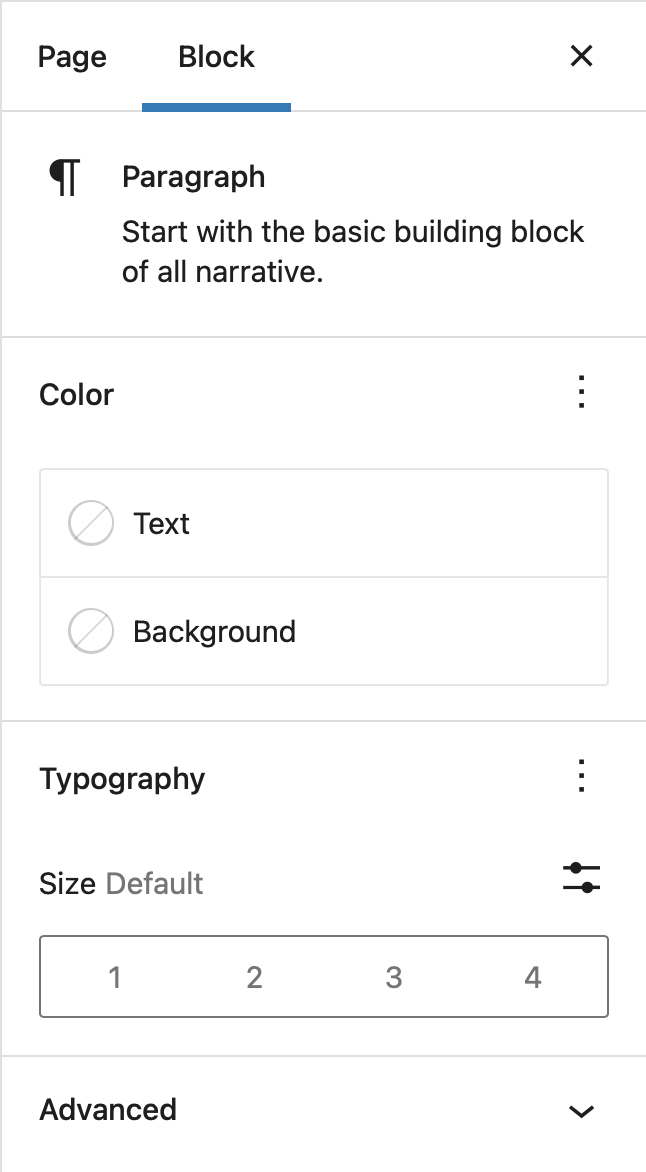 Inspector Controls appear in the post settings sidebar when a block is being edited. The controls appear in both HTML and visual editing modes, and thus should contain settings that affect the entire block.
## Usage
{% codetabs %}
{% ES5 %}
```js
var el = wp.element.createElement,
Fragment = wp.element.Fragment,
registerBlockType = wp.blocks.registerBlockType,
RichText = wp.editor.RichText,
InspectorControls = wp.blockEditor.InspectorControls,
useBlockProps = wp.blockEditor.useBlockProps,
CheckboxControl = wp.components.CheckboxControl,
RadioControl = wp.components.RadioControl,
TextControl = wp.components.TextControl,
ToggleControl = wp.components.ToggleControl,
SelectControl = wp.components.SelectControl;
registerBlockType( 'my-plugin/inspector-controls-example', {
apiVersion: 2,
title: 'Inspector controls example',
icon: 'universal-access-alt',
category: 'design',
attributes: {
content: {
type: 'string',
source: 'html',
selector: 'p',
},
checkboxField: {
type: 'boolean',
default: true,
},
radioField: {
type: 'string',
default: 'yes',
},
textField: {
type: 'string',
},
toggleField: {
type: 'boolean',
},
selectField: {
type: 'string',
},
},
edit: function ( props ) {
var blockProps = useBlockProps();
var content = props.attributes.content,
checkboxField = props.attributes.checkboxField,
radioField = props.attributes.radioField,
textField = props.attributes.textField,
toggleField = props.attributes.toggleField,
selectField = props.attributes.selectField;
function onChangeContent( newContent ) {
props.setAttributes( { content: newContent } );
}
function onChangeCheckboxField( newValue ) {
props.setAttributes( { checkboxField: newValue } );
}
function onChangeRadioField( newValue ) {
props.setAttributes( { radioField: newValue } );
}
function onChangeTextField( newValue ) {
props.setAttributes( { textField: newValue } );
}
function onChangeToggleField( newValue ) {
props.setAttributes( { toggleField: newValue } );
}
function onChangeSelectField( newValue ) {
props.setAttributes( { selectField: newValue } );
}
return el(
Fragment,
null,
el(
InspectorControls,
null,
el( CheckboxControl, {
heading: 'Checkbox Field',
label: 'Tick Me',
help: 'Additional help text',
checked: checkboxField,
onChange: onChangeCheckboxField,
} ),
el( RadioControl, {
label: 'Radio Field',
selected: radioField,
options: [
{
label: 'Yes',
value: 'yes',
},
{
label: 'No',
value: 'no',
},
],
onChange: onChangeRadioField,
} ),
el( TextControl, {
label: 'Text Field',
help: 'Additional help text',
value: textField,
onChange: onChangeTextField,
} ),
el( ToggleControl, {
label: 'Toggle Field',
checked: toggleField,
onChange: onChangeToggleField,
} ),
el( SelectControl, {
label: 'Select Field',
value: selectField,
options: [
{
value: 'a',
label: 'Option A',
},
{
value: 'b',
label: 'Option B',
},
{
value: 'c',
label: 'Option C',
},
],
onChange: onChangeSelectField,
} )
),
el(
RichText,
Object.assing( blockProps, {
key: 'editable',
tagName: 'p',
onChange: onChangeContent,
value: content,
} )
)
);
},
save: function ( props ) {
var blockProps = useBlockProps.save();
var content = props.attributes.content,
checkboxField = props.attributes.checkboxField,
radioField = props.attributes.radioField,
textField = props.attributes.textField,
toggleField = props.attributes.toggleField,
selectField = props.attributes.selectField;
return el(
'div',
blockProps,
el( RichText.Content, {
value: content,
tagName: 'p',
} ),
el( 'h2', null, 'Inspector Control Fields' ),
el(
'ul',
null,
el( 'li', null, 'Checkbox Field: ', checkboxField ),
el( 'li', null, 'Radio Field: ', radioField ),
el( 'li', null, 'Text Field: ', textField ),
el( 'li', null, 'Toggle Field: ', toggleField ),
el( 'li', null, 'Select Field: ', selectField )
)
);
},
} );
```
{% ESNext %}
```js
import { registerBlockType } from '@wordpress/blocks';
import {
CheckboxControl,
RadioControl,
TextControl,
ToggleControl,
SelectControl,
} from '@wordpress/components';
import {
RichText,
InspectorControls,
useBlockProps,
} from '@wordpress/block-editor';
registerBlockType( 'my-plugin/inspector-controls-example', {
apiVersion: 2,
title: 'Inspector controls example',
icon: 'universal-access-alt',
category: 'design',
attributes: {
content: {
type: 'string',
source: 'html',
selector: 'p',
},
checkboxField: {
type: 'boolean',
default: true,
},
radioField: {
type: 'string',
default: 'yes',
},
textField: {
type: 'string',
},
toggleField: {
type: 'boolean',
},
selectField: {
type: 'string',
},
},
edit( { attributes, setAttributes } ) {
const blockProps = useBlockProps();
const {
content,
checkboxField,
radioField,
textField,
toggleField,
selectField,
} = attributes;
function onChangeContent( newContent ) {
setAttributes( { content: newContent } );
}
function onChangeCheckboxField( newValue ) {
setAttributes( { checkboxField: newValue } );
}
function onChangeRadioField( newValue ) {
setAttributes( { radioField: newValue } );
}
function onChangeTextField( newValue ) {
setAttributes( { textField: newValue } );
}
function onChangeToggleField( newValue ) {
setAttributes( { toggleField: newValue } );
}
function onChangeSelectField( newValue ) {
setAttributes( { selectField: newValue } );
}
return (
<>
);
},
save( { attributes } ) {
const {
content,
checkboxField,
radioField,
textField,
toggleField,
selectField,
} = attributes;
const blockProps = useBlockProps.save();
return (
Inspector Controls appear in the post settings sidebar when a block is being edited. The controls appear in both HTML and visual editing modes, and thus should contain settings that affect the entire block.
## Usage
{% codetabs %}
{% ES5 %}
```js
var el = wp.element.createElement,
Fragment = wp.element.Fragment,
registerBlockType = wp.blocks.registerBlockType,
RichText = wp.editor.RichText,
InspectorControls = wp.blockEditor.InspectorControls,
useBlockProps = wp.blockEditor.useBlockProps,
CheckboxControl = wp.components.CheckboxControl,
RadioControl = wp.components.RadioControl,
TextControl = wp.components.TextControl,
ToggleControl = wp.components.ToggleControl,
SelectControl = wp.components.SelectControl;
registerBlockType( 'my-plugin/inspector-controls-example', {
apiVersion: 2,
title: 'Inspector controls example',
icon: 'universal-access-alt',
category: 'design',
attributes: {
content: {
type: 'string',
source: 'html',
selector: 'p',
},
checkboxField: {
type: 'boolean',
default: true,
},
radioField: {
type: 'string',
default: 'yes',
},
textField: {
type: 'string',
},
toggleField: {
type: 'boolean',
},
selectField: {
type: 'string',
},
},
edit: function ( props ) {
var blockProps = useBlockProps();
var content = props.attributes.content,
checkboxField = props.attributes.checkboxField,
radioField = props.attributes.radioField,
textField = props.attributes.textField,
toggleField = props.attributes.toggleField,
selectField = props.attributes.selectField;
function onChangeContent( newContent ) {
props.setAttributes( { content: newContent } );
}
function onChangeCheckboxField( newValue ) {
props.setAttributes( { checkboxField: newValue } );
}
function onChangeRadioField( newValue ) {
props.setAttributes( { radioField: newValue } );
}
function onChangeTextField( newValue ) {
props.setAttributes( { textField: newValue } );
}
function onChangeToggleField( newValue ) {
props.setAttributes( { toggleField: newValue } );
}
function onChangeSelectField( newValue ) {
props.setAttributes( { selectField: newValue } );
}
return el(
Fragment,
null,
el(
InspectorControls,
null,
el( CheckboxControl, {
heading: 'Checkbox Field',
label: 'Tick Me',
help: 'Additional help text',
checked: checkboxField,
onChange: onChangeCheckboxField,
} ),
el( RadioControl, {
label: 'Radio Field',
selected: radioField,
options: [
{
label: 'Yes',
value: 'yes',
},
{
label: 'No',
value: 'no',
},
],
onChange: onChangeRadioField,
} ),
el( TextControl, {
label: 'Text Field',
help: 'Additional help text',
value: textField,
onChange: onChangeTextField,
} ),
el( ToggleControl, {
label: 'Toggle Field',
checked: toggleField,
onChange: onChangeToggleField,
} ),
el( SelectControl, {
label: 'Select Field',
value: selectField,
options: [
{
value: 'a',
label: 'Option A',
},
{
value: 'b',
label: 'Option B',
},
{
value: 'c',
label: 'Option C',
},
],
onChange: onChangeSelectField,
} )
),
el(
RichText,
Object.assing( blockProps, {
key: 'editable',
tagName: 'p',
onChange: onChangeContent,
value: content,
} )
)
);
},
save: function ( props ) {
var blockProps = useBlockProps.save();
var content = props.attributes.content,
checkboxField = props.attributes.checkboxField,
radioField = props.attributes.radioField,
textField = props.attributes.textField,
toggleField = props.attributes.toggleField,
selectField = props.attributes.selectField;
return el(
'div',
blockProps,
el( RichText.Content, {
value: content,
tagName: 'p',
} ),
el( 'h2', null, 'Inspector Control Fields' ),
el(
'ul',
null,
el( 'li', null, 'Checkbox Field: ', checkboxField ),
el( 'li', null, 'Radio Field: ', radioField ),
el( 'li', null, 'Text Field: ', textField ),
el( 'li', null, 'Toggle Field: ', toggleField ),
el( 'li', null, 'Select Field: ', selectField )
)
);
},
} );
```
{% ESNext %}
```js
import { registerBlockType } from '@wordpress/blocks';
import {
CheckboxControl,
RadioControl,
TextControl,
ToggleControl,
SelectControl,
} from '@wordpress/components';
import {
RichText,
InspectorControls,
useBlockProps,
} from '@wordpress/block-editor';
registerBlockType( 'my-plugin/inspector-controls-example', {
apiVersion: 2,
title: 'Inspector controls example',
icon: 'universal-access-alt',
category: 'design',
attributes: {
content: {
type: 'string',
source: 'html',
selector: 'p',
},
checkboxField: {
type: 'boolean',
default: true,
},
radioField: {
type: 'string',
default: 'yes',
},
textField: {
type: 'string',
},
toggleField: {
type: 'boolean',
},
selectField: {
type: 'string',
},
},
edit( { attributes, setAttributes } ) {
const blockProps = useBlockProps();
const {
content,
checkboxField,
radioField,
textField,
toggleField,
selectField,
} = attributes;
function onChangeContent( newContent ) {
setAttributes( { content: newContent } );
}
function onChangeCheckboxField( newValue ) {
setAttributes( { checkboxField: newValue } );
}
function onChangeRadioField( newValue ) {
setAttributes( { radioField: newValue } );
}
function onChangeTextField( newValue ) {
setAttributes( { textField: newValue } );
}
function onChangeToggleField( newValue ) {
setAttributes( { toggleField: newValue } );
}
function onChangeSelectField( newValue ) {
setAttributes( { selectField: newValue } );
}
return (
<>
);
},
save( { attributes } ) {
const {
content,
checkboxField,
radioField,
textField,
toggleField,
selectField,
} = attributes;
const blockProps = useBlockProps.save();
return (
Inspector Control Fields
- Checkbox Field: { checkboxField }
- Radio Field: { radioField }
- Text Field: { textField }
- Toggle Field: { toggleField }
- Select Field: { selectField }
);
},
} );
```
{% end %}