[](https://github.com/42R0N/vue3-confirm-dialog/issues)
[](https://www.npmjs.com/package/@zapadale/vue3-confirm-dialog)
[](https://www.npmjs.com/package/@zapadale/vue3-confirm-dialog)
[](https://github.com/42R0N/vue3-confirm-dialog/blob/main/LICENSE)
# vue3-confirm-dialog
Vue.js 3 version of Onur Aslan's Simple Confirm Dialog verification plugin
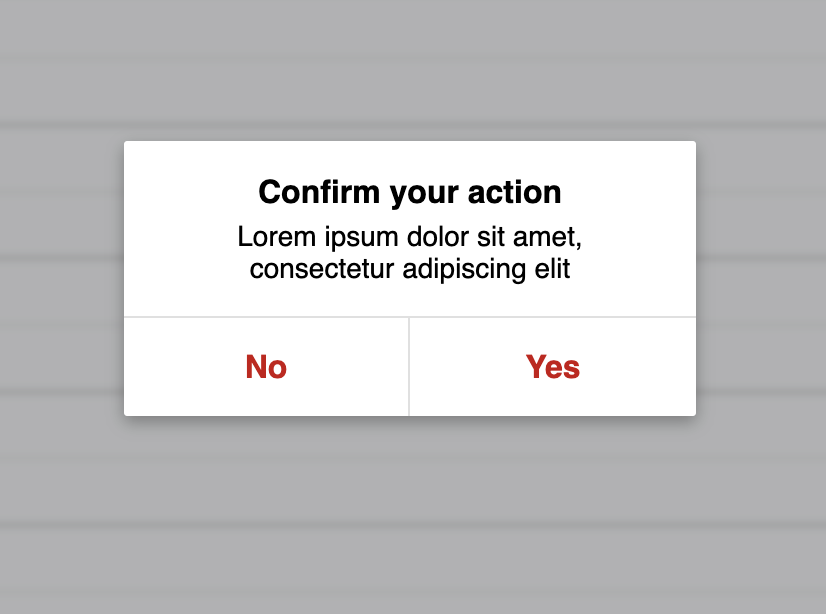
## Plug-and-play confirmation plugin for Vue 3 and Vuex 4, written in the new Conditional API.
- No custom template required - just load the plugin and use it right away.
- Custom Title, Message and Button names.
- Can be used as password input and confirmation window at the same time.
- Supports confirmation by pressing Enter and closing the window by pressing Escape. This functionality can be turned off.
## Install
```bash
$ npm install --save @zapadale/vue3-confirm-dialog
```
## Quick Start Usage
In app.js:
```js
import Vue3ConfirmDialog from '@zapadale/vue3-confirm-dialog'
const app = createApp(); // use your app name
app.use(Vue3ConfirmDialog);
```
Component is installed automatically by the plugin, you dont need to add it manually.
In App.vue:
```html
```
I recommend creating a app-wide notification component for handling all confirmations
## Vue Options API:
```js
methods: {
handleClick(){
this.$confirm(
{
title: 'Confirm your action',
message: 'Are you sure?',
disableKeys: false,
auth: false,
button: {
no: 'No',
yes: 'Yes'
},
/**
* Callback Function
* @param {Boolean} confirm
*/
callback: confirm => {
if (confirm) {
// ... do something
}
}
}
)
}
}
```
# Vue Composition API / Vuex files / other \*.js:
**Beware: Composition API does not have "this"**
## Direct confirm import for Vuex
Can be used in Vue files as well
```js
import { confirm } from '@zapadale/vue3-confirm-dialog'
export default {
namespaced: true,
state: {},
actions: {
logout({ commit }) {
confirm({
title: 'Confirm your action',
message: 'Are you sure?',
disableKeys: false,
auth: false,
button: {
no: 'No',
yes: 'Yes'
},
/**
* Callback Function
* @param {Boolean} confirm
* @param {String} password //if auth:true
*/
callback: (confirm, password) => {
//if auth:true
if (confirm && password == YOUR_PASSWORD) {
// ...do something
}
}
})
}
}
}
```
## Inject function for Vue files
The plugin automatically sets global provide() with key "vue3-confirm-dialog".
```js
```
## API
If you want to password confirm, "auth" key is must be true.
By default, you can confirm the dialog by pressing "enter" or deny by pressing "escape". To disable this functionality, set "disableKeys" to "true"
```js
this.$confirm({
title: 'Confirm your action',
message: 'Are you sure?',
disableKeys: false,
auth: false,
button: {
no: 'No',
yes: 'Yes'
},
/**
* Callback Function
* @param {Boolean} confirm
* @param {String} password //if auth:true
*/
callback: (confirm, password) => {
//if auth:true
if (confirm && password == YOUR_PASSWORD) {
// ...do something
}
}
});
```
## Use only for information
If you want to use only for information and you want of see one button in dialog, you can use only one of 'no' or 'yes' button object.
**Beware: clicking the single button still counts as clicking the YES/NO button. So, use "button:{no:'OK'}" if you want to just inform and not call the callback**
```js
methods: {
handleClick(){
this.$confirm(
{
title: 'Information',
message: 'This content has been removed',
disableKeys: false,
auth: false,
button: {
no: 'OK',
}
},
/**
* Callback Function
* @param {Boolean} confirm
*/
callback: confirm => {
if (confirm) {
// ... do something
}
}
)
}
}
```
## Issues/improvements
Since I am a beginner at Vue 3/Vuex 4 it would be a great help to report any bugs/improvements you find.
I am thrilled to fix/add them but I need to know about them. Thank you for your time!