_Cross-platform state without boundaries: Zustand-inspired simplicity for Electron_
## Why Zubridge?
> tldr: I want to seamlessly interact with my main process state using Zustand-inspired hooks.
[Zustand](https://github.com/pmndrs/zustand) is a great state management library that, like [Redux](https://redux.js.org/tutorials/fundamentals/part-4-store#redux-store), [recommends](https://zustand.docs.pmnd.rs/guides/flux-inspired-practice#recommended-patterns) using a single store for your application. However, in Electron apps, this approach faces challenges when state needs to be accessed across process boundaries.
`@zubridge/electron` solves this by enabling a single store workflow, abstracting away the IPC management and state synchronization between processes.
## How It Works
Zubridge creates a bridge between your main process state and your renderer processes. The main process state acts as the single source of truth, while renderer processes receive synchronized copies of the state through a Zustand-like interface.
Actions from renderer processes are sent through IPC to the main process, which updates the central state. These updates are then automatically broadcast to all connected renderer processes, ensuring consistent state throughout your application.
## Features
- **Zustand-like API** for state management across main and renderer processes
- **Frontend flexibility** - works with React, other frontend frameworks, or vanilla JavaScript
- **Choice of state management solutions**:
- Zustand adapter with support for store handlers, separate handlers, and Redux-style reducers
- Redux adapter for Redux/Redux Toolkit integration
- Generic bridge for creating custom state management implementations
- **Type-safe state management** between processes
- Enhanced TypeScript integration with typed action objects for auto-completion and type-checking
- **Automatic state synchronization** across multiple windows
- **Support for multiple windows and views**
- **Works with the latest [Electron security recommendations](https://www.electronjs.org/docs/latest/tutorial/security#checklist-security-recommendations)**
- **Full sandbox mode support** with automatic Node.js polyfills for renderer and preload processes
- **Rich action support** including thunks, inline actions, and action objects in both processes
- **Delta updates** — sends only changed state over IPC, reducing payload size and serialization cost
- **Action batching** — groups renderer actions into single IPC calls, reducing cross-process overhead
- **Automatic cleanup** for destroyed windows and error recovery
## Installation
```bash
npm install @zubridge/electron zustand
```
Or use your dependency manager of choice, e.g. `pnpm`, `yarn`.
## Quick Start
1. Create a Zustand store in your main process
2. Initialize the bridge with your store and windows
3. Use the `createUseStore` function to create a hook for accessing the store in your renderer process
## Documentation
- [Getting Started Guide](https://github.com/goosewobbler/zubridge/blob/main/packages/electron/docs/getting-started.md) - Step-by-step guide to setting up Zubridge in your Electron app
- [Advanced Usage](https://github.com/goosewobbler/zubridge/blob/main/packages/electron/docs/advanced-usage.md) - Advanced features including multi-window support, custom handlers, and more
- [Main Process](https://github.com/goosewobbler/zubridge/blob/main/packages/electron/docs/main-process.md) - Setting up and using Zubridge in the main process
- [Renderer Process](https://github.com/goosewobbler/zubridge/blob/main/packages/electron/docs/renderer-process.md) - Setting up and using Zubridge in the renderer process
- [Backend Contract](https://github.com/goosewobbler/zubridge/blob/main/packages/electron/docs/backend-contract.md) - Understanding the IPC contract between processes
- [Debugging](https://github.com/goosewobbler/zubridge/blob/main/packages/electron/docs/debugging.md) - Using the debug utilities to troubleshoot and monitor Zubridge
- [API Reference](https://github.com/goosewobbler/zubridge/blob/main/packages/electron/docs/api-reference.md) - Complete API documentation
- [Performance](https://github.com/goosewobbler/zubridge/blob/main/packages/electron/docs/performance.md) - Benchmark results for batching and selective subscriptions
## Example Applications
The example apps demonstrate different approaches to using zubridge with Electron:
- [Custom Example](https://github.com/goosewobbler/zubridge/tree/main/examples/electron/custom) - Custom state manager implementation using `createCoreBridge`
- [Redux Example](https://github.com/goosewobbler/zubridge/tree/main/examples/electron/redux) - Redux with Redux Toolkit using `createReduxBridge`
- [Zustand Basic Example](https://github.com/goosewobbler/zubridge/tree/main/examples/electron/zustand-basic) - Zustand with direct store mutations using `createZustandBridge`
- [Zustand Handlers Example](https://github.com/goosewobbler/zubridge/tree/main/examples/electron/zustand-handlers) - Zustand with dedicated action handler functions using `createZustandBridge`
- [Zustand Reducers Example](https://github.com/goosewobbler/zubridge/tree/main/examples/electron/zustand-reducers) - Zustand with Redux-style reducers using `createZustandBridge`
- [Zustand Immer Example](https://github.com/goosewobbler/zubridge/tree/main/examples/electron/zustand-immer) - Zustand with Immer middleware for immutable updates using `createZustandBridge`
### Special Configuration Examples
- [Sandbox Mode Enabled](https://github.com/goosewobbler/zubridge/tree/main/apps/electron/minimal-sandbox-true) - Example showing Zubridge usage with `sandbox: true` for enhanced security
- [Context Isolation Disabled](https://github.com/goosewobbler/zubridge/tree/main/apps/electron/minimal-context-isolation-false) - Example showing Zubridge usage with `contextIsolation: false` (legacy apps only, not recommended for new projects)
## Debugging
Zubridge includes a built-in debugging utility that allows you to control logging across different parts of the package. This is separate from the middleware logging which focuses on IPC traffic.
### Enabling Debug Mode
Zubridge uses the popular [debug](https://www.npmjs.com/package/debug) package for debugging. You can enable it in several ways:
1. **Using the DEBUG environment variable**:
```bash
# Enable all Zubridge debugging
DEBUG=zubridge:* electron .
# Enable specific debug areas only
DEBUG=zubridge:ipc,zubridge:core electron .
```
2. **Using the ZUBRIDGE_DEBUG environment variable**:
```bash
# Enable all debugging
ZUBRIDGE_DEBUG=true electron .
```
3. **Programmatically**:
```typescript
import { debug } from '@zubridge/core';
// Enable all debugging
debug.enable();
// Enable debugging for specific areas
debug.enable(['ipc', 'core']);
// Disable debugging
debug.disable();
```
### Debug Areas
The following debug namespaces are available:
- `zubridge:core`: Core bridge functionality
- `zubridge:ipc`: IPC communication between processes
- `zubridge:store`: Store management
- `zubridge:adapters`: Zustand and Redux adapters
- `zubridge:windows`: Window management
- `zubridge:serialization`: State serialization/deserialization
### Browser Integration
For debugging in the renderer process, you can use the browser's localStorage:
```javascript
// In the DevTools console
localStorage.debug = 'zubridge:*'; // Enable all debugging
localStorage.debug = ''; // Disable debugging
```
For more detailed information, see the [Debugging documentation](https://github.com/goosewobbler/zubridge/blob/main/packages/electron/docs/debugging.md).
## Action Batching
Zubridge includes built-in action batching that groups renderer actions within a configurable time window into single IPC calls, reducing cross-process overhead for high-frequency updates. Batching is enabled by default and requires no configuration.
For configuration options, priority-based flushing, and performance details, see [Action Batching](https://github.com/goosewobbler/zubridge/blob/main/packages/electron/docs/advanced-usage.md#action-batching) in the Advanced Usage guide.
## Delta Updates
Zubridge includes delta updates that send only changed portions of state over IPC instead of the full state tree. Delta updates are enabled by default and require no configuration. The savings scale with state size — for large state trees, delta serialization can be up to 5x faster than full-state serialization.
For configuration, how it works, and detailed benchmark results, see [Delta Updates](https://github.com/goosewobbler/zubridge/blob/main/packages/electron/docs/advanced-usage.md#delta-updates) in the Advanced Usage guide.
## Development
For information about contributing to this project, see the [Developer Guide](https://github.com/goosewobbler/zubridge/blob/main/docs/developer.md).
## License
MIT


 ## Why Zubridge?
> tldr: I want to seamlessly interact with my main process state using Zustand-inspired hooks.
[Zustand](https://github.com/pmndrs/zustand) is a great state management library that, like [Redux](https://redux.js.org/tutorials/fundamentals/part-4-store#redux-store), [recommends](https://zustand.docs.pmnd.rs/guides/flux-inspired-practice#recommended-patterns) using a single store for your application. However, in Electron apps, this approach faces challenges when state needs to be accessed across process boundaries.
`@zubridge/electron` solves this by enabling a single store workflow, abstracting away the IPC management and state synchronization between processes.
## How It Works
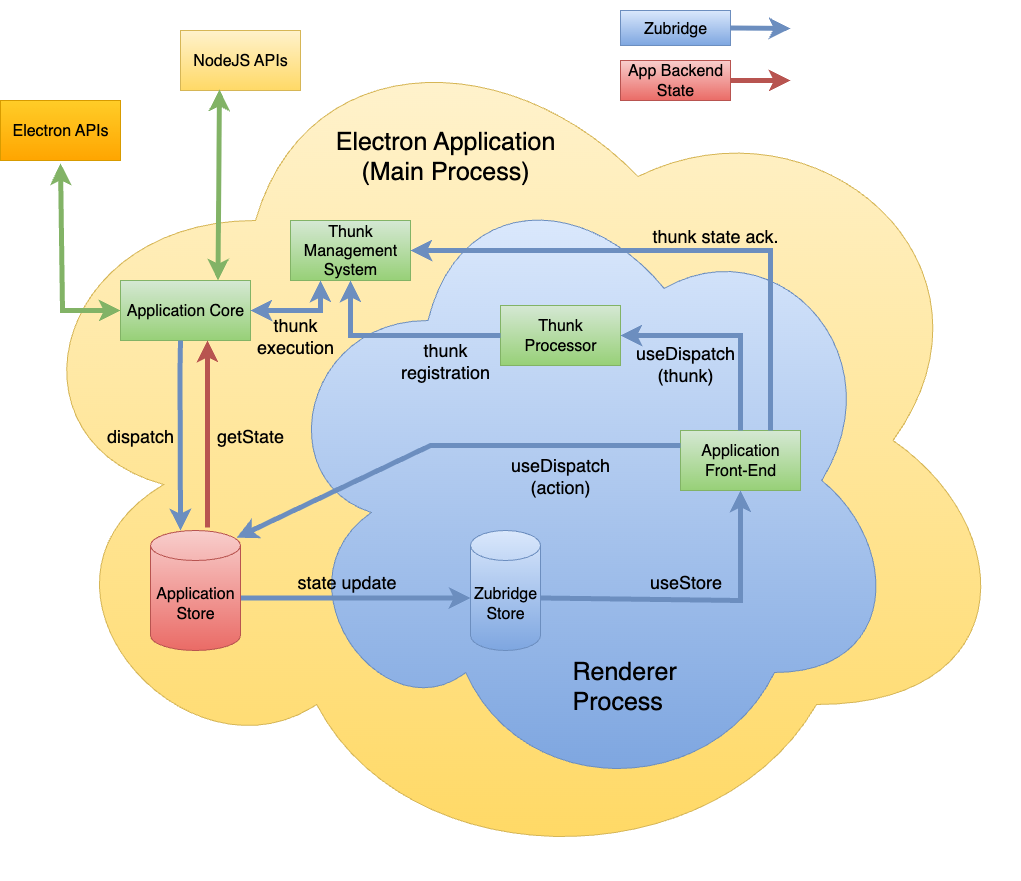
Zubridge creates a bridge between your main process state and your renderer processes. The main process state acts as the single source of truth, while renderer processes receive synchronized copies of the state through a Zustand-like interface.
Actions from renderer processes are sent through IPC to the main process, which updates the central state. These updates are then automatically broadcast to all connected renderer processes, ensuring consistent state throughout your application.
## Why Zubridge?
> tldr: I want to seamlessly interact with my main process state using Zustand-inspired hooks.
[Zustand](https://github.com/pmndrs/zustand) is a great state management library that, like [Redux](https://redux.js.org/tutorials/fundamentals/part-4-store#redux-store), [recommends](https://zustand.docs.pmnd.rs/guides/flux-inspired-practice#recommended-patterns) using a single store for your application. However, in Electron apps, this approach faces challenges when state needs to be accessed across process boundaries.
`@zubridge/electron` solves this by enabling a single store workflow, abstracting away the IPC management and state synchronization between processes.
## How It Works
Zubridge creates a bridge between your main process state and your renderer processes. The main process state acts as the single source of truth, while renderer processes receive synchronized copies of the state through a Zustand-like interface.
Actions from renderer processes are sent through IPC to the main process, which updates the central state. These updates are then automatically broadcast to all connected renderer processes, ensuring consistent state throughout your application.
 ## Features
- **Zustand-like API** for state management across main and renderer processes
- **Frontend flexibility** - works with React, other frontend frameworks, or vanilla JavaScript
- **Choice of state management solutions**:
- Zustand adapter with support for store handlers, separate handlers, and Redux-style reducers
- Redux adapter for Redux/Redux Toolkit integration
- Generic bridge for creating custom state management implementations
- **Type-safe state management** between processes
- Enhanced TypeScript integration with typed action objects for auto-completion and type-checking
- **Automatic state synchronization** across multiple windows
- **Support for multiple windows and views**
- **Works with the latest [Electron security recommendations](https://www.electronjs.org/docs/latest/tutorial/security#checklist-security-recommendations)**
- **Full sandbox mode support** with automatic Node.js polyfills for renderer and preload processes
- **Rich action support** including thunks, inline actions, and action objects in both processes
- **Delta updates** — sends only changed state over IPC, reducing payload size and serialization cost
- **Action batching** — groups renderer actions into single IPC calls, reducing cross-process overhead
- **Automatic cleanup** for destroyed windows and error recovery
## Installation
```bash
npm install @zubridge/electron zustand
```
Or use your dependency manager of choice, e.g. `pnpm`, `yarn`.
## Quick Start
1. Create a Zustand store in your main process
2. Initialize the bridge with your store and windows
3. Use the `createUseStore` function to create a hook for accessing the store in your renderer process
## Documentation
- [Getting Started Guide](https://github.com/goosewobbler/zubridge/blob/main/packages/electron/docs/getting-started.md) - Step-by-step guide to setting up Zubridge in your Electron app
- [Advanced Usage](https://github.com/goosewobbler/zubridge/blob/main/packages/electron/docs/advanced-usage.md) - Advanced features including multi-window support, custom handlers, and more
- [Main Process](https://github.com/goosewobbler/zubridge/blob/main/packages/electron/docs/main-process.md) - Setting up and using Zubridge in the main process
- [Renderer Process](https://github.com/goosewobbler/zubridge/blob/main/packages/electron/docs/renderer-process.md) - Setting up and using Zubridge in the renderer process
- [Backend Contract](https://github.com/goosewobbler/zubridge/blob/main/packages/electron/docs/backend-contract.md) - Understanding the IPC contract between processes
- [Debugging](https://github.com/goosewobbler/zubridge/blob/main/packages/electron/docs/debugging.md) - Using the debug utilities to troubleshoot and monitor Zubridge
- [API Reference](https://github.com/goosewobbler/zubridge/blob/main/packages/electron/docs/api-reference.md) - Complete API documentation
- [Performance](https://github.com/goosewobbler/zubridge/blob/main/packages/electron/docs/performance.md) - Benchmark results for batching and selective subscriptions
## Example Applications
The example apps demonstrate different approaches to using zubridge with Electron:
- [Custom Example](https://github.com/goosewobbler/zubridge/tree/main/examples/electron/custom) - Custom state manager implementation using `createCoreBridge`
- [Redux Example](https://github.com/goosewobbler/zubridge/tree/main/examples/electron/redux) - Redux with Redux Toolkit using `createReduxBridge`
- [Zustand Basic Example](https://github.com/goosewobbler/zubridge/tree/main/examples/electron/zustand-basic) - Zustand with direct store mutations using `createZustandBridge`
- [Zustand Handlers Example](https://github.com/goosewobbler/zubridge/tree/main/examples/electron/zustand-handlers) - Zustand with dedicated action handler functions using `createZustandBridge`
- [Zustand Reducers Example](https://github.com/goosewobbler/zubridge/tree/main/examples/electron/zustand-reducers) - Zustand with Redux-style reducers using `createZustandBridge`
- [Zustand Immer Example](https://github.com/goosewobbler/zubridge/tree/main/examples/electron/zustand-immer) - Zustand with Immer middleware for immutable updates using `createZustandBridge`
### Special Configuration Examples
- [Sandbox Mode Enabled](https://github.com/goosewobbler/zubridge/tree/main/apps/electron/minimal-sandbox-true) - Example showing Zubridge usage with `sandbox: true` for enhanced security
- [Context Isolation Disabled](https://github.com/goosewobbler/zubridge/tree/main/apps/electron/minimal-context-isolation-false) - Example showing Zubridge usage with `contextIsolation: false` (legacy apps only, not recommended for new projects)
## Debugging
Zubridge includes a built-in debugging utility that allows you to control logging across different parts of the package. This is separate from the middleware logging which focuses on IPC traffic.
### Enabling Debug Mode
Zubridge uses the popular [debug](https://www.npmjs.com/package/debug) package for debugging. You can enable it in several ways:
1. **Using the DEBUG environment variable**:
```bash
# Enable all Zubridge debugging
DEBUG=zubridge:* electron .
# Enable specific debug areas only
DEBUG=zubridge:ipc,zubridge:core electron .
```
2. **Using the ZUBRIDGE_DEBUG environment variable**:
```bash
# Enable all debugging
ZUBRIDGE_DEBUG=true electron .
```
3. **Programmatically**:
```typescript
import { debug } from '@zubridge/core';
// Enable all debugging
debug.enable();
// Enable debugging for specific areas
debug.enable(['ipc', 'core']);
// Disable debugging
debug.disable();
```
### Debug Areas
The following debug namespaces are available:
- `zubridge:core`: Core bridge functionality
- `zubridge:ipc`: IPC communication between processes
- `zubridge:store`: Store management
- `zubridge:adapters`: Zustand and Redux adapters
- `zubridge:windows`: Window management
- `zubridge:serialization`: State serialization/deserialization
### Browser Integration
For debugging in the renderer process, you can use the browser's localStorage:
```javascript
// In the DevTools console
localStorage.debug = 'zubridge:*'; // Enable all debugging
localStorage.debug = ''; // Disable debugging
```
For more detailed information, see the [Debugging documentation](https://github.com/goosewobbler/zubridge/blob/main/packages/electron/docs/debugging.md).
## Action Batching
Zubridge includes built-in action batching that groups renderer actions within a configurable time window into single IPC calls, reducing cross-process overhead for high-frequency updates. Batching is enabled by default and requires no configuration.
For configuration options, priority-based flushing, and performance details, see [Action Batching](https://github.com/goosewobbler/zubridge/blob/main/packages/electron/docs/advanced-usage.md#action-batching) in the Advanced Usage guide.
## Delta Updates
Zubridge includes delta updates that send only changed portions of state over IPC instead of the full state tree. Delta updates are enabled by default and require no configuration. The savings scale with state size — for large state trees, delta serialization can be up to 5x faster than full-state serialization.
For configuration, how it works, and detailed benchmark results, see [Delta Updates](https://github.com/goosewobbler/zubridge/blob/main/packages/electron/docs/advanced-usage.md#delta-updates) in the Advanced Usage guide.
## Development
For information about contributing to this project, see the [Developer Guide](https://github.com/goosewobbler/zubridge/blob/main/docs/developer.md).
## License
MIT
## Features
- **Zustand-like API** for state management across main and renderer processes
- **Frontend flexibility** - works with React, other frontend frameworks, or vanilla JavaScript
- **Choice of state management solutions**:
- Zustand adapter with support for store handlers, separate handlers, and Redux-style reducers
- Redux adapter for Redux/Redux Toolkit integration
- Generic bridge for creating custom state management implementations
- **Type-safe state management** between processes
- Enhanced TypeScript integration with typed action objects for auto-completion and type-checking
- **Automatic state synchronization** across multiple windows
- **Support for multiple windows and views**
- **Works with the latest [Electron security recommendations](https://www.electronjs.org/docs/latest/tutorial/security#checklist-security-recommendations)**
- **Full sandbox mode support** with automatic Node.js polyfills for renderer and preload processes
- **Rich action support** including thunks, inline actions, and action objects in both processes
- **Delta updates** — sends only changed state over IPC, reducing payload size and serialization cost
- **Action batching** — groups renderer actions into single IPC calls, reducing cross-process overhead
- **Automatic cleanup** for destroyed windows and error recovery
## Installation
```bash
npm install @zubridge/electron zustand
```
Or use your dependency manager of choice, e.g. `pnpm`, `yarn`.
## Quick Start
1. Create a Zustand store in your main process
2. Initialize the bridge with your store and windows
3. Use the `createUseStore` function to create a hook for accessing the store in your renderer process
## Documentation
- [Getting Started Guide](https://github.com/goosewobbler/zubridge/blob/main/packages/electron/docs/getting-started.md) - Step-by-step guide to setting up Zubridge in your Electron app
- [Advanced Usage](https://github.com/goosewobbler/zubridge/blob/main/packages/electron/docs/advanced-usage.md) - Advanced features including multi-window support, custom handlers, and more
- [Main Process](https://github.com/goosewobbler/zubridge/blob/main/packages/electron/docs/main-process.md) - Setting up and using Zubridge in the main process
- [Renderer Process](https://github.com/goosewobbler/zubridge/blob/main/packages/electron/docs/renderer-process.md) - Setting up and using Zubridge in the renderer process
- [Backend Contract](https://github.com/goosewobbler/zubridge/blob/main/packages/electron/docs/backend-contract.md) - Understanding the IPC contract between processes
- [Debugging](https://github.com/goosewobbler/zubridge/blob/main/packages/electron/docs/debugging.md) - Using the debug utilities to troubleshoot and monitor Zubridge
- [API Reference](https://github.com/goosewobbler/zubridge/blob/main/packages/electron/docs/api-reference.md) - Complete API documentation
- [Performance](https://github.com/goosewobbler/zubridge/blob/main/packages/electron/docs/performance.md) - Benchmark results for batching and selective subscriptions
## Example Applications
The example apps demonstrate different approaches to using zubridge with Electron:
- [Custom Example](https://github.com/goosewobbler/zubridge/tree/main/examples/electron/custom) - Custom state manager implementation using `createCoreBridge`
- [Redux Example](https://github.com/goosewobbler/zubridge/tree/main/examples/electron/redux) - Redux with Redux Toolkit using `createReduxBridge`
- [Zustand Basic Example](https://github.com/goosewobbler/zubridge/tree/main/examples/electron/zustand-basic) - Zustand with direct store mutations using `createZustandBridge`
- [Zustand Handlers Example](https://github.com/goosewobbler/zubridge/tree/main/examples/electron/zustand-handlers) - Zustand with dedicated action handler functions using `createZustandBridge`
- [Zustand Reducers Example](https://github.com/goosewobbler/zubridge/tree/main/examples/electron/zustand-reducers) - Zustand with Redux-style reducers using `createZustandBridge`
- [Zustand Immer Example](https://github.com/goosewobbler/zubridge/tree/main/examples/electron/zustand-immer) - Zustand with Immer middleware for immutable updates using `createZustandBridge`
### Special Configuration Examples
- [Sandbox Mode Enabled](https://github.com/goosewobbler/zubridge/tree/main/apps/electron/minimal-sandbox-true) - Example showing Zubridge usage with `sandbox: true` for enhanced security
- [Context Isolation Disabled](https://github.com/goosewobbler/zubridge/tree/main/apps/electron/minimal-context-isolation-false) - Example showing Zubridge usage with `contextIsolation: false` (legacy apps only, not recommended for new projects)
## Debugging
Zubridge includes a built-in debugging utility that allows you to control logging across different parts of the package. This is separate from the middleware logging which focuses on IPC traffic.
### Enabling Debug Mode
Zubridge uses the popular [debug](https://www.npmjs.com/package/debug) package for debugging. You can enable it in several ways:
1. **Using the DEBUG environment variable**:
```bash
# Enable all Zubridge debugging
DEBUG=zubridge:* electron .
# Enable specific debug areas only
DEBUG=zubridge:ipc,zubridge:core electron .
```
2. **Using the ZUBRIDGE_DEBUG environment variable**:
```bash
# Enable all debugging
ZUBRIDGE_DEBUG=true electron .
```
3. **Programmatically**:
```typescript
import { debug } from '@zubridge/core';
// Enable all debugging
debug.enable();
// Enable debugging for specific areas
debug.enable(['ipc', 'core']);
// Disable debugging
debug.disable();
```
### Debug Areas
The following debug namespaces are available:
- `zubridge:core`: Core bridge functionality
- `zubridge:ipc`: IPC communication between processes
- `zubridge:store`: Store management
- `zubridge:adapters`: Zustand and Redux adapters
- `zubridge:windows`: Window management
- `zubridge:serialization`: State serialization/deserialization
### Browser Integration
For debugging in the renderer process, you can use the browser's localStorage:
```javascript
// In the DevTools console
localStorage.debug = 'zubridge:*'; // Enable all debugging
localStorage.debug = ''; // Disable debugging
```
For more detailed information, see the [Debugging documentation](https://github.com/goosewobbler/zubridge/blob/main/packages/electron/docs/debugging.md).
## Action Batching
Zubridge includes built-in action batching that groups renderer actions within a configurable time window into single IPC calls, reducing cross-process overhead for high-frequency updates. Batching is enabled by default and requires no configuration.
For configuration options, priority-based flushing, and performance details, see [Action Batching](https://github.com/goosewobbler/zubridge/blob/main/packages/electron/docs/advanced-usage.md#action-batching) in the Advanced Usage guide.
## Delta Updates
Zubridge includes delta updates that send only changed portions of state over IPC instead of the full state tree. Delta updates are enabled by default and require no configuration. The savings scale with state size — for large state trees, delta serialization can be up to 5x faster than full-state serialization.
For configuration, how it works, and detailed benchmark results, see [Delta Updates](https://github.com/goosewobbler/zubridge/blob/main/packages/electron/docs/advanced-usage.md#delta-updates) in the Advanced Usage guide.
## Development
For information about contributing to this project, see the [Developer Guide](https://github.com/goosewobbler/zubridge/blob/main/docs/developer.md).
## License
MIT