# acho

[](https://travis-ci.org/achojs/acho)
[](https://coveralls.io/github/achojs/acho)
[](https://david-dm.org/achojs/acho)
[](https://david-dm.org/achojs/acho#info=devDependencies)
[](https://www.npmjs.org/package/acho)
[](https://paypal.me/kikobeats)
> The <hackeable /> Log
## Features
* Different log levels skins.
* Beauty object interpolation.
* Diff & log trace support.
* Easy to customize, easy to hack.
## Install
```bash
npm install acho
```
## Usage
### Logging levels
Examples
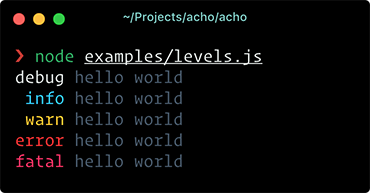
The first thing you need to do is create a new log instance:
```js
const acho = require('acho')
const log = acho()
```
Then you can print a log based on the level:
```js
const acho = require('acho')
const log = acho()
acho.info('hello world')
```
All methods are chainables:
```js
const acho = require('acho')
const log = acho()
acho
.info('hello world')
.error('something bad happens')
```
Establishing the loglevel is a good way to filter out undesired information from output. The available levels by default are:
- `fatal` : Display calls to `.fatal()` messages.
- `error` : Display calls to `.fatal()`, `.error()` messages.
- `warn` : Display calls from `.fatal()`, `.error()`, `.warn()` messages.
- `info` : Display calls from `.fatal()`, `.error()`, `.warn()`, `info()` messages.
- `debug` : Display calls from `.fatal()`, `.error()`, `.warn()`, `info()`, `debug()` messages.
Additionally exists two special levels:
- `muted` : Avoid all output.
- `all` : Allow print all message types.
The default log level is `all`. You can define it in the constructor:
```js
const acho = require('acho')
const log = acho({ level: 'debug' })
```
or at runtime:
```js
log.level = 'debug'
```
### Internal Store
Sometimes, when you are interacting with a logger you need to store the logs to be used later instead of print all of them.
We define `.push` as accumulator for store the log internally:
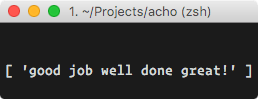
```js
const acho = require('acho')
const log = acho()
log.push('success', 'good job', 'well done', 'great!')
console.log(log.messages.success)
```
If you want to print previously stored messages, just call the method `.print`:
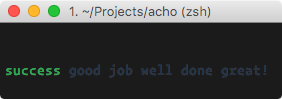
or you can retrieve the logs programatically from the internal storage at `acho.messages`
The method `.add` combine `.push` and `.print` actions in one: It store the message internally but also print the log.
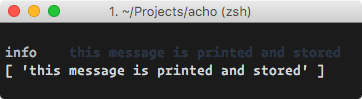
```js
log.add('info', 'this message is printed and stored')
console.log(acho.messages.info)
```
### Formatters
Examples
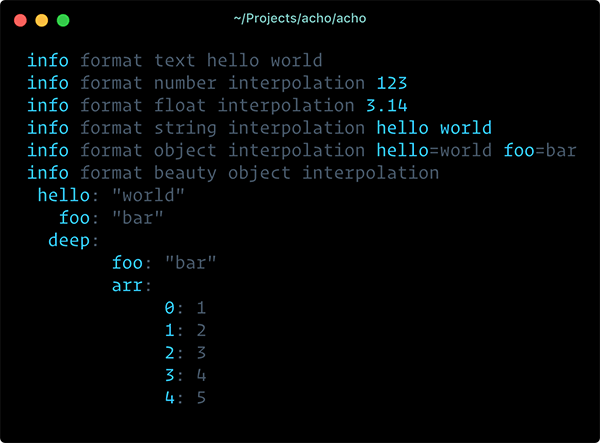
We use [printf-style](https://wikipedia.org/wiki/Printf_format_string) formatting. Below are the officially supported formatters:
| Formatter | Representation |
|-----------|---------------------------------------------------------------|
| `%s` | String. |
| `%d` | Number (both integer and float). |
| `%j` | JSON serialization in one line |
| `%J` | JSON pretty object in multiple lines |
| `%%` | Single percent sign ('%'). This does not consume an argument. |
By default, the `%j` is applied when you pass an object to be logged:
```js
const acho = require('acho')
const log = acho()
log.info({ hello: 'world', foo: 'bar' })
// => 'info hello=world foo=bar'
```
If you want to use a different formatter, use printf markup:
```js
const acho = require('acho')
const log = acho()
log.info('formatting with object interpolation %J', {
hello: 'world',
foo: 'bar',
deep: {
foo: 'bar',
arr: [1, 2, 3, 4, 5]
}
})
```
### Customization
Examples
One of the **acho** compromise is be easy to adapt. You can completely customize all the library functionalities.
For example, suppose you want to add a timestamp before your logs:

```js
const acho = require('acho')
const log = acho({
// Customize how to print the 'type' of each message
outputType: type => `[${type}]`,
// Customize how to print the message.
// Add things before and/or after.
outputMessage: message => `${Date.now()} :: ${message}`
})
acho.info('I am hungry')
```
That's all.
## API
### acho([options])
It creates a logger instance.
#### options
##### keyword
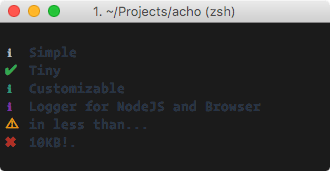
Type: `string`
Default: `loglevel`
Instead of print the type log level, print the keyword. By default this behavior is not activated.
You can pass the special keyword `symbol` to show an unicode icon. This is special behavior for CLI programs.
##### align
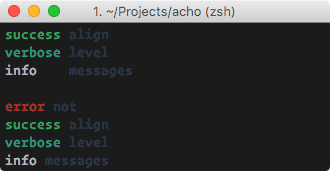
Type: `string`
Default: `' '`
It adds an alignment separator between the type of the message and the message.
You can provide your own separator or disable it providing a `false`.
##### diff
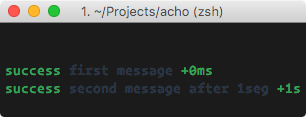
Type: `boolean`
Default: `false`
Prints trace between log from the same level. Specially useful to debug timings.
##### upper
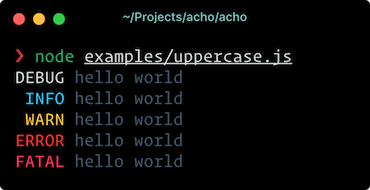
Type: `boolean`
Default: `false`.
Enable or disable print log level in upper case.
##### trace
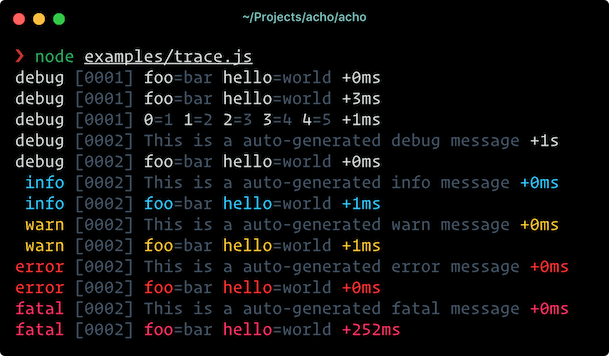
Type: `boolean`|`number`
Default: `false`.
Prints a numeric counter trace associated with each log line.
The value provided is the minimum quantity of time in milliseconds to consider print a different counter.
##### offset
Type: `number`
Default: `2`.
The amount of left whitespace between the property key and all of it's sub-properties.
This option is only applied under JSON pretty object in multiple lines (%J).
##### depth
Type: `number`
Default: `Infinity`.
Colapses all properties deeper than specified by depth.
This option is only applied under JSON pretty object in multiple lines (%J).
##### level
Type: `string`
Default: `all`
Provides the logging level. This sets from what level print logs using tranport.
Additionally you can provide `muted` to express don't print logs.
##### transport
Type: `function`
Default: `console.log`
Defines where write the log message.
##### types
Type: `object`
You can provide the types and priorities.
##### messages
Type: `object`
It provides a initial internal store state per each log level. This option is useful when you want to integrate the logger with the ouptut of a delayed function.
##### print
Type: `function`
Provides a function that determines how to print the messages. By default uses `.generateMessage` for generate the mesage that will be outputted.
##### outputType
Type: `function`
Provides a function to customize the type in the output.
##### outputMessage
Type: `function`
Provides a function to customize the message in the output.
##### generateMessage
Type: `function`
Provides a function that generate the message to be outputted. It combines other internal methods for generate the output (as `.isPrintable` or `.colorize`) and normally you are not interested in the definition of it, but you can provide it as option as well.
##### generateTypeMessage
Type: `function`
Provides a function used to generate the type message.
### .push(<type>, <message>)
Store a message of given `type` internally.
#### type
Type: `string`
#### message
Type: `string`
### .add(<type>, <message>)
Store a message of given `type` internally and also output it.
#### type
Type: `string`
#### message
Type: `string`
For each level you have a function following the pattern:
### .print()
Prints all messages internally stored.
### .\[loglevel\](<message>)
For each log level that you declared in the constructor (or the default log levels provides by the library if you don't declare nothing) will be created a function with the same name to output a message with these log level.
#### message
Type: `string`
## License
**acho** © [Kiko Beats](https://kikobeats.com), Released under the [MIT](https://github.com/achojs/acho/pulls/blob/master/LICENSE.md) License.
Authored and maintained by Kiko Beats with help from [contributors](https://github.com/achojs/acho/pulls/contributors).
> [kikobeats.com](https://kikobeats.com) · GitHub [Kiko Beats](https://github.com/kikobeats) · Twitter [@kikobeats](https://twitter.com/kikobeats)