# adf-aos-editonline-action
* [Description](#description)
* [Prerequisites](#prerequisites)
* [Office client requisites](#office-client-requisites)
* [Install](#install)
* [Basic usage](#basic-usage)
* [Screenshots](#screenshots)
* [**Execute "Edit on MS Office" action upon a ms file, for example a .pptx**](#execute-edit-on-ms-office-action-upon-a-ms-file-for-example-a-pptx)
* [**Give your Alfresco credentials**](#give-your-alfresco-credentials)
* [**Work with Alfresco content from within your Ms Office**](#work-with-alfresco-content-from-within-your-ms-office)
* [Build from sources](#build-from-sources)
* [History](#history)
* [Contributors](#contributors)
## Description
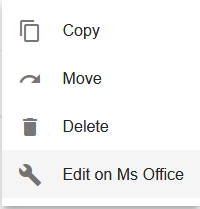
This module provides the **Edit on Ms Office** action present in Alfresco Share to be used on ADF [(Alfresco Development Framework)]() 2.0.0 applications.
The module was developed during the **Adding a new feature to Alfresco Content Application (ACA)** project of the [Alfresco Global Hackathon 2018](https://community.alfresco.com/docs/DOC-7234-projects-and-teams-hack-a-thon-at-devcon-2018#jive_content_id_Adding_a_new_feature_to_Alfresco_Content_Application_ACA). I did a previous similar [project](https://github.com/keensoft/ng2-alfresco-aos-editonline) that works for ADF 1.8.0 and 1.9.0. The idea of this projects is to create angular reusable components holding functionalities present on Alfresco Share and often used by our clients.
## Prerequisites
Before you start using this module, make sure you have properly installed and configured Alfresco Office Services (AOS) on your Alfresco Content Services installation, [documentation](https://docs.alfresco.com/aos/concepts/aos-intro.html).
For illustrating the use of the module I'll be using the [alfresco-content-app](https://github.com/Alfresco/alfresco-content-app)
## Office client requisites
[Alfresco Office Services documentation](https://docs.alfresco.com/aos/concepts/aos-prereqs.html)
**NOTE:** Alfresco server and the ADF application must be accessible by a qualified hostname from within your Office client.
**Example configuration**
To configure a hostname for your ADF application with webpack-dev-server, just edit ```package.json``` and add ```--public``` parameter to the start script.
```
"start": "npm run server-versions && npm run webpack-dev-server -- --config config/webpack.prod.js --progress --public app.example.com:3000 --content-base app/",
```
Next specify the externally accessible hostname for Alfresco on ```app.config.json```
```
"ecmHost": "https://acs.example.com",
```
Make sure you can access both services from the Office client.
## Install
* Npm
Install the **ng2-alfresco-aos-editonline** module into your ADF application
```sh
npm install adf-aos-editonline-action --save
```
## Compatibility Matrix
| package version | ADF version |
| --- | --- |
| 2.0.0 | 2.0.0 |
| 2.0.1 | 2.0.0 |
## Basic usage
1. Clone the Alfresco ADF content application and install the module
```
$ git clone https://github.com/Alfresco/alfresco-content-app.git
$ cd alfresco-content-app
$ npm install
$ npm install adf-aos-editonline-action --save
```
1. Import the module into the application
Edit the root module on your application to add the **AosModule**
app.module.ts
```ts
...
import { AosModule } from 'adf-aos-editonline-action';
...
@NgModule({
imports: [
...
AosModule
],
...
```
2. Extend FilesComponent HTML template
For this example we are going to use the FilesComponent that comes with the application generated with yeoman. This component showcases the use of the [**ng2-alfresco-documentlist**]() component which fits perfect to test the AOS action.
**NOTE:** Read the [ContentAction](https://github.com/Alfresco/alfresco-ng2-components/tree/master/ng2-components/ng2-alfresco-documentlist#actions) component documentation for understanding the extension point here
src/app/components/files/files.component.html
```html
...
```
3. Extend FilesComponent ts file
On the FileComponent controller we need to implement the ```aosEditonline(event)``` function, the name of the method is just and example and could be any other name, it only need to match the one defined in the HTML template.
src/app/components/files/files.component.ts
```ts
import { AosEditOnlineService } from 'adf-aos-editonline-action';
...
constructor(
...
private aosEditOnlineService: AosEditOnlineService) {
}
...
aosEditonline(event) {
this.aosEditOnlineService.onActionEditOnlineAos(event.value.entry);
}
```
4. Start the application
```
$ npm start
```
5. Test the action
Access your application on http:// (after successfully logged in), navigate to a Ms document and click on the actions menu
## Screenshots
### **Execute "Edit on MS Office" action upon a ms file, for example a .pptx**
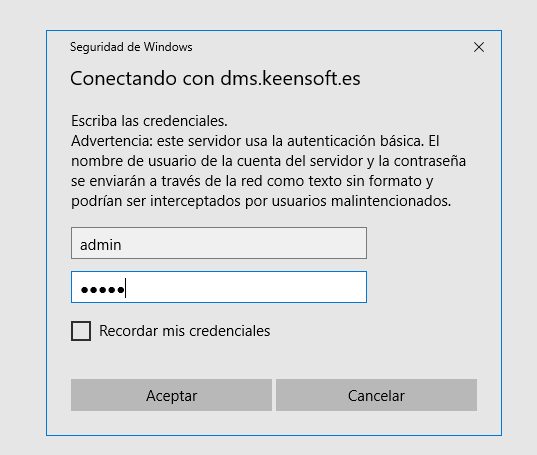
### **Give your Alfresco credentials**
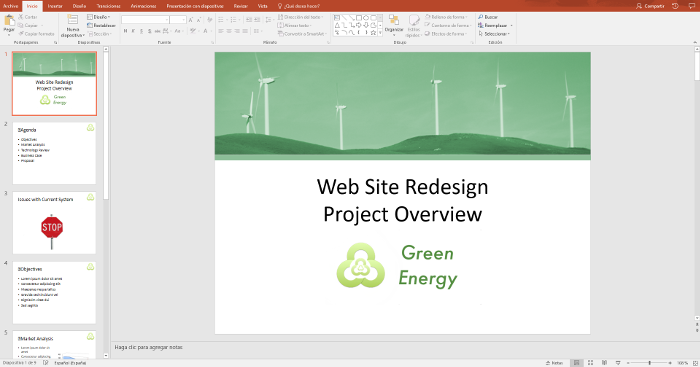
### **Work with Alfresco content from within your Ms Office**
## Build from sources
Alternatively you can build component from sources with the following commands:
```sh
npm install
npm run build
```
## History
For detailed changelog, check [Releases](https://github.com/keensoft/alfresco-content-app-with-aos/releases).
## Contributors
[Contributors](https://github.com/keensoft/alfresco-content-app-with-aos/graphs/contributors)