Styling
ag-Grid is designed to have it's look and feel derived from a theme.
Out of the box, three themes are provided, ag-fresh, ag-blue and ag-dark.
To use a theme, add the theme class name to the div element where the ag-Grid directive is attached.
The following is an example of using the ag-fresh theme:
<div ag-grid="gridOptions" class="ag-fresh"></div>
The following is an example of using the ag-dark theme:
<div ag-grid="gridOptions" class="ag-dark"></div>
To create a new theme, either create one from scratch (difficult), or start with one of the provided
themes that can be found on GitHub here:
https://github.com/ceolter/angular-grid/tree/master/src/styles
This section does not provide an example of building a theme because two themes
already come with ag-Grid.
When to Style via Themes
Themes are intended to change the overall look and feel of a grid. If you want to style a particular
column, or a particular header, consider using either cell and header renderers, or applying css
classes or styles at the column definition level.
Sometimes it is possible to achieve the same effect using custom renderers as it is with themes.
If so, use whichever one makes more sense for you, there isn't a hard and fast rule.
What to Style via Themes
Any of the CSS classes described below can have style associated with them.
However you should be cautious about overriding style that is associated outside of the theme.
For example, the ag-pinned-cols-viewport, has the following style:
    .ag-pinned-cols-viewport {
        float: left;
        position: absolute;
        overflow: hidden;
    }
The style attributes float, position and overflow are intrinsic to how the grid works. Changing
these values will change how the grid operates. If unsure, take a look at the styles associated
with an element using your browsers developer tools. If still unsure, try it out, see what
result you get.
Structure Example
The exact structure of the DOM within ag-Grid is dependent on it's configuration and what data is present.
This page takes the below basic example grid, with one pinned column, as an example to demonstrate the DOM structure.
The reader is encouraged to inspect the DOM (using your browsers developer tools) to dig deeper.
High Level Overview
The diagram below shows the hierarchy of the core div elements which form the four quadrants
of the table. The four quadrants are as follows:
- ag-pinned-header: Contains the pinned header cells. This container does not scroll.
- ag-header-container: Contains the non-pinned header cells. This container is within
a viewport (ag-header-viewport) that scrolls horizontally to match the position of the ag-body-viewport. This
container does not scroll vertically.
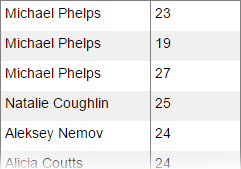
- ag-pinned-cols-container: Contains the pinned rows. This container is within a
viewport (ag-pinned-cols-viewport) that scrolls vertically to match the position of the ag-body-viewport. This
container does not scroll horizontally.
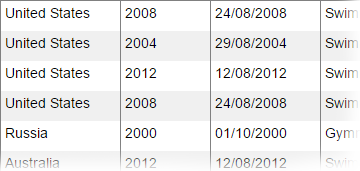
- ag-body-container: Contains the non-pinned rows. This container is within a
viewport (ag-body-viewport) that scrolls both vertically and horizontally.
Note: Both the ag-header-viewport and ag-pinned-cols-viewport do not have scrollbars. They
only scroll in response to changes to the ag-body-viewport.
Core DIV Elements
ag-root
ag-header
ag-pinned-header

ag-header-viewport
ag-header-container

ag-body
ag-pinned-cols-viewport
ag-pinned-cols-container
ag-body-viewport-wrapper
ag-body-viewport
ag-body-container
Detailed Breakdown
Below gives a detailed breakdown of the DOM for the example. In the example, the following is highlighted:
- Classes: These CSS classes can have style associated with them in a theme.
- Row & Col Attributes: These attributes can be used to identify rows and columns using CSS selectors.
- Position Attributes: Nothing to do with style, however they stick out below, so worth mentioning. These
are set by ag-Grid to position the rows within the containers. Because rows are virtualised, and widths are dynamic, these
attributes cannot be set as classes, they are set as dynamic styles by ag-Grid.
<div class='ag-root ag-scrolls'>
  <!-- header -->

  <div class="ag-header">
    <div class="ag-pinned-header">

      <!-- pinned header cell -->
      <div class="ag-header-cell">
        <div class="ag-header-label">Athlete</div>
      </div>
      <!-- pinned header cell -->
      <div class="ag-header-cell">
        <div class="ag-header-label">Age</div>
      </div>

    </div>
    <div class="ag-header-viewport">
      <div class="ag-header-container">

        <!-- main header cell -->
        <div class="ag-header-cell">
          <div class="ag-header-label">County</div>
        </div>
        <!-- main header cell -->
        <div class="ag-header-cell">
          <div class="ag-header-label">Year</div>
        </div>

        <!-- the other header cells... -->

      </div>
    </div>
  </div>

  <!-- body -->
  <div class="ag-body">
    <div class="ag-pinned-cols-viewport">
      <div class="ag-pinned-cols-container">

        <div class="ag-row ag-row-even" row="0" style="top: 0px; height: 30px;">
          <div class="ag-cell cell-col-0" col="0" style="width: 150px;">Michael Phelps</div>
          <div class="ag-cell cell-col-1" col="1" style="width: 90px;">23</div>
        </div>

        <div class="ag-row ag-row-odd" row="1" style="top: 30px; height: 30px;">
          <div class="ag-cell cell-col-0" col="0" style="width: 150px;">Michael Phelps</div>
          <div class="ag-cell cell-col-1" col="1" style="width: 90px;">19</div>
        </div>

        <!-- the other pinned rows... -->

      </div>
    </div>
    <div class="ag-body-viewport-wrapper">
      <div class="ag-body-viewport">
        <div class="ag-body-container">

          <div class="ag-row ag-row-even" row="0" style="top: 0px; height: 30px; width: 830px;">
            <div class="ag-cell cell-col-2" col="2" style="width: 120px;">United States</div>
            <div class="ag-cell cell-col-3" col="3" style="width: 90px;">2008</div>
            <div class="ag-cell cell-col-4" col="4" style="width: 110px;">24/08/2008</div>
            <!-- the other row cells... -->
          </div>

          <div class="ag-row ag-row-odd" row="1" style="top: 30px; height: 30px; width: 830px;">
            <div class="ag-cell cell-col-2" col="2" style="width: 120px;">United States</div>
            <div class="ag-cell cell-col-3" col="3" style="width: 90px;">2004</div>
            <div class="ag-cell cell-col-4" col="4" style="width: 110px;">29/08/2004</div>
            <!-- the other row cells... -->
          </div>

          <!-- the other body rows... -->

          </div>
      </div>
    </div>
  </div>
</div>
Styling with No Scrolls
Styling with the option 'no scrolls' is similar to styling with scrolls, however the dom layout is much simpler.
When no scrolls, there are no pinned columns and no viewports for scrolling.
<div class="ag-root ag-no-scrolls">

    <!-- header -->
    <div class="ag-header-container">
        <div class="ag-header-cell" style="width: 120px;">
            <span>Athlete</span>
        </div>
        <div class="ag-header-cell" style="width: 90px;">
            <span>Age</span>
        </div>

        <!-- the other headers... -->

    </div>

    <!-- body -->
    <div class="ag-body-container">
        <div class="ag-row ag-row-even" row="0" style="height: 30px; width: 830px;">
            <div class="ag-cell cell-col-0" col="0" style="width: 120px;">Michael Phelps</div>
            <div class="ag-cell cell-col-1" col="1" style="width: 90px;">United States</div>

            <!-- the other row cells... -->

        </div>
        <div class="ag-row ag-row-odd" row="1" style="height: 30px; width: 830px;">
            <div class="ag-cell cell-col-0" col="0" style="width: 120px;">Michael Phelps</div>
            <div class="ag-cell cell-col-1" col="1" style="width: 90px;">United States</div>

            <!-- the other row cells... -->

        </div>

        <!-- the other rows... -->

    </div>
</div>