# ionic-logging-viewer
**The dependencies used by the latest version are the same as needed for [Ionic 5.0.0](https://github.com/ionic-team/ionic/blob/master/CHANGELOG.md). For older versions use:**
| ionic-logging-viewer | Ionic | Angular
| ------ | -------- | ------
| 13.0.0 | >= 5.0.0 | ^12.0.0
| 12.0.0 | >= 5.0.0 | ^11.0.0
| 11.0.0 | >= 5.0.0 | ^10.0.0
| 9.0.0 | >= 5.0.0 | ^9.0.0
| 8.0.0 | >= 4.7.0 | ^8.0.0
| 2.0.0 | >= 4.0.0 | ^7.0.0
| 1.0.1 | >= 3.9.0 | ^5.0.0
The logging viewer is a small component which can be used in your [Ionic app](http://ionicframework.com)
for displaying the current logs, written by [ionic-logging-service](https://github.com/Ritzlgrmft/ionic-logging-service).
The viewer is meant for development and testing purposes, not for production.
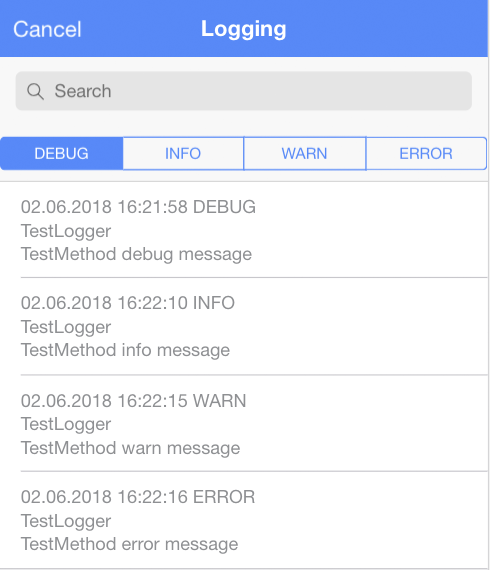
It provides two components:
- `LoggingViewerComponent`:
can be embedded in any web page using the directive
- `LoggingViewerModalComponent`:
a complete implemented modal containing the `LoggingViewerComponent`
Additionally, there are two components for filtering the data:
- `LoggingViewerLevelsComponent`:
allows filtering by log level
- `LoggingViewerSearchComponent`:
allows filtering by an arbitrary expression
A sample app using these components is [ionic-logging-viewer-app](https://github.com/Ritzlgrmft/ionic-logging-viewer).
## Screenshots
## Usage
### npm package
```bash
npm install ionic-logging-viewer --save
```
### import module
Import the `LoggingViewerModule` in to your `app.module.ts`:
```typescript
import { LoggingViewerModule } from "ionic-logging-viewer";
...
@NgModule({
imports: [
IonicModule.forRoot(AppComponent),
LoggingViewerModule
],
...
})
```
### LoggingViewerComponent directive
If you want to use the directive in one of your pages, just add
```html
```
### LoggingViewerLevelsComponent and LoggingViewerSearchComponent directives
For filtering the log messages, you can add also these directives to your page.
It is recommended to include them in `ion-toolbar`, but it is not necessary:
```html
```
### LoggingViewerModalComponent modal
```typescript
public async openModal(): Promise {
let componentProps: LoggingViewerModalProperties = { language: this.selectedLanguage };
const modal = await this.modalController.create({
component: LoggingViewerModalComponent,
componentProps: componentProps
});
await modal.present();
}
```
### multi language support
The `LoggingViewerComponent` does not need multi language support, since it just
displays the logged data. The same applies to `LoggingViewerLevelsComponent`
and `LoggingViewerSearchComponent`.
But for the `LoggingViewerModalComponent`, multi language support is needed,
since the modal contains some translatable texts. Therefore,
`loggingViewerModalManager.openModal()` has a `language` parameter, which you can
use to select the language. Currently `en` and `de` are supported.
If you need another language, either open an issue, or just use the `translation` parameter.
This parameter you can use to pass your completely own texts.
Just fill the `LoggingViewerTranslation` object.
## API
see [API documentation](https://ritzlgrmft.github.io/ionic-logging-service//viewer/index.html).