# app-launcher

A React-based app launcher component available as an npm package and also via CDN for easy integration in any web page.
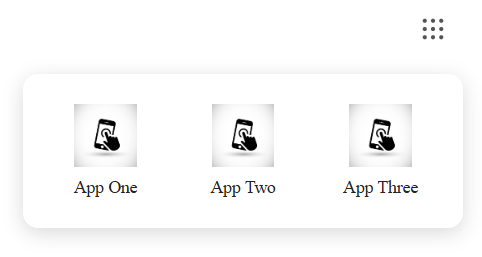

![App Launcher Demo Image](https://i9bbkdzqlpglxpdo.public.blob.vercel-storage.com/App-Launcher-v3sGILhBMszce5tB7jjj9HeqRn7Z67)

## Features

- 🚀 Easy integration via CDN or npm
- ⚛️ Built with React and TypeScript
- 🎨 Fully customizable styling with CSS-in-JS
- 📱 Responsive design with smooth animations
- 🔗 Simple click-to-launch functionality
- ⌨️ Keyboard navigation (ESC to close)
- 🖱️ Click outside to close
- 🖼️ Supports both URL and base64 icons
- ♿ Accessible with proper ARIA labels

## Installation

### Via npm

For React projects, install the package using npm:

```bash
npm install app-launcher-karma
```

Then import the components as needed in your React application.

### Via CDN

For quick integration into any HTML page without a build process, use the CDN version.

### CDN Usage

Include the app launcher in any HTML page by loading React, ReactDOM, and the app-launcher CDN script. Then call the global `renderAppLauncher` function to render the component.

```html

<body>
    <div id="app-launcher"></div>

    <!-- Load React and ReactDOM from CDN -->
    <script src="https://unpkg.com/react@18/umd/react.production.min.js"></script>
    <script src="https://unpkg.com/react-dom@18/umd/react-dom.production.min.js"></script>

    <!-- Load app-launcher from CDN -->
    <script src="https://cdn.jsdelivr.net/npm/app-launcher-karma@1.0.3/dist/app-launcher.cdn.js"></script>

    <!-- Render the app launcher -->
    <script>
       window.renderAppLauncher(
            "app-launcher",
            [
                { name: "App 1", icon: "/images/app1.jpg", url: "https://example.com/app1" },
                { name: "App 2", icon: "/images/app2.jpg", url: "https://example.com/app2" },
            ],
            {
                // Optional configuration
                svgColor: "#FF0000",  // Red dots
                position: "right",    // Position the dropdown
                dropdownStyles: {     // Custom styles
                    container: {
                        background: "#f5f5f5"
                    }
                }
            }
        );
    </script>
</body>
</html>
```

### npm Usage

#### JavaScript

```javascript
import { AppLauncher } from "app-launcher-karma";

function MyApp() {
  const products = [
    {
      name: "App 1",
      icon: "/images/app1.jpg",
      url: "https://example.com/app1",
    },
    {
      name: "App 2",
      icon: "/images/app2.jpg",
      url: "https://example.com/app2",
    },
  ];

  return (
    <div>
      <AppLauncher products={products} />
    </div>
  );
}
```

#### TypeScript

```typescript
import { AppLauncher, AppLauncherProduct } from "app-launcher-karma";

function MyApp() {
  const products: AppLauncherProduct[] = [
    {
      name: "App 1",
      icon: "/images/app1.jpg",
      url: "https://example.com/app1",
    },
    {
      name: "App 2",
      icon: "/images/app2.jpg",
      url: "https://example.com/app2",
    },
  ];

  return (
    <div>
      <AppLauncher products={products} />
    </div>
  );
}
```

## TypeScript Support

This package is written in TypeScript and includes type definitions. The following interfaces are available:

### AppLauncherProduct

```typescript
interface AppLauncherProduct {
  name: string;
  icon: string; // URL or base64 data URI
  url: string;
}
```

### AppLauncherProps

```typescript
interface AppLauncherProps {
  products: AppLauncherProduct[];
  dropdownStyles?: DropdownStyles;
}
```

### DropdownStyles

```typescript
interface DropdownStyles {
  container?: CSSProperties;
  grid?: CSSProperties;
  item?: CSSProperties;
  icon?: CSSProperties;
  label?: CSSProperties;
}
```

### Usage with Types

```typescript
import {
  AppLauncher,
  AppLauncherProduct,
  AppLauncherProps,
} from "app-launcher-karma";

const products: AppLauncherProduct[] = [
  {
    name: "Gmail",
    icon: "data:image/png;base64,iVBORw0KGgoAAAANSUhEUgAAAAEAAAABCAYAAAAfFcSJAAAADUlEQVR42mP8/5+hHgAHggJ/PchI7wAAAABJRU5ErkJggg==",
    url: "https://gmail.com",
  },
  {
    name: "Calendar",
    icon: "/icons/calendar.png",
    url: "https://calendar.google.com",
  },
];

function MyComponent(): JSX.Element {
  return <AppLauncher products={products} />;
}
```

### Custom Styling

```typescript
import {
  AppLauncher,
  AppLauncherProduct,
  DropdownStyles,
} from "app-launcher-karma";

const customStyles: DropdownStyles = {
  container: {
    background: "#f8f9fa",
    borderRadius: 16,
    boxShadow: "0 8px 32px rgba(0,0,0,0.12)",
    minWidth: 400,
  },
  grid: {
    gridTemplateColumns: "repeat(4, 1fr)",
    gap: 16,
  },
  item: {
    padding: 12,
    borderRadius: 12,
    transition: "all 0.2s ease",
    ":hover": {
      background: "#e9ecef",
    },
  },
  icon: {
    width: 64,
    height: 64,
    borderRadius: 8,
  },
  label: {
    fontSize: 12,
    fontWeight: 500,
    color: "#495057",
  },
};

const products: AppLauncherProduct[] = [
  { name: "Dashboard", icon: "/icons/dashboard.png", url: "/dashboard" },
  { name: "Analytics", icon: "/icons/analytics.png", url: "/analytics" },
];

function StyledLauncher(): JSX.Element {
  return <AppLauncher products={products} dropdownStyles={customStyles} />;
}
```

## API Reference

### renderAppLauncher (CDN)

When using the CDN version, call `window.renderAppLauncher(elementId, products, options)` with the following configuration:

| Parameter   | Type   | Required | Description                                                       |
| ----------- | ------ | -------- | ----------------------------------------------------------------- |
| `elementId` | string | Yes      | The id of the DOM element where the app launcher will be rendered |
| `products`  | array  | Yes      | Array of product objects (see Product Object structure below)     |
| `options`   | object | No       | Configuration options (see Options Object structure below)        |

### Options Object

| Property         | Type                       | Default | Description                                                     |
| ---------------- | -------------------------- | ------- | --------------------------------------------------------------- |
| `dropdownStyles` | DropdownStyles             | {}      | Custom styles for dropdown elements (see Styling section below) |
| `svgColor`       | string                     | "#555"  | Color of the launcher button dots                               |
| `position`       | "right" , "left" ,"center" | "left"  | Position of the dropdown relative to the launcher button        |
|                  |

### Product Object

Each product in the `products` array should have the following structure:

| Property | Type   | Required | Description                                       |
| -------- | ------ | -------- | ------------------------------------------------- |
| `name`   | string | Yes      | Name of the product to display                    |
| `icon`   | string | Yes      | URL or base64 data URI for the product icon image |
| `url`    | string | Yes      | URL to launch when the product is clicked         |

## Important Notes

- When using the CDN version, make sure to load React and ReactDOM before the app-launcher script
- The `renderAppLauncher` function is exposed globally by the CDN bundle
- Product icons should be optimized for web display (recommended: square images, 64x64px or larger)
- URLs can be absolute or relative paths
- Custom styles are merged with default styles, allowing for partial customization
- The dropdown uses a 3-column grid by default, but can be customized via `dropdownStyles.grid`
- The launcher button color can be customized using the svgColor option
- Dropdown positioning can be set to left (default), center, or right

## Styling & Customization

The app launcher supports comprehensive styling customization through the `dropdownStyles` prop. You can customize the following elements:

### Styling Options

| Style Key   | Description              | Default Values                                                 |
| ----------- | ------------------------ | -------------------------------------------------------------- |
| `container` | Main dropdown container  | Background: `#fff`, border-radius: `12px`, shadow, positioning |
| `grid`      | Product grid layout      | 3-column grid with `10px` gap                                  |
| `item`      | Individual product items | Flex column layout, padding: `8px`, border-radius: `8px`       |
| `icon`      | Product icons            | Size: `50x50px`, object-fit: `contain`                         |
| `label`     | Product name labels      | Font-size: `14px`, color: `#222`                               |

### Styling Examples

#### Dark Theme

```typescript
const darkStyles: DropdownStyles = {
  container: {
    background: "#2d3748",
    border: "1px solid #4a5568",
  },
  item: {
    color: "#e2e8f0",
    ":hover": {
      background: "#4a5568",
    },
  },
  label: {
    color: "#e2e8f0",
  },
};
```

#### Compact Layout

```typescript
const compactStyles: DropdownStyles = {
  container: {
    minWidth: 280,
    padding: 12,
  },
  grid: {
    gridTemplateColumns: "repeat(4, 1fr)",
    gap: 8,
  },
  icon: {
    width: 40,
    height: 40,
  },
  label: {
    fontSize: 12,
  },
};
```

#### Large Icons

```typescript
const largeIconStyles: DropdownStyles = {
  container: {
    minWidth: 480,
  },
  grid: {
    gridTemplateColumns: "repeat(3, 1fr)",
    gap: 20,
  },
  item: {
    padding: 16,
  },
  icon: {
    width: 80,
    height: 80,
    borderRadius: 12,
  },
  label: {
    fontSize: 16,
    fontWeight: 600,
    marginTop: 8,
  },
};
```

## Examples

### CDN with Custom Styles

```html
<script>
  const customStyles = {
    container: {
      background: "#f8f9fa",
      borderRadius: 16,
      minWidth: 400,
    },
    grid: {
      gridTemplateColumns: "repeat(4, 1fr)",
      gap: 16,
    },
    icon: {
      width: 60,
      height: 60,
      borderRadius: 8,
    },
  };

  window.renderAppLauncher(
    "app-launcher",
    [
      {
        name: "App 1",
        icon: "/images/app1.jpg",
        url: "https://example.com/app1",
      },
      {
        name: "App 2",
        icon: "/images/app2.jpg",
        url: "https://example.com/app2",
      },
    ],
    {
      // Optional configuration
      svgColor: "#FF0000", // Red dots
      position: "right", // Position the dropdown
      dropdownStyles: {
        // Custom styles
        container: {
          background: "#f5f5f5",
        },
      },
    }
  );
</script>
```

## License

This project is licensed under the MIT License.

## Support

If you encounter any issues or have questions, please file an issue on the GitHub repository.
