<p align="center"><a href="https://www.npmjs.com/package/arctic-landscape"><img src="https://raw.githubusercontent.com/arcticicestudio/arctic-landscape/develop/assets/repository-hero.svg?sanitize=true"/></a></p>

<p align="center"><a href="https://github.com/arcticicestudio/arctic-landscape/releases/latest"><img src="https://img.shields.io/github/release/arcticicestudio/arctic-landscape.svg?style=flat-square&label=Release&logo=github&logoColor=eceff4&colorA=4c566a&colorB=88c0d0"/></a> <a href="https://github.com/arcticicestudio/arctic-landscape/blob/develop/CHANGELOG.md"><img src="https://img.shields.io/github/release/arcticicestudio/arctic-landscape.svg?style=flat-square&label=Changelog&logo=github&logoColor=eceff4&colorA=4c566a&colorB=88c0d0"/></a></p>

<p align="center"><a href="https://github.com/arcticicestudio/arctic-landscape/releases/latest"><img src="https://img.shields.io/npm/v/arctic-landscape.svg?style=flat-square&logo=npm&logoColor=eceff4&colorA=4c566a&colorB=88c0d0"/></a> <a href="https://github.com/arcticicestudio/arctic-landscape/releases/latest"><img src="https://img.shields.io/npm/dt/arctic-landscape.svg?style=flat-square&logo=npm&logoColor=eceff4&colorA=4c566a&colorB=88c0d0"/></a></p>

<p align="center"><a href="https://circleci.com/gh/arcticicestudio/arctic-landscape"><img src="https://img.shields.io/circleci/project/github/arcticicestudio/arctic-landscape/develop.svg?style=flat-square&label=Build&logo=circleci&logoColor=eceff4&colorA=4c566a"/></a></p>

<p align="center"><a href="https://popmotion.io/pose"><img src="https://img.shields.io/badge/react--pose-v4+-5E81AC.svg?style=flat-square&colorA=4c566a&colorB=88c0d0"/></a> <a href="https://www.styled-components.com"><img src="https://img.shields.io/badge/styled--components-v4+-5E81AC.svg?style=flat-square&colorA=4c566a&colorB=88c0d0"/></a> <a href="https://reactjs.org"><img src="https://img.shields.io/badge/react-16.7+-5E81AC.svg?style=flat-square&colorA=4c566a&colorB=88c0d0"/></a></p>

<p align="center"><a href="https://github.com/arcticicestudio/styleguide-javascript/releases/latest"><img src="https://img.shields.io/github/release/arcticicestudio/styleguide-javascript.svg?style=flat-square&label=JavaScript%20Style%20Guide&logoColor=eceff4&colorA=4c566a&colorB=88c0d0&logo=javascript"/></a> <a href="https://github.com/arcticicestudio/styleguide-markdown/releases/latest"><img src="https://img.shields.io/github/release/arcticicestudio/styleguide-markdown.svg?style=flat-square&label=Markdown%20Style%20Guide&logoColor=eceff4&colorA=4c566a&colorB=88c0d0&logo=data%3Aimage%2Fsvg%2Bxml%3Bbase64%2CPHN2ZyB4bWxucz0iaHR0cDovL3d3dy53My5vcmcvMjAwMC9zdmciIHdpZHRoPSIzOSIgaGVpZ2h0PSIzOSIgdmlld0JveD0iMCAwIDM5IDM5Ij48cGF0aCBmaWxsPSJub25lIiBzdHJva2U9IiNEOERFRTkiIHN0cm9rZS13aWR0aD0iMyIgc3Ryb2tlLW1pdGVybGltaXQ9IjEwIiBkPSJNMS41IDEuNWgzNnYzNmgtMzZ6Ii8%2BPHBhdGggZmlsbD0iI0Q4REVFOSIgZD0iTTIwLjY4MyAyNS42NTVsNS44NzItMTMuNDhoLjU2Nmw1Ljg3MyAxMy40OGgtMS45OTZsLTQuMTU5LTEwLjA1Ni00LjE2MSAxMC4wNTZoLTEuOTk1em0tMi42OTYgMGwtMTMuNDgtNS44NzJ2LS41NjZsMTMuNDgtNS44NzJ2MS45OTVMNy45MzEgMTkuNWwxMC4wNTYgNC4xNnoiLz48L3N2Zz4%3D"/></a> <a href="https://github.com/arcticicestudio/styleguide-git/releases/latest"><img src="https://img.shields.io/github/release/arcticicestudio/styleguide-git.svg?style=flat-square&label=Git%20Style%20Guide&logoColor=eceff4&colorA=4c566a&colorB=88c0d0&logo=git"/></a></p>

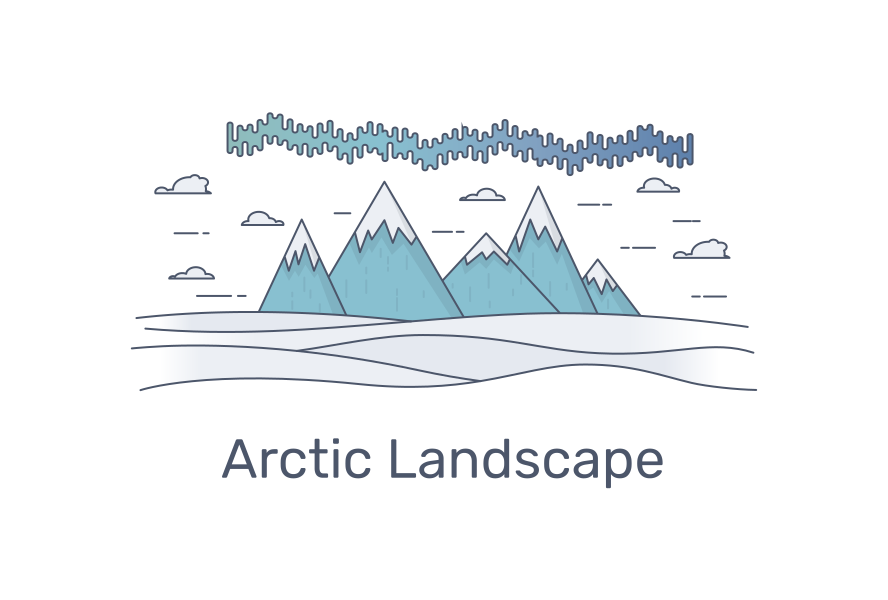
<p align="center">An animated drawing of an arctic landscape</p>

Arctic Landscape is an animated [React][] [SVG][mdn-svg] component with a flat, simple and elegant appearance.

It consists of lines that should convey the effect to be drawn by hand and fade-in fillings that are smoothly timed on each other.
The [“Aurora Borealis”][wiki-aurbor] (also called _northern lights_) uses a gentle gradient animation to imitate the shimmering light.

Next to the main [animation poses](#animation-pose) the component can be customized in aspects like the [total animation duration](#animation-duration) and [styles of the outlines](#additional-outlines-styles).
A callback function can be passed to be called when the [draw/erase animation has been completed](#animation-completion-callback).
It also allows to use a [custom SVG `<linear-gradient>` element for the _Aurora Borealis_ shimmering light](#aurora-borealis-gradient) effect.

The component is build and compatible with the awesome [styled-components][stc] and [React Pose][rp] projects.
It was mainly developed for the usage and integration with [Nord][], therefore all default colors are based on [Nord's color palettes][nord-docs-c].

## Quick Start

```sh
npm install --save react react-dom arctic-landscape styled-components react-pose
```

<p align="center"><img src="https://raw.githubusercontent.com/arcticicestudio/arctic-landscape/develop/assets/preview.gif"/></p>

## Getting Started

### Installation

Add the package as dependency to your project:

```sh
npm install --save arctic-landscape
```

Run `npm install` from within the project root to bootstrap the project and install the development- and runtime dependencies. Note that **this will not install the required [styled-components][npm-stc] and [react-pose][npm-rp]** packages that are defined as [peer dependencies][nodejs-blog-peerdeps] and must be installed separately like described in the [peer dependencies](#peer-dependencies) section below.

#### Peer Dependencies

This package uses [Styled Components][stc-doc-api] and [React Pose][rp-doc-api] API functions that return [React][] components.

Therefore, next to [React][npm-r] and [React DOM][npm-rd], this package depends on the [styled-components][npm-stc] and [react-pose][npm-rp] packages defined as [peer dependencies][nodejs-blog-peerdeps].

Linux & macOS users can easily install all peer dependencies by using [npx][npm-npx], [introduced in `npm@5.2.0`][npm-blog-npx], which comes [pre-bundled with **Node.js 8.2.0** or higher][npm-get]:

```sh
npx install-peerdeps arctic-landscape
```

When using **npm < 5.2.0**, _npx_ is not pre-bundled, but users can either simply install it globally and then run the above command or install the [install-peerdeps][npm-ipd] package locally/globally to let it handle the installation of all peer dependencies.

```sh
# Via local installation…
npm install install-peerdeps
./node_modules/.bin/install-peerdeps arctic-landscape

# …or globally.
npm install -g install-peerdeps
install-peerdeps arctic-landscape
```

#### Manually

All peer dependencies can also be installed manually (e.g. for users running a Microsoft Windows based system) by installing the correct version of each package:

```sh
# Show a list of all required peer dependencies
npm info "arctic-landscape@latest" peerDependencies

# Install all required peer dependencies
npm install --save arctic-landscape react react-dom react-pose styled-components
```

## Usage

Arctic Landscape can be used by importing the [default exported][mdn-export] React component `ArcticLandscape`.

```js
import React, { Component } from "react";
import ArcticLandscape from "arctic-landscape";
```

The component can now be placed somewhere in the render tree:

```jsx
// Within a simple function component…
const CustomFunctionComponent = props => (
  <div>
    <ArcticLandscape pose="erase" {...props} />
  </div>
);

// …or a class component.
class CustomFunctionComponent extends Component {
  /* ... */
  render() {
    return (
      <div>
        <ArcticLandscape pose="erase" />
      </div>
    );
  }
}
```

**NOTE**: The component itself **doesn't define any sizing attributes** and inherits from the parent element like the `<div>` in the example above. Therefore it must be wrapped in a container to control the width and height of the component.

To trigger the animation change the passed `erase` animation pose to the `draw` animation, e.g. by using a [class-based component][r-docs-comp] and store the name of the current pose in the state that can be toggled through a function:

```jsx
import React, { Component } from "react";
import ArcticLandscape, { POSE_DRAW, POSE_ERASE } from "arctic-landscape";

class CustomFunctionComponent extends Component {
  state = {
    pose: POSE_ERASE
  };

  togglePose = () => this.setState(({ pose }) => ({ pose: pose === POSE_ERASE ? POSE_DRAW : POSE_ERASE }));

  render() {
    const { pose } = this.state;

    return (
      <div>
        <button onClick={this.togglePose}>Toggle Animation Pose</button>
        <ArcticLandscape pose={pose} />
      </div>
    );
  }
}
```

Make sure to read the [React Pose documentation][rp-docs-gs] for more details if you're not already familiar with the animation concept with poses.

## Customization

The component can be customized through props. All available props are documented in more detail in the sections below.

### Aurora Borealis Gradient

> **Prop**: `auroraBorealisGleamGradientId`  
> **Type**: string  
> **Default**: `arctic-landscape-aurora-borealis-gleam`  
> **Required**: No

The component renders a [Aurora Borealis][wiki-aurbor] that is filled with an animated [`<linear-gradient>` element][mdn-svg-lg] to imitate the shimmering light. It can be swapped out with another `<linear-gradient>` element by passing the ID of this element to the `auroraBorealisGleamGradientId` prop.

```js
<ArcticLandscape auroraBorealisGleamGradientId="custom-gradient-element-id" />
```

### Animation Duration

> **Prop**: `duration`  
> **Type**: number  
> **Default**: `4000`(ms)  
> **Required**: No

The total animation duration in milliseconds.

```js
<ArcticLandscape pose="erase" duration={3200} />
```

### Animation Completion Callback

> **Prop**: `onAnimationComplete`  
> **Type**: function  
> **Default**: `() => {}`(noop)  
> **Required**: No

The function that will be called when the pose animation has been completed.

```js
const handleAnimationCompletion = () => console.log("Arctic Landscape pose animation has been completed!");

<ArcticLandscape pose="erase" onAnimationComplete={handleAnimationCompletion} />;
```

### Additional Outlines Styles

> **Prop**: `outlineStyles`  
> **Type**: [`css` object][stc-doc-api-css] or [style object][stc-doc-adv-sto]  
> **Default**: `() => {}` (noop)  
> **Required**: No

Allows to pass additional styles for all outlines of the vector graphic. Since Arctic Landscape is built with [styled-components][stc] this prop accepts either a object of the [`css`][stc-doc-api-css] API function or [style object][stc-doc-adv-sto].

```js
import { css } from "styled-components";

// Either use the `css` API…
const additionalCssStyles = css`
  stroke-width: 1;
  stroke: #5e81ac;
`;

//…or a simple style object.
const additionalObjectStyles = {
  strokeWidth: 1,
  stroke: "#5e81ac"
};

<ArcticLandscape pose="erase" outlineStyles={additionalCssStyles} />;
```

Note that this will **override the styles of all outlines**!

### Animation Pose

> **Prop**: `pose`  
> **Type**: string  
> **Default**: -  
> **Required**: Yes  
> **Values**: `draw`\|`erase`

The `pose` prop is currently the only required prop and defines the name of the actual animation pose.
This can either be `draw` or `erase` where the first one starts the drawing animation and makes the component visible while the second one "erases" all drawn lines and fillings again with a quick reverted animation of the `draw` pose.

Note that both animation pose names are also available as constants as [named exports][mdn-export]:

- `POSE_DRAW` — The name of the `draw` animation pose
- `POSE_ERASE` — The name of the `erase` animation pose

```js
import { POSE_DRAW, POSE_ERASE } from "arctic-landscape";
```

**NOTE**: The custom `<linear-gradient>` element **must be available in the DOM where the component is rendered in**, otherwise the element with the given ID won't be rendered!
Also make sure to follow the SVG specification for the custom [`<linear-gradient>` element][mdn-svg-lg] which \*\*must be placed within a [`<defs>` element][mdn-svg-defs], otherwise it won't be recognized in the DOM.

For example, if you'd like to use a custom gradient with different colors, define a new `<svg>` element or React component and place the custom `<linear-gradient>` element in it, wrapped by a `<defs>` element. Afterwards make sure to **give it a unique ID** (`custom-gradient-element-id` in the example above) to be passed to the `auroraBorealisGleamGradientId` prop and render it in the same DOM like the `ArcticLandscape` component.

**CustomAuroraBorealisGradient.jsx**

```jsx
const CustomAuroraBorealisGradient = () => (
  <svg>
    <defs>
      <linearGradient id="custom-gradient-element-id" x1="50%" x2="50%" y1="0%" y2="100%">
        <stop offset="0%" stopColor="#d08770">
          <animate
            attributeName="stop-color"
            dur="4s"
            repeatCount="indefinite"
            // values="#d08770; #ebcb8b; #d08770"
          />
        </stop>
        <stop offset="50%" stopColor="#ebcb8b">
          <animate attributeName="stop-color" dur="4s" repeatCount="indefinite" values="#ebcb8b; #a3be8c; #ebcb8b" />
        </stop>
        <stop offset="100%" stopColor="#a3be8c">
          <animate attributeName="stop-color" dur="4s" repeatCount="indefinite" values="#a3be8c; #b48ead; #a3be8c" />
        </stop>
      </linearGradient>
    </defs>
  </svg>
);

export default CustomAuroraBorealisGradient;
```

**App.jsx**

```jsx
import React, { Fragment } from "react";
import ArcticLandscape from "arctic-landscape";
import CustomAuroraBorealisGradient from "./CustomAuroraBorealisGradient";

const App = () => (
  <Fragment>
    <CustomAuroraBorealisGradient />
    <ArcticLandscape pose="erase" auroraBorealisGleamGradientId="custom-gradient-element-id" />
  </Fragment>
);

export default App;
```

The default `<linear-gradient>` element is implemented in the [`GleamGradient` component][gh-src-aurbor-gg].

## Development Workflow

Run `npm install` from within the project root to bootstrap the project and install the development- and runtime dependencies.

The project is configured for the opinionated code formatter [Prettier][] which provides [integration support for many editors][prettier-doc-editors] to e.g. automatically format the source file on save.

### Building

A distribution build can be created with [Rollup][] by running

```sh
npm run build
```

Continuous integration builds are running at [Circle CI][circle-ci].

### Testing

#### Linting

JavaScript sources are linted with [ESLint][] using the [arcticicestudio][npm-esl-ais] configuration which can be run with

```sh
npm run lint:js
```

Markdown sources are linted with [remark-lint][npm-rml] using the [arcticicestudio-preset][npm-rml-ais] which can be run with

```sh
npm run lint:md
```

All linting tasks can be run with

```sh
npm run lint
```

## Contributing

Read the [contributing guide][gh-contrib] to learn about the development process and how to propose [enhancement suggestions][gh-contrib-enhancements] and [report bugs][gh-contrib-bug-reports], how to [submit pull requests][gh-contrib-pr] and the project's [styleguides][gh-contrib-styleguides], [branch organization][gh-contrib-branch-org] and [versioning][gh-contrib-versioning] model.

The guide also includes information about [minimal, complete, and verifiable examples][gh-contrib-mcve] and other ways to contribute to the project like [improving existing issues][gh-contrib-improve-issues] and [giving feedback on issues and pull requests][gh-contrib-feedback].

---

<p align="center">Copyright &copy; 2019-present <a href="https://www.arcticicestudio.com">Arctic Ice Studio</a> & <a href="https://www.svengreb.de">Sven Greb</a></p>

<p align="center"><a href="https://github.com/arcticicestudio/arctic-landscape/blob/develop/LICENSE.md"><img src="https://img.shields.io/badge/License-MIT-5E81AC.svg?style=flat-square"/></a></p>

[circle-ci]: https://circleci.com/gh/arcticicestudio/arctic-landscape
[eslint]: https://eslint.org
[gh-contrib-branch-org]: https://github.com/arcticicestudio/arctic-landscape/blob/develop/CONTRIBUTING.md#branch-organization
[gh-contrib-bug-reports]: https://github.com/arcticicestudio/arctic-landscape/blob/develop/CONTRIBUTING.md#bug-reports
[gh-contrib-enhancements]: https://github.com/arcticicestudio/arctic-landscape/blob/develop/CONTRIBUTING.md#enhancement-suggestions
[gh-contrib-feedback]: https://github.com/arcticicestudio/arctic-landscape/blob/develop/CONTRIBUTING.md#give-feedback-on-issues-and-pull-requests
[gh-contrib-improve-issues]: https://github.com/arcticicestudio/arctic-landscape/blob/develop/CONTRIBUTING.md#improve-issues
[gh-contrib-mcve]: https://github.com/arcticicestudio/arctic-landscape/blob/develop/CONTRIBUTING.md#mcve
[gh-contrib-pr]: https://github.com/arcticicestudio/arctic-landscape/blob/develop/CONTRIBUTING.md#pull-requests
[gh-contrib-styleguides]: https://github.com/arcticicestudio/arctic-landscape/blob/develop/CONTRIBUTING.md#styleguides
[gh-contrib-versioning]: https://github.com/arcticicestudio/arctic-landscape/blob/develop/CONTRIBUTING.md#versioning
[gh-contrib]: https://github.com/arcticicestudio/arctic-landscape/blob/develop/CONTRIBUTING.md
[gh-src-aurbor-gg]: https://github.com/arcticicestudio/arctic-landscape/blob/develop/src/AuroraBorealis/styled/GleamGradient.jsx
[mdn-export]: https://developer.mozilla.org/en-US/docs/web/javascript/reference/statements/export
[mdn-svg-defs]: https://developer.mozilla.org/en-US/docs/Web/SVG/Element/defs
[mdn-svg-lg]: https://developer.mozilla.org/en-US/docs/Web/SVG/Element/linearGradient
[mdn-svg]: https://developer.mozilla.org/en-US/docs/Web/SVG
[nodejs-blog-peerdeps]: https://nodejs.org/en/blog/npm/peer-dependencies
[nord-docs-c]: https://www.nordtheme.com/docs/colors
[nord]: https://www.nordtheme.com
[npm-blog-npx]: https://blog.npmjs.org/post/162869356040/introducing-npx-an-npm-package-runner
[npm-esl-ais]: https://www.npmjs.com/package/eslint-config-arcticicestudio
[npm-get]: https://www.npmjs.com/get-npm
[npm-ipd]: https://www.npmjs.com/package/install-peerdeps
[npm-npx]: https://www.npmjs.com/package/npx
[npm-r]: https://www.npmjs.com/package/react
[npm-rd]: https://www.npmjs.com/package/react-dom
[npm-rml-ais]: https://www.npmjs.com/package/remark-preset-lint-arcticicestudio
[npm-rml]: https://www.npmjs.com/package/remark-cli
[npm-rp]: https://www.npmjs.com/package/react-pose
[npm-stc]: https://www.npmjs.com/package/styled-components
[prettier-doc-editors]: https://prettier.io/docs/en/editors
[prettier]: https://prettier.io
[r-docs-comp]: https://reactjs.org/docs/react-component.html
[react]: https://reactjs.org
[rollup]: https://rollupjs.org
[rp-doc-api]: https://popmotion.io/pose/api
[rp-docs-gs]: https://popmotion.io/pose/learn/get-started
[rp]: https://popmotion.io/pose
[stc-doc-adv-sto]: https://www.styled-components.com/docs/advanced#style-objects
[stc-doc-api-css]: https://www.styled-components.com/docs/api#css
[stc-doc-api]: https://www.styled-components.com/docs/api
[stc]: https://www.styled-components.com
[wiki-aurbor]: https://en.wikipedia.org/wiki/Aurora