# OpenAI Assistan(ts)
[](https://github.com/ChuckJonas/assistan-ts/actions/workflows/test.yml)
[](https://www.npmjs.org/package/assistan-ts)
`npm i assistan-ts`
A lightweight framework for building and running code first, type-safe "Agents".
This library aims to make it easy to create & run assistants, without introducing heavy abstractions or departing too far from the official `openai` library.
[Demo Video (1min)](https://youtu.be/1CNvlqAxoMM)
**Key Features:**
- Define Assistants using [`typebox`](https://github.com/sinclairzx81/typebox) schemas
- Sync changes with OpenAI
- Parse & validate arguments to tool calls
- Automatically poll `runs` for completion
> [!WARNING]
> Both this library & openai's assistants api are still in early development and is subject to change.
## Usage
### Define your Assistant
```typescript
import { Type, definition, assistant } from 'assistan-ts';
const def = definition({
key: "Schedul-O-Bot-3000", // 'unique' key added to metadata for linking
model: "gpt-4",
name: "Schedul-O-Bot-3000",
instructions: "You help schedule meetings for E-Corp.",
codeInterpreter: true,
functionTools: {
employee_directory: {
description: "List all employees with contact and role information",
parameters: Type.Void(),
},
schedule_meeting: {
description: "Schedule a meeting with an employee",
parameters: Type.Object({
employee: Type.Number({
description: "The Employee Id to schedule the meeting with",
}),
date: Type.String({
description: "The date to schedule the meeting on",
format: "date-time",
}),
duration: Type.Number({
description: "The duration of the meeting in minutes",
minimum: 15,
maximum: 60 * 3,
}),
}),
},
},
});
```
> [!NOTE]
> Not all `typebox` types are supported by OpenAI at this time
#### Syncing Files
You can sync files by setting the `files.resolve` property of the definition. This allows you to sync files from the filesystem or a remote location.
```typescript
import { toFile } from "openai/uploads";
import { readFile, readdir } from "fs/promises";
const def = definition({
//...
retrieval: true,
files: {
resolve: async () => {
const fileName = 'time-off-policy.md';
const content = await readFile(path.join('docs', fileName));
return [ toFile(content, filename) ];
},
},
});
```
Files will be compared for equality using the filename by default, but you can overrides this by setting `files.keyFn`.
### Link the Assistant to OpenAI
```typescript
const linked = await def.link(openai);
```
This will create the assistant if it doesn't exist, and update it to match the schema if there is any drift.
> [!WARNING]
> By default, this will update the assistant to match the schema. If you want to disable this behavior, pass `{ updateMode: "skip" }` to the `link` function.
### Create an instance of your assistant
For any tools you defined, you must provide an implementation with a matching signature.
```typescript
const scheduleBot = assistant({
definition: linked,
tools: {
employee_directory: async () => {
return [
{
id: 1000,
name: "John Chen",
email: "ariachen@example.com",
department: "Marketing",
role: "Marketing Manager",
},
//...
];
},
schedule_meeting: async ({ employee, date, duration }) => {
return {
status: "success",
meeting_id: "123",
};
},
},
toolOptions: {
// override defaults
}
});
```
### Create a thread and run
```typescript
const thread = await openai.beta.threads.create({
messages: [
{
role: "user",
content: "Schedule a 45m meeting with Alana on Tuesday at 3pm",
},
],
});
const { run, complete } = await scheduleBot.run.create({
threadId: thread.id,
});
await complete({ interval: 1500 });
const messages = await openai.beta.threads.messages.list(thread.id);
```
Alternately, you can use `toolsRequired` to better control the execution of the tools:
```typescript
const { toolsRequired } = await scheduleBot.run.create({
threadId: thread.id,
});
let toolActions = await toolsRequired();
while (toolActions) {
//let user confirm
if(confirm(`Continue with ${JSON.stringify(toolActions.toolCalls, null, 2)}?`)){
toolActions = await toolActions.execute( /* you may provide overrides outputs here */ );
}
}
```
## Running Examples
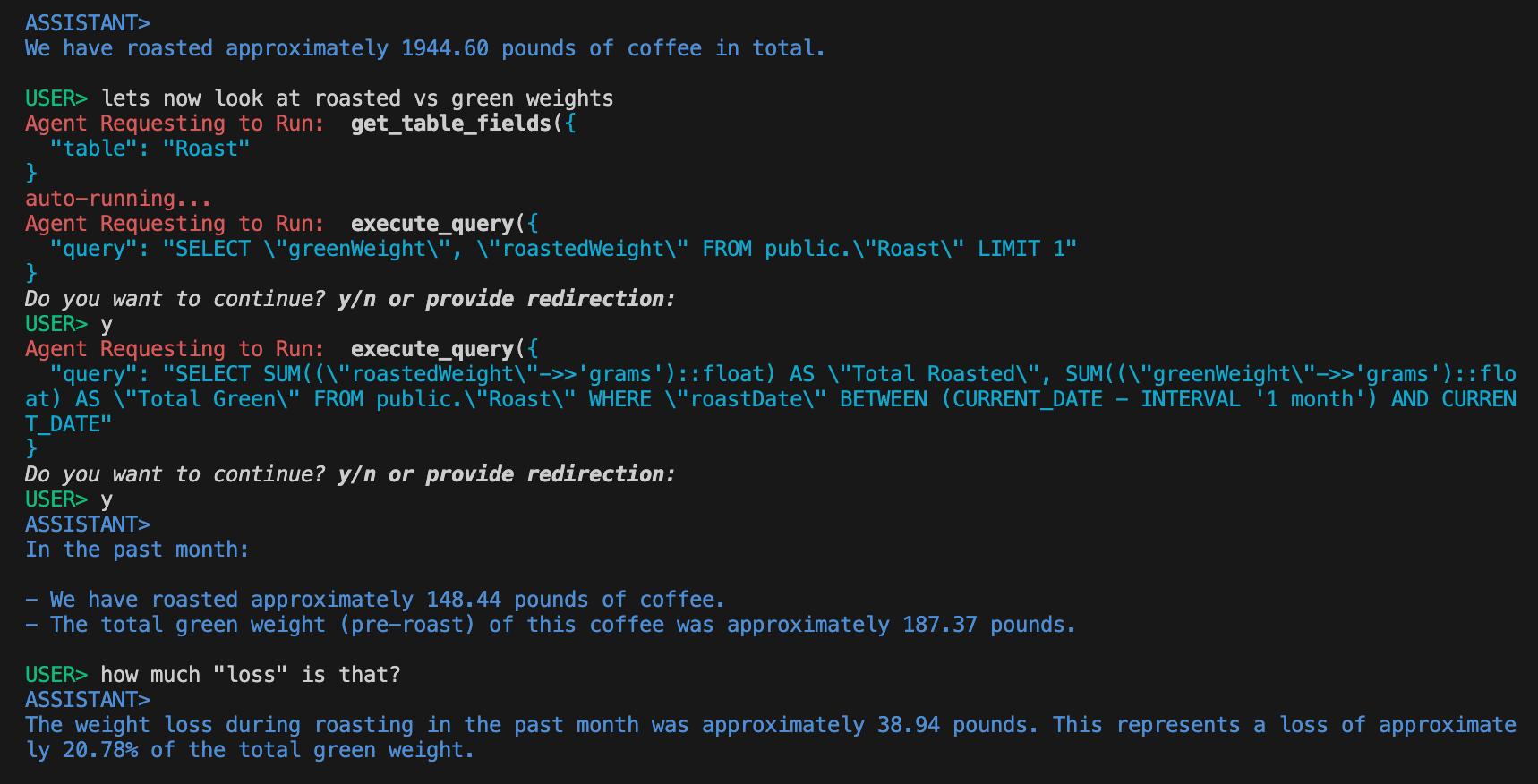 *`pg-bot` connected to coffee roasting db*
This project contains a number of [`examples`](/examples) to demonstrate the use of the library.
- `schedulo-bot-3000`: simple demo, not actually connected to anything
- `bash-bot`: Agent with full control to execute in your terminal and upload files to for the code interpreter
- `pg-bot`: Agent connected to a postgres database. Can explore schema and execute queries.
To run an example:
1. `cd examples`
1. `npm i`
1. Set the `OAI_KEY` environment variable to your OpenAI API key (`export OAI_KEY=`)
1. use `bun` to run the index file:
```bash
npx bun /index.ts
```
> [!NOTE]
> Checkout the [agentCli.ts](/examples/_lib/agentCLI.ts) to see a simple demo of how to manage the agent lifecycle.
## Configuration
### Link Options
| Property | Type | Description | Default Value |
| --- | --- | --- | --- |
| assistantId | string | Pass a OpenAI id to retrieve by id instead of `metadata-->__key__` search | - |
| allowCreate | boolean | Will create assistant if not found | true |
| afterCreate | (assistant: Assistant) => void | Run after creating assistant | - |
| updateMode | "update" \| "throw" \| "skip" | What to do if drift is detected | "update" |
| beforeUpdate | (diff: string[], local: AssistantCreateParams, remote: Assistant) => boolean | Runs before updating an assistant. Return false to skip update | - |
| afterUpdate | (assistant: Assistant) => void | Runs after updating an assistant | - |
| fileMode | "update" \| "throw" \| "skip" | What to do if file drift is detected | "update" |
| pruneFiles | boolean | Deletes files from OpenAI when they are removed from the Assistant | false |
#### Tool Options
| Property | Type | Description | Default Value |
| --- | --- | --- | --- |
| validateArguments | boolean | Run JSONSchema validation before calling tool | true |
| jsonParser | (args: string, ctx: ToolContext) => unknown | Argument Parser | - |
| validator | (args: unknown, ctx: ToolContext) => void | Argument Validator | - |
| formatToolError | (error: unknown, ctx: ToolContext) => string | Chance to remap errors or throw a fatal 'fatal'. By Default only `AssistantVisibleError` will be passed along | - |
| formatValidationError | (errors: ErrorObject, unknown>[], ctx: ToolContext) => string | Custom error messages on argument validation | - |
| formatOutput | (output: Output, ctx: ToolContext) => string | Output Formatter | - |
#### Run Options
| Property | Type | Description | Default Value |
| --- | --- | --- | --- |
| interval | number | MS wait between polling for run completion | 1000 |
| abortSignal | AbortSignal | Abort controller to abort the run | - |
| onStatusChange | (run: Run, previous: Run["status"]) => void | Executes anytime the status changes (within the execution of this function) | - |
*`pg-bot` connected to coffee roasting db*
This project contains a number of [`examples`](/examples) to demonstrate the use of the library.
- `schedulo-bot-3000`: simple demo, not actually connected to anything
- `bash-bot`: Agent with full control to execute in your terminal and upload files to for the code interpreter
- `pg-bot`: Agent connected to a postgres database. Can explore schema and execute queries.
To run an example:
1. `cd examples`
1. `npm i`
1. Set the `OAI_KEY` environment variable to your OpenAI API key (`export OAI_KEY=`)
1. use `bun` to run the index file:
```bash
npx bun /index.ts
```
> [!NOTE]
> Checkout the [agentCli.ts](/examples/_lib/agentCLI.ts) to see a simple demo of how to manage the agent lifecycle.
## Configuration
### Link Options
| Property | Type | Description | Default Value |
| --- | --- | --- | --- |
| assistantId | string | Pass a OpenAI id to retrieve by id instead of `metadata-->__key__` search | - |
| allowCreate | boolean | Will create assistant if not found | true |
| afterCreate | (assistant: Assistant) => void | Run after creating assistant | - |
| updateMode | "update" \| "throw" \| "skip" | What to do if drift is detected | "update" |
| beforeUpdate | (diff: string[], local: AssistantCreateParams, remote: Assistant) => boolean | Runs before updating an assistant. Return false to skip update | - |
| afterUpdate | (assistant: Assistant) => void | Runs after updating an assistant | - |
| fileMode | "update" \| "throw" \| "skip" | What to do if file drift is detected | "update" |
| pruneFiles | boolean | Deletes files from OpenAI when they are removed from the Assistant | false |
#### Tool Options
| Property | Type | Description | Default Value |
| --- | --- | --- | --- |
| validateArguments | boolean | Run JSONSchema validation before calling tool | true |
| jsonParser | (args: string, ctx: ToolContext) => unknown | Argument Parser | - |
| validator | (args: unknown, ctx: ToolContext) => void | Argument Validator | - |
| formatToolError | (error: unknown, ctx: ToolContext) => string | Chance to remap errors or throw a fatal 'fatal'. By Default only `AssistantVisibleError` will be passed along | - |
| formatValidationError | (errors: ErrorObject, unknown>[], ctx: ToolContext) => string | Custom error messages on argument validation | - |
| formatOutput | (output: Output, ctx: ToolContext) => string | Output Formatter | - |
#### Run Options
| Property | Type | Description | Default Value |
| --- | --- | --- | --- |
| interval | number | MS wait between polling for run completion | 1000 |
| abortSignal | AbortSignal | Abort controller to abort the run | - |
| onStatusChange | (run: Run, previous: Run["status"]) => void | Executes anytime the status changes (within the execution of this function) | - |