# bezier-mouse-js
Lightweight library to generate human-like mouse movements with [Bezier curves](https://en.wikipedia.org/wiki/B%C3%A9zier_curve).
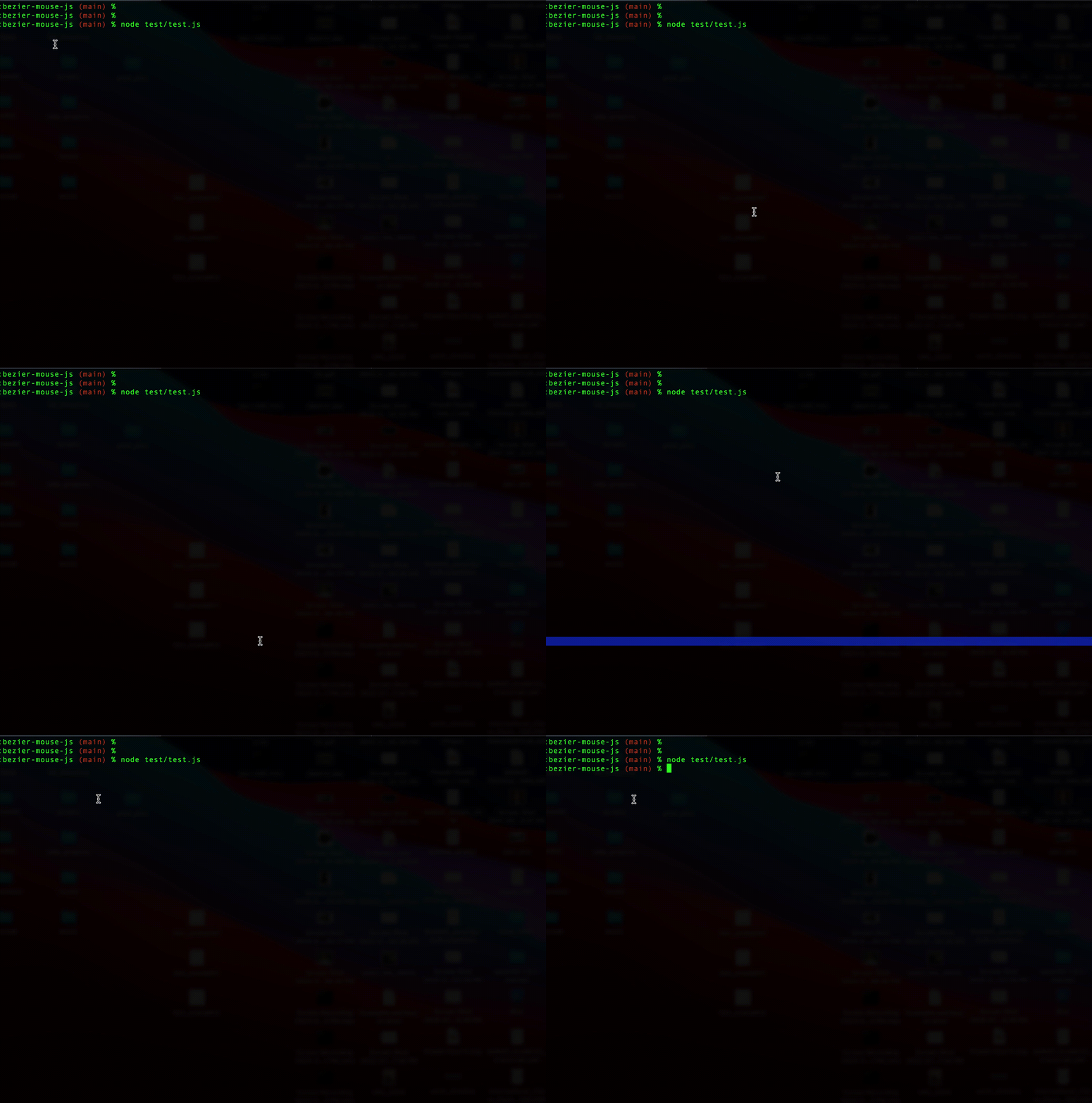
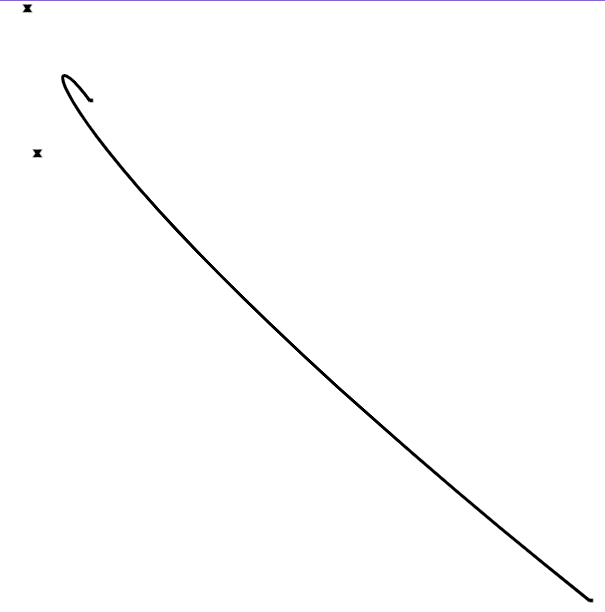
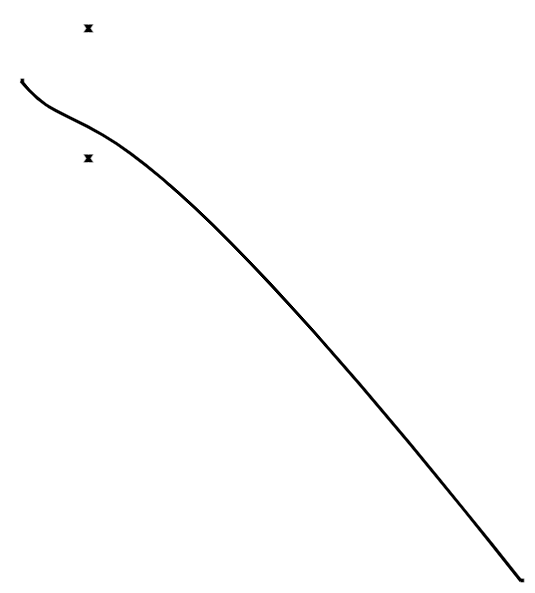
Straight-line mouse movements are a dead giveaway for automation. This library generates natural, curved paths that look human — plug the points into Playwright, Puppeteer, or any framework that takes `{x, y}` coordinates. Or use the built-in nut-js integration to control the mouse directly.
 ### Use cases
- **Browser automation** — Natural mouse paths for Playwright, Puppeteer, or Selenium scripts
- **Desktop automation** — Control the mouse with human-like movement via nut-js
- **AI computer-use agents** — Give screen-controlling agents realistic cursor behavior
## Getting Started
```bash
# Core library (curve generation only — works everywhere)
npm install bezier-mouse-js
# With mouse control (requires @nut-tree/nut-js)
npm install bezier-mouse-js @nut-tree/nut-js
```
### ESM
```js
import { BezierMouse } from "bezier-mouse-js";
const bezMouse = new BezierMouse();
// Generate curve points (no dependencies required)
const points = bezMouse.bezierCurveTo({ x: 100, y: 100 }, { x: 700, y: 700 });
// Move and click (requires @nut-tree/nut-js)
await bezMouse.moveAndClick({ x: 100, y: 100 }, { x: 700, y: 700 });
```
### CommonJS
```js
const { BezierMouse } = require("bezier-mouse-js");
const bezMouse = new BezierMouse();
await bezMouse.moveAndClick({ x: 100, y: 100 }, { x: 700, y: 700 });
```
## API
### `new BezierMouse(mouseSpeed?)`
| Param | Type | Default | Description |
|-------|------|---------|-------------|
| `mouseSpeed` | `number` | `100` | Mouse movement speed in pixels per second (used with nut-js) |
---
### `bezierCurveTo(initPos, finPos, opts?)` → `Point[]`
Generate an array of `{x, y}` points along a human-like Bezier curve. Pure math — no dependencies required.
| Param | Type | Default | Description |
|-------|------|---------|-------------|
| `initPos` | `{x, y}` | — | Starting position |
| `finPos` | `{x, y}` | — | Target position |
| `opts.deviation` | `number` | `20` | Curve deviation magnitude. Larger = more curve |
| `opts.flip` | `boolean` | `false` | Anchor control points from `initPos` instead of `finPos` |
| `opts.steps` | `number` | `100` | Number of points on the curve |
---
### `cubicBezierCurve(initPos, finPos, opts?)` → `Bezier`
Returns the raw [bezier-js](https://github.com/Pomax/bezierjs) `Bezier` object for a cubic curve. Pure math.
| Param | Type | Default | Description |
|-------|------|---------|-------------|
| `initPos` | `{x, y}` | — | Starting position |
| `finPos` | `{x, y}` | — | Target position |
| `opts.deviation` | `number` | `20` | Curve deviation magnitude |
| `opts.flip` | `boolean` | `false` | Anchor control points from `initPos` |
---
### `getBezierControlPoint(initPos, finPos, opts?)` → `Point`
Compute a single pseudo-random Bezier control point. Pure math.
| Param | Type | Default | Description |
|-------|------|---------|-------------|
| `initPos` | `{x, y}` | — | Starting position |
| `finPos` | `{x, y}` | — | Target position |
| `opts.deviation` | `number` | `20` | Curve deviation magnitude |
| `opts.flip` | `boolean` | `false` | Anchor control points from `initPos` |
---
### `moveAndClick(initPos, finPos, clickType?, opts?)` → `Promise`
Move the mouse along a Bezier curve and click. **Requires `@nut-tree/nut-js`.**
| Param | Type | Default | Description |
|-------|------|---------|-------------|
| `initPos` | `{x, y}` | — | Starting position |
| `finPos` | `{x, y}` | — | Target position |
| `clickType` | `"LEFT" \| "MIDDLE" \| "RIGHT"` | `"LEFT"` | Mouse button |
| `opts.preciseClick` | `boolean` | `false` | Click exact coordinates (no random deviation) |
| `opts.deviation` | `number` | `20` | Curve deviation magnitude |
| `opts.flip` | `boolean` | `false` | Anchor control points from `initPos` |
| `opts.steps` | `number` | `100` | Number of points on the curve |
---
### `moveAndDoubleClick(initPos, finPos, clickType?, opts?)` → `Promise`
Same as `moveAndClick` but double-clicks. **Requires `@nut-tree/nut-js`.**
---
### `move(initPos, finPos, opts?)` → `Promise`
Move the mouse along a Bezier curve without clicking. **Requires `@nut-tree/nut-js`.**
| Param | Type | Default | Description |
|-------|------|---------|-------------|
| `initPos` | `{x, y}` | — | Starting position |
| `finPos` | `{x, y}` | — | Target position |
| `opts.preciseClick` | `boolean` | `false` | Move to exact coordinates (no random deviation) |
| `opts.deviation` | `number` | `20` | Curve deviation magnitude |
| `opts.flip` | `boolean` | `false` | Anchor control points from `initPos` |
| `opts.steps` | `number` | `100` | Number of points on the curve |
## Using with Playwright
```js
import { BezierMouse } from "bezier-mouse-js";
import { chromium } from "playwright";
const browser = await chromium.launch();
const page = await browser.newPage();
await page.goto("https://example.com");
const bezMouse = new BezierMouse();
const points = bezMouse.bezierCurveTo(
{ x: 100, y: 100 },
{ x: 500, y: 300 },
{ steps: 50 }
);
// Move through each point with a small delay for natural movement
for (const point of points) {
await page.mouse.move(point.x, point.y);
}
await page.mouse.click(500, 300);
```
## Using with Puppeteer
```js
import { BezierMouse } from "bezier-mouse-js";
import puppeteer from "puppeteer";
const browser = await puppeteer.launch();
const page = await browser.newPage();
await page.goto("https://example.com");
const bezMouse = new BezierMouse();
const points = bezMouse.bezierCurveTo(
{ x: 100, y: 100 },
{ x: 500, y: 300 },
{ steps: 50 }
);
for (const point of points) {
await page.mouse.move(point.x, point.y);
}
await page.mouse.click(500, 300);
```
## Demo
**[Live Demo](https://chrisdewolf.github.io/bezier-mouse-js-docs/)**
### Use cases
- **Browser automation** — Natural mouse paths for Playwright, Puppeteer, or Selenium scripts
- **Desktop automation** — Control the mouse with human-like movement via nut-js
- **AI computer-use agents** — Give screen-controlling agents realistic cursor behavior
## Getting Started
```bash
# Core library (curve generation only — works everywhere)
npm install bezier-mouse-js
# With mouse control (requires @nut-tree/nut-js)
npm install bezier-mouse-js @nut-tree/nut-js
```
### ESM
```js
import { BezierMouse } from "bezier-mouse-js";
const bezMouse = new BezierMouse();
// Generate curve points (no dependencies required)
const points = bezMouse.bezierCurveTo({ x: 100, y: 100 }, { x: 700, y: 700 });
// Move and click (requires @nut-tree/nut-js)
await bezMouse.moveAndClick({ x: 100, y: 100 }, { x: 700, y: 700 });
```
### CommonJS
```js
const { BezierMouse } = require("bezier-mouse-js");
const bezMouse = new BezierMouse();
await bezMouse.moveAndClick({ x: 100, y: 100 }, { x: 700, y: 700 });
```
## API
### `new BezierMouse(mouseSpeed?)`
| Param | Type | Default | Description |
|-------|------|---------|-------------|
| `mouseSpeed` | `number` | `100` | Mouse movement speed in pixels per second (used with nut-js) |
---
### `bezierCurveTo(initPos, finPos, opts?)` → `Point[]`
Generate an array of `{x, y}` points along a human-like Bezier curve. Pure math — no dependencies required.
| Param | Type | Default | Description |
|-------|------|---------|-------------|
| `initPos` | `{x, y}` | — | Starting position |
| `finPos` | `{x, y}` | — | Target position |
| `opts.deviation` | `number` | `20` | Curve deviation magnitude. Larger = more curve |
| `opts.flip` | `boolean` | `false` | Anchor control points from `initPos` instead of `finPos` |
| `opts.steps` | `number` | `100` | Number of points on the curve |
---
### `cubicBezierCurve(initPos, finPos, opts?)` → `Bezier`
Returns the raw [bezier-js](https://github.com/Pomax/bezierjs) `Bezier` object for a cubic curve. Pure math.
| Param | Type | Default | Description |
|-------|------|---------|-------------|
| `initPos` | `{x, y}` | — | Starting position |
| `finPos` | `{x, y}` | — | Target position |
| `opts.deviation` | `number` | `20` | Curve deviation magnitude |
| `opts.flip` | `boolean` | `false` | Anchor control points from `initPos` |
---
### `getBezierControlPoint(initPos, finPos, opts?)` → `Point`
Compute a single pseudo-random Bezier control point. Pure math.
| Param | Type | Default | Description |
|-------|------|---------|-------------|
| `initPos` | `{x, y}` | — | Starting position |
| `finPos` | `{x, y}` | — | Target position |
| `opts.deviation` | `number` | `20` | Curve deviation magnitude |
| `opts.flip` | `boolean` | `false` | Anchor control points from `initPos` |
---
### `moveAndClick(initPos, finPos, clickType?, opts?)` → `Promise`
Move the mouse along a Bezier curve and click. **Requires `@nut-tree/nut-js`.**
| Param | Type | Default | Description |
|-------|------|---------|-------------|
| `initPos` | `{x, y}` | — | Starting position |
| `finPos` | `{x, y}` | — | Target position |
| `clickType` | `"LEFT" \| "MIDDLE" \| "RIGHT"` | `"LEFT"` | Mouse button |
| `opts.preciseClick` | `boolean` | `false` | Click exact coordinates (no random deviation) |
| `opts.deviation` | `number` | `20` | Curve deviation magnitude |
| `opts.flip` | `boolean` | `false` | Anchor control points from `initPos` |
| `opts.steps` | `number` | `100` | Number of points on the curve |
---
### `moveAndDoubleClick(initPos, finPos, clickType?, opts?)` → `Promise`
Same as `moveAndClick` but double-clicks. **Requires `@nut-tree/nut-js`.**
---
### `move(initPos, finPos, opts?)` → `Promise`
Move the mouse along a Bezier curve without clicking. **Requires `@nut-tree/nut-js`.**
| Param | Type | Default | Description |
|-------|------|---------|-------------|
| `initPos` | `{x, y}` | — | Starting position |
| `finPos` | `{x, y}` | — | Target position |
| `opts.preciseClick` | `boolean` | `false` | Move to exact coordinates (no random deviation) |
| `opts.deviation` | `number` | `20` | Curve deviation magnitude |
| `opts.flip` | `boolean` | `false` | Anchor control points from `initPos` |
| `opts.steps` | `number` | `100` | Number of points on the curve |
## Using with Playwright
```js
import { BezierMouse } from "bezier-mouse-js";
import { chromium } from "playwright";
const browser = await chromium.launch();
const page = await browser.newPage();
await page.goto("https://example.com");
const bezMouse = new BezierMouse();
const points = bezMouse.bezierCurveTo(
{ x: 100, y: 100 },
{ x: 500, y: 300 },
{ steps: 50 }
);
// Move through each point with a small delay for natural movement
for (const point of points) {
await page.mouse.move(point.x, point.y);
}
await page.mouse.click(500, 300);
```
## Using with Puppeteer
```js
import { BezierMouse } from "bezier-mouse-js";
import puppeteer from "puppeteer";
const browser = await puppeteer.launch();
const page = await browser.newPage();
await page.goto("https://example.com");
const bezMouse = new BezierMouse();
const points = bezMouse.bezierCurveTo(
{ x: 100, y: 100 },
{ x: 500, y: 300 },
{ steps: 50 }
);
for (const point of points) {
await page.mouse.move(point.x, point.y);
}
await page.mouse.click(500, 300);
```
## Demo
**[Live Demo](https://chrisdewolf.github.io/bezier-mouse-js-docs/)**

## License
MIT