@snowball-tech/design-tokens
Version:
Single source of truth repository for Fractal (Snowball's design system) design tokens
292 lines (211 loc) • 9.48 kB
Markdown
# Design tokens
This package represents the single source of truth for all design tokens and
guidelines for Fractal (Snowball's design system).
## Introduction
All of the design tokens and assets are in this package.
Design tokens are unique tokens that store style information used by the Design
System.
This can be colors, spacing, borders, typography styles, ...
A token has a name that follows a specific convention and helps understand what
information it stores. It also has a value that is shared across all
platforms _(web, iOS, Android, ...)_.
For example, `color.background.danger.hover` tells us which color
to use when drawing the background of an interactive component with a `danger`
variant, as it is hovered by the user.
Design tokens are used to keep consistency across all platforms
_(website, mobile apps, marketing, ...)_ and ensure a pleasant user and
developer experience.
Fractal documentation is also based on these design tokens.
The original source of truth for these tokens is the
[Figma project](https://www.figma.com/community/file/1281271374017743876/%E2%9D%84%EF%B8%8F-Fractal-Design-System)
and all design tokens are regularly manually updated to stay synchronized with
it.
This package produces CSS and ES6 (with TypeScript typings) compatible files to
be used in React web application.
## Installation
Using Yarn:
```bash
yarn add --dev @snowball-tech/design-tokens
```
Or using NPM:
```bash
npm install --save-dev @snowball-tech/design-tokens
```
## Usage
### Web
You should not use this package directly in your web application but use the
[Fractal design system](../fractal) instead.
## Development
If you want to contribute, update or edit the design tokens:
- First, install the needed dependencies:
```bash
yarn
```
Or (if you use NPM):
```bash
npm install
```
- Make the modifications you want in the JS files inside of the
[`tokens`](./tokens) directory.
- Build
```bash
yarn build
```
> The `build` task is what performs the style dictionary build steps to generate
> the files for each platform.
> Every time you change something in the style dictionary, like changing colors
> or adding design tokens, you will have to run this command again to generate
> the files.
> You can also run
>
> ```bash
> yarn dev
> ```
>
> To have the build process retrigger each time a modification is done.
> If you ever need to update or tweak the build process, all the needed files
> are in the [`src`](./src) directory.
- Test your updates **(TODO)**
- Commit and push your changes and open a Pull Request.
- When your changes are approved and merged in the `main` branch, a new release
will be automatically created and published to NPM.
### Useful Commands
- `yarn format-fix` to format the code according to our formatting guidelines
(using _Prettier_);
- `yarn lint-fix`: to check that the code matches our coding guidelines and
automatically fix what can be fixed _(using ESLint)_;
- `yarn test`: run all the unit tests;
- `yarn test-dev`: run the tests for modified components and re-trigger runs
everytime something is modified;
- `yarn build`: compiles and bundle the design token;
### Style Dictionary
This repository relies on
[Style Dictionary](https://amzn.github.io/style-dictionary/#/) by Amazon.
This is an open-source tool that take a
[standard tokens format definition](https://amzn.github.io/style-dictionary/#/tokens)
and is able to produce multiple outputs for different platforms according to
a given [configuration](https://amzn.github.io/style-dictionary/#/config).
Style Dictionary takes the tokens definitions (in JSON(C/5)/JS) and applies:
1. [transforms](https://amzn.github.io/style-dictionary/#/transforms) that
transforms _(obviously)_ the values of the tokens using tokens types and
other attributes;
2. [formats](https://amzn.github.io/style-dictionary/#/formats) that output the
transformed tokens in a given format.
3. [actions](https://amzn.github.io/style-dictionary/#/actions) that performs
some afterward actions (like formatting the generated files or copying some
assets)
You can find multiple pre-existing
[transforms](https://amzn.github.io/style-dictionary/#/transforms?id=pre-defined-transforms)
(and
[transform groups](https://amzn.github.io/style-dictionary/#/transform_groups?id=pre-defined-transform-groups)
),
[format](https://amzn.github.io/style-dictionary/#/formats?id=pre-defined-formats)
and
[actions](https://amzn.github.io/style-dictionary/#/actions?id=pre-defined-actions)
But what is interesting with Style Dictionary is its
[extensibility](https://amzn.github.io/style-dictionary/#/extending) and its
[API](https://amzn.github.io/style-dictionary/#/api).
You can create your own transforms, formats and actions to fit your needs and
virtually create any output you may need.
#### Transforms
Transforms can be used to transform:
- Token names: to camelCase, snake_case, kebab-case, CSS variables, ...
E.g. `color.background.danger.hover` can be transformed to
`colorBackgroundDangerHover`, `$color-background-danger-hover` or
`--color-background-danger-hover`;
- Value: for example, transform a color to a HSL or Hexadecimal value, ...
E.g. `#FFFBF4` can be transformed to `{ r: 255, g: 251, b: 244 }`,
`hsl(38, 100%, 98%)` or `rgba(255, 251, 244, 1)`;
- ...
They can also be used to compute re-defined or metadata than can then be used in
the formats:
- Add a comment with the `comment` property to self document your tokens;
- Deprecate a token using `deprecated` property;
- Ignore a token using `ignored` property which can be used to filter
transitive tokens that don't need to be outputted;
- ...
#### Formats
Formats handle how the tokens are outputted. For example, they can be used to:
- [references](https://amzn.github.io/style-dictionary/#/tokens?id=referencing-aliasing)
to other tokens
- Additional `value` properties like `value_<something>` specifically handle a
value for given conditions (for example for light/dark theme, breakpoints,
specific attributes, ...)
- How to output tokens (in a list or tree-like structure, or anything in
between)
- How to make use of and output custom metadata (e.g. the `comment` property)
#### Actions
Actions simply allows to run specific actions after the output files have been
generated. For example:
- format the generated files according to a given specification (e.g. using Prettier)
- copy some assets (e.g. images)
- generate some font (e.g. convert TTF to WOFF2)
#### Example
Given the following JSON tokens definition:
```json
{
"color": {
"base": {
"light-yellow": {
"50": { "value": "#FFFBF4" }
}
},
"background": {
"body": {
"value": "{color.base.light-yellow.50.value}",
"comment": "Base color for the body"
}
}
}
}
```
We can output a standard CSS files with variables:
```css
--color-base-light-yellow-50: hsl(46, 100%, 97%);
--color-background-body: var(--color-base-light-yellow-50);
```
### Structure
#### CTI (Category-Type-Item)
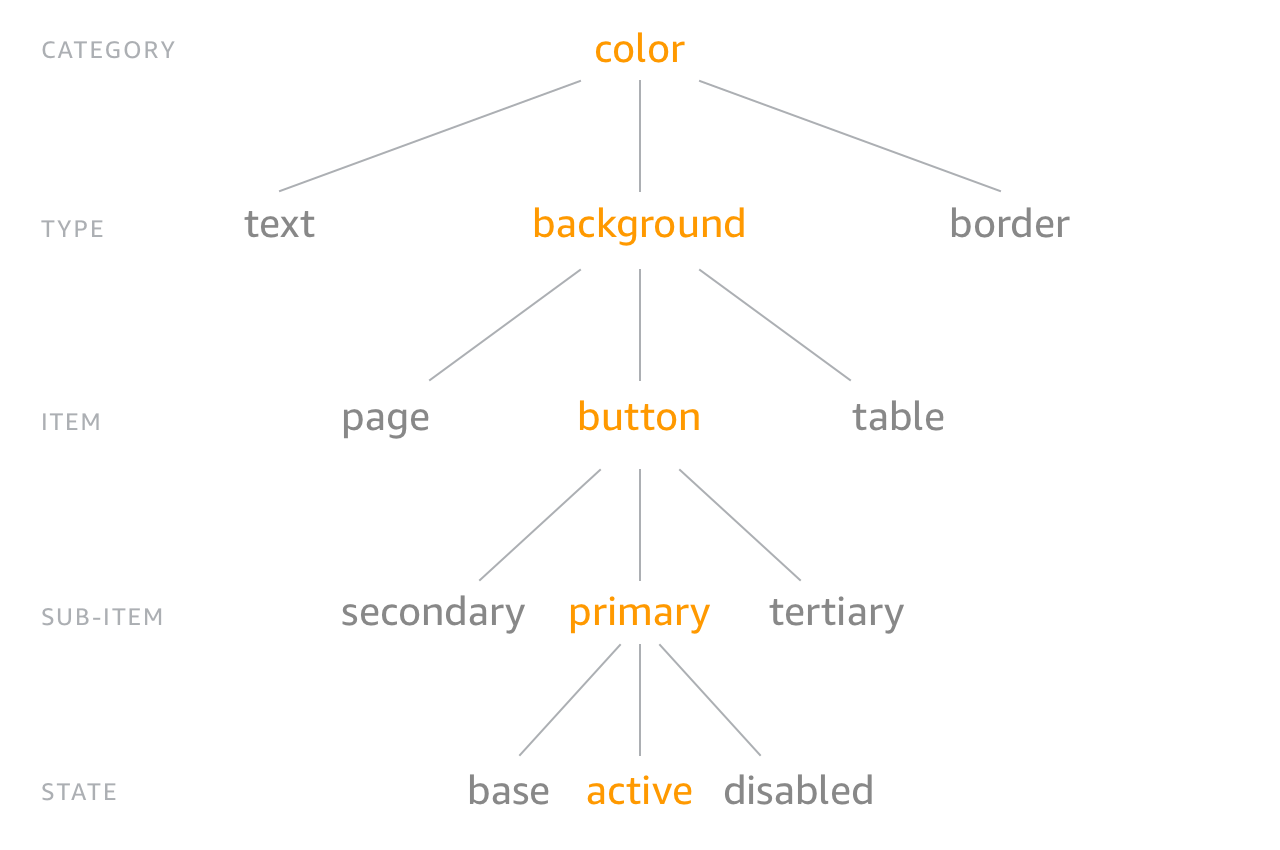
This design tokens repository is based on the
[CTI (Category-Type-Item)](https://amzn.github.io/style-dictionary/#/tokens?id=category-type-item)
structure.
For example, each file in the `color` folder represents a type of color tokens,
with individual items which can have multiple states, and so on.
#### Special files
Some files are not part of a category folders and are instead directly at the
root of the [`tokens`](./tokens) folder because they follow their own particular
structure.
### TypeScript
See [the dedicated `CONVENTIONS.md`](../../docs/CONVENTIONS.md) and
[`TOOLING.md`](../../docs/TOOLING.md) documentations.
### Linting & Formatting
See [the dedicated `CONVENTIONS.md`](../../docs/CONVENTIONS.md) and
[`TOOLING.md`](../../docs/TOOLING.md) documentations.
### Dependencies
> Always remember to add dependency if you **really** need it to avoid
> cluttering the packages and degrading the performance both in the developers
> and users side.
**It is your duty** as a member of the Snowball's engineering team to help
mainting the dependencies up to date. This means that you are expected and
should help reviewing, testing and merging dependencies updates PRs on a regular
basis.
> The best way to do so is to regularly check the
> [Renovate dashboard](https://github.com/snowball-tech/fractal/issues/1) and
> [the list of Pull Requests](https://github.com/snowball-tech/fractal/pulls?q=is%3Apr+is%3Aopen+sort%3Aupdated-desc+label%3Adev-deps%2Cdeps),
> for example every morning at the beginning of your day.
Also, see the [dedicated `TOOLING.md` documentation](../../docs/TOOLING.md) for more
information.
### Environment variables
See [the dedicated `TOOLING.md` documentation](../../docs/TOOLING.md).
## Tooling
See [the dedicated `TOOLING.md` documentation](../../docs/TOOLING.md).
## Contributing
See [the dedicated `CONTRIBUTING.md` documentation](../../CONTRIBUTING.md).
### Conventions
See [the dedicated `CONVENTIONS.md` documentation](../../docs/CONVENTIONS.md).
## Help and feedback
If you have any questions or feedback, feel free to reach out to us using this
repository [issues](https://github.com/snowball-tech/fractal/issues) or [discussions](https://github.com/snowball-tech/fractal/discussions).
You can also use the internal #engineering Slack channel if you are a member of
the Snowball tech team.