article-parser
Version:
To extract main article from given URL
336 lines (250 loc) • 8.84 kB
Markdown
# article-parser
Extract main article, main image and meta data from URL.
[](https://badge.fury.io/js/article-parser)

[](https://coveralls.io/github/ndaidong/article-parser)

[](https://standardjs.com)
[](https://go.deta.dev/deploy?repo=https://github.com/ndaidong/article-parser-deta)
## Demo
- [Give it a try!](https://demos.pwshub.com/article-parser)
- [Example FaaS](https://extract-article.deta.dev/?url=https://www.freethink.com/technology/virtual-world)
## Install & Usage
### Node.js
```bash
npm i article-parser
# pnpm
pnpm i article-parser
# yarn
yarn add article-parser
```
```js
import { extract } from 'article-parser'
// with CommonJS environments
// const { extract } = require('article-parser/dist/cjs/article-parser.js')
const url = 'https://www.freethink.com/technology/virtual-world'
extract(url).then((article) => {
console.log(article)
}).catch((err) => {
console.trace(err)
})
```
### Deno
```ts
import { extract } from 'https://esm.sh/article-parser'
(async () => {
const data = await extract('https://www.freethink.com/technology/virtual-world')
console.log(data)
})();
```
View [more examples](https://github.com/ndaidong/article-parser/tree/main/examples).
## APIs
- [.extract(String url | String html)](#extractstring-url--string-html)
- [Transformations](#transformations)
- [`transformation` object](#transformation-object)
- [.addTransformations](#addtransformationsobject-transformation--array-transformations)
- [.removeTransformations](#removetransformationsarray-patterns)
- [Priority order](#priority-order)
- [Configuration methods](#configuration-methods)
---
### extract(String url | String html)
Load and extract article data. Return a Promise object.
Example:
```js
import { extract } from 'article-parser'
const getArticle = async (url) => {
try {
const article = await extract(url)
return article
} catch (err) {
console.trace(err)
return null
}
}
getArticle('https://domain.com/path/to/article')
```
If the extraction works well, you should get an `article` object with the structure as below:
```json
{
"url": URI String,
"title": String,
"description": String,
"image": URI String,
"author": String,
"content": HTML String,
"published": Date String,
"source": String, // original publisher
"links": Array, // list of alternative links
"ttr": Number, // time to read in second, 0 = unknown
}
```
[Click here](https://extract-article.deta.dev/?url=https://www.freethink.com/technology/virtual-world) for seeing an actual result.
---
### Transformations
Sometimes the default extraction algorithm may not work well. That is the time when we need transformations.
By adding some functions before and after the main extraction step, we aim to come up with a better result as much as possible.
`transformation` is available since `article-parser@7.0.0`, as the improvement of `queryRule` in the older versions.
To play with transformations, `article-parser` provides 2 public methods as below:
- `addTransformations(Object transformation | Array transformations)`
- `removeTransformations(Array patterns)`
At first, let's talk about `transformation` object.
#### `transformation` object
In `article-parser`, `transformation` is an object with the following properties:
- `patterns`: required, a list of regexps to match the URLs
- `pre`: optional, a function to process raw HTML
- `post`: optional, a function to proces extracted article
Basically, the meaning of `transformation` can be interpreted like this:
> with the urls which match these `patterns` <br>
> let's run `pre` function to normalize HTML content <br>
> then extract main article content with normalized HTML, and if success <br>
> let's run `post` function to normalize extracted article content
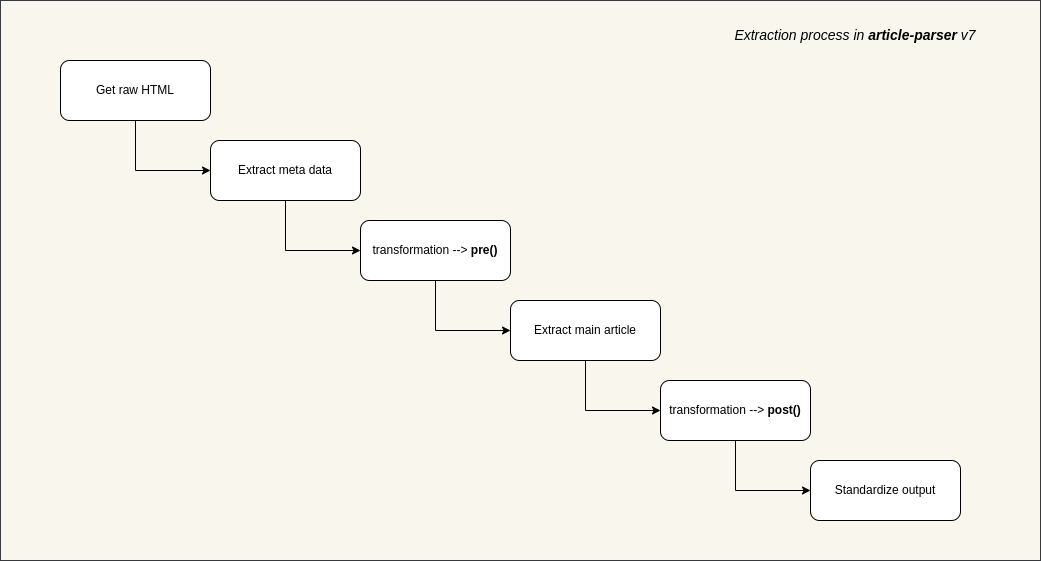
Here is an example transformation:
```js
{
patterns: [
/([\w]+.)?domain.tld\/*/,
/domain.tld\/articles\/*/
],
pre: (document) => {
// remove all .advertise-area and its siblings from raw HTML content
document.querySelectorAll('.advertise-area').forEach((element) => {
if (element.nodeName === 'DIV') {
while (element.nextSibling) {
element.parentNode.removeChild(element.nextSibling)
}
element.parentNode.removeChild(element)
}
})
return document
},
post: (document) => {
// with extracted article, replace all h4 tags with h2
document.querySelectorAll('h4').forEach((element) => {
const h2Element = document.createElement('h2')
h2Element.innerHTML = element.innerHTML
element.parentNode.replaceChild(h2Element, element)
})
// change small sized images to original version
document.querySelectorAll('img').forEach((element) => {
const src = element.getAttribute('src')
if (src.includes('domain.tld/pics/150x120/')) {
const fullSrc = src.replace('/pics/150x120/', '/pics/original/')
element.setAttribute('src', fullSrc)
}
})
return document
}
}
```
- To write better transformation logic, please refer [linkedom](https://github.com/WebReflection/linkedom) and [Document Object](https://developer.mozilla.org/en-US/docs/Web/API/Document).
#### `addTransformations(Object transformation | Array transformations)`
Add a single transformation or a list of transformations. For example:
```js
import { addTransformations } from 'article-parser'
addTransformations({
patterns: [
/([\w]+.)?abc.tld\/*/
],
pre: (document) => {
// do something with document
return document
},
post: (document) => {
// do something with document
return document
}
})
addTransformations([
{
patterns: [
/([\w]+.)?def.tld\/*/
],
pre: (document) => {
// do something with document
return document
},
post: (document) => {
// do something with document
return document
}
},
{
patterns: [
/([\w]+.)?xyz.tld\/*/
],
pre: (document) => {
// do something with document
return document
},
post: (document) => {
// do something with document
return document
}
}
])
````
The transformations without `patterns` will be ignored.
#### `removeTransformations(Array patterns)`
To remove transformations that match the specific patterns.
For example, we can remove all added transformations above:
```js
import { removeTransformations } from 'article-parser'
removeTransformations([
/([\w]+.)?abc.tld\/*/,
/([\w]+.)?def.tld\/*/,
/([\w]+.)?xyz.tld\/*/
])
```
Calling `removeTransformations()` without parameter will remove all current transformations.
#### Priority order
While processing an article, more than one transformation can be applied.
Suppose that we have the following transformations:
```js
[
{
patterns: [
/http(s?):\/\/google.com\/*/,
/http(s?):\/\/goo.gl\/*/
],
pre: function_one,
post: function_two
},
{
patterns: [
/http(s?):\/\/goo.gl\/*/,
/http(s?):\/\/google.inc\/*/
],
pre: function_three,
post: function_four
}
]
```
As you can see, an article from `goo.gl` certainly matches both them.
In this scenario, `article-parser` will execute both transformations, one by one:
`function_one` -> `function_three` -> extraction -> `function_two` -> `function_four`
---
### Configuration methods
In addition, this lib provides some methods to customize default settings. Don't touch them unless you have reason to do that.
- getParserOptions()
- setParserOptions(Object parserOptions)
- getSanitizeHtmlOptions()
- setSanitizeHtmlOptions(Object sanitizeHtmlOptions)
Here are default properties/values:
#### Object `parserOptions`:
View [default options](https://github.com/ndaidong/article-parser/blob/main/src/config.js#L51)
#### Object `sanitizeHtmlOptions`:
View [default options](https://github.com/ndaidong/article-parser/blob/main/src/config.js#L5)
Read [sanitize-html](https://www.npmjs.com/package/sanitize-html#what-are-the-default-options) docs for more info.
## Test
```bash
git clone https://github.com/ndaidong/article-parser.git
cd article-parser
npm i
npm test
# quick evaluation
npm run eval {URL_TO_PARSE_ARTICLE}
```
## License
The MIT License (MIT)
---