eslint-plugin-css-modules
Version:
Checks that you are using the existent css/scss/less classes, no more no less
120 lines (92 loc) • 3.01 kB
Markdown
# eslint-plugin-css-modules
[](https://travis-ci.org/atfzl/eslint-plugin-css-modules)
This plugin intends to help you in tracking down problems when you are using css-modules. It tells if you are using a non-existent css/scss/less class in js or if you forgot to use some classes which you declared in css/scss/less.
## Rules
* `css-modules/no-unused-class`: You must use all the classes defined in css/scss/less file.
>If you still want to mark a class as used, then use this comment on top of your file
```js
/* eslint css-modules/no-unused-class: [2, { markAsUsed: ['container'] }] */
```
where container is the css class that you want to mark as used.
Add all such classes in the array.
>If you use the `camelCase` option of `css-loader`, you must also enabled it for this plugin
```js
/* eslint css-modules/no-unused-class: [2, { camelCase: true }] */
```
* `css-modules/no-undef-class`: You must not use a non existing class, or a property that hasn't been exported using the [:export keyword](https://github.com/css-modules/icss#export).
>If you use the `camelCase` option of `css-loader`, you must also enabled it for this plugin
```js
/* eslint css-modules/no-undef-class: [2, { camelCase: true }] */
```
## Installation
```
npm i --save-dev eslint-plugin-css-modules
```
## Usage:
.eslintrc
```json
{
"plugins": [
"css-modules"
],
"extends": [
"plugin:css-modules/recommended"
]
}
```
You may also tweak the rules individually. For instance, if you use the [camelCase](https://github.com/webpack-contrib/css-loader#camelcase) option of webpack's css-loader:
```json
{
"plugins": [
"css-modules"
],
"extends": [
"plugin:css-modules/recommended"
],
"rules": {
"css-modules/no-unused-class": [2, { "camelCase": true }],
"css-modules/no-undef-class": [2, { "camelCase": true }]
}
}
```
The camelCase option has 4 possible values, see [css-loader#camelCase](https://github.com/webpack-contrib/css-loader#camelcase) for description:
```js
true | "dashes" | "only" | "dashes-only"
```
## Specifying base path
You can specify path for the base directory via plugin settings in .eslintrc. This is used by the plugin to resolve absolute (S)CSS paths:
```json
{
"settings": {
"css-modules": {
"basePath": "app/scripts/..."
}
}
}
```
## Screen Shot
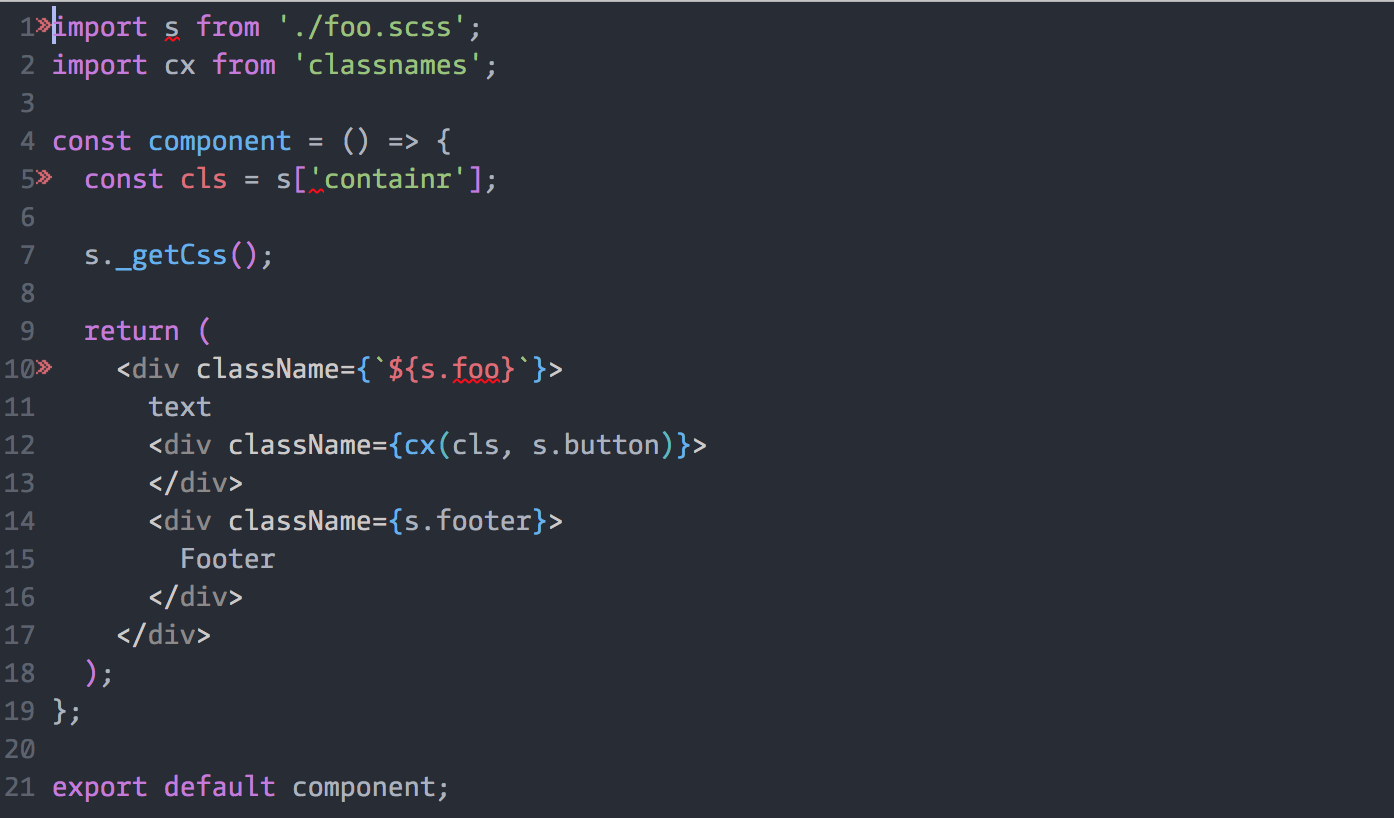
```
1:8 error Unused classes found: container css-modules/no-unused-class
5:17 error Class 'containr' not found css-modules/no-undef-class
10:26 error Class 'foo' not found css-modules/no-undef-class
```
scss:
```scss
/* .head is global, will not be used in js */
:global(.head) {
color: green;
}
.container {
width: 116px;
i {
font-size: 2.2rem;
}
.button {
padding: 7px 0 0 5px;
}
}
.footer {
color: cyan;
}
```