react-multi-carousel
Version:
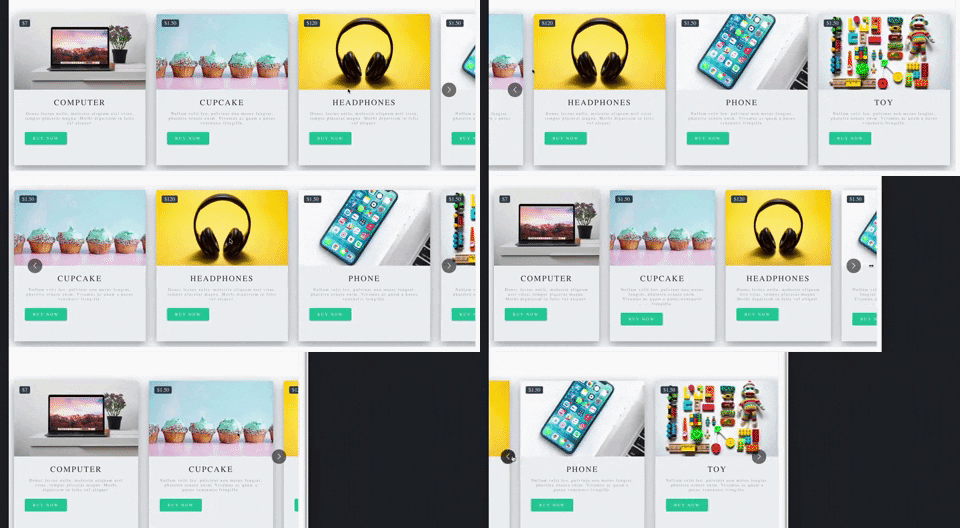
Production-ready, lightweight fully customizable React carousel component that rocks supports multiple items and SSR(Server-side rendering) with typescript.
478 lines (373 loc) • 26.6 kB
Markdown
# react-multi-carousel 👋
Production-ready, lightweight fully customizable React carousel component that rocks supports multiple items and SSR(Server-side rendering) with typescript.
Don't forget to leave a star if this project help you reduce time to develop.
[](https://packagequality.com/#?package=react-multi-carousel)
[](https://www.npmjs.com/package/react-multi-carousel)
<a href="https://www.npmjs.com/package/react-multi-carousel">
<img alt="download per month" src="https://img.shields.io/npm/dm/react-multi-carousel" target="_blank" />
</a>
[](https://travis-ci.org/YIZHUANG/react-multi-carousel)
<a href="https://w3js.com/react-multi-carousel">
<img alt="Documentation" src="https://img.shields.io/badge/documentation-yes-brightgreen.svg" target="_blank" />
</a>
<a href="https://github.com/YIZHUANG/react-multi-carousel/graphs/commit-activity">
<img alt="Maintenance" src="https://img.shields.io/badge/Maintained%3F-yes-green.svg" target="_blank" />
</a>
<a href="https://github.com/YIZHUANG/react-multi-carousel/blob/master/LICENSE">
<img alt="License: MIT" src="https://img.shields.io/badge/License-MIT-yellow.svg" target="_blank" />
</a>
[](https://app.fossa.io/projects/git%2Bgithub.com%2FYIZHUANG%2Freact-multi-carousel?ref=badge_shield)
[](https://david-dm.org/YIZHUANG/react-multi-carousel)
[](https://snyk.io/test/github/YIZHUANG/react-multi-carousel?targetFile=package.json)

### Job.
If you have any good developer jobs in the Helsinki area, please don't hesitate to contact the author.
### Features.
- Server-side rendering
- Infinite mode
- Dot mode
- Custom animation
- AutoPlay mode
- Auto play interval
- Supports images, videos, everything.
- Responsive
- Swipe to slide
- Mouse drag to slide
- Keyboard control to slide
- Multiple items
- Show / hide arrows
- Custom arrows / control buttons
- Custom dots
- Custom styling
- Accessibility support
- Center mode.
- Show next/previous set of items partially
### Shoutouts 🙏
<img src="/browserstack-logo-600x315.png" height="80" title="BrowserStack Logo" alt="BrowserStack Logo" />
Big thanks to [BrowserStack](https://www.browserstack.com) for letting the maintainers use their service to debug browser issues.
## [Documentation](https://w3js.com/react-multi-carousel/)
## Show your support
Give a ⭐️ if this project helped you!
## Other important links.
- [Code sandbox](https://codesandbox.io/embed/2omn67p8kj)
- [Contributing](https://github.com/YIZHUANG/react-multi-carousel/blob/master/contributing.md)
- [Changelog](https://github.com/YIZHUANG/react-multi-carousel/blob/master/CHANGELOG.md)
- [Releases](https://github.com/YIZHUANG/react-multi-carousel/releases)
- [TypeScript usage](https://github.com/YIZHUANG/react-multi-carousel/blob/master/TypeScriptUsage.md)
- [SSR demo](https://react-multi-carousel.now.sh/)
## Bundle size
[Bundle-size](https://bundlephobia.com/result?p=react-multi-carousel).
2.5kB
## Demo.
Documentation is [here](https://w3js.com/react-multi-carousel/).
Demo for the SSR <https://react-multi-carousel.now.sh/>
Try to disable JavaScript to test if it renders on the server-side.
Codes for SSR at [github](https://github.com/YIZHUANG/react-multi-carousel/blob/master/examples/ssr/pages/index.js).
Codes for the documentation at [github](https://github.com/YIZHUANG/react-multi-carousel/blob/master/stories/index.stories.js).
## Install
```
$ npm install react-multi-carousel --save
import Carousel from 'react-multi-carousel';
import 'react-multi-carousel/lib/styles.css';
```
### How the SSR mode works?
Codes for SSR at [github](https://github.com/YIZHUANG/react-multi-carousel/blob/master/examples/ssr/pages/index.js).
- Demo for the SSR are at [here](https://react-multi-carousel.now.sh/)
- Try to disable JavaScript to test if it renders on the server-side.
Here is a lighter version of the library for detecting the user's device type [alternative](https://github.com/faisalman/ua-parser-js)
If you are using Nextjs, you can choose to only bundle it on the server-side.
## Minimum working set up.
```js
import Carousel from "react-multi-carousel";
import "react-multi-carousel/lib/styles.css";
const responsive = {
superLargeDesktop: {
// the naming can be any, depends on you.
breakpoint: { max: 4000, min: 3000 },
items: 5,
},
desktop: {
breakpoint: { max: 3000, min: 1024 },
items: 3,
},
tablet: {
breakpoint: { max: 1024, min: 464 },
items: 2,
},
mobile: {
breakpoint: { max: 464, min: 0 },
items: 1,
},
};
<Carousel responsive={responsive}>
<div>Item 1</div>
<div>Item 2</div>
<div>Item 3</div>
<div>Item 4</div>
</Carousel>;
```
## Common Usage
```js
import Carousel from "react-multi-carousel";
import "react-multi-carousel/lib/styles.css";
const responsive = {
desktop: {
breakpoint: { max: 3000, min: 1024 },
items: 3,
slidesToSlide: 3, // optional, default to 1.
},
tablet: {
breakpoint: { max: 1024, min: 464 },
items: 2,
slidesToSlide: 2, // optional, default to 1.
},
mobile: {
breakpoint: { max: 464, min: 0 },
items: 1,
slidesToSlide: 1, // optional, default to 1.
},
};
<Carousel
swipeable={false}
draggable={false}
showDots={true}
responsive={responsive}
ssr={true} // means to render carousel on server-side.
infinite={true}
autoPlay={this.props.deviceType !== "mobile" ? true : false}
autoPlaySpeed={1000}
keyBoardControl={true}
customTransition="all .5"
transitionDuration={500}
containerClass="carousel-container"
removeArrowOnDeviceType={["tablet", "mobile"]}
deviceType={this.props.deviceType}
dotListClass="custom-dot-list-style"
itemClass="carousel-item-padding-40-px"
>
<div>Item 1</div>
<div>Item 2</div>
<div>Item 3</div>
<div>Item 4</div>
</Carousel>;
```
## Custom Arrows.
You can pass your own custom arrows to make it the way you want, the same for the position. For example, add media query for the arrows to go under when on smaller screens.
You custom arrows will receive a list of props/state that's passed back by the carousel such as the currentSide, is dragging or swiping in progress.
[An Example](https://w3js.com/react-multi-carousel/?selectedKind=Carousel&selectedStory=Custom%20arrow&full=0&addons=1&stories=1&panelRight=0&addonPanel=storybook%2Factions%2Factions-panel)
[Code](https://github.com/YIZHUANG/react-multi-carousel/blob/master/stories/CustomArrows.js)
```js
const CustomRightArrow = ({ onClick, ...rest }) => {
const {
onMove,
state: { currentSlide, deviceType },
} = rest;
// onMove means if dragging or swiping in progress.
return <button onClick={() => onClick()} />;
};
<Carousel customRightArrow={<CustomRightArrow />} />;
```
## Custom button group.
This is very useful if you don't want the dots, or arrows and you want to fully customize the control functionality and styling yourself.
[Example](https://w3js.com/react-multi-carousel/?selectedKind=Carousel&selectedStory=With%20custom%20button%20group&full=0&addons=1&stories=1&panelRight=0&addonPanel=storybook%2Factions%2Factions-panel)
[Code](https://github.com/YIZHUANG/react-multi-carousel/blob/master/stories/CustomArrows.js)
```js
const ButtonGroup = ({ next, previous, goToSlide ...rest }) => {
const { carouselState: { currentSlide } } = rest;
return (
<div className="carousel-button-group"> // remember to give it position:absolute
<ButtonOne className={currentSlide === 0 : 'disable' : ''} onClick={() => previous()} />
<ButtonTwo onClick={() => next()} />
<ButtonThree onClick={() => goToSlide(currentSlide + 1)}> Go to any slide </ButtonThree>
</div>
);
};
<Carousel arrows={false} customButtonGroup={<ButtonGroup />}>
<ItemOne>
<ItemTwo>
</Carousel>
```
## Custom dots.
You can pass your own custom dots to replace the default one.
Custom dots can also be a copy or an image of your carousel item. See example in this [one](https://react-multi-carousel.now.sh/)
The codes for this [example](https://github.com/YIZHUANG/react-multi-carousel/blob/master/examples/ssr/components/carousel-with-custom-dots.js)
You custom dots will receive a list of props/state that's passed back by the carousel such as the currentSide, is dragging or swiping in progress.
[An Example](https://w3js.com/react-multi-carousel/?selectedKind=Carousel&selectedStory=custom%20dots&full=0&addons=1&stories=1&panelRight=0&addonPanel=storybook%2Factions%2Factions-panel)
[Code](https://github.com/YIZHUANG/react-multi-carousel/blob/master/stories/CustomDot.js)
```js
const CustomDot = ({ onClick, ...rest }) => {
const { onMove, index, active, carouselState: { currentSlide, deviceType } } = rest;
const carouselItems = [<CarouselItem1, CaourselItem2, CarouselItem3];
// onMove means if dragging or swiping in progress.
// active is provided by this lib for checking if the item is active or not.
return (
<button className={active ? 'active' : 'inactive'} onClick={() => onClick()}>
{React.Children.toArray(carouselItems)[index]}
</button>
)
}
<Carousel showDots customDot={<CustomDot />}>
{carouselItems}
</Carousel>
```
## partialVisbile props.
Shows the next items partially, this is very useful if you want to indicate to the users that this carousel component is swipable, has more items behind it.
This is different from the "centerMode" prop, as it only shows the next items. For the centerMode, it shows both.
[An Example](https://w3js.com/react-multi-carousel/?selectedKind=Carousel&selectedStory=partially%20visibie%20on%20next%20items&full=0&addons=1&stories=1&panelRight=0&addonPanel=storybook%2Factions%2Factions-panel).
```js
const responsive = {
desktop: {
breakpoint: { max: 3000, min: 1024 },
items: 3,
partialVisibilityGutter: 40 // this is needed to tell the amount of px that should be visible.
},
tablet: {
breakpoint: { max: 1024, min: 464 },
items: 2,
partialVisibilityGutter: 30 // this is needed to tell the amount of px that should be visible.
},
mobile: {
breakpoint: { max: 464, min: 0 },
items: 1,
partialVisibilityGutter: 30 // this is needed to tell the amount of px that should be visible.
}
}
<Carousel partialVisbile={true} responsive={responsive}>
<ItemOne />
<ItemTwo />
</Carousel>
```
## centerMode
Shows the next items and previous items partially.
```js
<Carousel centerMode={true} />
```
## afterChange callback.
This is a callback function that is invoked each time when there has been a sliding.
[An Example](https://w3js.com/react-multi-carousel/?selectedKind=Carousel&selectedStory=afterChanged%20function%2C%20a%20callback%20function&full=0&addons=1&stories=1&panelRight=0&addonPanel=storybook%2Factions%2Factions-panel).
```js
<Carousel
afterChange={(previousSlide, { currentSlide, onMove }) => {
doSpeicalThing();
}}
/>
```
## beforeChange call back
This is a callback function that is invoked each time before a sliding.
[An Example](https://w3js.com/react-multi-carousel/?selectedKind=Carousel&selectedStory=beforeChanged%20function%2C%20a%20callback%20function&full=0&addons=1&stories=1&panelRight=0&addonPanel=storybook%2Factions%2Factions-panel).
```js
<Carousel
beforeChange={(nextSlide, { currentSlide, onMove }) => {
doSpeicalThing();
}}
/>
```
## Combine beforeChange and nextChange, real usage.
They are very useful in the following cases:
- The carousel item is clickable, but you don't want it to be clickable while the user is dragging it or swiping it.
```js
<Carousel
beforeChange={() => this.setState({ isMoving: true })}
afterChange={() => this.setState({ isMoving: false })}
>
<a
onClick={e => {
if (this.state.isMoving) {
e.preventDefault();
}
}}
href="https://w3js.com"
>
Click me
</a>
</Carousel>
```
- Preparing for the next slide.
```js
<Carousel beforeChange={nextSlide => this.setState({ nextSlide: nextSlide })}>
<div>Initial slide</div>
<div
onClick={() => {
if (this.state.nextSlide === 1) {
doVerySpecialThing();
}
}}
>
Second slide
</div>
</Carousel>
```
## focusOnSelect
Go to slide on click and make the slide a current slide.
```js
<Carousel focusOnSelect={true} />
```
## Using ref.
```js
<Carousel ref={(el) => (this.Carousel = el)} arrows={false} responsive={responsive}>
<ItemOne />
<ItemTwo />
</Carousel>
<button onClick={() => {
const nextSlide = this.Carousel.state.currentSlide + 1;
// this.Carousel.next()
// this.Carousel.goToSlide(nextSlide)
}}>Click me</button>
```
## additionalTransfrom Props.
This is very useful when you are fully customizing the control functionality by yourself like this [one](https://w3js.com/react-multi-carousel/?selectedKind=Carousel&selectedStory=With%20custom%20control%20functionality&full=0&addons=1&stories=1&panelRight=0&addonPanel=storybook%2Factions%2Factions-panel)
[Code](https://github.com/YIZHUANG/react-multi-carousel/blob/master/stories/WithScrollbar.js)
For example if you give to your carousel item padding left and padding right 20px. And you have 5 items in total, you might want to do the following:
```js
<Carousel ref={el => (this.Carousel = el)} additionalTransfrom={-20 * 5} /> // it needs to be a negative number
```
## Specific Props
| Name | Type | Default | Description |
| :---------------------- | :------------------------------------------------------------------------------------------------------------------------------------------------: | :-------------------------------: | :-------------------------------------------------------------------------------------------------------------------------------------------------------------------- |
| responsive | `object` | `{}` | Numbers of slides to show at each breakpoint |
| deviceType | `string` | `''` | Only pass this when use for server-side rendering, what to pass can be found in the example folder |
| ssr | `boolean` | `false` | Use in conjunction with responsive and deviceType prop |
| slidesToSlide | `Number` | `1` | How many slides to slide. |
| draggable | `boolean` | `true` | Optionally disable/enable dragging on desktop |
| swipeable | `boolean` | `true` | Optionally disable/enable swiping on mobile |
| arrows | `boolean` | `true` | Hide/Show the default arrows |
| removeArrowOnDeviceType | `string or array` | `''` | Hide the default arrows at different break point, should be used with `responsive` props. Value could be `mobile` or `['mobile', 'tablet'], can be a string or array` |
| customLeftArrow | `jsx` | `null` | Replace the default arrow with your own |
| customRightArrow | `jsx` | `null` | Replace the default arrow with your own |
| customDot | `jsx` | null | Replace the default dots with your own |
| customButtonGroup | `jsx` | null | Fully customize your own control functionality if you don't want arrows or dots |
| infinite | `boolean` | false | Infinite loop |
| minimumTouchDrag | `number` | `50` | The amount of distance to drag / swipe in order to move to the next slide. |
| afterChange | `function` | `null` | A callback after sliding everytime. |
| beforeChange | `function` | `null` | A callback before sliding everytime. |
| sliderClass | `string` | `'react-multi-carousel-track'` | CSS class for inner slider div, use this to style your own track list. |
| itemClass | `string` | `''` | CSS class for carousel item, use this to style your own Carousel item. For example add padding-left and padding-right |
| containerClass | `string` | `'react-multi-carousel-list'` | Use this to style the whole container. For example add padding to allow the "dots" or "arrows" to go to other places without being overflown. |
| dotListClass | `string` | `'react-multi-carousel-dot-list'` | Use this to style the dot list. |
| keyBoardControl | `boolean` | `true` | Use keyboard to navigate to next/previous slide |
| autoPlay | `boolean` | `false` | Auto play |
| autoPlaySpeed | `number` | 3000 | The unit is ms |
| showDots | `boolean` | `false` | Hide the default dot list |
| renderDotsOutside | `boolean` | `false` | Show dots outside of the container |
| partialVisbile | `boolean | string` | `false` | Show partial next slides. This is use with the `responsive` prop, see example for details |
| customTransition | `string` | `transform 300ms ease-in-out` | Configure your own anaimation when sliding |
| transitionDuration | `number |`300` | The unit is ms, if you are using customTransition, make sure to put the duration here as this is needed for the resizing to work. |
| focusOnSelect | `boolean |`false` | Go to slide on click and make the slide a current slide. |
| centerMode | `boolean |`false` | Shows the next items and previous items partially. |
| additionalTransfrom | `number |`0` | additional transfrom to the current one. |
## Author
👤 **Yi Zhuang**
- Github: [@YIZHUANG](https://github.com/YIZHUANG)
## 🤝 Contribute
Please read https://github.com/YIZHUANG/react-multi-carousel/blob/master/contributing.md
Submit an issue for feature request or submit a pr.
## Locale development.
- cd app
- npm install
- npm run dev
## Donation
If this project help you reduce time to develop, you can give me a cup of coffee :)
[](https://www.paypal.com/cgi-bin/webscr?cmd=_s-xclick&hosted_button_id=GJSPRG9RKSJLQ&source=url)
## License
[](https://app.fossa.io/projects/git%2Bgithub.com%2FYIZHUANG%2Freact-multi-carousel?ref=badge_large)