# bulma-toast
[](https://badge.fury.io/js/bulma-toast)
[](https://travis-ci.org/rfoel/bulma-toast)
Bulma's pure JavaScript extension to display toasts. Basically a Bulma's [notification](https://bulma.io/documentation/elements/notification) implemented as a toast plugin.
[Demo](https://rfoel.com/bulma-toast/)
## Options
The plugin comes with 5 options to be used as a JavaScript object:
- `message`: The actual message to be displayed. It can be a string, a template string, or a DOM node. [See examples](#examples).
- `type`: Essentially a Bulma's css class. It can be `is-primary`, `is-link`, `is-info`, `is-success`, `is-warning`, `is-danger`, or any other custom class. Default is a whitesmoke background with dark text as shown [here](https://bulma.io/documentation/elements/notification).
- `duration`: Duration of the notification in milliseconds. Default is `2000` milliseconds.
- `position`: Position where the notification will be shown. The default is `top-right`, so if you want it to be on the top-left just add `top-left` to this option. The available options are: `top-left`, `top-center`, `top-right`, `center`, `bottom-left`, `bottom-center`, and `bottom-right`.
- `dismissible`: Whether the notification will have a close button or not. Default is `false`.
- `pauseOnHover`: Pauses delay when hovering the notification. Default is `false`.
- `closeOnClick`: Dismisses the notification when clicked. Default is `true`.
- `opacity`: The notification's container opacity. Default is `1`.
- `animate`: [See here](#animate). Default is no animations.
## Install
#### [npm](https://www.npmjs.com/package/bulma-toast)
```
npm install --save bulma-toast
```
## Quick Start
1. Link to bulma-toast.min.js
```html
```
2. Use bulma-toast to display a toast
```js
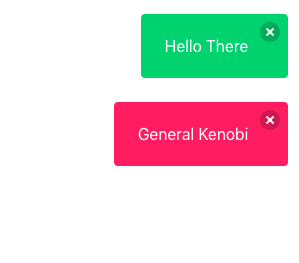
bulmaToast.toast({ message: "Hello There" });
bulmaToast.toast({ message: "General Kenobi", type: "is-danger" });
```
## Change document context
```js
bulmaToast.setDoc(window.document);
```
This can be changed before each toast call and can be set to eny element.
## ES Modules
```js
// Import the toast function
import * as bulmaToast from "bulma-toast";
// Or use
// import { toast as superToast } from 'bulma-toast'
// to rename your import
toast({
message: "Hello There",
type: "is-success",
dismissible: true,
animate: { in: "fadeIn", out: "fadeOut" }
});
```
## The Defaults
A simple default object to prevent errors. Your options will be merged with these and the defaults will be used if the fields are not provided.
```js
{
message: "Your message here",
duration: 2000,
position: "top-right",
closeOnClick: true,
opacity: 1
}
```
## Animate
Bulma Toast supports [animate.css](https://daneden.github.io/animate.css/) (and maybe others?). You MUST include [animate.css](https://daneden.github.io/animate.css/) on your document's ``
```html
```
Accepts a object with `in` and `out` with css classes to add animations. Using Animate.css you would pass a object like this:
```js
{
message: "I'm animated! Yay!",
duration: 2000,
position: "top-right",
animate: { in: 'fadeIn', out: 'fadeOut' }
}
```
_Warning_: Don't use `opacity` when using animations. Some of them use the opacity property like fade in and fade out.
## Examples
```js
import { toast } from "bulma-toast";
toast({
message: "Hello There",
type: "is-success",
dismissible: true,
pauseOnHover: true
});
toast({
message: "
LOOK HERE
",
type: "is-danger",
dismissible: true,
pauseOnHover: true,
animate: { in: "fadeIn", out: "fadeOut" }
});
const myMessage = `It's ${new Date().toDateString()}`;
toast({
message: myMessage,
type: "is-primary",
position: "center",
closeOnClick: true,
pauseOnHover: true,
opacity: 0.8
});
const elm = document.createElement("a");
elm.text = "Visit my website!";
elm.href = "https://rfoel.com";
toast({
message: elm,
type: "is-warning",
position: "center",
closeOnClick: true,
pauseOnHover: true,
animate: { in: "fadeIn", out: "fadeOut" }
});
```
## Contributing
Can you make this plugin better? Clean the mess I made? Feel free to do so!
1. Fork it ( https://github.com/rfoel/bulma-toast/fork )
2. Create your feature branch (`git checkout -b my_new_feature`)
3. Commit your changes (`git commit -am 'Add some feature'`)
4. Push to the branch (`git push origin my_new_feature`)
5. Create a new Pull Request