# CardInfo.js
[](https://travis-ci.org/iserdmi/card-info)
[](https://www.codacy.com/app/iserdmi/card-info/dashboard)
[](https://github.com/iserdmi/card-info)
[](https://www.npmjs.com/package/card-info)
CardInfo.js allows you to get the logo of the bank and brand, brand colors and etc. by card number. Use this data to make beautiful forms for bank cards. The database currently has 49 most popular Russian banks, soon will be added banks for United States, Canada, England, Australia and New Zealand. You can play with the example of the form [on the demo page.](http://srdm.io/demo/card-info)
[Документация на русском языке здесь.](https://github.com/iserdmi/card-info/blob/master/README.ru.md)
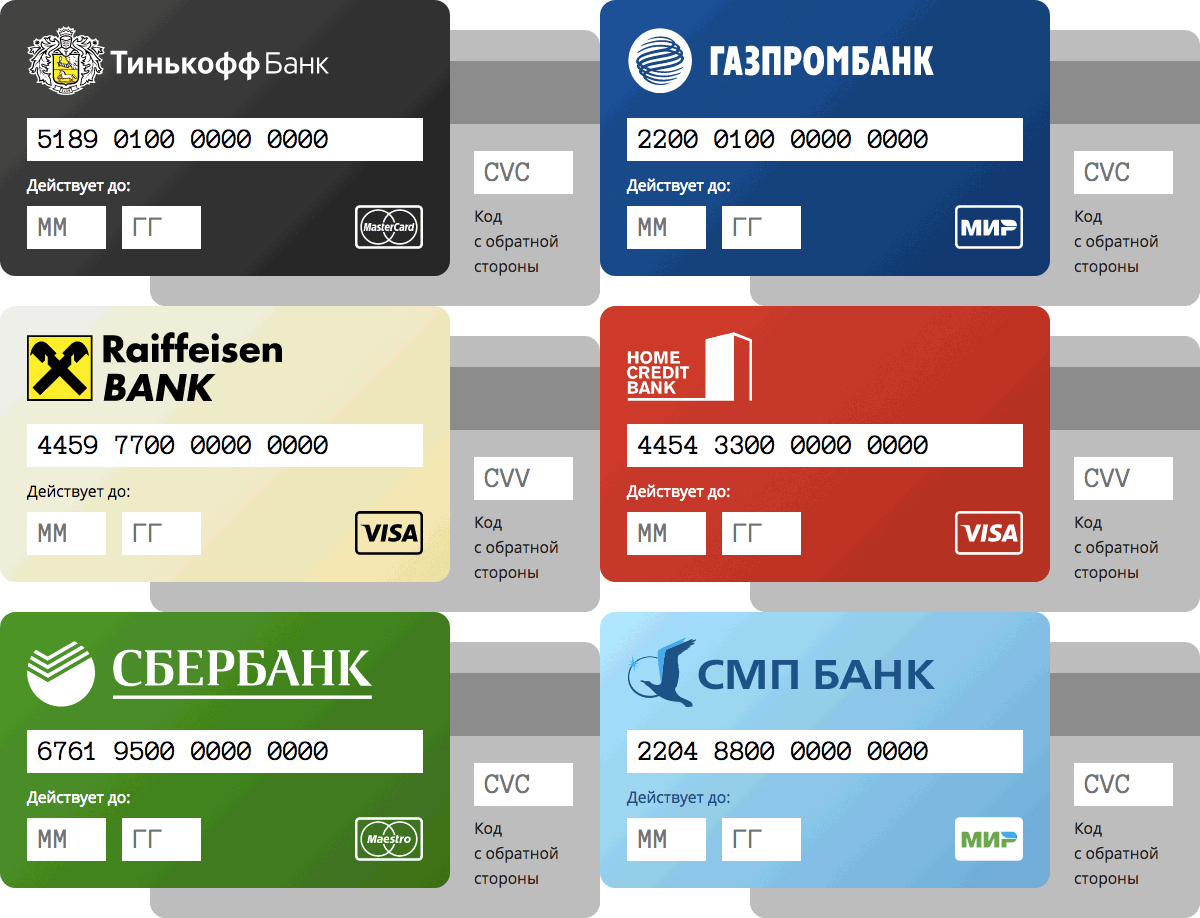
## Get Started
[Download CardInfo.js](https://github.com/iserdmi/card-info/archive/master.zip), install via bower `bower install card-info` or npm `npm install card-info`.
Insert JS file with plugin to your html:
```html
```
Now you can use the class `CardInfo` in your code:
```js
var cardInfo = new CardInfo('4377730000000000');
console.log('Bank name:', cardInfo.bankName);
// > Bank Name: Tinkoff Bank
console.log('Bank logo:', cardInfo.bankLogo);
// > Bank logo: /bower_components/card-info/dist/banks-logos/ru-tinkoff.svg
```
## Constructor
```
new CardInfo(number)
new CardInfo(number, options)
```
* **`number`** card number, number or string, spaces are allowed in the string.
* **`options`** the object with the settings.
## Instance
If the first 6 digits of the card number failed to determine the bank details, then the fields bankAlias, bankName, bankNameEn, bankCountry, bankUrl, bankLogoPng, bankLogoSvg, bankLogo, bankLogoStyle, backgroundColor, backgroundColors, backgroundLightness, textColor, backgroundGradient will have a default value.
If the first digits in the card number failed to determine the brand information, the fields brandAlias, brandName, brandLogoPng, brandLogoSvg, brandLogo, codeName, codeLength, numberLengths, numberGaps will have a default value.
* **`bankAlias`** by default `null`
Short name of the bank in English, all letters are small, without spaces. If the bank is not defined, the value is `null`.
* **`bankName`** by default `null`
The name of the bank in the language of the country in which the bank operates.
* **`bankNameEn`** by default `null`
Name of the bank in English.
* **`bankCountry`** by default `null`
The country code in which this bank operates. `'ru'` - Russia.
* **`bankUrl`** by default `null`
Link to the site of the bank.
* **`bankLogo`** by default `null`
The path to the bank's logo. For each bank in the folder `dist/banks-logos` there is a logo in PNG format, for some, also in SVG. The name of the file is determined by the property of the instance of `bankAlias`. The path to the file is determined by the property of the settings `banksLogosPath`. The extension of the logo is determined by the property of the preferences `preferredExt`. Example: for the bank "Tinkoff" the value will be `'/bower_components/card-info/dist/banks-logos/ru-tinkoff.svg'`.
* **`bankLogoPng`** by default `null`
The path to the bank's logo in PNG format.
* **`bankLogoSvg`** by default `null`
The path to the bank's logo in SVG format, if there is a logo in SVG format for this bank.
* **`bankLogoStyle`** by default `null`
If the logo is predominantly black, then `'black'`, if it is white, then `'white'`, if colored, `'colored'`.
* **`backgroundColor`** by default `'#eeeeee'`
The color associated with the bank. If the bank is not defined, the value will be `'#eeeeee'`.
* **`backgroundColors`** by default `['#eeeeee', '#dddddd']`
An array of colors associated with the bank. If the bank is not defined, the value will be `['#eeeeee', '#dddddd']`.
* **`backgroundLightness`** by default `'light'`
If the background color is light, then the value is `'light'`, otherwise `'dark'`.
* **`backgroundGradient`** by default `linear-gradient(135deg, #eeeeee, #dddddd)`
Contains a string with the CSS property of the `background` property, setting which, you will get a gradient from the colors specified in the field` backgroundColors`. The angle can be specified in the property of the settings `gradientDegrees`.
* **`textColor`** by default `'#000'`
The color of the text that will be well visible on the background specified in the `backgroundColor` property.
* **`brandAlias`** by default `null`
Short name of the brand in English, all letters are small, without spaces.
* **`brandName`** by default `null`
The full name of the brand.
* **`brandLogo`** by default `null`
The path to the logo brand. For each brand in the folder `dist/brands-logos` there is a logo in PNG and SVG format and in three styles: black, white and color. The name of the file is determined by the property of the instance `brandAlias`. The path to the file is determined by the properties of the `brandsLogosPath` settings. The extension of the logo is determined by the property of the preferences `preferredExt`. The style of the logo is determined by the property of the `brandLogoPolicy` settings. Example: for the "Visa" brand, the value will be `'/bower_components/card-info/dist/brands-logos/visa-colored.svg'`.
* **`brandLogoPng`** by default `null`
The path to the logo brand in PNG format.
* **`brandLogoSvg`** by default `null`
The path to the logo brand in SVG format.
* **`codeName`** by default `null`
The name of the code on the back of the card (CVC/CID/CVV/CVN).
* **`codeLength`** by default `null`
Expected length of the security code. Usually 3, but for American Express cards 4.
* **`numberMask`** by default `0000 0000 0000 0000000`
Mask for the card number of this brand. Usually the mask is 0000 0000 0000 0000, but some brands of cards have a different length of the card number than 16 characters, and spaces are placed in other places. For example, for American Express cards the mask will be 0000 000000 00000. The characters in the mask can be changed by changing the settings of `maskDigitSymbol` and `maskDelimiterSymbol`. Use the `numberMask` property to apply a mask to the card number entry field.
* **`numberGaps`** by default `[4, 8, 12]`
An array with numbers that determine the position of spaces when creating a mask.
* **`numberBlocks`** by default `[4, 4, 4, 7]`
An array with numbers that determine the number of digits in each block of the mask. It is defined on the basis of the property `numberGaps` and the maximum number in `numberLengths`.
* **`numberLengths`** by default `[12, 13, 14, 15, 16, 17, 18, 19]`
An array with numbers that define the number of characters allowed in the card number.
* **`numberNice`**
Card number, resulted in a beautiful view. The mask is defined by the property `numberMask`. Example: 4377730000000000 → 4377 7300 0000 0000, 437773 → 4377 73.
* **`number`**
Card number as a string with deleted spaces. If there were any characters in the transmitted card number, except for digits and spaces, there will be an empty string.
* **`numberSource`**
The card number that was sent when the instance was created.
* **`options`**
The settings used to create the instance.
## Settings
Settings are transferred either when creating a new instance:
```js
var cardInfo = new CardInfo('4377730000000000', {
banksLogosPath: '/my/path/to/banks/logos',
brandsLogosPath: '/my/path/to/brands/logos'
});
```
Or, the default settings are set, which will be applied when creating all subsequent instances:
```js
CardInfo.setDefaultOptions({
banksLogosPath: '/my/path/to/banks/logos',
brandsLogosPath: '/my/path/to/brands/logos'
});
```
* **`banksLogosPath`** by default `'/bower_components/card-info/dist/banks-logos/'`
The path to files with bank logos.
* **`brandsLogosPath`** by default `'/bower_components/card-info/dist/brands-logos/'`
The path to files with brand logos.
* **`brandLogoPolicy`** by default `'auto'`
This setting determines the style of the logo brand. Available values are 'black', 'white', 'colored', 'auto', 'mono'.
* `'colored'`
The brand logo will be colored
* `'black'`
The brand logo will be black
* `'white'`
The brand logo will be white
* `'mono'`
The brand logo will be white, if the background (`backgroundLightness`) is dark (`'dark'`)
The brand logo will be black if the background (`backgroundLightness`) is light (`'light'`)
* `'auto'`
The logo of the brand will be colored if the style of the bank logo (`bankLogoStyle`) is colored (`'colored'`)
The brand logo will be white if the bank logo style (`bankLogoStyle`) is white (`'white'`)
The brand logo will be black if the bank logo style (`bankLogoStyle`) is black (`'black'`)
The brand logo will be colored if the bank is not defined
* **`preferredExt`** by default `'svg'`
Preferred extension for bank logos and brands. The value can be `'png'` or `'svg'`.
* **`maskDigitSymbol`** by default `'0'`
A character indicating the number in the mask of the card number specified in the property of the instance `numberMask`.
* **`maskDelimiterSymbol`** by default `''`
A symbol indicating the delimiter in the mask of the card number specified in the property of the `numberMask` instance.
* **`gradientDegrees`** by default `135`
Degree, under which there is a gradient specified in the property of the instance `backgroundGradient`.
## Static methods
* **`CardInfo.setDefaultOptions(options)`**
Once the default settings are set, they will be applied each time the instance is created.
* **`CardInfo.getBrands()`**
**`CardInfo.getBrands(options)`**
Array with all brands.
* **`CardInfo.getBanks()`**
**`CardInfo.getBanks(options)`**
Array with all banks.
## Ways of connecting
1. Connect the main file. In this case, you download the entire database of banks.
```html
```
2. Connect only the file with the logic, without the database, and the database for your country separately. Bases of banks for each country separately are located in the `dist/banks-and-prefixes` folder.
```html
```
3. Connect as a module in your code
```js
const CardInfo = require('card-info')
// or
import CardInfo from 'card-info'
```
## Cutting Logos
All bank logos in the original size are stored in the folder `src/banks-logos`. If you installed CardInfo.js in npm, you will be able to use the command `npm run build-banks-logos`. After its call, all logos from the folder `src/banks-logos` will be transformed into PNG format, reduced to 600 pixels in width and 200 in height, copied to the folder` dist/banks-logos`. To change the settings for slicing logos, pass the settings when calling the command like this: `npm run build-banks-logos -- -w 1000 -h 300`
* **`-w | --width`** by default `600`
Width in pixels to which the image will be reduced/enlarged
* **`-h | --height`** by default `200`
Height in pixels to which the image will be reduced/enlarged
* **`-n | --enlargement`** is disabled by default
If the image is smaller in width or height than the values transferred in the settings, the picture will not be enlarged. However, if you transfer this option, the picture will be forced.
* **`-e | --embed`** is disabled by default
The image decreases/increases in proportion to its original size. So, for example, a picture of 600 × 200, when cutting with the options `-w 200 -h 100` becomes 200×50. However, if you pass this option, the picture will become 200×100, and the empty space will be taken by a transparent area.
All the information above also applies to brand logos. The command: `npm run build-brands-logos`. Source folder: `src/brands-logos`. The destination folder is `dist/brands-logos`. The default height is 60 pixels, and the width is not specified.
## Performance
The code is checked and works in all browsers, including Internet Explorer 6. To run the tests, run the command `npm test` or open the file `test/browser/main.html` in the browser.
## Thanks
Thanks to [BIN Codes](https://www.bincodes.com) for the current database of prefixes for all banks.
Thanks to [Stuart Colville](https://muffinresearch.co.uk/svg-credit-card-icons/) for brand logos.
Thanks to [Evgeny Katyshev](http://evgenykatyshev.ru/notes/all/mir-logo/) for the logo of the MIR payment system.
## Do you like the plugin?
Help correct errors in the documentation, please.