Tiny library to catch all JavaScript errors and email or post them to your server in `1.4k`.
Enable it with a single line before other JavaScript:
```html
```
No more mangled, half-understood, context-free error-feelings reported. \o/
```script
npm i catch-all-errors
```
This is intended for self-hosting, small businesses, and indie-hacker scale traffic, not venture backed startup scale traffic.
## API & usage
Catch every error and post to a URL on your server.
```html
```
By default only the first JS error is caught to prevent bad code from spamming of your API endpoint. You can change to continuous mode like this:
```html
```
By default the error is propagated through to default the browser resulting in `console.error`s but you can disable this behaviour with `data-prevent-default`:
```html
```
### Show error email modal
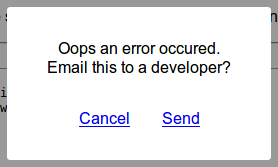
Use `data-email-to` to put up a simple modal which will allow the user to email the results to a developer.
```html
.
```
### Error object properties
Errors will have the following properties when caught and handled:
```json
{
"message": "blee is not defined",
"url": "http://localhost:8000/",
"line": 23,
"column": 9,
"useragent": "Mozilla/5.0 (X11; Ubuntu; Linux x86_64; rv:66.0) Gecko/20100101 Firefox/66.0",
"stack": "window.onload@http://localhost:8000/:23:9\n",
}
```
Where `line` and `column` are the position in the file where the error occured, and `stack` is the stack-trace leading up to the error.
### Example server API
[example-api.php](./example-api.php) provides a simple example of printing the JS errors into the error log using PHP.
### Why use this instead of hosted service X?
* You like self-hosting stuff.
* You don't want to sign up for yet another service.
* You don't need all of their weird complicated features.
* Those services keep going out of business.
* You find those services to be over-engineered.
This won't ever become complicated bloatware requiring a signup.