# chess-console
ChessConsole is a JavaScript-based chess game client framework that uses [cm-chessboard](https://github.com/shaack/cm-chessboard) and [Bootstrap](https://getbootstrap.com/) to create a browser-based, mobile-friendly, responsive chess game GUI.
- **[Repository on GitHub](https://github.com/shaack/chess-console)**
- **[Demo pages](https://shaack.com/projekte/chess-console)**
### chess-console is used in Production
**[Used by chessmail as a framework for an online chess computer.](https://www.chessmail.eu/pages/chess-computer.html)**
## Component structure
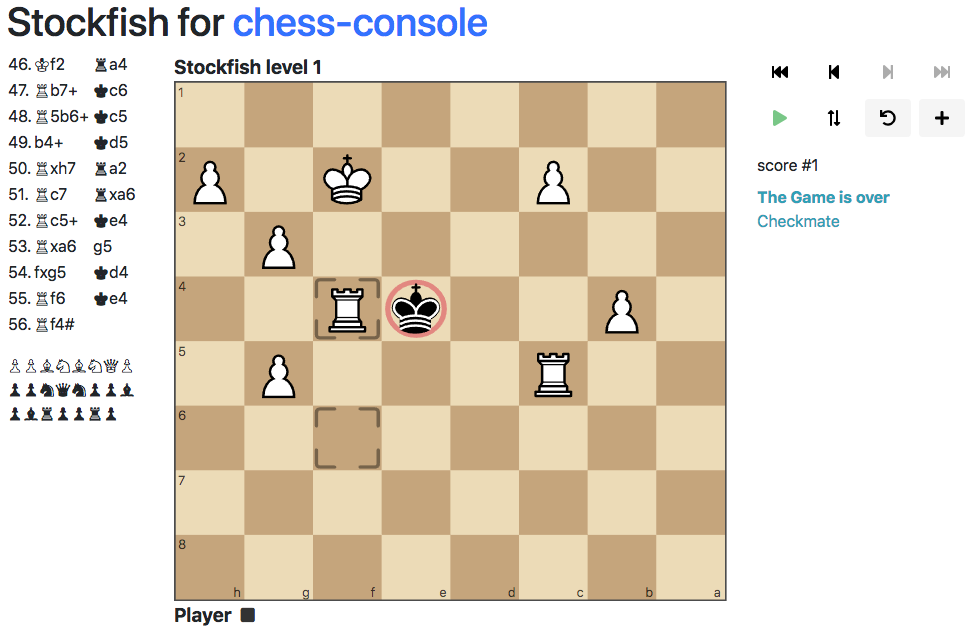
Because of its component architecture chess-console is expandable for all kind of chess pages. You may check out the [Stockfish Player](https://github.com/shaack/chess-console-stockfish) for chess-console, a fully functional online chess computer.
## Screenshot
## Installation
### Option 1: Download from GitHub
1. Clone the repository:
```sh
git clone https://github.com/shaack/chess-console.git
```
2. Navigate to the project directory and install dependencies:
```sh
cd chess-console
npm install
```
### Option 2: Install via npm
1. Install the npm package:
```sh
npm install chess-console
```
## Usage
### Initialization
To initialize a new ChessConsole instance, you need to provide the context, player, opponent, and optional properties.
```javascript
import { ChessConsole } from 'chess-console';
const context = document.getElementById('chess-console');
// a LocalPlayer, that can be controlled by the user
const player = { type: LocalPlayer, name: 'Player 1', props: {} };
// an engine player, that playes random moves
const opponent = { type: RandomPlayer, name: 'Player 2', props: {} };
const chessConsole = new ChessConsole(context, player, opponent, {
locale: 'en',
playerColor: 'w',
pgn: undefined,
accessible: false
});
```
## Running Examples
Open any HTML file in the `examples/` directory directly in a browser (requires a local web server due to ES6 modules):
- `examples/minimal.html` - Minimal setup without persistence
- `examples/play-both-local.html` - Two local players
- `examples/game-with-random.html` - Play against random moves engine
- `examples/load-pgn.html` - Load games from PGN notation
## Architecture
### Core Classes
**ChessConsole** (`src/ChessConsole.js`)
- Main orchestrator class that manages the entire game
- Initializes with: context (DOM element), player, opponent, and optional props
- Creates a MessageBroker for pub/sub communication between components
- Manages game flow via `initGame()`, `newGame()`, and `nextMove()`
- Delegates to players via `moveRequest()` → player responds via callback → `handleMoveResponse()` validates and processes
- Key message topics defined in `CONSOLE_MESSAGE_TOPICS`: newGame, initGame, gameOver, moveRequest, legalMove, illegalMove, moveUndone, load
**ChessConsoleState** (`src/ChessConsoleState.js`)
- Holds game state: Chess instance (cm-chess), orientation, plyViewed
- Provides `observeChess()` to watch for chess manipulation methods (move, load, undo, etc.)
- Uses cm-web-modules Observe utility for reactive state tracking
**ChessConsolePlayer** (`src/ChessConsolePlayer.js`)
- Abstract base class for all player types
- Subclasses must implement `moveRequest(fen, moveResponse)` method
- moveResponse is a callback that receives {from, to, promotion} move object
### Player Types
**LocalPlayer** (`src/players/LocalPlayer.js`)
- Human player controlled via chessboard drag-and-drop
- Handles move input events from cm-chessboard
- Supports promotion dialogs via `validateMoveAndPromote()`
- Implements premove support (optional via props.allowPremoves)
- Enables/disables chessboard move input based on turn
**RandomPlayer** (`src/players/RandomPlayer.js`)
- Computer player that makes random legal moves
- Uses chess.mjs to validate moves independently
- Configurable delay (default 1000ms) via props.delay
### Component Architecture
Components are instantiated after ChessConsole initialization and subscribe to message broker topics:
**Board** (`src/components/Board.js`)
- Wraps cm-chessboard with player name labels and markers
- Manages visual state: position updates, legal move markers, check indicators, last move highlights
- Subscribes to state changes via Observe.property
- Configures extensions: PromotionDialog, Markers, Accessibility, AutoBorderNone
- Marker types defined in `CONSOLE_MARKER_TYPE`
**GameStateOutput** (`src/components/GameStateOutput.js`)
- Displays current game state text (check, checkmate, stalemate, etc.)
**History** (`src/components/History.js`)
- Displays move history in algebraic notation
**HistoryControl** (`src/components/HistoryControl.js`)
- Navigation controls for viewing previous positions
**CapturedPieces** (`src/components/CapturedPieces.js`)
- Shows captured pieces for both sides
**Sound** (`src/components/Sound.js`)
- Plays sound effects for moves, captures, check, etc.
**GameControl** (`src/components/GameControl/GameControl.js`)
- Buttons for game actions (new game, undo, flip board, etc.)
**Persistence** (`src/components/Persistence.js`)
- Saves/loads game state to localStorage
### Data Flow
Game initialization → `ChessConsole.initGame()` → publishes initGame message → components update
Player turn → `ChessConsole.nextMove()` → `player.moveRequest(fen, moveResponse)` → player makes move → `moveResponse(move)` → `ChessConsole.handleMoveResponse()` → validates → publishes legalMove/illegalMove → updates state → triggers next move or gameOver
State changes propagate via:
1. MessageBroker pub/sub for game events
2. Observe.property for reactive state tracking
3. ChessConsoleState.observeChess() for chess manipulation detection
### Key Dependencies
- **cm-chessboard** - Interactive chessboard UI component
- **cm-chess** - Chess logic and validation
- **chess.mjs** - Alternative chess library used by players
- **cm-pgn** - PGN parsing
- **cm-web-modules** - Utilities (I18n, MessageBroker, Observe, DomUtils)
- **bootstrap-show-modal** - Modal dialogs
### Component Registration
Components can register themselves in `chessConsole.components` for cross-component access (e.g., Board registers itself so other components can access the promotion dialog).
### Initialization Pattern
Both ChessConsole and Board expose an `initialized` Promise that resolves when async initialization (i18n loading, etc.) completes. Always await these before calling methods.
Example:
```javascript
const chessConsole = new ChessConsole(context, player, opponent, props)
chessConsole.initialized.then((chessConsole) => {
new Board(chessConsole, boardProps)
chessConsole.newGame()
})
```
## Licenses
Source code license: MIT,
License for the Sounds: CC BY 4.0,
License of the SVG pieces CC BY-SA 3.0.
Copyright © [shaack.com](https://shaack.com).